open bonnet Seat Arona 2018 User Guide
[x] Cancel search | Manufacturer: SEAT, Model Year: 2018, Model line: Arona, Model: Seat Arona 2018Pages: 316, PDF Size: 6.77 MB
Page 140 of 316
Operation
●
If ther e i
s no valid key inside the vehicle or
the system fails to detect one, a warning will
display on the dash panel screen. This could
happen if any other radio frequency signal in-
terferes with the key signal (e.g. from a mo-
bile device accessory) or if the key is covered
by another object (e.g. an aluminium case).
● If the sensors are very dirty, e.g. have a lay-
er of sa
lt, the correct functioning of the sen-
sors on the door handles may be affected. In
this case, clean the vehicle.
● If the vehicle is equipped with an automatic
gearbo
x, it may only be locked in the gear
stick is in position P. Childproof lock
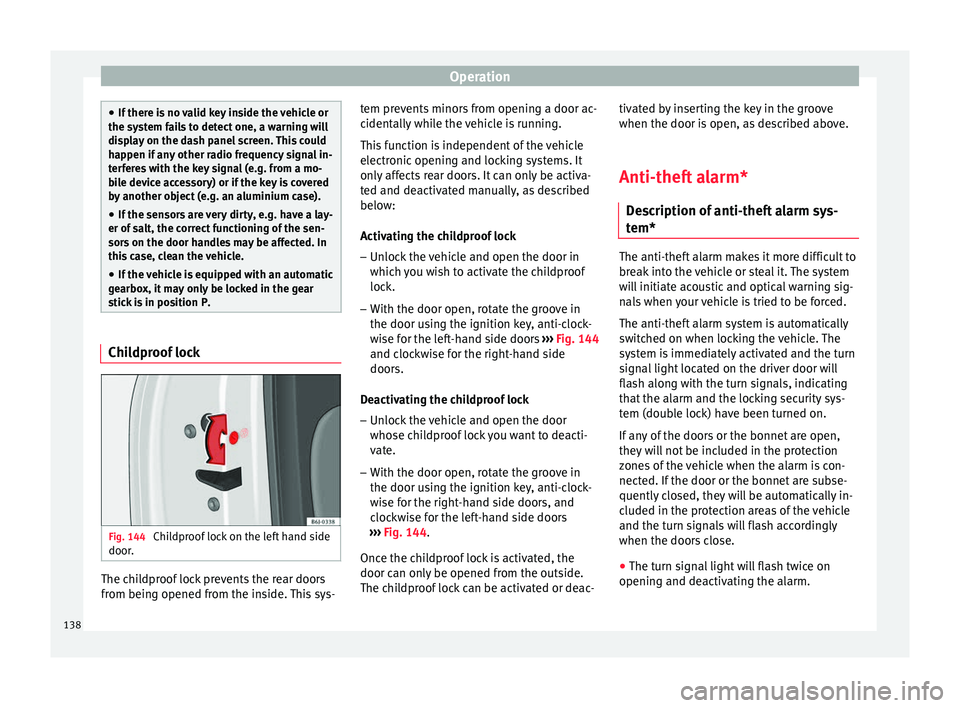
Fig. 144
Childproof lock on the left hand side
door . The childproof lock prevents the rear doors
fr
om bein
g opened fr
om the inside. This sys- tem prevents minors from opening a door ac-
cidental
ly while the vehicle is running.
This function is independent of the vehicle
electronic opening and locking systems. It
only affects rear doors. It can only be activa-
ted and deactivated manually, as described
below:
Activating the childproof lock – Unlock the vehicle and open the door in
which y
ou wish to activate the childproof
lock.
– With the door open, rotate the groove in
the door usin
g the ignition key, anti-clock-
wise for the left-hand side doors ››› Fig. 144
and clockwise for the right-hand side
doors.
Deactivating the childproof lock – Unlock the vehicle and open the door
whose chi
ldproof lock you want to deacti-
vate.
– With the door open, rotate the groove in
the door usin
g the ignition key, anti-clock-
wise for the right-hand side doors, and
clockwise for the left-hand side doors
››› Fig. 144.
Once the childproof lock is activated, the
door can only be opened from the outside.
The childproof lock can be activated or deac- tivated by inserting the key in the groove
when the door is open, a
s described above.
Anti-theft alarm* Des
cription of anti-theft alarm sys-
tem* The anti-theft alarm makes it more difficult to
bre
ak
into the vehicle or steal it. The system
will initiate acoustic and optical warning sig-
nals when your vehicle is tried to be forced.
The anti-theft alarm system is automatically
switched on when locking the vehicle. The
system is immediately activated and the turn
signal light located on the driver door will
flash along with the turn signals, indicating
that the alarm and the locking security sys-
tem (double lock) have been turned on.
If any of the doors or the bonnet are open,
they will not be included in the protection
zones of the vehicle when the alarm is con-
nected. If the door or the bonnet are subse-
quently closed, they will be automatically in-
cluded in the protection areas of the vehicle
and the turn signals will flash accordingly
when the doors close.
● The turn signal light will flash twice on
opening and de activ
ating the alarm.
138
Page 141 of 316
Opening and closing
● The t urn s
ign
al light will flash once on clos-
ing and activating the alarm.
When does the system trigger an alarm?
The system triggers an alarm, if the following
unauthorised actions are carried out when
the vehicle is locked:
● Mechanical opening of the vehicle with the
vehicl
e key without switching on the ignition
in the next 15 seconds (in certain markets,
such as the Netherlands, the alarm is activa-
ted immediately).
● A door is opened.
● Opening the bonnet.
● The rear lid is opened.
● Ignition switched on with a non-validated
key.
● Mo
vements in the driving compartment
(vehicl
es with a volume sensor).
● Towing of the vehicle 1)
.
● Vehicle tilt angle 1)
.
● Undue manipulation of the alarm.
● Battery handling.
In this c
ase, the acoustic signals will go off
and the turn signal will flash for approximate-
ly 30 seconds. This cycle may be repeated up
to 10 times depending on the country. Opening all the doors in manual mode
In vehic
les without an alarm, when opening
the driver door manually, all doors are
opened.
How to switch the alarm off
To deactivate the anti-theft alarm, turn the
key in the opening direction, open the door
and switch the ignition on, or press the un-
lock button on the remote control.
In vehicles equipped with an anti-theft alarm
system, you have 15 seconds to insert the
key in the ignition lock and activate the igni-
tion if the vehicle is opened using the driver
door key.
Otherwise, the alarm will trigger for 30 sec.
and the ignition will be blocked. Note
● Aft er 28 d
ays, the indicator light will be
switched off to prevent the battery from
draining if the vehicle has been left parked
for a long period of time. The alarm system
remains activated.
● The alarm will trigger again if attempts are
made t
o open another protection zone.
● The alarm system can be activated or deac-
tivated u
sing the radio frequency remote con-
trol ››› page 130. ●
The anti-theft a
larm is not activated when
the vehicle is locked from within using the
central locking button .
● If the vehicle battery is run down or flat
then the anti-theft a
larm will not operate cor-
rectly.
● Vehicle monitoring remains active even if
the batter
y is disconnected or not working for
any reason.
● The alarm is triggered immediately if one of
the batter
y cables is disconnected while the
alarm system is active. Vehicle interior monitoring and anti-
t
o
w sy
stem* Monitoring or control function incorporated
in the anti-thef
t
al
arm* which detects unau-
thorised vehicle entry by means of ultra-
sound.
Activation
– It is automatically switched on when the
anti-theft al
arm is activated.
Deactivation – Open the vehicle with the key, either me-
chanic
ally or by pressing the button on
the remote control. If the vehicle is opened »1)
With vehicles fitted with a tow-away protection
139
Technical data
Advice
Operation
Emergencies
Safety
Page 188 of 316
Operation
WARNING
● Before opening the bonnet, read and ob-
serve the warnings ››› page 273, Working in
the engine compartment.
● If the br
ake system warning lamp should
light up together with the ABS warning lamp
, stop the vehicle immediately and check
the brake fluid level in the reservoir
››› page 280, Brake fluid. If the brake fluid
lev
el has dropped below the “MIN” mark you
must not drive on. Risk of accident. Obtain
technical assistance.
● If the brake fluid level is correct, the fault in
the brake system may have been caused by a
failure of the ABS system. This could cause
the rear wheels to lock quickly when you
brake. This could cause the rear to break
away. Risk of skidding. Stop the vehicle and
seek technical assistance. Electronic differential lock (XDS)*
When taking a curve, the driveshaft differen-
tial mechanism allows the outer wheel to turn
at a higher speed than the inner wheel. In
this way, the wheel that is turning faster (out-
er wheel) receives less drive torque than the
inner wheel. This may mean that in certain
situations the torque delivered to the inner
wheel is too high, causing the wheels to
spin. On the other hand, the outer wheel is
receiving a lower drive torque than it could
transmit. This causes an overall loss of lateral grip on the front axle, resulting in understeer
or “lengthening” of the trajectory.
The XDS system can detect and correct this
effect via the sensors and signals of the ESC.
Via the ESC, the XDS will brake the inside
wheel and counter the excess driving torque
of that wheel. This means that the driver's
desired trajectory is much more precise.
The XDS system works in combination with
the ESC and is always active, even when ASR
traction control is disconnected or the ESC is
in Sport mode.
Mul t
i
-collision Brake In an accident, the multi-collision brake can
help the driver by braking to avoid the risk of
skidding during the accident, which could
lead to further collisions.
The multi-collision brake works for front, side
or rear accidents, when the airbag control
unit records its activation level and the acci-
dent takes place at a speed of over 10 km/h
(6 mph). The ESC automatically brakes the
vehicle, as long as the accident has not dam-
aged the ESC, the brake hydraulics or the on-
board network
The following actions control automatic brak-
ing during the accident:●
When the driver presses the accelerator,
the automatic braking does not take place.
● When the braking pressure through press-
ing the brake pedal is greater than the sys-
tem’s braking pressure the vehicle will brake
automatically.
● Multi-collision braking will not be available
if ESC is malfunctioning.
Brake servo The brake servo increases the pressure you
apply to the brake pedal. It works
only when
the engine is running .
If the brake servo is not functioning, e.g. due
to a malfunction, or if the vehicle is being
towed, you will have to press the brake pedal
considerably harder to make up for the lack
of servo assistance. WARNING
The braking distance can also be affected by
external factors.
● Never let the vehicle coast with the engine
switched off. Failure to follow this instruction
could result in an accident. The braking dis-
tance is increased considerably when the
brake servo is not active.
● If the brake servo is not working, for exam-
ple when the vehicle is being towed, you will
have to press the brake pedal considerably
harder than normal. 186 *
Page 191 of 316
Driving
WARNING
● Tak e c
are not to accidentally press the ac-
celerator pedal when the vehicle is stopped.
The vehicle could otherwise start moving im-
mediately (in some cases even if the parking
brake is engaged) resulting in the risk of an
accident.
● Never move the selector lever to R or P
when driving. F
ailure to follow this instruc-
tion could result in an accident.
● With selector lever in any position (except
P) the vehic
le must always be held with the
foot brake when the engine is running. This is
because an automatic gearbox still transmits
power even at idling speed, and the vehicle
tends to “creep”. The accelerator pedal must
on no account be pressed inadvertently when
a gear is engaged with the vehicle stationary.
The vehicle could otherwise start moving im-
mediately (in some cases even if the parking
brake is engaged) resulting in the risk of an
accident.
● While you are selecting a gear and the vehi-
cle i
s stopped with the engine running, do
not accelerate. Failure to follow this instruc-
tion could result in an accident.
● As a driver you should never leave your ve-
hicle if
the engine is running and a gear is en-
gaged. If you have to leave your vehicle while
the engine is running, you must apply the
handbrake and engage the parking lock (P).
● To avoid accidents, apply the handbrake
and put the sel
ector lever in position P before
opening the bonnet and working on the vehi- cle with the engine running. Please always
ob
ser
ve the important safety warnings
››› page 273, Working in the engine compart-
ment. Note
● If the sel ect
or lever is moved accidentally
to N when driving, release the accelerator and
let the engine speed drop to idling before se-
lecting gear range D or S again.
● Should the power supply to the selector
lever be int
errupted in position P, the selector
lever will be locked. If this should happen the
manual release can be used ›››
page 50. Selector lever lock
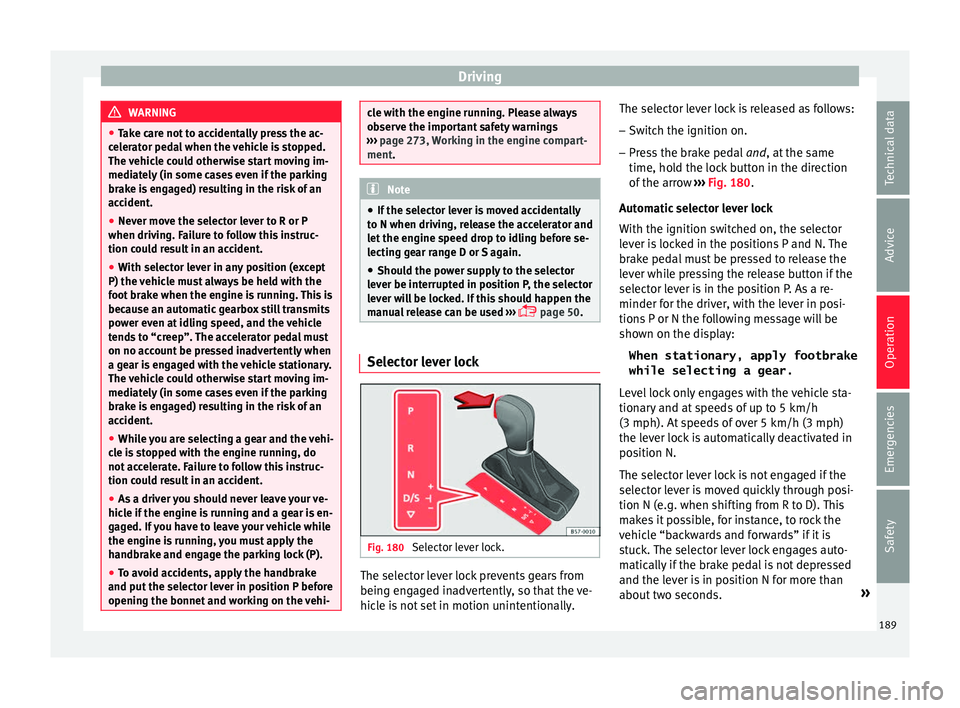
Fig. 180
Selector lever lock. The selector lever lock prevents gears from
bein g en
g
aged inadvertently, so that the ve-
hicle is not set in motion unintentionally. The selector lever lock is released as follows:
– Switch the ignition on.
– Press the brake pedal and, at
the same
time, hold the lock button in the direction
of the arrow ››› Fig. 180.
Automatic selector lever lock
With the ignition switched on, the selector
lever is locked in the positions P and N. The
brake pedal must be pressed to release the
lever while pressing the release button if the
selector lever is in the position P. As a re-
minder for the driver, with the lever in posi-
tions P or N the following message will be
shown on the display: When stationary, apply footbrake
while selecting a gear.
Level lock only engages with the vehicle sta-
tionary and at speeds of up to 5 km/h
(3 mph). At speeds of over 5 km/h (3 mph)
the lever lock is automatically deactivated in
position N.
The selector lever lock is not engaged if the
selector lever is moved quickly through posi-
tion N (e.g. when shifting from R to D). This
makes it possible, for instance, to rock the
vehicle “backwards and forwards” if it is
stuck. The selector lever lock engages auto-
matically if the brake pedal is not depressed
and the lever is in position N for more than
about two seconds. »
189
Technical data
Advice
Operation
Emergencies
Safety
Page 248 of 316
Operation
The braking while manoeuvring function is
c ontr
o
lled in the Easy Connect system with
the menu and the
S
ET
TINGS and
P ark
and m
anoeuvre function buttons.
● on – permits the u
se of the braking
while manoeuvring function.
● off – does not
permit the use of the
braking while manoeuvring function.
Temporary suppression of emergency brak-
ing
● When the function is deactivated with the
Brak in
g while manoeuvring button that appears
on the P ark
in
g System screen of the Easy
Connect system.
● Whenever any of the car doors, rear lid or
bonnet are opened.
R
ear Assist “Rear View Cam-
era”*
Rel
ated video Fig. 219
Safety Operating and safety warnings
WARNING
● The Re ar As
sist does not make it possible
to precisely calculate the distance from ob-
stacles (people, vehicles, etc.) and nor can it
overcome the system's own limits, hence us-
ing it may cause serious accidents and inju-
ries if used negligently or without due care.
The driver should be aware of his/her sur-
roundings at all times to ensure safe driving.
● The camera lens expands and distorts the
field of
vision and displays the objects on the
screen in a different, vague manner. The per-
ception of distances is also distorted by this
effect.
● Due to the screen resolution or insufficient
light condition
s, some items may be dis-
played in an unsatisfactory manner or not at
all. Take special care with thin posts, fences,
railings or trees that might not be displayed
on screen and could damage the vehicle.
● The rear assist has blind spots where it is
not pos
sible to represent people or objects
(small children, animals and certain objects
cannot be detected in its field of vision). Mon-
itor the vehicle's surrounding area at all
times.
● Keep the camera lens clean, free of ice and
snow
, and do not cover it.
● The system is not a replacement for driver
awar
eness. Supervise the parking operation
at all times, as well as the vehicle's surround-
ing area. Adapt your speed and driving style at all times to suit visibility, weather, road
and traffic
c
onditions.
● Do not be distracted from the traffic by
looking at
the screen.
● The images on the rear assist screen are
only tw
o-dimensional. Due to a lack of spatial
depth, protruding parts or holes in the road,
for example, are more difficult to detect or
may not be seen at all.
● Vehicle load modifies the representation of
the orientation lines
displayed. The width
represented by the lines diminishes with ve-
hicle load. Pay special attention to the vehi-
cle's surroundings when the inside of the ve-
hicle of the luggage compartment is carrying
a heavy load.
● In the following situations, the objects or
other vehic
les shown in the navigation sys-
tem display appear to be further away or
closer than they really are: Pay special atten-
tion:
– On moving from a horizontal plane to a
slope.
– On moving from a slope to a horizontal
plane.
– If the vehicle is heavily loaded at the
rear.
– When the vehicle approaches objects
that are not on the ground surface or are
jutting out from it. These objects may al-
so be outside the camera's angle of vi-
sion when reversing. 246
Page 268 of 316
Advice
have the engine cleaned. On commissioning
thi s
w
ork, ensure that all surfaces, seams,
joints and components in the engine com-
partment are given anti-corrosion treatment. WARNING
● When work in
g in the engine compartment,
always observe the safety warnings
››› page 273.
● Before opening the bonnet, switch the en-
gine off, app
ly the handbrake firmly and al-
ways remove the key from the ignition.
● Allow the engine to cool before you clean
the engine comp
artment.
● Do not clean, for example, the vehicle un-
derbody, wheel ar
ches or wheel trims without
protecting your hands and arms. You may cut
yourself on sharp-edged metal parts. Failure
to comply could result in injury.
● Moisture, ice and salt on the brake system
may
affect braking effectiveness. Risk of acci-
dent. Directly after washing, avoid sudden
and sharp braking.
● Never touch the radiator fan. It is tempera-
ture-c
ontrolled and could start automatically,
even when the key is removed from the igni-
tion! For the sake of the environment
Fuel, grease and oil deposits can be removed
when the engine i s
washed. The polluted wa-
ter must be cleaned in an oil separator. For
this reason, engine washing should be car- ried out only by a specialised workshop or a
petro
l
station. Caring for the vehicle interior
Scr een f
or the radio/Easy Connect*
and control panel* The display can be cleaned with a soft cloth
and a prof
e
ssionally available “LCD cleaner”.
Moisten the cloth with a small amount of the
cleaning fluid.
The Easy Connect control panel* should first
be cleaned with a brush so that no dirt goes
into the device or between the keys and
housing. Next, we recommend cleaning the
Easy Connect control panel* using a cloth
dampened with water and washing-up liquid. CAUTION
● To av oid s
cratching the screen, do not wipe
the display with a dry cloth.
● To avoid damage, ensure that no liquid
goes
into the Easy Connect control panel*. Cleaning plastic parts and the dash
p
anel –
Use a clean, damp cloth to clean plastic
par ts
and the dash panel. –
If this
does not provide satisfactory results,
use a special solvent-free plastic cleaning
product. WARNING
Never clean the dash panel and the airbag
modul e s
urface with cleaners containing sol-
vents. Solvents cause the surface to become
porous. If the airbag triggered, plastic parts
could become detached and cause injuries. CAUTION
Cleaning products which contain solvents will
dam ag
e the material. Cleaning wooden trim*
–
Clean the wooden trim with a water-mois-
tened c
l
ean cloth.
– If this does not provide satisfactory results,
use a gen
tle soap solution. CAUTION
Cleaning products which contain solvents will
dam ag
e the material. Cleaning textile covers and trim parts
Textile covers and trim parts (e.g. seats, door
trim) shou
l
d be c
leaned regularly with a
266
Page 275 of 316
Checking and refilling levels
Working in the engine compart-
ment Saf ety
not
es for work in the engine
compartment Read the additional information carefully
›› ›
page 17
Before starting any work on the engine or in
the engine compartment:
1. Switch off the engine and remove the key from the ignition.
2. Ap
ply the handbrake.
3. Move the gear lever to neutral or the selec- tor lev
er to position P.
4. Wait for the engine to cool down.
5. Keep children away from the vehicle.
6. Raise the bonnet ›››
page 274.
You should not do any work in the engine
compartment unless you know exactly how to
carry out the jobs and have the correct tools!
Have the work carried out by a specialised
workshop if you are uncertain.
All service fluids and consumables, e.g. cool-
ant, engine oil, spark plugs and batteries,
are under constant development. SEAT pro-
vides a constant flow of information to Tech-
nical Services concerning modifications. For
this reason, we recommend you have service fluids and consumables replaced by a Techni-
cal
Service. Please observe the relevant in-
structions ››› page 259. The engine compart-
ment of the vehicle is a hazardous area ››› .
WARNING
All work on the engine or in the engine com-
par tment, e.
g. checking and refilling fluids,
involves the danger of injury and burns, acci-
dents and even fire.
● Never open the bonnet if you see steam,
smoke or coo
lant escaping from the engine
compartment. Otherwise, there is a risk of
sustaining burns. Wait until no more steam or
coolant is emitted, then allow the engine to
cool before carefully opening the bonnet.
● Switch off the engine and remove the key
from the ignition.
● App
ly the handbrake and move the gear
lever t
o neutral or selector lever to position P.
● Keep children away from the vehicle.
● Never touch hot engine parts. There is a
risk of
burns.
● Never spill liquids on a hot engine or on a
hot exh
aust gas system. This is a fire hazard.
● Avoid causing short-circuits in the electri-
cal
system, particularly at the points where
the jump leads are attached ›››
page 72.
The battery could explode.
● Never touch the radiator fan. It is tempera-
ture c
ontrolled and could start automatically,
even when the engine has been switched off
and the key removed from the ignition! ●
Never c o
ver the engine with additional in-
sulating materials such as a blanket. Risk of
fire!
● Do not unscrew the cap on the coolant ex-
pans
ion tank when the engine is hot. If the
coolant is hot, the cooling system will be
pressurised!
● Protect face, hands and arms by covering
the cap with a l
arge, thick cloth to protect
against escaping coolant and steam.
● Always make sure you have not left any ob-
jects, s
uch as cleaning cloths or tools, in the
engine compartment.
● If you have to work underneath the vehicle,
you mus
t use suitable stands additionally to
support the vehicle, there is a risk of acci-
dent!. A hydraulic jack is insufficient for se-
curing the vehicle and there is a risk of injury.
● If any work has to be performed when the
engine is
started or with the engine running,
there is an additional, potentially fatal, safety
risk from the rotating parts, such as the drive
belts, alternator, radiator fan, etc., and from
the high-voltage ignition system. You should
also observe the following:
– Never touch the electrical wiring of the
ignition system.
– Ensure that jewellery, loose clothing and
long hair do not get trapped in rotating
engine parts. Danger of death. Before
starting any work remove jewellery, tie
back and cover hair, and wear tight-fit-
ting clothes. » 273
Technical data
Advice
Operation
Emergencies
Safety
Page 276 of 316
Advice
–
Never ac c
elerate with a gear engaged
without taking the necessary precau-
tions. The vehicle could move, even if the
handbrake is applied. Danger of death.
● If work has to be carried out on the fuel
syst
em or on electrical components, you
must observe the following safety notes in
addition to the above warnings:
– Always disconnect the battery from the
on-board network. The vehicle must be
unlocked when this is done, otherwise
the alarm will be triggered.
– Do not smoke.
– Never work near naked flames.
– Always have a fire extinguisher on hand. WARNING
If the bonnet is not correctly closed, it could
sud den
ly open while driving leaving the driv-
er without visibility. This could result in a se-
rious accident.
● After closing the bonnet, always check that
it is
properly secured by the locking mecha-
nism in the lock carrier piece. The bonnet
must be flush with the surrounding body pan-
els.
● While driving, if you notice that the bonnet
is not
correctly closed then stop immediately
and close it correctly.
● Only open and close the bonnet when there
is no
body within its range. CAUTION
When topping up service fluids, make sure
not t o mi
stake them. Using the wrong fluids
could cause serious malfunctions and engine
damage! For the sake of the environment
Service fluids leaks are harmful to the envi-
ronment . F
or this reason you should make
regular checks on the ground underneath
your vehicle. If you find spots of oil or other
fluids, have your vehicle inspected in a speci-
alised workshop. Opening the bonnet
Read the additional information carefully
› ›
›
page 17
The bonnet is released from inside the vehi-
cle.
Before opening the bonnet ensure that the
windscreen wipers are in rest position. WARNING
Hot coolant can scald!
● Never open the bonnet if you see steam,
smoke or c oo
lant escaping from the engine
compartment. ●
Wait u
ntil no more steam, smoke or coolant
is emitted from the bonnet, then carefully
open the bonnet.
● When working in the engine compartment,
alwa
ys observe the safety warnings
››› page 273. Closing the bonnet
–
Slightly lift the bonnet.
– Release the bonnet stay and replace it in its
sup
por
t.
– At a height of approximately 30 cm let it fall
so it lock
s.
If the bonnet does not close, do not press
downwards. Open it again and let it fall as
mentioned above. WARNING
If the bonnet is not closed properly, it could
open whil e
you are driving and completely
obscure your view of the road. Risk of acci-
dent.
● After closing the bonnet, always check that
it is
properly secured. The bonnet must be
flush with the surrounding body panels.
● If you notice that the bonnet latch is not se-
cured when the
vehicle is moving, stop the
vehicle immediately and close the bonnet
properly. Risk of accident. 274
Page 279 of 316
Checking and refilling levels
If the warning lamp flashes although the oil
l ev
el
is correct, stop driving. Do not even run
the engine at idle speed! Obtain technical as-
sistance.
Checking oil level
If the warning lamp is yellow the engine
oil level should be checked as soon as possi-
ble. Top up the oil at the next opportunity
››› page 277.
Oil level sensor faulty*
If the yellow warning lamp flashes, take
the vehicle to a specialised workshop to have
the oil level sensor checked. Until then it is
advisable to check the oil level every time
you refuel.
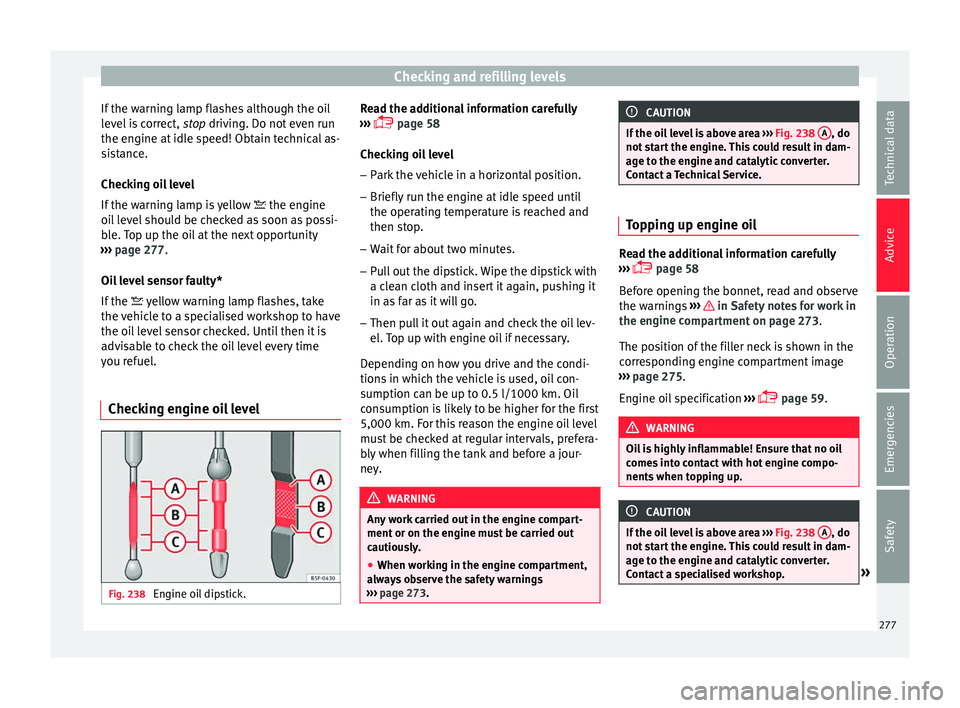
Checking engine oil level Fig. 238
Engine oil dipstick. Read the additional information carefully
› ›
›
page 58
Checking oil level
– Park the vehicle in a horizontal position.
– Briefly run the engine at idle speed until
the operating t
emperature is reached and
then stop.
– Wait for about two minutes.
– Pull out the dipstick. Wipe the dipstick with
a cle
an cloth and insert it again, pushing it
in as far as it will go.
– Then pull it out again and check the oil lev-
el. T
op up with engine oil if necessary.
Depending on how you drive and the condi-
tions in which the vehicle is used, oil con-
sumption can be up to 0.5 l/1000 km. Oil
consumption is likely to be higher for the first
5,000 km. For this reason the engine oil level
must be checked at regular intervals, prefera-
bly when filling the tank and before a jour-
ney. WARNING
Any work carried out in the engine compart-
ment or on the en gine mu
st be carried out
cautiously.
● When working in the engine compartment,
alwa
ys observe the safety warnings
››› page 273. CAUTION
If the oil level is above area ›››
Fig. 238 A , do
not s t
art the engine. This could result in dam-
age to the engine and catalytic converter.
Contact a Technical Service. Topping up engine oil
Read the additional information carefully
›› ›
page 58
Before opening the bonnet, read and observe
the warnings ››› in Safety notes for work in
the en gine c
omp
artment on page 273.
The position of the filler neck is shown in the
corresponding engine compartment image
››› page 275.
Engine oil specification ›››
page 59. WARNING
Oil is highly inflammable! Ensure that no oil
come s
into contact with hot engine compo-
nents when topping up. CAUTION
If the oil level is above area ›››
Fig. 238 A , do
not s t
art the engine. This could result in dam-
age to the engine and catalytic converter.
Contact a specialised workshop. » 277
Technical data
Advice
Operation
Emergencies
Safety
Page 280 of 316
Advice
For the sake of the environment
The oil level must never be above area
›› ›
Fig. 238 A . Otherwise oil can be drawn in
through the c r
ankcase breather and escape
into the atmosphere via the exhaust system. Changing engine oil
Read the additional information carefully
›› ›
page 58
The engine oil must be changed at the inter-
vals given in the service schedule.
We recommend that you have the engine oil
changed by a Technical Service.
The oil change intervals are shown in the
Maintenance Programme. WARNING
Only change the engine oil yourself if you
hav e the s
pecialist knowledge required!
● Before opening the bonnet, read and ob-
serve the w
arnings ››› page 273, Safety notes
for work in the engine compartment .
● Wait for the engine to cool down. Hot oil
may
cause burn injuries.
● Wear eye protection to avoid injuries, such
as ac
id burns, caused by splashes of oil.
● When removing the oil drain plug with your
finger
s, keep your arm horizontal to help pre-
vent oil from running down your arm. ●
Wa sh
your skin thoroughly if it comes into
contact with engine oil.
● Engine oil is poisonous! Used engine oil
must
be stored in a safe place out of the
reach of children. CAUTION
No additives should be used with engine oil.
Thi s c
ould result in engine damage. Any dam-
age caused by the use of such additives
would not be covered by the factory warranty. For the sake of the environment
● Bec au
se of disposal problems and the spe-
cial tools and specialist knowledge required,
we recommend that you have the engine oil
and filter changed by a Technical Service.
● Never pour oil down drains or into the
ground.
● U
se a suitable container when draining the
used oil
. It must be large enough to hold all
the engine oil. Cooling system
C ontr o
l lamp There is a fault if:
● The l amp does not go out again after a
f ew sec
onds. ●
The lamp lights up or fl
ashes while the
vehicle is running, and three acoustic warn-
ing signals are emitted ››› .
Thi s
me
ans that either the coolant level is too
low or the coolant temperature is too high.
Coolant temperature too high
If the lamp lights up, stop the vehicle,
turn off the engine and wait for it to cool
down. Check the coolant level.
If the coolant level is correct, the overheating
may be caused by a malfunction of the radia-
tor fan. Check the radiator fan fuse and have
it replaced if necessary ››› page 104.
If the control lamp lights up again after driv-
ing on for a short distance, stop the vehicle
and switch the engine off. Contact a Techni-
cal Service or a specialised workshop.
Coolant level too low
If the lamp lights up, stop the vehicle,
turn off the engine and wait for it to cool
down. First check the coolant level. If the lev-
el of the coolant is below the “MIN” mark,
top up with coolant liquid ››› .
WARNING
● If y
our vehicle is immobilised for technical
reasons, move it to a safe distance from traf-
fic. Turn the engine off, turn the hazard lights
on and place the warning triangle. 278