ESP Seat Arona 2018 Owner's Guide
[x] Cancel search | Manufacturer: SEAT, Model Year: 2018, Model line: Arona, Model: Seat Arona 2018Pages: 316, PDF Size: 6.77 MB
Page 149 of 316
Lights and visibility
Motorway light* The motorway light is available on vehicles
equipped w
ith f
ull-LED lights.
The function is connected/disconnected via
the corresponding Easy Connect system
menu.
● Activation: when going abo
ve 110 km/h
(68 mph) for more than 10 seconds, the dip-
ped beam raises slightly to increase the driv-
er's visibility distance.
● Deactivation: when reduc in
g the speed of
the car below 100 km/h (62 mph), the dip-
ped beam returns to its normal position.
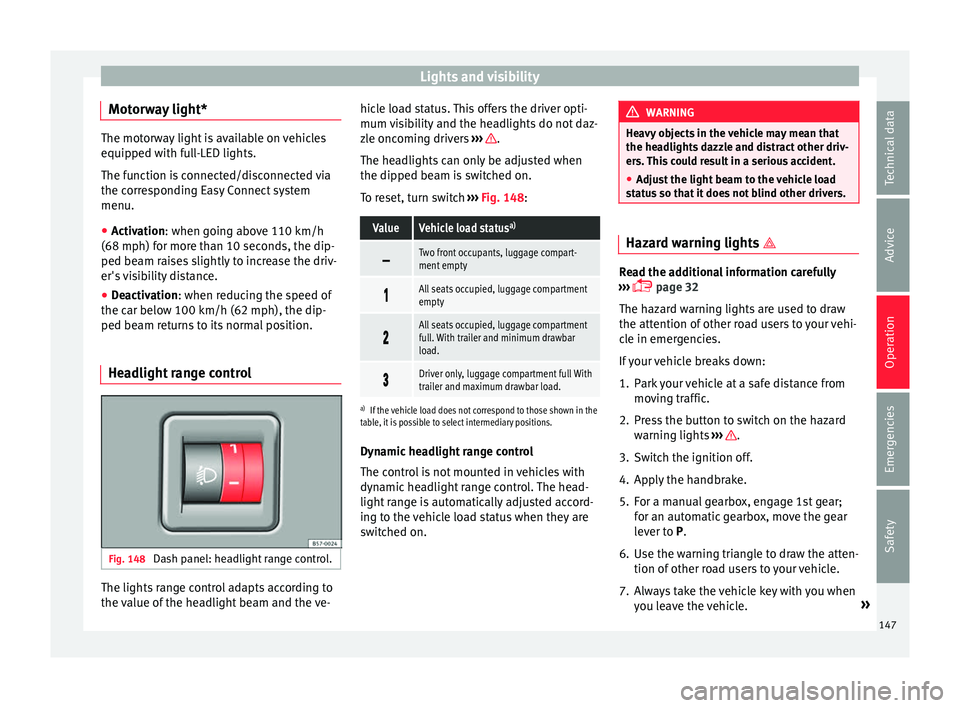
Headlight range control Fig. 148
Dash panel: headlight range control. The lights range control adapts according to
the
v
alue of
the headlight beam and the ve- hicle load status. This offers the driver opti-
mum vi
sibility and the headlights do not daz-
zle oncoming drivers ››› .
The he a
dlights
can only be adjusted when
the dipped beam is switched on.
To reset, turn switch ››› Fig. 148:
ValueVehicle load status a)
Two front occupants, luggage compart-
ment empty
All seats occupied, luggage compartment
empty
All seats occupied, luggage compartment
full. With trailer and minimum drawbar
load.
Driver only, luggage compartment full With
trailer and maximum drawbar load.
a)
If the vehicle load does not correspond to those shown in the
table, it is possible to select intermediary positions.
Dynamic headlight range control
The control is not mounted in vehicles with
dynamic headlight range control. The head-
light range is automatically adjusted accord-
ing to the vehicle load status when they are
switched on. WARNING
Heavy objects in the vehicle may mean that
the hea dlight
s dazzle and distract other driv-
ers. This could result in a serious accident.
● Adjust the light beam to the vehicle load
stat
us so that it does not blind other drivers. Hazard warning lights
Read the additional information carefully
›› ›
page 32
The hazard warning lights are used to draw
the attention of other road users to your vehi-
cle in emergencies.
If your vehicle breaks down:
1. Park your vehicle at a safe distance from mov in
g traffic.
2. Press the button to switch on the hazard warning lights
››› .
3. Switch the ignition off.
4. Apply the handbrake.
5. For a manual gearbox, engage 1st gear; for an aut
om
atic gearbox, move the gear
lever to P.
6. Use the warning triangle to draw the atten- tion of other ro
ad users to your vehicle.
7. Always take the vehicle key with you when you le
ave the vehicle. »
147
Technical data
Advice
Operation
Emergencies
Safety
Page 152 of 316
Operation
could otherwise freeze on the windscreen and
ob
s
cure your view of the road.
● Always note the corresponding warnings
›››
page 73. WARNING
The rain sensor* may not detect enough rain
t o sw it
ch on the wipers.
● If necessary, switch on the wipers manually
when water on the w
indscreen obstructs visi-
bility. CAUTION
In icy conditions, always check that the wind-
sc r
een wipers and the window wiper are not
frozen. If you switch on the windscreen wip-
ers when the wiper blades are frozen to the
windscreen, you could damage both the wip-
er blades and the wiper motor. Note
● The wiper s
and washers will work only
when the ignition is switched on.
● The heat output of the heated jets* is con-
trol
led automatically when the ignition is
switched on, depending upon the outside
temperature.
● In certain versions of vehicles with alarms,
the winds
creen wiper will only work in inter-
val/rain sensor mode when the ignition is on
and the bonnet closed. ●
When the inter v
al wipe function is on, the
intervals are directly proportional to the
speed. This way, the higher the vehicle speed
the shorter the intervals.
● If you stop the vehicle with the windscreen
wiper in pos
ition 1 or 2, it will automatically
change to a lower position speed. The set
speed will be resumed when the vehicle pulls
away.
● The windscreen will be wiped again after
appro
ximately five seconds once the “auto-
matic wash/wipe system” has been activa-
ted, provided the vehicle is moving (drip func-
tion). If you activate the wipers less than 3
seconds after the drip function, a new wash
sequence will begin without performing the
last wipe. For the “drip” function to work
again, you have to turn the ignition off and
then on again.
● Do not put stickers on the windscreen in
front of
the rain sensor*. This may cause sen-
sor disruption or faults.
● Depending on the version of the model,
when you en
gage reverse gear and with the
headlight wiper activated, this can start a
wipe. Rear view mirrors
Int erior mirr or It is dangerous to drive if you cannot see
c
le
arly through the rear window. Interior mirror with automatic anti-dazzle
function*
The anti-d
azzle function is activated every
time the ignition is switched on.
When the anti-dazzle function is enabled, the
interior rear vision mirror will darken auto-
matically according to the amount of light it
receives. The anti-dazzle function is cancel-
led if reverse gear is engaged. Note
● The autom atic
anti-dazzle function will only
work properly if the sun blind* for the rear
window is retracted and there are no other
objects preventing light from reaching the in-
terior rear vision mirror.
● If you have to stick any type of sticker on
the winds
creen, do not do so in front of the
sensors. Doing so could prevent the anti-daz-
zle function from working well or even from
working at all. Folding in the exterior mirrors man-
ua
l
ly The exterior mirrors of the vehicle may be fol-
ded in. F
or thi
s, pr
ess the mirror housing to-
wards the vehicle.
150
Page 155 of 316
Seats and head restraints
Note
● When fitting the he a
d restraints again, in-
sert the tubes as far as possible into the
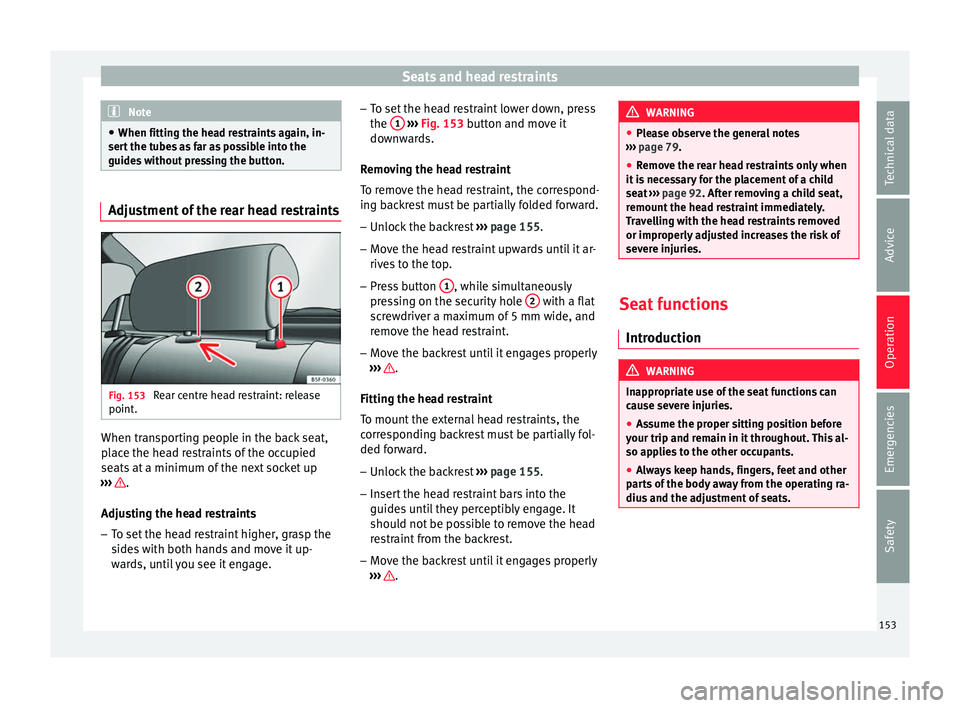
guides without pressing the button. Adjustment of the rear head restraints
Fig. 153
Rear centre head restraint: release
point . When transporting people in the back seat,
p
l
ac
e the head restraints of the occupied
seats at a minimum of the next socket up
››› .
Adju s
tin
g the head restraints
– To set the head restraint higher, grasp the
sides
with both hands and move it up-
wards, until you see it engage. –
To set the he
ad restraint lower down, press
the 1
› ››
Fig. 153
b utton and move it
downwards.
Removing the head restraint
To remove the head restraint, the correspond-
ing backrest must be partially folded forward. – Unlock the backrest ›››
page 155.
– Move the head restraint upwards until it ar-
rives
to the top.
– Press button 1 , while simultaneously
pr e
s
sing on the security hole 2 with a flat
s c
r
ewdriver a maximum of 5 mm wide, and
remove the head restraint.
– Move the backrest until it engages properly
›››
.
Fittin g the he
a
d restraint
To mount the external head restraints, the
corresponding backrest must be partially fol-
ded forward.
– Unlock the backrest ›››
page 155.
– Insert the head restraint bars into the
guides u
ntil they perceptibly engage. It
should not be possible to remove the head
restraint from the backrest.
– Move the backrest until it engages properly
›››
. WARNING
● Ple a
se observe the general notes
››› page 79.
● Remove the rear head restraints only when
it is
necessary for the placement of a child
seat ››› page 92. After removing a child seat,
remount the head restraint immediately.
Travelling with the head restraints removed
or improperly adjusted increases the risk of
severe injuries. Seat functions
Intr oduction WARNING
Inappropriate use of the seat functions can
cau se sev
ere injuries.
● Assume the proper sitting position before
your trip and rem
ain in it throughout. This al-
so applies to the other occupants.
● Always keep hands, fingers, feet and other
part
s of the body away from the operating ra-
dius and the adjustment of seats. 153
Technical data
Advice
Operation
Emergencies
Safety
Page 157 of 316
Seats and head restraints
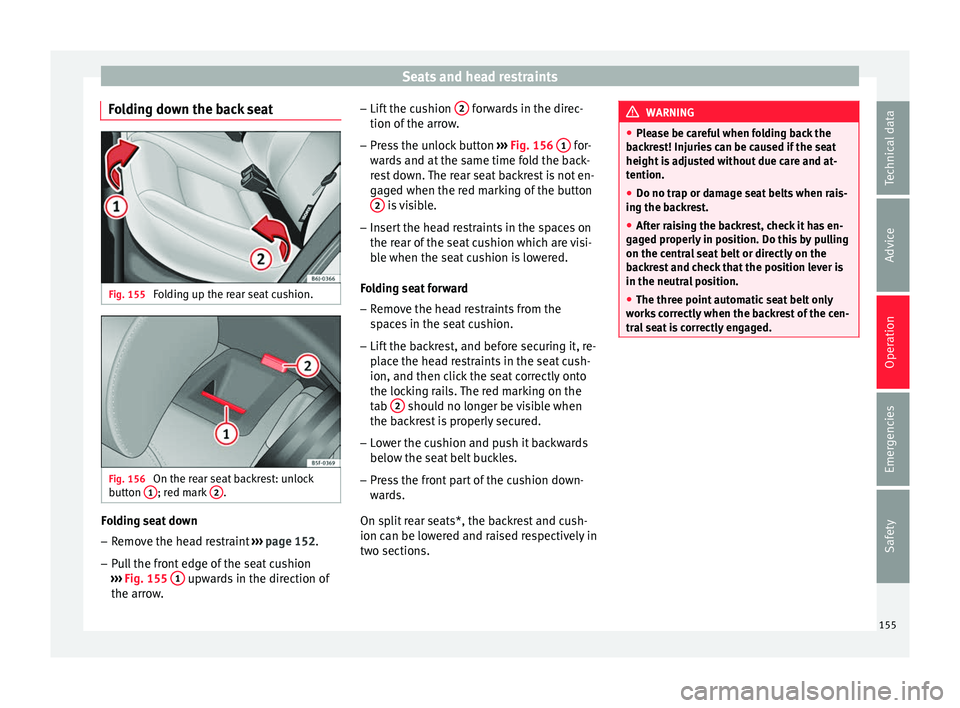
Folding down the back seat Fig. 155
Folding up the rear seat cushion. Fig. 156
On the rear seat backrest: unlock
b utt
on 1 ; red mark
2 .
Folding seat down
– Remove the head restraint ››
› page 152.
– Pull the front edge of the seat cushion
›››
Fig. 155 1 upwards in the direction of
the arr o
w
. –
Lift the c
ushion 2 forwards in the direc-
tion of the arr
o
w.
– Press the unlock button ›››
Fig. 156 1 for-
w ar
d
s and at the same time fold the back-
rest down. The rear seat backrest is not en-
gaged when the red marking of the button 2 is visible.
– Insert the head restraints in the spaces on
the r e
ar of
the seat cushion which are visi-
ble when the seat cushion is lowered.
Folding seat forward
– Remove the head restraints from the
spac
es in the seat cushion.
– Lift the backrest, and before securing it, re-
plac
e the head restraints in the seat cush-
ion, and then click the seat correctly onto
the locking rails. The red marking on the
tab 2 should no longer be visible when
the b ac
k
rest is properly secured.
– Lower the cushion and push it backwards
below the seat
belt buckles.
– Press the front part of the cushion down-
ward
s.
On split rear seats*, the backrest and cush-
ion can be lowered and raised respectively in
two sections. WARNING
● Ple a
se be careful when folding back the
backrest! Injuries can be caused if the seat
height is adjusted without due care and at-
tention.
● Do no trap or damage seat belts when rais-
ing the bac
krest.
● After raising the backrest, check it has en-
gaged pr
operly in position. Do this by pulling
on the central seat belt or directly on the
backrest and check that the position lever is
in the neutral position.
● The three point automatic seat belt only
works
correctly when the backrest of the cen-
tral seat is correctly engaged. 155
Technical data
Advice
Operation
Emergencies
Safety
Page 158 of 316
Operation
Transport and practical
equipment Pr actic
a
l equipment
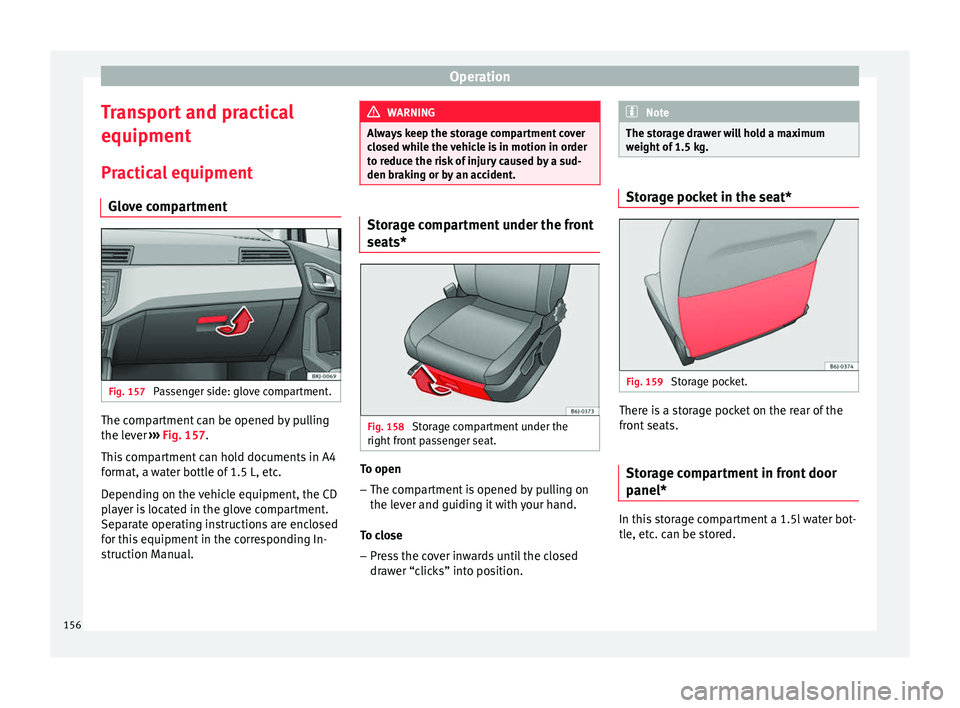
Glove compartment Fig. 157
Passenger side: glove compartment. The compartment can be opened by pulling
the l
ev
er ›
›› Fig. 157.
This compartment can hold documents in A4
format, a water bottle of 1.5 L, etc.
Depending on the vehicle equipment, the CD
player is located in the glove compartment.
Separate operating instructions are enclosed
for this equipment in the corresponding In-
struction Manual. WARNING
Always keep the storage compartment cover
clo sed whi
le the vehicle is in motion in order
to reduce the risk of injury caused by a sud-
den braking or by an accident. Storage compartment under the front
seat
s* Fig. 158
Storage compartment under the
right fr
ont
passenger seat. To open
– The compartment is opened by pulling on
the l ev
er and guidin
g it with your hand.
To close – Press the cover inwards until the closed
draw
er “clicks” into position. Note
The storage drawer will hold a maximum
weight of
1.5 kg. Storage pocket in the seat*
Fig. 159
Storage pocket. There is a storage pocket on the rear of the
fr
ont
se
ats.
Storage compartment in front door
panel* In this storage compartment a 1.5l water bot-
tl
e, et
c
. can be stored.
156
Page 161 of 316
Transport and practical equipment
●
Never e x
ceed the allowed axle weights or
allowed maximum weight. If said weights are
exceeded, the driving characteristics of the
vehicle may change, leading to accidents, in-
juries and damage to the vehicle.
● Please note that the centre of gravity may
shift when tr
ansporting heavy objects; this
may affect vehicle handling and lead to an ac-
cident. Therefore, it is essential to adjust
your speed and driving style accordingly, to
avoid accidents.
● Never leave your vehicle unattended, espe-
cia
lly when the rear lid is open. Children
could climb into the luggage compartment,
closing the door behind them; they will be
trapped and run the risk of death.
● Never allow children to play in or around
the vehic
le. Close and lock all the doors and
the rear lid when you leave the vehicle. Be-
fore you lock the vehicle, make sure that
there are no adults or children in the vehicle.
● Please observe the notes on the ›››
page 75. CAUTION
Hard objects on the rear shelf could chafe
again s
t the wires of the heating element in
the heated rear window and cause damage. Note
● The tyr e pr
essure must be adjusted accord-
ing to the load. When necessary, check the
tyre pressures on the adhesive label stuck to the back of the front left door frame
›› ›
page 284.
● Air circulation in the vehicle helps reduce
foggin
g of the windows. Used air escapes
through ventilation slits in the side trim of
the luggage compartment. Ensure that the
ventilation slots are never covered.
● Straps for securing the load to the fasten-
ing ring
s* are commercially available from ac-
cessory shops. Rear shelf
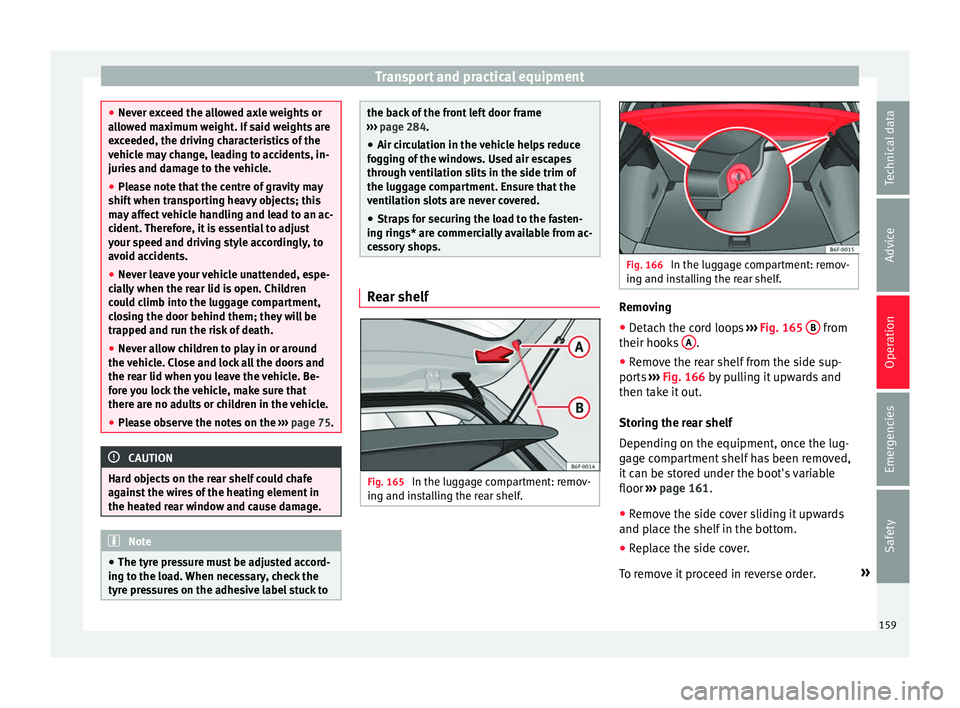
Fig. 165
In the luggage compartment: remov-
in g and in
s
talling the rear shelf. Fig. 166
In the luggage compartment: remov-
ing and in s
talling the rear shelf. Removing
● Detach the cord loops ››
›
Fig. 165 B from
their hook s
A .
● Remove the rear shelf from the side sup-
por ts
›
›› Fig. 166 by pulling it upwards and
then take it out.
Storing the rear shelf
Depending on the equipment, once the lug-
gage compartment shelf has been removed,
it can be stored under the boot's variable
floor ››› page 161.
● Remove the side cover sliding it upwards
and plac
e the shelf in the bottom.
● Replace the side cover.
To remo
ve it proceed in reverse order. »
159
Technical data
Advice
Operation
Emergencies
Safety
Page 162 of 316
Operation
Fitting
● Insert the cover horizontally so that the “re-
c e
s
s” fits onto the axis of the supports
››› Fig. 166 and press down until it engages.
● Hook the loops ›››
Fig. 165 B to the rear
lid. WARNING
Do not place heavy or hard objects on the
re ar shelf
, because they will endanger the ve-
hicle occupants in case of sudden braking. CAUTION
● Bef or
e closing the rear lid, ensure that the
rear shelf is correctly fitted.
● An overloaded luggage compartment could
mean that
the rear shelf is not correctly seat-
ed and it may be bent or damaged.
● If the luggage compartment is overloaded,
remov
e the tray. Note
● Ens ur
e that, when placing items of clothing
on the luggage compartment cover, rear visi-
bility is not reduced. Fastening rings*
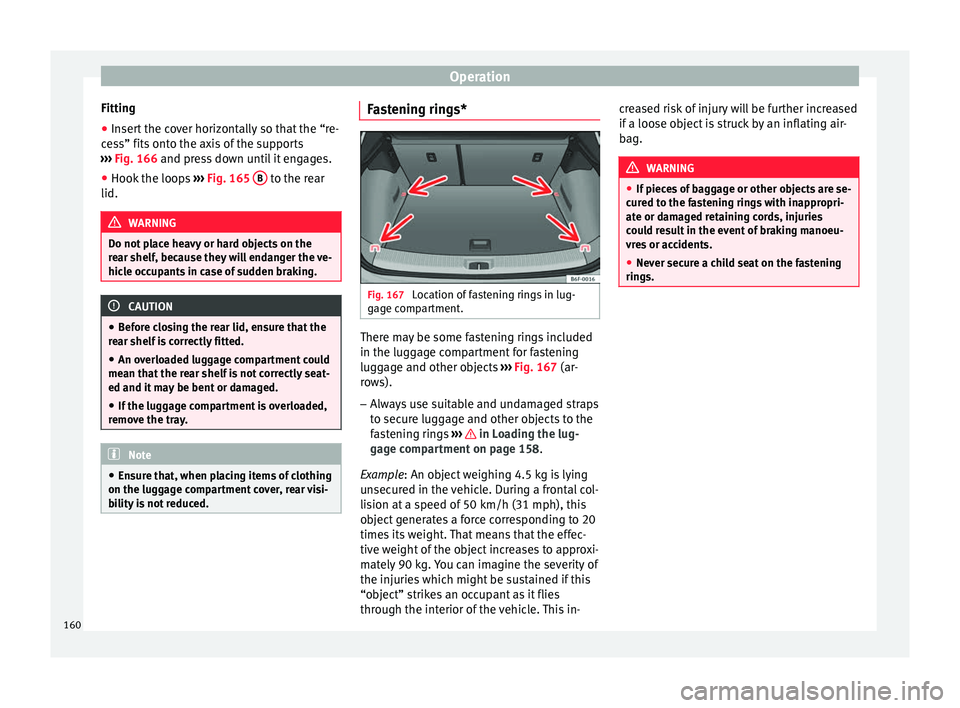
Fig. 167
Location of fastening rings in lug-
g ag
e c
ompartment. There may be some fastening rings included
in the lug
g
ag
e compartment for fastening
luggage and other objects ››› Fig. 167 (ar-
rows).
– Always use suitable and undamaged straps
to secur
e luggage and other objects to the
fastening rings ››› in Loading the lug-
g ag
e c
ompartment on page 158.
Example: An object weighing 4.5 kg is lying
unsecured in the vehicle. During a frontal col-
lision at a speed of 50 km/h (31 mph), this
object generates a force corresponding to 20
times its weight. That means that the effec-
tive weight of the object increases to approxi-
mately 90 kg. You can imagine the severity of
the injuries which might be sustained if this
“object” strikes an occupant as it flies
through the interior of the vehicle. This in- creased risk of injury will be further increased
if a loose o
bject is struck by an inflating air-
bag. WARNING
● If piec e
s of baggage or other objects are se-
cured to the fastening rings with inappropri-
ate or damaged retaining cords, injuries
could result in the event of braking manoeu-
vres or accidents.
● Never secure a child seat on the fastening
rings. 160
Page 173 of 316
Air conditioning
Climatronic* Gener a
l
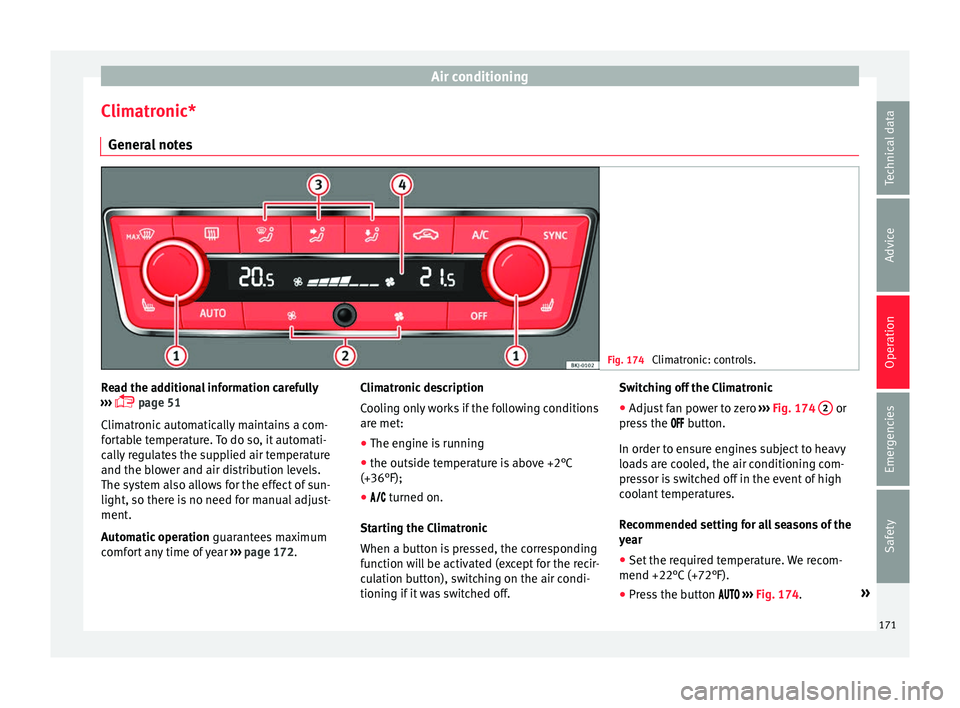
notes Fig. 174
Climatronic: controls. Read the additional information carefully
› ›
›
page 51
Climatronic automatically maintains a com-
fortable temperature. To do so, it automati-
cally regulates the supplied air temperature
and the blower and air distribution levels.
The system also allows for the effect of sun-
light, so there is no need for manual adjust-
ment.
Automatic operation guarantees maximum
comfort any time of year ››› page 172. Climatronic description
Coolin
g only works if the following conditions
are met:
● The engine is running
● the outside temperature is above +2°C
(+36°F);
● turned on.
Star
ting the Climatronic
When a button is pressed, the corresponding
function will be activated (except for the recir-
culation button), switching on the air condi-
tioning if it was switched off. Switching off the Climatronic
●
Adjust fan power to zero ›››
Fig. 174 2 or
pr e
s
s the button.
In order to ensure engines subject to heavy
loads are cooled, the air conditioning com-
pressor is switched off in the event of high
coolant temperatures.
Recommended setting for all seasons of the
year
● Set the required temperature. We recom-
mend +22°C (+72°F).
● Pre
ss the button ››
› Fig. 174. »
171
Technical data
Advice
Operation
Emergencies
Safety
Page 174 of 316
Operation
● Adju s
t
the vents so that the air flow is di-
rected slightly upwards.
Change between degrees Centigrade and de-
grees Fahrenheit
The units of degrees can be changed via the
Easy Connect system using the button
and the f u
nction b
utton SETTINGS >
Units > Temperature .
Automatic mode
Automatic mode is used to maintain a con-
stant temperature and demist the windows
inside the vehicle.
● Set a interior temperature between +16°C
(+64°F) and +29°C (+84°F).
● Adjus
t the vents so that the air flow is di-
rected s
lightly upwards.
● Press the butt
on, AUTO is displayed on
the screen.
Automatic mode is switched off by pressing
the air distribution buttons or increasing or
decreasing the blower speed. However, the
temperature remains regulated.
Adjusting the temperature
● When you switch on the ignition, control 1›››
Fig. 174 can be u sed t
o set the required in-
terior temperature. It is possible to select interior temperatures
from +16°C
(+64°F) t
o +29°C (+84°F). In this
range the temperature is regulated automati-
cally. If a temperature below +16°C (+64°F) is
selected, “LO” is displayed on the screen. If a
temperature above +29°C (+84°F) is selected,
“HI” is displayed on the screen. At both ex-
tremes, Climatronic works at maximum cool-
ing or heating power, respectively. The tem-
perature is not regulated.
In the event of prolonged, irregular distribu-
tion of the air flow from the outlets (particu-
larly the footwells) and significant differen-
ces in temperature, e.g. on leaving the vehi-
cle, sensitive people may catch cold.
Fan regulation
Climatronic automatically regulates blower
speed according to the interior temperature.
It is possible, however, to set the blower
speed to suit requirements.
● Press the 2 buttons to increase or reduce
f an s
peed.
C
limatronic will switch off when the blower
switches off.
Turn on windscreen defrost
● Press the button ›››
Fig. 174. Switching off windscreen defrosting
●
Press the button sev
eral times or
press the button.
The temperature is regulated automatically.
The air output from the vents ››› Fig. 171 2 is increased.
WARNING
Read and observe the safety warnings ›››
in
Genera l
notes on page 164. Note
● A v i
sit to the specialised service once a
year is recommended to clean the Climatronic
system.
● The interior temperature sensor is at the
bottom. Do not c
over it with stickers or the
like, as this could have a negative effect on
Climatronic operations. 172
Page 175 of 316
Driving
Driving St ar
tin
g and stopping the en-
gine
Ignition key positions Fig. 175
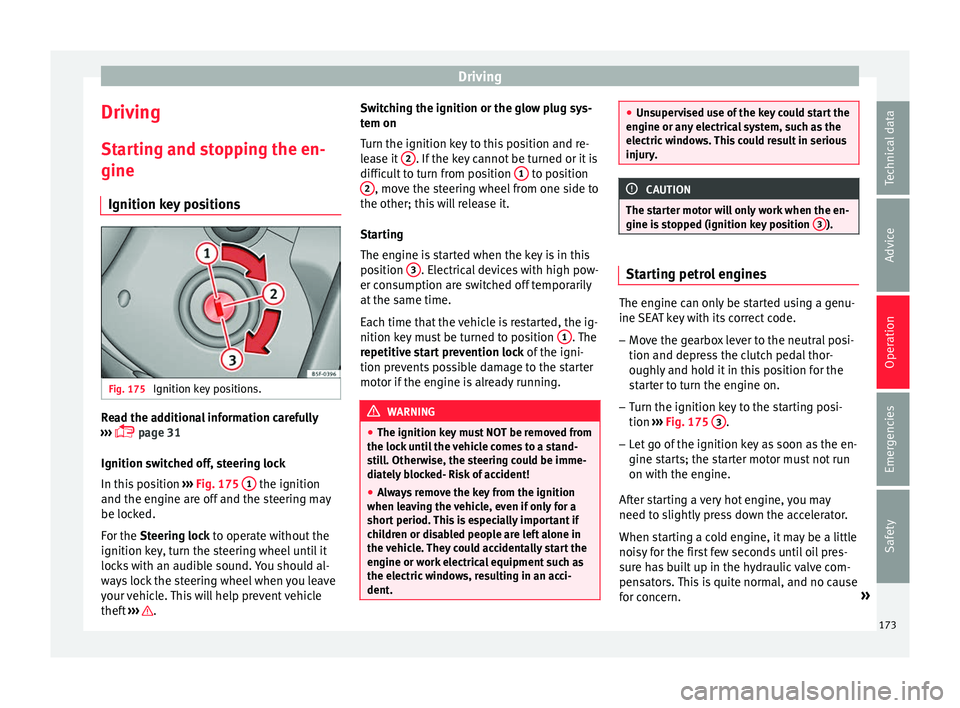
Ignition key positions. Read the additional information carefully
› ›
›
page 31
Ignition switched off, steering lock
In this position ››› Fig. 175 1 the ignition
and the en gine ar
e off
and the steering may
be locked.
For the Steering lock to operate without the
ignition key, turn the steering wheel until it
locks with an audible sound. You should al-
ways lock the steering wheel when you leave
your vehicle. This will help prevent vehicle
theft ››› . Switching the ignition or the glow plug sys-
t
em on
T urn the ignition k
ey to this position and re-
lease it 2 . If the key cannot be turned or it is
diffic u
lt
to turn from position 1 to position
2 , move the steering wheel from one side to
the other; thi s
w
ill release it.
Starting
The engine is started when the key is in this
position 3 . Electrical devices with high pow-
er c on
s
umption are switched off temporarily
at the same time.
Each time that the vehicle is restarted, the ig-
nition key must be turned to position 1 . The
r epetitiv
e s
tart prevention lock of the igni-
tion prevents possible damage to the starter
motor if the engine is already running. WARNING
● The ignition key mu
st NOT be removed from
the lock until the vehicle comes to a stand-
still. Otherwise, the steering could be imme-
diately blocked- Risk of accident!
● Always remove the key from the ignition
when leav
ing the vehicle, even if only for a
short period. This is especially important if
children or disabled people are left alone in
the vehicle. They could accidentally start the
engine or work electrical equipment such as
the electric windows, resulting in an acci-
dent. ●
Uns uper
vised use of the key could start the
engine or any electrical system, such as the
electric windows. This could result in serious
injury. CAUTION
The starter motor will only work when the en-
gine i s s
topped (ignition key position 3 ).
Starting petrol engines
The engine can only be started using a genu-
ine
S
EA
T key with its correct code.
– Move the gearbox lever to the neutral posi-
tion and depres
s the clutch pedal thor-
oughly and hold it in this position for the
starter to turn the engine on.
– Turn the ignition key to the starting posi-
tion ›››
Fig. 175 3 .
– Let go of the ignition key as soon as the en-
gine s t
ar
ts; the starter motor must not run
on with the engine.
After starting a very hot engine, you may
need to slightly press down the accelerator.
When starting a cold engine, it may be a little
noisy for the first few seconds until oil pres-
sure has built up in the hydraulic valve com-
pensators. This is quite normal, and no cause
for concern. »
173
Technical data
Advice
Operation
Emergencies
Safety