ESP Seat Arona 2018 Workshop Manual
[x] Cancel search | Manufacturer: SEAT, Model Year: 2018, Model line: Arona, Model: Seat Arona 2018Pages: 316, PDF Size: 6.77 MB
Page 231 of 316
Driver assistance systems
Using the blind spot detector (BSD)
w ith p
ark
ing assistant (RCTA)Activating and deactivating the blind spot
detect
or (BSD) w
ith parking assistant (RCTA)
The blind spot detector with parking assis-
tant can be switched on and off by accessing
the Assistance systems menu on the
dash panel display using the steering wheel
controls. If the vehicle is equipped with a
multifunction camera, it can also be ac-
cessed by means of the driver assistance sys-
tems key located on the main beam head-
light lever.
Open the Assistants menu.
● Blind spot
● Exit Assist
If
the verification box on the control panel is
checked , the functionality will be automat-
ically activated at ignition.
When the blind spot detector is ready to op-
erate, the indications in the external mirrors
will turn on briefly as confirmation.
When the vehicle is restarted, the last adjust-
ment in the system will remain active.
If the blind spot detector was automatically
deactivated, it will only be possible to restart
the system after turning the vehicle off and
restarting it. Automatic deactivation of the blind spot de-
tect
or (BSD)
The r
adar sensors of the blind spot detector
with rear cross traffic alert will be automati-
cally deactivated when, among other rea-
sons, one of the sensors is detected to be
permanently covered. This may be the case if,
for example, there is a layer of snow or ice in
front of one of the sensors.
The relevant text message will appear in the
dash panel display.
Trailer mode
The Blind spot detector and the rear cross
traffic alert will be automatically deactivated
and it will be impossible to activate them if
the tow hitch is electrically connected to a
trailer or other similar object.
As soon as the driver starts to drive with a
trailer connected electrically to the vehicle, a
message will appear on the instrument panel
display indicating that the blind spot detec-
tor and the rear cross traffic alert are deacti-
vated. Once the trailer has been unhitched
from the vehicle, if you want to use the blind
spot detector and the rear cross traffic alert,
you will have to reactivate them in the corre-
sponding menu.
If the towing hitch is not factory equipped,
then the blind spot detector and the rear
cross traffic alert will have to be deactivated
manually when driving with a trailer. SEAT Drive Profile*
Introduction SEAT Drive Profile enables the driver to
choo
se betw
een four profiles or modes, Nor-
mal , Sport , Eco and Individual , that
modify the behaviour of various vehicle func-
tions, providing different driving experiences.
The Individual profile can be configured
according to personal preferences. The other
profiles are fixed.
Description Depending on the equipment fitted in the ve-
hic
l
e,
SEAT Drive Profile can operate on the
following functions:
Engine
Depending on the profile selected, the en-
gine responds more spontaneously or more
in harmony with the movements of the accel-
erator. Additionally, when Eco mode is selec-
ted, the Start-stop function is automatically
activated.
In vehicles with automatic transmission, the
gear change points are modified to position
them in lower or higher engine speed ranges. »
229
Technical data
Advice
Operation
Emergencies
Safety
Page 232 of 316
Operation
Additionally, the Eco mode activat
e s the In-
ertia function, enabling consumption to be
further reduced.
In manual gearbox vehicles, Eco mode cau-
ses the gear change recommendation indica-
tions that appear on the instrument panel to
vary, facilitating more efficient driving.
“Dual Ride” suspension
The “Dual Ride” suspension features a com-
fortable suspension in the Eco and Normal
profiles, suitable for daily use. Contrasting
with this it features a sporty suspension in
the Sport profile, suitable for a sporty driv-
ing style. In the Individual profile the sus-
pension can be switched between Normal or
Sport , depending on personal preference.
In the event of a fault in the “Dual Ride” sus-
pension, the following message is displayed
on the instrument panel screen Fault:
damping setting .
Address
Power steering becomes more robust in
Sport mode to enable a sportier driving
style.
Air conditioning
In vehicles with Climatronic, this can operate
in eco mode, especially restricting fuel con-
sumption. Adaptive Cruise Control (ACC)
Acc
ording to the active driving profile, the ac-
celeration gradient of the adaptive cruise
control varies.
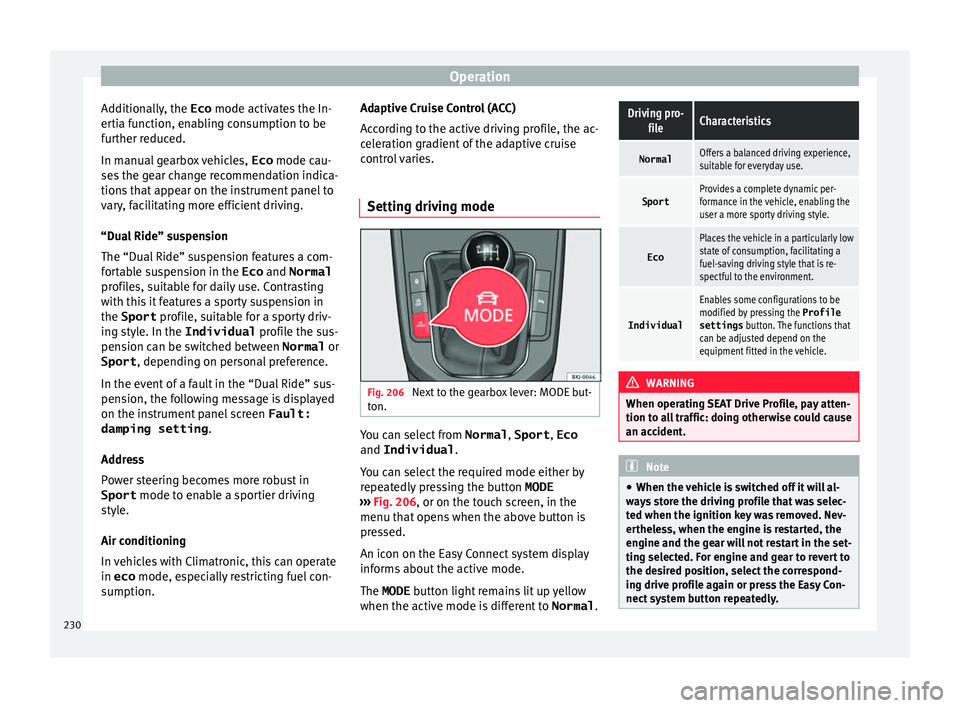
Setting driving mode Fig. 206
Next to the gearbox lever: MODE but-
t on. You can select from
Normal, Sport, Eco
and Individual .
Y ou c
an sel
ect the required mode either by
repeatedly pressing the button MODE
››› Fig. 206, or on the touch screen, in the
menu that opens when the above button is
pressed.
An icon on the Easy Connect system display
informs about the active mode.
The MODE button light remains lit up yellow
when the active mode is different to Normal.
Driving pro-
fileCharacteristics
NormalOffers a balanced driving experience,
suitable for everyday use.
SportProvides a complete dynamic per-
formance in the vehicle, enabling the
user a more sporty driving style.
Eco
Places the vehicle in a particularly low
state of consumption, facilitating a
fuel-saving driving style that is re-
spectful to the environment.
Individual
Enables some configurations to be
modified by pressing the Profile
settings button. The functions that
can be adjusted depend on the
equipment fitted in the vehicle. WARNING
When operating SEAT Drive Profile, pay atten-
tion to a l
l traffic: doing otherwise could cause
an accident. Note
● When the v ehic
le is switched off it will al-
ways store the driving profile that was selec-
ted when the ignition key was removed. Nev-
ertheless, when the engine is restarted, the
engine and the gear will not restart in the set-
ting selected. For engine and gear to revert to
the desired position, select the correspond-
ing drive profile again or press the Easy Con-
nect system button repeatedly. 230
Page 233 of 316
Driver assistance systems
●
Your s peed and driv
ing style must always
be adjusted to visibility, weather, and traffic
conditions.
● The eco mode is not
available when towing
a trailer. Kick-down
The kick-down feature allows maximum ac-
cel
er
ation to be reached.
If the eco* ››› page 230 mode has been se-
lected in SEAT Drive Profile*, and the acceler-
ator is pressed beyond a hard point, the en-
gine power is automatically controlled to give
your vehicle maximum acceleration. WARNING
Please note that if the road surface is slip-
pery or w
et, the kick-down feature could
cause the driving wheels to spin, which could
result in skidding. Fatigue detection (break rec-
ommend
ation)*
R el
ated video Fig. 207
Safety Introduction
The Fatigue detection informs the driver
when their driv
in
g beh
aviour shows signs of
fatigue. WARNING
Do not let the comfort afforded by the Fatigue
detection sy s
tem tempt you into taking any
risks when driving. Take regular breaks, suffi-
cient in length when making long journeys.
● The driver always assumes the responsibil-
ity of driv
ing to their full capacity.
● Never drive if you are tired.
● The system does not detect the tiredness of
the driver in al
l circumstances. Consult the in-
formation in the section ››› page 232, System
limitations. ●
In some sit uation
s, the system may incor-
rectly interpret an intended driving manoeu-
vre as driver tiredness.
● No warning is given in the event of the ef-
fect c
alled microsleep!
● Please observe the indications on the in-
strument p
anel and act as is necessary. Note
● Fatigue det ection h
as been developed for
driving on motorways and well paved roads
only.
● If there is a fault in the system, have it
check
ed by a specialised workshop. Function and operation
Fig. 208
On the instrument panel display: fa-
tigue det ection symbo
l
. Fatigue detection determines the driving be-
h
av
iour of
the driver when starting a journey, »
231
Technical data
Advice
Operation
Emergencies
Safety
Page 235 of 316
Driver assistance systems
compromise safety. The system is not a re-
pl
ac
ement for driver awareness.
● Any accidental movement of the vehicle
coul
d result in serious injury.
● Adapt your speed and driving style at all
times t
o suit visibility, weather, road and traf-
fic conditions.
● Certain surfaces of objects and garments
do not refl
ect the ultrasound sensors' sig-
nals. The system cannot detect, at least cor-
rectly, these objects or people wearing such
clothes.
● Ultrasound sensor signals may be affected
by e
xternal sound sources. In certain circum-
stances this may prevent them from detect-
ing people or objects.
● The ultrasound sensors have blind spots in
which ob
stacles and people are not regis-
tered.
● Monitor the area around the vehicle at all
times, sinc
e the ultrasound sensors do not
detect small children, animals or certain ob-
jects in all situations. WARNING
Quick turns of the steering wheel when park-
ing or e x
iting a parking space with Park As-
sist can cause serious injury.
● Do not hold the steering wheel during ma-
noeuvre
s to park or exit a parking space until
the system requests it. Doing so disables the
system during the manoeuvre, resulting in
the parking being cancelled. CAUTION
● In cer t
ain circumstances, the ultrasonic
sensors do not detect objects such as trailer
tongues, bars, fences, posts or thin trees, or
an open (or opening) rear lid, which could
damage the vehicle.
● Retrofitting of certain accessories to the ve-
hicle, s
uch as a bicycle rack, may interfere
with the operation of the Park Assist system
and cause damage.
● The Park Assist system uses as a reference
parked
vehicles, curbs and other objects.
Make sure that the tyres and wheels are not
damaged while parking. If necessary, oppor-
tunely interrupt the parking manoeuvre to
avoid damaging the vehicle.
● The ultrasound sensors on the bumper may
be damag
ed or shifted in the event of a colli-
sion, for example, when entering or exiting a
parking space.
● If you use high-pressure or vapour equip-
ment to c
lean the ultrasound sensors, do not
apply it directly unless very briefly and al-
ways from a distance of more than 10 cm.
● A registration plate or plate holder on the
front w
ith larger than the space for the regis-
tration plate, or a registration plate that is
curved or warped can cause:
–false detections,
– loss of sensor visibility.
– cancellation of the parking manoeuvre or
defective parking. ●
If one of the u
ltrasonic sensors is damaged,
the area corresponding to that group of sen-
sors (front or rear) is deactivated and cannot
be activated until the fault is corrected. How-
ever, you can still use the sensors of the oth-
er bumper as per usual. If there is a fault in
the system, consult a specialist workshop.
SEAT recommends visiting a SEAT dealership
for this. Note
● In or der t o guar
antee good system opera-
tion, keep the ultrasound sensors of the
bumper clean, free of snow or ice, and do not
cover them with adhesives or other objects.
● Certain sources of noise, such as rough as-
phalt
or paving stones and the noise of other
vehicles can induce the Park Assist system or
ParkPilot to give erroneous warnings.
● In order to become familiar with the system
and its f
unctions, SEAT recommends that you
practice operating the Park Assist system in
an area where there is not too much traffic or
in a car park. 233
Technical data
Advice
Operation
Emergencies
Safety
Page 237 of 316
Driver assistance systems
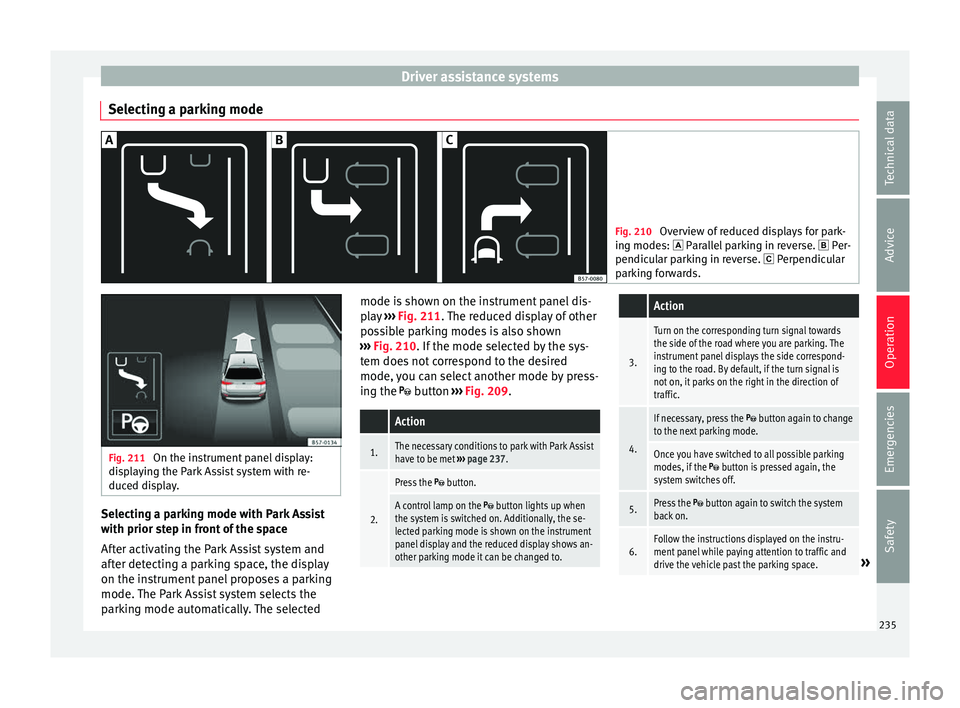
Selecting a parking mode Fig. 210
Overview of reduced displays for park-
ing mode s:
Parallel parking in reverse. Per-
pendicular parking in reverse. Perpendicular
parking forwards. Fig. 211
On the instrument panel display:
dis p
laying the Park Assist system with re-
duced display. Selecting a parking mode with Park Assist
w
ith prior s
t
ep in front of the space
After activating the Park Assist system and
after detecting a parking space, the display
on the instrument panel proposes a parking
mode. The Park Assist system selects the
parking mode automatically. The selected mode is shown on the instrument panel dis-
pla
y ››› Fig. 211. The reduced display of other
possible parking modes is also shown
››› Fig. 210. If the mode selected by the sys-
tem does not correspond to the desired
mode, you can select another mode by press-
ing the button ››› Fig. 209.
Action
1.The necessary conditions to park with Park Assist
have to be met ››› page 237.
2.
Press the button.
A control lamp on the button lights up when
the system is switched on. Additionally, the se-
lected parking mode is shown on the instrument
panel display and the reduced display shows an-
other parking mode it can be changed to.
Action
3.
Turn on the corresponding turn signal towards
the side of the road where you are parking. The
instrument panel displays the side correspond-
ing to the road. By default, if the turn signal is
not on, it parks on the right in the direction of
traffic.
4.
If necessary, press the button again to change
to the next parking mode.
Once you have switched to all possible parking
modes, if the button is pressed again, the
system switches off.
5.Press the button again to switch the system
back on.
6.Follow the instructions displayed on the instru-
ment panel while paying attention to traffic and
drive the vehicle past the parking space.
» 235
Technical data
Advice
Operation
Emergencies
Safety
Page 240 of 316
OperationFor parallel parking
spacesFor perpendicularparking spaces
Do not exceed approxi-
mately 40 km/h (25 mph)
when driving past the parking space.Do not exceed approxi-
mately 20 km/h (12 mph)
when driving past the parking space.
Keep a distance between 0.5 and 2.0 metres when driv- ing past the parking space.
Length of the space:
length of the vehicle + 0.8 metresWidth of the space: width
of the vehicle + 0.8 me- tres
Do not exceed approximately 7 km/h (4 mph) when
parking. Parking
Do the following:
1.The necessary conditions have to be met to park
with Park Assist
››› page 237 and the parking
mode must be selected ››› page 235.
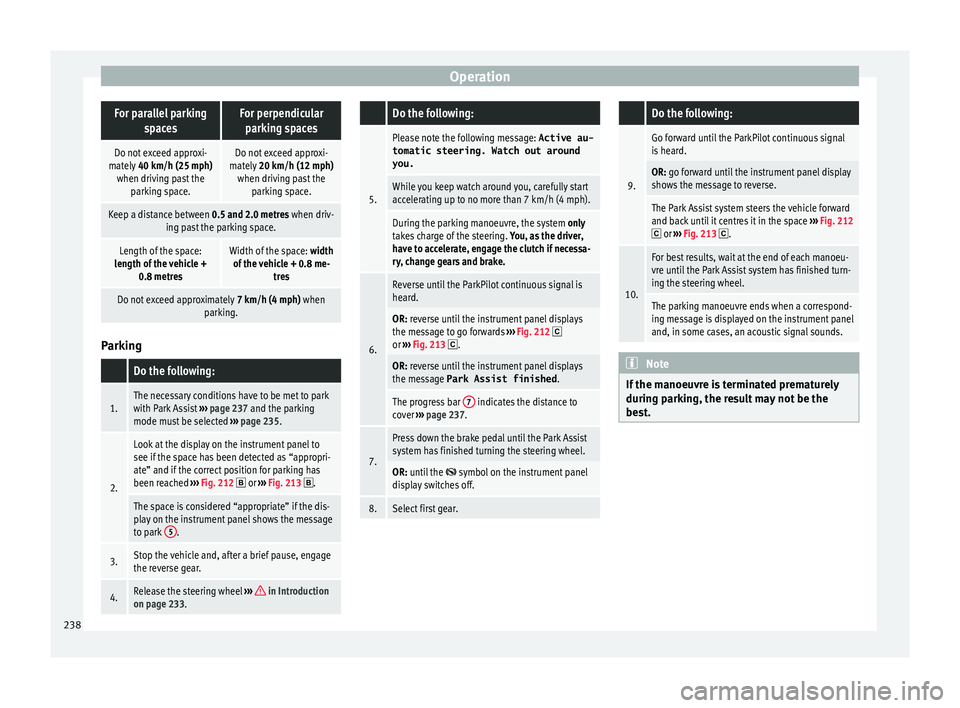
2.
Look at the display on the instrument panel to
see if the space has been detected as “appropri-
ate” and if the correct position for parking has
been reached ››› Fig. 212
or ››› Fig. 213 .
The space is considered “appropriate” if the dis-
play on the instrument panel shows the message
to park 5
.
3.Stop the vehicle and, after a brief pause, engage
the reverse gear.
4.Release the steering wheel
››› in Introduction
on page 233.
Do the following:
5.
Please note the following message: Active au-
tomatic steering. Watch out around
you.
While you keep watch around you, carefully start
accelerating up to no more than 7 km/h (4 mph).
During the parking manoeuvre, the system only
takes charge of the steering. You, as the driver,
have to accelerate, engage the clutch if necessa-
ry, change gears and brake.
6.
Reverse until the ParkPilot continuous signal is
heard.
OR: reverse until the instrument panel displays
the message to go forwards ››› Fig. 212 or ››› Fig. 213 .
OR: reverse until the instrument panel displays
the message Park Assist finished .
The progress bar 7 indicates the distance to
cover ››› page 237.
7.
Press down the brake pedal until the Park Assist
system has finished turning the steering wheel.
OR: until the symbol on the instrument panel
display switches off.
8.Select first gear.
Do the following:
9.
Go forward until the ParkPilot continuous signal
is heard.
OR: go forward until the instrument panel display
shows the message to reverse.
The Park Assist system steers the vehicle forward
and back until it centres it in the space ››› Fig. 212
or ››› Fig. 213 .
10.
For best results, wait at the end of each manoeu-
vre until the Park Assist system has finished turn-
ing the steering wheel.
The parking manoeuvre ends when a correspond-
ing message is displayed on the instrument panel
and, in some cases, an acoustic signal sounds. Note
If the manoeuvre is terminated prematurely
during p ark
ing, the result may not be the
best. 238
Page 241 of 316
Driver assistance systems
Exiting a parking space with Park As-
s i
s
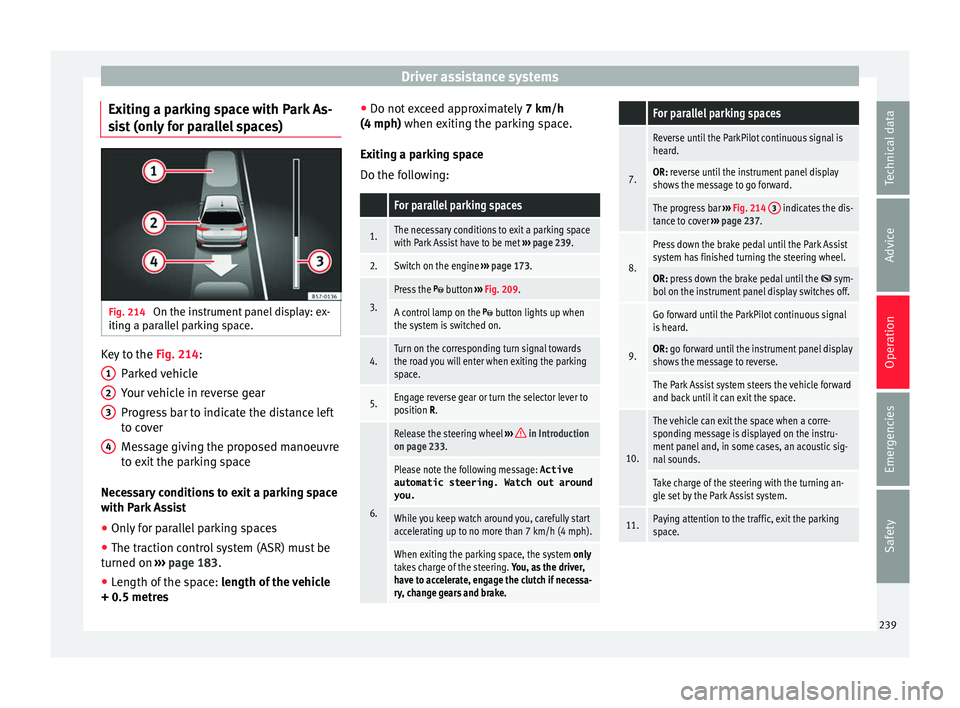
t (only for parallel spaces) Fig. 214
On the instrument panel display: ex-
itin g a p
ar
allel parking space. Key to the
Fig. 214:
P ark
ed
vehicle
Your vehicle in reverse gear
Progress bar to indicate the distance left
to cover
Message giving the proposed manoeuvre
to exit the parking space
Necessary conditions to exit a parking space
with Park Assist
● Only for parallel parking spaces
● The traction control system (ASR) must be
turned on ››
› page 183.
● Length of the space: leng
th of the vehicle
+ 0.5 metres 1 2
3
4 ●
Do not e
x
ceed approximately 7 km/h
(4 mph) when exiting the parking space.
Exiting a parking space
Do the following:
For parallel parking spaces
1.The necessary conditions to exit a parking space
with Park Assist have to be met ››› page 239.
2.Switch on the engine ››› page 173.
3.
Press the button ››› Fig. 209.
A control lamp on the button lights up when
the system is switched on.
4.Turn on the corresponding turn signal towards
the road you will enter when exiting the parking
space.
5.Engage reverse gear or turn the selector lever to
position R.
6.
Release the steering wheel ››› in Introduction
on page 233.
Please note the following message: Active
automatic steering. Watch out around
you.
While you keep watch around you, carefully start
accelerating up to no more than 7 km/h (4 mph).
When exiting the parking space, the system only
takes charge of the steering. You, as the driver,
have to accelerate, engage the clutch if necessa-
ry, change gears and brake.
For parallel parking spaces
7.
Reverse until the ParkPilot continuous signal is
heard.
OR: reverse until the instrument panel display
shows the message to go forward.
The progress bar ››› Fig. 214 3 indicates the dis-
tance to cover ››› page 237.
8.
Press down the brake pedal until the Park Assist
system has finished turning the steering wheel.
OR: press down the brake pedal until the sym-
bol on the instrument panel display switches off.
9.
Go forward until the ParkPilot continuous signal
is heard.
OR: go forward until the instrument panel display
shows the message to reverse.
The Park Assist system steers the vehicle forward
and back until it can exit the space.
10.
The vehicle can exit the space when a corre-
sponding message is displayed on the instru-
ment panel and, in some cases, an acoustic sig-
nal sounds.
Take charge of the steering with the turning an-
gle set by the Park Assist system.
11.Paying attention to the traffic, exit the parking
space. 239
Technical data
Advice
Operation
Emergencies
Safety
Page 242 of 316
Operation
Automatic braking intervention by
P ark
As
sist Park Assist helps the driver by automatically
brak
in
g in certain situations.
The driver is always responsible for braking
in time ››› .
Autom atic
braking intervention to avoid ex-
ceeding the speed limit
To avoid exceeding the speed limit of approx-
imately 7 km/h (4 mph) when entering or
leaving a parking space, the brakes may acti-
vate automatically. After automatically acti-
vating the brakes, the manoeuvres to enter or
exit a parking space may continue.
The brakes are only automatically activated
once for each attempt to enter or exit a park-
ing space. If the speed of approximately
7 km/h (4 mph) is exceeded again, the corre-
sponding operation is halted.
Automatic braking to reduce damages
Depending on certain conditions, the Park
Assist system can automatically brake the ve-
hicle when faced with an obstacle, briefly ac-
tioning and holding down the brake ped-
al ››› . Following this the driver must press
the br ak
e ped
al.
Automatic braking intervention to reduce
damage leads to the parking manoeuvre fin-
ishing. WARNING
The automatic braking intervention by Park
Ass i
st should never tempt you to take any
risk that may compromise safety. The system
is not a replacement for driver awareness.
● The Park Assist system is subject to certain
limitations
inherent to the system. In certain
situations, the automatic braking interven-
tion may only work in a limited way or not
work at all.
● Always be ready to use the brakes yourself!
● The automatic braking intervention will end
after ap
proximately 1.5 seconds. Following
this, brake the vehicle yourself. Parking aid (Park Pilot)
Gener a
l
information Assorted assistance systems – which vary
dependin
g on the equipment
fitt
ed in the car
– will help you when parking or manoeu-
vring.
The rear parking aid is an audible assistant
that warns about obstacles located behind
the vehicle ›››
page 241.
During parking, Parking System Plus assists
the driver by visually and audibly warning
them about obstacles detected in front and
behind the vehicle ›››
page 242. WARNING
● Alw a
ys pay attention, also when looking
straight ahead, to traffic and the vehicle sur-
roundings. The assistance systems are not a
replacement for driver awareness. When in-
serting or removing the vehicle from a park-
ing space, or when performing similar ma-
noeuvres the driver always assumes the re-
sponsibility.
● Adapt your speed and driving style at all
times t
o suit visibility, weather, road and traf-
fic conditions.
● The ultrasound sensors have blind spots in
which ob
stacles and people are not regis-
tered. Pay special attention to children and
animals.
● Always keep visual control of the vehicle
surrou
ndings: use the mirrors for additional
help. CAUTION
Parking Aid functions may be negatively af-
fect ed b
y different factors that may lead to
damage to the vehicle or its immediate sur-
rounds:
● Under certain circumstances, the system
does not
detect or display certain objects:
– Objects such as chains, trailer draw bars,
fences, posts and thin trees.
– Objects that are located above the sen-
sors, such as protrusions in a wall. 240
Page 246 of 316
Operation
● Sw it
c
h off the ignition and switch it on
again.
● OR: accelerate above 10 km/h (6 mph) be-
for
e reducing speed below this number
again.
● OR: place the selector lever in position P
and then mov
e it from this position.
● OR: switch on and off the automatic activa-
tion in the Ea
sy Connect system menu.
The automatic activation with parking aid
miniature indication can be switched on and
off from the Easy Connect system menu
››› page 34:
● Switch the ignition on.
● Select: button > Settings
> Parking
and manoeuvring .
● Select the Automatic activation op-
tion. When the f
u
nction button check box is
activated , the function is on.
If the system has been activated automatical-
ly, an audible sound warning will only be giv-
en when obstacles in front are at a distance
of less than 50 cm. CAUTION
The automatic connection of the Parking Aid
only w
orks when you are driving slowly. If
driving style is not adapted to the circum-
stances, an accident and serious injury or
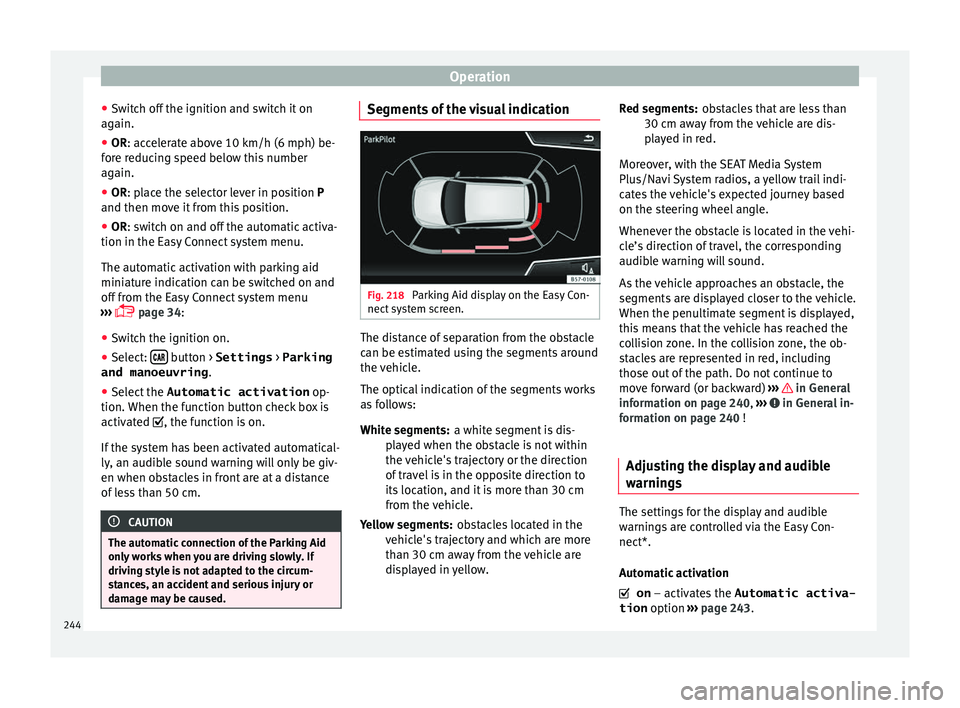
damage may be caused. Segments of the visual indication
Fig. 218
Parking Aid display on the Easy Con-
nect sy
s
tem screen. The distance of separation from the obstacle
c
an be e
s
timated using the segments around
the vehicle.
The optical indication of the segments works
as follows:
a white segment is dis-
played when the obstacle is not within
the vehicle's trajectory or the direction
of travel is in the opposite direction to
its location, and it is more than 30 cm
from the vehicle.
obstacles located in the
vehicle's trajectory and which are more
than 30 cm away from the vehicle are
displayed in yellow.
White segments:
Yellow segments: obstacles that are less than
30 cm aw
ay from the vehicle are dis-
played in red.
Moreover, with the SEAT Media System
Plus/Navi System radios, a yellow trail indi-
cates the vehicle's expected journey based
on the steering wheel angle.
Whenever the obstacle is located in the vehi-
cle’s direction of travel, the corresponding
audible warning will sound.
As the vehicle approaches an obstacle, the
segments are displayed closer to the vehicle.
When the penultimate segment is displayed,
this means that the vehicle has reached the
collision zone. In the collision zone, the ob-
stacles are represented in red, including
those out of the path. Do not continue to
move forward (or backward) ››› in General
inf orm
ation on p
age 240, ››› in General in-
f orm
ation on p
age 240 !
Adjusting the display and audible
warning
s The settings for the display and audible
w
arnin
g
s are controlled via the Easy Con-
nect*.
Automatic activation
on – activates the Automatic activa-
tion option ››› page 243.
Red segments:
244
Page 249 of 316
Driver assistance systems
Note
● It i s
important to take great care and pay
special attention if you are not yet familiar
with the system.
● Rear assist will not be available if the vehi-
cle's
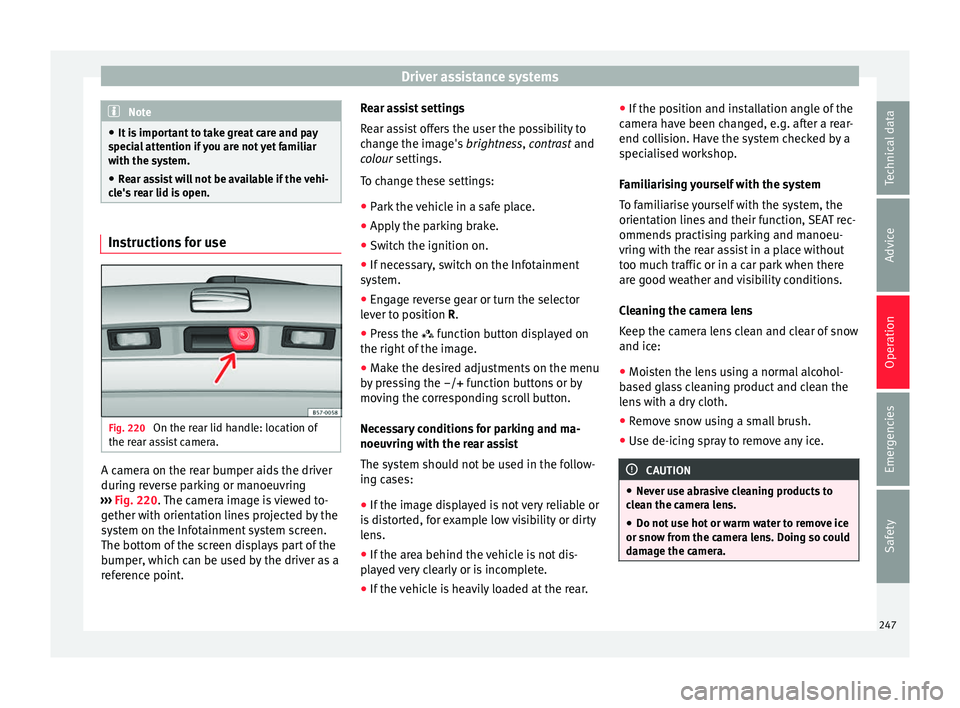
rear lid is open. Instructions for use
Fig. 220
On the rear lid handle: location of
the r e
ar a
ssist camera. A camera on the rear bumper aids the driver
durin
g r
ev
erse parking or manoeuvring
››› Fig. 220. The camera image is viewed to-
gether with orientation lines projected by the
system on the Infotainment system screen.
The bottom of the screen displays part of the
bumper, which can be used by the driver as a
reference point. Rear assist settings
Rear a
ssist offers the user the possibility to
change the image's brightness, contrast and
colour settings.
To change these settings:
● Park the vehicle in a safe place.
● Apply the parking brake.
● Switch the ignition on.
● If necessary, switch on the Infotainment
syst
em.
● Engage reverse gear or turn the selector
lever t
o position R.
● Press the function b
utton displayed on
the right of the image.
● Make the desired adjustments on the menu
by pr
essing the –/+ function buttons or by
moving the corresponding scroll button.
Necessary conditions for parking and ma-
noeuvring with the rear assist
The system should not be used in the follow-
ing cases:
● If the image displayed is not very reliable or
is di
storted, for example low visibility or dirty
lens.
● If the area behind the vehicle is not dis-
pla
yed very clearly or is incomplete.
● If the vehicle is heavily loaded at the rear. ●
If the pos
ition and installation angle of the
camera have been changed, e.g. after a rear-
end collision. Have the system checked by a
specialised workshop.
Familiarising yourself with the system
To familiarise yourself with the system, the
orientation lines and their function, SEAT rec-
ommends practising parking and manoeu-
vring with the rear assist in a place without
too much traffic or in a car park when there
are good weather and visibility conditions.
Cleaning the camera lens
Keep the camera lens clean and clear of snow
and ice:
● Moisten the lens using a normal alcohol-
based gl
ass cleaning product and clean the
lens with a dry cloth.
● Remove snow using a small brush.
● Use de-icing spray to remove any ice. CAUTION
● Never u se abr
asive cleaning products to
clean the camera lens.
● Do not use hot or warm water to remove ice
or snow fr
om the camera lens. Doing so could
damage the camera. 247
Technical data
Advice
Operation
Emergencies
Safety