instrument panel Seat Arona 2018 Repair Manual
[x] Cancel search | Manufacturer: SEAT, Model Year: 2018, Model line: Arona, Model: Seat Arona 2018Pages: 316, PDF Size: 6.77 MB
Page 237 of 316
Driver assistance systems
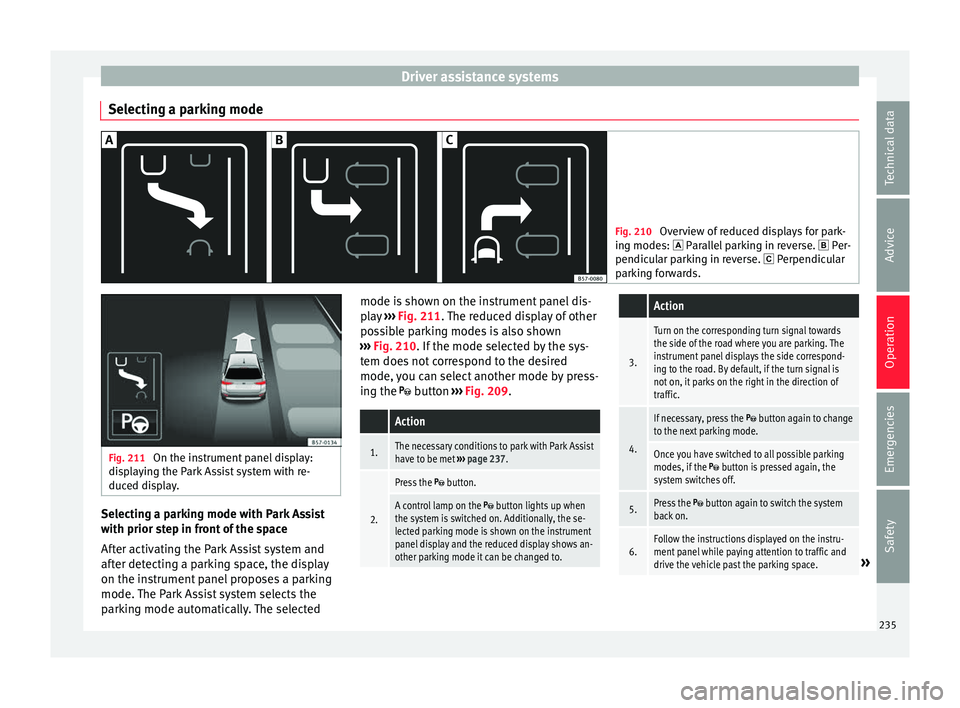
Selecting a parking mode Fig. 210
Overview of reduced displays for park-
ing mode s:
Parallel parking in reverse. Per-
pendicular parking in reverse. Perpendicular
parking forwards. Fig. 211
On the instrument panel display:
dis p
laying the Park Assist system with re-
duced display. Selecting a parking mode with Park Assist
w
ith prior s
t
ep in front of the space
After activating the Park Assist system and
after detecting a parking space, the display
on the instrument panel proposes a parking
mode. The Park Assist system selects the
parking mode automatically. The selected mode is shown on the instrument panel dis-
pla
y ››› Fig. 211. The reduced display of other
possible parking modes is also shown
››› Fig. 210. If the mode selected by the sys-
tem does not correspond to the desired
mode, you can select another mode by press-
ing the button ››› Fig. 209.
Action
1.The necessary conditions to park with Park Assist
have to be met ››› page 237.
2.
Press the button.
A control lamp on the button lights up when
the system is switched on. Additionally, the se-
lected parking mode is shown on the instrument
panel display and the reduced display shows an-
other parking mode it can be changed to.
Action
3.
Turn on the corresponding turn signal towards
the side of the road where you are parking. The
instrument panel displays the side correspond-
ing to the road. By default, if the turn signal is
not on, it parks on the right in the direction of
traffic.
4.
If necessary, press the button again to change
to the next parking mode.
Once you have switched to all possible parking
modes, if the button is pressed again, the
system switches off.
5.Press the button again to switch the system
back on.
6.Follow the instructions displayed on the instru-
ment panel while paying attention to traffic and
drive the vehicle past the parking space.
» 235
Technical data
Advice
Operation
Emergencies
Safety
Page 238 of 316
Operation
Special case of perpendicular parking space
t o p
ark
forwards without driving past first
Action
1.The necessary conditions to park with Park Assist
have to be met ››› page 237.
2.Drive forward towards the parking space while
paying attention to traffic and stop the vehicle.
Action
3.
Press the button once.
A control lamp on the button lights up when
the system is switched on. Additionally, the se-
lected parking mode is shown on the instrument
panel display without reduced display.
4.Release the steering wheel ››› in Introduction
on page 233. 236
Page 239 of 316
Driver assistance systems
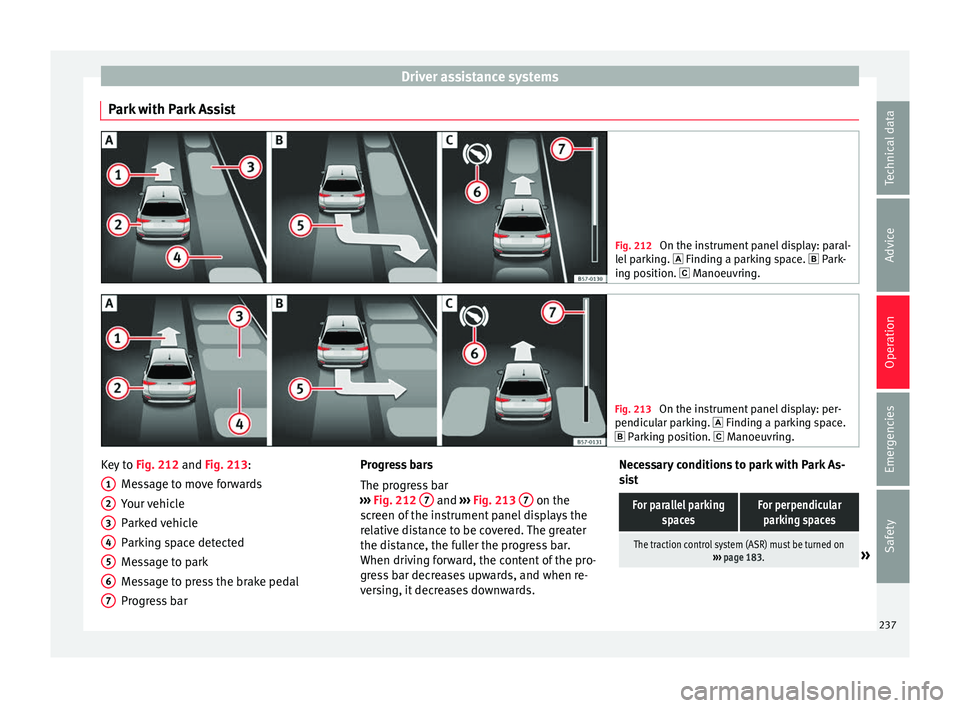
Park with Park Assist Fig. 212
On the instrument panel display: paral-
lel p
arking. Finding a parking space. Park-
ing position. Manoeuvring. Fig. 213
On the instrument panel display: per-
pendicu l
ar parking. Finding a parking space.
Parking position. Manoeuvring. Key to
Fig. 212 and Fig. 213:
M e
s
sage to move forwards
Your vehicle
Parked vehicle
Parking space detected
Message to park
Message to press the brake pedal
Progress bar
1 2
3
4
5
6
7 Progress bars
The pr
ogr
e
ss bar
››› Fig. 212 7 and
›››
Fig. 213 7 on the
s c
r
een of the instrument panel displays the
relative distance to be covered. The greater
the distance, the fuller the progress bar.
When driving forward, the content of the pro-
gress bar decreases upwards, and when re-
versing, it decreases downwards. Necessary conditions to park with Park As-
sis
t
For parallel parking spacesFor perpendicularparking spaces
The traction control system (ASR) must be turned on ››› page 183.» 237
Technical data
Advice
Operation
Emergencies
Safety
Page 240 of 316
OperationFor parallel parking
spacesFor perpendicularparking spaces
Do not exceed approxi-
mately 40 km/h (25 mph)
when driving past the parking space.Do not exceed approxi-
mately 20 km/h (12 mph)
when driving past the parking space.
Keep a distance between 0.5 and 2.0 metres when driv- ing past the parking space.
Length of the space:
length of the vehicle + 0.8 metresWidth of the space: width
of the vehicle + 0.8 me- tres
Do not exceed approximately 7 km/h (4 mph) when
parking. Parking
Do the following:
1.The necessary conditions have to be met to park
with Park Assist
››› page 237 and the parking
mode must be selected ››› page 235.
2.
Look at the display on the instrument panel to
see if the space has been detected as “appropri-
ate” and if the correct position for parking has
been reached ››› Fig. 212
or ››› Fig. 213 .
The space is considered “appropriate” if the dis-
play on the instrument panel shows the message
to park 5
.
3.Stop the vehicle and, after a brief pause, engage
the reverse gear.
4.Release the steering wheel
››› in Introduction
on page 233.
Do the following:
5.
Please note the following message: Active au-
tomatic steering. Watch out around
you.
While you keep watch around you, carefully start
accelerating up to no more than 7 km/h (4 mph).
During the parking manoeuvre, the system only
takes charge of the steering. You, as the driver,
have to accelerate, engage the clutch if necessa-
ry, change gears and brake.
6.
Reverse until the ParkPilot continuous signal is
heard.
OR: reverse until the instrument panel displays
the message to go forwards ››› Fig. 212 or ››› Fig. 213 .
OR: reverse until the instrument panel displays
the message Park Assist finished .
The progress bar 7 indicates the distance to
cover ››› page 237.
7.
Press down the brake pedal until the Park Assist
system has finished turning the steering wheel.
OR: until the symbol on the instrument panel
display switches off.
8.Select first gear.
Do the following:
9.
Go forward until the ParkPilot continuous signal
is heard.
OR: go forward until the instrument panel display
shows the message to reverse.
The Park Assist system steers the vehicle forward
and back until it centres it in the space ››› Fig. 212
or ››› Fig. 213 .
10.
For best results, wait at the end of each manoeu-
vre until the Park Assist system has finished turn-
ing the steering wheel.
The parking manoeuvre ends when a correspond-
ing message is displayed on the instrument panel
and, in some cases, an acoustic signal sounds. Note
If the manoeuvre is terminated prematurely
during p ark
ing, the result may not be the
best. 238
Page 241 of 316
Driver assistance systems
Exiting a parking space with Park As-
s i
s
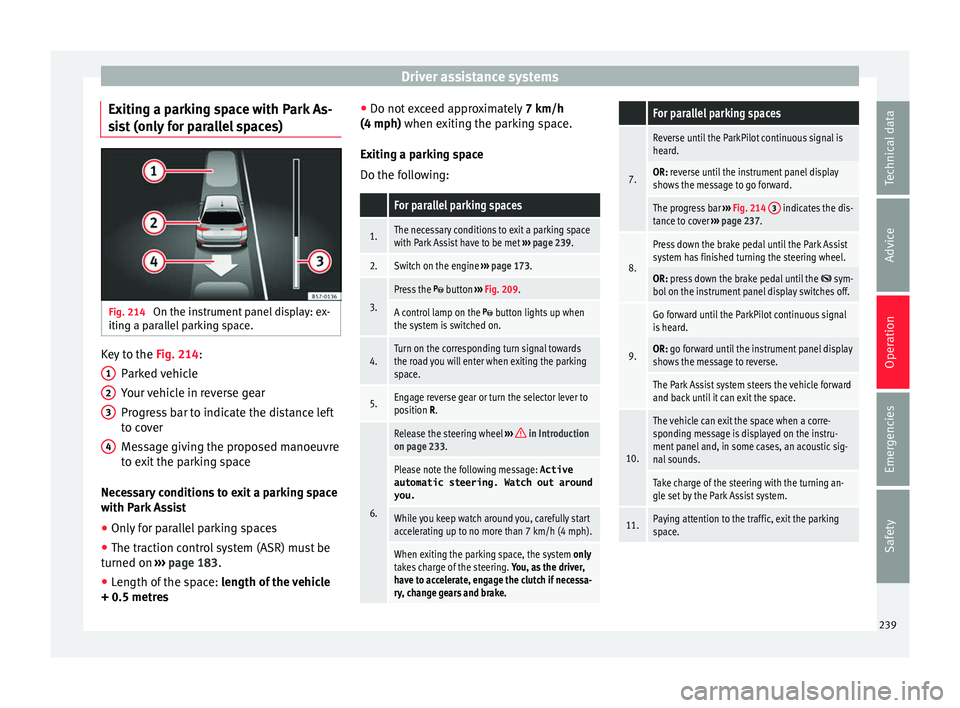
t (only for parallel spaces) Fig. 214
On the instrument panel display: ex-
itin g a p
ar
allel parking space. Key to the
Fig. 214:
P ark
ed
vehicle
Your vehicle in reverse gear
Progress bar to indicate the distance left
to cover
Message giving the proposed manoeuvre
to exit the parking space
Necessary conditions to exit a parking space
with Park Assist
● Only for parallel parking spaces
● The traction control system (ASR) must be
turned on ››
› page 183.
● Length of the space: leng
th of the vehicle
+ 0.5 metres 1 2
3
4 ●
Do not e
x
ceed approximately 7 km/h
(4 mph) when exiting the parking space.
Exiting a parking space
Do the following:
For parallel parking spaces
1.The necessary conditions to exit a parking space
with Park Assist have to be met ››› page 239.
2.Switch on the engine ››› page 173.
3.
Press the button ››› Fig. 209.
A control lamp on the button lights up when
the system is switched on.
4.Turn on the corresponding turn signal towards
the road you will enter when exiting the parking
space.
5.Engage reverse gear or turn the selector lever to
position R.
6.
Release the steering wheel ››› in Introduction
on page 233.
Please note the following message: Active
automatic steering. Watch out around
you.
While you keep watch around you, carefully start
accelerating up to no more than 7 km/h (4 mph).
When exiting the parking space, the system only
takes charge of the steering. You, as the driver,
have to accelerate, engage the clutch if necessa-
ry, change gears and brake.
For parallel parking spaces
7.
Reverse until the ParkPilot continuous signal is
heard.
OR: reverse until the instrument panel display
shows the message to go forward.
The progress bar ››› Fig. 214 3 indicates the dis-
tance to cover ››› page 237.
8.
Press down the brake pedal until the Park Assist
system has finished turning the steering wheel.
OR: press down the brake pedal until the sym-
bol on the instrument panel display switches off.
9.
Go forward until the ParkPilot continuous signal
is heard.
OR: go forward until the instrument panel display
shows the message to reverse.
The Park Assist system steers the vehicle forward
and back until it can exit the space.
10.
The vehicle can exit the space when a corre-
sponding message is displayed on the instru-
ment panel and, in some cases, an acoustic sig-
nal sounds.
Take charge of the steering with the turning an-
gle set by the Park Assist system.
11.Paying attention to the traffic, exit the parking
space. 239
Technical data
Advice
Operation
Emergencies
Safety
Page 247 of 316
Driver assistance systems
off – deactiv
at es the Automatic ac-
tivation option ››› page 243.
Front volume*
Volume in the front and rear area.
Front sound settings/sharpness*
Frequency (tone) of the sound in the front
area.
Rear volume*
Volume in the rear area.
Rear sound settings/sharpness*
Frequency (tone) of the sound in the rear
area.
Adjust volume
With the parking aid switched on, the active
audio/video source volume will be reduced
to the intensity of the selected setting.
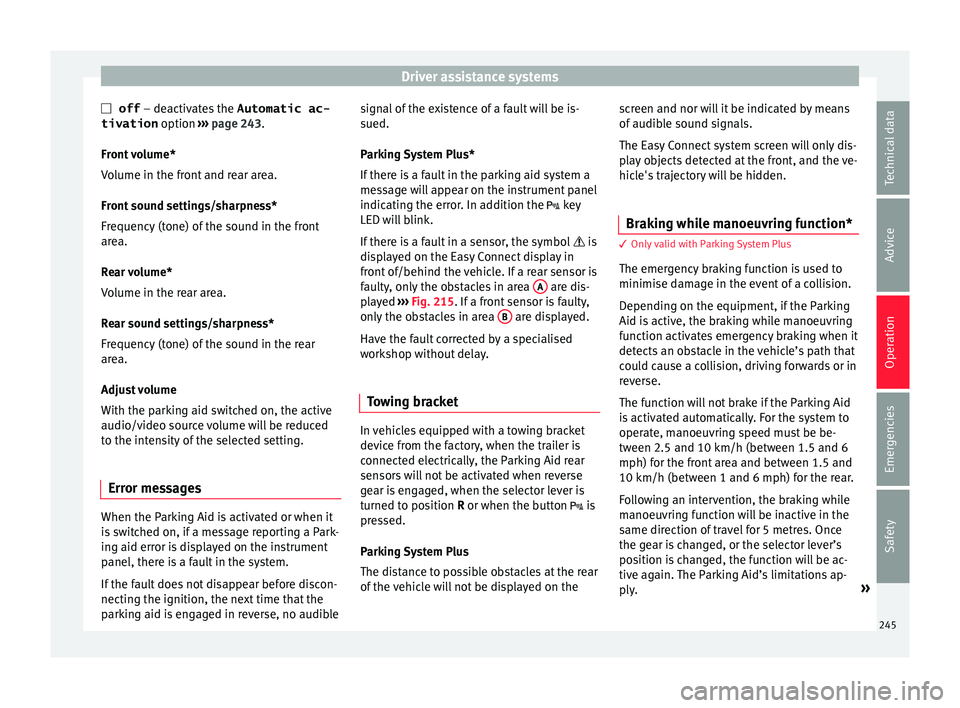
Error messages When the Parking Aid is activated or when it
i
s
sw
itched on, if a message reporting a Park-
ing aid error is displayed on the instrument
panel, there is a fault in the system.
If the fault does not disappear before discon-
necting the ignition, the next time that the
parking aid is engaged in reverse, no audible signal of the existence of a fault will be is-
sued.
Park
ing System Plus*
If there is a fault in the parking aid system a
message will appear on the instrument panel
indicating the error. In addition the key
LED will blink.
If there is a fault in a sensor, the symbol is
displayed on the Easy Connect display in
front of/behind the vehicle. If a rear sensor is
faulty, only the obstacles in area A are dis-
p l
a
yed ››› Fig. 215. If a front sensor is faulty,
only the obstacles in area B are displayed.
Hav e the f
au
lt corrected by a specialised
workshop without delay.
Towing bracket In vehicles equipped with a towing bracket
dev
ic
e fr
om the factory, when the trailer is
connected electrically, the Parking Aid rear
sensors will not be activated when reverse
gear is engaged, when the selector lever is
turned to position R or when the button is
pressed.
Parking System Plus
The distance to possible obstacles at the rear
of the vehicle will not be displayed on the screen and nor will it be indicated by means
of audibl
e sound signals.
The Easy Connect system screen will only dis-
play objects detected at the front, and the ve-
hicle's trajectory will be hidden.
Braking while manoeuvring function* 3 Only valid with Parking System Plus
The emer
g
ency braking function is used to
minimise damage in the event of a collision.
Depending on the equipment, if the Parking
Aid is active, the braking while manoeuvring
function activates emergency braking when it
detects an obstacle in the vehicle’s path that
could cause a collision, driving forwards or in
reverse.
The function will not brake if the Parking Aid
is activated automatically. For the system to
operate, manoeuvring speed must be be-
tween 2.5 and 10 km/h (between 1.5 and 6
mph) for the front area and between 1.5 and
10 km/h (between 1 and 6 mph) for the rear.
Following an intervention, the braking while
manoeuvring function will be inactive in the
same direction of travel for 5 metres. Once
the gear is changed, or the selector lever’s
position is changed, the function will be ac-
tive again. The Parking Aid’s limitations ap-
ply. »
245
Technical data
Advice
Operation
Emergencies
Safety
Page 258 of 316
Operation
WARNING
The towing bracket ball coupling must be
st or
ed securely in the luggage compartment
to prevent them being flung through the vehi-
cle and causing injury. Note
● By l
aw, the ball coupling must be removed
if a trailer is not being towed if it obscures
the number plate. Driving with a trailer
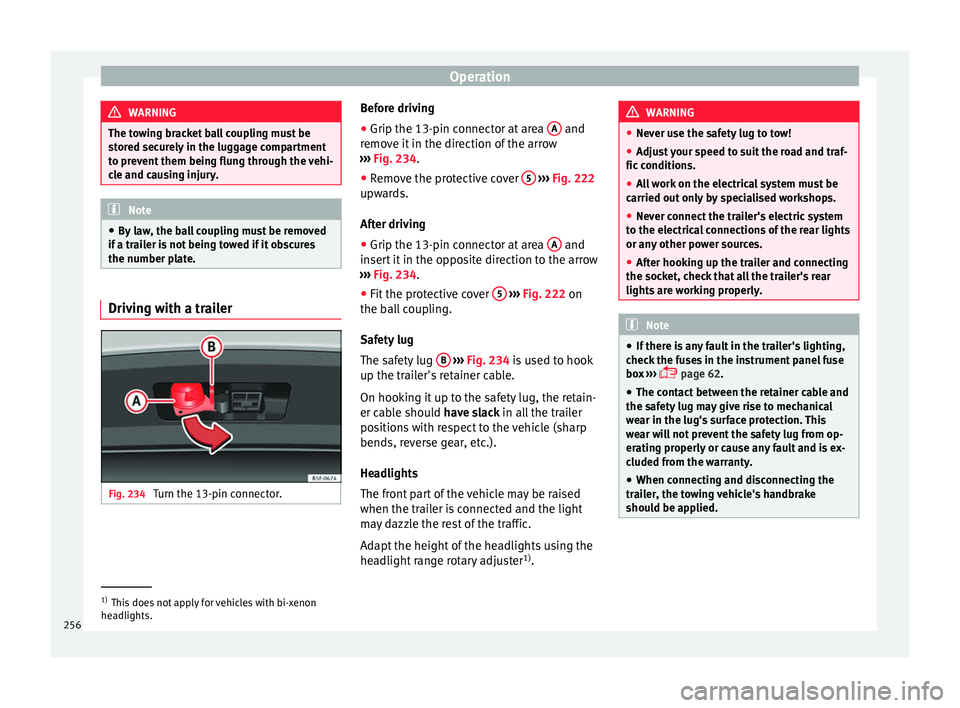
Fig. 234
Turn the 13-pin connector. Before driving
●
Grip the 13-pin connector at area A and
r emo
v
e it in the direction of the arrow
››› Fig. 234.
● Remove the protective cover 5
› ››
Fig. 222
up w
ards.
After driving
● Grip the 13-pin connector at area A and
in ser
t
it in the opposite direction to the arrow
››› Fig. 234.
● Fit the protective cover 5
› ›
› Fig. 222
on
the ball coupling.
Safety lug
The safety lug B
› ›
› Fig. 234
is used to hook
up the trailer's retainer cable.
On hooking it up to the safety lug, the retain-
er cable should have slack in all the trailer
positions with respect to the vehicle (sharp
bends, reverse gear, etc.).
Headlights
The front part of the vehicle may be raised
when the trailer is connected and the light
may dazzle the rest of the traffic.
Adapt the height of the headlights using the
headlight range rotary adjuster 1)
. WARNING
● Never u se the s
afety lug to tow!
● Adjust your speed to suit the road and traf-
fic condition
s.
● All work on the electrical system must be
carried out on
ly by specialised workshops.
● Never connect the trailer's electric system
to the electric
al connections of the rear lights
or any other power sources.
● After hooking up the trailer and connecting
the socket, c
heck that all the trailer's rear
lights are working properly. Note
● If ther e i
s any fault in the trailer's lighting,
check the fuses in the instrument panel fuse
box ›››
page 62.
● The contact between the retainer cable and
the safety
lug may give rise to mechanical
wear in the lug's surface protection. This
wear will not prevent the safety lug from op-
erating properly or cause any fault and is ex-
cluded from the warranty.
● When connecting and disconnecting the
trail
er, the towing vehicle's handbrake
should be applied. 1)
This does not apply for vehicles with bi-xenon
hea dlights.
256
Page 282 of 316
Advice
CAUTION
The original additives should never be mixed
with c oo
lants which are not approved by
SEAT. Otherwise, you run the risk of causing
severe damage to the engine and the engine
cooling system.
● If the fluid in the expansion tank is not pur-
ple b
ut is, for example, brown, this indicates
that the G13 additive has been mixed with an
inadequate coolant. The coolant must be
changed as soon as possible if this is the
case! This could result in serious faults and
engine damage. For the sake of the environment
Coolants and additives can contaminate the
env ir
onment. If any fluids are spilled, they
should be collected and correctly disposed
of, with respect to the environment. Brake fluid
Chec k
in
g the brake fluid levelRead the additional information carefully
› ›
›
page 60
The position of the brake fluid reservoir is
shown in the corresponding engine compart-
ment image ›››
page 275. The brake fluid res-
ervoir has a black and yellow cap. The brake fluid level drops slightly when the
vehicl
e is being used as the brake pads are
automatically adjusted as they wear.
However, if the level goes down noticeably in
a short time, or drops below the “MIN” mark,
there may be a leak in the brake system. A
display on the instrument panel will warn you
if the brake fluid level is too low ››› page 121. WARNING
Before opening the bonnet to check the brake
fluid lev el, r
ead and observe the warnings
››› page 273. Changing the brake fluid
The Maintenance Programme indicates brake
fluid c
h
an
ge intervals.
We recommend that you have the brake fluid
changed by a Technical Service.
Before opening the bonnet, please read and
follow the warnings ››› in Safety notes for
w ork
in the en
gine compartment on
page 273 in section “Safety notes for work-
ing in the engine compartment”.
In the course of time, brake fluid becomes
hygroscopic and absorbs water from the am-
bient air. If the water content in the brake flu-
id is too high, the brake system could cor-
rode. This also considerably reduces the boil-
ing point of the brake fluid. Heavy use of the brakes may then cause a vapour lock which
coul
d impair the braking effect.
Be sure to always use the correct brake fluid.
Only use brake fluid that expressly meets the
VW 501 14 standard.
You can buy VW 501 14 standard brake fluid
in a SEAT dealership or a SEAT Official Serv-
ice. If none is available, use only high-quality
brake fluid that meets DIN ISO 4925 CLASS 4
standards, or USA Standards FMVSS 116 DOT
4.
Using any other kind of brake fluid or one
that is not of a high quality may affect opera-
tion of the brake system and reduce its effec-
tiveness. Never use a brake fluid if the con-
tainer does not state that it complies with VW
501 14, DIN ISO 4925 CLASS 4 standards, or
USA standards FMVSS 116 DOT 4. WARNING
Brake fluid is poisonous. Old brake fluid im-
pair s
the braking effect.
● Before opening the bonnet to check the
brake fluid l
evel, read and observe the warn-
ings ››› page 273.
● Brake fluid should be stored in the closed
original
container in a safe place out of reach
of children. There is a toxic risk.
● Perform the brake fluid change according to
the Mainten
ance Programme. Heavy use of
the brakes may cause a vapour lock if the
brake fluid is left in the brake system for too 280
Page 294 of 316
Technical data
Vehicle data label
The d at
a s
ticker is placed on the inside of the
spare wheel well, in the boot and on the rear
cover of the Maintenance Programme.
The following information is provided on the
vehicle data sticker: ››› Fig. 244
Vehicle identification number (chassis
number)
Vehicle type, model, capacity, engine
type, finish, engine power and gearbox
type
Engine code, gearbox code, external
paint code and internal equipment code
Optional extras and PR numbers
Identifying letters
The identifying letters of the engine can be
viewed on the instrument panel when the en-
gine is switched off and the ignition is on.
● Hold down the button 0.0/SET on the dash
p anel
f
or more than 15 seconds.
Information on fuel consump-
tion Fuel c
onsumption Approved consumption values are derived
fr
om me
a
surements performed or supervised
1 2
3
4 by certified EU laboratories, according to the
l
e
gi
slation in force at the time (for more infor-
mation, see the Publications Office of the Eu-
ropean Union on the EUR-Lex website: © Eu-
ropean Union, http://eur-lex.europa.eu/) and
apply to the specified vehicle characteristics.
The values relating to fuel consumption and
CO 2 emissions can be found in the documen-
tation provided to the purchaser of the vehi-
cle at the time of purchase.
Fuel consumption and CO 2 emissions depend
on the equipment/features of each individual
vehicle, as well as on the driving style, road
conditions, traffic conditions, environmental
conditions, load or number of passengers. Note
In practice, and considering all the factors
mentioned here, c on
sumption values can dif-
fer from those calculated in the current Euro-
pean regulations. Weights
Kerb weight refers to the basic model with a
f
uel
t
ank filled to 90% capacity and without
optional extras. The figure quoted includes
75 kg to allow for the weight of the driver.
Special versions, optional equipment fittings
or retro-fitting accessories will increase the
weight of the vehicle ››› . WARNING
● Ple a
se note that the centre of gravity may
shift when transporting heavy objects; this
may affect vehicle handling and lead to an ac-
cident. Always adjust your speed and driving
style to suit road conditions and require-
ments.
● Never exceed the gross axle weight rating
or the gros
s vehicle weight rating. If the per-
missible axle load or the permissible total
weight is exceeded, the driving characteris-
tics of the vehicle may change, leading to ac-
cidents, injuries and damage to the vehicle. Trailer mode
Tr
ai
ler weights The trailer weights and drawbar loads ap-
pr
o
v
ed are selected in intensive trials accord-
ing to precisely defined criteria. The ap-
proved trailer weights are valid for vehicles in
the EU for maximum speeds of 80 km/h (50
mph) (in certain circumstances up to 100
km/h (62 mph)). The figures may be different
in other countries. All data in the official vehi-
cle documentation takes precedence over
these data at all times ››› .
292
Page 305 of 316
Index
Cleaning . . . . . . . . . . . . . . . . . . . . . . . . . . . . . . . . 260 adhe
s
ive sheets . . . . . . . . . . . . . . . . . . . . . . . . 262
alcantara . . . . . . . . . . . . . . . . . . . . . . . . . . . . . . 268
alloy wheel rims . . . . . . . . . . . . . . . . . . . . . . . . 265
chrome parts . . . . . . . . . . . . . . . . . . . . . . . . . . . 264
Easy Connect control panel . . . . . . . . . . . . . . . 266
engine compartment . . . . . . . . . . . . . . . . . . . . 265
fabrics . . . . . . . . . . . . . . . . . . . . . . . . . . . . . . . . 266
high pressure cleaners . . . . . . . . . . . . . . . . . . . 262
leather . . . . . . . . . . . . . . . . . . . . . . . . . . . . . . . . 267
plastic parts . . . . . . . . . . . . . . . . . . . . . . 263, 266
radio screen . . . . . . . . . . . . . . . . . . . . . . . . . . . 266
rubber seals . . . . . . . . . . . . . . . . . . . . . . . . . . . 264
seat belts . . . . . . . . . . . . . . . . . . . . . . . . . . . . . 268
steel wheel rims . . . . . . . . . . . . . . . . . . . . . . . . 265
washing the vehicle . . . . . . . . . . . . . . . . . . . . . 261
windows and exterior mirrors . . . . . . . . . . . . . 263
windscreen wiper blades . . . . . . . . . . . . . . . . . 264
wooden trim . . . . . . . . . . . . . . . . . . . . . . . . . . . 266
Climatronic . . . . . . . . . . . . . . . . . . . . . . . . . . . . . . . 51 adjusting the temperature . . . . . . . . . . . . . . . . 172
automatic mode . . . . . . . . . . . . . . . . . . . . . . . . 172
controls . . . . . . . . . . . . . . . . . . . . . . . . . . . . . . . 171
fan regulation . . . . . . . . . . . . . . . . . . . . . . . . . . 172
general notes . . . . . . . . . . . . . . . . . . . . . . . . . . 164
windscreen defrost . . . . . . . . . . . . . . . . . . . . . . 172
Close . . . . . . . . . . . . . . . . . . . . . . . . . . . . . . . . . . . 130
Closing . . . . . . . . . . . . . . . . . . . . . . . . . . . . . . . . . 130 bonnet . . . . . . . . . . . . . . . . . . . . . . . . . . . . . . . . 274
windows . . . . . . . . . . . . . . . . . . . . . . . . . . . . . . 141
Clutch (warning lamp) . . . . . . . . . . . . . . . . . . . . . 194
Coming Home . . . . . . . . . . . . . . . . . . . . . . . . . . . . 146
Coming Home Function . . . . . . . . . . . . . . . . . . . . 146
Connectivity Box . . . . . . . . . . . . . . . . . . . . . . . . . . 129
Contact key . . . . . . . . . . . . . . . . . . . . . . . . . . . . . . 173 Control and warning lamps . . . . . . . . . . . . . . . . . 121
adaptiv e cruise control . . . . . . . . . . . . . . . . . . . 216
airbags . . . . . . . . . . . . . . . . . . . . . . . . . . . . . . . . 90
airbag system . . . . . . . . . . . . . . . . . . . . . . . . . . . 91
alternator . . . . . . . . . . . . . . . . . . . . . . . . . . . . . 282
Anti-lock brake system (ABS) . . . . . . . . . . . . . . 185
applying the brake . . . . . . . . . . . . . . . . . . . . . . 216
ASR . . . . . . . . . . . . . . . . . . . . . . . . . . . . . . . . . . 182
audible warning signal . . . . . . . . . . . . . . . . . . 121
blind spot detector (BSD) . . . . . . . . . . . . . . . . 224
braking system . . . . . . . . . . . . . . . . . . . . . . . . . 179
coolant . . . . . . . . . . . . . . . . . . . . . . . . . . . . . . . 278
cruise control system (CCS) . . . . . . . . . . . . . . . 206
depress the brake . . . . . . . . . . . . . . . . . . . . . . . 210
diesel particulate filter . . . . . . . . . . . . . . . . . . . 200
EDL . . . . . . . . . . . . . . . . . . . . . . . . . . . . . . . . . . 184
emission control . . . . . . . . . . . . . . . . . . . . . . . . 201
engine management . . . . . . . . . . . . . . . . . . . . 201
engine oil . . . . . . . . . . . . . . . . . . . . . . . . . . . . . 276
engine pre-heating/fault system . . . . . . . . . . . 201
ESC . . . . . . . . . . . . . . . . . . . . . . . . . . . . . . . . . . 181
gear change . . . . . . . . . . . . . . . . . . . . . . . . . . . 194
instrument panel . . . . . . . . . . . . . . . . . . . . . 47, 49
instrument panel display . . . . . . . . . . . . . . . . . . 48
lights . . . . . . . . . . . . . . . . . . . . . . . . . . . . . . . . . 143
parking assistant (RCTA) . . . . . . . . . . . . . . . . . 224
seat belt . . . . . . . . . . . . . . . . . . . . . . . . . . . . . . . 81
speed limiter . . . . . . . . . . . . . . . . . . . . . . . . . . . 207
Start-Stop . . . . . . . . . . . . . . . . . . . . . . . . . . . . . 203
steering column lock . . . . . . . . . . . . . . . . . . . . 196
tyres . . . . . . . . . . . . . . . . . . . . . . . . . . . . . . . . . . 287
Controls and displays general instrument panel . . . . . . . . . . . . . . . . . 115
Controls for the windows . . . . . . . . . . . . . . . 18, 141
Controls on the steering wheel without voice control . . . . . . . . . . . . . . . . . . . . 127
with voice control . . . . . . . . . . . . . . . . . . . . . . . 125 Coolant
check ing level . . . . . . . . . . . . . . . . . . . . . . . . . . 279
Coolant level control lamp . . . . . . . . . . . . . . . . . . . . . . . . . . . 278
Coolant temperature control lamp . . . . . . . . . . . . . . . . . . . . . . . . . . . 278
safety instructions . . . . . . . . . . . . . . . . . . . . . . 279
Cooling coolant temperature gauge . . . . . . . . . . . . . . . 120
Cooling system checking coolant . . . . . . . . . . . . . . . . . . 278, 279
topping up coolant . . . . . . . . . . . . . . . . . 278, 279
Correct sitting position . . . . . . . . . . . . . . . . . . . . . 76 driver . . . . . . . . . . . . . . . . . . . . . . . . . . . . . . . . . . 76
front passenger . . . . . . . . . . . . . . . . . . . . . . . . . 77
rear seat passengers . . . . . . . . . . . . . . . . . . . . . 78
Cruise control . . . . . . . . . . . . . . . . . . . . . . . . . . . . . 45 control and warning lamps . . . . . . . . . . . . . . . 206
operation . . . . . . . . . . . . . . . . . . . . . . . . . . . . . . 206
Cruise control system . . . . . . . . . . . . . . . . . . . . . . 205
Current . . . . . . . . . . . . . . . . . . . . . . . . . . . . . . . . . 157
D Dangers in not using the seat belt . . . . . . . . . . . . 83
Dash panel . . . . . . . . . . . . . . . . . . . . . . . . . . . . . . . 47
Data label . . . . . . . . . . . . . . . . . . . . . . . . . . . . . . . 291
Deactivating the front passenger front airbag . . . 22
Deactivation of front airbag . . . . . . . . . . . . . . . . . . 90
Detachable ball assembling . . . . . . . . . . . . . . . . . . . . . . . . . . . . 251
checking attachment . . . . . . . . . . . . . . . . . . . . 252
placing in standby position . . . . . . . . . . . . . . . 250
removing . . . . . . . . . . . . . . . . . . . . . . . . . 252, 253
standby position . . . . . . . . . . . . . . . . . . . . . . . . 250
Diesel diesel particulate filter . . . . . . . . . . . . . . . . . . . 200
refuelling . . . . . . . . . . . . . . . . . . . . . . . . . . . . . . 270
303