page 65 Seat Arona 2018 Manual Online
[x] Cancel search | Manufacturer: SEAT, Model Year: 2018, Model line: Arona, Model: Seat Arona 2018Pages: 316, PDF Size: 6.77 MB
Page 103 of 316
Self-help
WARNING
The risk of accidents is high when tow-start-
ing, f or e
xample, the towed vehicle can easily
be driven into the towing vehicle. CAUTION
If there is no oil in the gearbox or no lubricant
in the autom atic
transmission the car may
only be towed with the driven wheels lifted
clear of the road, or transported on a special
car transporter or trailer. CAUTION
Do not tow a vehicle for more than 50 m in at-
tempt t
o start it. There is risk of damage to
the catalytic converter. Note
● Ple a
se observe related legal requirements.
● Switch on the hazard warning lights of both
vehicl
es. However, observe any regulations
to the contrary.
● The tow rope must not be twisted. Other-
wise the fr
ont tow line anchorage could be
pulled off the vehicle. Indications for tow-starting
Vehicle's should not generally be tow-star-
t
ed.
The jump s
tart should be used instead
››› page 71. For technical reasons, towing the following
vehicl
es is not allowed:
● Vehicles with an automatic gearbox.
● If the vehicle battery is discharged, be-
cause in
vehicles with the Keyless Access
locking and ignition system the steering re-
mains locked and the electronic parking
brake cannot be deactivated nor can the elec-
tronic lock of the steering column be re-
leased if they are activated.
● If the battery is flat, it is possible that the
engine contr
ol units may not operate correct-
ly.
However, if the vehicle must absolutely be
tow-started (in the case of manual gearbox-
es):
● Engage the 2nd or 3rd gear.
● Keep the clutch pressed down.
● Switch on the ignition and the hazard warn-
ing lights.
● Once both
vehicles are moving, release the
clutc
h.
● Once the engine starts, press the clutch
and diseng
age the gear to avoid colliding
with the towing vehicle. Note
The vehicle can only be tow-started if the
electr onic
parking brake and, if appropriate,
the electronic lock of the steering column are deactivated. If the vehicle has no power sup-
ply
or ther
e is an electric system fault, the
engine must be tow-started to deactivate the
electronic parking brake and the electronic
lock of the steering column. 101
Technical data
Advice
Operation
Emergencies
Safety
Page 104 of 316
Emergencies
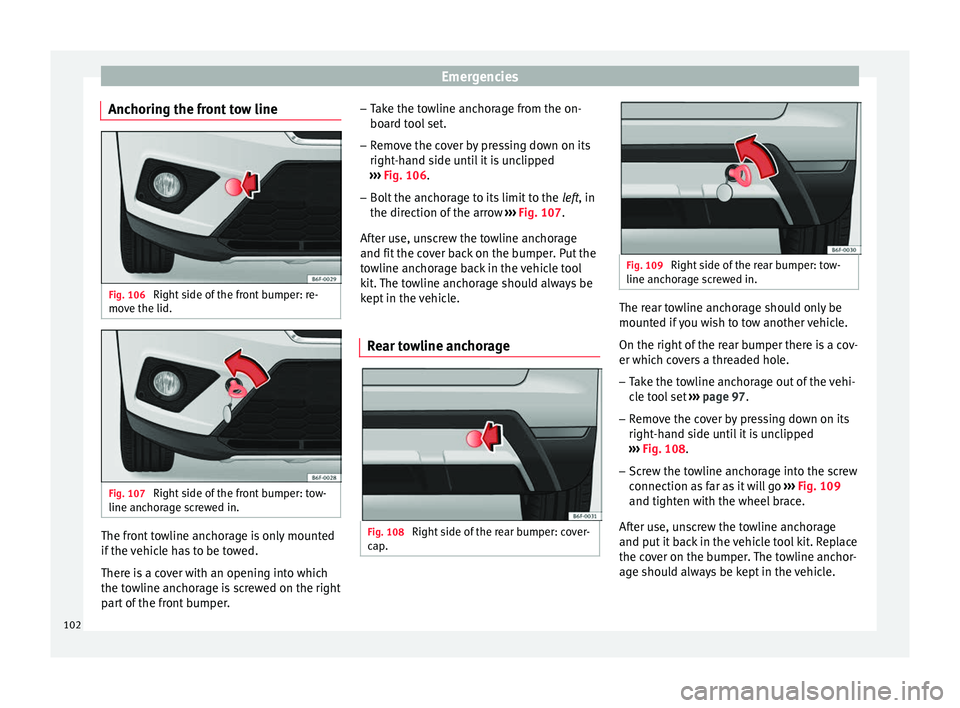
Anchoring the front tow line Fig. 106
Right side of the front bumper: re-
mo v
e the lid. Fig. 107
Right side of the front bumper: tow-
line anc horag
e screwed in. The front towline anchorage is only mounted
if
the
v
ehicle has to be towed.
There is a cover with an opening into which
the towline anchorage is screwed on the right part of the front bumper. –
Take the t
owline anchorage from the on-
board tool set.
– Remove the cover by pressing down on its
right-hand s
ide until it is unclipped
››› Fig. 106.
– Bolt the anchorage to its limit to the left, in
the dir
ection of the arrow ››› Fig. 107.
After use, unscrew the towline anchorage
and fit the cover back on the bumper. Put the
towline anchorage back in the vehicle tool
kit. The towline anchorage should always be
kept in the vehicle.
Rear towline anchorage Fig. 108
Right side of the rear bumper: cover-
c ap
. Fig. 109
Right side of the rear bumper: tow-
line anchor ag
e screwed in. The rear towline anchorage should only be
mou
nt
ed if
you wish to tow another vehicle.
On the right of the rear bumper there is a cov-
er which covers a threaded hole. – Take the towline anchorage out of the vehi-
cle t
ool set ››› page 97.
– Remove the cover by pressing down on its
right-hand s
ide until it is unclipped
››› Fig. 108.
– Screw the towline anchorage into the screw
connection as
far as it will go ››› Fig. 109
and tighten with the wheel brace.
After use, unscrew the towline anchorage
and put it back in the vehicle tool kit. Replace
the cover on the bumper. The towline anchor-
age should always be kept in the vehicle.
102
Page 105 of 316
Self-help
WARNING
● If the t o
wline anchorage is not screwed in
as far as the stop, there is a risk of the screw
connection shearing off during towing (acci-
dent risk).
● If your car has a towing bracket, only use
speci
al towing ropes. Risk of accident! CAUTION
In vehicles fitted with a towing bracket, only
use s pec
ial tow bars to prevent damage to
the ball joint. These tow bars have been spe-
cially approved for use with towing brackets. Towing vehicles with a manual gear-
bo
x Towing is relatively straightforward.
Pl
e
a
se observe the relevant instructions
››› page 100.
The vehicle can be towed using a tow bar or
tow rope in the normal way, with all four
wheels on the road; it can also be towed with
either the front or rear wheels lifted off the
road. The maximum towing speed is 50 km/h
(30 mph). Towing a vehicle equipped with auto-
matic g
earbox Certain restrictions must be observed when
to
w
ing your vehicle.
Please observe the relevant instructions
››› page 100.
The vehicle can be towed with a tow bar or
tow rope in the normal way, with all four
wheels on the ground. When doing so,
please note the following points:
● Make sure the select or l
ever is in the N po-
sition.
● The vehicle must not be towed faster than
50 km/h (30 mph).
● The vehicle must not be towed further than
50 km (30 mile
s). Reason: when the engine
is not running, the gearbox oil pump does
not work and the gearbox is not adequately
lubricated for higher speeds or longer distan-
ces.
If the vehicle has to be towed with a break-
down truck, it must only be suspended at the
front wheels. Reason: the drive shafts are lo-
cated on the front wheels. If the car is towed
with the rear wheels lifted off the road (I.e.
travelling backwards), the drive shafts also
turn backwards. The planetary gears in the
automatic gearbox then turn at such high
speeds that the gearbox will be severely
damaged in a short time. Note
● If it i
s not possible to tow the vehicle in the
normal way, or if it has to be towed further
than 50 km (30 miles), it must be transported
on a special car transporter or trailer.
● Should the power supply to the selector
lever be int
errupted in position P, the selector
lever will be locked. Before the vehicle can be
recovered/manoeuvred you must manually
release the selector lever. 103Technical data
Advice
Operation
Emergencies
Safety
Page 106 of 316
Emergencies
Fuses and bulbs F u
se
s
Introduction In general, a fuse can be assigned to various
electric
al
components. Likewise, an electrical
component can be protected by several
fuses.
Only replace fuses when the cause of the
problem has been solved. If a newly inserted
fuse blows after a short time, you must have
the electrical system checked by a special-
ised workshop as soon as possible. WARNING
The high voltages in the electrical system can
give seriou s
electrical shocks, causing burns
and even death!
● Never touch the electrical wiring of the igni-
tion syst
em.
● Take care not to cause short circuits in the
electrica
l system. WARNING
Using unsuitable fuses, repairing fuses or
bridging a c urr
ent circuit without fuses can
cause a fire and serious injury. ●
Never u se a f
use with a higher value. Only
replace fuses with a fuse of the same amper-
age (same colour and markings) and size.
● Never repair a fuse.
● Never replace a fuse by a metal strip, staple
or simil
ar. CAUTION
● To pr ev
ent damage to the vehicle's electric
system, before replacing a fuse always turn
off the ignition, the lights and all electrical
elements and remove the key from the igni-
tion.
● If you replace a fuse with higher-rating
fuse,
you could cause damage to another part
of the electrical system.
● Protect the fuse boxes when open to pre-
vent the entr
y of dust or humidity as they can
damage the electrical system.
● Always carefully remove the fuse box cov-
ers and r
efit them correctly to avoid problems
with your vehicle. Note
● One component m
ay have more than one
fuse.
● Several components may run on a single
fuse.
● In the
vehicle, there are more fuses than
those indicat
ed in this chapter. These should
only be changed by a specialised workshop. ●
Po s
itions not containing a fuse do not ap-
pear in the following tables.
● Some of the equipment listed in the tables
below pert
ain only to certain versions of the
model or are optional extras.
● Please note that the above lists, while cor-
rect at
the time of printing, are subject to
change. Fuses to the left of the instrument
panel
Read the additional information carefully
› ›
›
page 62
Only replace fuses with a fuse of the same
amperage (same colour and markings) and
size.
No.Consumer/Amps
1Tow Hook20
2Cigarette lighter /Power point20
3Sound amplifier30
6Central locking40
8Heating fan/Climatronic30
10Tow Hook20
11CNG Solenoid Valves7.5 104
Page 107 of 316
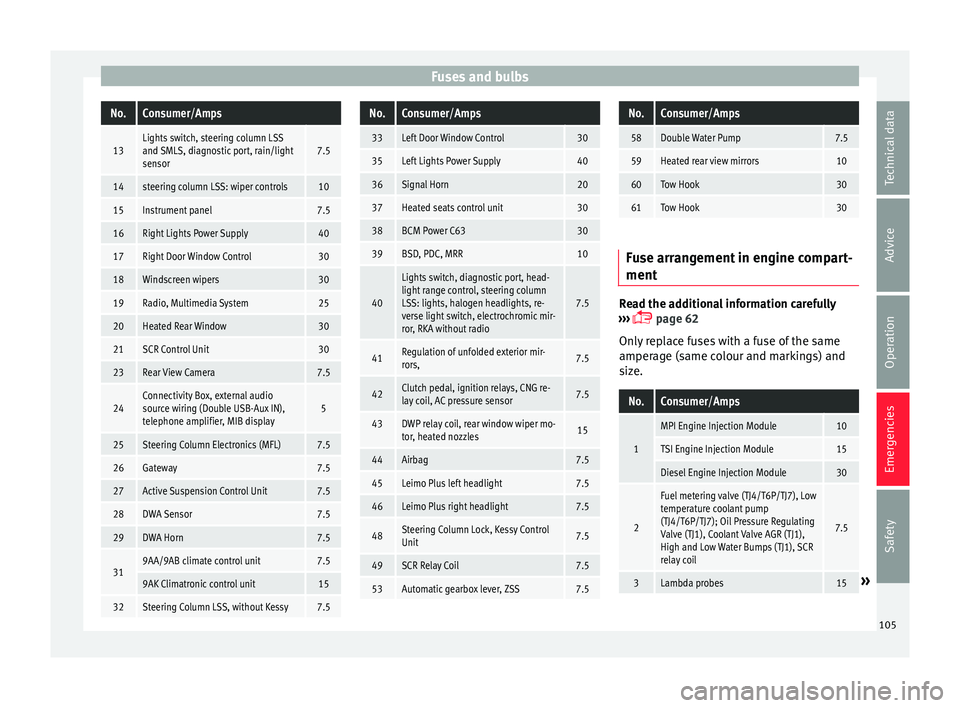
Fuses and bulbsNo.Consumer/Amps
13Lights switch, steering column LSS
and SMLS, diagnostic port, rain/light
sensor7.5
14steering column LSS: wiper controls10
15Instrument panel7.5
16Right Lights Power Supply40
17Right Door Window Control30
18Windscreen wipers30
19Radio, Multimedia System25
20Heated Rear Window30
21SCR Control Unit30
23Rear View Camera7.5
24Connectivity Box, external audio
source wiring (Double USB-Aux IN),
telephone amplifier, MIB display5
25Steering Column Electronics (MFL)7.5
26Gateway7.5
27Active Suspension Control Unit7.5
28DWA Sensor7.5
29DWA Horn7.5
319AA/9AB climate control unit7.5
9AK Climatronic control unit15
32Steering Column LSS, without Kessy7.5
No.Consumer/Amps
33Left Door Window Control30
35Left Lights Power Supply40
36Signal Horn20
37Heated seats control unit30
38BCM Power C6330
39BSD, PDC, MRR10
40
Lights switch, diagnostic port, head-
light range control, steering column
LSS: lights, halogen headlights, re-
verse light switch, electrochromic mir-
ror, RKA without radio
7.5
41Regulation of unfolded exterior mir-
rors,7.5
42Clutch pedal, ignition relays, CNG re-
lay coil, AC pressure sensor7.5
43DWP relay coil, rear window wiper mo-
tor, heated nozzles15
44Airbag7.5
45Leimo Plus left headlight7.5
46Leimo Plus right headlight7.5
48Steering Column Lock, Kessy Control
Unit7.5
49SCR Relay Coil7.5
53Automatic gearbox lever, ZSS7.5
No.Consumer/Amps
58Double Water Pump7.5
59Heated rear view mirrors10
60Tow Hook30
61Tow Hook30
Fuse arrangement in engine compart-
ment
Read the additional information carefully
› ›
›
page 62
Only replace fuses with a fuse of the same
amperage (same colour and markings) and
size.
No.Consumer/Amps
1
MPI Engine Injection Module10
TSI Engine Injection Module15
Diesel Engine Injection Module30
2
Fuel metering valve (TJ4/T6P/TJ7), Low
temperature coolant pump
(TJ4/T6P/TJ7); Oil Pressure Regulating
Valve (TJ1), Coolant Valve AGR (TJ1),
High and Low Water Bumps (TJ1), SCR
relay coil
7.5
3Lambda probes15» 105
Technical data
Advice
Operation
Emergencies
Safety
Page 108 of 316
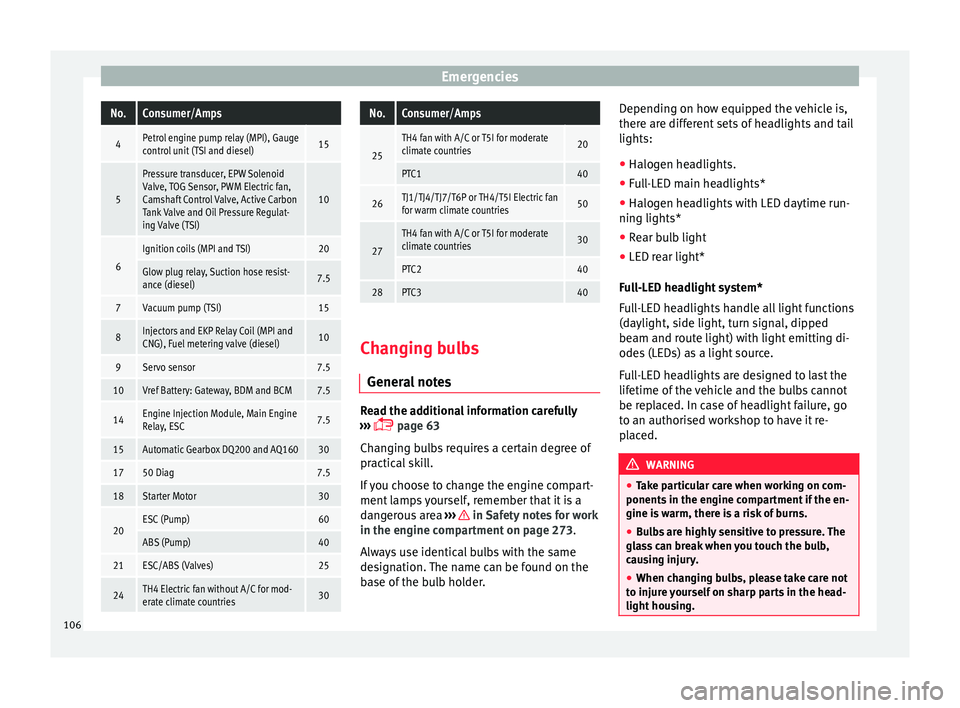
EmergenciesNo.Consumer/Amps
4Petrol engine pump relay (MPI), Gauge
control unit (TSI and diesel)15
5
Pressure transducer, EPW Solenoid
Valve, TOG Sensor, PWM Electric fan,
Camshaft Control Valve, Active Carbon
Tank Valve and Oil Pressure Regulat-
ing Valve (TSI)
10
6
Ignition coils (MPI and TSI)20
Glow plug relay, Suction hose resist-
ance (diesel)7.5
7Vacuum pump (TSI)15
8Injectors and EKP Relay Coil (MPI and
CNG), Fuel metering valve (diesel)10
9Servo sensor7.5
10Vref Battery: Gateway, BDM and BCM7.5
14Engine Injection Module, Main Engine
Relay, ESC7.5
15Automatic Gearbox DQ200 and AQ16030
1750 Diag7.5
18Starter Motor30
20ESC (Pump)60
ABS (Pump)40
21ESC/ABS (Valves)25
24TH4 Electric fan without A/C for mod-
erate climate countries30
No.Consumer/Amps
25
TH4 fan with A/C or T5I for moderate
climate countries20
PTC140
26TJ1/TJ4/TJ7/T6P or TH4/T5I Electric fan
for warm climate countries50
27
TH4 fan with A/C or T5I for moderate
climate countries30
PTC240
28PTC340
Changing bulbs
Gener a
l
notes Read the additional information carefully
› ›
›
page 63
Changing bulbs requires a certain degree of
practical skill.
If you choose to change the engine compart-
ment lamps yourself, remember that it is a
dangerous area ››› in Safety notes for work
in the en gine c
omp
artment on page 273.
Always use identical bulbs with the same
designation. The name can be found on the
base of the bulb holder. Depending on how equipped the vehicle is,
there are diff
erent sets of headlights and tail
lights:
● Halogen headlights.
● Full-LED main headlights*
● Halogen headlights with LED daytime run-
ning lights*
● Re
ar bulb light
● LED rear light*
Ful
l-LED headlight system*
Full-LED headlights handle all light functions
(daylight, side light, turn signal, dipped
beam and route light) with light emitting di-
odes (LEDs) as a light source.
Full-LED headlights are designed to last the
lifetime of the vehicle and the bulbs cannot
be replaced. In case of headlight failure, go
to an authorised workshop to have it re-
placed. WARNING
● Tak e p
articular care when working on com-
ponents in the engine compartment if the en-
gine is warm, there is a risk of burns.
● Bulbs are highly sensitive to pressure. The
glas
s can break when you touch the bulb,
causing injury.
● When changing bulbs, please take care not
to injure
yourself on sharp parts in the head-
light housing. 106
Page 118 of 316
Operation
›››
page 115. However, the symbols used to
identif y
the controls are the same.116
Page 119 of 316
Instruments and warning/control lamps
Instruments and warning/control lamps
In s
trument
s
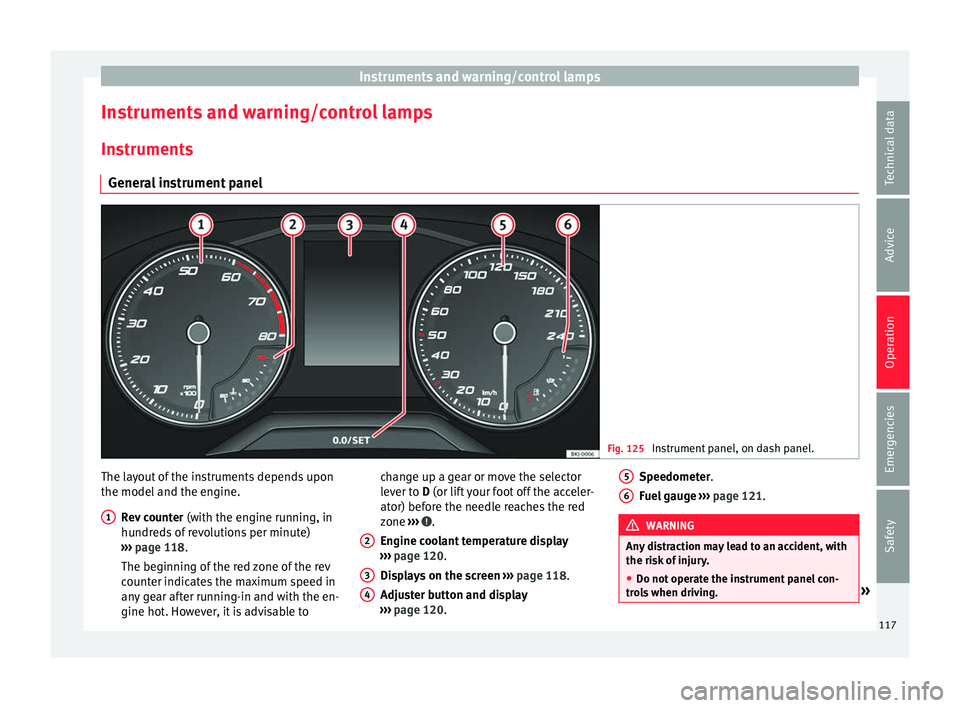
General instrument panel Fig. 125
Instrument panel, on dash panel. The layout of the instruments depends upon
the model
and the en
gine.
R
ev counter (with the engine running, in
hundreds of revolutions per minute)
››› page 118.
The beginning of the red zone of the rev
counter indicates the maximum speed in
any gear after running-in and with the en-
gine hot. However, it is advisable to
1 change up a gear or move the selector
l
ev
er t
o D (or lift your foot off the acceler-
ator) before the needle reaches the red
zone ››› .
En gine c
oo
lant temperature display
››› page 120.
Displays on the screen ››› page 118.
Adjuster button and display
››› page 120.
2 3
4 Speedometer.
F
uel
g
auge ››› page 121. WARNING
Any distraction may lead to an accident, with
the risk of
injury.
● Do not operate the instrument panel con-
trol
s when driving. » 5
6
117
Technical data
Advice
Operation
Emergencies
Safety
Page 120 of 316
Operation
CAUTION
● When the engine i s
cold, avoid high revs
and heavy acceleration and do not make the
engine work hard. Rev counter
The rev counter indicates the number of en-
gine rev
o
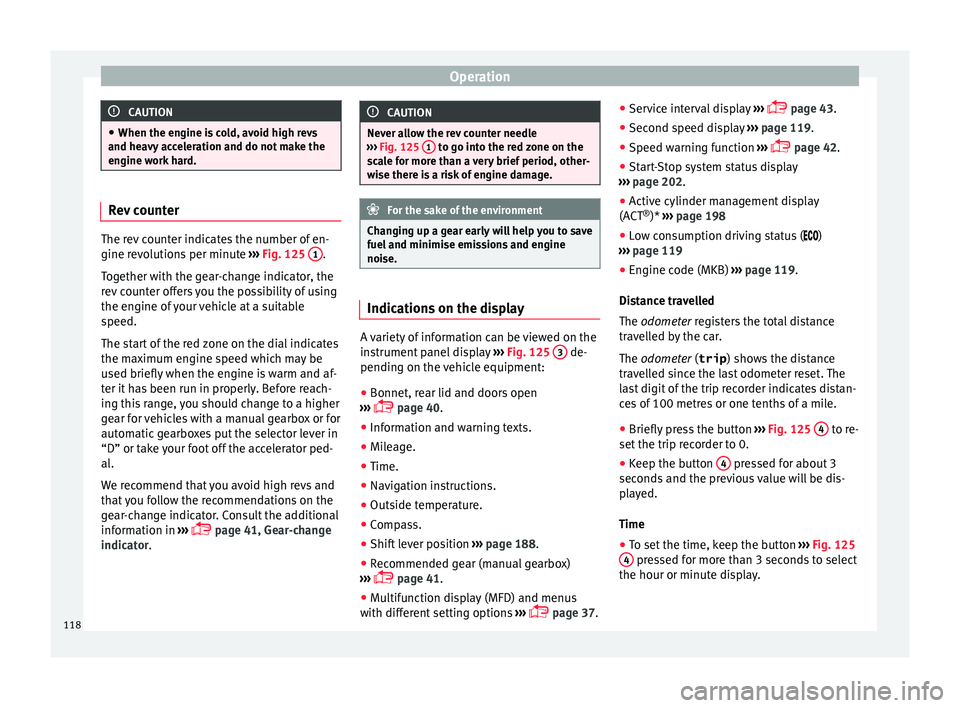
lutions per minute ››› Fig. 125 1 .
Tog ether w
ith the gear-change indicator, the
rev counter offers you the possibility of using
the engine of your vehicle at a suitable
speed.
The start of the red zone on the dial indicates
the maximum engine speed which may be
used briefly when the engine is warm and af-
ter it has been run in properly. Before reach-
ing this range, you should change to a higher
gear for vehicles with a manual gearbox or for
automatic gearboxes put the selector lever in
“D” or take your foot off the accelerator ped-
al.
We recommend that you avoid high revs and
that you follow the recommendations on the
gear-change indicator. Consult the additional
information in ›››
page 41, Gear-change
indicator. CAUTION
Never allow the rev counter needle
›› ›
Fig. 125 1 to go into the red zone on the
sc a
le for more than a very brief period, other-
wise there is a risk of engine damage. For the sake of the environment
Changing up a gear early will help you to save
fuel and minimi
se emissions and engine
noise. Indications on the display
A variety of information can be viewed on the
in
s
trument
panel display ›››
Fig. 125 3 de-
pendin g on the
v
ehicle equipment:
● Bonnet, rear lid and doors open
›››
page 40.
● Information and warning texts.
● Mileage.
● Time.
● Navigation instructions.
● Outside temperature.
● Compass.
● Shift lever position ›››
page 188.
● Recommended gear (manual gearbox)
›››
page 41.
● Multifunction display (MFD) and menus
with differ
ent setting options ›››
page 37. ●
Servic
e interval display ›››
page 43.
● Second speed display ›››
page 119.
● Speed warning function ›››
page 42.
● Start-Stop system status display
›››
page 202.
● Active cylinder management display
(ACT ®
)* ››
› page 198
● Low consumption driving status ( )
›
›› page 119
● Engine code (MKB) ›››
page 119.
Distance travelled
The odometer registers the total distance
travelled by the car.
The odometer (trip ) shows the distance
travelled since the last odometer reset. The
last digit of the trip recorder indicates distan-
ces of 100 metres or one tenths of a mile.
● Briefly press the button ›››
Fig. 125 4 to re-
set the trip r
ec
order to 0.
● Keep the button 4 pressed for about 3
sec ond
s
and the previous value will be dis-
played.
Time
● To set the time, keep the button ›››
Fig. 125
4 pressed for more than 3 seconds to select
the hour or minut e dis
play.
118
Page 121 of 316
Instruments and warning/control lamps
● To c
ontinue settin
g the time, press button
4 . Hold button down to scroll through the
number s
quic
kly.
● Once you have set the time, the second
count
will begin from 0 automatically.
● Press the button 4 again in order to finish
settin g the time.
● Onc e
you have set the time, the time indi-
cator w
ill disappear and the changes will re-
main.
The time can also be set on the Easy Connect
system using the button and the function
b utt
on
SETTINGS > Date and time
››› page 122.
Compass
With the ignition on and the navigation sys-
tem on, the cardinal point corresponding to
the direction of travel of the vehicle is dis-
played on the instrument panel.
Selector lever position
The selected gear is displayed on the side of
the selector lever and on the instrument pan-
el display. In positions D and S, and with the
Tiptronic, the corresponding gear is also dis-
played. Recommended gear (manual gearbox)
The r
ecommended g
ear in order to save fuel
is displayed on the instrument panel while
you are driving ›››
page 41.
Second speed display (mph or km/h)
In addition to the speedometer, the speed
can also be displayed in a different unit of
measurement (in miles or in km per hour).
This option cannot be deactivated in models
destined for countries in which the second
speed must always be visible.
The second speed display can be adjusted in
the Easy Connect system by means of the button and the function button SETTINGS >
Units › ›
›
page 122.
Speed warning
When the speed setting is exceeded, this will
be indicated on the instrument panel display.
This is very useful, for example when using
winter tyres that are not designed for driving
at the maximum speed of the vehicle
››› page 42.
The speed warning settings can be adjusted
in the Easy Connect system by means of the button and the function button SET-
TINGS > Driver Assistance
› ›
›
page 122. Start-Stop operating display
Updat
ed information relating to the status is
displayed on the instrument panel
››› page 202.
Low consumption driving status (ECO)*
Depending on the equipment, when driving,
the “ ECO” display appears on the instrument
panel when the vehicle is in low consump-
tion status due to active cylinder manage-
ment (ACT ®
)* ››› page 198.
Identifying letters on engine (MKB)
Hold the button ››› Fig. 125 4 down for more
th an 15 sec
ond
s to display the identifying
letters of the vehicle engine (MKB). To do
this, the ignition must be switched on and
the engine switched off. WARNING
Observe the safety warnings ›››
in Warning
symbol s on p
age 122. WARNING
Even though outside temperatures are above
freez in
g, some roads and bridges may be icy.
● At outside temperatures above +4°C
(+39°F), even when the “ice c
rystal” symbol
is not visible, there may still be patches of ice
on the road.
● The outside temperature sensor takes a
guideline meas
urement. » 119
Technical data
Advice
Operation
Emergencies
Safety