%27 Seat Arona 2018 Owner's Manual
[x] Cancel search | Manufacturer: SEAT, Model Year: 2018, Model line: Arona, Model: Seat Arona 2018Pages: 316, PDF Size: 6.77 MB
Page 1 of 316
OWNER’S
MANUAL
Arona
6F9012720BB
Inglés
6F9012720BB (11.17)
Arona
Inglés (11.17)
SEAT recommends
SEAT GENUINE OIL
SEAT recommends
Castrol EDGE Professional
Page 8 of 316
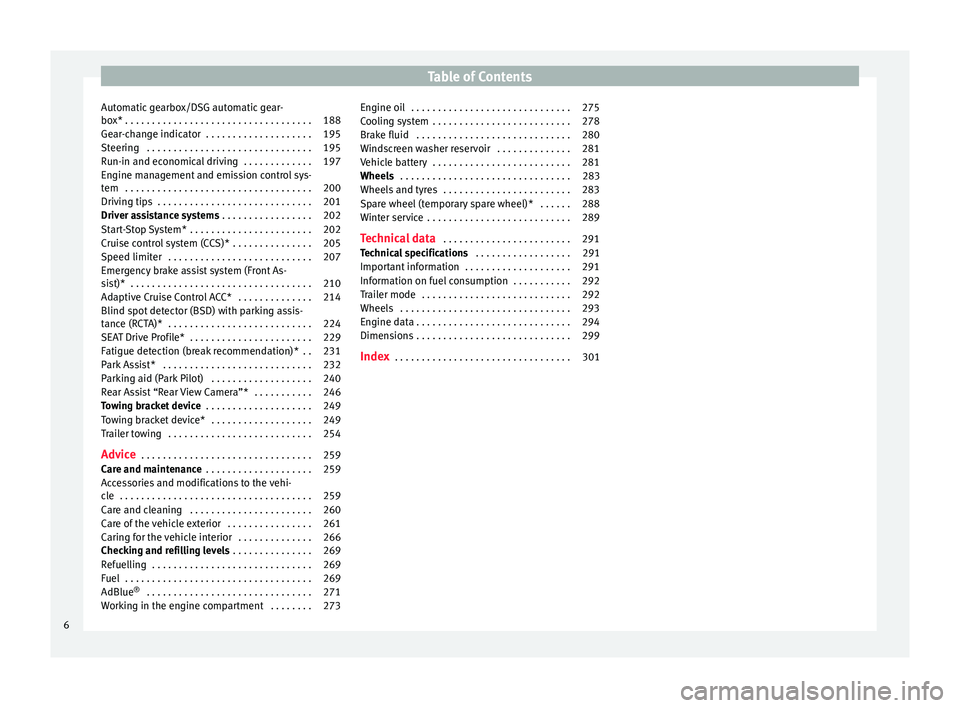
Table of Contents
Automatic gearbox/DSG automatic gear-
bo x*
. . . . . . . . . . . . . . . . . . . . . . . . . . . . . . . . . . . 188
Ge
ar-change indicator . . . . . . . . . . . . . . . . . . . . 195
Steering . . . . . . . . . . . . . . . . . . . . . . . . . . . . . . . 195
Run-in and economical driving . . . . . . . . . . . . . 197
Engine management and emission control sys-
tem . . . . . . . . . . . . . . . . . . . . . . . . . . . . . . . . . . . 200
Driv
ing tips . . . . . . . . . . . . . . . . . . . . . . . . . . . . . 201
Driver assistance systems . . . . . . . . . . . . . . . . . 202
Start-Stop System* . . . . . . . . . . . . . . . . . . . . . . . 202
Cruise control system (CCS)* . . . . . . . . . . . . . . . 205
Speed limiter . . . . . . . . . . . . . . . . . . . . . . . . . . . 207
Emergency brake assist system (Front As-
sis
t)* . . . . . . . . . . . . . . . . . . . . . . . . . . . . . . . . . . 210
Adaptive Cruise Control ACC* . . . . . . . . . . . . . . 214
Blind spot detector (BSD) with parking assis-
tance (RCT
A)* . . . . . . . . . . . . . . . . . . . . . . . . . . . 224
SEAT Drive Profile* . . . . . . . . . . . . . . . . . . . . . . . 229
Fatigue detection (break recommendation)* . . 231
Park Assist* . . . . . . . . . . . . . . . . . . . . . . . . . . . . 232
Parking aid (Park Pilot) . . . . . . . . . . . . . . . . . . . 240
Rear Assist “Rear View Camera”* . . . . . . . . . . . 246
Towing bracket device . . . . . . . . . . . . . . . . . . . . 249
Towing bracket device* . . . . . . . . . . . . . . . . . . . 249
Trailer towing . . . . . . . . . . . . . . . . . . . . . . . . . . . 254
Advice . . . . . . . . . . . . . . . . . . . . . . . . . . . . . . . . 259
Care and maintenance . . . . . . . . . . . . . . . . . . . . 259
Accessories and modifications to the vehi-
cle
. . . . . . . . . . . . . . . . . . . . . . . . . . . . . . . . . . . . 259
Care and cleaning . . . . . . . . . . . . . . . . . . . . . . . 260
Care of the vehicle exterior . . . . . . . . . . . . . . . . 261
Caring for the vehicle interior . . . . . . . . . . . . . . 266
Checking and refilling levels . . . . . . . . . . . . . . . 269
Refuelling . . . . . . . . . . . . . . . . . . . . . . . . . . . . . . 269
Fuel . . . . . . . . . . . . . . . . . . . . . . . . . . . . . . . . . . . 269
AdBlue ®
. . . . . . . . . . . . . . . . . . . . . . . . . . . . . . . 271
Working in the engine compartment . . . . . . . . 273 Engine oil . . . . . . . . . . . . . . . . . . . . . . . . . . . . . . 275
Cooling system . . . . . . . . . . . . . . . . . . . . . . . . . . 278
Brake fluid . . . . . . . . . . . . . . . . . . . . . . . . . . . . . 280
Windscreen washer reservoir . . . . . . . . . . . . . . 281
Vehicle battery . . . . . . . . . . . . . . . . . . . . . . . . . . 281
Wheels . . . . . . . . . . . . . . . . . . . . . . . . . . . . . . . . 283
Wheels and tyres . . . . . . . . . . . . . . . . . . . . . . . . 283
Spare wheel (temporary spare wheel)* . . . . . . 288
Winter service . . . . . . . . . . . . . . . . . . . . . . . . . . . 289
Technical data . . . . . . . . . . . . . . . . . . . . . . . . 291
Technical specifications . . . . . . . . . . . . . . . . . . 291
Important information . . . . . . . . . . . . . . . . . . . . 291
Information on fuel consumption . . . . . . . . . . . 292
Trailer mode . . . . . . . . . . . . . . . . . . . . . . . . . . . . 292
Wheels . . . . . . . . . . . . . . . . . . . . . . . . . . . . . . . . 293
Engine data . . . . . . . . . . . . . . . . . . . . . . . . . . . . . 294
Dimensions . . . . . . . . . . . . . . . . . . . . . . . . . . . . . 299
Index . . . . . . . . . . . . . . . . . . . . . . . . . . . . . . . . . 301
6
Page 16 of 316
The essentials
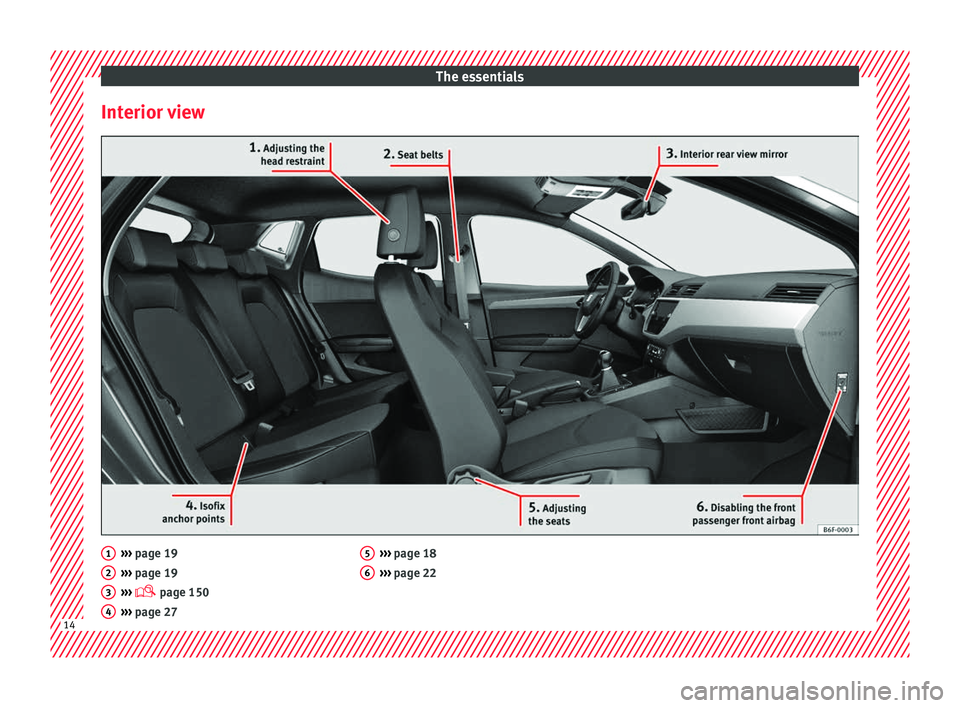
Interior view ›››
page 19
› ›
› page 19
››› page 150
››› page 27
1 2
3
4 ›››
page 18
› ›
› page 22 5
6
14
Page 20 of 316
The essentials
● To lif
t
the bonnet, press towards the left on
the lever located under the bonnet, in the
centre ››› Fig. 10 2 . The arrester hooks are
r el
e
ased.
● Release the bonnet stay and secure it in
the fixtur
e designed for this in the bonnet.
››› in Safety notes for work in the en-
gine compartment on page 273
››› page 273 Controls for the windows
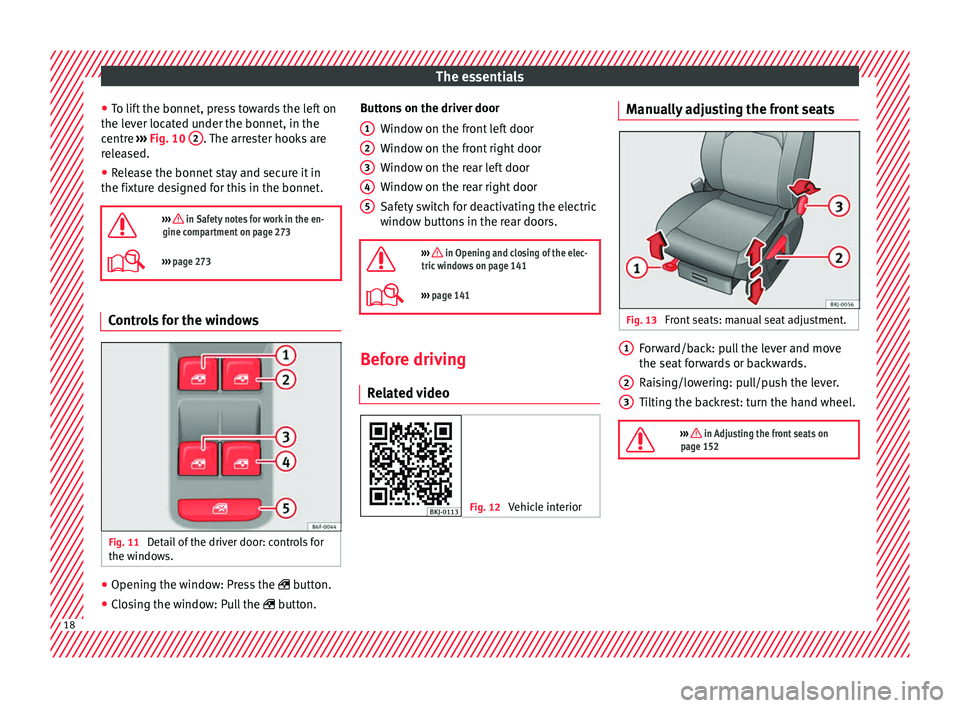
Fig. 11
Detail of the driver door: controls for
the w indo
w
s. ●
Opening the window: Press the butt
on.
● C
losing the window: Pull the button.B
uttons on the driver door
Window on the fr
ont left door
Window on the front right door
Window on the rear left door
Window on the rear right door
Safety switch for deactivating the electric
window buttons in the rear doors.
››› in Opening and closing of the elec-
tric windows on page 141
››› page 141 Before driving
R el
at
ed video Fig. 12
Vehicle interior 1
2
3
4
5 Manually adjusting the front seats
Fig. 13
Front seats: manual seat adjustment. Forward/back: pull the lever and move
the se
at
f
orwards or backwards.
Raising/lowering: pull/push the lever.
Tilting the backrest: turn the hand wheel.
››› in Adjusting the front seats on
page 152 1
2
3
18
Page 25 of 316
The essentials
In conjunction with the seat belts, the side
airb ag sy
s
tem provides additional protection
for the upper body in the event of a severe
side collision.
In a side collision, the side airbags reduce
the risk of injury to passengers to the areas
of the body facing the impact. In addition to
their normal function of protecting the occu-
pants in a collision, the front and rear outer
seat belts also hold the passengers in the
event of a side collision; this is how these air-
bags provide maximum protection.
››› in Side airbags* on page 88 Head-protection airbags*
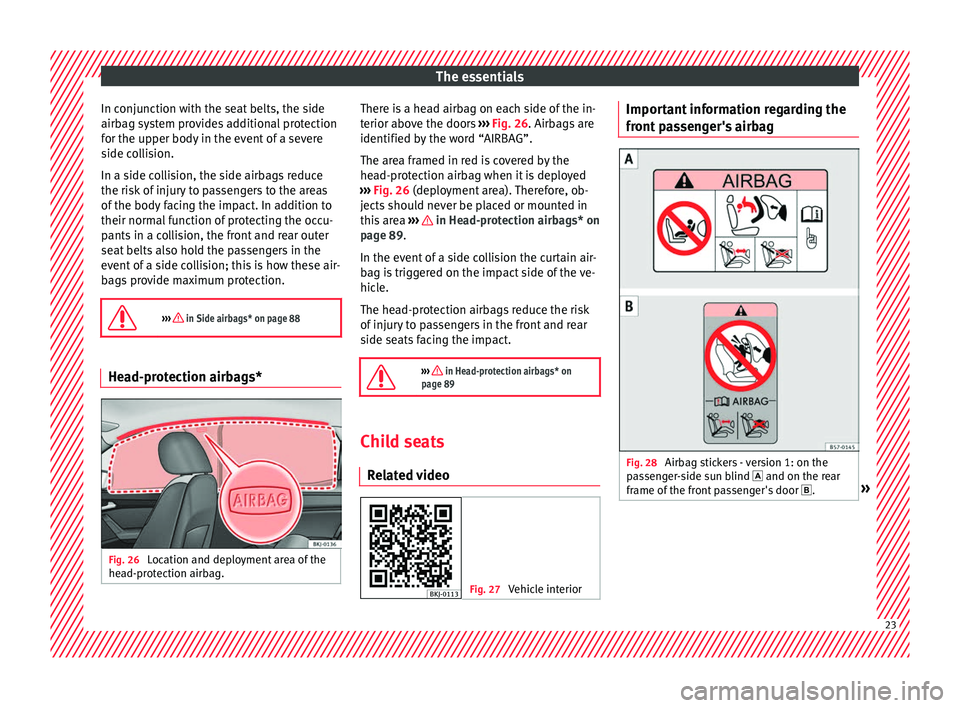
Fig. 26
Location and deployment area of the
he a
d-pr
otection airbag. There is a head airbag on each side of the in-
t
erior abo
v
e the doors ››› Fig. 26. Airbags are
identified by the word “AIRBAG”.
The area framed in red is covered by the
head-protection airbag when it is deployed
››› Fig. 26 (deployment area). Therefore, ob-
jects should never be placed or mounted in
this area ››› in Head-protection airbags* on
p ag
e 89
.
In the event of a side collision the curtain air-
bag is triggered on the impact side of the ve-
hicle.
The head-protection airbags reduce the risk
of injury to passengers in the front and rear
side seats facing the impact.
››› in Head-protection airbags* on
page 89 Child seats
R el at
ed video Fig. 27
Vehicle interior Important information regarding the
fr
ont
p
assenger's airbag Fig. 28
Airbag stickers - version 1: on the
p a
s
senger-side sun blind and on the rear
frame of the front passenger's door .» 23
Page 29 of 316
The essentials
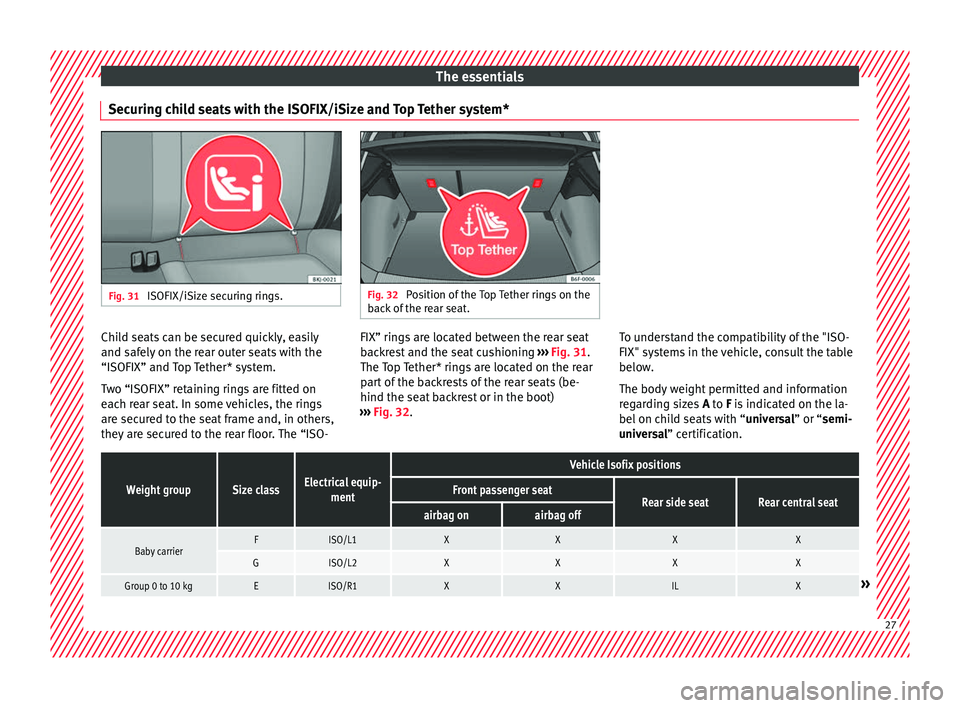
Securing child seats with the ISOFIX/iSize and Top Tether system* Fig. 31
ISOFIX/iSize securing rings. Fig. 32
Position of the Top Tether rings on the
bac k
of the rear seat. Child seats can be secured quickly, easily
and s
af
ely
on the rear outer seats with the
“ISOFIX” and Top Tether* system.
Two “ISOFIX” retaining rings are fitted on
each rear seat. In some vehicles, the rings are secured to the seat frame and, in others,
they are secured to the rear floor. The “ISO- FIX” rings are located between the rear seat
back
rest and the seat cushioning ››› Fig. 31.
The Top Tether* rings are located on the rear
part of the backrests of the rear seats (be-
hind the seat backrest or in the boot)
››› Fig. 32. To understand the compatibility of the "ISO-
FIX" syst
ems in the vehicle, consult the table
below.
The body weight permitted and information
regarding sizes A to F is indicated on the la-
bel on child seats with “ universal” or “semi-
universal” certification.
Weight groupSize classElectrical equip- ment
Vehicle Isofix positions
Front passenger seatRear side seatRear central seatairbag onairbag off
Baby carrierFISO/L1XXXX
GISO/L2XXXX
Group 0 to 10 kgEISO/R1XXILX» 27
Page 43 of 316
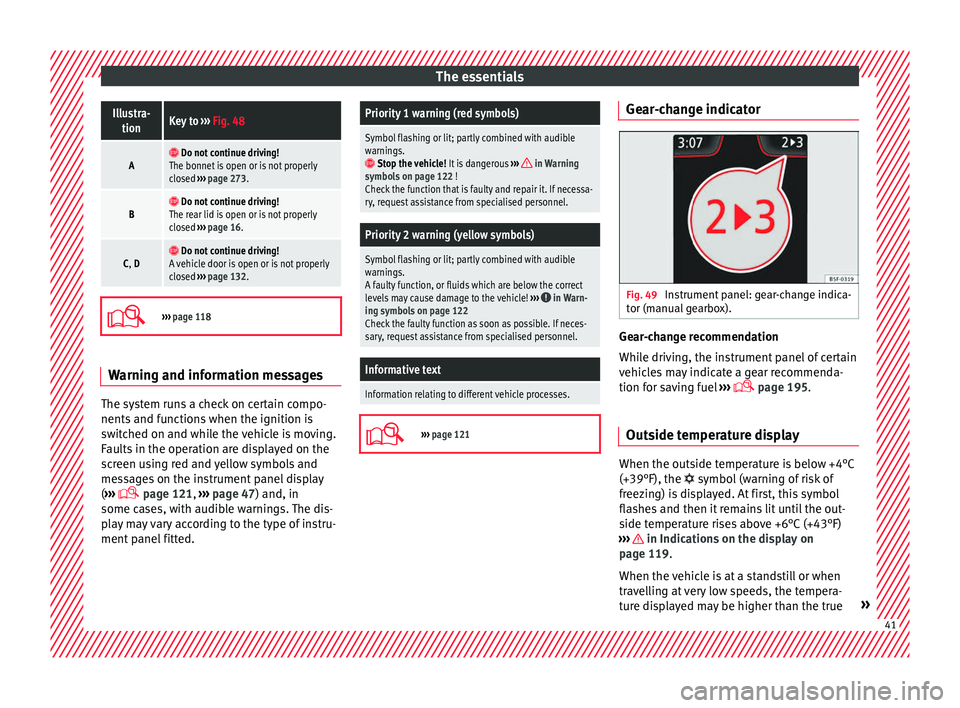
The essentialsIllustra-
tionKey to ››› Fig. 48
A Do not continue driving!
The bonnet is open or is not properly
closed ››› page 273.
B Do not continue driving!
The rear lid is open or is not properly
closed ››› page 16.
C, D Do not continue driving!
A vehicle door is open or is not properly
closed ››› page 132.
›››
page 118 Warning and information messages
The system runs a check on certain compo-
nents
and f
u
nctions when the ignition is
switched on and while the vehicle is moving.
Faults in the operation are displayed on the
screen using red and yellow symbols and
messages on the instrument panel display
( ›››
page 121,
››› page 47) and, in
some cases, with audible warnings. The dis-
play may vary according to the type of instru-
ment panel fitted.
Priority 1 warning (red symbols)
Symbol flashing or lit; partly combined with audible
warnings.
Stop the vehicle! It is dangerous ››› in Warning
symbols on page 122 !
Check the function that is faulty and repair it. If necessa-
ry, request assistance from specialised personnel.
Priority 2 warning (yellow symbols)
Symbol flashing or lit; partly combined with audible
warnings.
A faulty function, or fluids which are below the correct
levels may cause damage to the vehicle! ›››
in Warn-
ing symbols on page 122
Check the faulty function as soon as possible. If neces-
sary, request assistance from specialised personnel.
Informative text
Information relating to different vehicle processes.
›››
page 121 Gear-change indicator
Fig. 49
Instrument panel: gear-change indica-
t or (m
anual
gearbox). Gear-change recommendation
Whi
l
e driv
ing, the instrument panel of certain
vehicles may indicate a gear recommenda-
tion for saving fuel ›››
page 195.
Outside temperature display When the outside temperature is below +4°C
(+39°F), the
symbol
(w
arning of risk of
freezing) is displayed. At first, this symbol
flashes and then it remains lit until the out-
side temperature rises above +6°C (+43°F)
››› in Indications on the display on
p ag
e 119
.
When the vehicle is at a standstill or when
travelling at very low speeds, the tempera-
ture displayed may be higher than the true » 41
Page 50 of 316
The essentials
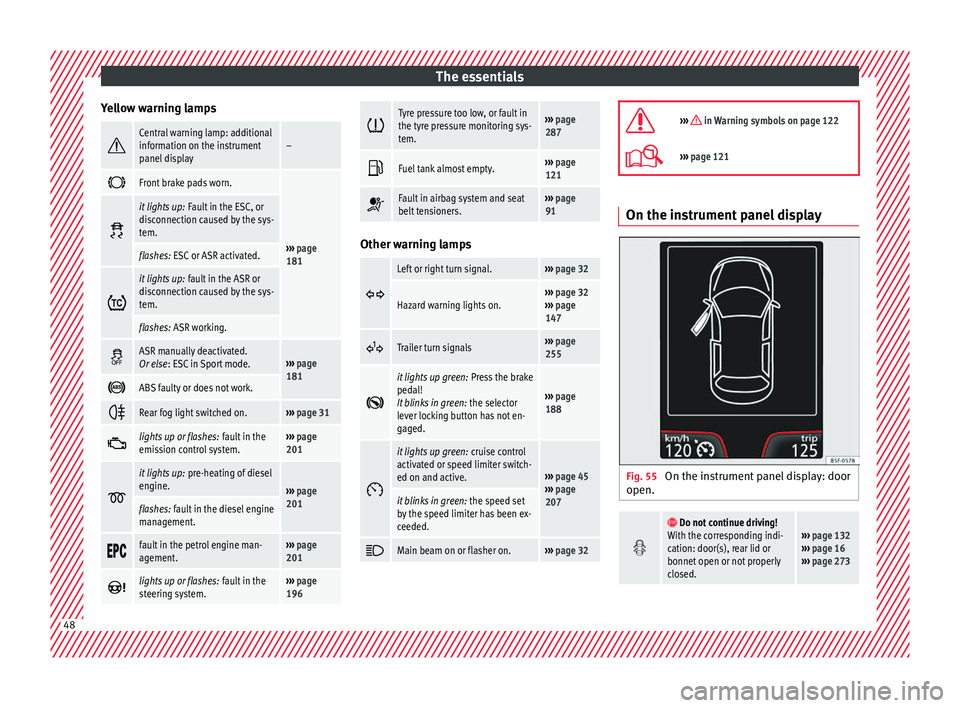
Yellow warning lamps Central warning lamp: additional
information on the instrument
panel display–
Front brake pads worn.
›››
page
181
it lights up:
Fault in the ESC, or
disconnection caused by the sys-
tem.
flashes: ESC or ASR activated.
it lights up:
fault in the ASR or
disconnection caused by the sys-
tem.
flashes: ASR working.
ASR manually deactivated.
Or else
: ESC in Sport mode.››› page
181
ABS faulty or does not work.
Rear fog light switched on.›››
page 31
lights up or flashes:
fault in the
emission control system.››› page
201
it lights up:
pre-heating of diesel
engine.
››› page
201
flashes: fault in the diesel engine
management.
fault in the petrol engine man-
agement.›››
page
201
lights up or flashes:
fault in the
steering system.››› page
196
Tyre pressure too low, or fault in
the tyre pressure monitoring sys-
tem.›››
page
287
Fuel tank almost empty.›››
page
121
Fault in airbag system and seat
belt tensioners.›››
page
91 Other warning lamps
Left or right turn signal.›››
page 32
Hazard warning lights on.››› page 32
››› page
147
Trailer turn signals›››
page
255
it lights up green:
Press the brake
pedal!
It blinks in green: the selector
lever locking button has not en-
gaged.
››› page
188
it lights up green:
cruise control
activated or speed limiter switch-
ed on and active.
››› page 45
››› page
207
it blinks in green: the speed set
by the speed limiter has been ex-
ceeded.
Main beam on or flasher on.›››
page 32
››› in Warning symbols on page 122
›››
page 121 On the instrument panel display
Fig. 55
On the instrument panel display: door
open.
Do not continue driving!
With the corresponding indi-
cation: door(s), rear lid or
bonnet open or not properly
closed.››› page 132
››› page 16
››› page 273 48
Page 51 of 316
The essentials
Ignition: Do not carry on
driving! Engine coolant level
too low, coolant temperature
too high
››› page 278
Flashing: Fault in the engine
coolant system.
Do not continue driving!
Engine oil pressure too low.››› page 275
Fault in the battery.›››
page 281
Driving light totally or partial-
ly faulty.›››
page 106
Fault in the cornering light
system.››› page 143
particulate filter blocked.›››
page 200
Flashing: Fault in the oil level
detection. Control manually.
›››
page 275Ignition: Insufficient engine
oil.
Fault in the gearbox.›››
page 194
Immobiliser active.›››
page 175
Service interval display›››
page 43
Mobile telephone is connec-
ted via Bluetooth to the origi-
nal telephone device.›››
page 124
››› page 129
››› Booklet
Audio or
navigation
system
Mobile telephone battery
charge meter. Available only
for devices pre-installed in
factory.
Freezing warning. The outside
temperature is lower than
+4°C (+39°F).›››
page 41
Start-Stop system activated.
›››
page 202 Start-Stop system unavaila-
ble.
Low consumption driving sta-
tus›››
page 119
›››
page 118 On the instrument panel
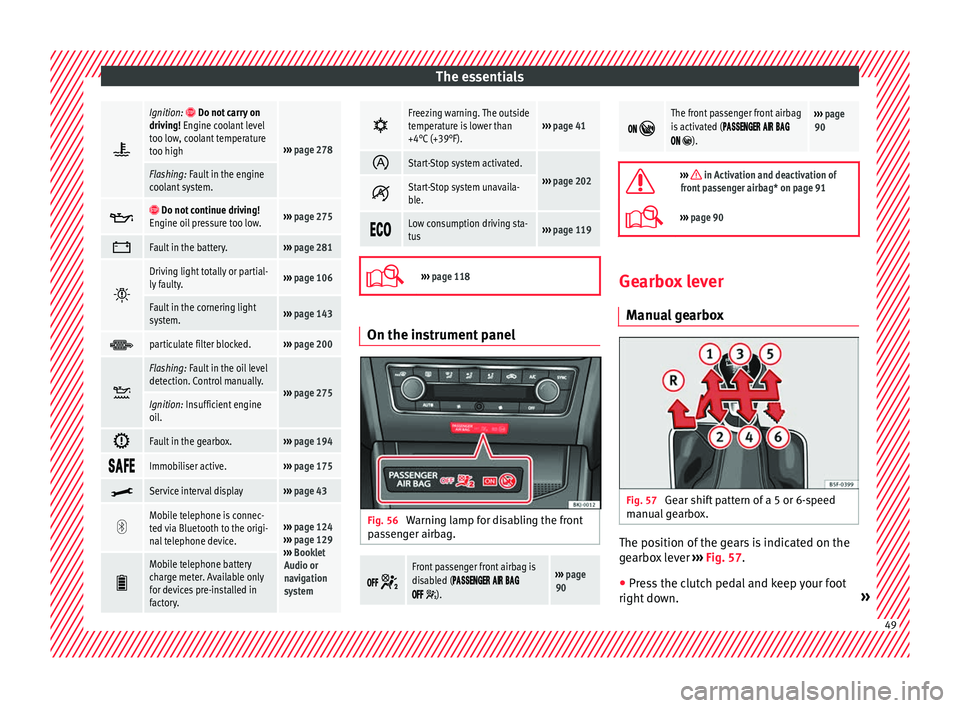
Fig. 56
Warning lamp for disabling the front
p as
senger airbag.
Front passenger front airbag is
disabled (
).
››› page
90
The front passenger front airbag
is activated (
).
››› page
90
››› in Activation and deactivation of
front passenger airbag* on page 91
››› page 90 Gearbox lever
Manual
gearbox Fig. 57
Gear shift pattern of a 5 or 6-speed
m anual
g
earbox. The position of the gears is indicated on the
g
e
arbo
x lever ›››
Fig. 57.
● Press the clutch pedal and keep your foot
right do wn. » 49
Page 60 of 316
The essentials
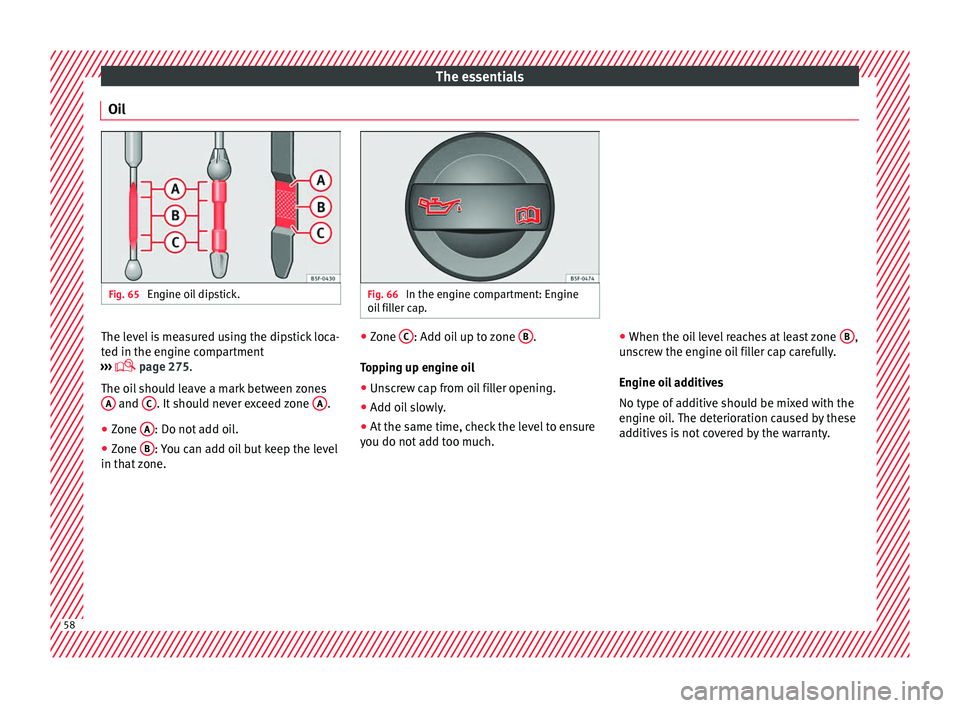
Oil Fig. 65
Engine oil dipstick. Fig. 66
In the engine compartment: Engine
oil fi
ller cap. The level is measured using the dipstick loca-
t
ed in the en
gine c
ompartment
››› page 275.
The oil should leave a mark between zones A and
C . It should never exceed zone
A .
● Zone A : Do not add oil.
● Zone B : You can add oil but keep the level
in th at
zone. ●
Zone C : Add oil up to zone
B .
T op
pin
g up engine oil
● Unscrew cap from oil filler opening.
● Add oil slowly.
● At the same time, check the level to ensure
you do not a
dd too much. ●
When the oil l
evel reaches at least zone B ,
u n
s
crew the engine oil filler cap carefully.
Engine oil additives
No type of additive should be mixed with the
engine oil. The deterioration caused by these
additives is not covered by the warranty. 58