AUX Seat Arona 2018 Owner's Manual
[x] Cancel search | Manufacturer: SEAT, Model Year: 2018, Model line: Arona, Model: Seat Arona 2018Pages: 316, PDF Size: 6.77 MB
Page 107 of 316
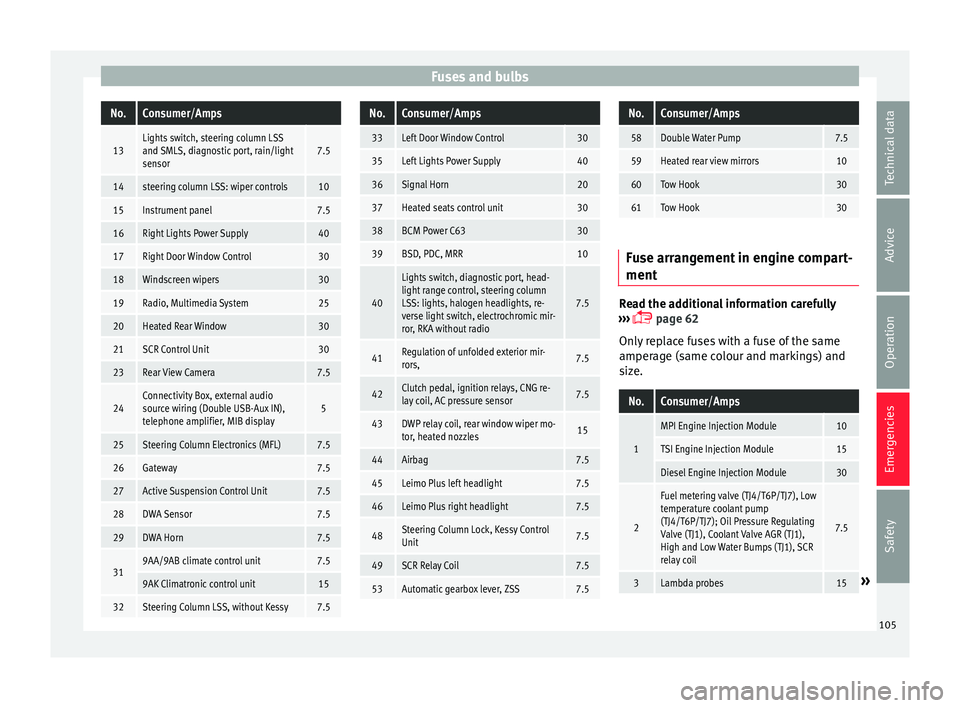
Fuses and bulbsNo.Consumer/Amps
13Lights switch, steering column LSS
and SMLS, diagnostic port, rain/light
sensor7.5
14steering column LSS: wiper controls10
15Instrument panel7.5
16Right Lights Power Supply40
17Right Door Window Control30
18Windscreen wipers30
19Radio, Multimedia System25
20Heated Rear Window30
21SCR Control Unit30
23Rear View Camera7.5
24Connectivity Box, external audio
source wiring (Double USB-Aux IN),
telephone amplifier, MIB display5
25Steering Column Electronics (MFL)7.5
26Gateway7.5
27Active Suspension Control Unit7.5
28DWA Sensor7.5
29DWA Horn7.5
319AA/9AB climate control unit7.5
9AK Climatronic control unit15
32Steering Column LSS, without Kessy7.5
No.Consumer/Amps
33Left Door Window Control30
35Left Lights Power Supply40
36Signal Horn20
37Heated seats control unit30
38BCM Power C6330
39BSD, PDC, MRR10
40
Lights switch, diagnostic port, head-
light range control, steering column
LSS: lights, halogen headlights, re-
verse light switch, electrochromic mir-
ror, RKA without radio
7.5
41Regulation of unfolded exterior mir-
rors,7.5
42Clutch pedal, ignition relays, CNG re-
lay coil, AC pressure sensor7.5
43DWP relay coil, rear window wiper mo-
tor, heated nozzles15
44Airbag7.5
45Leimo Plus left headlight7.5
46Leimo Plus right headlight7.5
48Steering Column Lock, Kessy Control
Unit7.5
49SCR Relay Coil7.5
53Automatic gearbox lever, ZSS7.5
No.Consumer/Amps
58Double Water Pump7.5
59Heated rear view mirrors10
60Tow Hook30
61Tow Hook30
Fuse arrangement in engine compart-
ment
Read the additional information carefully
› ›
›
page 62
Only replace fuses with a fuse of the same
amperage (same colour and markings) and
size.
No.Consumer/Amps
1
MPI Engine Injection Module10
TSI Engine Injection Module15
Diesel Engine Injection Module30
2
Fuel metering valve (TJ4/T6P/TJ7), Low
temperature coolant pump
(TJ4/T6P/TJ7); Oil Pressure Regulating
Valve (TJ1), Coolant Valve AGR (TJ1),
High and Low Water Bumps (TJ1), SCR
relay coil
7.5
3Lambda probes15» 105
Technical data
Advice
Operation
Emergencies
Safety
Page 117 of 316
Controls and displays
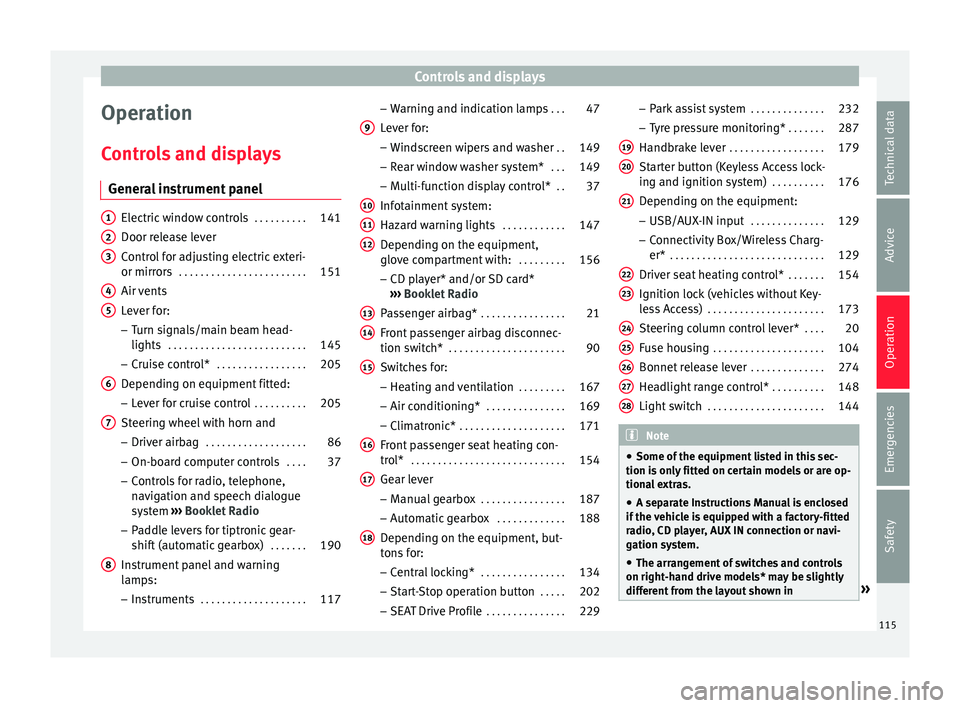
Operation
C ontr
o
ls and displays
General instrument panel Electric window controls
. . . . . . . . . .141
Door release lever
Contr o
l for adjusting electric exteri-
or mirrors . . . . . . . . . . . . . . . . . . . . . . . . 151
Air vents
Lev er f
or:
– Turn signals/main beam head-
lights . . . . . . . . . . . . . . . . . . . . . . . . . . 145
– Crui se c
ontrol* . . . . . . . . . . . . . . . . . 205
Depending on equipment fitted:
– Lev er f
or cruise control . . . . . . . . . .205
Steering wheel with horn and – Driver airbag . . . . . . . . . . . . . . . . . . . 86
– On-boar d c
omputer controls . . . .37
– Contro
ls for radio, telephone,
navigation and speech dialogue
system ›››
Booklet Radio
– Paddle levers for tiptronic gear-
shift (automatic gearbox) . . . . . . .190
Instrument panel and warning
lamp s:
– In
struments . . . . . . . . . . . . . . . . . . . . 117
1 2
3
4
5
6
7
8 –
Warnin
g and indic
ation lamps . . .47
Lever for:
– Winds
creen wipers and washer . .149
– Rear w
indow washer system* . . .149
– Multi-f
unction display control* . .37
Infotainment system:
Hazard w
arning lights . . . . . . . . . . . . 147
Depending on the equipment,
glove c
ompartment with: . . . . . . . . .156
– CD pla
yer* and/or SD card*
››› Booklet Radio
Passenger airbag* . . . . . . . . . . . . . . . . 21
Front passenger airbag disconnec-
tion switc
h* . . . . . . . . . . . . . . . . . . . . . . 90
Switches for: – Heating and
ventilation . . . . . . . . . 167
– Air conditionin g* . . . . . . . . . . . . . . . 169
– C
limatr
onic* . . . . . . . . . . . . . . . . . . . . 171
Front passenger seat heating con-
tro l* . . . . . . . . . . . . . . . . . . . . . . . . . . . . . 154
Ge
ar lever
– Manual g
earbox . . . . . . . . . . . . . . . . 187
– Autom atic
gearbox . . . . . . . . . . . . . 188
Depending on the equipment, but-
ton s
for:
– Central locking* . . . . . . . . . . . . . . . . 134
– Star t
-Stop operation button . . . . .202
– SEAT Driv
e Profile . . . . . . . . . . . . . . . 229
9
10
11
12
13
14
15
16
17
18 –
Park
a
ssist system . . . . . . . . . . . . . . 232
– Tyr
e pressure monitoring* . . . . . . .287
Handbrake lever . . . . . . . . . . . . . . . . . . 179
Starter button (Keyless Access lock-
ing and ignition sys
tem) . . . . . . . . . . 176
Depending on the equipment:
– USB/AUX-IN inp
ut . . . . . . . . . . . . . . 129
– Connectivity
Box/Wireless Charg-
er* . . . . . . . . . . . . . . . . . . . . . . . . . . . . . 129
Driver seat heating control* . . . . . . .154
Ignition lock (vehicles without Key-
les
s Access) . . . . . . . . . . . . . . . . . . . . . . 173
Steering column control lever* . . . .20
Fuse housing . . . . . . . . . . . . . . . . . . . . . 104
Bonnet release lever . . . . . . . . . . . . . .274
Headlight range control* . . . . . . . . . .148
Light switch . . . . . . . . . . . . . . . . . . . . . . 144 Note
● Some of the equipment li
sted in this sec-
tion is only fitted on certain models or are op-
tional extras.
● A separate Instructions Manual is enclosed
if the v
ehicle is equipped with a factory-fitted
radio, CD player, AUX IN connection or navi-
gation system.
● The arrangement of switches and controls
on right-hand driv
e models* may be slightly
different from the layout shown in » 19
20
21
22
23
24
25
26
27
28
115
Technical data
Advice
Operation
Emergencies
Safety
Page 127 of 316
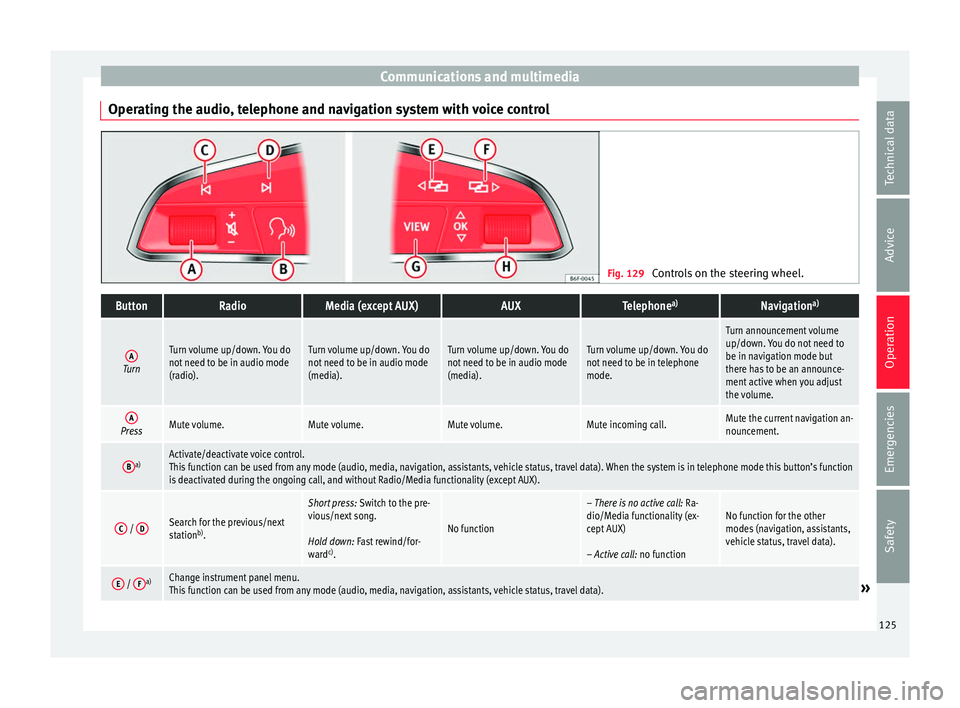
Communications and multimedia
Operating the audio, telephone and navigation system with voice control Fig. 129
Controls on the steering wheel.ButtonRadioMedia (except AUX)AUXTelephone a)Navigation a)
ATurn
Turn volume up/down. You do
not need to be in audio mode
(radio).Turn volume up/down. You do
not need to be in audio mode
(media).Turn volume up/down. You do
not need to be in audio mode
(media).Turn volume up/down. You do
not need to be in telephone
mode.
Turn announcement volume
up/down. You do not need to
be in navigation mode but
there has to be an announce-
ment active when you adjust
the volume.
APressMute volume.Mute volume.Mute volume.Mute incoming call.Mute the current navigation an-
nouncement.
Ba)Activate/deactivate voice control.
This function can be used from any mode (audio, media, navigation, assistants, vehicle status, travel data). When the system is in telephone mode this button’s function
is deactivated during the ongoing call, and without Radio/Media functionality (except AUX).
C /
DSearch for the previous/next
station b)
.
Short press: Switch to the pre-
vious/next song.
Hold down: Fast rewind/for-
ward c)
.
No function
– There is no active call: Ra-
dio/Media functionality (ex-
cept AUX)
– Active call: no functionNo function for the other
modes (navigation, assistants,
vehicle status, travel data).
E / Fa)Change instrument panel menu.
This function can be used from any mode (audio, media, navigation, assistants, vehicle status, travel data).» 125
Technical data
Advice
Operation
Emergencies
Safety
Page 128 of 316
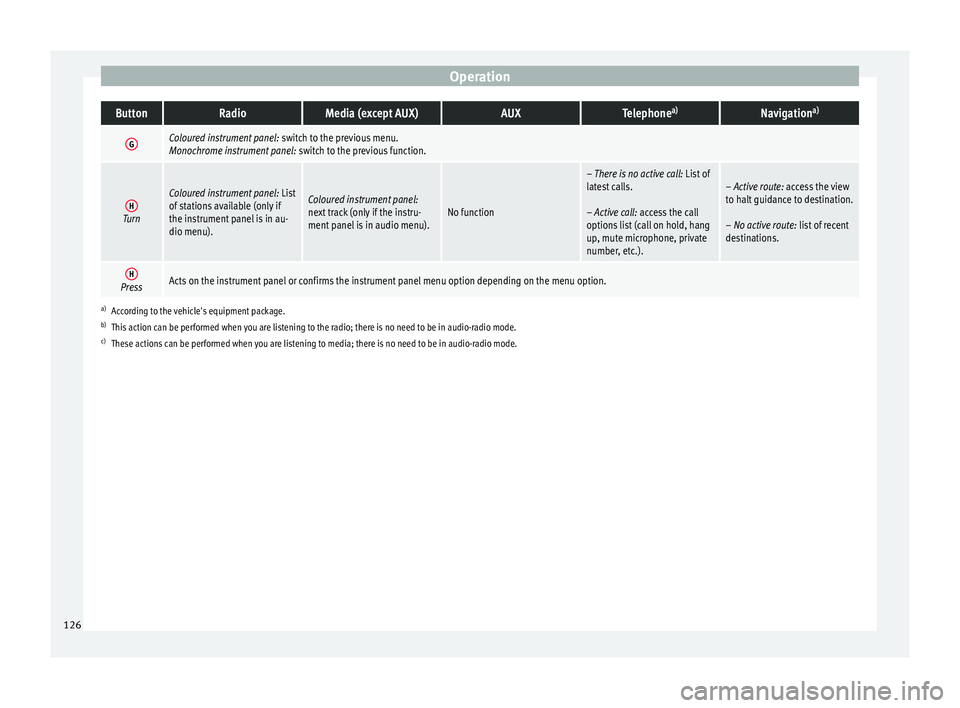
OperationButtonRadioMedia (except AUX)AUXTelephone
a)Navigation a)
GColoured instrument panel:
switch to the previous menu.
Monochrome instrument panel: switch to the previous function.
HTurn
Coloured instrument panel: List
of stations available (only if
the instrument panel is in au-
dio menu).Coloured instrument panel:
next track (only if the instru-
ment panel is in audio menu).No function
– There is no active call: List of
latest calls.
– Active call: access the call
options list (call on hold, hang
up, mute microphone, private
number, etc.).– Active route: access the view
to halt guidance to destination.
– No active route: list of recent
destinations.
HPressActs on the instrument panel or confirms the instrument panel menu option depending on the menu option.
a) According to the vehicle's equipment package.
b) This action can be performed when you are listening to the radio; there is no need to be in audio-radio mode.
c) These actions can be performed when you are listening to media; there is no need to be in audio-radio mode. 126
Page 129 of 316
Communications and multimedia
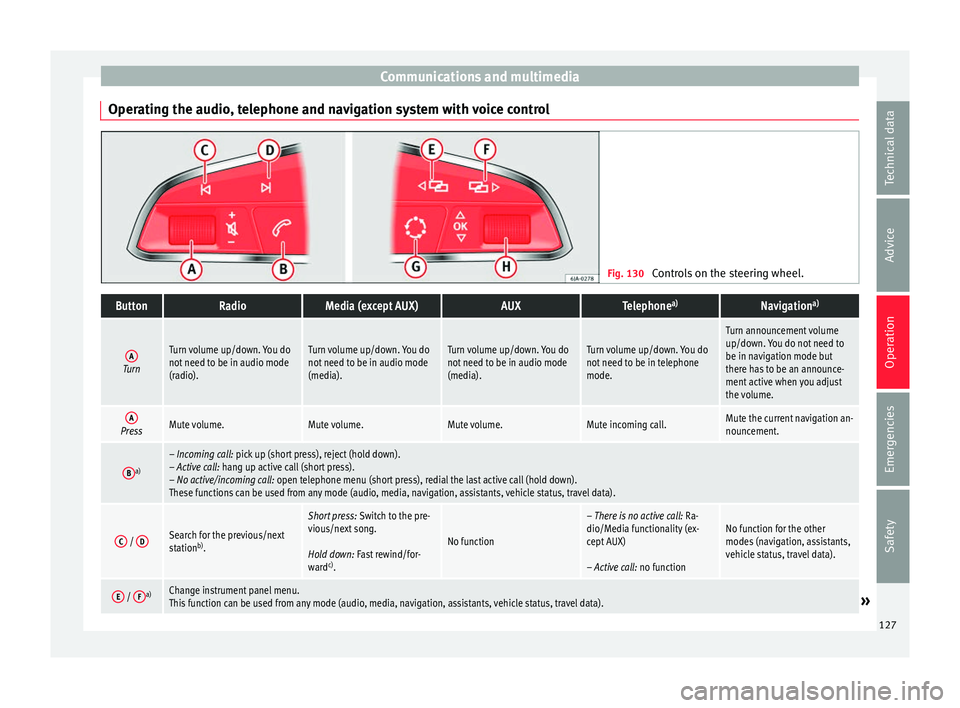
Operating the audio, telephone and navigation system with voice control Fig. 130
Controls on the steering wheel.ButtonRadioMedia (except AUX)AUXTelephone a)Navigation a)
ATurn
Turn volume up/down. You do
not need to be in audio mode
(radio).Turn volume up/down. You do
not need to be in audio mode
(media).Turn volume up/down. You do
not need to be in audio mode
(media).Turn volume up/down. You do
not need to be in telephone
mode.
Turn announcement volume
up/down. You do not need to
be in navigation mode but
there has to be an announce-
ment active when you adjust
the volume.
APressMute volume.Mute volume.Mute volume.Mute incoming call.Mute the current navigation an-
nouncement.
Ba)– Incoming call: pick up (short press), reject (hold down).
– Active call: hang up active call (short press).
– No active/incoming call: open telephone menu (short press), redial the last active call (hold down).
These functions can be used from any mode (audio, media, navigation, assistants, vehicle status, travel data).
C /
DSearch for the previous/next
station b)
.
Short press: Switch to the pre-
vious/next song.
Hold down: Fast rewind/for-
ward c)
.
No function
– There is no active call: Ra-
dio/Media functionality (ex-
cept AUX)
– Active call: no functionNo function for the other
modes (navigation, assistants,
vehicle status, travel data).
E / Fa)Change instrument panel menu.
This function can be used from any mode (audio, media, navigation, assistants, vehicle status, travel data).» 127
Technical data
Advice
Operation
Emergencies
Safety
Page 130 of 316
OperationButtonRadioMedia (except AUX)AUXTelephone
a)Navigation a)
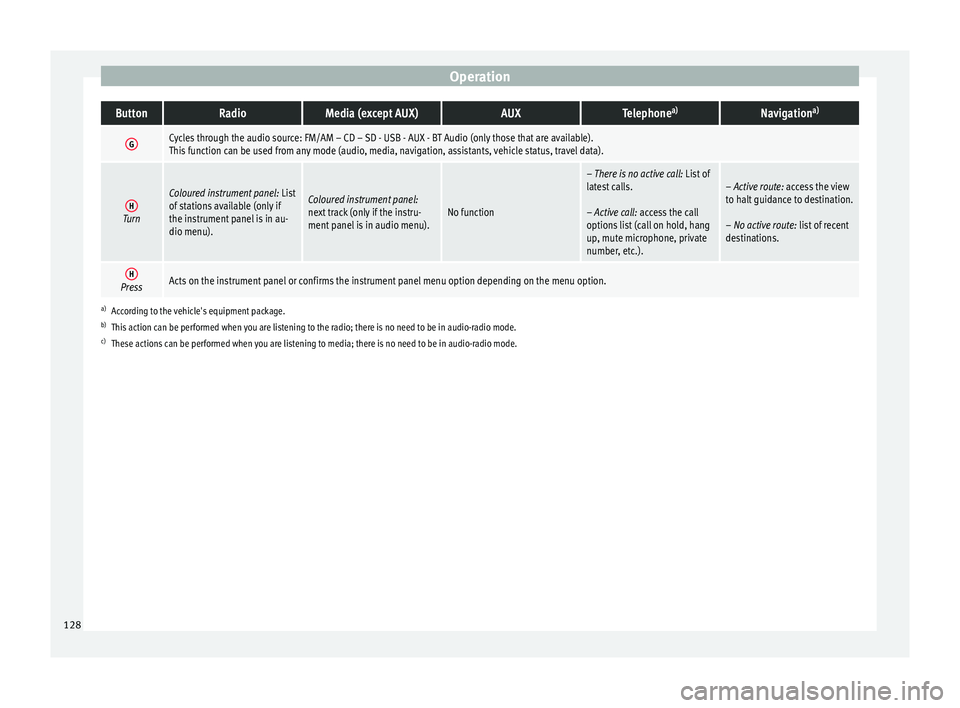
GCycles through the audio source: FM/AM – CD – SD - USB - AUX - BT Audio (only those that are available).
This function can be used from any mode (audio, media, navigation, assistants, vehicle status, travel data).
HTurn
Coloured instrument panel:
List
of stations available (only if
the instrument panel is in au-
dio menu).Coloured instrument panel:
next track (only if the instru-
ment panel is in audio menu).No function
– There is no active call: List of
latest calls.
– Active call: access the call
options list (call on hold, hang
up, mute microphone, private
number, etc.).– Active route: access the view
to halt guidance to destination.
– No active route: list of recent
destinations.
HPressActs on the instrument panel or confirms the instrument panel menu option depending on the menu option.
a) According to the vehicle's equipment package.
b) This action can be performed when you are listening to the radio; there is no need to be in audio-radio mode.
c) These actions can be performed when you are listening to media; there is no need to be in audio-radio mode. 128
Page 131 of 316
Communications and multimedia
Multimedia USB/A UX
-INP
ortFig. 131
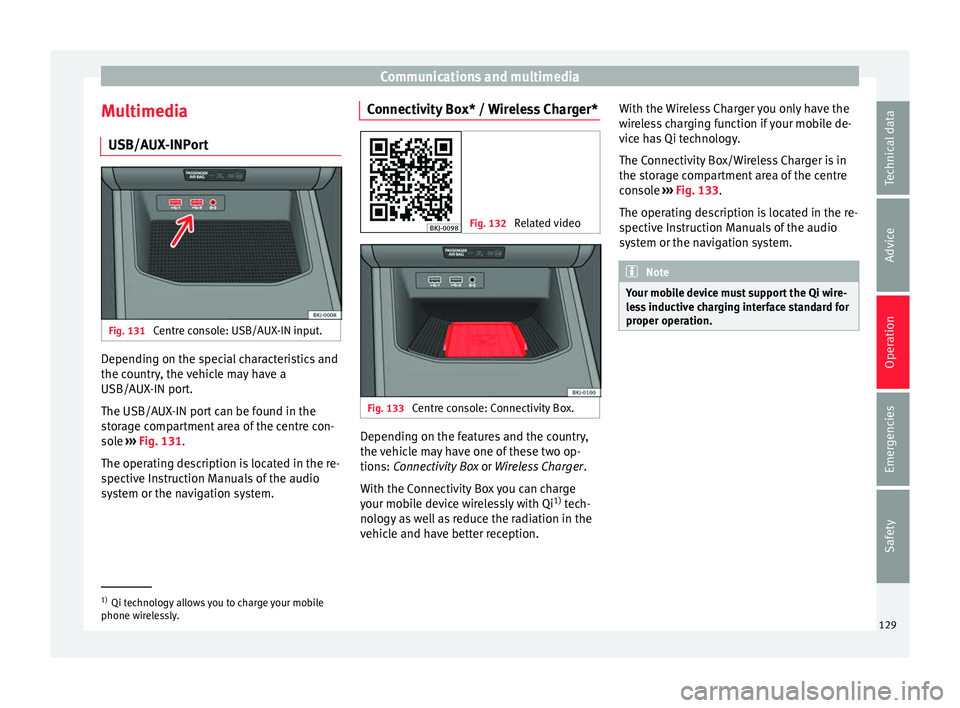
Centre console: USB/AUX-IN input. Depending on the special characteristics and
the c
ou
ntr
y, the vehicle may have a
USB/AUX-IN port.
The USB/AUX-IN port can be found in the
storage compartment area of the centre con-
sole ››› Fig. 131.
The operating description is located in the re-
spective Instruction Manuals of the audio
system or the navigation system. Connectivity Box* / Wireless Charger* Fig. 132
Related video Fig. 133
Centre console: Connectivity Box. Depending on the features and the country,
the
v
ehic
le may have one of these two op-
tions: Connectivity Box or Wireless Charger.
With the Connectivity Box you can charge
your mobile device wirelessly with Qi 1)
tech-
nology as well as reduce the radiation in the
vehicle and have better reception. With the Wireless Charger you only have the
wirel
ess charging function if your mobile de-
vice has Qi technology.
The Connectivity Box/Wireless Charger is in
the storage compartment area of the centre
console ››› Fig. 133.
The operating description is located in the re-
spective Instruction Manuals of the audio
system or the navigation system. Note
Your mobile device must support the Qi wire-
le s
s inductive charging interface standard for
proper operation. 1)
Qi technology allows you to charge your mobile
phone wir el
essly. 129
Technical data
Advice
Operation
Emergencies
Safety
Page 180 of 316
Operation
driving or if you restart it immediately after
swit
c
hing it off.
● If the engine is cold, avoid high engine
speeds, p
ushing the engine too hard and rap-
id acceleration.
● Do not start the engine by pushing the ve-
hicle or t
owing it. Unburnt fuel could enter
the catalytic converter and damage it. Note
● Do not wait
until the engine warms up with
the vehicle stationary; if you have good visi-
bility through the windows, start driving im-
mediately. This helps the engine reach oper-
ating temperature faster and reduces emis-
sions.
● Electrical components with a high power
cons
umption are switched off temporarily
when the engine starts.
● When starting with a cold engine, noise
level
s may briefly increase. This is quite nor-
mal, and no cause for concern.
● When the outside temperature is below
+5°C (+41°F), if the en
gine is diesel, some
smoke may appear under the vehicle when
the fuel-operated auxiliary heater is on. Stopping the engine
3 Valid for vehicles: with starter button
StepSwitch off the engine with the starter
button
››› page 176.
1.Stop the vehicle completely ››› .
2.Press and hold the brake pedal until the step
4 is performed.
3.If you are driving an automatic vehicle, place
the selector lever in position P.
4.Apply the handbrake ››› page 180.
5.
Briefly press the start-up button ››› Fig. 176.
The START ENGINE STOP button blinks again. If
the engine fails to switch off, perform an
emergency disconnect ››› page 176.
6.If the vehicle is equipped with a manual
gearbox, put it into 1st or reverse. WARNING
Never switch off the engine while the vehicle
is mo
ving. This could cause loss of control of
the vehicle, accidents and serious injury.
● The airbags and belt tensioners do not
work when the ignition i
s switched off.
● The brake servo does not work with the en-
gine off. Ther
efore, you need to press the
break pedal harder to brake the vehicle.
● Power steering does not work when the en-
gine is not
running. You need more strength
to steer when the engine is switched off. ●
If the ignition i s
switched off, the steering
column could be locked, making it impossible
to control the vehicle. CAUTION
If the engine is made to work hard for a long
time, it ma
y overheat after being switched
off. To prevent damage to the engine before
switching it off, leave it idle for approx. 2 mi-
nutes in neutral. Note
After switching off the engine, the cooling fan
ma y
continue to operate in the engine com-
partment for a few more minutes, even with
the ignition off. The radiator fan is automati-
cally switched off. “My Beat” Function
For vehicles with a convenience key there is
the “M
y
B
eat” function. This feature provides
an additional indication of the vehicle igni-
tion system.
When accessing the vehicle, e.g. by opening
the doors with the remote control, the START ENGINE STOP button flashes, calling at-
t ention t
o the r
elevant starter system button.
Upon switching the ignition on/off, the light
of the START ENGINE STOP button flashes. With
the en gine sw
it
ched off, after a few seconds,
178
Page 197 of 316
Driving
Take the vehicle to a specialised workshop
and h av
e the f
ault repaired without delay.
Gearbox: System fault! You
can continue driving in D until
switching off the engine
Stop the vehicle in a safe place well away
from moving traffic. Seek specialist assis-
tance. Gearbox: too hot. Adapt your
driving accordingly
Continue driving at moderate speeds. When
the warning lamp switches off, you can con-
tinue driving in a normal manner. Gearbox: press the brake and
engage a gear again.
If the fault was caused by a gearbox with a
high temperature, this driver message will be
displayed when the gearbox has cooled
again.
Gear-change indicator
Selecting the optim
al gearWhile driving, and depending on vehicle
equipment, the in
s
trument
panel display may
show a recommendation with the gear num-
ber that would be advisable to save fuel. In vehicles with an
automatic gear
box, the
selector lever must be in the tiptronic posi-
tion ››› page 190.
No recommendation will appear if the opti-
mal gear is already engaged. The current
gear will be displayed.
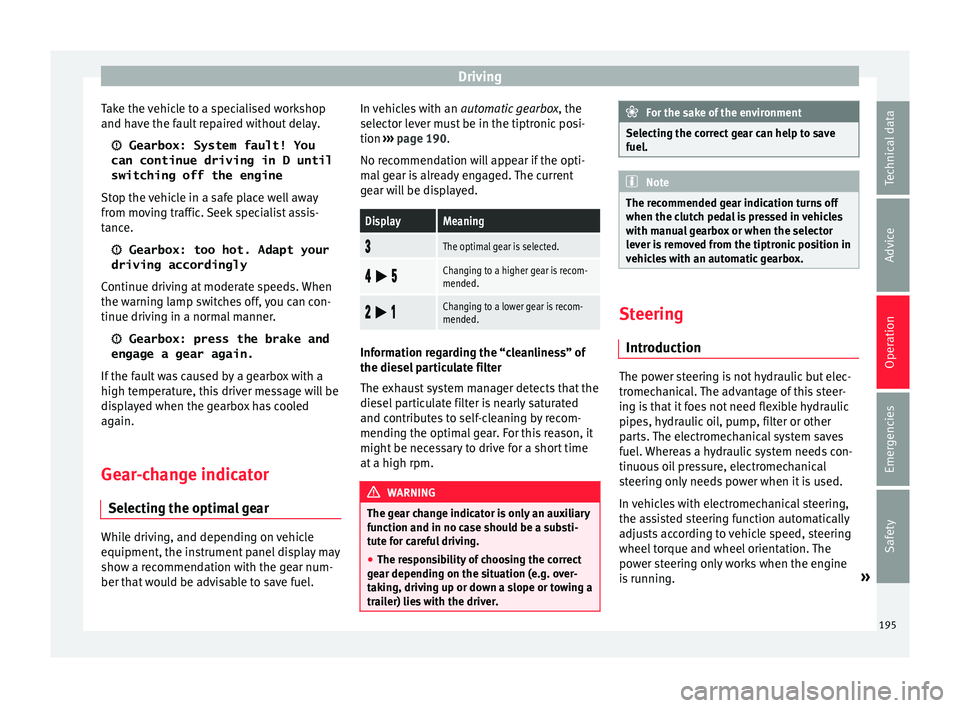
DisplayMeaning
The optimal gear is selected.
Changing to a higher gear is recom-
mended.
Changing to a lower gear is recom-
mended.
Information regarding the “cleanliness” of
the die
sel
p
articulate filter
The exhaust system manager detects that the
diesel particulate filter is nearly saturated
and contributes to self-cleaning by recom-
mending the optimal gear. For this reason, it
might be necessary to drive for a short time
at a high rpm. WARNING
The gear change indicator is only an auxiliary
fu nction and in no c
ase should be a substi-
tute for careful driving.
● The responsibility of choosing the correct
gear dependin
g on the situation (e.g. over-
taking, driving up or down a slope or towing a
trailer) lies with the driver. For the sake of the environment
Selecting the correct gear can help to save
fuel . Note
The recommended gear indication turns off
when the clut c
h pedal is pressed in vehicles
with manual gearbox or when the selector
lever is removed from the tiptronic position in
vehicles with an automatic gearbox. Steering
Intr oduction The power steering is not hydraulic but elec-
tr
omec
h
anical. The advantage of this steer-
ing is that it foes not need flexible hydraulic
pipes, hydraulic oil, pump, filter or other
parts. The electromechanical system saves
fuel. Whereas a hydraulic system needs con-
tinuous oil pressure, electromechanical
steering only needs power when it is used.
In vehicles with electromechanical steering,
the assisted steering function automatically
adjusts according to vehicle speed, steering
wheel torque and wheel orientation. The
power steering only works when the engine
is running. »
195
Technical data
Advice
Operation
Emergencies
Safety
Page 304 of 316
Index
launch control program . . . . . . . . . . . . . . . . . . 192
m anual
r
elease of the selector lever . . . . . . . . . 50
selector lever lock . . . . . . . . . . . . . . . . . . . . . . . 189
selector lever positions . . . . . . . . . . . . . . . . . . 188
steering wheel with gear shift paddles . . . . . . 190
tiptronic . . . . . . . . . . . . . . . . . . . . . . . . . . 188, 190
Automatic lighting . . . . . . . . . . . . . . . . . . . . . . . . 144
AUX-IN . . . . . . . . . . . . . . . . . . . . . . . . . . . . . . . . . . 129
B Back seat folding down and raising the back seat back-rest . . . . . . . . . . . . . . . . . . . . . . . . . . . . . . . . . 155
Battery . . . . . . . . . . . . . . . . . . . . . . . . . . . . . . . . . . 131
Before setting off . . . . . . . . . . . . . . . . . . . . . . . . . . 75
Belt tensioners control lamp . . . . . . . . . . . . . . . . . . . . . . . . . . . . 91
Belt tightening . . . . . . . . . . . . . . . . . . . . . . . . . . . . 85
Biodiesel . . . . . . . . . . . . . . . . . . . . . . . . . . . . . . . . 270
Blind spot detector (BSD) . . . . . . . . . . . . . . . . . . 224 control lamps . . . . . . . . . . . . . . . . . . . . . . . . . . 224
driving situations . . . . . . . . . . . . . . . . . . . . . . . 227
indication in the external rear view mirror . . . 225
malfunction . . . . . . . . . . . . . . . . . . . . . . . . . . . . 224
operating . . . . . . . . . . . . . . . . . . . . . . . . . . . . . . 225
towing . . . . . . . . . . . . . . . . . . . . . . . . . . . . . . . . 229
Bonnet . . . . . . . . . . . . . . . . . . . . . . . . . 17, 273, 275 closing . . . . . . . . . . . . . . . . . . . . . . . . . . . . . . . . 274
opening . . . . . . . . . . . . . . . . . . . . . . . . . . . . . . . 274
Brake assist . . . . . . . . . . . . . . . . . . . . . . . . . . . . . 181
Brake fluid . . . . . . . . . . . . . . . . . . . . . . . . . . 60, 280 changing . . . . . . . . . . . . . . . . . . . . . . . . . . . . . . 280
Brake pads . . . . . . . . . . . . . . . . . . . . . . . . . 179, 197
Brakes brake fluid . . . . . . . . . . . . . . . . . . . . . . . . . . . . . 280
new Brake pads . . . . . . . . . . . . . . . . . . . . . . . . 179
Brake servo . . . . . . . . . . . . . . . . . . . . . . . . . 179, 186 Brake system . . . . . . . . . . . . . . . . . . . . . . . . . . . . 280
Brakin
g
brake assist . . . . . . . . . . . . . . . . . . . . . . . . . . . . 181
Braking distance . . . . . . . . . . . . . . . . . . . . . . . . . 179
Braking system warning lamp . . . . . . . . . . . . . . . . . . . . . . . . . . 179
BSD see Blind spot detector (BSD) . . . . . . . . . . . . . 224
Bulbs changing the bulbs . . . . . . . . . . . . . . . . . . . . . 106
Buzzer . . . . . . . . . . . . . . . . . . . . . . . . . . . . . . . . . . 145
C
Capacities . . . . . . . . . . . . . . . . . . . . . . . . . . . . . . . . 57 AdBlue tank . . . . . . . . . . . . . . . . . . . . . . . . . . . 271
fuel tank . . . . . . . . . . . . . . . . . . . . . . . . . . . . . . 121
Car care exterior . . . . . . . . . . . . . . . . . . . . . . . . . . . . . . . 261
Care and cleaning . . . . . . . . . . . . . . . . . . . . . . . . 260
Catalytic converter . . . . . . . . . . . . . . . . . . . . . . . . 200 malfunction . . . . . . . . . . . . . . . . . . . . . . . . . . . . 200
CCS . . . . . . . . . . . . . . . . . . . . . . . . . . . . . . . . . . . . . 45
Central locking anti-theft alarm . . . . . . . . . . . . . . . . . . . . . . . . . 138
automatic speed-dependent locking . . . . . . . 134
central locking button . . . . . . . . . . . . . . . . . . . 134
electric windows . . . . . . . . . . . . . . . . . . . . . . . . 142
emergency locking . . . . . . . . . . . . . . . . . . . . . . . 16
key by remote control . . . . . . . . . . . . . . . . . . . . 130
Keyless Access . . . . . . . . . . . . . . . . . . . . . . . . . 135
selective unlocking system . . . . . . . . . . . . . . . 133
self-locking system to prevent involuntary un-locking . . . . . . . . . . . . . . . . . . . . . . . . . . . . . . 134
unlocking system . . . . . . . . . . . . . . . . . . . . . . . 134
Central locking system . . . . . . . . . . . . . . . . . . . . . 132 safe security system . . . . . . . . . . . . . . . . . . . . . 132
Central wheel trim . . . . . . . . . . . . . . . . . . . . . . 65, 66 Centre console . . . . . . . . . . . . . . . . . . . . . . . . . . . . 11
Cetane number (die
sel fuel) . . . . . . . . . . . . . . . . 270
Changing a bulb additional brake light . . . . . . . . . . . . . . . . . . . . 111
dipped beam . . . . . . . . . . . . . . . . . . . . . . . . . . 108
DRL (daytime running light) . . . . . . . . . . . . . . . 108
fog light . . . . . . . . . . . . . . . . . . . . . . . . . . . . . . . 109
general notes . . . . . . . . . . . . . . . . . . . . . . . . . . 106
interior light and reading light . . . . . . . . . . . . 111
luggage compartment light . . . . . . . . . . . . . . . 112
main beam headlight . . . . . . . . . . . . . . . . . . . . 107
number plate light . . . . . . . . . . . . . . . . . . . . . . 110
rear bulb in the side panel . . . . . . . . . . . . . . . . 109
rear light in the rear lid . . . . . . . . . . . . . . . . . . . 110
turn signal light . . . . . . . . . . . . . . . . . . . . . . . . 108
Changing a wheel . . . . . . . . . . . . . . . . . . . . . . . . . 65 subsequent work . . . . . . . . . . . . . . . . . . . . . . . . 69
wheel bolts . . . . . . . . . . . . . . . . . . . . . . . . . . . . . 67
Changing settings CAR menu . . . . . . . . . . . . . . . . . . . . . . . . . . . . . . 34
Changing the blades . . . . . . . . . . . . . . . . . . . . . . 100
Charging the battery . . . . . . . . . . . . . . . . . . . . . . . 71
Checking levels engine compartment . . . . . . . . . . . . . . . . . . . . 275
Childproof locks electric windows . . . . . . . . . . . . . . . . . . . . . . . . 141
Child seats . . . . . . . . . . . . . . . . . . . . . . . . . . . . 23, 93 categorisation into groups . . . . . . . . . . . . . . . . . 94
ISOFIX system . . . . . . . . . . . . . . . . . . . . . . . . . . . 27
safety instructions . . . . . . . . . . . . . . . . . . . . 23, 92
securing with seat belt . . . . . . . . . . . . . . . . . . . . 25
Top Tether system . . . . . . . . . . . . . . . . . . . . . 27, 30
Chrome parts cleaning . . . . . . . . . . . . . . . . . . . . . . . . . . . . . . 264
Cigarette lighter . . . . . . . . . . . . . . . . . . . . . . . . . . 158
302