TYRES Seat Arona 2018 Owner's Manual
[x] Cancel search | Manufacturer: SEAT, Model Year: 2018, Model line: Arona, Model: Seat Arona 2018Pages: 316, PDF Size: 6.77 MB
Page 8 of 316
Table of Contents
Automatic gearbox/DSG automatic gear-
bo x*
. . . . . . . . . . . . . . . . . . . . . . . . . . . . . . . . . . . 188
Ge
ar-change indicator . . . . . . . . . . . . . . . . . . . . 195
Steering . . . . . . . . . . . . . . . . . . . . . . . . . . . . . . . 195
Run-in and economical driving . . . . . . . . . . . . . 197
Engine management and emission control sys-
tem . . . . . . . . . . . . . . . . . . . . . . . . . . . . . . . . . . . 200
Driv
ing tips . . . . . . . . . . . . . . . . . . . . . . . . . . . . . 201
Driver assistance systems . . . . . . . . . . . . . . . . . 202
Start-Stop System* . . . . . . . . . . . . . . . . . . . . . . . 202
Cruise control system (CCS)* . . . . . . . . . . . . . . . 205
Speed limiter . . . . . . . . . . . . . . . . . . . . . . . . . . . 207
Emergency brake assist system (Front As-
sis
t)* . . . . . . . . . . . . . . . . . . . . . . . . . . . . . . . . . . 210
Adaptive Cruise Control ACC* . . . . . . . . . . . . . . 214
Blind spot detector (BSD) with parking assis-
tance (RCT
A)* . . . . . . . . . . . . . . . . . . . . . . . . . . . 224
SEAT Drive Profile* . . . . . . . . . . . . . . . . . . . . . . . 229
Fatigue detection (break recommendation)* . . 231
Park Assist* . . . . . . . . . . . . . . . . . . . . . . . . . . . . 232
Parking aid (Park Pilot) . . . . . . . . . . . . . . . . . . . 240
Rear Assist “Rear View Camera”* . . . . . . . . . . . 246
Towing bracket device . . . . . . . . . . . . . . . . . . . . 249
Towing bracket device* . . . . . . . . . . . . . . . . . . . 249
Trailer towing . . . . . . . . . . . . . . . . . . . . . . . . . . . 254
Advice . . . . . . . . . . . . . . . . . . . . . . . . . . . . . . . . 259
Care and maintenance . . . . . . . . . . . . . . . . . . . . 259
Accessories and modifications to the vehi-
cle
. . . . . . . . . . . . . . . . . . . . . . . . . . . . . . . . . . . . 259
Care and cleaning . . . . . . . . . . . . . . . . . . . . . . . 260
Care of the vehicle exterior . . . . . . . . . . . . . . . . 261
Caring for the vehicle interior . . . . . . . . . . . . . . 266
Checking and refilling levels . . . . . . . . . . . . . . . 269
Refuelling . . . . . . . . . . . . . . . . . . . . . . . . . . . . . . 269
Fuel . . . . . . . . . . . . . . . . . . . . . . . . . . . . . . . . . . . 269
AdBlue ®
. . . . . . . . . . . . . . . . . . . . . . . . . . . . . . . 271
Working in the engine compartment . . . . . . . . 273 Engine oil . . . . . . . . . . . . . . . . . . . . . . . . . . . . . . 275
Cooling system . . . . . . . . . . . . . . . . . . . . . . . . . . 278
Brake fluid . . . . . . . . . . . . . . . . . . . . . . . . . . . . . 280
Windscreen washer reservoir . . . . . . . . . . . . . . 281
Vehicle battery . . . . . . . . . . . . . . . . . . . . . . . . . . 281
Wheels . . . . . . . . . . . . . . . . . . . . . . . . . . . . . . . . 283
Wheels and tyres . . . . . . . . . . . . . . . . . . . . . . . . 283
Spare wheel (temporary spare wheel)* . . . . . . 288
Winter service . . . . . . . . . . . . . . . . . . . . . . . . . . . 289
Technical data . . . . . . . . . . . . . . . . . . . . . . . . 291
Technical specifications . . . . . . . . . . . . . . . . . . 291
Important information . . . . . . . . . . . . . . . . . . . . 291
Information on fuel consumption . . . . . . . . . . . 292
Trailer mode . . . . . . . . . . . . . . . . . . . . . . . . . . . . 292
Wheels . . . . . . . . . . . . . . . . . . . . . . . . . . . . . . . . 293
Engine data . . . . . . . . . . . . . . . . . . . . . . . . . . . . . 294
Dimensions . . . . . . . . . . . . . . . . . . . . . . . . . . . . . 299
Index . . . . . . . . . . . . . . . . . . . . . . . . . . . . . . . . . 301
6
Page 37 of 316
The essentialsMenuSubmenuPossible settingDescription
ESC system–Activation of the Electronic Stability Programme (ESC)›››
page 181
Tyres
Tyre monitor systemTyre pressure storing (Calibration)››› page 287
Winter tyresActivation and deactivation of the speed warning. Setting the speed warning
value››› page 289
Lights
Light assistMotorway function, turning-on time, automatic lights when raining, one-touch
signalling.››› page 144,
››› page 147
Vehicle interior lightingBrightness of instrument panel and controls››› page 148
“Coming home/Leaving home” functionSwitch-on time of the “Coming home” and “Leaving home” functions››› page 146
Driver assistance
Adaptive Cruise Control (ACC)Switch on/off default distance level, driving profiles.››› page 214
Front Assist (emergency brake as-
sist system)Switch on/off Front Assist, advance warning, distance warning display››› page 210
Fatigue detectionActivation/deactivation››› page 231
Parking and manoeu-
vringParking and manoeuvring settingsAutomatically activate front volume, front sound treble, rear volume, rear sound
treble››› page 244
Ambient lighting–Background lighting, switch-off, colour››› page 148
Mirrors and wind-
screen wipersRear view mirrorsActivate/deactivate folding after parking››› page 151
Windscreen wipersActivate and deactivate automatic wipe in case of rain, wipe when reversing››› page 33
Opening and closingElectric windows controlConvenience open function, all, only driver››› page 142
Central locking systemUnlocking doors, automatic lock when driving››› page 132
Instrument panel–
Current consumption, average consumption, convenience consumers, ECO Ad-
vice, travelling time, distance travelled, average speed, digital speed display,
speed warning, oil temperature, reset data “when setting off”, reset data for
“total calculation”
››› page 38
Date and time–Time, summer time, time zone, time format, date, date format››› page 118» 35
Page 44 of 316
The essentials
outside temperature as a result of the heat
pr oduc
ed b
y the engine.
The temperatures measured range from
-40°C to +50°C (-40°F to +122°F).
Engine oil temperature display The engine reaches its operating temperature
when in normal
driv
ing conditions the oil
temperature is between 80°C (178°F) and
120°C (248°F). If the engine is required to
work hard and the outside temperature is
high, the engine oil temperature can in-
crease. This does not present any problem as
long as the warning lamps ››› table on
page 48 or ››› table on page 48 do not
appear on the display.
Vehicles without multifunction steering
wheel
● Press the rocker switch ››
›
Fig. 46 2 until
the m ain menu ap
pe
ars. Enter into Driving
data . With the button 2 move to the oil
t emper
at
ure gauge.
Vehicles with multifunction steering wheel
● Enter the submenu Driving data and
turn the thumbwheel
until the oil tempera-
ture display appears. Additional consumers ●
Operation with the windscreen wiper lever*:
Pre s
s the rocker switch ››› Fig. 46 2 until the
main menu ap pe
ars. Enter into the section
Driving data . With the rocker switch,
move to the display Convenience con-
sumers .
● Operation with the multi-function steering
wheel*:
move with the buttons
or
to Driving data
and enter with
OK. Turn
the right thumbwheel until the Conven-
ience consumers display appears.
In addition, a scale will inform you of the cur-
rent sum of all the additional appliances.
Saving tips Tips on how to save fuel will be displayed in
c
ondition
s
that increase fuel consumption.
Follow them to reduce consumption. The indi-
cations appear automatically only with the ef-
ficiency programme. After a time, the tips will
disappear automatically.
If you wish to hide a saving tip immediately
after it appears, press any button on the
windscreen wiper lever*/multifunction steer-
ing wheel*. Note
● If y
ou hide a saving tip, it will reappear af-
ter you switch the ignition on again.
● The saving tips do not appear in all situa-
tions, but
rather with a large separation of
time. Speed warning device
The speed warning device warns the driver
when they h
av
e exceeded the pre-set speed
limit by 3 km/h (2 mph). An audible warning
signal sounds, and the warning lamp and
the driver message Speed limit excee-
ded! will be displayed simultaneously on the
instrument panel. The warning lamp
switches off when reducing speed below the
stored maximum limit.
Speed warning programming is recommen-
ded if you wish to be reminded of a maxi-
mum speed, such as when travelling in a
country with different speed limits or for a
maximum speed for winter tyres.
Setting speed limit warning
You can use the radio or the Easy Connect* to
set, alter or cancel the speed limit warning.
● Vehicles with radio : pres
s the SETUP button
> c ontr
o
l button Driver Assistant >
Speed warning .42
Page 70 of 316
The essentials
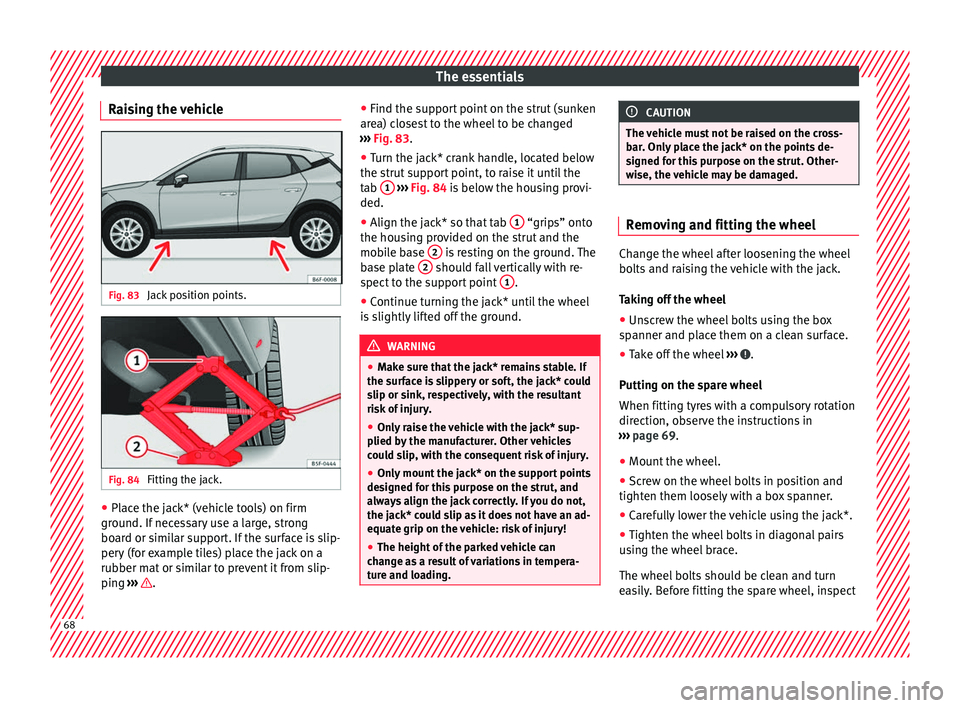
Raising the vehicle Fig. 83
Jack position points. Fig. 84
Fitting the jack. ●
Place the jack* (vehicle tools) on firm
gr ou
nd. If
necessary use a large, strong
board or similar support. If the surface is slip-
pery (for example tiles) place the jack on a
rubber mat or similar to prevent it from slip-
ping ››› . ●
Find the s up
por
t point on the strut (sunken
area) closest to the wheel to be changed
››› Fig. 83.
● Turn the jack* crank handle, located below
the strut s
upport point, to raise it until the
tab 1
› ››
Fig. 84
i
s below the housing provi-
ded.
● Align the jack* so that tab 1 “grips” onto
the hou s
in
g provided on the strut and the
mobile base 2 is resting on the ground. The
b a
se p
late 2 should fall vertically with re-
s pect
t
o the support point 1 .
● Continue turning the jack* until the wheel
i s
s
lightly lifted off the ground. WARNING
● Mak e s
ure that the jack* remains stable. If
the surface is slippery or soft, the jack* could
slip or sink, respectively, with the resultant
risk of injury.
● Only raise the vehicle with the jack* sup-
plied by
the manufacturer. Other vehicles
could slip, with the consequent risk of injury.
● Only mount the jack* on the support points
designed f
or this purpose on the strut, and
always align the jack correctly. If you do not,
the jack* could slip as it does not have an ad-
equate grip on the vehicle: risk of injury!
● The height of the parked vehicle can
chan
ge as a result of variations in tempera-
ture and loading. CAUTION
The vehicle must not be raised on the cross-
bar . On
ly place the jack* on the points de-
signed for this purpose on the strut. Other-
wise, the vehicle may be damaged. Removing and fitting the wheel
Change the wheel after loosening the wheel
bolts
and r
aising the vehicle with the jack.
Taking off the wheel
● Unscrew the wheel bolts using the box
sp anner and p
lace them on a clean surface.
● Take off the wheel ›››
.
P uttin
g on the s
pare wheel
When fitting tyres with a compulsory rotation
direction, observe the instructions in
››› page 69.
● Mount the wheel.
● Screw on the wheel bolts in position and
tighten them loosely
with a box spanner.
● Carefully lower the vehicle using the jack*.
● Tighten the wheel bolts in diagonal pairs
usin
g the wheel brace.
The wheel bolts should be clean and turn
easily. Before fitting the spare wheel, inspect 68
Page 71 of 316
The essentials
the wheel condition and hub mounting surfa-
c e
s.
These surfaces must be clean before fit-
ting the wheel.
Wheel bolt tightening torque
The prescribed tightening torque for wheel
bolts for steel and alloy wheels is 120 Nm.
After changing a wheel, have the tightening
torque checked immediately with a torque
wrench that is working perfectly.
Before checking tightening torque, have any
rusty wheel bolts that are difficult to screw re-
placed and clean the wheel hub threads.
Never apply grease or oil to wheel bolts or to
the wheel hub threads. Even if the bolts have
been tightened to the prescribed torque, they
could come loose while driving. WARNING
If the wheel bolts are not properly tightened,
they c ou
ld come loose while driving and
cause an accident, serious injury and loss of
vehicle control.
● Use only wheel bolts which correspond to
the rim in question.
● Nev
er use different wheel bolts.
● Wheel bolts and threads should be clean,
free of oi
l and grease, and it should be possi-
ble to screw them easily.
● To loosen and tighten wheel bolts, only use
the wheel wrenc
h that came with the car from
the factory. ●
Loo sen the wheel
bolts only about one turn
before raising the vehicle with the jack.
● Never apply grease or oil to wheel bolts or
to the wheel hub thr
eads. Even if the bolts
have been tightened to the prescribed tor-
que, they could come loose while driving.
● Never loosen the screwed joints of wheel
rims with bo
lted ring trims.
● If wheel bolts are tightened below the pre-
scribed t
orque, the bolts and rims could come
loose while driving. If tightening torque is too
high, the wheel bolts or threads can be dam-
aged. CAUTION
When removing/fitting the wheel, the rim
ma y
hit and damage the brake disc. For this
reason, please take care and get a second
person to assist you. Tyres with compulsory direction of ro-
t
ation A directional tread pattern can be identified
b
y
the arr
ows on the sidewall that point in
the direction of rotation. Always observe the
direction of rotation indicated when fitting
the wheel to guarantee optimum properties
of this type of tyres with regard to grip,
noises, wear and aquaplaning.
If it is absolutely necessary to fit the spare
tyre* against the direction of rotation, drive with care as this means the tyre does not of-
fer optimum drivin
g properties. This is of par-
ticular importance when the road surface is
wet.
To return to directional tread tires, replace
the punctured tyre as soon as possible and
restore the obligatory direction of rotation of
all tyres.
Subsequent work ●
Alloy wheels: rep
l
ace the wheel bolt caps.
● Plate wheels: repl
ace the wheel hubcap.
● Return all tools to their proper storing loca-
tion.
● If the replaced wheel does not fit in the
spar
e wheel housing, store it safely in the
luggage compartment ›››
page 158.
● Check the tyre pressure of the newly moun-
ted tyr
e as soon as possible.
● In vehicles fitted with a tyre pressure indi-
cator
, adjust the pressure and store it in
memory ›››
page 287.
● Have the tightening torque of the wheel
bolts c
hecked as soon as possible with a tor-
que wrench (it should be 120 Nm). Mean-
while, drive carefully.
● Have the flat tyre replaced as quickly as
pos s
ible. 69
Page 101 of 316
Self-help
Contents of the tyre mobility system* Fig. 105
Standard representation: contents of
the anti-p u
nct
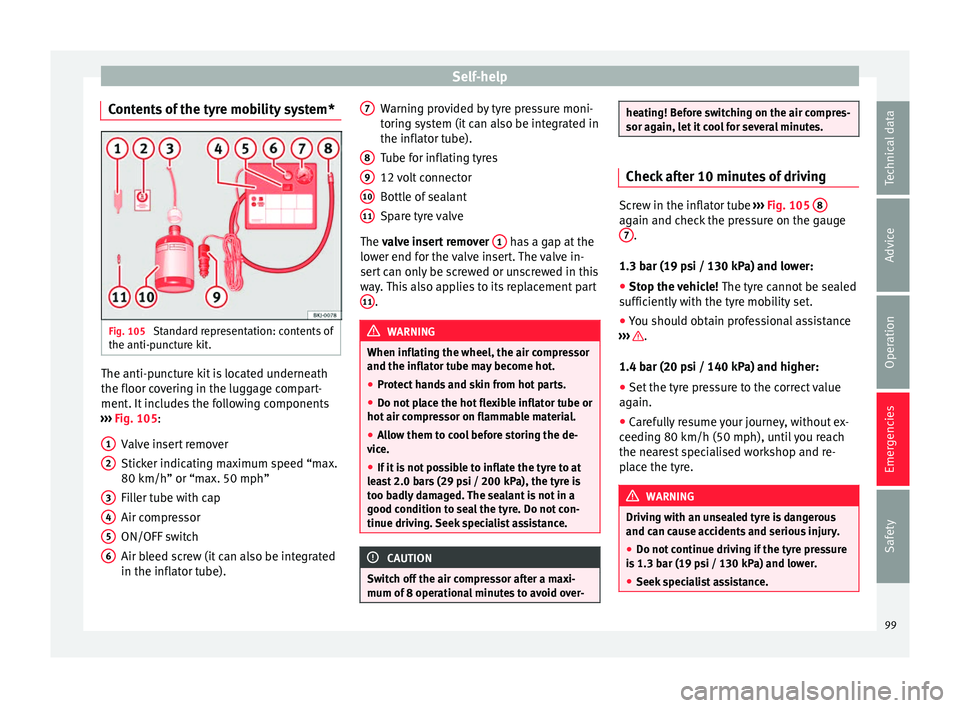
ure kit. The anti-puncture kit is located underneath
the floor c
o
v
ering in the luggage compart-
ment. It includes the following components
››› Fig. 105:
Valve insert remover
Sticker indicating maximum speed “max.
80 km/h” or “max. 50 mph”
Filler tube with cap
Air compressor
ON/OFF switch
Air bleed screw (it can also be integrated
in the inflator tube).
1 2
3
4
5
6 Warning provided by tyre pressure moni-
t
orin
g sy
stem (it can also be integrated in
the inflator tube).
Tube for inflating tyres
12 volt connector
Bottle of sealant
Spare tyre valve
The valve insert remover 1 has a gap at the
lo w
er end f
or the valve insert. The valve in-
sert can only be screwed or unscrewed in this
way. This also applies to its replacement part 11 .
WARNING
When inflating the wheel, the air compressor
and the inflat or t
ube may become hot.
● Protect hands and skin from hot parts.
● Do not place the hot flexible inflator tube or
hot air compr
essor on flammable material.
● Allow them to cool before storing the de-
vice.
● If
it is not possible to inflate the tyre to at
lea
st 2.0 bars (29 psi / 200 kPa), the tyre is
too badly damaged. The sealant is not in a
good condition to seal the tyre. Do not con-
tinue driving. Seek specialist assistance. CAUTION
Switch off the air compressor after a maxi-
mum of 8 oper ation
al minutes to avoid over- 7
8
9
10
11 heating! Before switching on the air compres-
sor again, l
et
it cool for several minutes. Check after 10 minutes of driving
Screw in the inflator tube
›››
Fig. 105 8 again and check the pressure on the gauge
7 .
1.3 bar (19 p s
i / 130 kPa) and lower:
● Stop the vehicle! The tyre c
annot be sealed
sufficiently with the tyre mobility set.
● You should obtain professional assistance
›››
.
1.4 b ar (20 p
s
i / 140 kPa) and higher:
● Set the tyre pressure to the correct value
again.
● Car
efully resume your journey, without ex-
ceeding 80 km/h (50 mph), u
ntil you reach
the nearest specialised workshop and re-
place the tyre. WARNING
Driving with an unsealed tyre is dangerous
and can c au
se accidents and serious injury.
● Do not continue driving if the tyre pressure
is 1.3
bar (19 psi / 130 kPa) and lower.
● Seek specialist assistance. 99
Technical data
Advice
Operation
Emergencies
Safety
Page 121 of 316
Instruments and warning/control lamps
● To c
ontinue settin
g the time, press button
4 . Hold button down to scroll through the
number s
quic
kly.
● Once you have set the time, the second
count
will begin from 0 automatically.
● Press the button 4 again in order to finish
settin g the time.
● Onc e
you have set the time, the time indi-
cator w
ill disappear and the changes will re-
main.
The time can also be set on the Easy Connect
system using the button and the function
b utt
on
SETTINGS > Date and time
››› page 122.
Compass
With the ignition on and the navigation sys-
tem on, the cardinal point corresponding to
the direction of travel of the vehicle is dis-
played on the instrument panel.
Selector lever position
The selected gear is displayed on the side of
the selector lever and on the instrument pan-
el display. In positions D and S, and with the
Tiptronic, the corresponding gear is also dis-
played. Recommended gear (manual gearbox)
The r
ecommended g
ear in order to save fuel
is displayed on the instrument panel while
you are driving ›››
page 41.
Second speed display (mph or km/h)
In addition to the speedometer, the speed
can also be displayed in a different unit of
measurement (in miles or in km per hour).
This option cannot be deactivated in models
destined for countries in which the second
speed must always be visible.
The second speed display can be adjusted in
the Easy Connect system by means of the button and the function button SETTINGS >
Units › ›
›
page 122.
Speed warning
When the speed setting is exceeded, this will
be indicated on the instrument panel display.
This is very useful, for example when using
winter tyres that are not designed for driving
at the maximum speed of the vehicle
››› page 42.
The speed warning settings can be adjusted
in the Easy Connect system by means of the button and the function button SET-
TINGS > Driver Assistance
› ›
›
page 122. Start-Stop operating display
Updat
ed information relating to the status is
displayed on the instrument panel
››› page 202.
Low consumption driving status (ECO)*
Depending on the equipment, when driving,
the “ ECO” display appears on the instrument
panel when the vehicle is in low consump-
tion status due to active cylinder manage-
ment (ACT ®
)* ››› page 198.
Identifying letters on engine (MKB)
Hold the button ››› Fig. 125 4 down for more
th an 15 sec
ond
s to display the identifying
letters of the vehicle engine (MKB). To do
this, the ignition must be switched on and
the engine switched off. WARNING
Observe the safety warnings ›››
in Warning
symbol s on p
age 122. WARNING
Even though outside temperatures are above
freez in
g, some roads and bridges may be icy.
● At outside temperatures above +4°C
(+39°F), even when the “ice c
rystal” symbol
is not visible, there may still be patches of ice
on the road.
● The outside temperature sensor takes a
guideline meas
urement. » 119
Technical data
Advice
Operation
Emergencies
Safety
Page 124 of 316
Operation
Examples of priority 1 warning messages
(r ed)
● Br ak
e system symbol with the warnin
g
message STOP BRAKE FLUID INSTRUC-
TION MANUAL or STOP BRAKE FAULT IN-
STRUCTION MANUAL .
● Coolant symbol with the warnin
g mes-
sage STOP SEE COOLANT INSTRUCTION
MANUAL .
● Engine oil pressure symbol with the
warnin
g message STOP ENGINE OIL
PRESSURE LOW! INSTRUCTION MANUAL .
Warning messages, Priority 2 (yellow)
If one of these faults occurs, the correspond-
ing warning lamp lights up and is accompa-
nied by an audible warning. Check the corre-
sponding function as soon as possible al-
though the vehicle may be used without risk.
If several priority 2 warning messages are de-
tected at the same time, the symbols are dis-
played one after the other for about 2 sec-
onds at a time. After a set time, the informa-
tion text will disappear and the symbol will
be shown as a reminder at the side of the
display.
Priority 2 warning messages will not be
shown until all Priority 1 warning messages
have been dealt with! Examples of priority 2 warning reports (yel-
low):*
●
Fuel
warning light with the information text
PLEASE REFUEL . WARNING
If the warning lamps and messages are ignor-
ed, the v ehic
le may stall in traffic, or may
cause accidents and severe injuries.
● Never ignore the warning lamps or text
mess
ages.
● Stop the vehicle safely as soon as possible.
● Park the vehicle away from traffic and en-
sure th
at there are no highly flammable ma-
terials under the vehicle that could come into
contact with the exhaust system (e.g. dry
grass, fuel).
● A faulty vehicle represents a risk of acci-
dent for the driv
er and for other road users. If
necessary, switch on the hazard warning
lamps and put out the warning triangle to ad-
vise other drivers.
● Before opening the bonnet, switch off the
engine and al
low it to cool.
● In any vehicle, the engine compartment is a
hazar
dous area and could cause severe inju-
ries ››› page 273. CAUTION
Failure to heed the control lamps and text
mes s
ages when they appear may result in
faults in the vehicle. Introduction to the Easy
C
onnect
sy
stem*
System settings (CAR)* CAR menu Read the additional information carefully
›› ›
page 34
To select the settings menus, depending on
the version, press the Easy Connect button and the
S
ET
TINGS function button, OR
pr e
s
s the button and then SETTINGS .
The act ual
number of
menus available and
the name of the various options in these me-
nus will depend on the vehicle’s electronics
and equipment.
When the function button check box is activa-
ted , the function is active.
Pressing the menu button will always take
y ou t
o the l
ast menu used.
Any changes made using the settings menus
are automatically saved on closing those me-
nus.
Menu Vehicle settingsPage
ESC system››› page 181
Tyres››› page 287 122
Page 184 of 316
Operation
The control lamp ha
s the following func-
tions:
● It flashes whilst driving when the ASR/ESC
is activ
ated.
● It will light up if there is a fault in the ESC.
● As the ESC operates in conjunction with the
ABS, the ESC light
will also come on if a fault
should occur in the ABS.
If the ESC control lamp lights up and stays
on after the engine is started, this may mean
that the control system has temporarily
switched off the ESC. In this case the ESC can
be reactivated by switching the ignition off
and then on again. If the control lamp goes
out, this means the system is fully functional.
The lamp provides information about the
disconnection status of the system:
● It stays lit when the ASR is disconnected or
if y
ou select ESC Sport mode, only by means
of Easy Connect. WARNING
● Do not f or
get that the electronic stability
control ESC cannot defy the laws of physics.
Bear this in mind, particularly on slippery
and wet roads and when towing a trailer.
● Always adapt your driving style to suit the
condition of the r
oads and the traffic situa-
tion. The greater safety provided by the ESC
should not encourage you to run any risks. CAUTION
● To en s
ure that the ESC works correctly, all
four wheels must be fitted with the same
tyres. Any differences in the rolling radius of
the tyres can cause the system to reduce en-
gine power when this is not desired.
● Any modifications made to the vehicle (for
examp
le, to the engine, brake system, run-
ning gear or to the combination of wheels
and tyres) may affect the operation of the
ABS, EDL, ESC and ASR. Traction control system (ASR)
The traction control system prevents the driv-
en wheel
s
fr
om spinning when the vehicle is
accelerating.
Description and operation of the traction
control system during acceleration (ASR)
The ASR system intervenes by reducing en-
gine power and preventing the driven wheels
from slipping during acceleration.
TCS helps the car to start moving, accelerate
and climb a gradient in slippery conditions
where this may otherwise be difficult or even
impossible.
The ASR automatically switches on when the
engine is started. If necessary, it could be
switched on or off using the Easy Connect
system*. When the ASR is off, the warning lamp lights
up . The ASR shoul
d normally be left on.
Only in exceptional cases can it be discon-
nected, i.e. when you want the wheels to
slide; this done through the Easy Connect
system, by means of the button and the
f u
nction b
utton SETTINGS> ESC system ,
for example:
● With compact temporary spare wheel.
● When using the snow chains.
● When driving in deep snow or on soft ter-
rain.
● When the v
ehicle is bogged-down, to free it
“by r
ocking it.”
The ASR should be switched on again as
soon as possible.
Control lamp
There are three control lamps for the traction
control system: (for vehicles equipped
with M-ABS), (for vehicles equipped with
ESC) and . Both control lamps light up to-
gether when the ignition is switched on and
should turn off after approximately 2 sec-
onds, which is the time taken for the function
check.
The or lamp has the following function:
● It flashes when the ASR is working if the ve-
hicl e i
s moving.
182
Page 185 of 316
Driving
If the system is deactivated or if it has any
f au
lt, the w
arning lamp will remain lit. The
warning lamp will also light up if a fault
should occur in the ABS because the ASR op-
erates in conjunction with the ABS. For fur-
ther information, see ››› page 183.
The lamp provides information about the
disconnection status of the system:*
● It stays lit when the ASR is disconnected
via E
asy Connect.
By means of Easy Connect, the ASR function
is reactivated and the warning lamp switched
off. WARNING
● Remember th at
not even the ASR can defy
the laws of physics. Bear this in mind, partic-
ularly on slippery and wet roads and when
towing a trailer.
● Always adapt your driving style to suit the
condition of the r
oads and the traffic situa-
tion. The greater safety provided by the ASR
should not encourage you to run any risks. CAUTION
● To en s
ure that the ASR works correctly,
identical tyres should be fitted on all four
wheels. Any differences in the rolling radius
of the tyres can cause the system to reduce
engine power when this is not desired. ●
Any modific
ations made to the vehicle (for
example, to the engine, brake system, run-
ning gear or to the combination of wheels
and tyres) may affect the operation of the
ABS and ASR. Connecting/disconnecting ESC and
ASR*
The ESC is switched on automatically when
the engine i
s
started, and only works when
the engine is running and includes the ABS,
EDS and ASR systems.
The ASR and ESC function should only be
switched off in situations in which traction is
insufficient, among others:
● When driving in deep snow or on surfaces
that ar
e not very firm.
● To “free” the vehicle if it gets stuck.
Then switc
h the ASR and ESC function back
on.
Depending on finishes and versions, it is
possible either to disconnect only the ASR or
else activate ESC Sport mode.
ESC in “Sport” mode
Sport mode can be connected via the Easy
Connect ››› page 122 system menu. The ESC
and the traction control system (ASR) have
only a limited ability to stabilise the vehicle. The control lamp
lights up. F
or vehicles
with a driver information system*, the driver
will be shown the electronic stability
control (ESC) option: sport.
Warning! Limited stability.
Disable ESC “Sport” mode
Through the Easy Connect system menu
››› page 122. The warning lamp will switch
off. For vehicles with a driver information sys-
tem*, the driver will be shown the elec-
tronic stability control (ESC)
option: on.
Disable ASR
The Easy Connect system menu is used to
switch off the ASR ››› page 122. The traction
control system will be disabled.
The control lamp lights up. For vehicles
with a driver information system* the driver
will be informed that ASR is disabled.
Activate ASR
The Easy Connect system menu ››› page 122
is used to switch on the ASR. The traction
control system will be enabled.
The control lamp switches off. For vehicles
with a driver information system* the driver
will be informed that ASR is enabled.
● Activate or deactivate the ASR or ESC func-
tion in the Ea sy
Connect system by means of »
183
Technical data
Advice
Operation
Emergencies
Safety