rear view mirror Seat Arona 2018 Owner's Manual
[x] Cancel search | Manufacturer: SEAT, Model Year: 2018, Model line: Arona, Model: Seat Arona 2018Pages: 316, PDF Size: 6.77 MB
Page 7 of 316
Table of Contents
Table of Contents
The e s
senti
als . . . . . . . . . . . . . . . . . . . . . . . . 7
Exterior view . . . . . . . . . . . . . . . . . . . . . . . . . . . . 7
Exterior view . . . . . . . . . . . . . . . . . . . . . . . . . . . . 8
Driver-side general instrument panel (left-
hand drive) . . . . . . . . . . . . . . . . . . . . . . . . . . . . .
9
Driver-side general instrument panel (right-
hand drive) . . . . . . . . . . . . . . . . . . . . . . . . . . . . .
10
Centre console . . . . . . . . . . . . . . . . . . . . . . . . . . 11
Passenger-side general instrument panel (left-
hand drive) . . . . . . . . . . . . . . . . . . . . . . . . . . . . .
12
Passenger-side general instrument panel
(right-hand driv
e) . . . . . . . . . . . . . . . . . . . . . . . . 13
Interior view . . . . . . . . . . . . . . . . . . . . . . . . . . . . 14
How it works . . . . . . . . . . . . . . . . . . . . . . . . . . . . 15
Opening and closing . . . . . . . . . . . . . . . . . . . . . 15
Before driving . . . . . . . . . . . . . . . . . . . . . . . . . . . 18
Airbags . . . . . . . . . . . . . . . . . . . . . . . . . . . . . . . . 20
Child seats . . . . . . . . . . . . . . . . . . . . . . . . . . . . . 23
Starting the vehicle . . . . . . . . . . . . . . . . . . . . . . 31
Lights and visibility . . . . . . . . . . . . . . . . . . . . . . 31
Easy Connect . . . . . . . . . . . . . . . . . . . . . . . . . . . 34
Driver information System . . . . . . . . . . . . . . . . . 37
Status display . . . . . . . . . . . . . . . . . . . . . . . . . . . 40
Cruise control . . . . . . . . . . . . . . . . . . . . . . . . . . . 45
Warning lamps . . . . . . . . . . . . . . . . . . . . . . . . . . 47
Gearbox lever . . . . . . . . . . . . . . . . . . . . . . . . . . . 49
Air conditioning . . . . . . . . . . . . . . . . . . . . . . . . . 51
Fluid Level control . . . . . . . . . . . . . . . . . . . . . . . 57
Emergencies . . . . . . . . . . . . . . . . . . . . . . . . . . . . 62
Fuses . . . . . . . . . . . . . . . . . . . . . . . . . . . . . . . . . . 62
Bulbs . . . . . . . . . . . . . . . . . . . . . . . . . . . . . . . . . . 63
Action in the event of a puncture . . . . . . . . . . . 64
Changing a wheel . . . . . . . . . . . . . . . . . . . . . . . 65
Snow chains . . . . . . . . . . . . . . . . . . . . . . . . . . . . 70
Emergency towing of the vehicle . . . . . . . . . . . 70 How to jump start . . . . . . . . . . . . . . . . . . . . . . . . 71
Changing the windscreen wiper blades . . . . . . 73
Safety . . . . . . . . . . . . . . . . . . . . . . . . . . . . . . . . 75
Safe driving . . . . . . . . . . . . . . . . . . . . . . . . . . . . 75
Safety first! . . . . . . . . . . . . . . . . . . . . . . . . . . . . . 75
Advice about driving . . . . . . . . . . . . . . . . . . . . . 75
Correct position of the vehicle occupants . . . . 76
Pedal area . . . . . . . . . . . . . . . . . . . . . . . . . . . . . . 80
Seat belts . . . . . . . . . . . . . . . . . . . . . . . . . . . . . . 81
Why wear a seat belt . . . . . . . . . . . . . . . . . . . . . 81
How to properly adjust your seatbelt . . . . . . . . 84
Seat belt tensioners* . . . . . . . . . . . . . . . . . . . . . 85
Airbag system . . . . . . . . . . . . . . . . . . . . . . . . . . 86
Brief introduction . . . . . . . . . . . . . . . . . . . . . . . . 86
Safety instructions about airbags . . . . . . . . . . . 88
Deactivating airbags . . . . . . . . . . . . . . . . . . . . . 90
Transporting children safely . . . . . . . . . . . . . . . 92
Safety for children . . . . . . . . . . . . . . . . . . . . . . . 92
Child seats . . . . . . . . . . . . . . . . . . . . . . . . . . . . . 93
Event Data Recorder . . . . . . . . . . . . . . . . . . . . . . 96
Description and operation . . . . . . . . . . . . . . . . . 96
Emergencies . . . . . . . . . . . . . . . . . . . . . . . . . . 97
Self-help . . . . . . . . . . . . . . . . . . . . . . . . . . . . . . . 97
Emergency equipment . . . . . . . . . . . . . . . . . . . . 97
Tyre repair . . . . . . . . . . . . . . . . . . . . . . . . . . . . . . 98
Changing the windscreen wiper blades . . . . . . 100
Towing or tow-starting . . . . . . . . . . . . . . . . . . . . 100
Fuses and bulbs . . . . . . . . . . . . . . . . . . . . . . . . . 104
Fuses . . . . . . . . . . . . . . . . . . . . . . . . . . . . . . . . . . 104
Changing bulbs . . . . . . . . . . . . . . . . . . . . . . . . . 106
Change the front bulbs . . . . . . . . . . . . . . . . . . . 107
Change the rear bulbs . . . . . . . . . . . . . . . . . . . . 109
Changing the interior bulbs . . . . . . . . . . . . . . . . 111
Operation . . . . . . . . . . . . . . . . . . . . . . . . . . . . . 115
Controls and displays . . . . . . . . . . . . . . . . . . . . 115
General instrument panel . . . . . . . . . . . . . . . . . 114 Instruments and warning/control lamps
. . . . . 117
Instruments . . . . . . . . . . . . . . . . . . . . . . . . . . . . 117
Warning and control lamps . . . . . . . . . . . . . . . . 121
Introduction to the Easy Connect system* . . . . 122
System settings (CAR)* . . . . . . . . . . . . . . . . . . . 122
Communications and multimedia . . . . . . . . . . . 124
Steering wheel controls* . . . . . . . . . . . . . . . . . . 124
Multimedia . . . . . . . . . . . . . . . . . . . . . . . . . . . . . 129
Opening and closing . . . . . . . . . . . . . . . . . . . . . 130
Keys . . . . . . . . . . . . . . . . . . . . . . . . . . . . . . . . . . . 130
Central locking system . . . . . . . . . . . . . . . . . . . . 132
Anti-theft alarm* . . . . . . . . . . . . . . . . . . . . . . . . 138
Rear lid . . . . . . . . . . . . . . . . . . . . . . . . . . . . . . . . 141
Controls for the windows . . . . . . . . . . . . . . . . . . 141
Lights and visibility . . . . . . . . . . . . . . . . . . . . . . 143
Lights . . . . . . . . . . . . . . . . . . . . . . . . . . . . . . . . . 143
Interior lights . . . . . . . . . . . . . . . . . . . . . . . . . . . 148
Visibility . . . . . . . . . . . . . . . . . . . . . . . . . . . . . . . 149
Windscreen wiper and rear window wiper sys-
tems . . . . . . . . . . . . . . . . . . . . . . . . . . . . . . . . . . 149 R
ear view mirrors . . . . . . . . . . . . . . . . . . . . . . . . 150
Seats and head restraints . . . . . . . . . . . . . . . . . 152
Adjusting the seat and head restraints . . . . . . 152
Seat functions . . . . . . . . . . . . . . . . . . . . . . . . . . 153
Transport and practical equipment . . . . . . . . . 156
Practical equipment . . . . . . . . . . . . . . . . . . . . . . 156
Luggage compartment . . . . . . . . . . . . . . . . . . . . 158
Roof carrier* . . . . . . . . . . . . . . . . . . . . . . . . . . . . 162
Air conditioning . . . . . . . . . . . . . . . . . . . . . . . . . 164
Heating, ventilation and cooling . . . . . . . . . . . . 164
Heating and fresh air . . . . . . . . . . . . . . . . . . . . . 167
Manual air conditioning* . . . . . . . . . . . . . . . . . . 169
Climatronic* . . . . . . . . . . . . . . . . . . . . . . . . . . . . 171
Driving . . . . . . . . . . . . . . . . . . . . . . . . . . . . . . . . 173
Starting and stopping the engine . . . . . . . . . . . 173
Braking and parking . . . . . . . . . . . . . . . . . . . . . 179
Braking and stability systems . . . . . . . . . . . . . . 181
Manual gearbox . . . . . . . . . . . . . . . . . . . . . . . . . 187 5
Page 37 of 316
The essentialsMenuSubmenuPossible settingDescription
ESC system–Activation of the Electronic Stability Programme (ESC)›››
page 181
Tyres
Tyre monitor systemTyre pressure storing (Calibration)››› page 287
Winter tyresActivation and deactivation of the speed warning. Setting the speed warning
value››› page 289
Lights
Light assistMotorway function, turning-on time, automatic lights when raining, one-touch
signalling.››› page 144,
››› page 147
Vehicle interior lightingBrightness of instrument panel and controls››› page 148
“Coming home/Leaving home” functionSwitch-on time of the “Coming home” and “Leaving home” functions››› page 146
Driver assistance
Adaptive Cruise Control (ACC)Switch on/off default distance level, driving profiles.››› page 214
Front Assist (emergency brake as-
sist system)Switch on/off Front Assist, advance warning, distance warning display››› page 210
Fatigue detectionActivation/deactivation››› page 231
Parking and manoeu-
vringParking and manoeuvring settingsAutomatically activate front volume, front sound treble, rear volume, rear sound
treble››› page 244
Ambient lighting–Background lighting, switch-off, colour››› page 148
Mirrors and wind-
screen wipersRear view mirrorsActivate/deactivate folding after parking››› page 151
Windscreen wipersActivate and deactivate automatic wipe in case of rain, wipe when reversing››› page 33
Opening and closingElectric windows controlConvenience open function, all, only driver››› page 142
Central locking systemUnlocking doors, automatic lock when driving››› page 132
Instrument panel–
Current consumption, average consumption, convenience consumers, ECO Ad-
vice, travelling time, distance travelled, average speed, digital speed display,
speed warning, oil temperature, reset data “when setting off”, reset data for
“total calculation”
››› page 38
Date and time–Time, summer time, time zone, time format, date, date format››› page 118» 35
Page 107 of 316
Fuses and bulbsNo.Consumer/Amps
13Lights switch, steering column LSS
and SMLS, diagnostic port, rain/light
sensor7.5
14steering column LSS: wiper controls10
15Instrument panel7.5
16Right Lights Power Supply40
17Right Door Window Control30
18Windscreen wipers30
19Radio, Multimedia System25
20Heated Rear Window30
21SCR Control Unit30
23Rear View Camera7.5
24Connectivity Box, external audio
source wiring (Double USB-Aux IN),
telephone amplifier, MIB display5
25Steering Column Electronics (MFL)7.5
26Gateway7.5
27Active Suspension Control Unit7.5
28DWA Sensor7.5
29DWA Horn7.5
319AA/9AB climate control unit7.5
9AK Climatronic control unit15
32Steering Column LSS, without Kessy7.5
No.Consumer/Amps
33Left Door Window Control30
35Left Lights Power Supply40
36Signal Horn20
37Heated seats control unit30
38BCM Power C6330
39BSD, PDC, MRR10
40
Lights switch, diagnostic port, head-
light range control, steering column
LSS: lights, halogen headlights, re-
verse light switch, electrochromic mir-
ror, RKA without radio
7.5
41Regulation of unfolded exterior mir-
rors,7.5
42Clutch pedal, ignition relays, CNG re-
lay coil, AC pressure sensor7.5
43DWP relay coil, rear window wiper mo-
tor, heated nozzles15
44Airbag7.5
45Leimo Plus left headlight7.5
46Leimo Plus right headlight7.5
48Steering Column Lock, Kessy Control
Unit7.5
49SCR Relay Coil7.5
53Automatic gearbox lever, ZSS7.5
No.Consumer/Amps
58Double Water Pump7.5
59Heated rear view mirrors10
60Tow Hook30
61Tow Hook30
Fuse arrangement in engine compart-
ment
Read the additional information carefully
› ›
›
page 62
Only replace fuses with a fuse of the same
amperage (same colour and markings) and
size.
No.Consumer/Amps
1
MPI Engine Injection Module10
TSI Engine Injection Module15
Diesel Engine Injection Module30
2
Fuel metering valve (TJ4/T6P/TJ7), Low
temperature coolant pump
(TJ4/T6P/TJ7); Oil Pressure Regulating
Valve (TJ1), Coolant Valve AGR (TJ1),
High and Low Water Bumps (TJ1), SCR
relay coil
7.5
3Lambda probes15» 105
Technical data
Advice
Operation
Emergencies
Safety
Page 113 of 316
Fuses and bulbs
Side turn signals Fig. 120
Turn signal integrated in the rear
v iew mirr
or The side turn signals are LEDS and are inte-
gr
at
ed in the r
ear view mirrors.
In case of failure, go to an authorised work-
shop to have it replaced.
Additional brake light Given the difficulty involved in the replace-
ment
of
thi
s light it should be done by Tech-
nical Services. Changing the interior bulbs
Interior light and fr
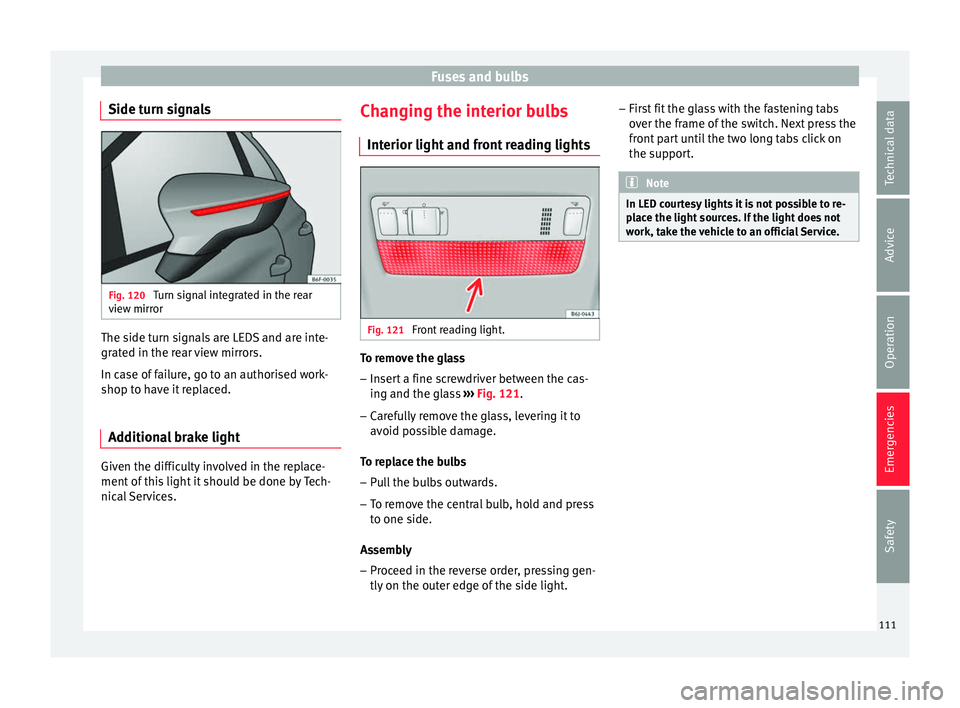
ont reading lights Fig. 121
Front reading light. To remove the glass
– Insert a fine screwdriver between the cas-
ing and the gl
a
ss ››› Fig. 121.
– Carefully remove the glass, levering it to
avoid pos
sible damage.
To replace the bulbs
– Pull the bulbs outwards.
– To remove the central bulb, hold and press
to one side.
As
sembly
– Proceed in the reverse order, pressing gen-
tly on the outer edg
e of the side light. –
First
fit the glass with the fastening tabs
over the frame of the switch. Next press the
front part until the two long tabs click on
the support. Note
In LED courtesy lights it is not possible to re-
pl ac
e the light sources. If the light does not
work, take the vehicle to an official Service. 111
Technical data
Advice
Operation
Emergencies
Safety
Page 152 of 316
Operation
could otherwise freeze on the windscreen and
ob
s
cure your view of the road.
● Always note the corresponding warnings
›››
page 73. WARNING
The rain sensor* may not detect enough rain
t o sw it
ch on the wipers.
● If necessary, switch on the wipers manually
when water on the w
indscreen obstructs visi-
bility. CAUTION
In icy conditions, always check that the wind-
sc r
een wipers and the window wiper are not
frozen. If you switch on the windscreen wip-
ers when the wiper blades are frozen to the
windscreen, you could damage both the wip-
er blades and the wiper motor. Note
● The wiper s
and washers will work only
when the ignition is switched on.
● The heat output of the heated jets* is con-
trol
led automatically when the ignition is
switched on, depending upon the outside
temperature.
● In certain versions of vehicles with alarms,
the winds
creen wiper will only work in inter-
val/rain sensor mode when the ignition is on
and the bonnet closed. ●
When the inter v
al wipe function is on, the
intervals are directly proportional to the
speed. This way, the higher the vehicle speed
the shorter the intervals.
● If you stop the vehicle with the windscreen
wiper in pos
ition 1 or 2, it will automatically
change to a lower position speed. The set
speed will be resumed when the vehicle pulls
away.
● The windscreen will be wiped again after
appro
ximately five seconds once the “auto-
matic wash/wipe system” has been activa-
ted, provided the vehicle is moving (drip func-
tion). If you activate the wipers less than 3
seconds after the drip function, a new wash
sequence will begin without performing the
last wipe. For the “drip” function to work
again, you have to turn the ignition off and
then on again.
● Do not put stickers on the windscreen in
front of
the rain sensor*. This may cause sen-
sor disruption or faults.
● Depending on the version of the model,
when you en
gage reverse gear and with the
headlight wiper activated, this can start a
wipe. Rear view mirrors
Int erior mirr or It is dangerous to drive if you cannot see
c
le
arly through the rear window. Interior mirror with automatic anti-dazzle
function*
The anti-d
azzle function is activated every
time the ignition is switched on.
When the anti-dazzle function is enabled, the
interior rear vision mirror will darken auto-
matically according to the amount of light it
receives. The anti-dazzle function is cancel-
led if reverse gear is engaged. Note
● The autom atic
anti-dazzle function will only
work properly if the sun blind* for the rear
window is retracted and there are no other
objects preventing light from reaching the in-
terior rear vision mirror.
● If you have to stick any type of sticker on
the winds
creen, do not do so in front of the
sensors. Doing so could prevent the anti-daz-
zle function from working well or even from
working at all. Folding in the exterior mirrors man-
ua
l
ly The exterior mirrors of the vehicle may be fol-
ded in. F
or thi
s, pr
ess the mirror housing to-
wards the vehicle.
150
Page 153 of 316
Lights and visibility
Note
Before washing the vehicle with an automatic
car w a
sh, fold in the exterior mirrors to avoid
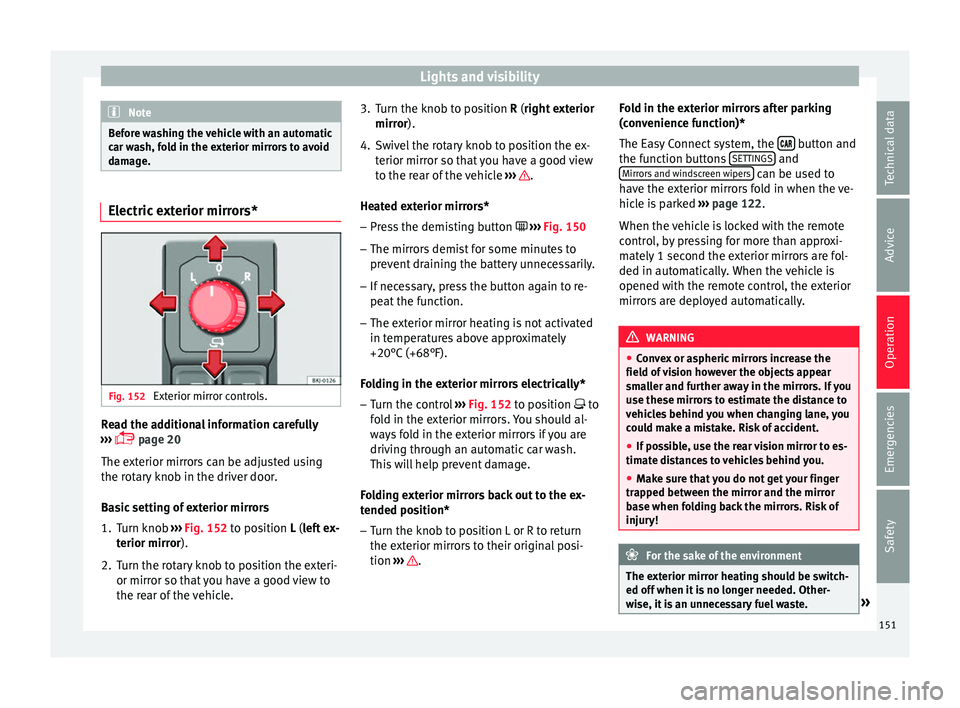
damage. Electric exterior mirrors*
Fig. 152
Exterior mirror controls. Read the additional information carefully
› ›
›
page 20
The exterior mirrors can be adjusted using
the rotary knob in the driver door.
Basic setting of exterior mirrors
1. Turn knob ›››
Fig. 152 to position L (left ex-
terior mirror).
2. Turn the rotary knob to position the exteri- or mirror so that
you have a good view to
the rear of the vehicle. 3. Turn the knob to position R (right ext
erior
mirror).
4. Swivel the rotary knob to position the ex- terior mirror so th
at you have a good view
to the rear of the vehicle ››› .
He at
ed e
xterior mirrors*
– Press the demisting button ›››
Fig. 150
– The mirrors demist for some minutes to
prevent
draining the battery unnecessarily.
– If necessary, press the button again to re-
peat the f
unction.
– The exterior mirror heating is not activated
in temperat
ures above approximately
+20°C (+68°F).
Folding in the exterior mirrors electrically* – Turn the control ›››
Fig. 152 to position to
fold in the exterior mirrors. You should al-
ways fold in the exterior mirrors if you are
driving through an automatic car wash.
This will help prevent damage.
Folding exterior mirrors back out to the ex-
tended position* – Turn the knob to position L or R to return
the exterior mirr
ors to their original posi-
tion ››› .Fold in the exterior mirrors after parking
(c
on v
enience function)*
The Easy Connect system, the button and
the f u
nction b
uttons SETTINGS and
Mirr or
s
and windscreen wipers can be used to
h av
e the e
xterior mirrors fold in when the ve-
hicle is parked ››› page 122.
When the vehicle is locked with the remote
control, by pressing for more than approxi-
mately 1 second the exterior mirrors are fol-
ded in automatically. When the vehicle is
opened with the remote control, the exterior
mirrors are deployed automatically. WARNING
● Con v
ex or aspheric mirrors increase the
field of vision however the objects appear
smaller and further away in the mirrors. If you
use these mirrors to estimate the distance to
vehicles behind you when changing lane, you
could make a mistake. Risk of accident.
● If possible, use the rear vision mirror to es-
timate di
stances to vehicles behind you.
● Make sure that you do not get your finger
trapped betw
een the mirror and the mirror
base when folding back the mirrors. Risk of
injury! For the sake of the environment
The exterior mirror heating should be switch-
ed off when it i
s no longer needed. Other-
wise, it is an unnecessary fuel waste. » 151
Technical data
Advice
Operation
Emergencies
Safety
Page 226 of 316
Operation
Blind spot detector (BSD) with
p ark
in
g assistance (RCTA)*
Introduction The blind spot detector (BSD) helps to detect
the traffic
s
ituation behind the vehicle.
The integrated parking assistant (RCTA) helps
the driver when backing out of a parallel
parking spot and in manoeuvring.
The blind spot detector has been developed
for driving on paved roads. WARNING
The smart technology incorporated into the
blind s pot
detector (BSD) with parking assis-
tance (RCTA) included cannot overcome the
limits imposed by the laws of physics; it only
works within the limits of the system. Acci-
dents and severe injury may occur if the blind
spot detection system or the rear cross traffic
alert are used negligently or involuntarily.
The system is not a replacement for driver
awareness.
● Adapt your speed and safe distance to the
vehicl
e in front of you at all times to suit visi-
bility, weather, road and traffic conditions.
● Keep your hands on the wheel at all times
to be re
ady to intervene in the steering at any
time.
● Pay attention to the control lamps that may
come on in the ext
ernal rear view mirrors and on the instrument panel, and follow any in-
struction
s
they may give.
● The blind spot assistant could react to any
speci
al constructions that might be present
on the sides of the vehicle: e.g. high or irreg-
ular dividers. This may cause erroneous warn-
ings.
● Never use the blind spot detector with rear
cro
ss traffic alert on unpaved roads. The blind
spot detector with rear cross traffic alert has
been designed for use on paved roads.
● Always pay attention to the vehicle's sur-
roundin
gs.
● Never use the blind spot detector or the
parkin
g assistant if the radar sensors are
dirty.
● The external rear view mirror control lamps
may
have limited functionality due to solar
radiation. CAUTION
● The ra d
ar sensors on the rear bumper may
be damaged or shifted in the event of a colli-
sion, for example, when entering or exiting a
parking space. This may result in the system
disconnecting itself, or at least possibly hav-
ing its functionality diminished.
● In order to ensure that the radar sensors
work pr
operly, keep the rear bumper free of
snow and ice and do not cover it.
● The rear bumper should only be painted
with paint
authorised by SEAT. The blind spot detector's functions may be limited or work
incorr
ectly
if other paints are used. Note
If the blind spot detector with parking assis-
t ant doe
s not work as described in this chap-
ter, do not use it and contact a specialised
workshop. Control lamps
Control lamp in external rear view mirrors:
Lights up
Lights up once briefly: the blind spot detector is activa-
ted and ready to operate.
Lights up: blind spot detector has detected a vehicle in
the blind spot.
Flashes
The blind spot detector has detected a vehicle in the
blind spot and the turn signal has been turned on in the
direction of the detected vehicle
›››
. Some warning and control lamps will light up
briefly
when the ignition i
s
switched on to
check certain functions. They will switch off
after a few seconds.
If there are no indications from the control
lamp in the external rear view mirror, this
224
Page 227 of 316
Driver assistance systems
means that the blind spot detector has not
det ect
ed an
y other vehicles in the area ››› .
If the dip
ped be
am is on, then the control
lamps in the external rear view mirrors will be
dimmed (night mode). WARNING
If the warning lamps and the corresponding
mes s
ages are ignored when they light up, the
vehicle may stall in traffic and cause acci-
dents and severe injuries.
● Never ignore the warning lamps or messag-
es.
● Carr
y out the necessary operations. CAUTION
Failure to heed the control lamps and corre-
spondin g t
ext messages when they light up
may result in damage to the vehicle. Blind spot detector (BSD)
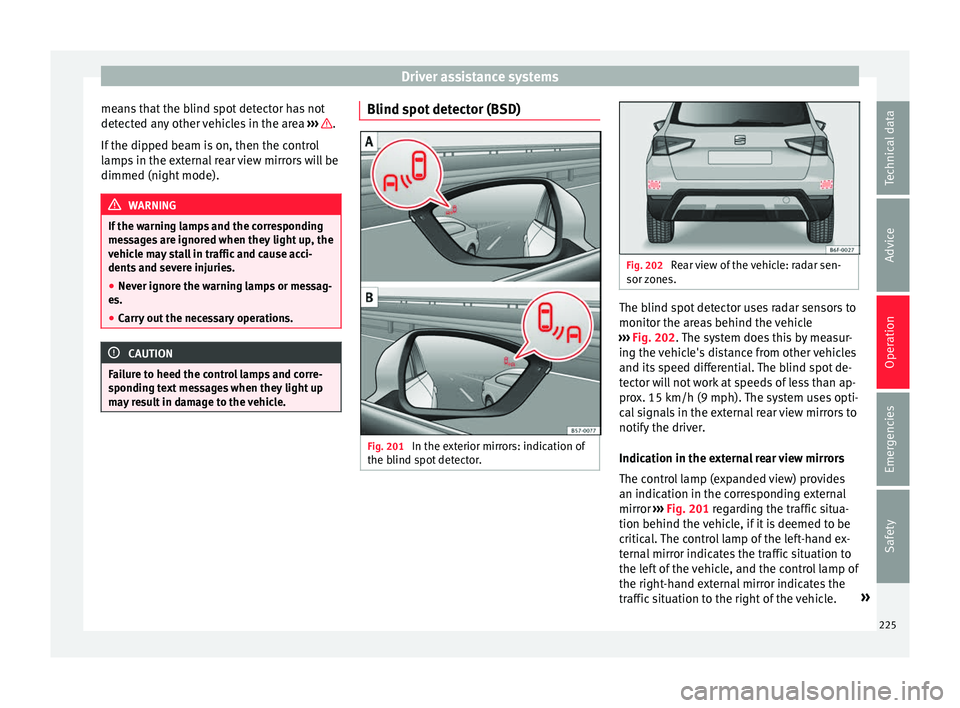
Fig. 201
In the exterior mirrors: indication of
the b lind s
pot
detector. Fig. 202
Rear view of the vehicle: radar sen-
sor z one
s. The blind spot detector uses radar sensors to
monit
or the ar
e
as behind the vehicle
››› Fig. 202. The system does this by measur-
ing the vehicle's distance from other vehicles
and its speed differential. The blind spot de-
tector will not work at speeds of less than ap-
prox. 15 km/h (9 mph). The system uses opti-
cal signals in the external rear view mirrors to
notify the driver.
Indication in the external rear view mirrors
The control lamp (expanded view) provides
an indication in the corresponding external
mirror ››› Fig. 201 regarding the traffic situa-
tion behind the vehicle, if it is deemed to be
critical. The control lamp of the left-hand ex-
ternal mirror indicates the traffic situation to
the left of the vehicle, and the control lamp of
the right-hand external mirror indicates the
traffic situation to the right of the vehicle. »
225
Technical data
Advice
Operation
Emergencies
Safety
Page 250 of 316
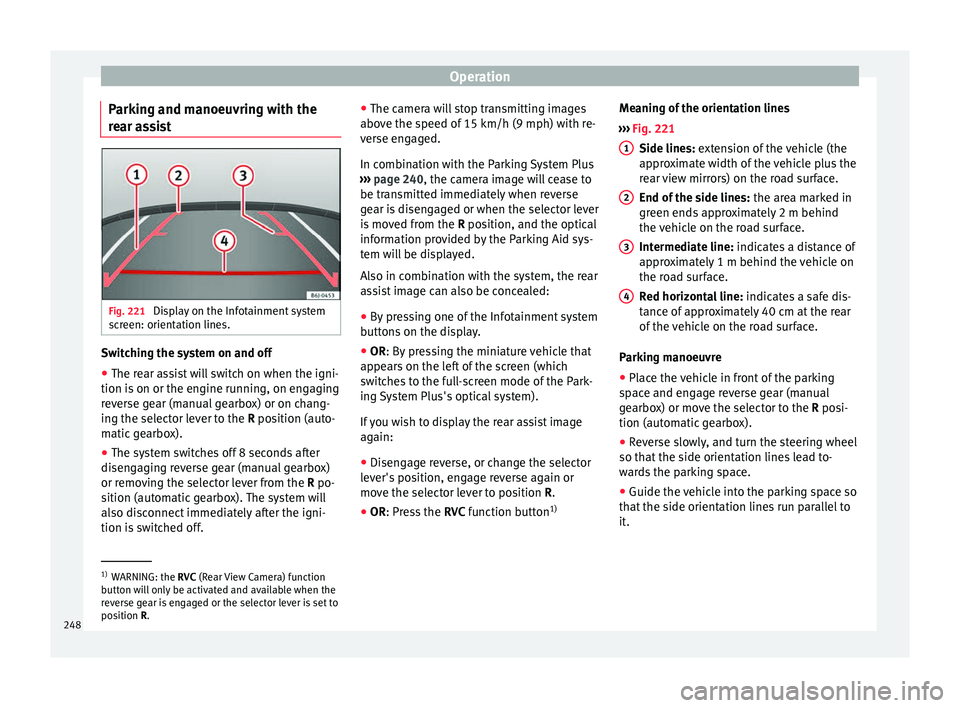
Operation
Parking and manoeuvring with the
r e
ar a
ssist Fig. 221
Display on the Infotainment system
s c
r
een: orientation lines. Switching the system on and off
●
The rear assist will switch on when the igni-
tion i s
on or the en
gine running, on engaging
reverse gear (manual gearbox) or on chang-
ing the selector lever to the R position (auto-
matic gearbox).
● The system switches off 8 seconds after
diseng
aging reverse gear (manual gearbox)
or removing the selector lever from the R po-
sition (automatic gearbox). The system will
also disconnect immediately after the igni-
tion is switched off. ●
The camera w
ill stop transmitting images
above the speed of 15 km/h (9 mph) with re-
verse engaged.
In combination with the Parking System Plus
››› page 240, the camera image will cease to
be transmitted immediately when reverse
gear is disengaged or when the selector lever
is moved from the R position, and the optical
information provided by the Parking Aid sys-
tem will be displayed.
Also in combination with the system, the rear
assist image can also be concealed:
● By pressing one of the Infotainment system
button
s on the display.
● OR: By pressing the miniature vehicle that
appe
ars on the left of the screen (which
switches to the full-screen mode of the Park-
ing System Plus's optical system).
If you wish to display the rear assist image
again:
● Disengage reverse, or change the selector
lever's
position, engage reverse again or
move the selector lever to position R.
● OR: Press the RVC fu
nction button1)Meaning of the orientation lines
›››
Fig. 221
Side lines: extension of the vehicle (the
approximate width of the vehicle plus the
rear view mirrors) on the road surface.
End of the side lines: the area marked in
green ends approximately 2 m behind
the vehicle on the road surface.
Intermediate line: indicates a distance of
approximately 1 m behind the vehicle on
the road surface.
Red horizontal line: indicates a safe dis-
tance of approximately 40 cm at the rear
of the vehicle on the road surface.
Parking manoeuvre
● Place the vehicle in front of the parking
spac
e and engage reverse gear (manual
gearbox) or move the selector to the R posi-
tion (automatic gearbox).
● Reverse slowly, and turn the steering wheel
so that the s
ide orientation lines lead to-
wards the parking space.
● Guide the vehicle into the parking space so
that the s
ide orientation lines run parallel to
it. 1
2
3
4
1)
WARNING: the RVC (Rear
View Camera) function
button will only be activated and available when the
reverse gear is engaged or the selector lever is set to
position R.
248
Page 263 of 316
Care and maintenance
WARNING
● Car -c
are products can be toxic. Because of
this, they must always be kept closed in their
original container. Keep them out of the reach
of children. Failure to comply could result in
poisoning.
● Always read and observe the instructions
and warning
s on the package before using
car-care products. Improper use could cause
health problems or damage the vehicle. The
use of certain products may produce noxious
vapours; they should be used in well ventila-
ted areas.
● Never use fuel, turpentine, engine oil, nail
varnish r
emover or other volatile fluids.
These are toxic and highly flammable. Risk of
fire and explosion.
● Before washing your vehicle, or carrying
out any
maintenance, switch the engine off,
apply the handbrake firmly and remove the
key from the ignition. CAUTION
Never attempt to remove dirt, mud or dust if
the sur f
ace of the vehicle is dry. Never use a
dry cloth or sponge for cleaning purposes.
This could damage the paintwork or the win-
dows of your vehicle. Soak dirt, mud or dust
with plenty of water. For the sake of the environment
● When pur c
hasing car care products, try to
select ones that are not harmful to the envi-
ronment.
● The waste from car-care products should
not be dis
posed of with ordinary household
waste. Observe the disposal information on
the package. Care of the vehicle exterior
Autom atic
car wash tunnel The vehicle paintwork is so durable that the
v
ehic
l
e can normally be washed without
problems in an automatic car wash tunnel.
However, the paintwork wear depends to a
large extent on the kind of the car wash tun-
nel, the brushes used, its water filtering and
the type of cleaning and preservative prod-
ucts.
Before going through a car wash, be sure to
take the usual precautions (close the win-
dows and rear-view mirrors). There is nothing
to note apart from that.
If the vehicle has special accessories such as
spoilers or a roof rack or two-way radio aerial,
etc., it is advisable to consult the car wash
tunnel operator first. After washing, the brake
s could take some
time to respond as the brake discs and pads
could be wet, or even frozen in winter. “Dry”
the brakes by braking several times. WARNING
Water, ice and salt on the brake system can
reduc e br
aking effectiveness. Risk of acci-
dent. Hand-washing
Vehicle washing
– First soften the dirt and rinse it off with wa-
ter
.
– C
lean your vehicle from top to bottom with
a soft s
ponge, a glove or a brush. Use very
light pressure.
– Rinse the sponge or glove often with clean
water
.
– Special car shampoo should only be used
for v
ery stubborn dirt.
– Leave the wheels, sill panels etc. until last,
usin
g a different sponge or glove.
– Rinse the vehicle thoroughly with water.
– Dry the vehicle surface gently with a cha-
mois l
eather.
– In cold temperature, dry the rubber seals
and their sur
faces to prevent them from »
261
Technical data
Advice
Operation
Emergencies
Safety