air condition Seat Ateca 2016 User Guide
[x] Cancel search | Manufacturer: SEAT, Model Year: 2016, Model line: Ateca, Model: Seat Ateca 2016Pages: 328, PDF Size: 6.32 MB
Page 93 of 328
Fuses and bulbs
●
Nev er u
se a fuse with a higher value. Only
replace fuses with a fuse of the same amper-
age (same colour and markings) and size.
● Never repair a fuse.
● Never replace a fuse by a metal strip, staple
or simi
lar. CAUTION
● To pr
event damage to the vehicle's electric
system, before replacing a fuse always turn
off the ignition, the lights and all electrical
elements and remove the key from the igni-
tion.
● If you replace a fuse with higher-rating
fu
se, you could cause damage to another part
of the electrical system.
● Protect the fuse boxes when open to pre-
vent
the entry of dust or humidity as they can
damage the electrical system. Note
● One c omponent
may have more than one
fuse.
● Several components may run on a single
fu
se. Vehicle fuses
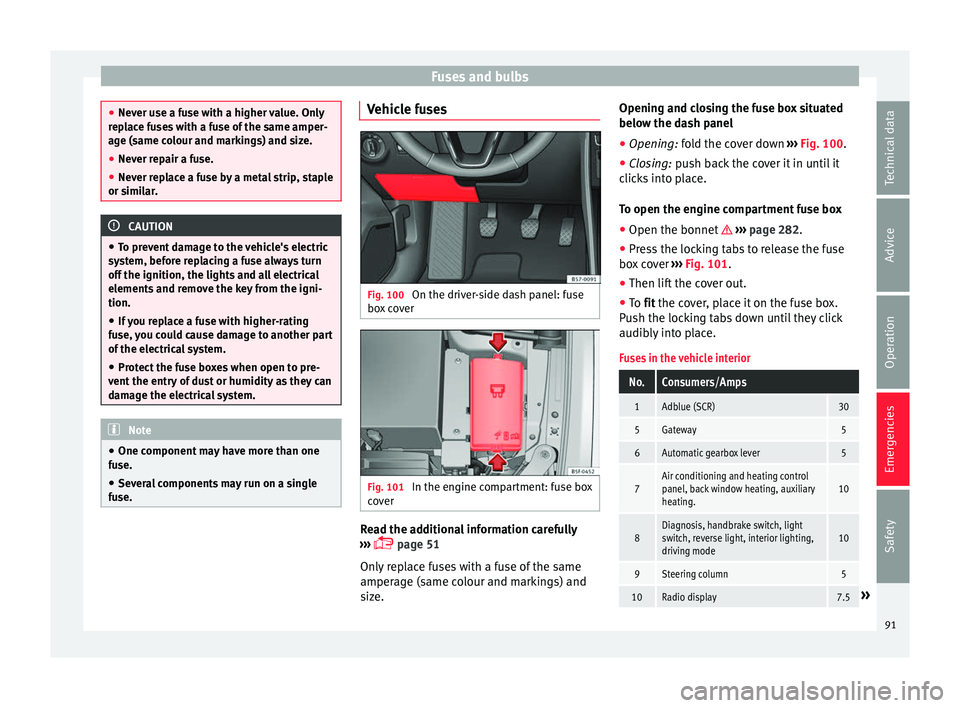
Fig. 100
On the driver-side dash panel: fuse
bo x
cover Fig. 101
In the engine compartment: fuse box
c o
ver Read the additional information carefully
› ›
› page 51
Only replace fuses with a fuse of the same
amperage (same colour and markings) and
size. Opening and closing the fuse box situated
below the d
ash panel
● Opening: fold the cover down ›
›› Fig. 100.
● Closing: push back the cover it in until it
c
licks into place.
To open the engine compartment fuse box
● Open the bonnet ››
› page 282.
● Press the locking tabs to release the fuse
box
cover ››› Fig. 101.
● Then lift the cover out.
● To fit the cover, place it on the fuse box.
P
ush the locking tabs down until they click
audibly into place.
Fuses in the vehicle interior
No.Consumers/Amps
1Adblue (SCR)30
5Gateway5
6Automatic gearbox lever5
7Air conditioning and heating control
panel, back window heating, auxiliary
heating.10
8Diagnosis, handbrake switch, light
switch, reverse light, interior lighting,
driving mode10
9Steering column5
10Radio display7.5» 91
Technical data
Advice
Operation
Emergencies
Safety
Page 94 of 328
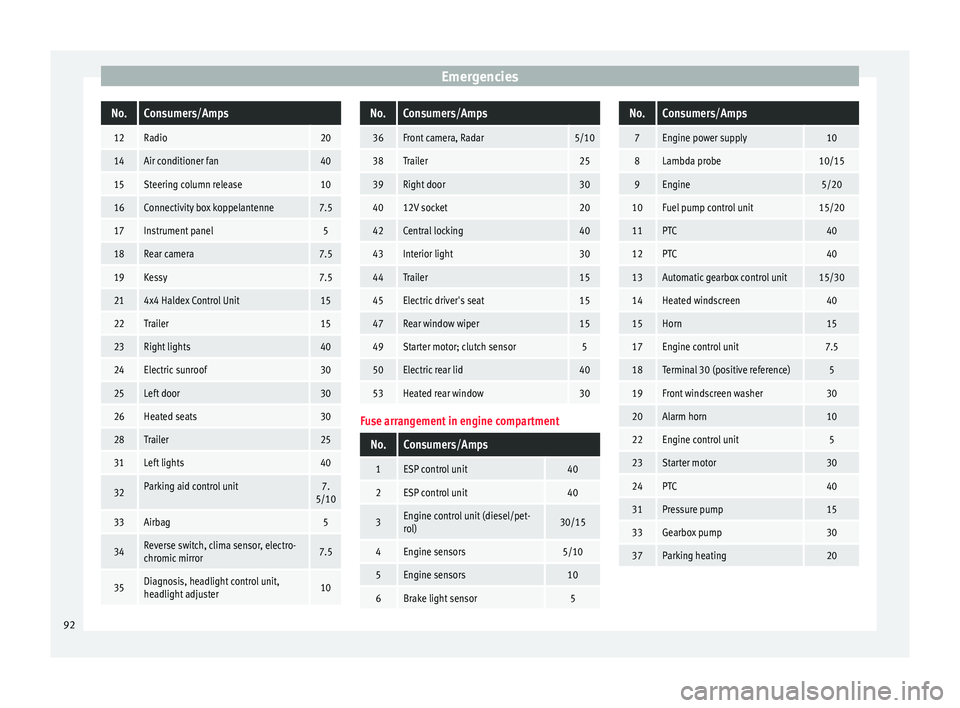
EmergenciesNo.Consumers/Amps
12Radio20
14Air conditioner fan40
15Steering column release10
16Connectivity box koppelantenne7.5
17Instrument panel5
18Rear camera7.5
19Kessy7.5
214x4 Haldex Control Unit15
22Trailer15
23Right lights40
24Electric sunroof30
25Left door30
26Heated seats30
28Trailer25
31Left lights40
32Parking aid control unit7.
5/10
33Airbag5
34Reverse switch, clima sensor, electro-
chromic mirror7.5
35Diagnosis, headlight control unit,
headlight adjuster10
No.Consumers/Amps
36Front camera, Radar5/10
38Trailer25
39Right door30
4012V socket20
42Central locking40
43Interior light30
44Trailer15
45Electric driver's seat15
47Rear window wiper15
49Starter motor; clutch sensor5
50Electric rear lid40
53Heated rear window30
Fuse arrangement in engine compartment
No.Consumers/Amps
1ESP control unit40
2ESP control unit40
3Engine control unit (diesel/pet-
rol)30/15
4Engine sensors5/10
5Engine sensors10
6Brake light sensor5
No.Consumers/Amps
7Engine power supply10
8Lambda probe10/15
9Engine5/20
10Fuel pump control unit15/20
11PTC40
12PTC40
13Automatic gearbox control unit15/30
14Heated windscreen40
15Horn15
17Engine control unit7.5
18Terminal 30 (positive reference)5
19Front windscreen washer30
20Alarm horn10
22Engine control unit5
23Starter motor30
24PTC40
31Pressure pump15
33Gearbox pump30
37Parking heating20 92
Page 103 of 328
Controls and displays
Operation
C ontr
ols and displays
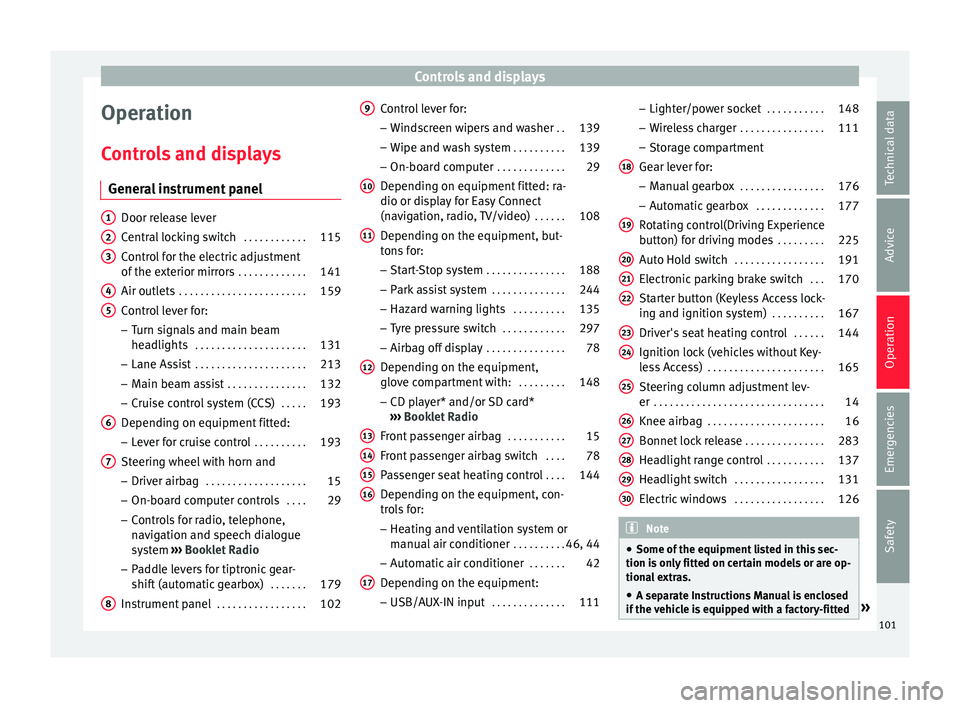
General instrument panel Door release lever
C
entr
al locking switch . . . . . . . . . . . .115
Control for the electric adjustment
of the e
xterior mirrors . . . . . . . . . . . . . 141
Air outlets . . . . . . . . . . . . . . . . . . . . . . . . 159
Control lever for:
– Turn s
ignals and main beam
headlights . . . . . . . . . . . . . . . . . . . . . 131
– Lane As s
ist . . . . . . . . . . . . . . . . . . . . . 213
– Main be
am assist . . . . . . . . . . . . . . . 132
– Crui
se control system (CCS) . . . . .193
Depending on equipment fitted:
– Lev
er for cruise control . . . . . . . . . .193
Steering wheel with horn and – Driver airb
ag . . . . . . . . . . . . . . . . . . . 15
– On-bo ar
d computer controls . . . .29
– Contr
ols for radio, telephone,
navigation and speech dialogue
system ›››
Booklet Radio
– Paddle levers for tiptronic gear-
shift (automatic gearbox) . . . . . . .179
Instrument panel . . . . . . . . . . . . . . . . . 102
1 2
3
4
5
6
7
8 Control lever for:
– Wind
screen wipers and washer . .139
– Wipe and w
ash system . . . . . . . . . . 139
– On-boar
d computer . . . . . . . . . . . . . 29
Depending on equipment fitted: ra-
dio or dis
play for Easy Connect
(navigation, radio, TV/video) . . . . . .108
Depending on the equipment, but-
ton
s for:
– Start-Stop system . . . . . . . . . . . . . . . 188
– Park
assist system . . . . . . . . . . . . . . 244
– Hazar
d warning lights . . . . . . . . . .135
– Ty
re pressure switch . . . . . . . . . . . .297
– Airbag off
display . . . . . . . . . . . . . . . 78
Depending on the equipment,
glo v
e compartment with: . . . . . . . . .148
– CD p l
ayer* and/or SD card*
››› Booklet Radio
Front passenger airbag . . . . . . . . . . .15
Front passenger airbag switch . . . .78
Passenger seat heating control . . . .144
Depending on the equipment, con-
tr o
ls for:
– Heating and ventilation system or
manual air conditioner . . . . . . . . . .46, 44
– Aut om
atic air conditioner . . . . . . .42
Depending on the equipment:
– USB/A UX
-IN input . . . . . . . . . . . . . . 111
9
10
11
12
13
14
15
16
17 –
Light er/po
wer socket . . . . . . . . . . . 148
– Wir
eless charger . . . . . . . . . . . . . . . . 111
– Stor
age compartment
Gear lever for: – Manual gearbox . . . . . . . . . . . . . . . . 176
– Autom
atic gearbox . . . . . . . . . . . . . 177
Rotating control(Driving Experience
butt
on) for driving modes . . . . . . . . .225
Auto Hold switch . . . . . . . . . . . . . . . . . 191
Electronic parking brake switch . . .170
Starter button (Keyless Access lock-
ing and ignition sy
stem) . . . . . . . . . . 167
Driver's seat heating control . . . . . .144
Ignition lock (vehicles without Key-
le
ss Access) . . . . . . . . . . . . . . . . . . . . . . 165
Steering column adjustment lev-
er . . . . . . . . . . . . . . . . . . . . . . . . . . . . . . . . 14
Knee airbag . . . . . . . . . . . . . . . . . . . . . . 16
Bonnet lock release . . . . . . . . . . . . . . .283
Headlight range control . . . . . . . . . . .137
Headlight switch . . . . . . . . . . . . . . . . . 131
Electric windows . . . . . . . . . . . . . . . . . 126 Note
● Some of the equipment
listed in this sec-
tion is only fitted on certain models or are op-
tional extras.
● A separate Instructions Manual is enclosed
if the
vehicle is equipped with a factory-fitted » 18
19
20
21
22
23
24
25
26
27
28
29
30
101
Technical data
Advice
Operation
Emergencies
Safety
Page 141 of 328
Lights and visibility
Note
The light above the sun visor automatically
sw it
ches off after a few minutes in certain
conditions. This prevents the battery from
discharging. Windscreen wiper and window
w
iper sy
stems
Window wiper lever Read the additional information carefully
› ›
› page 25 CAUTION
If the ignition is switched off with the wind-
s c
reen wipers active, they complete their
wipe before returning to the rest position.
When switching the ignition back on, the
windscreen wiper will continue to operate at
the same wiping level. Ice, snow and other
obstacles on the windscreen may damage the
wiper and the windscreen wiper motor.
● If necessary, remove snow and ice from the
wind
screen wipers before starting your jour-
ney.
● Carefully lift the frozen windscreen wipers
from the gl
ass. SEAT recommends a de-icer
spray for this operation.
● Do not switch on the windscreen wipers if
the wind
screen is dry. Cleaning with the windscreen wipers while dry can cause dam-
ag
e.
● In icy
conditions, always check that the
wiper b
lades are not frozen to the glass be-
fore using the wipers. In cold weather, it may
help to leave the vehicle parked with the wip-
ers in service position ›››
page 60. Note
● The w ind
screen and window wipers only
function when the ignition is switched on and
the bonnet or rear lid, respectively, are
closed.
● The interval wipe speed varies according to
the v
ehicle speed. The faster the vehicle is
moving, the more often the windscreen is
cleaned.
● The rear wiper is automatically switched on
when the wind
screen wiper is on and the car
is in reverse gear. Windscreen wiper functions
Windscreen wiper performance in different sit-
uations
If the vehicle is at a
standstillThe activated position provision-
ally changes to the previous posi-
tion.
Windscreen wiper performance in different sit-
uations
During automatic
wipe
The air conditioner comes on for
approximately 30 seconds in air
recirculation mode to prevent the
smell of the windscreen washer
fluid entering the inside the vehi-
cle.
For the interval wipe
Intervals between wipes depend
on the vehicle's speed. The high-
er the vehicle speed the shorter
the intervals. Heated windscreen washer jets
The he
atin
g only thaws the frozen jets, it
does not thaw the water in the washer hoses.
When the ignition is switched on the heated
windscreen washer jets automatically adjust
the heat depending on the ambient tempera-
ture.
Headlight wash/wipe system
The headlight washers/wipers clean the
headlight lenses.
After the ignition is switched on, the first and
every fifth time the windscreen washer is
switched on, the headlights are also washed.
Therefore, the windscreen wiper lever should
be pulled towards the steering wheel when
the dipped beam or main beam are on. Any
incrusted dirt (such as insects) should be
cleaned regularly (e.g. when refuelling). »
139
Technical data
Advice
Operation
Emergencies
Safety
Page 156 of 328
Operation
Variable floor in the tilted position
When the v
ariable floor is tilted you can ac-
cess the spare wheel/anti-puncture kit area.
● Lift the variable floor using handle
››
› Fig. 158 1 and pull it back until the front
of the floor h
as fully passed the tilted
grooves ››› Fig. 159 3 .
● Pass the floor through these slots using the
h andl
e 1 , pushing until the movable front of
the v
ariable floor folds and rests on the floor
itself.
Variable floor with folded seats
● Lift the variable floor by the handle
››
› Fig. 158 1 and pull it back a little.
● Push the variable floor towards the folded
r e
ar seats with the handle 1 using some
do wn
ward pressure so that the moving part
of the floor is flush with the backs of the rear
seats. WARNING
During a sudden driving or braking manoeu-
vr e, or in the ev
ent of an accident, objects
could be flung though the interior and cause
serious or fatal injuries.
● Always secure objects, even when the lug-
gag
e compartment floor is properly lifted.
● Only objects that do not protrude more
than 2/3 the height
of the floor may be car- ried between the rear seat and the raised lug-
g
ag
e compartment floor.
● Only objects that do not weigh than ap-
pro
ximately 7.5 kg may be carried between
the rear seat and the raised luggage compart-
ment floor. CAUTION
● The m ax
imum weight that can be loaded on
the luggage compartment variable floor in
the top position is 150 kg.
● Do not let the luggage compartment floor
fa
ll when closing it. Always carefully guide it
downwards in a controlled manner. Other-
wise, the lining and the floor of the luggage
compartment could be damaged. Note
SEAT recommends the use of straps to secure
o b
jects to retaining rings. Roof carrier
Intr oduction The vehicle roof has been designed to opti-
mi
se aer
odynamics. For this reason, cross
bars or conventional roof carrier systems can-
not be secured to the roof water drains. As the roof water drains are integrated in the
roof
to reduce air resistance, only SEAT-ap-
proved cross bars and roof carrier systems
can be used.
Cases in which cross bars and the roof carri-
er system should be disassembled.
● When they are not used.
● When the vehicle is washed in a car wash.
● When the vehicle height exceeds the maxi-
mum height, for e
xample, in some garages. WARNING
When heavy or bulky loads are transported
on the r oof
carrier system, car driving per-
formance is affected, as the centre of gravity
shifts and there is greater wind resistance.
● Always secure the load properly using belts
or ret
aining straps that are suitable and in a
good condition.
● Bulky, heavy, long or flat loads have a neg-
ative eff
ect on aerodynamics, the centre of
gravity and driving performance.
● Avoid sudden braking and manoeuvres.
● Adapt your speed and driving style at all
times
to suit visibility, weather, road and traf-
fic conditions. CAUTION
● Remo
ve the cross bars and the roof carrier
system before entering a car wash. 154
Page 157 of 328
Transport and practical equipment
●
Vehic
le height is increased by the installa-
tion of cross bars or a roof carrier system and
the load secured on them. For this purpose,
check that your vehicle's height does not sur-
pass the headspace limit, for example, for un-
derpasses or for entering garage doors.
● Cross bars, the roof carrier system and the
loa
d secured on them should not interfere
with the roof aerial or hamper the path of the
panoramic sun roof and the rear lid.
● On opening the rear lid make sure that it
does
not knock into the roof load. For the sake of the environment
When cross bars and a roof carrier system are
in s
talled, the increased air resistance means
that the vehicle uses more fuel. Attach the cross bars of the roof carri-
er sy
s
tem Fig. 160
Attachment points for the roof rail-
in g
s for the roof carrier system. The crossbars are the basis of a series of spe-
c
i
al roof carrier systems. For safety reasons,
special fixtures must be used to safely trans-
port luggage, bicycles, skis, surf boards or
boats on the roof. Suitable accessories can
be acquired at SEAT dealerships.
Always secure the crossbars and the roof car-
rier system properly. Always take the assem-
bly instructions that come with the crossbars
and the roof carrier system in question into
account.
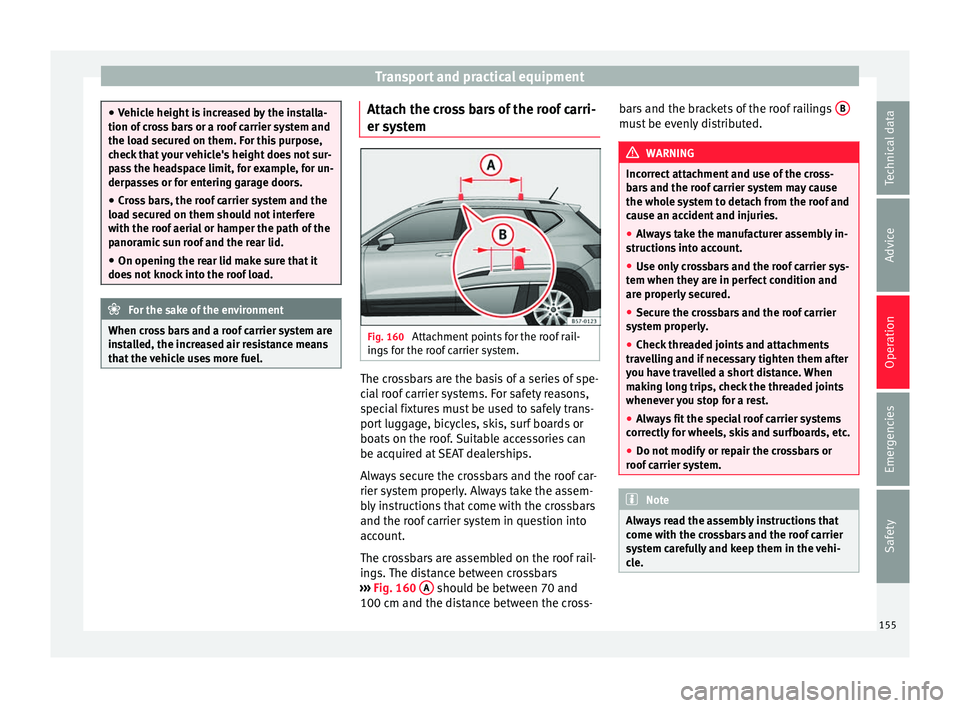
The crossbars are assembled on the roof rail-
ings. The distance between crossbars
››› Fig. 160 A should be between 70 and
100 c m and the di
stance between the cross- bars and the brackets of the roof railings
B must be evenly distributed.
WARNING
Incorrect attachment and use of the cross-
b ar
s and the roof carrier system may cause
the whole system to detach from the roof and
cause an accident and injuries.
● Always take the manufacturer assembly in-
struction
s into account.
● Use only crossbars and the roof carrier sys-
tem when they
are in perfect condition and
are properly secured.
● Secure the crossbars and the roof carrier
sys
tem properly.
● Check threaded joints and attachments
trav
elling and if necessary tighten them after
you have travelled a short distance. When
making long trips, check the threaded joints
whenever you stop for a rest.
● Always fit the special roof carrier systems
corr
ectly for wheels, skis and surfboards, etc.
● Do not modify or repair the crossbars or
roof
carrier system. Note
Always read the assembly instructions that
c ome w
ith the crossbars and the roof carrier
system carefully and keep them in the vehi-
cle. 155
Technical data
Advice
Operation
Emergencies
Safety
Page 158 of 328
Operation
Loading the roof carrier system The load can only be secured if the crossbars
and the r
oof
carrier system are properly in-
stalled ››› .
M ax
imum authorised roof load
The maximum permissible roof load is 75 kg.
This figure comes from the combined weight
of the roof carrier, the cross bars and the load
itself on the roof ››› .
A lw
ays check the weight of the roof carrier
system, the cross bars and the weight of the
load to be transported and weigh them if
necessary. Never exceed the maximum au-
thorised roof load.
If you are using cross bars and a roof carrier
with a lower weight rating, you will not be
able to carry the maximum authorised roof
load. In this case, do not exceed the maxi-
mum weight limit for the roof carrier which is
listed in the fitting instructions.
Distributing a load
Distribute loads uniformly and secure them
correctly ››› .
Chec k
attachments
Once the cross bars and roof carrier system
have been installed, check the bolted con-
nections and attachments after a short jour- ney and subsequently with a certain frequen-
cy. WARNING
Exceeding the maximum authorised roof load
c an r
esult in accidents and considerable vehi-
cle damage.
● Never exceed the maximum authorised
loa
d on the roof and on the axles or the vehi-
cle's maximum authorised weight.
● Never exceed the load capacity of the cross
bar
s and the roof carrier system, even if the
maximum authorised roof load has not been
reached.
● Secure heavy items as far forward as possi-
bl
e and distribute the vehicle load uniformly. WARNING
If the load is loose or not secured, it could fall
fr om the r
oof carrier system or cause acci-
dents and injuries.
● Always use belts or retaining straps that
are s
uitable and in a good condition.
● Secure the load properly. Air conditioning
He atin
g, ventilation and cool-
ing
Introduction Read the additional information carefully
› ›
› page 42
Viewing Climatronic information
On the screen of Climatronic control unit and
on the screen of the factory-fitted Easy Con-
nect system, the theoretical values of the
temperature zones are shown.
The unit of temperature measurement can be
changed in the Easy Connect system.
Dust and pollen filter
The dust and pollen filter with its activated
charcoal cartridge serves as a barrier against
impurities in the air taken into the vehicle in-
terior.
The dust and pollen filter must be changed
regularly so that air conditioner performance
is not adversely affected.
If the filter loses efficiency prematurely due
to use in areas with very high levels of air
pollution, the filter must be changed more
frequently than stated in the Service Sched-
ule.
156
Page 159 of 328
Air conditioning
WARNING
Reduced visibility through the windows in-
c r
eases the risk of serious accidents.
● Always ensure that all windows are free of
ice and s
now, and that they are not fogged,
so as to maintain good visibility of everything
outside.
● The maximum heat output required to de-
fro
st windows as quickly as possible is only
available when the engine has reached its
normal running temperature. Only drive when
you have good visibility.
● Always ensure that you use the heating
sys
tem, fresh air system, air conditioner and
the heated rear window to maintain good visi-
bility to the outside.
● Never leave the air recirculation on for a
long period of
time. If the cooling system is
switched off and air recirculation mode
switched on, the windows can mist over very
quickly, considerably limiting visibility.
● Switch air recirculation mode off when it is
not r
equired. WARNING
Stuffy or used air will increase fatigue and re-
duc e driv
er concentration possibly resulting
in a serious accident.
● Never leave the fresh air fan turned off or
use the air r
ecirculation for long periods of
time; the air in the vehicle interior will not be
refreshed. CAUTION
● To r
eplace the pollen filter, always visit a
service centre.
● Switch the air conditioner off if you think it
ma
y be broken. This will avoid additional
damage. Have the air conditioner checked by
a specialised workshop.
● Repairs to the air conditioner require spe-
ci
alist knowledge and special tools. SEAT rec-
ommends visiting a SEAT Official Service. Note
● When the c oo
ling system is turned off, air
coming from the outside will not be dried. To
prevent fogging of the windows, SEAT recom-
mends leaving the cooling system (compres-
sor) turned on. To do this, press the button . The button lamp should light up.
● The maximum heat output required to de-
fr o
st windows as quickly as possible is only
available when the engine has reached its
normal running temperature.
● Keep the air intake slots in front of the
wind
screen free of snow, ice and leaves to en-
sure heating and cooling are not impaired,
and to prevent the windows from misting
over. Adjust using the Easy Connect sys-
t
em* 3 Ap
plies to vehicles with a Touch/Colour Media
S
ystem.
In the Easy Connect system it is also possible
to perform various adjustments to the Clima-
tronic.
Open the air conditioner menu
● Press the Setup button.
● OR: pr ess the MENU button in Easy Con-
nect .
With the rotating switch select the air
conditioner menu and open it.
On the touch screen you can see and change
the current settings, for example, the temper-
ature set for the driver and passenger sides,
the air distribution and the fan speed. With
button the driver and passenger side
t emper
atures are synchronised ›››
Book-
let Media System Touch/Colour, chapter Air
conditioning.
To switch a function on or off, or to select a
submenu, you must press the corresponding
function button.
For more information about functions
››› page 108. »
157
Technical data
Advice
Operation
Emergencies
Safety
Page 160 of 328
OperationFunc-
tion
buttonFunction
OFFSwitch off and switch on the Climatronic.
SETUP
The air conditioning settings submenu is
opened. It is possible to make the following
adjustments:
Function button Air conditioning profile.
: to ad-
just the level of the fan in AUTO mode. You
can choose between low, medium and
high.
Function button Automatic air recirculation
to
switch on and off automatic air recircula-
tion ››› page 160.
BACK
function button to close the sub-
menu. Adjust using the Easy Connect sys-
t
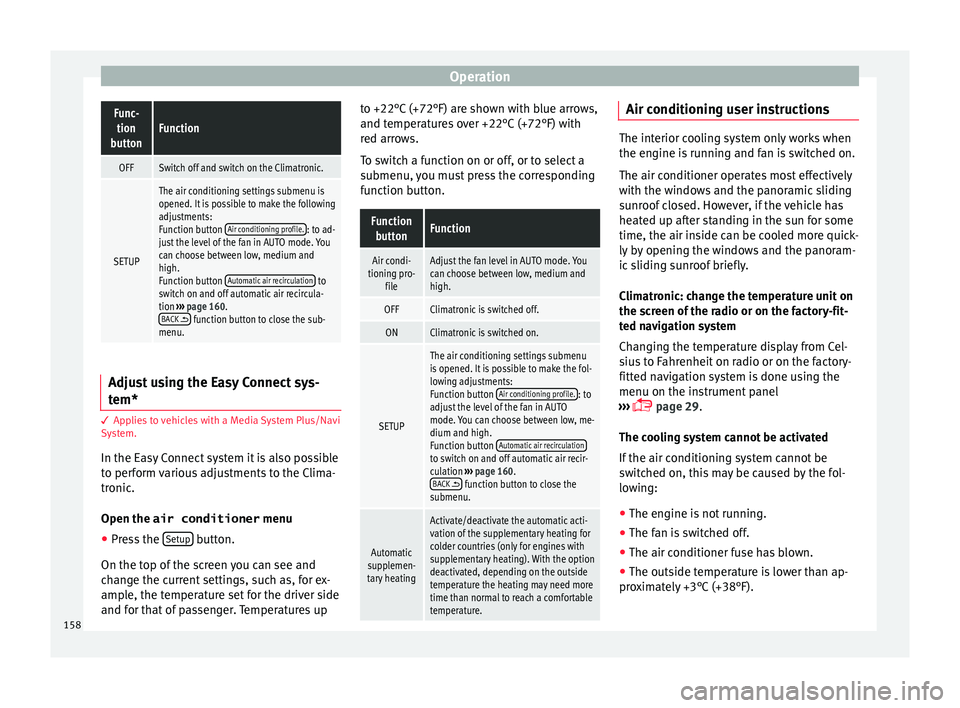
em* 3 Ap
p
lies to vehicles with a Media System Plus/Navi
System.
In the Easy Connect system it is also possible
to perform various adjustments to the Clima-
tronic.
Open the air conditioner menu
● Press the Set
up button.
On the t op of
the screen you can see and
change the current settings, such as, for ex-
ample, the temperature set for the driver side
and for that of passenger. Temperatures up to +22°C (+72°F) are shown with blue arrows,
and temper
atures over +22°C (+72°F) with
red arrows.
To switch a function on or off, or to select a
submenu, you must press the corresponding
function button.
Function buttonFunction
Air condi-
tioning pro- fileAdjust the fan level in AUTO mode. You
can choose between low, medium and
high.
OFFClimatronic is switched off.
ONClimatronic is switched on.
SETUP
The air conditioning settings submenu
is opened. It is possible to make the fol-
lowing adjustments:
Function button Air conditioning profile.
: to
adjust the level of the fan in AUTO
mode. You can choose between low, me-
dium and high.
Function button Automatic air recirculation
to switch on and off automatic air recir-
culation
››› page 160.
BACK
function button to close the
submenu.
Automatic
supplemen-
tary heating
Activate/deactivate the automatic acti-
vation of the supplementary heating for
colder countries (only for engines with
supplementary heating). With the option
deactivated, depending on the outside
temperature the heating may need more
time than normal to reach a comfortable
temperature. Air conditioning user instructions
The interior cooling system only works when
the en
gine i
s running and fan is switched on.
The air conditioner operates most effectively
with the windows and the panoramic sliding
sunroof closed. However, if the vehicle has
heated up after standing in the sun for some
time, the air inside can be cooled more quick-
ly by opening the windows and the panoram-
ic sliding sunroof briefly.
Climatronic: change the temperature unit on
the screen of the radio or on the factory-fit-
ted navigation system
Changing the temperature display from Cel-
sius to Fahrenheit on radio or on the factory-
fitted navigation system is done using the
menu on the instrument panel
››› page 29.
The cooling system cannot be activated
If the air conditioning system cannot be
switched on, this may be caused by the fol-
lowing: ● The engine is not running.
● The fan is switched off.
● The air conditioner fuse has blown.
● The outside temperature is lower than ap-
pr o
ximately +3°C (+38°F).
158
Page 161 of 328
Air conditioning
● The air c onditioner c
ompressor has been
temporarily switched off because the engine
coolant temperature is too high.
● Another fault in the vehicle. Have the air
conditioner c
hecked by a specialised work-
shop. Special Characteristics
If the humidity
and temperature outside the
vehicle are high, condensation can drip off
the evaporator in the cooling system and
form a pool underneath the vehicle. This is
normal and does not indicate a leak! Note
After starting the engine, any residual humid-
ity in the air c
onditioner could mist over the
windscreen. Switch on the defrost function as
soon as possible to clear the windscreen of
condensation. Air outlets
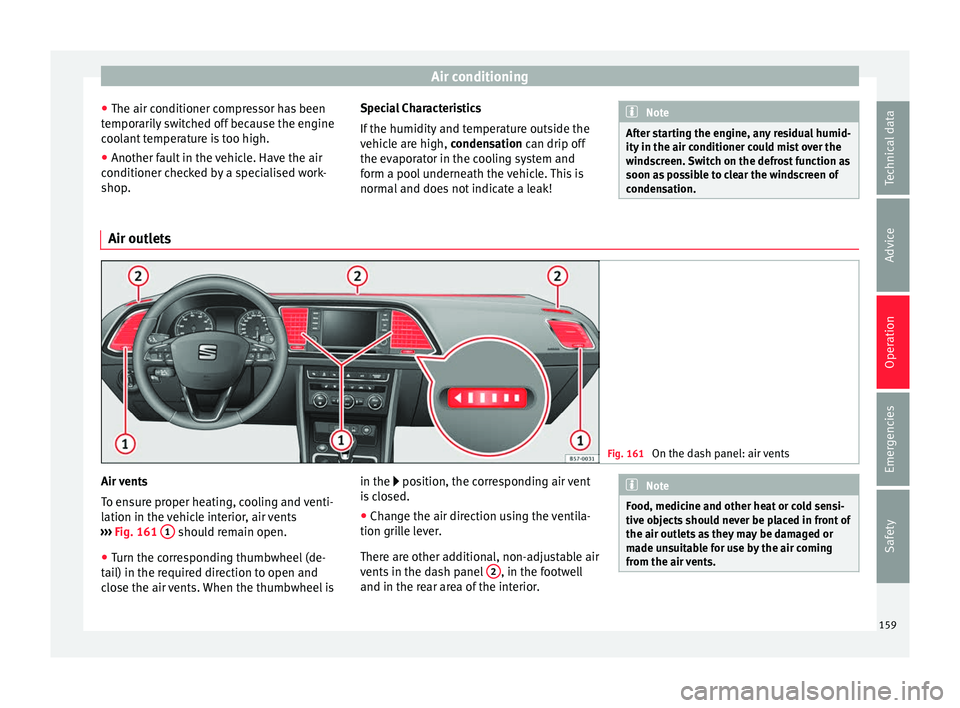
Fig. 161
On the dash panel: air vents Air vents
T
o en
sure proper heating, cooling and venti-
lation in the vehicle interior, air vents
››› Fig. 161 1 should remain open.
● Turn the corresponding thumbwheel (de-
t ai
l) in the required direction to open and
close the air vents. When the thumbwheel is in the position, the corresponding air vent
i
s closed.
● Change the air direction using the ventila-
tion gril
le lever.
There are other additional, non-adjustable air
vents in the dash panel 2 , in the footwell
and in the r e
ar area of the interior. Note
Food, medicine and other heat or cold sensi-
tiv e o
bjects should never be placed in front of
the air outlets as they may be damaged or
made unsuitable for use by the air coming
from the air vents. 159
Technical data
Advice
Operation
Emergencies
Safety