steering Seat Ateca 2016 User Guide
[x] Cancel search | Manufacturer: SEAT, Model Year: 2016, Model line: Ateca, Model: Seat Ateca 2016Pages: 328, PDF Size: 6.32 MB
Page 38 of 328
The essentials
the display mode changes. A clock symbol
ap pe
ars and the number of days until the
next service is due.
Vehicles with text messages : Service in
--- km or --- days will be shown on the
instrument panel display.
Service due
When the service date is due , an audible
warning is given when the ignition is switch-
ed on and the spanner displayed on the
screen flashes for a few seconds .
Vehicles with text messages : Service now
will be shown on the instrument panel dis-
play.
Reading a service notification
With the ignition switched on, the engine off
and the vehicle at a standstill, the current
service notification can be read:
Press and hold the button ›››
Fig. 115
4 for more than 5 seconds to consult the serv-
ic
e me
ssage.
When the service date has passed , a minus
sign is displayed in front of the number of kil-
ometres or days.
Vehicles with text messages : the following
message is displayed: Service --- km
(miles) or --- days ago .The time can also be set via the
key and
Set up function button in the Easy Connect
sy s
tem ›››
page 108.
Resetting service interval display
If the service was not carried out by a SEAT
dealership, the display can be reset as fol-
lows: ● Switch off the ignition, press and hold but-
ton ›
›› Fig. 115
4 .
● Switch ignition back on.
● Release THE 4
› ›
›
Fig. 115 button and
press it again for the next 20 seconds. Note
● The ser v
ice message disappears after a few
seconds, when the engine is started or when OK/RESET is pressed on the windscreen wiper
l ev
er, or OK on the multifunction steering
wheel .
● In
vehicles with the LongLife system in
which the b
attery has been disconnected for
a long period of time, it is not possible to cal-
culate the date of the next service. Therefore
the service interval display may not be cor- rect. In this case, bear in mind the maximum
service intervals permitted in the ››› Book-
let Maintenance Programme.
● If you reset the display manually, the next
serv
ice interval will be indicated as in vehi-
cles with fixed service intervals. For this rea-
son we recommend that the service interval
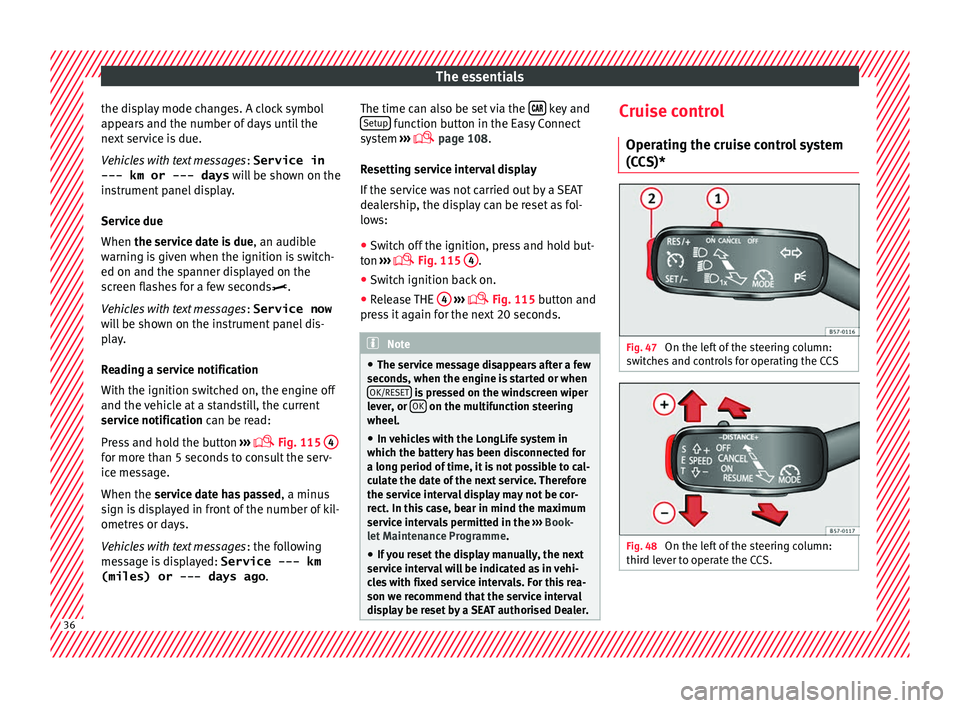
display be reset by a SEAT authorised Dealer. Cruise control
Oper atin
g the cruise control system
(CCS)* Fig. 47
On the left of the steering column:
sw it
ches and controls for operating the CCS Fig. 48
On the left of the steering column:
thir d l
ever to operate the CCS. 36
Page 40 of 328
The essentials
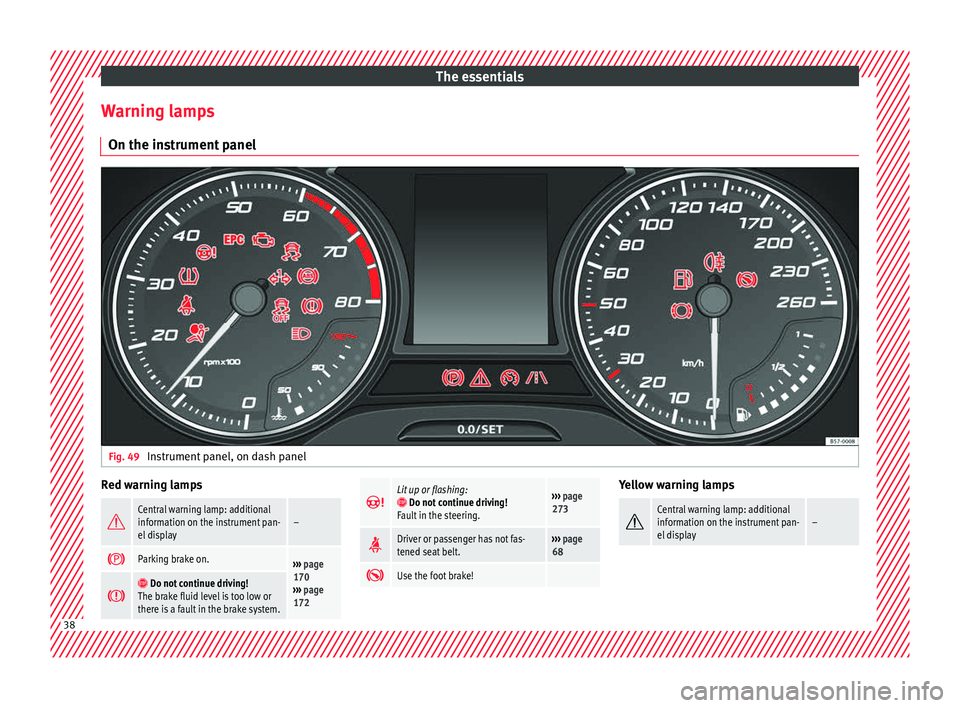
Warning lamps On the in s
trument panelFig. 49
Instrument panel, on dash panel Red warning lamps
Central warning lamp: additional
information on the instrument pan-
el display–
Parking brake on.›››
page
170
››› page
172
Do not continue driving!
The brake fluid level is too low or
there is a fault in the brake system.
Lit up or flashing: Do not continue driving!
Fault in the steering.››› page
273
Driver or passenger has not fas-
tened seat belt.›››
page
68
Use the foot brake! Yellow warning lamps
Central warning lamp: additional
information on the instrument pan-
el display–
38
Page 41 of 328
The essentials
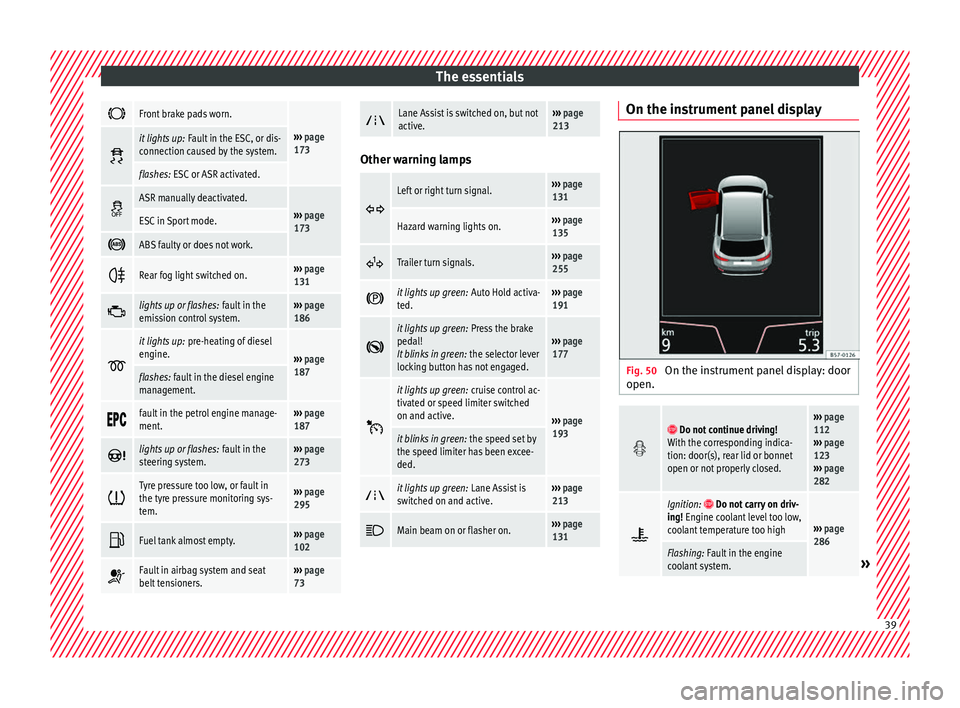
Front brake pads worn.
›››
page
173 it lights up:
Fault in the ESC, or dis-
connection caused by the system.
flashes: ESC or ASR activated.
ASR manually deactivated.›››
page
173ESC in Sport mode.
ABS faulty or does not work.
Rear fog light switched on.›››
page
131
lights up or flashes:
fault in the
emission control system.››› page
186
it lights up:
pre-heating of diesel
engine.
››› page
187
flashes: fault in the diesel engine
management.
fault in the petrol engine manage-
ment.›››
page
187
lights up or flashes:
fault in the
steering system.››› page
273
Tyre pressure too low, or fault in
the tyre pressure monitoring sys-
tem.›››
page
295
Fuel tank almost empty.›››
page
102
Fault in airbag system and seat
belt tensioners.›››
page
73
Lane Assist is switched on, but not
active.›››
page
213 Other warning lamps
Left or right turn signal.›››
page
131
Hazard warning lights on.››› page
135
Trailer turn signals.›››
page
255
it lights up green:
Auto Hold activa-
ted.››› page
191
it lights up green:
Press the brake
pedal!
It blinks in green: the selector lever
locking button has not engaged.››› page
177
it lights up green:
cruise control ac-
tivated or speed limiter switched
on and active.
››› page
193
it blinks in green: the speed set by
the speed limiter has been excee-
ded.
it lights up green:
Lane Assist is
switched on and active.››› page
213
Main beam on or flasher on.›››
page
131 On the instrument panel display
Fig. 50
On the instrument panel display: door
open.
Do not continue driving!
With the corresponding indica-
tion: door(s), rear lid or bonnet
open or not properly closed.››› page
112
››› page
123
››› page
282
Ignition: Do not carry on driv-
ing! Engine coolant level too low,
coolant temperature too high
››› page
286
Flashing: Fault in the engine
coolant system.» 39
Page 60 of 328
The essentials
Do not pull too hard with the towing vehicle
and t ak
e care to avoid jerking the tow rope.
When towing on an unpaved road, there is al-
ways a risk of overloading and damaging the
anchorage points.
Switch on the ignition so that the turn sig-
nals, windscreen wipers and windscreen
washer can work. Ensure that the steering
wheel is unlocked and moves freely.
Place the gear lever in neutral on vehicles
with a manual gearbox. With an automatic
gearbox, place the lever in N.
To brake, press the brake pedal firmly. The
brake servo does not work when the engine
is switched off.
The power steering only works when the igni-
tion is switched on and the vehicle is moving,
provided that the battery is sufficiently charg-
ed. Otherwise, it will need more force.
Ensure that the tow rope remains taut at all
times.
››› in Introduction on page 86
››› page 86 Tow-starting
If the engine will not start, first try starting it
u
s
ing the battery of another vehicle
››› page 58. You should only attempt to tow-
start a vehicle if charging the battery does
not work. This is done by leveraging wheel
movement.
When tow-starting a vehicle with a petrol en-
gine, do not tow it more than a short dis-
tance, otherwise unburned fuel can enter the
catalytic converter.
● Engage 2nd or 3rd gear before moving off.
● Press the clutch and hold the pedal down.
● Switch the ignition on.
● Once both vehicles are moving, release the
c lut
ch.
● As soon as the engine has started, press
the clut
ch and move the gear lever to neutral.
How to jump start Jump le
ads The jump lead must have a sufficient wire
c
r
oss section.
If the engine fails to start because of a dis-
charged battery, the battery can be connec-
ted to the battery of another vehicle to start
the engine. Jump leads must comply with standard
DIN
72553 (see cab
le manufacturer's instruc-
tions). The wire cross section must be at least
25 mm 2
for petrol engines and at least
35 mm 2
for diesel engines. Note
● The v
ehicles must not touch each other,
otherwise electricity could flow as soon as
the positive terminals are connected.
● The discharged battery must be properly
connect
ed to the on-board network.58
Page 65 of 328
Safe driving
● Belt
tensioners for the front seats
● Front airbags
● knee airbags,
● Side airbags in the front seat backrests
● Head-protection airbags
● “ISOFIX” anchor points for child seats in
the re
ar side seats with the “ISOFIX” system,
● Height-adjustable front head restraints
● Rear head restraints with in-use position
and non-use po
sition
● Adjustable steering column
The saf
ety equipment mentioned above
works together to provide you and your pas-
sengers with the best possible protection in
the event of an accident. However, these
safety systems can only be effective if you
and your passengers are sitting in a correct
position and use this equipment properly.
Safety is everyone's business! Correct position for passengers
Corr
ect sitting position for driver Fig. 81
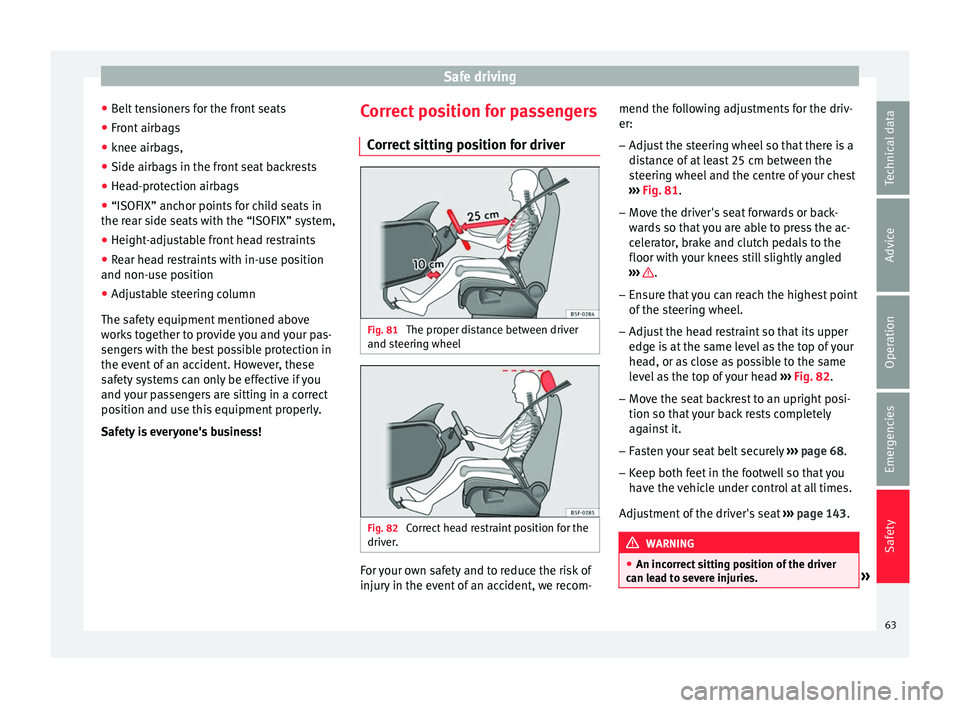
The proper distance between driver
and s t
eering wheel Fig. 82
Correct head restraint position for the
driv er
. For your own safety and to reduce the risk of
injur
y
in the event of an accident, we recom- mend the following adjustments for the driv-
er:
– Adjust the steering wheel so that there is a
dis
tance of at least 25 cm between the
steering wheel and the centre of your chest
››› Fig. 81.
– Move the driver's seat forwards or back-
war
ds so that you are able to press the ac-
celerator, brake and clutch pedals to the
floor with your knees still slightly angled
››› .
– Ensure that you can reach the highest point
of the s
teering wheel.
– Adjust the head restraint so that its upper
edge i
s at the same level as the top of your
head, or as close as possible to the same
level as the top of your head ››› Fig. 82.
– Move the seat backrest to an upright posi-
tion so that
your back rests completely
against it.
– Fasten your seat belt securely ››
› page 68.
– Keep both feet in the footwell so that you
hav
e the vehicle under control at all times.
Adjustment of the driver's seat ››› page 143. WARNING
● An inc orr
ect sitting position of the driver
can lead to severe injuries. » 63
Technical data
Advice
Operation
Emergencies
Safety
Page 66 of 328
Safety
●
Adju s
t the driver's seat so that there is at
least 25 cm distance between the centre of
the chest and the centre of the steering
wheel ››› Fig. 81. If you are sitting closer than
25 cm, the airbag system cannot protect you
properly.
● If your physical constitution prevents you
from m
aintaining the minimum distance of 25
cm, contact a specialised workshop. The
workshop will help you decide if special spe-
cific modifications are necessary.
● When driving, always hold the steering
wheel w
ith both hands on the outside of the
ring at the 9 o'clock and 3 o'clock positions.
This reduces the risk of injury when the driver
airbag is triggered.
● Never hold the steering wheel at the 12
o'cloc
k position, or in any other manner (e.g.
in the centre of the steering wheel). In such
cases, if the airbag is triggered, you may sus-
tain injuries to the arms, hands and head.
● To reduce the risk of injury to the driver
during s
udden braking manoeuvres or an ac-
cident, never drive with the backrest tilted far
back! The airbag system and seat belts can
only provide optimal protection when the
backrest is in an upright position and the
driver is wearing his or her seat belt correct-
ly.
● Adjust the head restraint properly to ach-
ieve optim
al protection. Adjusting the steering wheel position
Read the additional information carefully
› ›
› page 14. WARNING
● Nev er a
djust the position of the steering
wheel when the vehicle is moving, as this
could cause an accident.
● Move the lever up firmly so the steering
wheel po
sition does not accidentally change
during driving. risk of accident!
● Make sure you are capable of reaching and
firmly
holding the upper part of the steering
wheel: risk of accident!
● If you adjust the steering wheel so that it
points
towards your face, the driver airbag
will not protect you properly in the event of
an accident. Make sure that the steering
wheel points towards your chest. Correct sitting position for front pas-
sen
g
er For your own safety and to reduce the risk of
injur
y
in the event of an accident, we recom-
mend the following adjustments for the front
passenger:
– Move the front passenger seat back as far
as
possible ››› .–
Mo v
e the seat backrest to an upright posi-
tion so that your back rests completely
against it.
– Adjust the head restraint so that its upper
edge i
s at the same level as the top of your
head, or as close as possible to the same
level as the top of your head ››› page 66.
– Always keep both feet in the footwell in
front
of the front passenger seat.
– Fasten your seat belt securely ››
› page 68.
It is possible to deactivate the front passen-
ger airbag in exceptional circumstances
››› page 77.
Adjusting the front passenger seat
››› page 143. WARNING
● An inc orr
ect sitting position of the front
passenger can lead to severe injuries.
● Adjust the front passenger seat so that
there i
s at least 25 cm between your chest
and the dash panel. If you are sitting closer
than 25 cm, the airbag system cannot protect
you properly.
● If your physical constitution prevents you
from m
aintaining the minimum distance of 25
cm, contact a specialised workshop. The
workshop will help you decide if special spe-
cific modifications are necessary. 64
Page 73 of 328
Seat belts
possible to brace oneself with one's hands.
In a fr ont
al collision, unbelted passengers
are thrown forward and will make violent con-
tact with the steering wheel, dash panel,
windscreen or whatever else is in the way
››› Fig. 88.
It is also important for rear passengers to
wear seat belts properly, as they could other-
wise be thrown forward violently through the
vehicle interior in an accident. Passengers in
the rear seats who do not use seat belts en-
danger not only themselves but also the front
occupants ››› Fig. 89. How to properly adjust your
seat
belt
Fastening and unfastening the seat
belt Fig. 90
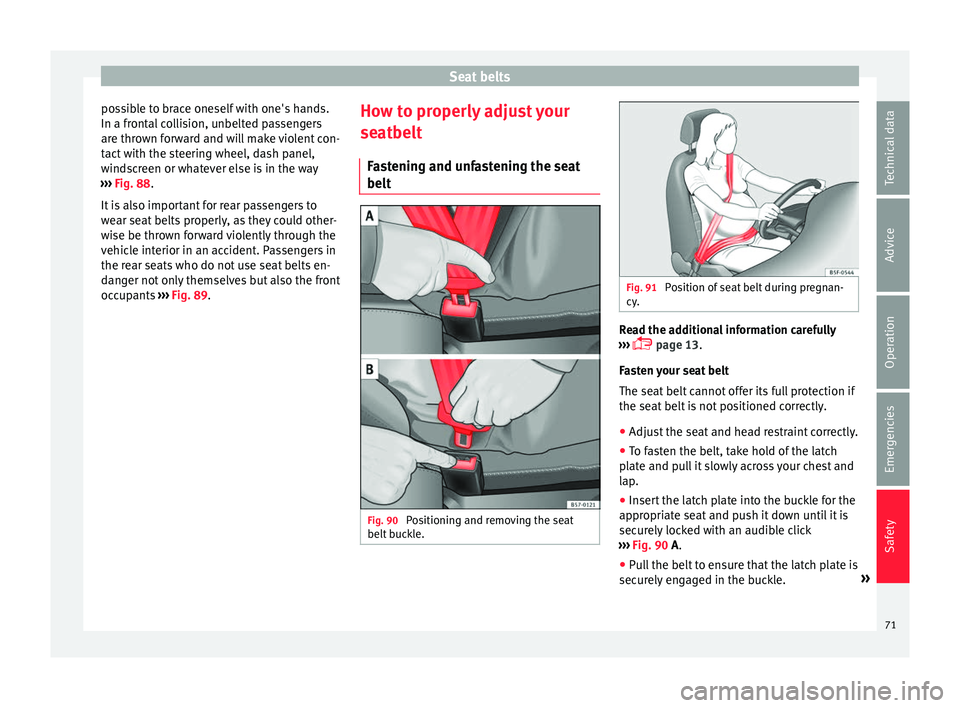
Positioning and removing the seat
belt b
uckle. Fig. 91
Position of seat belt during pregnan-
cy . Read the additional information carefully
› ›
› page 13.
Fasten your seat belt
The seat belt cannot offer its full protection if
the seat belt is not positioned correctly.
● Adjust the seat and head restraint correctly.
● To fasten the belt, take hold of the latch
pl
ate and pull it slowly across your chest and
lap.
● Insert the latch plate into the buckle for the
appr
opriate seat and push it down until it is
securely locked with an audible click
››› Fig. 90 A.
● Pull the belt to ensure that the latch plate is
secur
ely engaged in the buckle. »
71
Technical data
Advice
Operation
Emergencies
Safety
Page 79 of 328
Airbag system
●
The s ide and he
ad airbags are managed
through sensors located in the interior of the
front doors. To ensure the correct operation of
the side and curtain airbags neither the
doors nor the door panels should be modified
in any way (e.g. fitting loudspeakers). If the
front door is damaged, the airbag system
may not work correctly. All work carried out
on the front door must be done in a special-
ised workshop. Deactivating airbags
D e
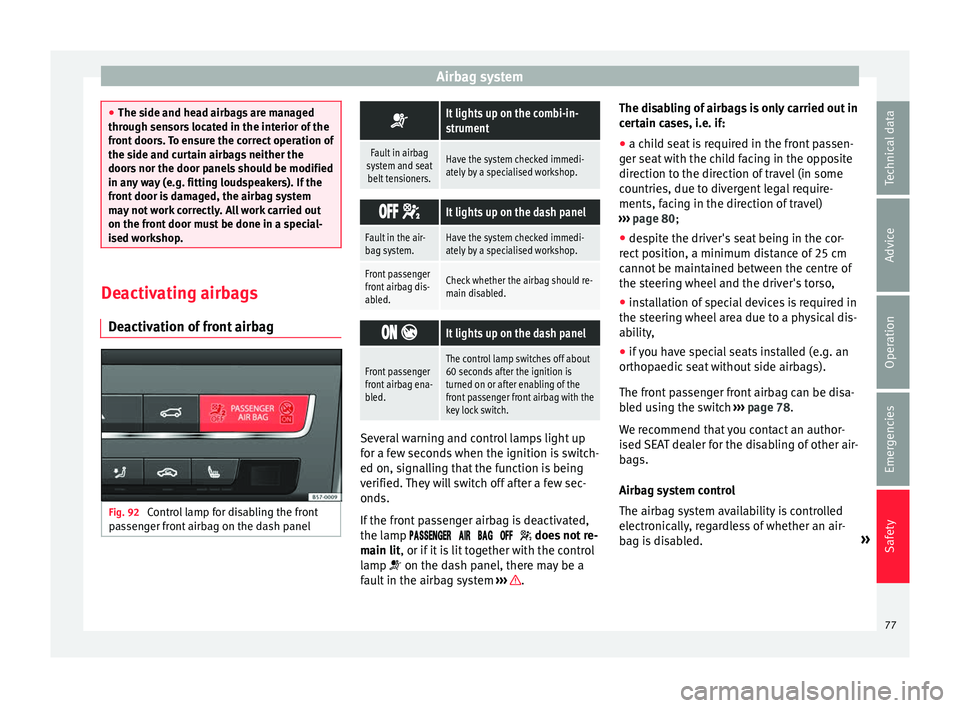
activation of front airbag Fig. 92
Control lamp for disabling the front
p a
ssenger front airbag on the dash panel
It lights up on the combi-in-
strument
Fault in airbag
system and seat belt tensioners.Have the system checked immedi-
ately by a specialised workshop.
It lights up on the dash panel
Fault in the air-
bag system.Have the system checked immedi-
ately by a specialised workshop.
Front passenger
front airbag dis-
abled.Check whether the airbag should re-
main disabled.
It lights up on the dash panel
Front passenger
front airbag ena-
bled.The control lamp switches off about
60 seconds after the ignition is
turned on or after enabling of the
front passenger front airbag with the
key lock switch. Several warning and control lamps light up
f
or a f
ew seconds when the ignition is switch-
ed on, signalling that the function is being
verified. They will switch off after a few sec-
onds.
If the front passenger airbag is deactivated,
the lamp does not re-
main lit, or if it is lit together with the control
lamp on the dash panel, there may be a
fault in the airbag system ››› .The disabling of airbags is only carried out in
c
er
tain cases, i.e. if:
● a child seat is required in the front passen-
ger se
at with the child facing in the opposite
direction to the direction of travel (in some
countries, due to divergent legal require-
ments, facing in the direction of travel)
››› page 80;
● despite the driver's seat being in the cor-
rect
position, a minimum distance of 25 cm
cannot be maintained between the centre of
the steering wheel and the driver's torso,
● installation of special devices is required in
the st
eering wheel area due to a physical dis-
ability,
● if you have special seats installed (e.g. an
orthop
aedic seat without side airbags).
The front passenger front airbag can be disa-
bled using the switch ››› page 78.
We recommend that you contact an author-
ised SEAT dealer for the disabling of other air-
bags.
Airbag system control
The airbag system availability is controlled
electronically, regardless of whether an air-
bag is disabled. »
77
Technical data
Advice
Operation
Emergencies
Safety
Page 88 of 328
Emergencies
they should be changed if they are damaged,
or c l
eaned if they are dirty ››› .
Dam ag
ed wiper blades should be replaced
immediately. These are available from quali-
fied workshops. WARNING
Worn or dirty wiper blades reduce visibility
and inc r
ease the risk of accident and serious
injury.
● Always replace damaged or worn blades or
bl
ades which do not clean the windscreen
correctly. CAUTION
● Dam ag
ed or dirty windscreen wipers could
scratch the glass.
● If products containing solvents, rough
spon
ges or sharp objects are used to clean
the blades, the graphite layer will be dam-
aged.
● Never use fuel, nail varnish remover, paint
thinner or simi
lar products to clean the win-
dows.
● In icy conditions, always check that the
wiper b
lades are not frozen to the glass be-
fore using the wipers. In cold weather, it may
help to leave the vehicle parked with the wip-
ers in service position ›››
page 60. CAUTION
● To pr
event damage to the bonnet and the
wiper arms, only leave them in the service
position.
● Before driving, always lower the wiper
arms. Tow-starting and towing
Intr oduction Tow-starting me
an
s starting the engine of
the vehicle while another pulls it.
Towing means one vehicle pulling another
that is not roadworthy.
Always consider the legal provisions relating
to tow-starting and towing.
For technical reasons, towing a vehicle with a
discharged battery is not allowed. The jump
start should be used instead ›››
page 58.
If the vehicle comes with the Keyless Access
system, towing is only allowed with the igni-
tion on!
The vehicle battery drains if the vehicle is
towed with the engine switched off and the
ignition connected. Depending on the battery
charge status, the drop in voltage may be so
large, even after just a few minutes, that no
electrical device in the vehicle may work e.g. the hazard warning lights. In vehicles with
the Keyl
ess Access system, the steering
wheel could lock ››› .
WARNING
A vehicle with no power should never be tow-
ed.
● During towing, never switch off the ignition
w ith the s
tarter button. Otherwise, the elec-
tronic lock of the steering column could sud-
denly get blocked and it would be impossible
to steer the vehicle. This could cause an acci-
dent, serious injury and loss of control of the
vehicle.
● If during towing the vehicle runs out of
pow
er, stop towing immediately and request
the assistance of specialist personnel. WARNING
Vehicle handling and braking capacity
c h
ange considerably during towing. Please
observe the following instructions to mini-
mise the risk of serious accidents and injury:
● As the driver of the vehicle being towed:
– You shou
ld depress the brake much hard-
er as the brake servo does not operate.
Pay the utmost attention to avoid crash-
ing into the towing vehicle.
– More strength is required at the steering
wheel as the power steering does not op-
erate when the engine is switched off.
● As the driver of the towing vehicle: 86
Page 89 of 328
Self-help
–
Ac
celerate with particular care and cau-
tion.
– Avoid sudden braking and manoeuvres.
– Brake earlier than usual and more
smoothly. CAUTION
● To av
oid damaging the vehicle, for example
the paint, remove and replace the lid and
towing eye carefully.
● Unburnt fuel could enter the catalytic con-
ver
ter and damage it during towing. Indications for tow-starting
Vehicle's should not generally be tow-star-
t
ed.
The jump start should be used instead
››› page 58.
For technical reasons, towing the following
vehicles is not allowed:
● Vehicles with an automatic gearbox.
● If the vehicle battery is discharged, be-
cau
se in vehicles with the Keyless Access
locking and ignition system the steering re-
mains locked and the electronic parking
brake cannot be deactivated nor can the elec-
tronic lock of the steering column be re-
leased if they are activated. ●
If the b
attery is flat, it is possible that the
engine control units may not operate correct-
ly.
However, if the vehicle must absolutely be
tow-started (in the case of manual gearbox-
es):
● Engage the 2nd or 3rd gear.
● Keep the clutch pressed down.
● Switch on the ignition and the hazard warn-
ing lights.
● Onc
e both vehicles are moving, release the
clut
ch.
● Once the engine starts, press the clutch
and disen
gage the gear to avoid colliding
with the towing vehicle. CAUTION
When tow-starting, unburnt fuel could enter
the c at
alytic converter and damage it. Note
The vehicle can only be tow-started if the
el ectr
onic parking brake and, if appropriate,
the electronic lock of the steering column are
deactivated. If the vehicle has no power sup-
ply or there is an electric system fault, the
engine must be tow-started to deactivate the
electronic parking brake and the electronic
lock of the steering column. Indications for towing
Tow rope or tow bar
It
i
s safer for the vehicle to be towed using a
tow bar, avoiding damage to the vehicle. A
tow rope should only be used if a tow bar is
not available.
A tow rope should be slightly elastic to avoid
damage to both vehicles. It is advisable to
use a tow rope made of synthetic fibre or sim-
ilarly elastic material.
Only attach the tow rope or the tow bar to the
towing eyes provided or a towing bracket.
If the vehicle is factory-equipped with a tow-
ing bracket, it is only allowed to tow with a
tow bar if this has been specially designed to
be installed with a tow hitch ›››
page 257.
When the vehicle needs to be towed:
Check whether the vehicle may be towed
››› page 88, Cases where towing a vehicle
is not allowed .
● Switch the ignition on.
● Put the gearbox lever in neutral or the se-
l ect
or lever in the N position ›››
page 176.
● Do not allow the vehicle to be towed at
speed
s of over 50 km/h (30 mph).
● Do not allow the vehicle to be towed at
s peed
s of over 50 km. »
87
Technical data
Advice
Operation
Emergencies
Safety