radio Seat Ateca 2016 Owner's Guide
[x] Cancel search | Manufacturer: SEAT, Model Year: 2016, Model line: Ateca, Model: Seat Ateca 2016Pages: 328, PDF Size: 6.32 MB
Page 165 of 328
Air conditioning
The battery is located beneath a cover on the
b ac
k of the remote control.
● To open the cover, lift it slightly at the bot-
tom and s
lide it down.
● Remove the old battery.
● Insert the new battery. When doing so, take
into ac
count the polarity and use batteries of
the same type ››› .
● Replace the battery cover by inserting the
t ab
s at the top and pressing the bottom.
Range
The receiver is inside the vehicle. The remote
control, when fitted with new batteries, has a
range of several hundred metres. Obstacles
between the remote control and the vehicle,
bad weather conditions and discharged bat-
teries can considerably reduce the range of
the remote control. CAUTION
● The r a
dio frequency remote control con-
tains electronic components. Therefore, avoid
getting it wet and exposing it to knocks or di-
rect sunlight.
● The use of inappropriate batteries may
dam
age the radio frequency remote control.
For this reason, always replace the used bat-
tery with another of the same voltage, size
and specifications. For the sake of the environment
● Ple
ase dispose of your used batteries cor-
rectly and with respect for the environment.
● The remote control battery may contain
perc
hlorate. Observe the legal provisions re-
garding disposal.
● Care should be taken so as not to operate
the remot
e control unintentionally so as to
prevent the auxiliary heater being switched
on accidentally. Programming the auxiliary heater
Before pr
ogramming it, check that the vehi-
c
le's date and time are set correctly ››› .
The aux i
liary heater is programmed in the
Auxiliary heater menu of the infotain-
ment system.
Open the Auxiliary heater menu.
● Press the button in the C
limatronic
control panel.
● Press the fu
nction button.
Function button: function
Switch off: The auxiliary heater is immediately switched
off.
Function button: function
Heat, Ventilate: Set to heat or ventilate the vehicle interi-
or when the auxiliary heater is switched on. By pressing
the function button
, you can select the desired
mode.
Set: Opens the Auxiliary heater menu.
Departure time 1, Departure time 2, Departure time 3:
Three different departure times (hh.mm) may be
programmed. If the auxiliary heater should only
be switched on a certain day of the week, this can
also be selected.
Duration: The duration determines the operating
time of the auxiliary heater when switched on us-
ing the fast heating button
on the air condi-
tioning controls. The duration is also used to cal-
culate the departure time for the manual air con-
ditioner. It can be set between 10 and 60 mi-
nutes at 10-minute intervals.
This returns to the main menu.
The programmed departure time determines
the ap
pr
oximate time it should take to reach
the temperature set in the vehicle. The start
of the heating operation is determined auto-
matically depending on the outside tempera-
ture.
Checking the programming
When a departure time is activated and the
ignition is switched off the control lamp of
the fast heating button lights up for approx-
imately 10 seconds. »
163
Technical data
Advice
Operation
Emergencies
Safety
Page 226 of 328
Operation
● in the c a
se of special constructions to the
side of the vehicle, e.g., high or irregular di-
viders.
Parking assistant (RTA) Fig. 196
Schematic representation of the rear
c r
oss traffic alert: monitored zone around the
vehicle being parked. The parking assistant uses the radar sensors
on the r
e
ar bumper ››› Fig. 193 to monitor the
traffic crossing behind the vehicle as it backs
out of a parallel parking space or as it is be-
ing manoeuvred, for example in very low visi-
bility conditions.
If the system detects that someone else on
the road is approaching the rear of the vehi-
cle ››› Fig. 196, an acoustic alarm is heard. ●
The acou
stic alarm comes from the same
acoustic indicator used by the ParkPilot.
In addition to the acoustic alarm, the driver is
also informed by means of a visual signal on
the radio screen. This signal is displayed in
the form of a red strip at the back of the im-
age of the vehicle on the radio screen. This
strip displays the side of the vehicle towards
which traffic is approaching.
Automatic braking to reduce damages
If the rear cross traffic alert detects that
someone else on the road is approaching the
rear of the vehicle and the driver does not
step on the brake, the system will engage the
brakes automatically.
The parking system helps the driver by auto-
matically engaging the brakes to reduce any
damage. The system will brake automatically
if the vehicle is reversing at a speed of ap-
proximately 1-12 km (1-7 mph). Once it has
detected that the vehicle has stopped, the
system will keep the vehicle stopped for ap-
prox. 2 seconds.
After automatically braking to reduce dam-
age, the system will not be able to automati-
cally brake again for approximately 10 sec-
onds.
You can interrupt the automatic braking by
stepping hard on the accelerator pedal or the
brake pedal in order to regain control of the
vehicle. WARNING
The smart technology incorporated into the
r e
ar cross traffic alert cannot overcome the
limits imposed by the laws of physics; it only
works within the limits of the system. The
parking assistant function should not tempt
you into taking any risks. The system is not a
replacement for driver awareness.
● The system should never be used in limited
vi
sibility conditions or complicated traffic,
e.g., in high-traffic areas or when crossing
multiple lanes.
● Be sure to always be aware of the vehicle's
surr
oundings, since the system often fails to
detect things such as bicycles or pedestrians.
● The rear cross traffic alert itself will not
brak
e the vehicle to a complete stop. Using the blind spot detector (BSD)
w
ith p
arking assistant (RTA) Activating and deactivating the blind spot
det
ect
or (BSD) with parking assistant (RTA)
The blind spot detector with parking assis-
tant can be switched on and off by accessing
the Assistance systems menu on the
dash panel display using the steering wheel
controls. If the vehicle is equipped with a
multifunction camera, it can also be ac-
cessed by means of the driver assistance sys-
tems key located on the main beam head-
light lever.
224
Page 234 of 328
Operation
● When c ornerin
g
● On roads in poor condition
● In unfavourable weather conditions
● When a sporty driving style is employed
● In the event of a serious distraction to the
driver
F
atigue detection will be restored when the
vehicle is stopped for more than 15 minutes,
when the ignition is switched off or when the
driver has unbuckled their seat belt and
opened the door.
In the event of slow driving during a long pe-
riod of time (below 65 km/h, 40 mph) the
system automatically re-establishes the tired-
ness calculation. When driving at a faster
speed the driving behaviour will be recalcula-
ted.
Park Assist*
Introduction
› ›
›
table on page 2
The Park Assist system is an additional func-
tion of ParkPilot ›››
page 239 and helps the
driver to:
● find a suitable parking space,
● select a parking mode, ●
park
driving in reverse in suitable perpen-
dicular and parallel spaces,
● park driving forwards in suitable perpen-
dicu
lar spaces,
● exit a parking space driving forwards from
a par
allel space.
In vehicles with a Park Assist system and fac-
tory radio the front, rear and side areas are
represented, and the position of obstacles is
shown relative to the vehicle.
The Park Assist system is subject to certain
limitations inherent to the system and its use
requires special attention by the driver ››› .
WARNING
The smart technology incorporated into the
P ark
Assist system cannot overcome the lim-
its imposed by the laws of physics; it only
works within the limits of the system. The
greater convenience provided by Park Assist
should never tempt you to take any risk that
may compromise safety. The system is not a
replacement for driver awareness.
● Any accidental movement of the vehicle
cou
ld result in serious injury.
● Adapt your speed and driving style at all
times
to suit visibility, weather, road and traf-
fic conditions.
● Certain surfaces of objects and garments
do not r
eflect the ultrasound sensors' sig-
nals. The system cannot detect, at least cor- rectly, these objects or people wearing such
c
lothe
s.
● Ultrasound sensor signals may be affected
by
external sound sources. In certain circum-
stances this may prevent them from detect-
ing people or objects.
● The ultrasound sensors have blind spots in
which o
bstacles and people are not regis-
tered.
● Monitor the area around the vehicle at all
times, s
ince the ultrasound sensors do not
detect small children, animals or certain ob-
jects in all situations. WARNING
Quick turns of the steering wheel when park-
in g or e
xiting a parking space with Park As-
sist can cause serious injury.
● Do not hold the steering wheel during ma-
noeuvr
es to park or exit a parking space until
the system requests it. Doing so disables the
system during the manoeuvre, resulting in
the parking being cancelled. CAUTION
● In c er
tain circumstances, the ultrasonic
sensors do not detect objects such as trailer
tongues, bars, fences, posts or thin trees, or
an open (or opening) rear lid, which could
damage the vehicle.
● Retrofitting of certain accessories to the ve-
hicl
e, such as a bicycle rack, may interfere 232
Page 245 of 328
Driver assistance systems
Moreover, with the SEAT Media System
Plu s/Nav
i System radios, a yellow trail indi-
cates the vehicle's expected trajectory based
on the steering wheel angle.
Whenever the obstacle is located in the vehi-
cle’s direction of travel, the corresponding
audible warning will sound.
As the vehicle approaches an obstacle, the
segments are displayed closer to the vehicle.
When the penultimate segment is displayed,
this means that the vehicle has reached the
collision zone. In the collision zone, the ob-
stacles are represented in red, including
those out of the path. Do not continue to
move forward (or backward) ››› in Descrip-
tion on p ag
e 240, ››› in Description on
p ag
e 240 !
In the event the car is equipped with the Area
View system, visual indication of Park Assist
will appear depending on the selected view
in the Area View system.
Adjusting the display and audible
warnin
gs The settings for the display and audible
w
arnin
gs are controlled via the Easy Con-
nect*. Automatic activation
on – activat
es the Automatic activa-
tion option ››› page 242.
off – deactivates the Automatic ac-
tivation option ››› page 242.
Front volume*
Volume in the front and rear area.
Front sound settings/sharpness*
Frequency (tone) of the sound in the front
area.
Rear volume*
Volume in the rear area.
Rear sound settings/sharpness*
Frequency (tone) of the sound in the rear
area.
Adjust volume
With the parking aid switched on, the active
audio/video source volume will be reduced
to the intensity of the selected setting.
Error messages When the Parking Aid is activated or when it
i
s
switched on, if a message reporting a Park- ing aid error is displayed on the instrument
panel, ther
e is a fault in the system.
If the fault doesn't disappear before discon-
necting the ignition, next time that parking
aid is engaged in reverse, it will not be indi-
cated.
If there is a fault in the parking aid system a
message will appear on the instrument panel
indicating the error. In addition the key
LED will blink.
If there is a fault in a sensor, the symbol is
displayed on the Easy Connect display in
front of/behind the vehicle. If a rear sensor is
faulty, only the obstacles in the areas A and
B are displayed
››
› Fig. 206. If a front sensor
is faulty, only the obstacles in the areas C and
D are displayed.
Hav e the f
ault corrected by a specialised
workshop without delay.
243
Technical data
Advice
Operation
Emergencies
Safety
Page 251 of 328
Driver assistance systems
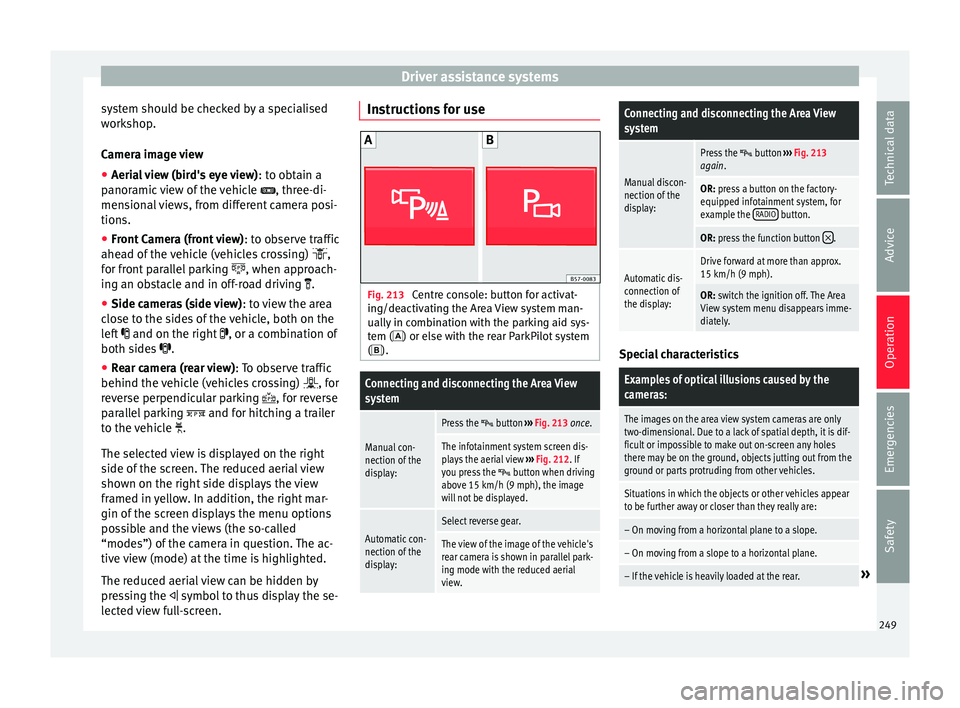
system should be checked by a specialised
w ork
shop.
Camera image view
● Aerial view (bird's eye view) : to o
btain a
panoramic view of the vehicle , three-di-
mensional views, from different camera posi-
tions.
● Front Camera (front view) : to o
bserve traffic
ahead of the vehicle (vehicles crossing) ,
for front parallel parking , when approach-
ing an obstacle and in off-road driving .
● Side cameras (side view) : to
view the area
close to the sides of the vehicle, both on the
left and on the right , or a combination of
both sides .
● Rear camera (rear view) : T
o observe traffic
behind the vehicle (vehicles crossing) , for
reverse perpendicular parking , for reverse
parallel parking and for hitching a trailer
to the vehicle .
The selected view is displayed on the right
side of the screen. The reduced aerial view
shown on the right side displays the view
framed in yellow. In addition, the right mar-
gin of the screen displays the menu options
possible and the views (the so-called
“modes”) of the camera in question. The ac-
tive view (mode) at the time is highlighted.
The reduced aerial view can be hidden by
pressing the symbol to thus display the se-
lected view full-screen. Instructions for use
Fig. 213
Centre console: button for activat-
in g/de
activating the Area View system man-
ually in combination with the parking aid sys-
tem () or else with the rear ParkPilot system ().
Connecting and disconnecting the Area View
system
Manual con-
nection of the
display:
Press the button ››› Fig. 213 once.
The infotainment system screen dis-
plays the aerial view ››› Fig. 212. If
you press the
button when driving
above 15 km/h (9 mph), the image
will not be displayed.
Automatic con-
nection of the
display:
Select reverse gear.
The view of the image of the vehicle's
rear camera is shown in parallel park-
ing mode with the reduced aerial
view.
Connecting and disconnecting the Area View
system
Manual discon-
nection of the
display:
Press the button ››› Fig. 213
again.
OR: press a button on the factory-
equipped infotainment system, for
example the RADIO
button.
OR: press the function button .
Automatic dis-
connection of
the display:Drive forward at more than approx.
15 km/h (9 mph).
OR: switch the ignition off. The Area
View system menu disappears imme-
diately. Special characteristics
Examples of optical illusions caused by the
cameras:
The images on the area view system cameras are only
two-dimensional. Due to a lack of spatial depth, it is dif-
ficult or impossible to make out on-screen any holes
there may be on the ground, objects jutting out from the
ground or parts protruding from other vehicles.
Situations in which the objects or other vehicles appear
to be further away or closer than they really are:
– On moving from a horizontal plane to a slope.
– On moving from a slope to a horizontal plane.
– If the vehicle is heavily loaded at the rear.»
249
Technical data
Advice
Operation
Emergencies
Safety
Page 267 of 328
Care and maintenance
Advice
C ar
e and maintenance
Accessories and modifications to the vehicle
Accessories, replacement parts and
repair work Always ask your dealer or specialist retailer
f
or a
dvice before purchasing accessories and
replacement parts.
Your vehicle is designed to offer a high
standard of active and passive safety. For this
reason, we recommend that you ask a SEAT
Official Service for advice before fitting ac-
cessories or replacement parts. Your SEAT Of-
ficial Service has the latest information from
the manufacturer and can recommend acces-
sories and replacement parts which are suita-
ble for your requirements. They can also an-
swer any questions you might have regarding
official regulations.
We recommend you to use only SEAT acces-
sories and Genuine SEAT parts ®
. SEAT has
tested these parts and accessories for suita-
bility, reliability and safety. SEAT Official
Services have the necessary experience and
facilities to ensure that the parts are installed
correctly and professionally. Any
retro-fitted equipment which has a direct
eff
ect on the vehicle and/or the way it is driv-
en, such as a cruise control system or elec-
tronically-controlled suspension, must be
approved for use in your vehicle and bear the
e mark (the European Union's authorisation
symbol).
If any additional electrical devices are fitted
which do not serve to control the vehicle it-
self (for instance a refrigerator box, laptop or
ventilator fan, etc.), they must bear the
sign (manufacturer conformity declaration in
the European Union). WARNING
Accessories, for example telephone holders
or c up ho
lders, should never be fitted on the
covers, or within the working range of the air-
bags. Otherwise, there is a danger of injury if
the airbag is triggered in an accident. Modifications
Modifications must always be carried out ac-
c
or
ding to our specifications.
Unauthorised modifications to the electronic
components, software, wiring or data transfer
in the vehicle may cause malfunctioning. Due
to the way the electronic components are
linked together in networks, other indirect
systems may be affected by the faults. This
can seriously impair safety, lead to excessive wear of components, and also invalidate your
vehic
le registration documents.
You will appreciate that your SEAT dealership
cannot be held liable for any damage caused
by modifications and/or work performed in-
correctly.
We therefore recommend that all work should
be performed by a SEAT Official Service using
genuine SEAT parts ®
. WARNING
Incorrectly performed modifications or other
w ork
on your vehicle can lead to malfunctions
and cause accidents. Radio transmitters and office equip-
ment
Radio transmitters (fixed installation)
An
y
retrofit installations of radio transmitters
in the vehicle require prior approval. SEAT
generally authorises in-vehicle installations
of approved types of radio transmitters provi-
ded that:
● The aerial is installed correctly.
● The aerial is installed on the exterior of the
vehic
le (and shielded cables are used togeth-
er with non-reflective aerial trimming).
● The effective transmitting power does not
ex
ceed 10 Watts at the aerial base. »
265
Technical data
Advice
Operation
Emergencies
Safety
Page 268 of 328
Advice
A SEAT Official Service and specialised work-
shop w i
ll be able to inform you about options
for installing and operating radio transmitters
with a higher transmitting power.
Mobile radio transmitters
Commercial mobile telephones or radio
equipment might interfere with the electron-
ics of your vehicle and cause malfunctions.
This may be due to:
● No external aerial.
● External aerial incorrectly installed.
● Transmitting power more than 10 W.
You mu
st, therefore, do not operate portable
mobile telephones or radio equipment inside
the vehicle without a properly installed exter-
nal aerial ››› .
Pl e
ase note also that the maximum range of
the equipment can only be achieved with an
external aerial.
Business equipment
Retrofit installation of business or private
equipment in the vehicle is permitted, provi-
ded the equipment cannot interfere with the
driver's immediate control of the vehicle and
that any such equipment carries the mark.
Any retrofit equipment that could influence
the driver's control of the vehicle must have a
type approval for your vehicle and must carry
the e mark. WARNING
Mobile telephones or radio equipment which
i s
operated inside the vehicle without a prop-
erly installed external aerial can create exces-
sive magnetic fields that could cause a health
hazard. Note
● The po s
terior fitting of electric and elec-
tronic equipment in this vehicle affects its li-
cence and could lead to the withdrawal of the
vehicle registration document under certain
circumstances.
● Please use the mobile telephone/radio op-
eratin
g instructions. Care and cleaning
Gener a
l information Regular and careful care helps to
maint
ain
the value of the vehicle. This may also be one
of the requirements for upholding any war-
ranty claims in the event of corrosion or paint
defects.
SEAT Official Services and specialist retailers
carry stocks of suitable car care materials.
Please follow the instructions for use on the
packaging. WARNING
● Cl
eaning products and other materials used
for car care can be damaging to your health if
misused.
● Always keep care products in a safe place,
out of
the reach of children. Failure to comply
could result in poisoning. For the sake of the environment
● If po
ssible, use environmentally friendly
products.
● The remains of car care products should not
be dis
posed of with ordinary household
waste. Vehicle exterior care
W a
shing the vehicle The longer substances such as insects, bird
dr
op
pings, resinous tree sap, road dirt, in-
dustrial deposits, tar, soot or road salt and
other aggressive materials remain on the ve-
hicle, the more damage they do to the paint-
work. High temperatures (for instance due to
strong sunlight) further intensify the corro-
sive effect.
After the period when salt is put on the roads
it is important to have the underside of the
vehicle washed thoroughly.
266
Page 269 of 328
Care and maintenance
Automatic car washes
B ef
ore going through a car wash, be sure to
take the usual precautions such as closing
the windows and roof. If the vehicle has spe-
cial accessories such as spoilers or a roof
rack or two-way radio aerial, etc., it is advisa-
ble to consult the car wash tunnel operator.
It is best to use a car wash without revolving
bristles if possible.
Washing the vehicle with a high pressure
cleaner
When washing the vehicle with a high-pres-
sure cleaner, always follow the operating in-
structions for the equipment. This applies
particularly to the operating pressure and the
spraying distance. Do not hold the nozzle too
close to soft materials such as rubber hoses
or seals. The same applies to the parking aid
sensors*, which are located in the rear bump-
er.
Do not use a nozzle that sprays the water out
in a direct stream or one that has a rotating
jet for forcing off dirt.
Washing the car by hand
When washing the car by hand, use plenty of
water to soften the dirt first, and rinse off as
well as possible.
Then clean the vehicle with a soft sponge,
glove or brush using only slight pressure.
You should start on the roof and work down. Special car
soap should only be used for very
persistent dirt.
Rinse the sponge or glove thoroughly and of-
ten.
Wheels, sills and similar should be cleaned
last. Use a second sponge for this. WARNING
● The v
ehicle should only be washed with the
ignition switched off. Failure to follow this in-
struction could result in an accident.
● Do not clean the underside of chassis, the
ins
ide of wheel arches or wheel trims without
protecting your hands and arms. You may cut
yourself on sharp-edged metal parts. Other-
wise, there is a risk of sustaining cuts.
● When washing the car during the winter
sea
son: water and ice in the brake system
can reduce braking effectiveness: risk of acci-
dent! CAUTION
● Do not w
ash the vehicle in direct sunlight –
otherwise the paint can be damaged.
● Do not use sponges, abrasive household
spon
ges or similar to clean insect remains.
This could damage the surface.
● Clean off stubborn dirt (insects, etc.) from
the hea
dlights at regular intervals, for in-
stance when filling the fuel tank. The head-
lights should only be washed with water, do not wipe them with a dry cloth or sponge. It
i
s
best to use soapy water.
● Never wash tyres with a jet that sprays the
wat
er out in a direct stream. This could dam-
age the tyres even if the spray is kept at a
distance and only used for a very short time.
● Before washing the vehicle in an automatic
car w
ash, please make sure to retract the ex-
terior mirrors to prevent them from being
damaged. Electrically retractable exterior
mirrors must not be folded in or out by hand,
always use the electrical power control. CAUTION
● Bef
ore washing the vehicle in an automatic
car wash, please proceed as follows to lock
the wiper arms so that they are not moved to-
wards the top of the windscreen:
–the bonnet must be closed.
– switch the ignition on and off.
– press the windscreen wiper lever forward
briefly (windscreen washer function).
This will lock the wiper arms. For the sake of the environment
The car should only be washed in special
w a
sh bays. These areas are prepared to pre-
vent oily water from getting into the public
drains. In some places, washing vehicles out-
side the areas intended for this purpose is
prohibited. 267
Technical data
Advice
Operation
Emergencies
Safety
Page 313 of 328
Index
Changing a wheel . . . . . . . . . . . . . . . . . . . . . . . . . 54 sub
sequent work . . . . . . . . . . . . . . . . . . . . . . . . 56
Changing bulbs number plate light . . . . . . . . . . . . . . . . . . . . . . . 98
Changing gear engaging gears (manual gearbox) . . . . . . . . . 176
Changing settings CAR menu . . . . . . . . . . . . . . . . . . . . . . . . . . . . . . 26
Changing the blades . . . . . . . . . . . . . . . . . . . . . . . 85
Changing the wiper blades . . . . . . . . . . . . . . . . . . 60
Charging the battery . . . . . . . . . . . . . . . . . . . . . . 290
Checking levels engine compartment . . . . . . . . . . . . . . . . . . . . 282
Child-proof locking electric windows . . . . . . . . . . . . . . . . . . . . . . . . 126
Child seat Categorisation in groups . . . . . . . . . . . . . . . . . . 81
Child seats . . . . . . . . . . . . . . . . . . . . . . . . . . . . 17, 80 ISOFIX system . . . . . . . . . . . . . . . . . . . . . . . . . . . 19
safety instructions . . . . . . . . . . . . . . . . . . . . 17, 79
securing with seat belt . . . . . . . . . . . . . . . . . . . . 18
Top Tether system . . . . . . . . . . . . . . . . . . . . . 19, 22
City Emergency braking function . . . . . . . . . . . . . 211
Cleaning . . . . . . . . . . . . . . . . . . . . . . . . . . . . . . . . 266 alcantara . . . . . . . . . . . . . . . . . . . . . . . . . . . . . . 272
carbon parts . . . . . . . . . . . . . . . . . . . . . . . . . . . 269
Easy Connect control panel . . . . . . . . . . . . . . . 270
Exhaust pipe . . . . . . . . . . . . . . . . . . . . . . . . . . . 269
fabrics . . . . . . . . . . . . . . . . . . . . . . . . . . . . . . . . 270
leather . . . . . . . . . . . . . . . . . . . . . . . . . . . . . . . . 271
natural leather . . . . . . . . . . . . . . . . . . . . . . . . . 271
plastic parts . . . . . . . . . . . . . . . . . . . . . . . . . . . 270
Plastic parts . . . . . . . . . . . . . . . . . . . . . . . . . . . 268
Radio display . . . . . . . . . . . . . . . . . . . . . . . . . . 270
seat belts . . . . . . . . . . . . . . . . . . . . . . . . . . . . . 272
trims . . . . . . . . . . . . . . . . . . . . . . . . . . . . . . . . . 268
washing the vehicle . . . . . . . . . . . . . . . . . . . . . 266 wheels . . . . . . . . . . . . . . . . . . . . . . . . . . . . . . . . 269
windo
ws . . . . . . . . . . . . . . . . . . . . . . . . . . . . . . 269
Climatronic . . . . . . . . . . . . . . . . . . . . . . . . . . . . . . . 42
Close . . . . . . . . . . . . . . . . . . . . . . . . . . . . . . . . . . . 112 rear lid . . . . . . . . . . . . . . . . . . . . . . . . . . . . . . . . 123
sunroof . . . . . . . . . . . . . . . . . . . . . . . . . . . . . . . 129
windows . . . . . . . . . . . . . . . . . . . . . . . . . . . . . . 126
Closing . . . . . . . . . . . . . . . . . . . . . . . . . . . . . . . . . 112 bonnet . . . . . . . . . . . . . . . . . . . . . . . . . . . . . . . . 283
rear lid . . . . . . . . . . . . . . . . . . . . . . . . . . . . . . . . 123
sun blind (sunroof) . . . . . . . . . . . . . . . . . . . . . . 129
sunroof . . . . . . . . . . . . . . . . . . . . . . . . . . . . . . . 129
windows . . . . . . . . . . . . . . . . . . . . . . . . . . . . . . 126
Clutch (warning lamp) . . . . . . . . . . . . . . . . . . . . . 183
Coming Home . . . . . . . . . . . . . . . . . . . . . . . . . . . . 134
Connectivity Box . . . . . . . . . . . . . . . . . . . . . . . . . . 111
Contact . . . . . . . . . . . . . . . . . . . . . . . . . . . . . . . . . 165
Control and warning lamps diesel particulate filter . . . . . . . . . . . . . . . . . . . 186
emission control . . . . . . . . . . . . . . . . . . . . . . . . 187
remote control (auxiliary heater) . . . . . . . . . . . 162
Control lamps AdBlue . . . . . . . . . . . . . . . . . . . . . . . . . . . . . . . . 279
blind spot detector (BSD) . . . . . . . . . . . . . . . . 220
Hill Descent Control . . . . . . . . . . . . . . . . . . . . . 190
parking assistant (RTA) . . . . . . . . . . . . . . . . . . 220
speed limiter . . . . . . . . . . . . . . . . . . . . . . . . . . . 194
tow hitch . . . . . . . . . . . . . . . . . . . . . . . . . . . . . . 258
towing bracket . . . . . . . . . . . . . . . . . . . . . . . . . 256
Controls and displays general instrument panel . . . . . . . . . . . . . . . . . 101
Controls on the steering wheel operating the audio system and telephone . . 109
Coolant checking level . . . . . . . . . . . . . . . . . . . . . . . . . . 286
cooling system checking coolant . . . . . . . . . . . . . . . . . . . . . . . 286 Cooling system
Coo lant temperature gauge . . . . . . . . . . . . . . . 105
topping up coolant . . . . . . . . . . . . . . . . . . . . . . 286
Cornering lights . . . . . . . . . . . . . . . . . . . . . . . . . . . . . . . . . 134
Correct position . . . . . . . . . . . . . . . . . . . . . . . . . . . 63
Correct sitting position front passenger . . . . . . . . . . . . . . . . . . . . . . . . . 64
rear seat passengers . . . . . . . . . . . . . . . . . . . . . 65
Cruise control . . . . . . . . . . . . . . . . . . . . . . . . 36, 193 operation . . . . . . . . . . . . . . . . . . . . . . . . . . . . . . 193
Cruise control system . . . . . . . . . . . . . . . . . . . . . . 193 Warning and indication lamp . . . . . . . . . . . . . 193
D Dangers in not using the seat belt . . . . . . . . . . . . 70
Dash panel . . . . . . . . . . . . . . . . . . . . . . . . . . . . . . . 38
Data sticker . . . . . . . . . . . . . . . . . . . . . . . . . . . . . . 301
Deactivating the front passenger front airbag . . . 15
Deactivation of front airbag . . . . . . . . . . . . . . . . . . 77
Defective bulbs changing a bulb . . . . . . . . . . . . . . . . . . . . . . . . . 93
Diesel diesel particulate filter . . . . . . . . . . . . . . . . . . . 186
engine oil . . . . . . . . . . . . . . . . . . . . . . . . . . . . . 284
preheating . . . . . . . . . . . . . . . . . . . . . . . . . . . . 165
refuelling . . . . . . . . . . . . . . . . . . . . . . . . . . . . . . 278
Diesel particulate filter malfunction . . . . . . . . . . . . . . . . . . . . . . . . . . . . 186
Digital clock . . . . . . . . . . . . . . . . . . . . . . . . . . . . . 102
Dimensions . . . . . . . . . . . . . . . . . . . . . . . . . . . . . . 307
Direction of rotation tyres . . . . . . . . . . . . . . . . . . . . . . . . . . . . . . . . . . . 56
Display . . . . . . . . . . . . . . . . . . . . . . . . . . . . 102, 103
Display messages speed limiter . . . . . . . . . . . . . . . . . . . . . . . . . . . 194
311
Page 314 of 328
Index
Display of traffic signs on the instrument panel activ at
e . . . . . . . . . . . . . . . . . . . . . . . . . . . . . . . 229
deactivate . . . . . . . . . . . . . . . . . . . . . . . . . . . . . 229
Disposal Seat belt tensioners . . . . . . . . . . . . . . . . . . . . . . 72
Distance control see Adaptive cruise control . . . . . . . . . . . . . . . 197
Door cylinder . . . . . . . . . . . . . . . . . . . . . . . . . . . . . . 9
Door handle . . . . . . . . . . . . . . . . . . . . . . . . . . . . . . . 9
Door lock . . . . . . . . . . . . . . . . . . . . . . . . . . . . . . . . . . 9
Door release lever . . . . . . . . . . . . . . . . . . . . . . . . 101
Doors Childproof locks . . . . . . . . . . . . . . . . . . . . . . . . 120
opening and closing . . . . . . . . . . . . . . . . . . . . . . 9
Downhill speed control . . . . . . . . . . . . . . . . . . . . 182
Downhill speed control function . . . . . . . . . . . . . 182
Drawer . . . . . . . . . . . . . . . . . . . . . . . . . . . . . . . . . . 147
Drink holders . . . . . . . . . . . . . . . . . . . . . . . . . . . . 147
Driver see Correct sitting position . . . . . . . . . 63, 64, 65
Driver information system CD/radio indication . . . . . . . . . . . . . . . . . . . . . . 29
engine oil temperature display . . . . . . . . . . . . . 34
Operation with the windscreen wiper lever . . . 29
Driving Driving abroad . . . . . . . . . . . . . . . . . . . . . . . . . 136
driving through water . . . . . . . . . . . . . . . . . . . . 187
towing . . . . . . . . . . . . . . . . . . . . . . . . . . . . . . . . . 90
Driving abroad headlights . . . . . . . . . . . . . . . . . . . . . . . . . . . . . 136
Driving data . . . . . . . . . . . . . . . . . . . . . . . . . . . . . . 29 data summary . . . . . . . . . . . . . . . . . . . . . . . . . . . 33
memory . . . . . . . . . . . . . . . . . . . . . . . . . . . . . . . . 33
Driving in winter trailer . . . . . . . . . . . . . . . . . . . . . . . . . . . . . . . . . 255
Driving mode . . . . . . . . . . . . . . . . . . . . . . . . . . . . 226
Driving on flooded roads . . . . . . . . . . . . . . . . . . . 187 Driving profile . . . . . . . . . . . . . . . . . . . . . . . . . . . . 226
Drivin
g safety . . . . . . . . . . . . . . . . . . . . . . . . . . . . . 62
DSG . . . . . . . . . . . . . . . . . . . . . . . . . . . . . . . . . . . . 177
Duplicate keys . . . . . . . . . . . . . . . . . . . . . . . . . . . 113
Dust and pollen filter . . . . . . . . . . . . . . . . . . . . . . 156
Dynamic headlight range control . . . . . . . . . . . . 137
E E10 see Ethanol (fuel) . . . . . . . . . . . . . . . . . . . . . . . 277
Easy Connect . . . . . . . . . . . . . . . . . . . . . . . . 26, 108
Easy Open . . . . . . . . . . . . . . . . . . . . . . . . . . . . . . . 116 special characteristics . . . . . . . . . . . . . . . . . . . 118
Economical driving . . . . . . . . . . . . . . . . . . . . . . . . . . . . . . . . 185
EDL see Electronic differential lock . . . . . . . . . . . . . 173
Efficiency programme additional electrical appliances . . . . . . . . . . . . 34
saving tips . . . . . . . . . . . . . . . . . . . . . . . . . . . . . . 34
Electric windows . . . . . . . . . . . . . . . . . . . . . . 12, 126 convenience opening and closing . . . . . . . . . 127
Electromechanical steering . . . . . . . . . . . . . . . . . 273 lamp . . . . . . . . . . . . . . . . . . . . . . . . . . . . . . . . . 273
Electronic differential lock . . . . . . . . . . . . . . . . . . 173
Electronic immobiliser . . . . . . . . . . . . . . . . . . . . . . . 9
Electronic self-locking . . . . . . . . . . . . . . . . . . . . . 173
Electronic stability control (ESC) . . . . . . . . . . . . . 173
Electronic torque management (XDS) . . . . . . . . . 173
Emergencies . . . . . . . . . . . . . . . . . . . . . . . . . . . . . . 83 Anti-puncture kit . . . . . . . . . . . . . . . . . . . . . . . . . 83
automatic gearbox backup programme . . . . . 183
bulbs . . . . . . . . . . . . . . . . . . . . . . . . . . . . . . . . . . 52
changing a wheel . . . . . . . . . . . . . . . . . . . . . . . . 54
emergency towing of the vehicle . . . . . . . . . . . . 57
fuses . . . . . . . . . . . . . . . . . . . . . . . . . . . . . . . . . . 51
hazard warning lights . . . . . . . . . . . . . . . . . . . 135 jump leads . . . . . . . . . . . . . . . . . . . . . . . . . . . . . 58
Manual
unlocking and locking . . . . . . . . . . . . . 85
puncture . . . . . . . . . . . . . . . . . . . . . . . . . . . . . . . 52
replacing a blown fuse . . . . . . . . . . . . . . . . . . . . 51
replacing the battery . . . . . . . . . . . . . . . . . . . . 290
vehicle tool kit . . . . . . . . . . . . . . . . . . . . . . . . . . 83
Emergency Assist . . . . . . . . . . . . . . . . . . . . . . . . . 218 see Emergency Assist . . . . . . . . . . . . . . . . . . . . 218
switching off . . . . . . . . . . . . . . . . . . . . . . . . . . . 218
switching on . . . . . . . . . . . . . . . . . . . . . . . . . . . 218
Emergency braking function . . . . . . . . . . . . . . . . 170
Emergency braking warning . . . . . . . . . . . . . . . . 136
Emergency operation passenger door . . . . . . . . . . . . . . . . . . . . . . . . . . 10
Selector lever . . . . . . . . . . . . . . . . . . . . . . . . . . . 41
Emission control system control lamp . . . . . . . . . . . . . . . . . . . . . . . . . . . 187
Emissions data . . . . . . . . . . . . . . . . . . . . . . . . . . . 301
Engine assisted starting . . . . . . . . . . . . . . . . . . . . . . . . . 58
noises . . . . . . . . . . . . . . . . . . . . . . . . . . . . . . . . 169
preheating . . . . . . . . . . . . . . . . . . . . . . . . . . . . 165
running in . . . . . . . . . . . . . . . . . . . . . . . . . . . . . 184
Start-Stop system . . . . . . . . . . . . . . . . . . . . . . . 188
starting . . . . . . . . . . . . . . . . . . . . . . . . . . . . . . . 165
starting up (driver messages with the mechan- ical contact) . . . . . . . . . . . . . . . . . . . . . . . . . . 165
switching off (key) . . . . . . . . . . . . . . . . . . . . . . 166
Engine and ignition automatic ignition switch-off . . . . . . . . . . . . . . 167
My Beat . . . . . . . . . . . . . . . . . . . . . . . . . . . . . . . 169
preheating the engine . . . . . . . . . . . . . . . . . . . 168
starting the engine . . . . . . . . . . . . . . . . . . . . . . 168
starting the engine with Press & Drive . . . . . . 168
stopping the engine . . . . . . . . . . . . . . . . . . . . . 169
Engine compartment . . . . . . . . . . . . . . . . . . 11, 282 battery . . . . . . . . . . . . . . . . . . . . . . . . . . . . 50, 289
brake fluid . . . . . . . . . . . . . . . . . . . . . . . . . 50, 287
312