buttons Seat Ateca 2017 User Guide
[x] Cancel search | Manufacturer: SEAT, Model Year: 2017, Model line: Ateca, Model: Seat Ateca 2017Pages: 328, PDF Size: 6.36 MB
Page 126 of 328
Operation
› › ›
table on page 2
Open rear lid
● Unlock the vehicle ››
› page 112 and briefly
press the handle of the rear lid. On vehicles
with Keyless Access you can directly press
the handle of the rear lid. The rear lid is un-
locked if an authorised key in the proximity of
the vehicle is recognised.
● OR: press the button on the centre console
f
or at least one second ››› Fig. 130. The but-
ton also works when the ignition is switched
off.
● OR: press and hold the
vehicle key but-
ton for approx. 1 second. If the vehicle is
locked, unlock the rear lid only (the doors re-
main locked).
● OR: on vehicles with Keyless Access and
c
ontrolled opening sensors you can open the
rear lid by moving one foot in the area of the
sensors located below the rear bumper (Easy
Open). The rear lid opens automatically.
Closing luggage lid
● Briefly press the butt
on on the rear lid
››› Fig. 129 ››› .
● OR: pr ess the
b
utton located on the
centre console until the rear lid is closed
››› Fig. 130.
● OR: on vehicles with Keyless Access, press
and ho
ld the vehicle key button until the
rear lid is closed or move one foot in the area of the sensors located below the rear bumper
(Ea
sy Open) ››› page 116. The vehicle key
must not be further than approx. 1.5 m from
the luggage compartment and should not be
in the vehicle.
● OR: move the rear lid with the hand in the
dir
ection of closing until it closes automati-
cally.
● The rear lid goes down automatically to the
final
position and also closes automatically
››› .
Int erruptin
g opening or closing
After beginning to open or close the rear lid,
the action can be halted by pressing one of
the buttons.
Continue opening or closing the rear lid by
hand. To do this, some force will have to be
used.
If you press one of the buttons again, the
rear lid will move again in the exit direction.
If the rear lid finds resistance or an obstacle
during the automatic opening or closing,
opening or closing will be interrupted imme-
diately. For the closing process, the rear lid
opens again slightly.
● Check why it has not been possible to open
or clo
se the rear lid.
● Try to open or close the rear lid again. ●
If nec
essary, the rear lid can be opened or
closed by hand using reasonable force.
Special feature for pulling a trailer
If the factory-fitted towing bracket is electri-
cally connected to a trailer ››› page 255, the
electric rear lid can only be opened or closed
with the keys available within it.
Acoustic warnings
Throughout the process of opening or closing
the rear lid, audible warnings can be heard.
Exception: when the rear lid is opened man-
ually using the handle or the Easy Open func-
tion with the movement of the foot or closed
using the button available within it
››› Fig. 129.
Modifying and memorising the opening an-
gle
If the space behind or above the vehicle is
less than the travel area of the rear lid, you
can change the opening angle of the rear lid.
To memorise a new opening angle, the rear
lid must be open at least halfway.
● Interrupt the opening process in the de-
sir
ed position.
● Press the ››
› Fig. 129 button available in
the rear lid for at least 3 seconds.
124
Page 128 of 328
Operation
●
Alw
ays close the rear lid properly. Risk of
accident or injury.
● The rear lid must not be opened when the
rev
erse or rear fog lights are lit. This may
damage the tail lights.
● Do not close the rear lid by pushing it down
with
your hand on the rear window. The glass
could smash. Risk of injury!
● Ensure the rear lid is locked after closing it.
If not, it
may open unexpectedly while driv-
ing.
● Closing the rear lid without observing and
ens
uring it is clear could cause serious injury
to you and to third parties. Make sure that no
one is in the path of the rear lid.
● Never drive with the rear lid open or half-
clo
sed, exhaust gases may penetrate into the
interior of the vehicle. Danger of poisoning!
● If you only open the rear lid, do not leave
the key
inside. The vehicle cannot be opened
if the key is left inside. Electric windows
El ectric
opening and closing of win-
dows Fig. 131
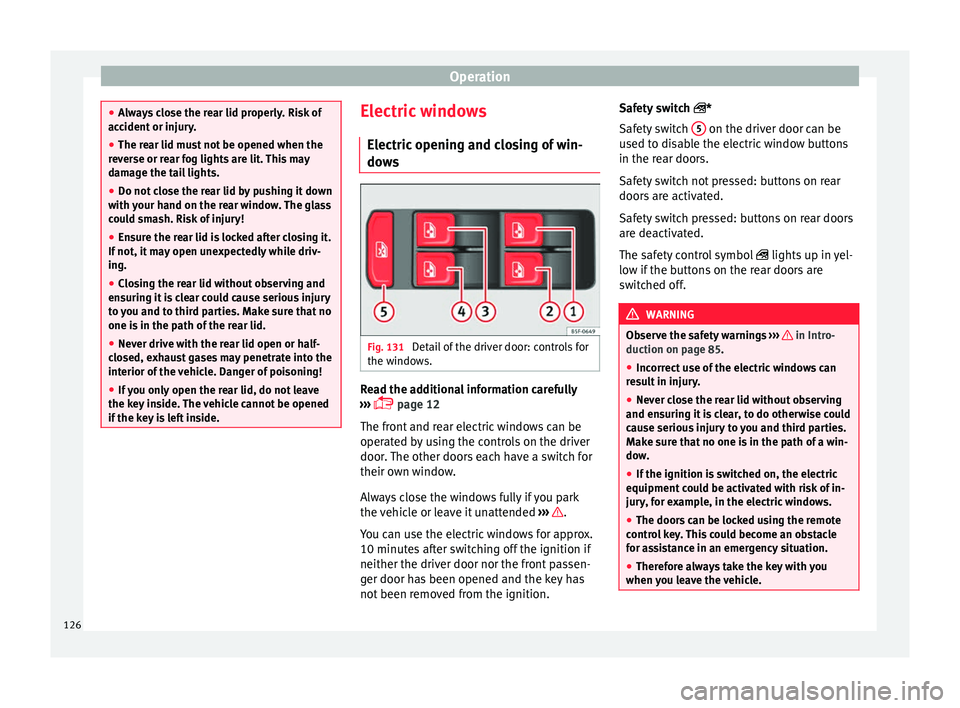
Detail of the driver door: controls for
the w indo
ws. Read the additional information carefully
› ›
› page 12
The front and rear electric windows can be
operated by using the controls on the driver
door. The other doors each have a switch for
their own window.
Always close the windows fully if you park
the vehicle or leave it unattended ››› .
Y ou c
an use the electric windows for approx.
10 minutes after switching off the ignition if
neither the driver door nor the front passen-
ger door has been opened and the key has
not been removed from the ignition. Safety switch
*
Safety
switch 5 on the driver door can be
u sed t
o disable the electric window buttons
in the rear doors.
Safety switch not pressed: buttons on rear
doors are activated.
Safety switch pressed: buttons on rear doors
are deactivated.
The safety control symbol lights up in yel-
low if the buttons on the rear doors are
switched off. WARNING
Observe the safety warnings ››
› in Intro-
duction on p ag
e 85.
● Incorrect use of the electric windows can
re
sult in injury.
● Never close the rear lid without observing
and ens
uring it is clear, to do otherwise could
cause serious injury to you and third parties.
Make sure that no one is in the path of a win-
dow.
● If the ignition is switched on, the electric
equipment c
ould be activated with risk of in-
jury, for example, in the electric windows.
● The doors can be locked using the remote
contr
ol key. This could become an obstacle
for assistance in an emergency situation.
● Therefore always take the key with you
when y
ou leave the vehicle.126
Page 129 of 328
Opening and closing
●
The el ectric
windows will work until the ig-
nition has been switched off and one of the
front doors has been opened.
● If necessary, use the safety switch to disa-
bl
e the rear electric windows. Make sure that
they have been disabled. Note
If the window is not able to close because it
i s
stiff or because of an obstruction, the win-
dow will automatically open again
››› page 127. If this happens, check why the
window could not be closed before attempt-
ing to close it again. Roll-back function
The roll-back function reduces the risk of in-
jur
y
when the electric windows close.
● If a window is obstructed when closing au-
tom
atically, the window stops at this point
and lowers immediately ››› .
● Next, check why the window does not close
bef or
e attempting it again.
● If you try within the following 10 seconds
and the windo
w closes again with difficulty
or there is an obstruction, the automatic clos-
ing will stop working for 10 seconds.
● If the window is still obstructed, the win-
dow w
ill stop at this point. ●
If ther
e is no obvious reason why the win-
dow cannot be closed, try to close it again by
pulling the tab within ten seconds. The win-
dow closes with maximum force. The roll-
back function is now deactivated.
● If more than 10 seconds pass, the window
wi
ll open fully when you operate one of the
buttons. One-touch closing is reactivated. WARNING
Observe the safety warnings ››
› in Electric
openin g and c
losing of windows on page 126.
● The roll-back function does not prevent fin-
ger
s or other parts of the body getting
pinched against the window frame. Risk of
accident. Convenience opening/closing
Use the convenience opening/closing func-
tion t
o e
asily open/close all the windows and
the sliding/tilting sunroof* from the outside.
Convenience open function
– Press and hold button on the remote
c ontr
ol key until all the windows and the
sliding/tilting sunroof* have reached the
desired position, or
– First unlock the vehicle using button on
the r emot
e control key and then keep the
key in the driver door lock until all the win- dows and the sliding/tilting sunroof* have
re
ached the required position.
Convenience close function
– Press and hold button on the remote
c ontr
ol key until all the windows and the
sliding/tilting sunroof* are closed ››› , or
– Keep the key in the driver door in the "lock"
po s
ition until all the windows and the slid-
ing/tilting sunroof* are closed.
Programming convenience opening in the
Easy Connect*
– Select: function button CAR > control but-
t on Vehicle systems
* > Vehicle set-
tings > Central locking > Open the
window by holding button down or
el
se > Front window on/off or else
Roof on/off *. WARNING
● Tak
e care when closing the sliding/tilting
sunroof* and windows. There is a risk of suf-
fering injury.
● For safety reasons, you should only use the
remot
e control open and close functions with-
in about 2 metres of the vehicle. To avoid in-
juries, always keep an eye on the windows
and the sliding/tilting sunroof* when press-
ing the button to close them. The windows
stop moving as soon as the button is re-
leased. 127
Technical data
Advice
Operation
Emergencies
Safety
Page 130 of 328
Operation
One-touch opening and closing One-touch opening and closing means you
do not
h
ave to hold down the button.
Buttons ››› Fig. 131 1 ,
2 ,
3 and
4 have
tw o po
sitions for opening windows and two
for closing them. This makes it easier to open
and close windows to the desired position.
One-touch closing
– Pull up the window button briefly up to the
second po
sition. The window closes fully.
One-touch opening
– Push down the window button briefly up to
the sec ond po
sition. The window opens
fully.
Resetting one-touch opening and closing
The automatic open and close function will
not work if the battery has been temporarily
disconnected. The function can be restored
as follows:
– Close the window as far as it will go by lift-
ing and ho
lding the electric window switch.
– Release the switch and then lift it again for
1 second.
This will re-enable the automatic
function.
If you push (or pull) a button to the first
stage, the window will open (or close) until
you release the button. If you push or lift the button briefly to the second stage, the win-
dow w
ill open (one-touch opening) or close
(one-touch closing) automatically. If you op-
erate the button while the window is opening
or closing, it stops at this position.
Sunroof*
Introduction The sunroof consists of two glass parts. The
r
e
ar part is fixed and cannot be opened. It al-
so has a sun blind. WARNING
If the sunroof is used negligently or without
p a
ying due attention, it can cause serious in-
jury.
● Open or close the sunroof and the sun blind
only
when no one is in their path of move-
ment.
● Never leave any key inside the vehicle
when ex
iting.
● Never leave a child or any other person who
ma
y need help in the vehicle, especially if
they have access to the vehicle key. If using
they key unattended, they could lock the ve-
hicle, start the engine, switch on the ignition
and activate the sunroof.
● After switching off, it is still possible to
open or clo
se the sunroof during a short space of time provided that neither the driver
nor p
a
ssenger door is opened. CAUTION
● To pr
event damage, during winter tempera-
tures remove any ice or snow that might be
on the car roof before opening the sunroof or
adjusting the tilt position.
● Before leaving the vehicle or in case of rain-
fa
ll, always close the sunroof. With the sun-
roof open or in a tilted position, water can en-
ter the interior and can cause considerable
damage to the electrical system. As a result,
other damage can occur in the vehicle. Note
● Le
aves and other loose objects that accu-
mulate on the sunroof rails should be regular-
ly cleaned away either by hand or with a vac-
uum.
● If the sunroof does not work correctly, the
anti-trap f
unction will not work either. Con-
tact a specialised workshop.
● Some settings can be saved in user ac-
cou
nts of the personalisation function
››› page 26.128
Page 132 of 328
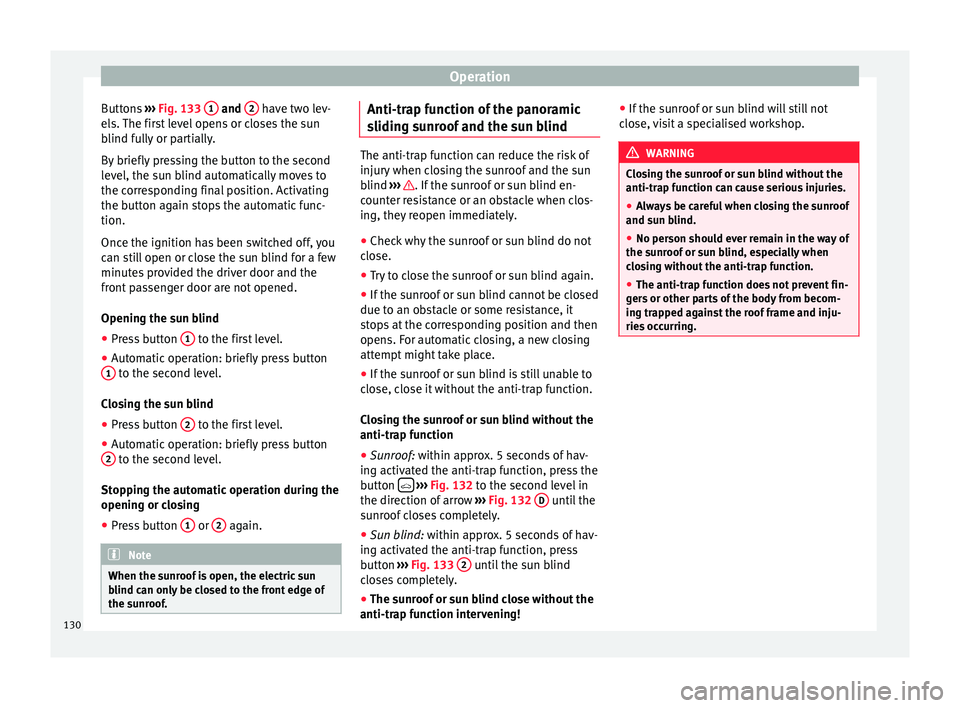
Operation
Buttons ›››
Fig. 133 1 and
2 have two lev-
el s.
The first level opens or closes the sun
blind fully or partially.
By briefly pressing the button to the second
level, the sun blind automatically moves to
the corresponding final position. Activating
the button again stops the automatic func-
tion.
Once the ignition has been switched off, you
can still open or close the sun blind for a few
minutes provided the driver door and the
front passenger door are not opened.
Opening the sun blind
● Press button 1 to the first level.
● Automatic operation: briefly press button
1 to the second level.
C lo
sing the sun blind
● Press button 2 to the first level.
● Automatic operation: briefly press button
2 to the second level.
St op
ping the automatic operation during the
opening or closing
● Press button 1 or
2 again.
Note
When the sunroof is open, the electric sun
b lind c
an only be closed to the front edge of
the sunroof. Anti-trap function of the panoramic
s
lidin
g sunroof and the sun blind The anti-trap function can reduce the risk of
injur
y
when closing the sunroof and the sun
blind ››› . If the sunroof or sun blind en-
c ou
nter resistance or an obstacle when clos-
ing, they reopen immediately.
● Check why the sunroof or sun blind do not
clo
se.
● Try to close the sunroof or sun blind again.
● If the sunroof or sun blind cannot be closed
due t o an o
bstacle or some resistance, it
stops at the corresponding position and then
opens. For automatic closing, a new closing
attempt might take place.
● If the sunroof or sun blind is still unable to
clo
se, close it without the anti-trap function.
Closing the sunroof or sun blind without the
anti-trap function
● Sunroof: within approx. 5 seconds of hav-
in
g activated the anti-trap function, press the
button
› ›
›
Fig. 132 to the second level in
the direction of arrow ›››
Fig. 132 D until the
s u
nroof closes completely.
● Sun blind: within ap
prox. 5 seconds of hav-
ing activated the anti-trap function, press
button ›››
Fig. 133 2 until the sun blind
c lo
ses completely.
● The sunroof or sun blind close without the
anti-trap f
unction intervening! ●
If the s
unroof or sun blind will still not
close, visit a specialised workshop. WARNING
Closing the sunroof or sun blind without the
anti-tr ap f
unction can cause serious injuries.
● Always be careful when closing the sunroof
and su
n blind.
● No person should ever remain in the way of
the su
nroof or sun blind, especially when
closing without the anti-trap function.
● The anti-trap function does not prevent fin-
ger
s or other parts of the body from becom-
ing trapped against the roof frame and inju-
ries occurring. 130
Page 164 of 328
OperationSwitching the auxiliary heater off:
Automatically once the programmed departure
time has arrived or after the programmed oper-
ating time has elapsed
››› page 163.
Automatically when the control lamp (fuel
level indicator) ››› page 276 lights up.
Automatically when the 12-volt battery charge
is too low ››› page 289. Special feature
Onc
e sw
itched off, the auxiliary heater will
continue to operate for a short period of time
in order to burn the fuel remaining in the sys-
tem and also to expel the exhaust fumes.
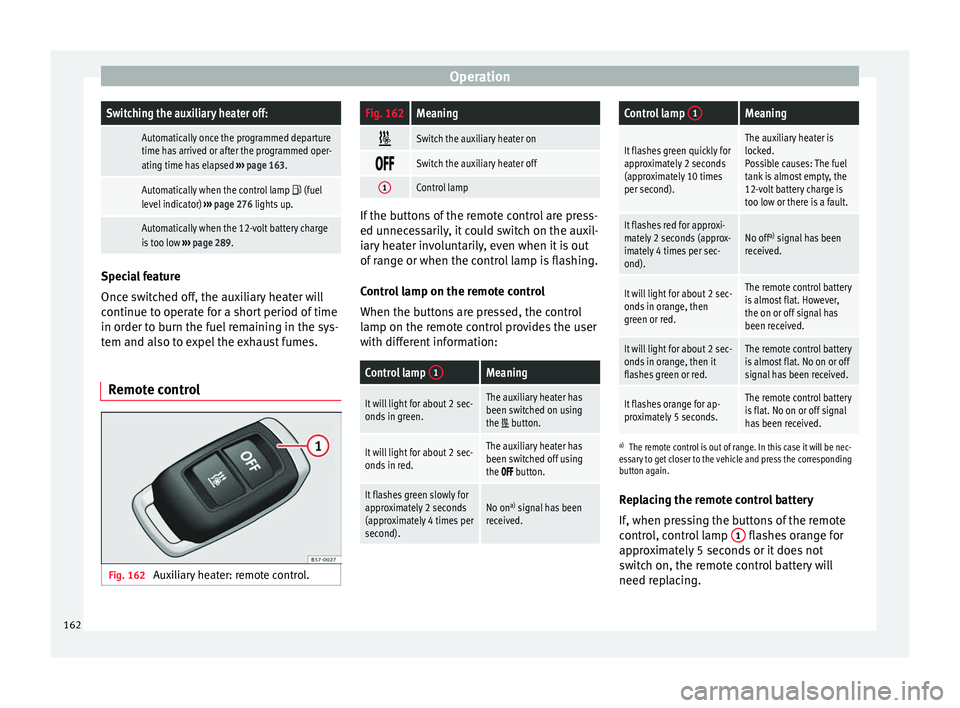
Remote control Fig. 162
Auxiliary heater: remote control.
Fig. 162Meaning
Switch the auxiliary heater on
Switch the auxiliary heater off
1Control lamp
If the buttons of the remote control are press-
ed u
nnec
essarily, it could switch on the auxil-
iary heater involuntarily, even when it is out
of range or when the control lamp is flashing.
Control lamp on the remote control
When the buttons are pressed, the control
lamp on the remote control provides the user
with different information:
Control lamp 1Meaning
It will light for about 2 sec-
onds in green.The auxiliary heater has
been switched on using
the
button.
It will light for about 2 sec-
onds in red.The auxiliary heater has
been switched off using
the
button.
It flashes green slowly for
approximately 2 seconds
(approximately 4 times per
second).No on a)
signal has been
received.
Control lamp 1Meaning
It flashes green quickly for
approximately 2 seconds
(approximately 10 times
per second).The auxiliary heater is
locked.
Possible causes: The fuel
tank is almost empty, the
12-volt battery charge is
too low or there is a fault.
It flashes red for approxi-
mately 2 seconds (approx-
imately 4 times per sec-
ond).No off a)
signal has been
received.
It will light for about 2 sec-
onds in orange, then
green or red.The remote control battery
is almost flat. However,
the on or off signal has
been received.
It will light for about 2 sec-
onds in orange, then it
flashes green or red.The remote control battery
is almost flat. No on or off
signal has been received.
It flashes orange for ap-
proximately 5 seconds.The remote control battery
is flat. No on or off signal
has been received.
a) The remote control is out of range. In this case it will be nec-
essary to get closer to the vehicle and press the corresponding
button again.
Replacing the remote control battery
If, when pressing the buttons of the remote
control, control lamp 1 flashes orange for
ap pr
oximately 5 seconds or it does not
switch on, the remote control battery will
need replacing.
162
Page 197 of 328
Driver assistance systems
●
When driv in
g downhill, the speed limiter
cannot limit the vehicle speed. Its speed will
increase due to its own weight. In this case,
select a lower gear or use the foot brake to
slow the vehicle. WARNING
Observe the safety warnings ›
›
› in Warning
and c ontr
ol lamps on page 107. Note
● Diff er
ent versions of the instrument panel
are available and therefore the versions and
instructions on the display may vary.
● If when switching the ignition off, the
crui
se control system (CCS), the adaptive
cruise control (ACC) or the speed limiter were
switched on, then the cruise control system or the adaptive cruise control will automati-
c
a
lly switch themselves on when the ignition
is back on. However, no speed will be stored.
The last set speed of the speed limiter will be
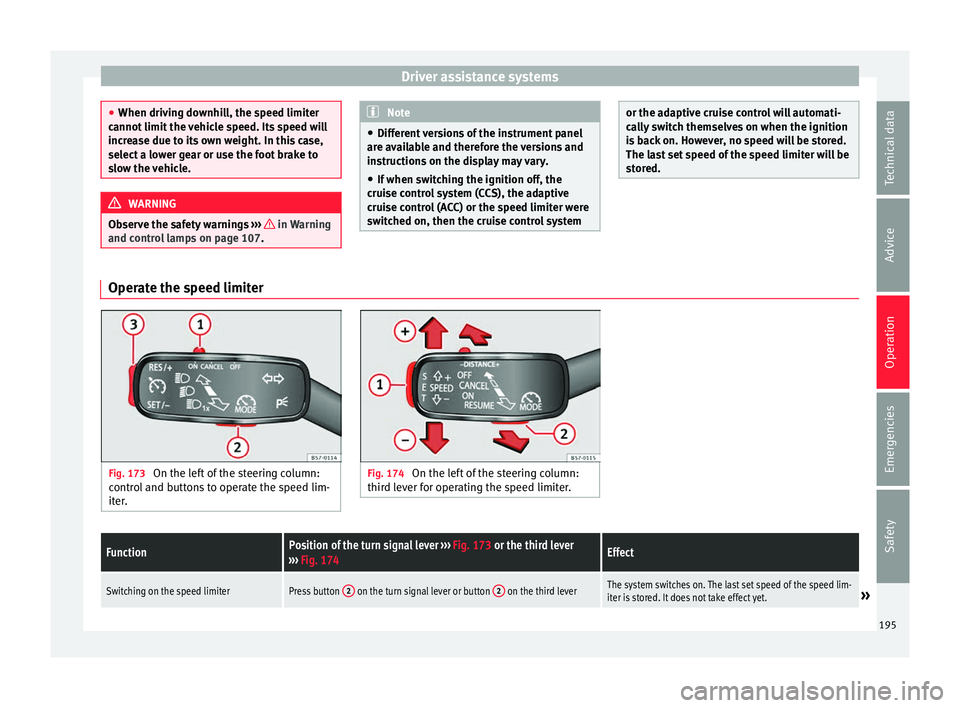
stored. Operate the speed limiter
Fig. 173
On the left of the steering column:
c ontr
ol and buttons to operate the speed lim-
iter. Fig. 174
On the left of the steering column:
thir d l
ever for operating the speed limiter.
FunctionPosition of the turn signal lever ››› Fig. 173 or the third lever
››› Fig. 174Effect
Switching on the speed limiterPress button 2 on the turn signal lever or button 2 on the third leverThe system switches on. The last set speed of the speed lim-
iter is stored. It does not take effect yet.» 195
Technical data
Advice
Operation
Emergencies
Safety
Page 204 of 328
Operation
Any modification to the programmed speed
i s
shown on the bottom left part of the instru-
ment panel display.
Adjusting distance level
The distance according to speed with regard
to the vehicle in front can be controlled on
the Easy Connect system on 5 levels
››› page 26.
In wet road conditions, you should always set
a larger distance with regard to the vehicle in
front than when driving in dry conditions.
The following distances can be preselected:
● Very short
● Short
● Media
● Long
● Very long
In the Ea
sy Connect system the distance that
must be set when connecting the ACC may be
adjusted using the button and the
Set
up and
Driv
er a
ssistance function buttons
› ›
› page 26.
Adjusting the driving programme
In vehicles with driving profile selection
(SEAT Drive Profile), the profile selected can
influence acceleration behaviour
››› page 225. The following driving programmes items can
be select
ed:
● Normal
● Sport
● Eco
● Convenience
In v
ehicles without the driving profile selec-
tion function, acceleration behaviour can be
influenced by selecting a driving programme
on the Easy Connect system using the button and the
Set
up and
Driv
er a
ssistance function buttons
››
›
page 26.
The following conditions may lead the ACC
not to react:
● If the accelerator is pressed.
● If there is no gear engaged.
● If the ESC is controlling.
● If the driver is not wearing his/her seat
belt.
● If
several brake lights of the vehicle or elec-
trical
ly connected trailer are damaged.
● If the vehicle is reversing.
● Driving faster than 210 km/h (150 mph). WARNING
There is a danger of rear collision when the
minimum di s
tance to the vehicle in front is
exceeded and the speed difference between both vehicles is so great that a speed reduc-
tion b
y
the ACC will not suffice. In this case
the brake pedal should be applied immedi-
ately.
● The ACC may not be able to detect all situa-
tions
properly.
● “Stepping” on the accelerator may cause
the AC
C not to intervene in braking. Driver
braking will have priority over intervention by
the speed control or adaptive cruise control.
● Always be ready to use the brakes!
● Observe country-specific provisions gov-
erning o
bligatory minimum distances be-
tween vehicles. Note
● The pr ogr
ammed speed is erased once the
ignition or the ACC are switched off.
● When the traction control system (ASR) is
deactiv
ated during acceleration or else the
ESC is activated in Sport* Mode
( ››› page 108), the ACC switches off automati-
cally.
● In vehicles with the Start-Stop system, the
engine sw
itches off automatically during the
ACC stopping phase and restarts automatical-
ly to begin driving. Vehicles with an automatic gearbox
If the vehicle is equipped with automatic
g
e
arbox, the ACC can brake the vehicle until
202
Page 212 of 328
Operation
SEAT recommends leaving the Front Assist al-
w a
ys switched on. Exceptions ››› page 210,
Temporarily switching the Front Assist sys-
tem off in the following situations .
Switching the Front Assist monitoring sys-
tem on and off
With the ignition switched on, the Front As-
sist can be switched on and off as follows:
● Select the corresponding menu option us-
ing the b
utton for the driver assistance sys-
tems ›››
page 30.
● OR: switch the system on and off in Easy
C
onnect using the button and the
Set
up and
Driv
er a
ssistance function buttons
› ›
› page 26.
When the Front Assist monitoring system is
switched off, the instrument panel will inform
that it has been switched off with the follow-
ing indicator ››› Fig. 186.
Switching the advance warning function on
or off
The advance warning function may be switch-
ed on and off in the Easy Connect system us-
ing the button and the
Set
up and
Driv er a
ssistance function buttons
› ›
› page 26.
The system will store the setting for the next
time the ignition is switched on. SEAT recommends keeping the advance
warnin
g function switched on at all times.
Depending on the infotainment system in-
stalled in the vehicle, the advance warning
function may be adjusted as follows:
● Ready
● Medium
● Delayed
● Deactivated
SEA
T recommends driving with the function
in “Medium” mode.
Switching distance warning on and off
If the safe distance with regard to the vehicle
in front is exceeded, the relevant warning will
appear on the instrument panel display
. In this case, increase the safe dis-
tance.
The distance warning may be switched on
and off in the Easy Connect system using
the button and the
Set
up and
Driv er a
ssistance function buttons
› ›
› page 26.
The system will store the setting for the next
time the ignition is switched on.
SEAT recommends keeping the distance
warning switched on at all times. Temporarily switching the Front Assist
sys
tem off in the following situations In the following situations the Front Assist
Monit
orin
g System should be deactivated
due to the system's limitations ››› :
● When the vehicle is to be towed.
● If the vehicle is on a test bed.
● When the radar sensor is damaged.
● If the radar sensor takes a heavy knock, for
e x
ample in a rear collision.
● If it intervenes several times unnecessarily.
● If the radar sensor is covered temporarily
w ith some k
ind of accessory, such as an ad-
ditional headlight or the like.
● When the vehicle is to be loaded on a lorry,
ferr
y or train. WARNING
If the Front Assist is not switched off in the
s it
uations described, serious accidents and
injuries may occur.
● Switch off the Front Assist in critical situa-
tions. System limitations
The Front Assist Monitoring System has cer-
t
ain ph
ysical limitations inherent in the sys-
tem. Thus, in certain circumstances some of
210
Page 213 of 328
Driver assistance systems
the system's reactions may be inopportune
or be del a
yed from the driver's standpoint.
So pay attention in order to intervene if nec-
essary.
The following conditions may cause the Front
Assist Monitoring System not to react or do
so too late:
● On taking tight bends.
● Pressing the accelerator all the way down.
● If the Front Assist is switched off or dam-
aged.
● If
the ASR has been manually disconnec-
ted.
● If
the ESC is controlling.
● If several brake lights of the vehicle or elec-
trical
ly connected trailer are damaged.
● If the radar sensor is dirty or covered.
● If there are metal objects, e.g. rails on the
ro
ad or sheets used in road works.
● If the vehicle is reversing.
● If the vehicle over-accelerates.
● In case of snow or heavy rain.
● In case of narrow vehicles, such as motor-
bik
es.
● Misaligned vehicles.
● Vehicles crossing the other's path. ●
Vehic
les approaching in the opposite direc-
tion.
● Special loads and accessories of other ve-
hicl
es that jut out over the sides, backwards
or over the top.
City Emergency braking function Fig. 187
On the instrument panel display: ad-
v anc
e warning message The City Emergency braking function is part
of
the Fr
ont Assist monitoring and is active
whenever the system is switched on.
Depending on the equipment, the City emer-
gency braking function may be switched on
and off in the Easy Connect system using
the button and the
Set
up andDriver assistance function buttons
› ›
› page 26.
The City Emergency braking function picks
up, at speeds between 4 km/h (2.5 mph) and
30 km/h (19 mph) approximately, the traffic
situation in front of the vehicle up to a dis-
tance of about 15 m.
If the system detects a possible collision with
a vehicle in front of it, the vehicle prepares
for a possible emergency braking ››› .
If the driv
er fails to react to a possible colli-
sion, the system may brake the vehicle auto-
matically, by progressively increasing braking
effect driving to reduce speed in the event of
a collision. The system can thus help to re-
duce the consequences of an accident.
Status display
Automatic deceleration by means of the City
Emergency braking function is displayed on
the instrument panel by means of the ad-
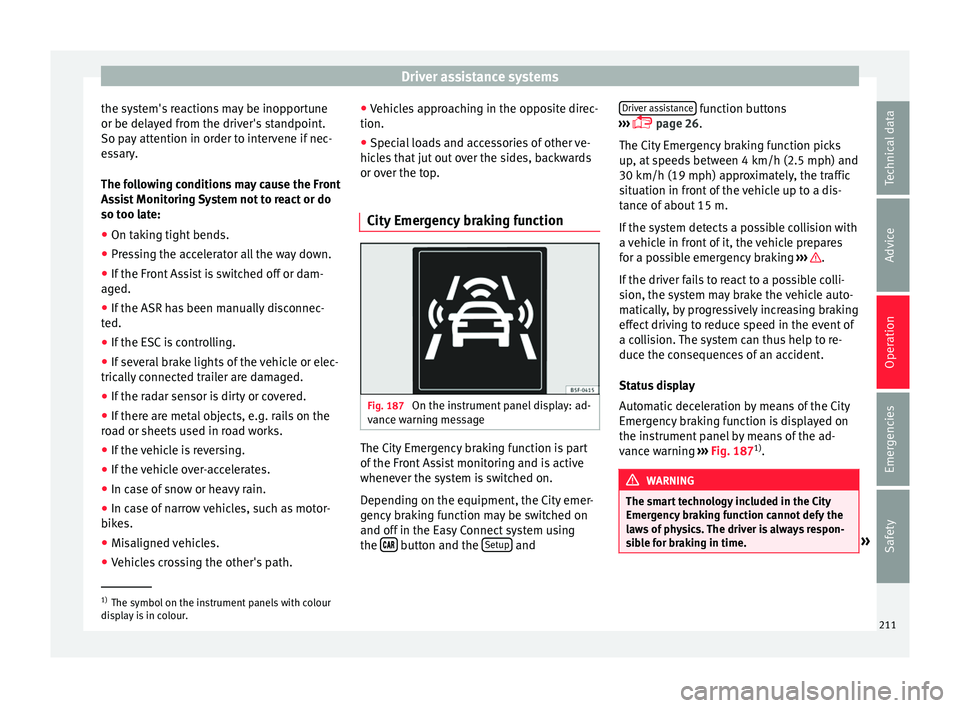
vance warning ››› Fig. 187 1)
. WARNING
The smart technology included in the City
Emer g
ency braking function cannot defy the
laws of physics. The driver is always respon-
sible for braking in time. »1)
The symbol on the instrument panels with colour
di s
play is in colour. 211
Technical data
Advice
Operation
Emergencies
Safety