child seat Seat Ateca 2017 Owner's Guide
[x] Cancel search | Manufacturer: SEAT, Model Year: 2017, Model line: Ateca, Model: Seat Ateca 2017Pages: 328, PDF Size: 6.36 MB
Page 84 of 328
Safety
list of vehicle models for which they can be
in s
talled.
● i-Size: Child seats with i-Size approval must
meet
the requirements prescribed in the ECE-
R 129 standard in relation to installation and
safety. Child seat manufacturers can tell you
which seats have i-Size approval for this vehi-
cle.
Attachment systems Depending on the country, different attach-
ment
sy
stems are used for safely installing
child seats.
Attachment systems overview
● ISOFIX: ISOFIX i
s a standardised attach-
ment system allowing quick and safe attach-
ment of child seats in the vehicle. ISOFIX at-
tachment establishes a rigid connection be-
tween the child seat and the car body.
The child seat has two rigid attachment clips,
called connectors. These connectors are fit-
ted into the ISOFIX attachment rings found
between the seat cushion and the backrest of
the vehicle's back seat (on the sides). ISOFIX
attachment systems are used mainly in Eu-
rope ›››
page 19. If necessary, ISOFIX at-
tachment may have to be supplemented with
a Top Tether belt or a support bracket. ●
Autom
atic three-point seat belt . Whenever
possible, it is preferable to attach the child
seats with the ISOFIX system rather than at-
taching them with an automatic three-point
seat belt ›››
page 18.
Additional attachment:
● Top Tether : The Top Tether belt is guided
o
ver the back of the rear seat and attached to
an anchor point with a hook. Anchor points
are located at the back of the rear seat back-
rest on the boot side ›››
page 22
. The
rings for retaining the Top Tether belt are
marked with an anchor symbol.
● Support bracket : Some c
hild seats rest on
the floor of the vehicle with a support brack-
et. The support bracket prevents the child
seat from tipping forward in the event of im-
pact. Child seats fitted with a support bracket
should only be used in the passenger seat
and side rear seats ››› . For the assembly of
thi s
type of seat you should also consult the
list of approved vehicles for this assembly,
available in the instructions for child restraint
systems.
Recommended systems for attaching child
seats
SEAT recommends attaching child seats as
follows: ●
Bab
y carriers or child seats in the opposite
direction of travel: ISOFIX and support brack-
et or iSize.
● Child seats in the direction of travel: ISO-
FIX and
Top Tether. WARNING
Incorrect use of the support bracket can
c au
se serious or fatal injury.
● Make sure the support bracket is correctly
and saf
ely installed.82
Page 122 of 328
Operation
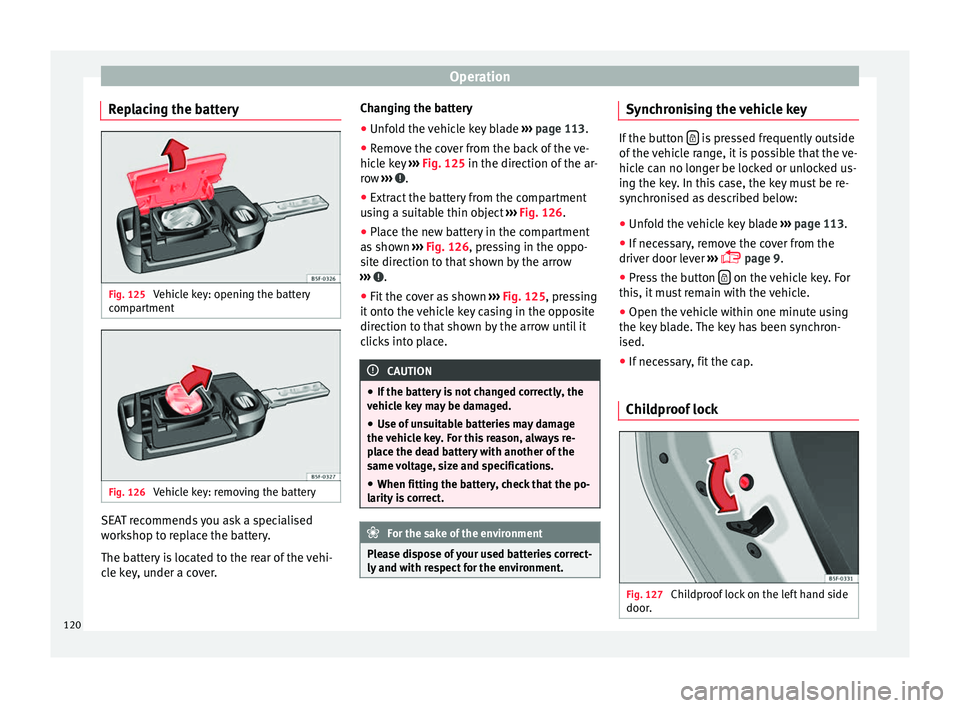
Replacing the battery Fig. 125
Vehicle key: opening the battery
c omp
artment Fig. 126
Vehicle key: removing the battery SEAT recommends you ask a specialised
w
ork
shop to replace the battery.
The battery is located to the rear of the vehi-
cle key, under a cover. Changing the battery
● Unfold the vehicle key blade ››
› page 113.
● Remove the cover from the back of the ve-
hicl
e key ››› Fig. 125 in the direction of the ar-
row ››› .
● Extract the battery from the compartment
u s
ing a suitable thin object ››› Fig. 126.
● Place the new battery in the compartment
as
shown ››› Fig. 126, pressing in the oppo-
site direction to that shown by the arrow
››› .
● Fit the cover as shown ››
› Fig. 125 , pressing
it onto the vehicle key casing in the opposite
direction to that shown by the arrow until it
clicks into place. CAUTION
● If the b
attery is not changed correctly, the
vehicle key may be damaged.
● Use of unsuitable batteries may damage
the v
ehicle key. For this reason, always re-
place the dead battery with another of the
same voltage, size and specifications.
● When fitting the battery, check that the po-
larity
is correct. For the sake of the environment
Please dispose of your used batteries correct-
ly and w
ith respect for the environment. Synchronising the vehicle key
If the button
is pressed frequently outside
of the
vehicle range, it is possible that the ve-
hicle can no longer be locked or unlocked us-
ing the key. In this case, the key must be re-
synchronised as described below:
● Unfold the vehicle key blade ››
› page 113.
● If necessary, remove the cover from the
driver door l
ever ›››
page 9.
● Press the button on the vehicle key. For
thi s, it
must remain with the vehicle.
● Open the vehicle within one minute using
the k ey
blade. The key has been synchron-
ised.
● If necessary, fit the cap.
Childproof lock Fig. 127
Childproof lock on the left hand side
door .120
Page 127 of 328
Opening and closing
The opening angle is memorised. Memorisa-
tion i s
indicated by blinking of the hazard
warning lights and an audible warning.
Resetting and memorising the opening angle
For the rear lid to reopen completely, the
opening angle must be reset and memorised
again.
● Release the rear lid and open it to the
memorised height
.
● Lift the rear lid by hand until it stops. To do
this, some f
orce will have to be used.
● Press the ››
› Fig. 129 button available in
the rear lid for at least 3 seconds.
● This resets and memorises the factory-set
opening an
gle. Memorisation is indicated by
blinking of the hazard warning lights and an
audible warning.
Automatic protection against overheating
If the system is operated repeatedly in a
short space of time, it automatically switches
off to prevent overheating.
Once the system is cool again, the function
can be reused. Until then the rear lid can only
be opened and closed by hand using reason-
able force.
If with the rear lid open the vehicle battery is
disconnected ››› page 289 or the corre-
sponding fuse burns out ››› page 90, the sys- tem will have to be reset. This requires clos-
ing the r
ear lid completely once.
Emergency unlocking
››› page 11 WARNING
If a lot of snow builds up on the rear lid or it
i s
heavily loaded, the rear lid may not open
or, after opening, it may lower by itself due to
the extra weight and cause serious injury.
● Never open the rear lid when there is a lot
of s
now on it or when carrying a load (e.g. on
a rack).
● Before opening the rear lid, remove the
sno
w or the load. WARNING
If the rear lid is closed incorrectly or without
due c ar
e, it could result in serious injury.
● Never leave the vehicle unattended or allow
chi
ldren to play inside or next to it, especially
if the rear lid is open. Children could enter
the luggage compartment, close the rear lid
and become trapped. A locked vehicle can
reach extremely high and low temperatures,
depending on the time of year, thus causing
serious injuries, illness or even death. CAUTION
Before opening or closing the rear lid, make
s ur
e that there is enough space to open or close it, e.g. when pulling a trailer or in a ga-
r
ag
e. Tailgate automatic lock
Where the vehicle has been locked by press-
in
g the button on the remote control with
the r e
ar lid open, the rear lid will lock auto-
matically when closed.
The automatic tailgate locking time extension
function can be activated. Where this func-
tion is activated and once the rear lid has
been unlocked by pressing the button on
the r emot
e control key ››› page 114, the rear
lid can be re-opened for a certain length of
time.
Where required, the automatic tailgate lock-
ing time extension function can be activated
or deactivated at an Authorised SEAT Service,
which will provide all the necessary informa-
tion.
Before the vehicle locks automatically, there
is a risk of intruders getting into the vehicle.
Therefore, we recommend you always lock
the vehicle by pressing the button on the
r emot
e control or by using the central locking
button. WARNING
Observe the safety warnings ››
› in Intro-
duction on p ag
e 85. » 125
Technical data
Advice
Operation
Emergencies
Safety
Page 145 of 328
Seats and head restraints
Seats and head restraints
Adju s
ting the seats and headr-
ests
Manual adjustment of seats Read the additional information carefully
› ›
› page 12 WARNING
The safe driving chapter contains important
inf orm
ation, tips, suggestions and warnings
that you should read and observe for your
own safety and the safety of your passengers
››› page 62. WARNING
● Adju s
t the front seats only when the vehi-
cle is stationary. Failure to follow this instruc-
tion could result in an accident.
● Be careful when adjusting the seat height.
Car
eless or uncontrolled adjustment can
cause injuries.
● The front seat backrests must not be re-
clined f
or driving. Otherwise, seat belts and
the airbag system might not protect as they
should, with the subsequent danger of injury. Electric driver's seat adjustment*
Read the additional information carefully
› ›
› page 13 WARNING
● If the el
ectric front seats are used negli-
gently or without paying due attention, it can
cause serious injury.
● The front seats can also be electrically ad-
jus
ted when the ignition is switched off. Nev-
er leave a child or any other person who may
need help in the vehicle.
● In the event of an emergency, electrical ad-
jus
tment can be stopped by pressing any
control. CAUTION
To avoid damaging the electrical components
of the fr
ont seats, please refrain from kneel-
ing on the seat or applying sharp pressure at
a single point to the seat cushion and back-
rest. Note
● It m
ay not be possible to electrically adjust
the seat if the vehicle battery is very low.
● If the engine is started while the seats are
being el
ectrically adjusted, the adjustment
will stop. Adjusting the front head restraints
Read the additional information carefully
› ›
› page 13
Adjust the head restraint ›››
page 13 so
that as far as possible the top of the head re-
straint is level with the top of your head.
When this is not possible, try to get as close
as possible to this position.
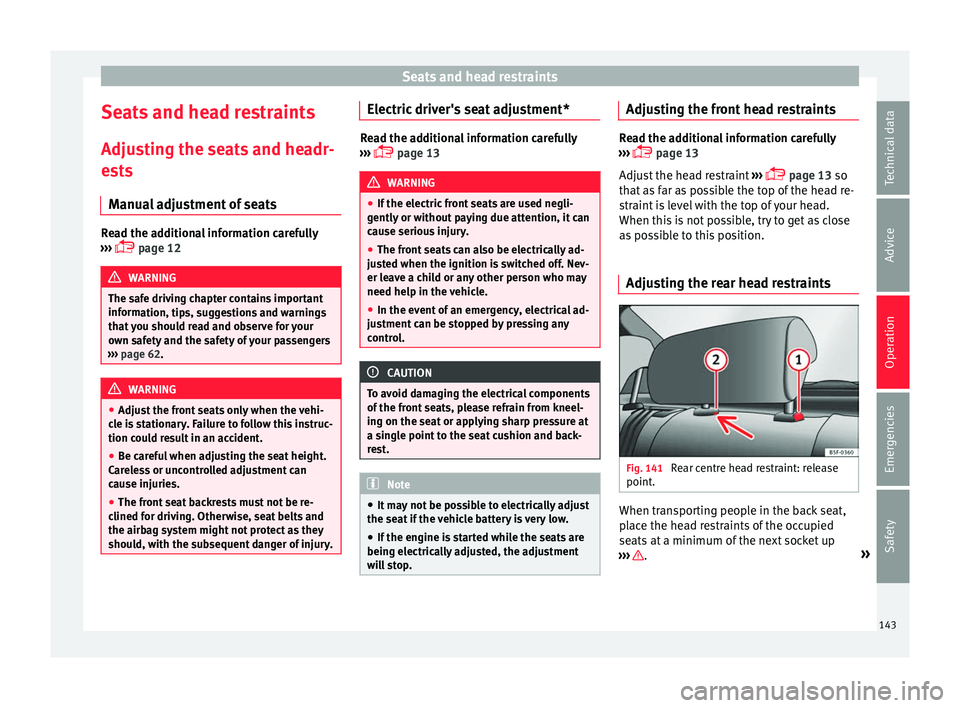
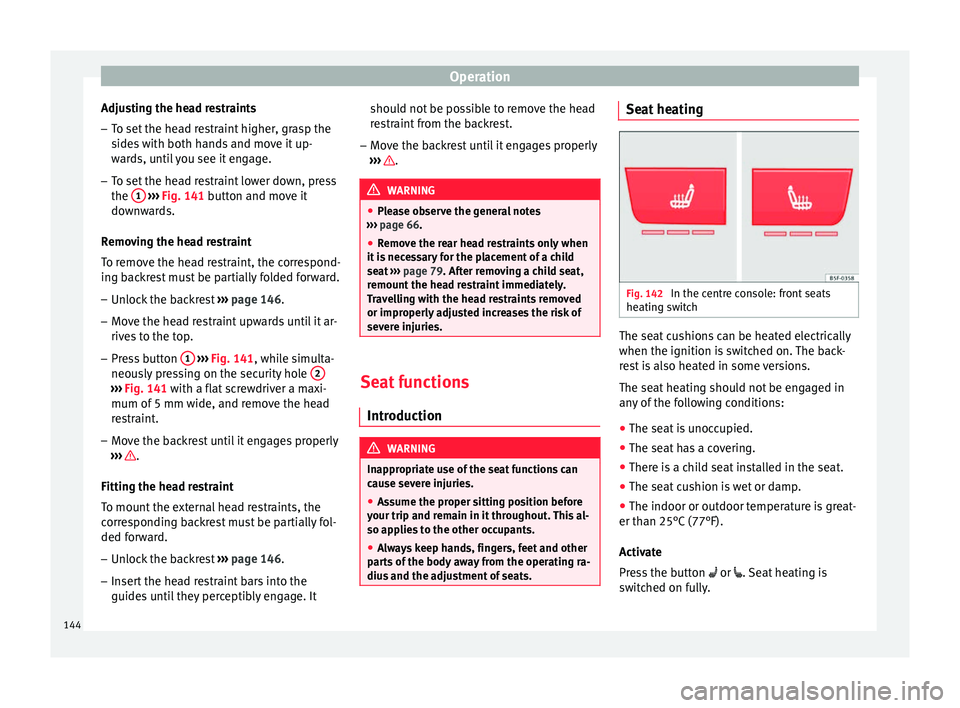
Adjusting the rear head restraints Fig. 141
Rear centre head restraint: release
point . When transporting people in the back seat,
p
l
ace the head restraints of the occupied
seats at a minimum of the next socket up
››› .
»
143
Technical data
Advice
Operation
Emergencies
Safety
Page 146 of 328
Operation
Adjusting the head restraints
– To set the head restraint higher, grasp the
side
s with both hands and move it up-
wards, until you see it engage.
– To set the head restraint lower down, press
the 1
› ››
Fig. 141
button and move it
downwards.
Removing the head restraint
To remove the head restraint, the correspond-
ing backrest must be partially folded forward. – Unlock the backrest ››
› page 146.
– Move the head restraint upwards until it ar-
rive
s to the top.
– Press button 1
› ›
›
Fig. 141, while simulta-
neously pressing on the security hole 2›››
Fig. 141 w ith a fl
at screwdriver a maxi-
mum of 5 mm wide, and remove the head
restraint.
– Move the backrest until it engages properly
› ›
› .
Fittin g the he
ad restraint
To mount the external head restraints, the
corresponding backrest must be partially fol-
ded forward.
– Unlock the backrest ››
› page 146.
– Insert the head restraint bars into the
guides
until they perceptibly engage. It should not be possible to remove the head
re
straint from the backrest.
– Move the backrest until it engages properly
››
› .
WARNING
● Ple
ase observe the general notes
››› page 66.
● Remove the rear head restraints only when
it i
s necessary for the placement of a child
seat ››› page 79. After removing a child seat,
remount the head restraint immediately.
Travelling with the head restraints removed
or improperly adjusted increases the risk of
severe injuries. Seat functions
Intr oduction WARNING
Inappropriate use of the seat functions can
c au
se severe injuries.
● Assume the proper sitting position before
your trip and r
emain in it throughout. This al-
so applies to the other occupants.
● Always keep hands, fingers, feet and other
par
ts of the body away from the operating ra-
dius and the adjustment of seats. Seat heating
Fig. 142
In the centre console: front seats
he atin
g switch The seat cushions can be heated electrically
when the ignition i
s
switched on. The back-
rest is also heated in some versions.
The seat heating should not be engaged in
any of the following conditions:
● The seat is unoccupied.
● The seat has a covering.
● There is a child seat installed in the seat.
● The seat cushion is wet or damp.
● The indoor or outdoor temperature is great-
er than 25°C
(77°F).
Activate
Press the button or . Seat heating is
switched on fully.
144
Page 147 of 328
Seats and head restraints
Adjusting the heating output
Pr e
ss the button or repeatedly until the
desired intensity level is reached.
Deactivating
Press the button or until all warning
lamps switch off. WARNING
Children and people who cannot perceive
p ain or t
emperature because of medications,
paralysis or chronic diseases (e.g. diabetes)
or have a limited perception of these, may
suffer burns to the back, buttocks or legs
when using seat heating, an occurrence that
may entail a very lengthy recovery period or
from which it may not be possible to recover
fully. Seek medical advice if you have doubts
regarding your health.
● People with limited pain and temperature
thre
sholds must never use seat heating.
● If an abnormality in the device's tempera-
tur
e control is detected, have it checked by a
specialist workshop. WARNING
If the fabric of the cushion is wet, this can ad-
v er
sely affect the operation of the seat heat-
ing, increasing the risk of burns.
● Make sure the seat cushion is dry prior to
us
ing the seat heater. ●
Do not s
it on the seat with clothing that is
wet or damp.
● Do not leave clothing that is wet or damp
on the seat
.
● Do not spill liquid on the seat. CAUTION
● To av
oid damaging the heating elements of
the seat heaters, please do not kneel on the
seat or apply sharp pressure to a single point
on the seat cushion or backrest.
● Liquids, sharps objects and insulating ma-
teri
als (e.g. covers or child seats) can damage
the seat heating.
● In the event of smells, switch off the seat
heatin
g immediately and have it inspected by
a specialised workshop. For the sake of the environment
The seat heating should remain on only when
needed. Other w
ise, it is an unnecessary fuel
waste. Front centre armrest
The centre armrest can be adjusted to various
l
ev
els.
Adjusting the centre armrest – To adjust the tilt, lift the armrest from the
st
arting position so that it is engaged. –
To r
eturn the armrest to the starting posi-
tion, remove the armrest from the upper
fixed position and lower it.
The armrest can be moved backwards and
forwards.
145
Technical data
Advice
Operation
Emergencies
Safety
Page 148 of 328
Operation
Folding down and lifting the rear seat
b ac
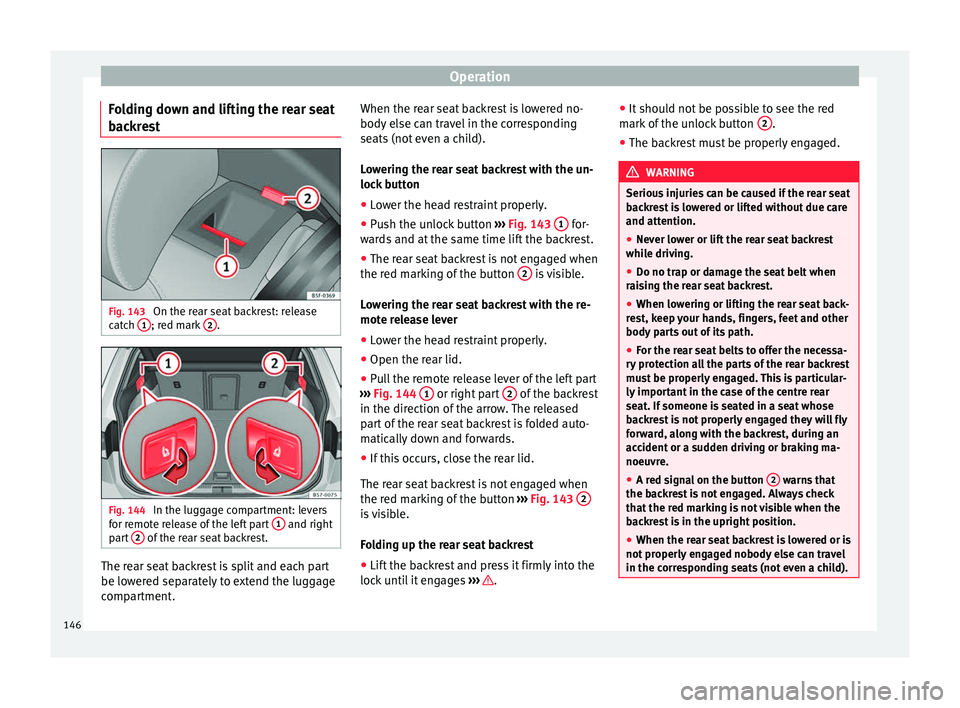
krest Fig. 143
On the rear seat backrest: release
c at
ch 1 ; red mark
2 .
Fig. 144
In the luggage compartment: levers
f or r
emote release of the left part 1 and right
p ar
t 2 of the rear seat backrest.
The rear seat backrest is split and each part
be lo
w
ered separately to extend the luggage
compartment. When the rear seat backrest is lowered no-
body el
se can travel in the corresponding
seats (not even a child).
Lowering the rear seat backrest with the un-
lock button
● Lower the head restraint properly.
● Push the unlock button ››
› Fig. 143 1 for-
w ar
ds and at the same time lift the backrest.
● The rear seat backrest is not engaged when
the red m
arking of the button 2 is visible.
L o
wering the rear seat backrest with the re-
mote release lever
● Lower the head restraint properly.
● Open the rear lid.
● Pull the remote release lever of the left part
››
› Fig. 144 1 or right part
2 of the backrest
in the dir ection of
the arrow. The released
part of the rear seat backrest is folded auto-
matically down and forwards.
● If this occurs, close the rear lid.
The re
ar seat backrest is not engaged when
the red marking of the button ››› Fig. 143 2 is visible.
F
o
lding up the rear seat backrest
● Lift the backrest and press it firmly into the
lock
until it engages ››› .●
It shou
ld not be possible to see the red
mark of the unlock button 2 .
● The backrest must be properly engaged. WARNING
Serious injuries can be caused if the rear seat
b ac
krest is lowered or lifted without due care
and attention.
● Never lower or lift the rear seat backrest
whil
e driving.
● Do no trap or damage the seat belt when
rai
sing the rear seat backrest.
● When lowering or lifting the rear seat back-
re
st, keep your hands, fingers, feet and other
body parts out of its path.
● For the rear seat belts to offer the necessa-
ry
protection all the parts of the rear backrest
must be properly engaged. This is particular-
ly important in the case of the centre rear
seat. If someone is seated in a seat whose
backrest is not properly engaged they will fly
forward, along with the backrest, during an
accident or a sudden driving or braking ma-
noeuvre.
● A red signal on the button 2 warns that
the b ac
krest is not engaged. Always check
that the red marking is not visible when the
backrest is in the upright position.
● When the rear seat backrest is lowered or is
not pr
operly engaged nobody else can travel
in the corresponding seats (not even a child). 146
Page 154 of 328
Operation
●
Ob
jects in the luggage compartment that
are unsecured could move suddenly and
modify the handling of the vehicle.
● Secure all objects, little and large.
● Never exceed the maximum tensile load of
the fa
stening ring when securing objects.
● Never secure a child seat to the fastening
ring
s. Note
● The m ax
imum tensile load that the fasten-
ing rings can support is 3.5 kN.
● Belts and securing systems for the appro-
priat
e load can be obtained from specialised
dealerships. SEAT recommends visiting a
SEAT dealership for this.
● The fastening rings are rendered unusable
for
versions with a spare wheel. Retaining hooks
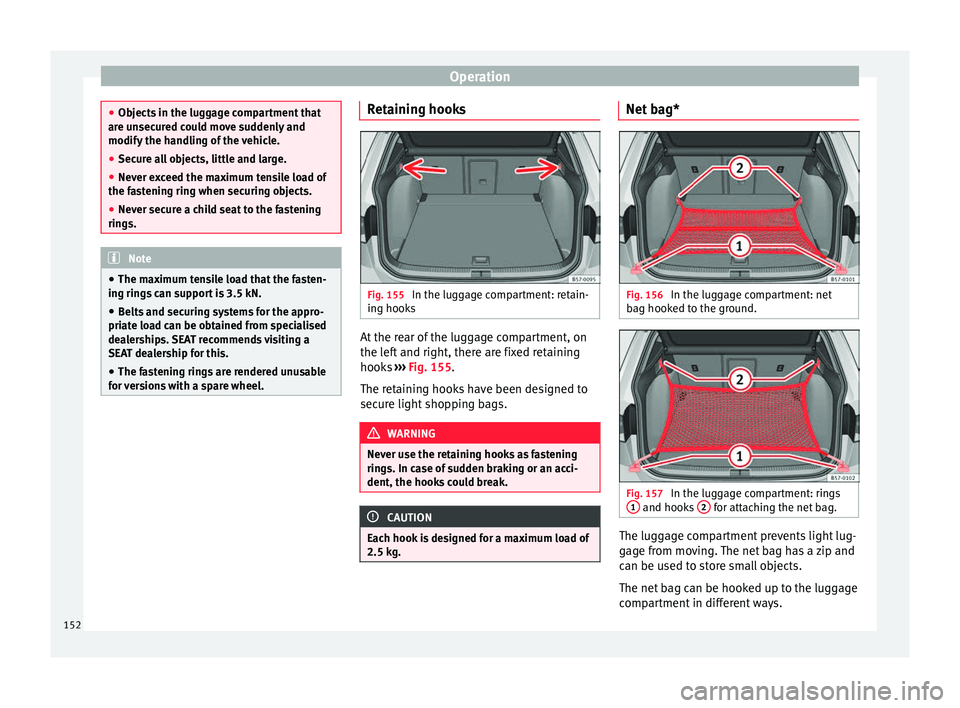
Fig. 155
In the luggage compartment: retain-
in g hook
s At the rear of the luggage compartment, on
the l
ef
t and right, there are fixed retaining
hooks ››› Fig. 155.
The retaining hooks have been designed to
secure light shopping bags. WARNING
Never use the retaining hooks as fastening
rin g
s. In case of sudden braking or an acci-
dent, the hooks could break. CAUTION
Each hook is designed for a maximum load of
2.5 k g. Net bag*
Fig. 156
In the luggage compartment: net
b ag hook
ed to the ground. Fig. 157
In the luggage compartment: rings
1 and hooks
2 for attaching the net bag.
The luggage compartment prevents light lug-
g
ag
e from moving. The net bag has a zip and
can be used to store small objects.
The net bag can be hooked up to the luggage
compartment in different ways.
152
Page 234 of 328
Operation
● When c ornerin
g
● On roads in poor condition
● In unfavourable weather conditions
● When a sporty driving style is employed
● In the event of a serious distraction to the
driver
F
atigue detection will be restored when the
vehicle is stopped for more than 15 minutes,
when the ignition is switched off or when the
driver has unbuckled their seat belt and
opened the door.
In the event of slow driving during a long pe-
riod of time (below 65 km/h, 40 mph) the
system automatically re-establishes the tired-
ness calculation. When driving at a faster
speed the driving behaviour will be recalcula-
ted.
Park Assist*
Introduction
› ›
›
table on page 2
The Park Assist system is an additional func-
tion of ParkPilot ›››
page 239 and helps the
driver to:
● find a suitable parking space,
● select a parking mode, ●
park
driving in reverse in suitable perpen-
dicular and parallel spaces,
● park driving forwards in suitable perpen-
dicu
lar spaces,
● exit a parking space driving forwards from
a par
allel space.
In vehicles with a Park Assist system and fac-
tory radio the front, rear and side areas are
represented, and the position of obstacles is
shown relative to the vehicle.
The Park Assist system is subject to certain
limitations inherent to the system and its use
requires special attention by the driver ››› .
WARNING
The smart technology incorporated into the
P ark
Assist system cannot overcome the lim-
its imposed by the laws of physics; it only
works within the limits of the system. The
greater convenience provided by Park Assist
should never tempt you to take any risk that
may compromise safety. The system is not a
replacement for driver awareness.
● Any accidental movement of the vehicle
cou
ld result in serious injury.
● Adapt your speed and driving style at all
times
to suit visibility, weather, road and traf-
fic conditions.
● Certain surfaces of objects and garments
do not r
eflect the ultrasound sensors' sig-
nals. The system cannot detect, at least cor- rectly, these objects or people wearing such
c
lothe
s.
● Ultrasound sensor signals may be affected
by
external sound sources. In certain circum-
stances this may prevent them from detect-
ing people or objects.
● The ultrasound sensors have blind spots in
which o
bstacles and people are not regis-
tered.
● Monitor the area around the vehicle at all
times, s
ince the ultrasound sensors do not
detect small children, animals or certain ob-
jects in all situations. WARNING
Quick turns of the steering wheel when park-
in g or e
xiting a parking space with Park As-
sist can cause serious injury.
● Do not hold the steering wheel during ma-
noeuvr
es to park or exit a parking space until
the system requests it. Doing so disables the
system during the manoeuvre, resulting in
the parking being cancelled. CAUTION
● In c er
tain circumstances, the ultrasonic
sensors do not detect objects such as trailer
tongues, bars, fences, posts or thin trees, or
an open (or opening) rear lid, which could
damage the vehicle.
● Retrofitting of certain accessories to the ve-
hicl
e, such as a bicycle rack, may interfere 232
Page 247 of 328
Driver assistance systems
●
The u ltr
asound sensors have blind spots in
which obstacles and people are not regis-
tered. Pay special attention to children and
animals.
● Always keep visual control of the vehicle
surr
oundings: use the mirrors for additional
help. CAUTION
Parking Aid functions may be negatively af-
f ect
ed by different factors that may lead to
damage to the vehicle or its immediate sur-
rounds:
● Under certain circumstances, the system
does
not detect or display certain objects:
– Objects such as chains, trailer draw bars,
fences, posts and thin trees.
– Objects that are located above the sen-
sors, such as protrusions in a wall.
– Objects with certain surfaces or struc-
tures, such as wire mesh fences or pow-
der snow.
● Certain surfaces of objects and garments
do not r
eflect the ultrasound sensors' sig-
nals. The system cannot detect these objects
or people wearing such clothes correctly.
● Ultrasound sensor signals may be affected
by
external sound sources. In certain circum-
stances this may prevent them from detect-
ing people or objects.
● Please note that low obstacles detected by
the sys
tem may no longer be registered by the sensors as the car moves closer, so the
sy
s
tem will not give any further warning. In
certain circumstances, objects such as high
kerbs that could damage the bottom of the
vehicle are not detected either.
● If the first warning from the ParkPilot is ig-
nored, the
vehicle could suffer considerable
damage.
● The knocks or damage on the radiator
gril
le, bumper, wheel arch and vehicle under-
body can adjust the orientation of the sen-
sors. This can affect the parking aid function.
In this case, have the function checked by a
specialised workshop. Note
● In c er
tain situations, the system can give a
warning even though there is no obstacle in
the detected area, e.g:
–with rough or cobbled floors or ground
with long grass;
– with external ultrasound sources, such as
cleaning vehicles or other vehicles equip-
ped with ultrasound systems;
– in downpours, intense snow, hail or
dense exhaust gases,
– if the number plate is not perfectly se-
cured to the bumper surface,
– or in locations such as the brow of a hill.
● In order to guarantee good system opera-
tion, keep the u
ltrasound sensors clean, free of snow or ice, and do not cover them with
a
dhe
sives or other objects.
● If you use high-pressure or vapour equip-
ment t
o clean the ultrasound sensors, apply
it directly only very briefly and always from a
distance of more than 10 cm.
● Retrofitting of accessories to the vehicle,
suc
h as a bicycle rack, may interfere with the
operation of the Parking Aid.
● In order to familiarise yourself with the sys-
tem, it
is advised that you practice parking in
an area or car park that is free from traffic.
There must be good weather and light condi-
tions.
● The volume and tone of the warnings can
be modified, in ad
dition to the indications
››› page 246.
● In vehicles without
an infotainment system,
these parameters can be modified in a SEAT
Official Service or in a specialised workshop.
● Please observe information on towing a
trai
ler ››› page 247.
● The display on the Easy Connect screen
show
s a slight time delay. Parking Aid operation
Manual disconnection of Parking Aid display
(the audib
l
e sounds remain active)
● Press a button on the main menu of the fac-
t or
y-assembled infotainment system.
● OR: Pr ess the BACK f
unction button. »
245
Technical data
Advice
Operation
Emergencies
Safety