clutch Seat Ateca 2017 Owner's Guide
[x] Cancel search | Manufacturer: SEAT, Model Year: 2017, Model line: Ateca, Model: Seat Ateca 2017Pages: 328, PDF Size: 6.36 MB
Page 206 of 328
Operation
speed accordingly and then controls the ad-
ju s
ted distance. If the vehicle detected in
front accelerates, the adaptive cruise control
will also accelerate up to the target speed
programmed at most.
The greater the speed, the greater the dis-
tance in metres should be ››› . We recom-
mend the settin g
Distance 3. WARNING
With regard to distance setting, the driver is
r e
sponsible for observing country-specific
legislation. Driver messages
A
C
C not available
The system can no longer continue to guar-
antee safe vehicle detection and will be de-
activated. The sensor has lost its setting or is
damaged. Take the vehicle to a specialised
workshop and have the fault repaired.
ACC: currently not available. No sensor vi-
sion
ACC and Front Assist: currently not availa-
ble. No sensor vision
This message will be displayed to the driver if
the radar sensor's vision is impaired due, for example, to leaves, snow, heavy fog or dirt.
C
l
ean the SEAT badge ››› Fig. 177.
ACC: currently not available. Gradient too
steep
The maximum road slope has been excee-
ded, hence safe ACC operation cannot be
guaranteed. The ACC cannot be switched on.
ACC: only available in D, S or M
Select the D/S or M position on the selector
lever.
ACC: parking brake applied
The ACC is deactivated if the parking brake is
applied. The ACC is available once again after
the parking brake is released.
ACC: currently not available. Intervention
of stability control
The message for the driver is displayed when
the electronic stability control (ESC) inter-
venes. In this case, the ACC is automatically
switched off.
ACC: Take action!
The message for the driver is displayed if,
when the vehicle starts up on a hill with a
mild slope, the vehicle rolls back even al-
though the ACC is activated. Apply the brake
to stop the vehicle from moving/colliding
with another vehicle.
ACC: speed limit
The me ssage for the driver is displayed if, in
vehicles with manual gearbox, the current
speed is too low for the ACC mode.
The speed to be stored must be at least
30 km/h (18 mph). The speed limiter
switches off if the speed falls below 20 km/h (12 mph).
ACC: available as of the 2nd gear
The ACC is operational as of the 2nd gear
(manual gearbox).
ACC: engine speed
The message for the driver is displayed if, when the ACC accelerates or brakes, the driv-
er does not shift up or down a gear in time,
which means exceeding or not reaching the
permissible engine speed. The ACC switches
itself off. A buzzer warning is heard.
ACC: clutch pressed
Vehicles with a manual gearbox: pressing the
clutch pedal for longer abandons control
mode.
Door open
Vehicles with automatic gearbox: the ACC
cannot be activated with the vehicle station-
ary and the door open.
204
Page 210 of 328
Operation
Front assist
If the Fr
ont Assist notices that the driver is
not braking sufficiently in case of a collision
hazard, the system can increase braking ef-
fect and thus avert the collision when driving
at a speed of between approximately 4 km/h
(2.5 mph) and 250 km/h (156 mph). Front
assist only acts while the brake pedal is
pressed down hard. WARNING
The intelligent technology in the Front Assist
c annot
change the laws of physics. The driver
is always responsible for braking in time. If
the Front Assist issues a warning, then, de-
pending on the traffic circumstances, you
must brake immediately or dodge the obsta-
cle.
● Adapt your speed and safe distance to the
vehic
le in front of you at all times to suit visi-
bility, weather, road and traffic conditions.
● The Front Assist alone cannot avoid acci-
dents
and serious injuries.
● In complex driving situations, the Front As-
si
st may issue unnecessary warnings and in-
tervene unnecessarily in braking, such as in
traffic islands.
● If the operation of the Front Assist is im-
pair
ed, for example, by dirt or because the ra-
dar sensor has lost its settings, the system
may issue unnecessary warnings and inter-
vene inopportunely in the braking. ●
Front
Assist does not react to animals or ve-
hicles crossing your path or approaching
head-on down the same lane.
● The driver must always be ready to take
ov
er the control of the vehicle. Note
● When the Fr ont
Assist causes a braking,
the brake pedal is “harder”.
● Automatic interventions by the Front Assist
on the brak
es may be interrupted by pressing
the clutch, accelerator or moving the wheel.
● If the Front Assist does not work as descri-
bed in this
chapter (e.g. in intervenes several
times unnecessarily), switch it off. Have the
system checked by a specialised workshop.
SEAT recommends visiting a SEAT dealership. On-screen warning lamps and mes-
s
ag
es Fig. 184
On the instrument panel display:
W arnin
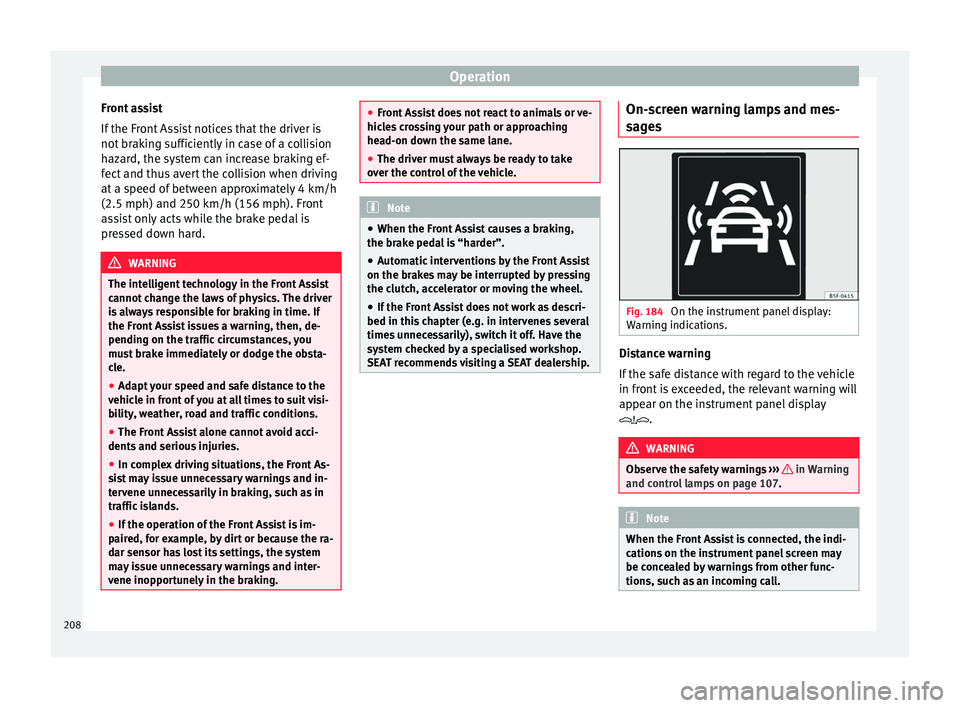
g indications. Distance warning
If
the s
afe distance with regard to the vehicle
in front is exceeded, the relevant warning will
appear on the instrument panel display
. WARNING
Observe the safety warnings ››
› in Warning
and c ontr
ol lamps on page 107. Note
When the Front Assist is connected, the indi-
c ation
s on the instrument panel screen may
be concealed by warnings from other func-
tions, such as an incoming call. 208
Page 214 of 328
Operation
●
Ad apt
your speed and safe distance to the
vehicle in front of you at all times to suit visi-
bility, weather, road and traffic conditions.
● The City Emergency braking function alone
cannot
prevent accidents or serious injury.
● In complex driving situations, the City
Emerg
ency braking function may issue unnec-
essary warnings and intervene inopportunely
in braking, such as in work areas or if there
are metal rails.
● If the operation of the City Emergency brak-
ing f
unction is impaired, for example, by dirt
or because the radar sensor has lost its set-
tings, the system may issue unnecessary
warnings and intervene inopportunely in the
braking.
● The City emergency braking function only
re
acts to people if the vehicle has a pedes-
trian-monitoring system. The system does
not react to animals or vehicles crossing your
path or approaching head-on in the same
lane. Note
● When the C ity
Emergency braking function
causes a braking, the brake pedal is “hard-
er”.
● Automatic interventions on the brakes by
the City
Emergency braking function may be interrupted by pressing the clutch, accelera-
t
or or mo
ving the wheel.
● The City Emergency braking function can
brak
e the vehicle until it stops completely.
However, the brake system does not halt the
vehicle permanently. Use the foot brake!
● If several inopportune intervenes occur,
swit
ch off the Front Assist and with it the City
Emergency braking function. Take it to a spe-
cialised workshop, SEAT recommends visiting
a SEAT dealership.
● If numerous unnecessary interventions oc-
cur
, the City Emergency braking function may
switch off automatically. Pedestrian Monitoring*
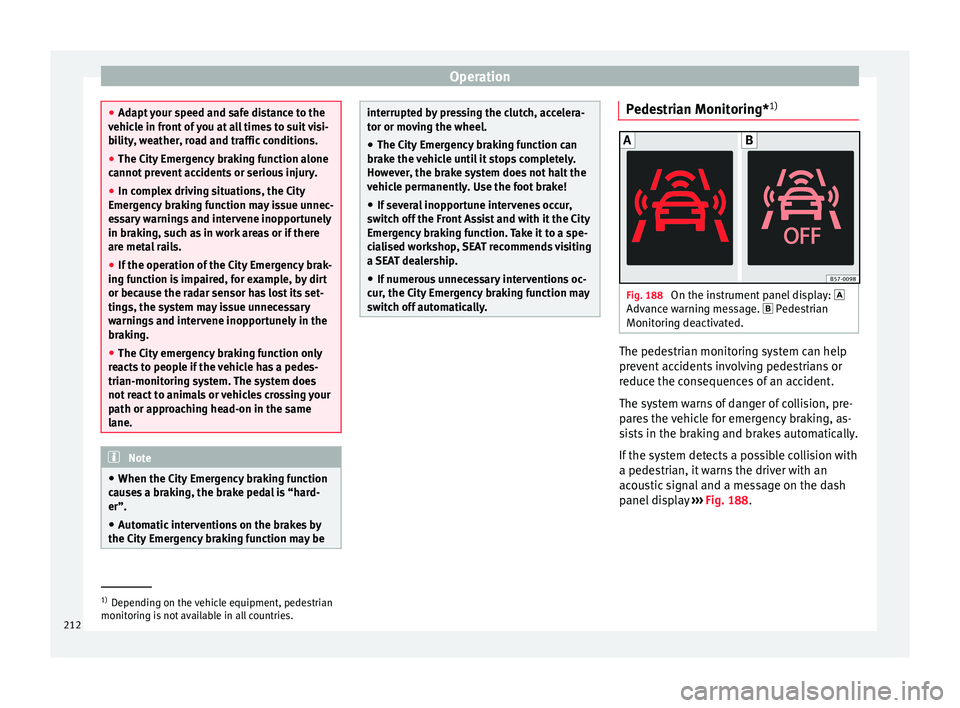
1) Fig. 188
On the instrument panel display:
Adv anc
e warning message. Pedestrian
Monitoring deactivated. The pedestrian monitoring system can help
pr
ev
ent accidents involving pedestrians or
reduce the consequences of an accident.
The system warns of danger of collision, pre-
pares the vehicle for emergency braking, as-
sists in the braking and brakes automatically.
If the system detects a possible collision with
a pedestrian, it warns the driver with an
acoustic signal and a message on the dash
panel display ››› Fig. 188. 1)
Depending on the vehicle equipment, pedestrian
monit orin
g is not available in all countries.
212
Page 239 of 328
Driver assistance systemsFor parallel parking
spacesFor perpendicularparking spaces
Do not exceed approxi-
mately 40 km/h (25 mph)
when driving past the parking space.Do not exceed approxi-
mately 20 km/h (12 mph)
when driving past the parking space.
Keep a distance between 0.5 and 2.0 metres when driv- ing past the parking space.
Length of the space:
length of the vehicle + 0.8 metresWidth of the space: width
of the vehicle + 0.8 me- tres
Do not exceed approximately 7 km/h (4 mph) when
parking. Parking
Do the following:
1.The necessary conditions have to be met to park
with Park Assist
››› page 236 and the parking
mode must be selected ››› page 234.
2.
Look at the display on the instrument panel to
see if the space has been detected as “appropri-
ate” and if the correct position for parking has
been reached ››› Fig. 203
or ››› Fig. 204 .
The space is considered “appropriate” if the dis-
play on the instrument panel shows the message
to park 5
.
3.Stop the vehicle and, after a brief pause, engage
the reverse gear.
4.Release the steering wheel
››› in Introduction
on page 232.
Do the following:
5.
Please note the following message: Active au-
tomatic steering. Watch out around
you.
While you keep watch around you, carefully start
accelerating up to no more than 7 km/h (4 mph).
During the parking manoeuvre, the system only
takes charge of the steering. You, as the driver,
have to accelerate, engage the clutch if necessa-
ry, change gears and brake.
6.
Reverse until the ParkPilot continuous signal is
heard.
OR: reverse until the instrument panel displays
the message to go forwards ››› Fig. 203 1or
››› Fig. 204 1.
OR: reverse until the instrument panel displays
the message Park Assist finished
.
The progress bar 7 indicates the distance to
cover ››› page 236.
7.
Press down the brake pedal until the Park Assist
system has finished turning the steering wheel.
OR: until the symbol on the instrument panel
display switches off.
8.Select first gear.
Do the following:
9.
Go forward until the ParkPilot continuous signal
is heard.
OR: go forward until the instrument panel display
shows the message to reverse.
The Park Assist system steers the vehicle forward
and back until it centres it in the space ››› Fig. 203
or ››› Fig. 204 .
10.
For best results, wait at the end of each manoeu-
vre until the Park Assist system has finished turn-
ing the steering wheel.
The parking manoeuvre ends when a correspond-
ing message is displayed on the instrument panel
and, in some cases, an acoustic signal sounds. Note
If the manoeuvre is terminated prematurely
durin g p
arking, the result may not be the
best. 237
Technical data
Advice
Operation
Emergencies
Safety
Page 240 of 328
Operation
Exiting a parking space with Park As-
s i
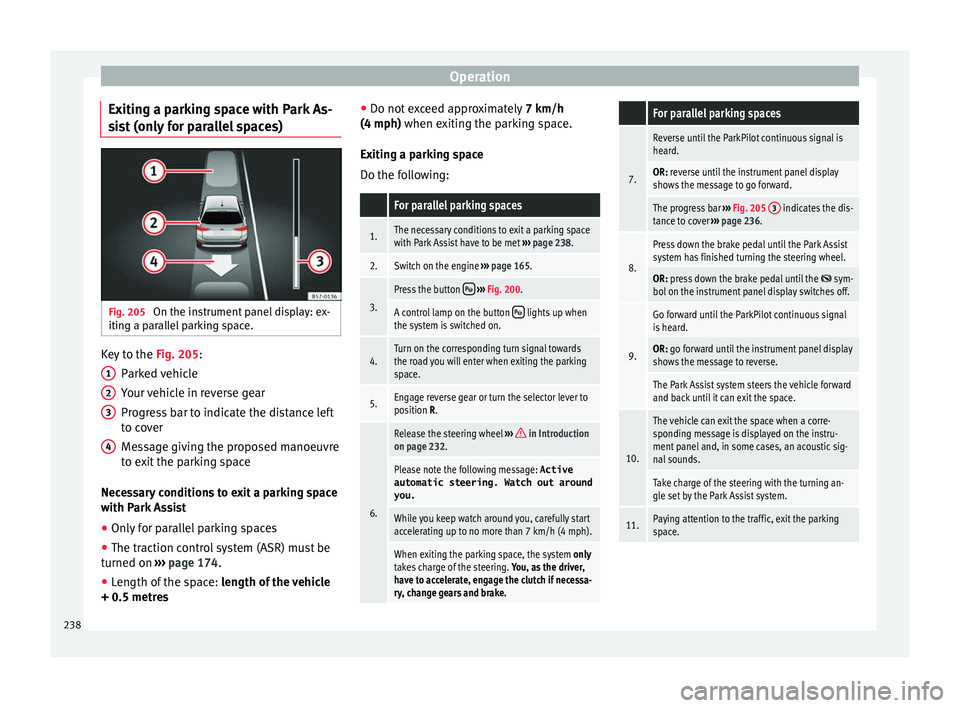
st (only for parallel spaces) Fig. 205
On the instrument panel display: ex-
itin g a p
arallel parking space. Key to the
Fig. 205:
P ark
ed vehicle
Your vehicle in reverse gear
Progress bar to indicate the distance left
to cover
Message giving the proposed manoeuvre
to exit the parking space
Necessary conditions to exit a parking space
with Park Assist
● Only for parallel parking spaces
● The traction control system (ASR) must be
turned on ›
›› page 174.
● Length of the space: len
gth of the vehicle
+ 0.5 metres 1 2
3
4 ●
Do not e
xceed approximately 7 km/h
(4 mph) when exiting the parking space.
Exiting a parking space
Do the following:
For parallel parking spaces
1.The necessary conditions to exit a parking space
with Park Assist have to be met ››› page 238.
2.Switch on the engine ››› page 165.
3.
Press the button ››› Fig. 200.
A control lamp on the button lights up when
the system is switched on.
4.Turn on the corresponding turn signal towards
the road you will enter when exiting the parking
space.
5.Engage reverse gear or turn the selector lever to
position R.
6.
Release the steering wheel ››› in Introduction
on page 232.
Please note the following message: Active
automatic steering. Watch out around
you.
While you keep watch around you, carefully start
accelerating up to no more than 7 km/h (4 mph).
When exiting the parking space, the system only
takes charge of the steering. You, as the driver,
have to accelerate, engage the clutch if necessa-
ry, change gears and brake.
For parallel parking spaces
7.
Reverse until the ParkPilot continuous signal is
heard.
OR: reverse until the instrument panel display
shows the message to go forward.
The progress bar ››› Fig. 205 3 indicates the dis-
tance to cover ››› page 236.
8.
Press down the brake pedal until the Park Assist
system has finished turning the steering wheel.
OR: press down the brake pedal until the sym-
bol on the instrument panel display switches off.
9.
Go forward until the ParkPilot continuous signal
is heard.
OR: go forward until the instrument panel display
shows the message to reverse.
The Park Assist system steers the vehicle forward
and back until it can exit the space.
10.
The vehicle can exit the space when a corre-
sponding message is displayed on the instru-
ment panel and, in some cases, an acoustic sig-
nal sounds.
Take charge of the steering with the turning an-
gle set by the Park Assist system.
11.Paying attention to the traffic, exit the parking
space. 238
Page 264 of 328
Operation
Driving with a trailer Adjusting the headlights
When t
o
wing a trailer, the front part of the ve-
hicle could lift up, and if the dipped beams
are on, this could dazzle other drivers. Use
the headlight range control to lower the cone
of light. If you do not have headlight range
control, have the headlights adjusted by a
specialised workshop.
Special characteristics of driving with a trail-
er
● If your trailer has an ov
errun brake, brake
gently at first and then rapidly. This will pre-
vent the jerking that can be caused by the
locking of trailer wheels.
● Due to the gross combination weight of the
to
wing vehicle and trailer, the braking dis-
tance increases.
● When going down a slope, go into lower
ge
ar (if using a manual gearbox or the Tip-
tronic automatic gearbox) to take advantage
of the braking power provided by the engine.
Otherwise, the braking system could over-
heat and even fail.
● The trailer weight, as well as the gross com-
bin
ation weight of the towing vehicle and
trailer, change the centre of gravity and the
properties of the vehicle.
● If the towing vehicle is empty and the trail-
er is
loaded, then the load distribution is in- correct. Under these conditions, drive slowly
and with e
xtra caution.
Hill starts with a trailer
Depending on the slope of the hill and the
combination weight of the towing vehicle
and trailer, the vehicle might start rolling
backwards slightly when you first start up.
For hill-starting with a trailer, do the follow-
ing:
● Press and hold the brake pedal.
● Press the butt
on to disconnect the elec-
tronic parking brake ››› page 170.
● If the vehicle is equipped with a manual
ge
arbox, push the clutch pedal all the way
down.
● Put the vehicle into first gear or turn the se-
lect
or lever to position D/S ››› page 176.
● Pull out the butt
on and hold it in that
position to stop the towing vehicle and trailer
with the electronic parking brake.
● Release the brake pedal.
● Start driving slowly. To do this, in the case
of a m
anual gearbox, slowly release the
clutch pedal.
● Do not release the butt
on until the en-
gine has sufficient force to start driving. WARNING
If a trailer is pulled incorrectly, this may lead
t o lo
ss of control of the vehicle and serious
injury.
● Driving with a trailer and transporting
heavy
or large objects will change the vehicle
handling and braking distances.
● Always drive cautiously and carefully.
Brak
e earlier than usual.
● Adapt your speed and driving style at all
times
to suit visibility, weather, road and traf-
fic conditions. Slow down, especially when
driving down hills or slopes.
● Accelerate with particular care and caution.
Av
oid sudden braking and manoeuvres.
● Take great care when overtaking. Reduce
speed immedi
ately if you notice that the trail-
er is swaying, however slightly.
● Never attempt to “straighten” the towing
vehic
le and trailer while accelerating.
● Take into account the speed limit for vehi-
cl
es with a trailer, as it could be lower than
for vehicles without a trailer. Stabilisation of the towing vehicle
and tr
ai
ler The stabilisation of the towing vehicle and
tr
ai
ler together is an additional function of
the electronic stability control (ESC).
262
Page 313 of 328
Index
Changing a wheel . . . . . . . . . . . . . . . . . . . . . . . . . 54 sub
sequent work . . . . . . . . . . . . . . . . . . . . . . . . 56
Changing bulbs number plate light . . . . . . . . . . . . . . . . . . . . . . . 98
Changing gear engaging gears (manual gearbox) . . . . . . . . . 176
Changing settings CAR menu . . . . . . . . . . . . . . . . . . . . . . . . . . . . . . 26
Changing the blades . . . . . . . . . . . . . . . . . . . . . . . 85
Changing the wiper blades . . . . . . . . . . . . . . . . . . 60
Charging the battery . . . . . . . . . . . . . . . . . . . . . . 290
Checking levels engine compartment . . . . . . . . . . . . . . . . . . . . 282
Child-proof locking electric windows . . . . . . . . . . . . . . . . . . . . . . . . 126
Child seat Categorisation in groups . . . . . . . . . . . . . . . . . . 81
Child seats . . . . . . . . . . . . . . . . . . . . . . . . . . . . 17, 80 ISOFIX system . . . . . . . . . . . . . . . . . . . . . . . . . . . 19
safety instructions . . . . . . . . . . . . . . . . . . . . 17, 79
securing with seat belt . . . . . . . . . . . . . . . . . . . . 18
Top Tether system . . . . . . . . . . . . . . . . . . . . . 19, 22
City Emergency braking function . . . . . . . . . . . . . 211
Cleaning . . . . . . . . . . . . . . . . . . . . . . . . . . . . . . . . 266 alcantara . . . . . . . . . . . . . . . . . . . . . . . . . . . . . . 272
carbon parts . . . . . . . . . . . . . . . . . . . . . . . . . . . 269
Easy Connect control panel . . . . . . . . . . . . . . . 270
Exhaust pipe . . . . . . . . . . . . . . . . . . . . . . . . . . . 269
fabrics . . . . . . . . . . . . . . . . . . . . . . . . . . . . . . . . 270
leather . . . . . . . . . . . . . . . . . . . . . . . . . . . . . . . . 271
natural leather . . . . . . . . . . . . . . . . . . . . . . . . . 271
plastic parts . . . . . . . . . . . . . . . . . . . . . . . . . . . 270
Plastic parts . . . . . . . . . . . . . . . . . . . . . . . . . . . 268
Radio display . . . . . . . . . . . . . . . . . . . . . . . . . . 270
seat belts . . . . . . . . . . . . . . . . . . . . . . . . . . . . . 272
trims . . . . . . . . . . . . . . . . . . . . . . . . . . . . . . . . . 268
washing the vehicle . . . . . . . . . . . . . . . . . . . . . 266 wheels . . . . . . . . . . . . . . . . . . . . . . . . . . . . . . . . 269
windo
ws . . . . . . . . . . . . . . . . . . . . . . . . . . . . . . 269
Climatronic . . . . . . . . . . . . . . . . . . . . . . . . . . . . . . . 42
Close . . . . . . . . . . . . . . . . . . . . . . . . . . . . . . . . . . . 112 rear lid . . . . . . . . . . . . . . . . . . . . . . . . . . . . . . . . 123
sunroof . . . . . . . . . . . . . . . . . . . . . . . . . . . . . . . 129
windows . . . . . . . . . . . . . . . . . . . . . . . . . . . . . . 126
Closing . . . . . . . . . . . . . . . . . . . . . . . . . . . . . . . . . 112 bonnet . . . . . . . . . . . . . . . . . . . . . . . . . . . . . . . . 283
rear lid . . . . . . . . . . . . . . . . . . . . . . . . . . . . . . . . 123
sun blind (sunroof) . . . . . . . . . . . . . . . . . . . . . . 129
sunroof . . . . . . . . . . . . . . . . . . . . . . . . . . . . . . . 129
windows . . . . . . . . . . . . . . . . . . . . . . . . . . . . . . 126
Clutch (warning lamp) . . . . . . . . . . . . . . . . . . . . . 183
Coming Home . . . . . . . . . . . . . . . . . . . . . . . . . . . . 134
Connectivity Box . . . . . . . . . . . . . . . . . . . . . . . . . . 111
Contact . . . . . . . . . . . . . . . . . . . . . . . . . . . . . . . . . 165
Control and warning lamps diesel particulate filter . . . . . . . . . . . . . . . . . . . 186
emission control . . . . . . . . . . . . . . . . . . . . . . . . 187
remote control (auxiliary heater) . . . . . . . . . . . 162
Control lamps AdBlue . . . . . . . . . . . . . . . . . . . . . . . . . . . . . . . . 279
blind spot detector (BSD) . . . . . . . . . . . . . . . . 220
Hill Descent Control . . . . . . . . . . . . . . . . . . . . . 190
parking assistant (RTA) . . . . . . . . . . . . . . . . . . 220
speed limiter . . . . . . . . . . . . . . . . . . . . . . . . . . . 194
tow hitch . . . . . . . . . . . . . . . . . . . . . . . . . . . . . . 258
towing bracket . . . . . . . . . . . . . . . . . . . . . . . . . 256
Controls and displays general instrument panel . . . . . . . . . . . . . . . . . 101
Controls on the steering wheel operating the audio system and telephone . . 109
Coolant checking level . . . . . . . . . . . . . . . . . . . . . . . . . . 286
cooling system checking coolant . . . . . . . . . . . . . . . . . . . . . . . 286 Cooling system
Coo lant temperature gauge . . . . . . . . . . . . . . . 105
topping up coolant . . . . . . . . . . . . . . . . . . . . . . 286
Cornering lights . . . . . . . . . . . . . . . . . . . . . . . . . . . . . . . . . 134
Correct position . . . . . . . . . . . . . . . . . . . . . . . . . . . 63
Correct sitting position front passenger . . . . . . . . . . . . . . . . . . . . . . . . . 64
rear seat passengers . . . . . . . . . . . . . . . . . . . . . 65
Cruise control . . . . . . . . . . . . . . . . . . . . . . . . 36, 193 operation . . . . . . . . . . . . . . . . . . . . . . . . . . . . . . 193
Cruise control system . . . . . . . . . . . . . . . . . . . . . . 193 Warning and indication lamp . . . . . . . . . . . . . 193
D Dangers in not using the seat belt . . . . . . . . . . . . 70
Dash panel . . . . . . . . . . . . . . . . . . . . . . . . . . . . . . . 38
Data sticker . . . . . . . . . . . . . . . . . . . . . . . . . . . . . . 301
Deactivating the front passenger front airbag . . . 15
Deactivation of front airbag . . . . . . . . . . . . . . . . . . 77
Defective bulbs changing a bulb . . . . . . . . . . . . . . . . . . . . . . . . . 93
Diesel diesel particulate filter . . . . . . . . . . . . . . . . . . . 186
engine oil . . . . . . . . . . . . . . . . . . . . . . . . . . . . . 284
preheating . . . . . . . . . . . . . . . . . . . . . . . . . . . . 165
refuelling . . . . . . . . . . . . . . . . . . . . . . . . . . . . . . 278
Diesel particulate filter malfunction . . . . . . . . . . . . . . . . . . . . . . . . . . . . 186
Digital clock . . . . . . . . . . . . . . . . . . . . . . . . . . . . . 102
Dimensions . . . . . . . . . . . . . . . . . . . . . . . . . . . . . . 307
Direction of rotation tyres . . . . . . . . . . . . . . . . . . . . . . . . . . . . . . . . . . . 56
Display . . . . . . . . . . . . . . . . . . . . . . . . . . . . 102, 103
Display messages speed limiter . . . . . . . . . . . . . . . . . . . . . . . . . . . 194
311
Page 318 of 328
Index
Main beam lever . . . . . . . . . . . . . . . . . . . . . . . . . . 131
M ain p
anel
turn signal and main beam lever . . . . . . . . . . . 131
Maintenance intervals . . . . . . . . . . . . . . . . . . . . . 284
malfunction catalytic converter . . . . . . . . . . . . . . . . . . . . . . 186
Front Assist . . . . . . . . . . . . . . . . . . . . . . . . . . . . 208
Malfunction Adaptive cruise control . . . . . . . . . . . . . . . . . . 198
clutch . . . . . . . . . . . . . . . . . . . . . . . . . . . . . . . . . 183
diesel particulate filter . . . . . . . . . . . . . . . . . . . 186
front assist monitoring system . . . . . . . . . . . . 208
gearbox . . . . . . . . . . . . . . . . . . . . . . . . . . . . . . . 183
towing bracket . . . . . . . . . . . . . . . . . . . . . . . . . 260
Manual air conditioning . . . . . . . . . . . . . . . . . . . . 44
Manual gearbox . . . . . . . . . . . . . . . . . . . . . . . . . . 176 towing . . . . . . . . . . . . . . . . . . . . . . . . . . . . . . . . . 87
Manual unlocking and locking . . . . . . . . . . . . . . . 85
Maximum trailer weight loading the trailer . . . . . . . . . . . . . . . . . . . . . . . 261
Mirror . . . . . . . . . . . . . . . . . . . . . . . . . . . . . . . . . . 141
Mobile . . . . . . . . . . . . . . . . . . . . . . . . . . . . . . . . . . 265
Mobile telephones . . . . . . . . . . . . . . . . . . . . . . . . 265
Model plate . . . . . . . . . . . . . . . . . . . . . . . . . . . . . . 301
Modifications . . . . . . . . . . . . . . . . . . . . . . . . . . . . 265
Multi-collision Brake . . . . . . . . . . . . . . . . . . . . . . 174
Multimedia . . . . . . . . . . . . . . . . . . . . . . . . . . . . . . 111
My Beat . . . . . . . . . . . . . . . . . . . . . . . . . . . . . . . . . 169
N Natural leather cleaning . . . . . . . . . . . . . . . . . . . . . . . . . . . . . . 271
Navigation system CD-ROM player . . . . . . . . . . . . . . . . . . . . . . . . . 148
Net bag luggage compartment . . . . . . . . . . . . . . . . . . . 152 Noises
Adaptiv e cruise control . . . . . . . . . . . . . . . . . . 198
auxiliary heater . . . . . . . . . . . . . . . . . . . . . . . . . 164
brakes . . . . . . . . . . . . . . . . . . . . . . . . . . . . . . . . 172
ESC . . . . . . . . . . . . . . . . . . . . . . . . . . . . . . . . . . 174
parking brake . . . . . . . . . . . . . . . . . . . . . . . . . . 171
tyres . . . . . . . . . . . . . . . . . . . . . . . . . . . . . . 56, 291
Number of seats . . . . . . . . . . . . . . . . . . . . . . . . . . . 68
O
Octane rating (petrol) . . . . . . . . . . . . . . . . . . . . . . 277
Odometer . . . . . . . . . . . . . . . . . . . . . . . . . . . . . . . 105 partial . . . . . . . . . . . . . . . . . . . . . . . . . . . . . . . . 102
reset button . . . . . . . . . . . . . . . . . . . . . . . . . . . 105
total . . . . . . . . . . . . . . . . . . . . . . . . . . . . . . . . . . 102
Oil change . . . . . . . . . . . . . . . . . . . . . . . . . . . . . . . 286
Oil properties . . . . . . . . . . . . . . . . . . . . . . . . . . . . . 49
On-screen messages Front Assist monitoring system . . . . . . . . . . . . 208
One-touch opening and closing Electric windows . . . . . . . . . . . . . . . . . . . . . . . . 128
Open and close . . . . . . . . . . . . . . . . . . . . . . . . . . 112 rear lid with electric opening and closing . . . . 123
windows . . . . . . . . . . . . . . . . . . . . . . . . . . . . . . 126
Opening . . . . . . . . . . . . . . . . . . . . . . . . . . . . . . . . 112 bonnet . . . . . . . . . . . . . . . . . . . . . . . . . . . . . . . . 283
fuel tank flap . . . . . . . . . . . . . . . . . . . . . . . . . . . 276
rear lid . . . . . . . . . . . . . . . . . . . . . . . . . . . . . . . . 123
sun blind (sunroof) . . . . . . . . . . . . . . . . . . . . . . 129
sunroof . . . . . . . . . . . . . . . . . . . . . . . . . . . . . . . 129
windows . . . . . . . . . . . . . . . . . . . . . . . . . . . . . . 126
Opening and closing . . . . . . . . . . . . . . . . . . . . . . . . 9 bonnet . . . . . . . . . . . . . . . . . . . . . . . . . . . . . . . . 283
by remote control . . . . . . . . . . . . . . . . . . . . . . . 114
fuel tank flap . . . . . . . . . . . . . . . . . . . . . . . . . . . 276
in the door cylinder . . . . . . . . . . . . . . . . . . . . . . . 9
rear lid of the luggage compartment . . . . . . . . 10 sunroof . . . . . . . . . . . . . . . . . . . . . . . . . . . . . . . 129
with the c
entral locking switch . . . . . . . . . . . . 115
Opening manually rear lid . . . . . . . . . . . . . . . . . . . . . . . . . . . . . . . . . 11
Operating malfunction Park Assist . . . . . . . . . . . . . . . . . . . . . . . . . . . . 232
sunroof . . . . . . . . . . . . . . . . . . . . . . . . . . . . . . . 128
Outside temperature . . . . . . . . . . . . . . . . . . . . . . . 31
P Paint . . . . . . . . . . . . . . . . . . . . . . . . . . . . . . . . . . . 268 care . . . . . . . . . . . . . . . . . . . . . . . . . . . . . . . . . . 268
damage . . . . . . . . . . . . . . . . . . . . . . . . . . . . . . . 269
Paintwork code . . . . . . . . . . . . . . . . . . . . . . . . . . . . . . . . . . 301
Panoramic sliding sunroof convenience opening and closing . . . . . . . . . 127
see also Sunroof . . . . . . . . . . . . . . . . . . . . . . . . 128
Park Assist . . . . . . . . . . . . . . . . . . . . . . . . . . . . . . 232 automatic braking intervention . . . . . . . . . . . . 239
automatic interruption . . . . . . . . . . . . . . . . . . . 233
conditions for exiting a parking space . . . . . . 238
driving with a trailer . . . . . . . . . . . . . . . . . . . . . 244
exiting a parking space (only for parallelspaces) . . . . . . . . . . . . . . . . . . . . . . . . . . . . . 238
operating malfunction . . . . . . . . . . . . . . . . . . . 232
parallel parking . . . . . . . . . . . . . . . . . . . . . . . . 236
parking conditions . . . . . . . . . . . . . . . . . . . . . . 236
perpendicular parking . . . . . . . . . . . . . . . . . . . 236
see Park Assist . . . . . . . . . . . . . . . . . . . . . . . . . 232
stopping prematurely . . . . . . . . . . . . . . . . . . . . 233
Parking . . . . . . . . . . . . . . . . . . . . . . . . . . . . 171, 180 with Park Assist . . . . . . . . . . . . . . . . . . . . . . . . 236
Parking aid Rear parking aid . . . . . . . . . . . . . . . . . . . . . . . . 244
316