warning Seat Ateca 2018 Owner's Manual
[x] Cancel search | Manufacturer: SEAT, Model Year: 2018, Model line: Ateca, Model: Seat Ateca 2018Pages: 348, PDF Size: 7.32 MB
Page 234 of 348
Operation
Self-deactivation: the Lane As s
i st system can
be automatically deactivated if there is a sys-
tem malfunction. The control lamp
disappears.
Hands-Off Function
In the absence of steering wheel activity the
system alerts the driver with acoustic signals
and a text message on the dash panel asking
to actively take over the steering.
If the driver does not react to this, the system
also alerts the driver with a little shaking mo-
tion through the brakes and, if the vehicle
has it, activates the Emergency Assist func-
tion ››› page 234.
In vehicles without Emergency Assist, the
adaptive lane guidance function will be disa-
bled after the corresponding warnings to the
driver.
The lane assist system is active but it is not
available (the control lamp is lit up yellow)
● When driving at speeds below 65 km/h (38
mph).
● When the Lane Assist system does not de-
tect the div
iding lines of the road. For exam-
ple, in the event warnings indicating road
works, and snow, dirt, moisture or reflec-
tions.
● When the radius of a curve is too small.
● When no road markings can be seen. ●
When the dist
ance to the next marking to
too great.
● When the system does not detect any clear
and active st
eering movement during a long
period of time.
● Temporarily, in the event of very dynamic
driving s
tyles.
● If a turn signal is activated.
● With the stability control system (ESC) in
Sport
mode or switched off.
BSD Plus (Lane Assist with Blind Spot Detec-
tor)*
The BSD Plus function is achieved by activat-
ing the Lane Assist and BSD functions
››› page 237. In this case, the Lane Assist
function expands its functions in the follow-
ing way:
If the driver tries to change lane and there is
a vehicle in the blind spot:
● The lamp flashes in the corresponding
re
ar-view mirror even though the turn signal
has not been activated.
● The steering wheel vibrates to warn the
driver of the ri
sk of collision.
● torque is applied to correct the steering
and return the
vehicle to its lane. Switching off the Lane Assist system in the
fol
lowing situations
Due to the limits of the Lane Assist system,
switch it off in the following situations:
● When more attention is required of the
driver
● When drivin
g in a sporty style
● In unfavourable weather conditions
● On roads in poor condition
● In areas of road works WARNING
The intelligent technology in the Lane Assist
sys t
em cannot change the limits imposed by
the laws of physics and by the very nature of
the system. Careless or uncontrolled use of
the Lane Assist system may cause accidents
and injury. The system is not a replacement
for driver awareness.
● Always adapt your speed and the distance
to the v
ehicles ahead in line with visibility,
weather conditions, the condition of the road
and the traffic situation.
● Always keep your hands on the steering
wheel so it c
an be turned at any time.
● The Lane Assist system does not detect all
roa
d markings. The road surfaces, road struc-
tures or objects in poor condition can be in-
correctly detected as road markings under
certain circumstances by the Lane Assist sys-
tem. In such situations, switch the Lane As-
sist system off immediately. 232
Page 235 of 348
Driver assistance systems
●
Ple a
se observe the indications on the in-
strument panel and act as is necessary.
● Always pay attention to the vehicle's sur-
roundin
gs.
● When the area of vision of the camera be-
comes
dirty, covered or is damaged, the Lane
Assist system function can be affected. CAUTION
In order to avoid influencing the operation of
the sy st
em, the following points must be tak-
en into account:
● Regularly clean the area of vision of the
camera and k
eep it in a clean state, without
snow or ice.
● Do not cover the area of vision of the cam-
era.
● Check
that the area of vision of the wind-
scr
een camera is not damaged. Note
● The lane dep ar
ture warning system has
been exclusively developed for driving on
paved roads only.
● If the Lane Assist system does not work as
desc
ribed in this chapter, do not use it and
contact a specialised workshop.
● Before starting a journey, verify that the
field of
vision of the camera is not covered
››› Fig. 202. ●
Alw a
ys keep the field of vision of the cam-
era clean.
● If there is a fault in the system, have it
check
ed by a specialised workshop. Traffic Jam Assist
Rel at
ed video Fig. 205
Autonomous
drivin g Description and operation
Traffic Jam Assist helps the driver keep the
c
ar w
ithin its
lane and to move in convoy in
case of traffic congestion or slow traffic.
Traffic Jam Assist is an additional function of
Lane Assist ››› page 230 and combines Lane
Assist functions with Adaptive Cruise Control
(ACC) ›››
page 221. Therefore, it is essential
that you read these two chapters carefully
and note the limitations of the systems and
the information about them. Operation of Traffic Jam Assist
At speed
s of below 60 km/h (40 mph), Traffic
Jam Assist can maintain a (temporary) dis-
tance preset by the driver with respect to the
vehicle ahead and help stay within the lane
››› .
T o do thi
s, the sy
stem automatically controls
the accelerator, brakes and steering, and
slows the vehicle, stopping it fully if neces-
sary, when faced with a vehicle in front that
has stopped. It automatically moves off again
when the vehicle ahead moves.
Traffic Jam Assist is designed only for use on
motorways and wide roads. Therefore, never
use it in city traffic.
Technical requirements for using Traffic Jam
Assist
● Lane departure warning must
be activated:
button > SETTINGS > Driver as-
sistance > Lane departure warning
(Lane Assist) › ›
›
page 33.
● The Lane Centring Guide must be activated:
button > SETTINGS > Driver as-
sistance > Lane departure warning
(Lane Assist)
● Adaptive Cruise Control (ACC) must be con-
nect ed and activ
e ›
›› page 224.
● The speed must be below 60 km/h
(38 mph). »
233
Technical data
Advice
Operation
Emergencies
Safety
Page 236 of 348
Operation
Traffic Jam Assist is not active (the Lane As-
s i
s
t control light turns yellow)
● If any of the conditions mentioned on
page 233, T
echnical requirements for using
Traffic Jam Assist are no longer met.
● If any of the conditions required for opera-
tion of the Lane Ass
ist are not met
››› page 230.
● If any of the conditions necessary for the
adaptiv
e cruise control (ACC) to work are no
longer fulfilled ››› page 221.
Situations in which Traffic Jam Assist must
be switched off
Due to the limitations of the system, Traffic
Jam Assist must always be switched off in the
following situations:
● When more attention is required by the
driver.
● When driv
ing in a very sporty style.
● In adverse weather conditions, e.g. in case
of sno
w or heavy rain.
● When driving on roads in poor condition.
● In sections with roadworks.
● In city journeys. WARNING
The smart technology incorporated into Traf-
fic Jam As s
ist cannot defy the laws of phys-
ics; it only works within the limits of the sys- tem. Accidents and severe injury may occur if
Tr
affic
Jam Assist is used negligently or invol-
untarily. The system is not a replacement for
driver awareness.
● Adapt your speed and safe distance to the
vehicl
e in front of you at all times to suit the
visibility, weather, road and traffic condi-
tions.
● Do not use Traffic Jam Assist in city jour-
neys.
● Do not u
se Traffic Jam Assist if there is poor
vis
ibility, for example, in case of snow, ice,
rain or loose gravel, or on steep or slippery
sections or flooded roads.
● Do not use Traffic Jam Assist offroad or on
roa
ds where the surface is not firm. Traffic
Jam Assist has been designed for use on
paved roads only.
● Traffic Jam Assist does not react to people
or animal
s or vehicles crossing your path or
that approach you head-on down the same
lane.
● If Traffic Jam Assist does not reduce speed
sufficiently
, brake the vehicle immediately by
applying the pedal.
● If the vehicle continues to move when you
wish it
to stop after a driver intervention
prompt, brake the vehicle by applying the
pedal.
● If driver intervention is requested on the
da
sh panel display, immediately resume con-
trol of the vehicle.
● Keep your hands on the wheel at all times
to be re
ady to intervene in the steering at any time. The driver is always responsible for
keepin
g the
vehicle in its own lane.
● Always be prepared to take charge of driv-
ing (acc
elerating or braking) yourself. Note
● If T
raffic Jam Assist does not work as de-
scribed in this chapter, stop using it and con-
tact a specialised workshop.
● If the system is faulty, take it to a special-
ised work
shop and have it checked. Emergency Assist
D es
cription and operation Emergency Assist detects whether there is in-
activ
ity
b
y the driver and can automatically
keep the car within the lane and stop it alto-
gether if necessary. This way the system can
actively help avoid an accident.
Emergency Assist is an additional function of
Lane Assist ››› page 230 and combines Lane
Assist functions with Adaptive Cruise Control
(ACC) ››› page 221. Therefore, it is essential
that you read these two chapters carefully
and note the limitations of the systems and
the information about them.
234
Page 237 of 348
Driver assistance systems
Operation of Emergency Assist
Emer g
ency
Assist detects when the driver
ceases to perform any activity and repeatedly
requests that he/she regain active control of
the vehicle, through the use of optical and
acoustic warnings and by applying the
brakes.
If the driver continues to do nothing, the sys-
tem automatically takes over the accelerator,
brakes and steering in order to brake the ve-
hicle and keep it in its lane ››› . When the
Emer g
ency
Assist is actively adjusting, the
hazard warning lights come on ››› page 149
and the vehicle makes slight zigzag move-
ments in the lane in order to warn other driv-
ers.
If the remaining braking distance is suffi-
cient, if necessary the system slows down the
vehicle until it stops completely and auto-
matically switches on the electronic parking
brake ››› page 186.
Switching the Emergency Assist on and off
The Emergency Assist is switched on auto-
matically when the Lane Assist is switched on
››› page 230.
Technical requirements for using the Emer-
gency Assist ● The adaptive cruise control (ACC) must be
switc
hed on ››› page 221. ●
The Lane Assi
st must be switched on
››› page 230.
● The selector lever must be in the D/S posi-
tion or in the
Tiptronic selector gate.
● The system must have detected a lane sep-
aration line on both side
s of the vehicle
››› Fig. 204.
The following conditions may cause the
Emergency Assist not to react or to switch off
automatically:
● If the driver accelerates, brakes or moves
the steerin
g wheel.
● If any of the conditions mentioned in
›››
page 235, Technical requirements for us-
ing the Emergency Assist are not fulfilled.
● If any of the conditions required for opera-
tion of the Lane Ass
ist are not met
››› page 230.
● If any of the conditions necessary for the
adaptiv
e cruise control (ACC) to work are no
longer fulfilled ››› page 221. WARNING
The smart technology incorporated into the
Emerg ency
Assist cannot overcome the limits
imposed by the laws of physics; it only works
within the limits of the system. The driver is
responsible for driving the vehicle.
● Adapt your speed and safe distance to the
vehicl
e in front of you at all times to suit the visibility, weather, road and traffic condi-
tions.
● Keep
your hands on the wheel at all times
to be re
ady to intervene in the steering at any
time.
● The Emergency Assist alone cannot always
avoid acc
idents or serious injuries.
● If the operation of the Emergency Assist is
impaired, f
or example if the radar sensor of
the adaptive cruise control (ACC) or the Lane
Assist camera are covered or have lost their
settings, the system may intervene inoppor-
tunely in braking or in steering.
● The Emergency Assist does not react to
people or anim
al or vehicles crossing your
path or which approach you head-on in the
same lane. WARNING
If the Emergency Assist Intervenes inoppor-
tu nely
, serious accidents and injuries may oc-
cur.
● If the Emergency Assist does not operate
properly, sw
itch off the Lane Assist
››› page 230. Doing so will also switch off the
Emergency Assist.
● Have the system checked by a specialised
workshop
. SEAT recommends visiting a SEAT
dealership for this. » 235
Technical data
Advice
Operation
Emergencies
Safety
Page 238 of 348
Operation
Note
● Autom atic
interventions by the Emergency
Assist on the brakes may be interrupted by
pressing the accelerator or brake or by mov-
ing the wheel.
● Hazard warning lights that come on auto-
matica
lly can be switched off by pressing the
accelerator or the break, moving the steering
wheel or pressing the hazard warning light
switch.
● If this occurs, the Emergency Assist may
deceler
ate the vehicle until it comes to a com-
plete stop.
● When the Emergency Assist is activated, it
is on
ly available again after the ignition has
been switched off and back on again. 236
Page 239 of 348
Driver assistance systems
Blind spot detector (BSD) with
p ark
in
g assistance (RCTA)*
Related video Fig. 206
Smart solutions Introduction
The blind spot detector (BSD) helps to detect
the tr
affic
s
ituation behind the vehicle.
The integrated parking assistant (RCTA) helps
the driver when backing out of a parallel
parking spot and in manoeuvring.
The blind spot detector has been developed
for driving on paved roads. WARNING
The smart technology incorporated into the
blind s pot
detector (BSD) with parking assis-
tance (RCTA) included cannot overcome the
limits imposed by the laws of physics; it only
works within the limits of the system. Acci-
dents and severe injury may occur if the blind
spot detection system or the rear cross traffic alert are used negligently or involuntarily.
The sys
t
em is not a replacement for driver
awareness.
● Adapt your speed and safe distance to the
vehicl
e in front of you at all times to suit visi-
bility, weather, road and traffic conditions.
● Keep your hands on the wheel at all times
to be re
ady to intervene in the steering at any
time.
● Pay attention to the control lamps that may
come on in the ext
ernal rear view mirrors and
on the instrument panel, and follow any in-
structions they may give.
● The blind spot assistant could react to any
speci
al constructions that might be present
on the sides of the vehicle: e.g. high or irreg-
ular dividers. This may cause erroneous warn-
ings.
● Never use the blind spot detector with rear
cro
ss traffic alert on unpaved roads. The blind
spot detector with rear cross traffic alert has
been designed for use on paved roads.
● Always pay attention to the vehicle's sur-
roundin
gs.
● Never use the blind spot detector or the
parkin
g assistant if the radar sensors are
dirty.
● The external rear view mirror control lamps
may
have limited functionality due to solar
radiation. CAUTION
● The ra d
ar sensors on the rear bumper may
be damaged or shifted in the event of a colli-
sion, for example, when entering or exiting a
parking space. This may result in the system
disconnecting itself, or at least possibly hav-
ing its functionality diminished.
● In order to ensure that the radar sensors
work pr
operly, keep the rear bumper free of
snow and ice and do not cover it.
● The rear bumper should only be painted
with paint
authorised by SEAT. The blind spot
detector's functions may be limited or work
incorrectly if other paints are used. Note
If the blind spot detector with parking assis-
tant doe
s not work as described in this chap-
ter, do not use it and contact a specialised
workshop. Control lamps
Control lamp in external rear view mirrors:
Lights up
Lights up once briefly: the blind spot detector is activa-
ted and ready to operate.
Lights up: blind spot detector has detected a vehicle in
the blind spot.»
237
Technical data
Advice
Operation
Emergencies
Safety
Page 240 of 348
Operation
Flashes
The blind spot detector has detected a vehicle in the
blind spot and the turn signal has been turned on in the
direction of the detected vehicle
›››
.
For vehicles that are also equipped with Lane Assist
››› page 230, a warning to switch lanes will also appear
even though the turn signal has not been engaged
(blind spot detector “Plus”). Some warning and control lamps will light up
briefly when the ignition i
s
switched on to
check certain functions. They will switch off
after a few seconds.
If there are no indications from the control
lamp in the external rear view mirror, this
means that the blind spot detector has not
detected any other vehicles in the area ››› .
If the dip
ped be
am is on, then the control
lamps in the external rear view mirrors will be
dimmed (night mode). WARNING
If the warning lamps and the corresponding
mes s
ages are ignored when they light up, the
vehicle may stall in traffic and cause acci-
dents and severe injuries.
● Never ignore the warning lamps or messag-
es.
● Carr
y out the necessary operations. CAUTION
Failure to heed the control lamps and corre-
spondin g t
ext messages when they light up
may result in damage to the vehicle. Blind spot detector (BSD)
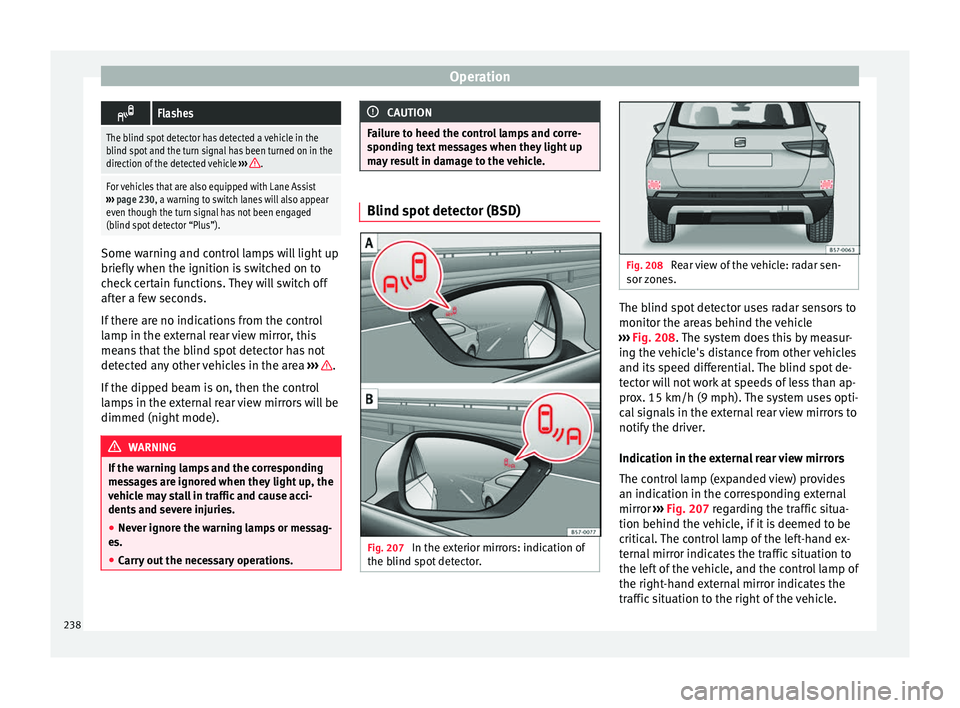
Fig. 207
In the exterior mirrors: indication of
the b lind s pot
detector. Fig. 208
Rear view of the vehicle: radar sen-
sor z one
s. The blind spot detector uses radar sensors to
monit
or the ar
e
as behind the vehicle
››› Fig. 208. The system does this by measur-
ing the vehicle's distance from other vehicles
and its speed differential. The blind spot de-
tector will not work at speeds of less than ap-
prox. 15 km/h (9 mph). The system uses opti-
cal signals in the external rear view mirrors to
notify the driver.
Indication in the external rear view mirrors
The control lamp (expanded view) provides
an indication in the corresponding external
mirror ››› Fig. 207 regarding the traffic situa-
tion behind the vehicle, if it is deemed to be
critical. The control lamp of the left-hand ex-
ternal mirror indicates the traffic situation to
the left of the vehicle, and the control lamp of
the right-hand external mirror indicates the
traffic situation to the right of the vehicle.
238
Page 243 of 348
Driver assistance systems
● in the c a
se of
special constructions to the
side of the vehicle, e.g., high or irregular di-
viders.
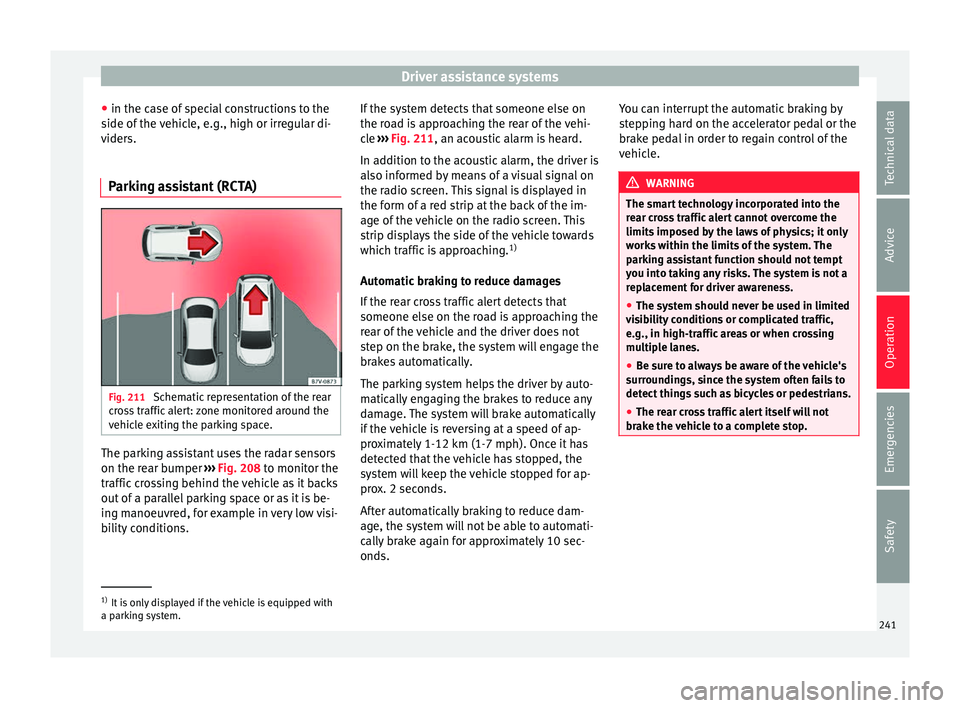
Parking assistant (RCTA) Fig. 211
Schematic representation of the rear
c r
o
ss traffic alert: zone monitored around the
vehicle exiting the parking space. The parking assistant uses the radar sensors
on the r
e
ar b
umper ››› Fig. 208 to monitor the
traffic crossing behind the vehicle as it backs
out of a parallel parking space or as it is be-
ing manoeuvred, for example in very low visi-
bility conditions. If the system detects that someone else on
the roa
d is approaching the rear of the vehi-
cle ››› Fig. 211, an acoustic alarm is heard.
In addition to the acoustic alarm, the driver is
also informed by means of a visual signal on
the radio screen. This signal is displayed in
the form of a red strip at the back of the im-
age of the vehicle on the radio screen. This
strip displays the side of the vehicle towards
which traffic is approaching. 1)
Automatic braking to reduce damages
If the rear cross traffic alert detects that
someone else on the road is approaching the
rear of the vehicle and the driver does not
step on the brake, the system will engage the
brakes automatically.
The parking system helps the driver by auto-
matically engaging the brakes to reduce any
damage. The system will brake automatically
if the vehicle is reversing at a speed of ap-
proximately 1-12 km (1-7 mph). Once it has
detected that the vehicle has stopped, the
system will keep the vehicle stopped for ap-
prox. 2 seconds.
After automatically braking to reduce dam-
age, the system will not be able to automati-
cally brake again for approximately 10 sec-
onds. You can interrupt the automatic braking by
step
ping hard on the accelerator pedal or the
brake pedal in order to regain control of the
vehicle. WARNING
The smart technology incorporated into the
re ar c
ross traffic alert cannot overcome the
limits imposed by the laws of physics; it only
works within the limits of the system. The
parking assistant function should not tempt
you into taking any risks. The system is not a
replacement for driver awareness.
● The system should never be used in limited
vis
ibility conditions or complicated traffic,
e.g., in high-traffic areas or when crossing
multiple lanes.
● Be sure to always be aware of the vehicle's
surrou
ndings, since the system often fails to
detect things such as bicycles or pedestrians.
● The rear cross traffic alert itself will not
brake the
vehicle to a complete stop. 1)
It is only displayed if the vehicle is equipped with
a park in
g system. 241
Technical data
Advice
Operation
Emergencies
Safety
Page 246 of 348
OperationDriving
profileCharacteristics
Eco
Places the vehicle in a particularly low
state of consumption, facilitating a fuel-
saving driving style that is respectful to
the environment.
NormalOffers a balanced driving experience,
suitable for everyday use.
SportProvides a complete dynamic perform-
ance in the vehicle, enabling the user a
more sporty driving style.
Individ- ualIt allows you to personalise the configura-
tion. The functions that can be adjusted
depend on the equipment fitted in the ve-
hicle.
Offroad a)It adjusts the vehicle's parameters in or-
der to maintain optimal off-road driving.
Snowa)It adjusts the vehicle's behaviour for driv-
ing on slippery road surfaces, optimising
grip and manoeuvrability.
a)
Only for 4Drive models. WARNING
When operating SEAT Drive Profile, pay atten-
tion to a l
l traffic: doing otherwise could cause
an accident. Note
● When the v ehic
le is switched off it will al-
ways store the driving profile that was selec-
ted when the ignition key was removed. Nev- ertheless, when the engine is restarted, the
engine and the g
e
ar will not restart in the set-
ting selected. For engine and gear to revert to
the desired position, select the correspond-
ing drive profile again or press the Easy Con-
nect system button repeatedly.
● When the vehicle is restarted after using
the Offroad or Snow settings, the sy
stem is
always activated in the Normal profile.
● Your speed and driving style must always
be adjus
ted to visibility, weather, and traffic
conditions.
● The Eco profile is not recommended when
to
wing a vehicle. Kick-down
The Kick-down feature allows maximum ac-
c
el
er
ation to be reached.
If the Eco* profile has been selected in the
SEAT Drive Profile ››› page 243 and the
accelerator is pressed beyond a hard point,
the engine power is automatically controlled
to give your vehicle maximum acceleration. WARNING
Please note that if the road surface is slip-
pery or w
et, the kick-down feature could
cause the driving wheels to spin, which could
result in skidding. 244
Page 247 of 348
Driver assistance systems
Traffic sign detection system* 1)
Intr oduction The traffic sign detection system records the
st
and
ard traffic signs in front of the vehicle
with a camera located on the base of the in-
terior mirror and provides information about
speed limits and overtaking prohibitions.
Within its limitations, the system also dis-
plays additional signals, such as time-specif-
ic prohibitions, signs for vehicles towing trail-
ers ›››
page 273 or limitations that only apply
in the event of rain. Even on journeys without
signs, the system may display any applicable
speed limits.
In Germany, on motorways and vehicle roads,
besides speed limits and overtaking provi-
sions the system also displays the end of
prohibition signs. The valid speed limit at the
time in other countries is always shown. WARNING
The technology in the traffic sign detection
sys t
em cannot change the limits imposed by
the laws of physics and only works within the
system's limits. Do not let the extra conven-
ience afforded by the traffic sign detection
system tempt you into taking any risks when
driving. The system is not a replacement for
driver awareness. ●
Adapt
your speed and driving style to suit
visibility, weather, road and traffic condi-
tions.
● Poor visibility, darkness, snow, rain and fog
may
lead to the system failing to display traf-
fic signs or not displaying them correctly.
● If the camera's field of vision is dirty, cov-
ered or dam
aged, system operation may be
impaired. WARNING
The driving recommendations and traffic indi-
c ation s
shown on the traffic sign detection
system may differ from the actual current
traffic situation.
● The system may not detect or correctly
show al
l the traffic signs.
● Traffic signs and traffic regulations have
priority ov
er the recommendations and dis-
plays provided by the system. Note
In order not to compromise the system's op-
eration, p l
ease take the following points into
account:
● Regularly clean the area of vision of the
camera and k
eep it in a clean state, without
snow or ice. ●
Do not c o
ver the field of vision of the cam-
era.
● Always replace damaged or worn blades
when required t
o avoid lines on the camera's
field of vision.
● Check that the windscreen is not damaged
in the area of
the camera's field of vision. Note
● The u se of out
dated maps on the naviga-
tion system may cause the system to show
traffic signs incorrectly.
● In the waypoints mode of the navigation
syst
em, the traffic sign detection system is
only partly available. 1)
System available depending on the country.
245
Technical data
Advice
Operation
Emergencies
Safety