ADAPTIVE CRUISE Seat Ateca 2018 User Guide
[x] Cancel search | Manufacturer: SEAT, Model Year: 2018, Model line: Ateca, Model: Seat Ateca 2018Pages: 348, PDF Size: 7.32 MB
Page 226 of 348
Operation
presence of metallic objects (e.g. rails on the
r o
a
d or sheets used in road works).
The area in front of and around the radar sen-
sor should not be covered with adhesives,
additional or similar headlights, as this may
negatively affect ACC operation.
If the front of the vehicle is not properly re-
paired or structural modifications are made
to it, for example, if the suspension is low-
ered, ACC operation may be affected. In this
scenario, SEAT recommends visiting a SEAT
dealership. CAUTION
If you have the sensation that the radar sen-
sor is d
amaged or has lost its settings, dis-
connect the ACC. This will avoid possible
damage. If this occurs have it adjusted.
● The sensor may become damaged or lose
its settin
gs when knocked, for example, dur-
ing a parking manoeuvre. This may compro-
mise the system's efficacy or disconnect it.
● Repairs to the radar sensor require special-
ist
knowledge and special tools. SEAT recom-
mends visiting a SEAT dealership for this pur-
pose.
● Clean away the snow with a brush and the
ice pref
erably with a solvent-free de-icer
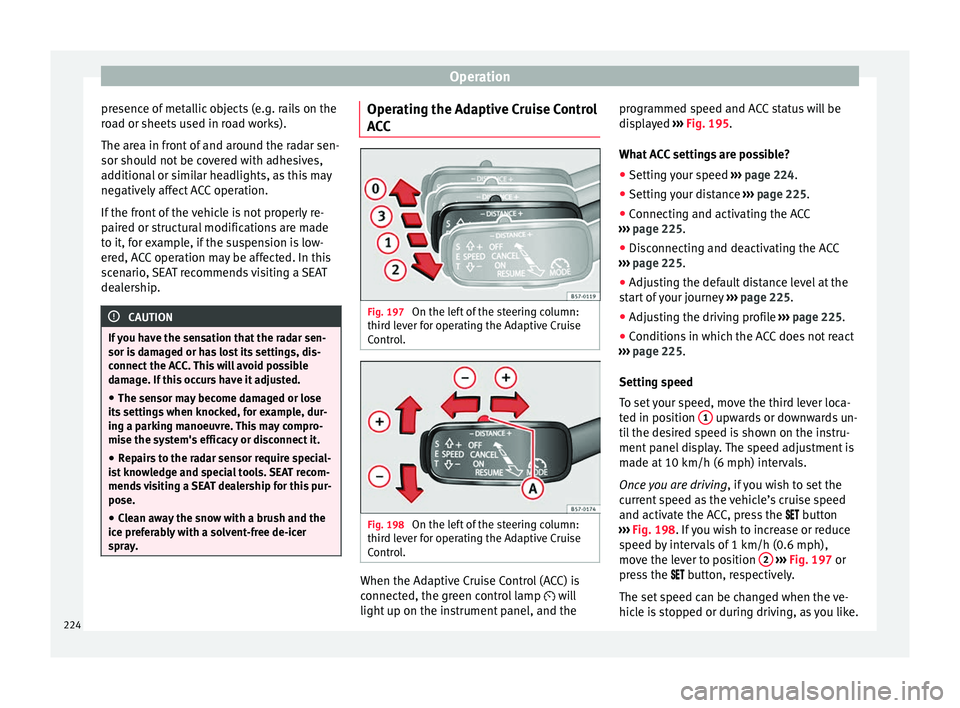
spray. Operating the Adaptive Cruise Control
A
C
C Fig. 197
On the left of the steering column:
thir d l
ev
er for operating the Adaptive Cruise
Control. Fig. 198
On the left of the steering column:
thir d l
ev
er for operating the Adaptive Cruise
Control. When the Adaptive Cruise Control (ACC) is
c
onnect
ed, the gr
een control lamp will
light up on the instrument panel, and the programmed speed and ACC status will be
disp
layed ››› Fig. 195.
What ACC settings are possible? ● Setting your speed ›››
page 224.
● Setting your distance ›››
page 225.
● Connecting and activating the ACC
›››
page 225.
● Disconnecting and deactivating the ACC
›››
page 225.
● Adjusting the default distance level at the
star
t of your journey ››› page 225.
● Adjusting the driving profile ›››
page 225.
● Conditions in which the ACC does not react
›››
page 225.
Setting speed
To set your speed, move the third lever loca-
ted in position 1 upwards or downwards un-
ti l
the de
sired speed is shown on the instru-
ment panel display. The speed adjustment is
made at 10 km/h (6 mph) intervals.
Once you are driving , if you wish to set the
current speed as the vehicle’s cruise speed
and activate the ACC, press the button
››› Fig. 198. If you wish to increase or reduce
speed by intervals of 1 km/h (0.6 mph),
move the lever to position 2
›
››
Fig. 197 or
press the button, respectively.
The set speed can be changed when the ve-
hicle is stopped or during driving, as you like.
224
Page 229 of 348
Driver assistance systems
braking will have priority over intervention by
the speed c
ontr
ol or adaptive cruise control.
● Always be ready to use the brakes!
● Observe country-specific provisions gov-
erning ob
ligatory minimum distances be-
tween vehicles. Note
● The pr ogrammed s
peed is erased once the
ignition or the ACC are switched off.
● When the traction control system (ASR) is
deactivat
ed during acceleration or else the
ESC is activated in Sport* Mode
( ››› page 120), the ACC switches off automati-
cally.
● In vehicles with the Start-Stop system, the
engine swit
ches off automatically during the
ACC stopping phase and restarts automatical-
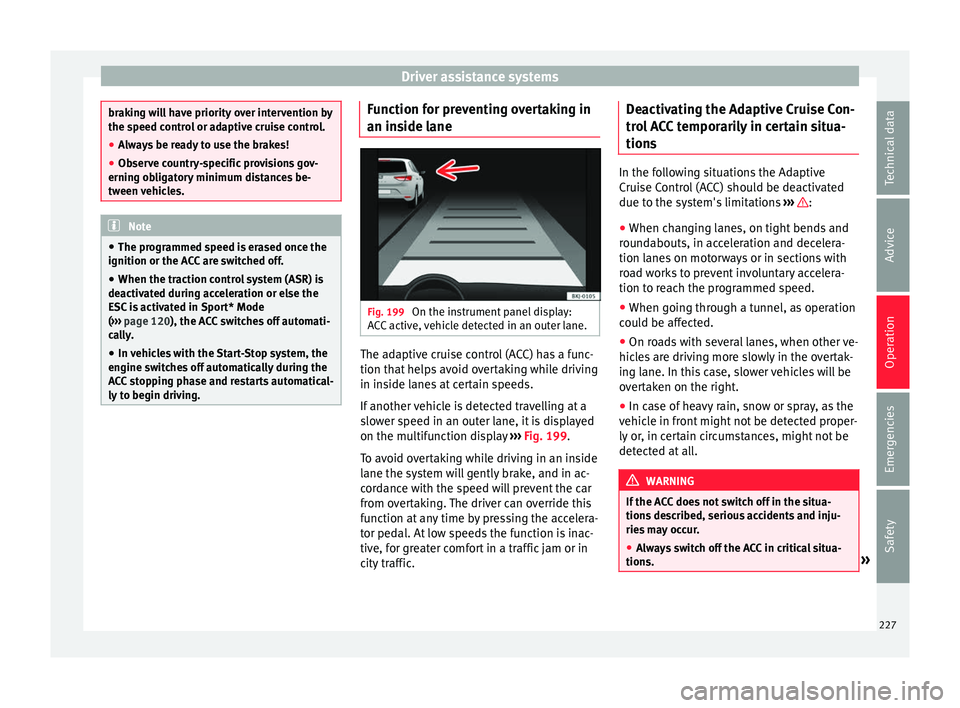
ly to begin driving. Function for preventing overtaking in
an in
s
ide l
ane Fig. 199
On the instrument panel display:
A C
C
active, vehicle detected in an outer lane. The adaptive cruise control (ACC) has a func-
tion th
at
help
s avoid overtaking while driving
in inside lanes at certain speeds.
If another vehicle is detected travelling at a
slower speed in an outer lane, it is displayed
on the multifunction display ››› Fig. 199.
To avoid overtaking while driving in an inside
lane the system will gently brake, and in ac-
cordance with the speed will prevent the car
from overtaking. The driver can override this
function at any time by pressing the accelera-
tor pedal. At low speeds the function is inac-
tive, for greater comfort in a traffic jam or in
city traffic. Deactivating the Adaptive Cruise Con-
trol
ACC temporarily in certain situa-
tions In the following situations the Adaptive
Crui
se C
ontrol (ACC) should be deactivated
due to the system's limitations ››› :
● When changing lanes, on tight bends and
rou nd
abouts, in acceleration and decelera-
tion lanes on motorways or in sections with
road works to prevent involuntary accelera-
tion to reach the programmed speed.
● When going through a tunnel, as operation
cou l
d be affected.
● On roads with several lanes, when other ve-
hicle
s are driving more slowly in the overtak-
ing lane. In this case, slower vehicles will be
overtaken on the right.
● In case of heavy rain, snow or spray, as the
vehicl
e in front might not be detected proper-
ly or, in certain circumstances, might not be
detected at all. WARNING
If the ACC does not switch off in the situa-
tions de
scribed, serious accidents and inju-
ries may occur.
● Always switch off the ACC in critical situa-
tions. » 227
Technical data
Advice
Operation
Emergencies
Safety
Page 230 of 348
Operation
Note
If you do not switch off the ACC in the afore-
mentioned sit uation
s, you may commit a le-
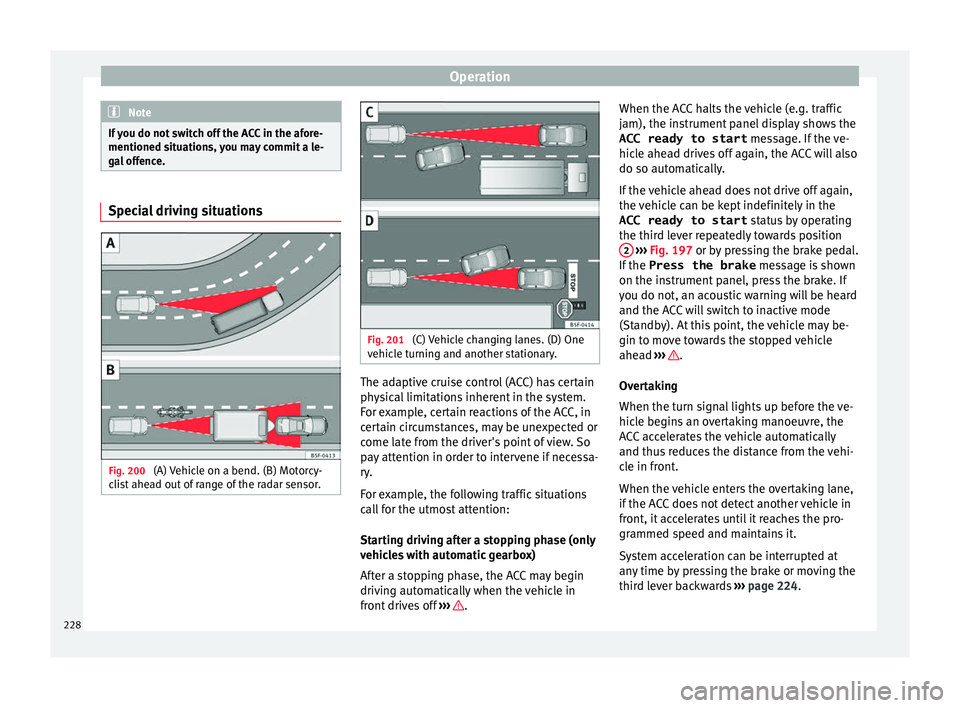
gal offence. Special driving situations
Fig. 200
(A) Vehicle on a bend. (B) Motorcy-
c li
s
t ahead out of range of the radar sensor. Fig. 201
(C) Vehicle changing lanes. (D) One
v ehic
l
e turning and another stationary. The adaptive cruise control (ACC) has certain
ph
y
s
ical limitations inherent in the system.
For example, certain reactions of the ACC, in
certain circumstances, may be unexpected or
come late from the driver's point of view. So
pay attention in order to intervene if necessa-
ry.
For example, the following traffic situations
call for the utmost attention:
Starting driving after a stopping phase (only
vehicles with automatic gearbox)
After a stopping phase, the ACC may begin
driving automatically when the vehicle in
front drives off ››› .When the ACC halts the vehicle (e.g. traffic
j
am), the in
s
trument panel display shows the
ACC ready to start message. If the ve-
hicle ahead drives off again, the ACC will also
do so automatically.
If the vehicle ahead does not drive off again,
the vehicle can be kept indefinitely in the
ACC ready to start status by operating
the third lever repeatedly towards position 2
› ››
Fig. 197
or b
y pressing the brake pedal.
If the Press the brake message is shown
on the instrument panel, press the brake. If
you do not, an acoustic warning will be heard
and the ACC will switch to inactive mode
(Standby). At this point, the vehicle may be-
gin to move towards the stopped vehicle
ahead ››› .
Ov er
t
aking
When the turn signal lights up before the ve-
hicle begins an overtaking manoeuvre, the
ACC accelerates the vehicle automatically
and thus reduces the distance from the vehi-
cle in front.
When the vehicle enters the overtaking lane,
if the ACC does not detect another vehicle in
front, it accelerates until it reaches the pro-
grammed speed and maintains it.
System acceleration can be interrupted at
any time by pressing the brake or moving the
third lever backwards ››› page 224.
228
Page 231 of 348
Driver assistance systems
Driving through a bend
On ent erin
g or e
xiting bends, the radar sen-
sor may no longer determine the vehicle in
front or react to a vehicle in the adjacent lane
››› Fig. 200 A. In these situations the vehicle
may brake unnecessarily or fail to react to re-
act to the vehicle in front. In this case, the
driver has to intervene by accelerating or in-
terrupting the braking process by applying
the brake or pushing the third lever back-
wards ››› page 224.
Driving in tunnels
When driving through tunnels the radar sen-
sor may be limited. Switch off the ACC in tun-
nels.
Narrow or misaligned vehicles
The radar sensor can only detect narrow or
misaligned vehicles when they are within
range ››› Fig. 200 B. This applies particularly
to narrow vehicles such as motorbikes. In
these cases, you should brake as necessary.
Vehicles with special loads and accessories
Special loads and accessories of other vehi-
cles that jut out over the sides, backwards or
over the top may be out of the ACC's range.
Switch off the ACC when driving behind vehi-
cles with special loads and accessories or
when overtaking them. In these cases, you
should brake as necessary. Other vehicles changing lanes
Vehicl
es changing lanes a short distance
away from your own can only be detected
when they are within range of the sensors.
Consequently, the ACC will take longer to re-
act ››› Fig. 201 C. In these cases, you should
brake as necessary.
Stationary vehicles
The ACC does not detect stationary objects
while driving, such as traffic tails or damaged
vehicles.
If a vehicle detected by the ACC turns or
moves over and there is a stationary vehicle
in front of it, the ACC will not react to it
››› Fig. 201 D. In these cases, you should
brake as necessary.
Vehicles driving in the opposite direction
and vehicles crossing your path
The ACC does not react to vehicles approach-
ing from the opposite direction or vehicles
crossing your path.
Metal objects
Metal objects, e.g. rails on the road or sheets
used in road works, can confuse the radar
sensor and cause the ACC to react wrongly. Factors that may affect how the radar sensor
operate
s
If laser sensor operation is impaired, due to
heavy rain, spray, snow or mud, the ACC is
deactivated temporarily. The relevant text
message will appear in the dash panel dis-
play. If necessary clean the SEAT
badge ››› Fig. 196.
When the radar sensor begins to operate
properly again, the ACC will automatically be
available again. The message on the instru-
ment panel screen will switch off and the ACC
will be reactivated again.
ACC operation may be affected by a strong ra-
dar reverse reflection, for example in a closed
car park.
Trailer mode
When driving with trailer the ACC controls
less dynamically.
Overheated brakes
If the brakes overheat, for example after
abrupt braking or in long and steep slopes,
the ACC may be deactivated temporarily. The
relevant text message will appear in the dash
panel display. In this case, adaptive cruise
control cannot be activated.
Adaptive cruise control can be reactivated
once brake temperature has cooled suffi-
ciently. The message will disappear from the
instrument panel display. If the message ACC»
229
Technical data
Advice
Operation
Emergencies
Safety
Page 235 of 348
Driver assistance systems
●
Ple a
se observe the indications on the in-
strument panel and act as is necessary.
● Always pay attention to the vehicle's sur-
roundin
gs.
● When the area of vision of the camera be-
comes
dirty, covered or is damaged, the Lane
Assist system function can be affected. CAUTION
In order to avoid influencing the operation of
the sy st
em, the following points must be tak-
en into account:
● Regularly clean the area of vision of the
camera and k
eep it in a clean state, without
snow or ice.
● Do not cover the area of vision of the cam-
era.
● Check
that the area of vision of the wind-
scr
een camera is not damaged. Note
● The lane dep ar
ture warning system has
been exclusively developed for driving on
paved roads only.
● If the Lane Assist system does not work as
desc
ribed in this chapter, do not use it and
contact a specialised workshop.
● Before starting a journey, verify that the
field of
vision of the camera is not covered
››› Fig. 202. ●
Alw a
ys keep the field of vision of the cam-
era clean.
● If there is a fault in the system, have it
check
ed by a specialised workshop. Traffic Jam Assist
Rel at
ed video Fig. 205
Autonomous
drivin g Description and operation
Traffic Jam Assist helps the driver keep the
c
ar w
ithin its
lane and to move in convoy in
case of traffic congestion or slow traffic.
Traffic Jam Assist is an additional function of
Lane Assist ››› page 230 and combines Lane
Assist functions with Adaptive Cruise Control
(ACC) ›››
page 221. Therefore, it is essential
that you read these two chapters carefully
and note the limitations of the systems and
the information about them. Operation of Traffic Jam Assist
At speed
s of below 60 km/h (40 mph), Traffic
Jam Assist can maintain a (temporary) dis-
tance preset by the driver with respect to the
vehicle ahead and help stay within the lane
››› .
T o do thi
s, the sy
stem automatically controls
the accelerator, brakes and steering, and
slows the vehicle, stopping it fully if neces-
sary, when faced with a vehicle in front that
has stopped. It automatically moves off again
when the vehicle ahead moves.
Traffic Jam Assist is designed only for use on
motorways and wide roads. Therefore, never
use it in city traffic.
Technical requirements for using Traffic Jam
Assist
● Lane departure warning must
be activated:
button > SETTINGS > Driver as-
sistance > Lane departure warning
(Lane Assist) › ›
›
page 33.
● The Lane Centring Guide must be activated:
button > SETTINGS > Driver as-
sistance > Lane departure warning
(Lane Assist)
● Adaptive Cruise Control (ACC) must be con-
nect ed and activ
e ›
›› page 224.
● The speed must be below 60 km/h
(38 mph). »
233
Technical data
Advice
Operation
Emergencies
Safety
Page 236 of 348
Operation
Traffic Jam Assist is not active (the Lane As-
s i
s
t control light turns yellow)
● If any of the conditions mentioned on
page 233, T
echnical requirements for using
Traffic Jam Assist are no longer met.
● If any of the conditions required for opera-
tion of the Lane Ass
ist are not met
››› page 230.
● If any of the conditions necessary for the
adaptiv
e cruise control (ACC) to work are no
longer fulfilled ››› page 221.
Situations in which Traffic Jam Assist must
be switched off
Due to the limitations of the system, Traffic
Jam Assist must always be switched off in the
following situations:
● When more attention is required by the
driver.
● When driv
ing in a very sporty style.
● In adverse weather conditions, e.g. in case
of sno
w or heavy rain.
● When driving on roads in poor condition.
● In sections with roadworks.
● In city journeys. WARNING
The smart technology incorporated into Traf-
fic Jam As s
ist cannot defy the laws of phys-
ics; it only works within the limits of the sys- tem. Accidents and severe injury may occur if
Tr
affic
Jam Assist is used negligently or invol-
untarily. The system is not a replacement for
driver awareness.
● Adapt your speed and safe distance to the
vehicl
e in front of you at all times to suit the
visibility, weather, road and traffic condi-
tions.
● Do not use Traffic Jam Assist in city jour-
neys.
● Do not u
se Traffic Jam Assist if there is poor
vis
ibility, for example, in case of snow, ice,
rain or loose gravel, or on steep or slippery
sections or flooded roads.
● Do not use Traffic Jam Assist offroad or on
roa
ds where the surface is not firm. Traffic
Jam Assist has been designed for use on
paved roads only.
● Traffic Jam Assist does not react to people
or animal
s or vehicles crossing your path or
that approach you head-on down the same
lane.
● If Traffic Jam Assist does not reduce speed
sufficiently
, brake the vehicle immediately by
applying the pedal.
● If the vehicle continues to move when you
wish it
to stop after a driver intervention
prompt, brake the vehicle by applying the
pedal.
● If driver intervention is requested on the
da
sh panel display, immediately resume con-
trol of the vehicle.
● Keep your hands on the wheel at all times
to be re
ady to intervene in the steering at any time. The driver is always responsible for
keepin
g the
vehicle in its own lane.
● Always be prepared to take charge of driv-
ing (acc
elerating or braking) yourself. Note
● If T
raffic Jam Assist does not work as de-
scribed in this chapter, stop using it and con-
tact a specialised workshop.
● If the system is faulty, take it to a special-
ised work
shop and have it checked. Emergency Assist
D es
cription and operation Emergency Assist detects whether there is in-
activ
ity
b
y the driver and can automatically
keep the car within the lane and stop it alto-
gether if necessary. This way the system can
actively help avoid an accident.
Emergency Assist is an additional function of
Lane Assist ››› page 230 and combines Lane
Assist functions with Adaptive Cruise Control
(ACC) ››› page 221. Therefore, it is essential
that you read these two chapters carefully
and note the limitations of the systems and
the information about them.
234
Page 237 of 348
Driver assistance systems
Operation of Emergency Assist
Emer g
ency
Assist detects when the driver
ceases to perform any activity and repeatedly
requests that he/she regain active control of
the vehicle, through the use of optical and
acoustic warnings and by applying the
brakes.
If the driver continues to do nothing, the sys-
tem automatically takes over the accelerator,
brakes and steering in order to brake the ve-
hicle and keep it in its lane ››› . When the
Emer g
ency
Assist is actively adjusting, the
hazard warning lights come on ››› page 149
and the vehicle makes slight zigzag move-
ments in the lane in order to warn other driv-
ers.
If the remaining braking distance is suffi-
cient, if necessary the system slows down the
vehicle until it stops completely and auto-
matically switches on the electronic parking
brake ››› page 186.
Switching the Emergency Assist on and off
The Emergency Assist is switched on auto-
matically when the Lane Assist is switched on
››› page 230.
Technical requirements for using the Emer-
gency Assist ● The adaptive cruise control (ACC) must be
switc
hed on ››› page 221. ●
The Lane Assi
st must be switched on
››› page 230.
● The selector lever must be in the D/S posi-
tion or in the
Tiptronic selector gate.
● The system must have detected a lane sep-
aration line on both side
s of the vehicle
››› Fig. 204.
The following conditions may cause the
Emergency Assist not to react or to switch off
automatically:
● If the driver accelerates, brakes or moves
the steerin
g wheel.
● If any of the conditions mentioned in
›››
page 235, Technical requirements for us-
ing the Emergency Assist are not fulfilled.
● If any of the conditions required for opera-
tion of the Lane Ass
ist are not met
››› page 230.
● If any of the conditions necessary for the
adaptiv
e cruise control (ACC) to work are no
longer fulfilled ››› page 221. WARNING
The smart technology incorporated into the
Emerg ency
Assist cannot overcome the limits
imposed by the laws of physics; it only works
within the limits of the system. The driver is
responsible for driving the vehicle.
● Adapt your speed and safe distance to the
vehicl
e in front of you at all times to suit the visibility, weather, road and traffic condi-
tions.
● Keep
your hands on the wheel at all times
to be re
ady to intervene in the steering at any
time.
● The Emergency Assist alone cannot always
avoid acc
idents or serious injuries.
● If the operation of the Emergency Assist is
impaired, f
or example if the radar sensor of
the adaptive cruise control (ACC) or the Lane
Assist camera are covered or have lost their
settings, the system may intervene inoppor-
tunely in braking or in steering.
● The Emergency Assist does not react to
people or anim
al or vehicles crossing your
path or which approach you head-on in the
same lane. WARNING
If the Emergency Assist Intervenes inoppor-
tu nely
, serious accidents and injuries may oc-
cur.
● If the Emergency Assist does not operate
properly, sw
itch off the Lane Assist
››› page 230. Doing so will also switch off the
Emergency Assist.
● Have the system checked by a specialised
workshop
. SEAT recommends visiting a SEAT
dealership for this. » 235
Technical data
Advice
Operation
Emergencies
Safety
Page 245 of 348
Driver assistance systems
Engine
D ependin
g on the pr
ofile selected, the en-
gine responds more spontaneously or more
in harmony with the movements of the accel-
erator. Additionally, when the Eco profile is
selected, the Start-Stop function is automati-
cally activated.
In vehicles with automatic transmission, the
gear change points are modified to position
them in lower or higher engine speed ranges.
Additionally, the Eco profile activates the in-
ertia function, enabling consumption to be
further reduced.
In manual gearbox vehicles, the Eco profile
causes the gear change recommendation in-
dications that appear on the dash panel to
vary, facilitating more efficient driving.
Address
The power steering varies its driving modes
and adapts to the profile selected, thus offer-
ing the best behaviour for each situation.
Air conditioning
In vehicles with Climatronic, this can operate
in Eco mode, especially restricting fuel con-
sumption. Adaptive cruise control (ACC)
The accel
eration gradient of the adaptive
cruise control varies according to the active
driving profile ››› page 221.
Electronic stability control (ESC)
In the Offroad and Snow driving profiles,
the electronic stability Control (ESC)
››› page 189 adjusts to adapt to the terrain.
In addition, hill descent control (HDC) is acti-
vated in the Offroad profile ››› page 210.
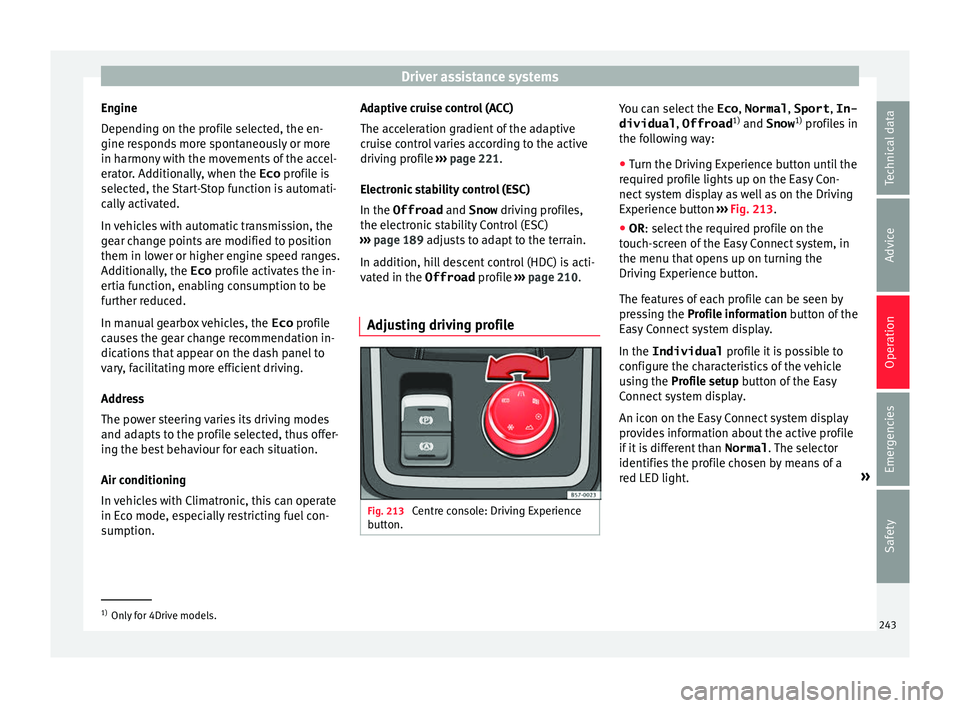
Adjusting driving profile Fig. 213
Centre console: Driving Experience
b utt
on. You can select the
Eco, Normal , Sport, In-
dividual , Offroad1)
and Snow 1)
pr ofi
l
es in
the following way:
● Turn the Driving Experience button until the
required pr
ofile lights up on the Easy Con-
nect system display as well as on the Driving
Experience button ››› Fig. 213.
● OR: select the required profile on the
touc
h-screen of the Easy Connect system, in
the menu that opens up on turning the
Driving Experience button.
The features of each profile can be seen by
pressing the Profile information button of the
Easy Connect system display.
In the Individual profile it is possible to
configure the characteristics of the vehicle
using the Profile setup button of the Easy
Connect system display.
An icon on the Easy Connect system display
provides information about the active profile
if it is different than Normal. The selector
identifies the profile chosen by means of a
red LED light. »1)
Only for 4Drive models.
243
Technical data
Advice
Operation
Emergencies
Safety
Page 331 of 348
Index
Index
A
ABS se
e
Anti-lock brake system . . . . . . . . . . . . . . . 189
ACC . . . . . . . . . . . . . . . . . . . . . . . . . . . . . . . . . . . . 221 radar sensor . . . . . . . . . . . . . . . . . . . . . . . . . . . 223
Accessories . . . . . . . . . . . . . . . . . . . . . . . . . 162, 284
Adaptive cruise control . . . . . . . . . . . . . . . . . . . . 221 function for preventing overtaking in an insidelane . . . . . . . . . . . . . . . . . . . . . . . . . . . . . . . . 227
indications on the display . . . . . . . . . . . . . . . . 222
malfunction . . . . . . . . . . . . . . . . . . . . . . . . . . . . 222
radar sensor . . . . . . . . . . . . . . . . . . . . . . . . . . . 223
special driving situations . . . . . . . . . . . . . . . . . 228
warning and control lamp . . . . . . . . . . . . . . . . 222
Adaptive Cruise Control deactivating temporarily . . . . . . . . . . . . . . . . . 227
operating . . . . . . . . . . . . . . . . . . . . . . . . . . . . . . 224
AdBlue information . . . . . . . . . . . . . . . . . . . . . . . . . . . . 295
maximum filling capacity . . . . . . . . . . . . . . . . . 295
refilling . . . . . . . . . . . . . . . . . . . . . . . . . . . . . . . 295
specification . . . . . . . . . . . . . . . . . . . . . . . . . . . 295
tank capacity . . . . . . . . . . . . . . . . . . . . . . . . . . . 295
Additional consumers (efficiency program) . . . . . 42
Adjusting front head restraints . . . . . . . . . . . . . . . . . . . . . . 77
front seats . . . . . . . . . . . . . . . . . . . . . . . . . . . . . 156
lights . . . . . . . . . . . . . . . . . . . . . . . . . . . . . . . . . 151
rear head restraints . . . . . . . . . . . . . . . . . . . . . 157
seats . . . . . . . . . . . . . . . . . . . . . . . . . . . . . . . . . . 74
Adjusting the head restraints front head restraints . . . . . . . . . . . . . . . . . . . . . 157 Adjustment
CAR menu . . . . . . . . . . . . . . . . . . . . . . . . . . . . . 120
fr
ont head restraints . . . . . . . . . . . . . . . . . . . . . 157
rear head restraints . . . . . . . . . . . . . . . . . . . . . . 77
Airbag covers . . . . . . . . . . . . . . . . . . . . . . . . . . . . . 21
Airbags . . . . . . . . . . . . . . . . . . . . . . . . . . . . . . . . . . 84 description . . . . . . . . . . . . . . . . . . . . . . . . . . . . . 85
Airbag system . . . . . . . . . . . . . . . . . . . . . . . . . . 21, 84 activation . . . . . . . . . . . . . . . . . . . . . . . . . . . . . . 85
control lamp . . . . . . . . . . . . . . . . . . . . . . . . . . . . 89
deactivation of front airbag . . . . . . . . . . . . . . . . 88
description . . . . . . . . . . . . . . . . . . . . . . . . . . . . . 85
front airbags . . . . . . . . . . . . . . . . . . . . . . . . . 21, 86
functioning . . . . . . . . . . . . . . . . . . . . . . . . . . . . . 85
head-protection airbags . . . . . . . . . . . . . . . . . . 24
knee airbags . . . . . . . . . . . . . . . . . . . . . . . . . . . . 23
side airbags . . . . . . . . . . . . . . . . . . . . . . . . . . . . 23
Air conditioning auxiliary heater . . . . . . . . . . . . . . . . . . . . . . . . . 177
Climatronic . . . . . . . . . . . . . . . . . . . . . . . . 51, 170
heated windscreen . . . . . . . . . . . . . . . . . . . . . . 175
heating and fresh air . . . . . . . . . . . . . . . . . . . . . 54
manual air conditioning . . . . . . . . . . . . . . . . . . . 53
user instructions . . . . . . . . . . . . . . . . . . . . . . . . 173
Air outlets . . . . . . . . . . . . . . . . . . . . . . . . . . . . . . . 174
Air recirculation . . . . . . . . . . . . . . . . . . . . . . . . . . 174
Alcantara: cleaning . . . . . . . . . . . . . . . . . . . . . . . 291
Ambient lighting . . . . . . . . . . . . . . . . . . . . . . . . . 152
Anti-freeze . . . . . . . . . . . . . . . . . . . . . . . . . . . . . . . 58
Anti-lock brake system . . . . . . . . . . . . . . . . . . . . . 189
Anti-puncture . . . . . . . . . . . . . . . . . . . . . . . . . . 63, 95
Anti-puncture kit . . . . . . . . . . . . . . . . . . . . . . . . 63, 95 check after 10 minutes . . . . . . . . . . . . . . . . . . . . 97
Anti-puncture set . . . . . . . . . . . . . . . . . . . . . . . . . . 95
Anti-slip regulation . . . . . . . . . . . . . . . . . . . . . . . 189 Anti-theft alarm . . . . . . . . . . . . . . . . . . . . . 125, 134
trail er . . . . . . . . . . . . . . . . . . . . . . . . . . . . . . . . . 279
vehicle interior monitoring and anti-tow pro- tection . . . . . . . . . . . . . . . . . . . . . . . . . . . . . . 136
Anti-theft security system . . . . . . . . . . 15, 125, 133
Anti-theft system trailer . . . . . . . . . . . . . . . . . . . . . . . . . . . . . . . . . 278
Anti-tow protection . . . . . . . . . . . . . . . . . . . . . . . 136
Anti-trap function sun blind (sunroof) . . . . . . . . . . . . . . . . . . . . . . 143
sunroof . . . . . . . . . . . . . . . . . . . . . . . . . . . . . . . 143
Area view system (Top View Camera) special characteristics . . . . . . . . . . . . . . . . . . . 268
Aspects to note before setting off . . . . . . . . . . . . . 73
Assistance systems ACC . . . . . . . . . . . . . . . . . . . . . . . . . . . . . . . . . . 221
adaptive cruise control . . . . . . . . . . . . . . . . . . . 221
Auto Hold function . . . . . . . . . . . . . . . . . . . . . . 211
blind spot detector (BSD) with parking assis-tance (RCTA) . . . . . . . . . . . . . . . . . . . . . . . . . 237
cruise control system . . . . . . . . . . . . . . . . . . . . 212
Emergency Assist . . . . . . . . . . . . . . . . . . . . . . . 234
emergency brake assist (Front Assist) . . . . . . . 217
fatigue detection . . . . . . . . . . . . . . . . . . . . . . . 248
Hill Descent Control . . . . . . . . . . . . . . . . . . . . . 210
Park Assist . . . . . . . . . . . . . . . . . . . . . . . . . . . . 249
parking assistance (RCTA) . . . . . . . . . . . . . . . . 237
parking system Plus . . . . . . . . . . . . . . . . . . . . . 257
Rear parking aid . . . . . . . . . . . . . . . . . . . . . . . . 262
speed limiter . . . . . . . . . . . . . . . . . . . . . . . . . . . 214
Top View Camera . . . . . . . . . . . . . . . . . . . . . . . 265
traffic jam assist . . . . . . . . . . . . . . . . . . . . . . . . 233
traffic sign detection system . . . . . . . . . . . . . . 245
tyre monitoring . . . . . . . . . . . . . . . . . . . . . . . . . 312
tyre monitoring indicator . . . . . . . . . . . . . . . . . 313
tyre monitoring systems . . . . . . . . . . . . . . . . . 311
Assisted starting . . . . . . . . . . . . . . . . . . . . . . . . . . 69
329
Page 333 of 348
Index
Changing gear en g
agin
g gears (manual gearbox) . . . . . . . . . 192
Changing settings CAR menu . . . . . . . . . . . . . . . . . . . . . . . . . . . . . . 33
Changing the blades . . . . . . . . . . . . . . . . . . . . . . . 97
Changing the wiper blades . . . . . . . . . . . . . . . . . . 71
Charging the battery . . . . . . . . . . . . . . . . . . . . . . 306
Checking levels engine compartment . . . . . . . . . . . . . . . . . . . . 298
Childproof locks electric windows . . . . . . . . . . . . . . . . . . . . . . . . 139
Child seats . . . . . . . . . . . . . . . . . . . . . . . . . . . . 24, 91 categorisation into groups . . . . . . . . . . . . . . . . . 92
ISOFIX system . . . . . . . . . . . . . . . . . . . . . . . . . . . 26
safety instructions . . . . . . . . . . . . . . . . . . . . 24, 90
securing with seat belt . . . . . . . . . . . . . . . . . . . . 25
Top Tether system . . . . . . . . . . . . . . . . . . . . . 26, 29
Cleaning . . . . . . . . . . . . . . . . . . . . . . . . . . . . . . . . 285 alcantara . . . . . . . . . . . . . . . . . . . . . . . . . . . . . . 291
carbon parts . . . . . . . . . . . . . . . . . . . . . . . . . . . 288
Easy Connect control panel . . . . . . . . . . . . . . . 289
exhaust pipe . . . . . . . . . . . . . . . . . . . . . . . . . . . 289
fabrics . . . . . . . . . . . . . . . . . . . . . . . . . . . . . . . . 289
leather . . . . . . . . . . . . . . . . . . . . . . . . . . . . . . . . 290
natural leather . . . . . . . . . . . . . . . . . . . . . . . . . 291
plastic parts . . . . . . . . . . . . . . . . . . . . . . 288, 289
radio screen . . . . . . . . . . . . . . . . . . . . . . . . . . . 289
rims . . . . . . . . . . . . . . . . . . . . . . . . . . . . . . . . . . 288
seat belts . . . . . . . . . . . . . . . . . . . . . . . . . . . . . 292
trims . . . . . . . . . . . . . . . . . . . . . . . . . . . . . . . . . 287
washing the vehicle . . . . . . . . . . . . . . . . . . . . . 285
windows . . . . . . . . . . . . . . . . . . . . . . . . . . . . . . 288
Climatronic . . . . . . . . . . . . . . . . . . . . . . . . . . . . . . . 51
Close sunroof . . . . . . . . . . . . . . . . . . . . . . . . . . . . . . . 142
windows . . . . . . . . . . . . . . . . . . . . . . . . . . . . . . 139 Closing . . . . . . . . . . . . . . . . . . . . . . . . . . . . . . . . . 125
bonnet . . . . . . . . . . . . . . . . . . . . . . . . . . . . . . . . 299
re
ar lid . . . . . . . . . . . . . . . . . . . . . . . . . . . . . . . . 137
sun blind (sunroof) . . . . . . . . . . . . . . . . . . . . . . 143
sunroof . . . . . . . . . . . . . . . . . . . . . . . . . . . . . . . 142
windows . . . . . . . . . . . . . . . . . . . . . . . . . . . . . . 139
Clutch (warning lamp) . . . . . . . . . . . . . . . . . . . . . 199
Coming Home . . . . . . . . . . . . . . . . . . . . . . . . . . . . 148
Coming Home function . . . . . . . . . . . . . . . . . . . . 148
Connectivity Box . . . . . . . . . . . . . . . . . . . . . . . . . . 123
Control and warning lamps . . . . . . . . . . . . . 46, 119 adaptive cruise control . . . . . . . . . . . . . . . . . . . 222
airbags . . . . . . . . . . . . . . . . . . . . . . . . . . . . . . . . 88
airbag system . . . . . . . . . . . . . . . . . . . . . . . . . . . 89
applying the brake . . . . . . . . . . . . . . . . . . . . . . 222
ASR . . . . . . . . . . . . . . . . . . . . . . . . . . . . . . . . . . 191
audible warning signal . . . . . . . . . . . . . . . . . . 119
blind spot detector (BSD) . . . . . . . . . . . . . . . . 237
cruise control system (CCS) . . . . . . . . . . . . . . . 212
depress the brake . . . . . . . . . . . . . . . . . . . . . . . 217
diesel particulate filter . . . . . . . . . . . . . . . . . . . 204
electromechanical steering . . . . . . . . . . . . . . . 200
emission control . . . . . . . . . . . . . . . . . . . . . . . . 205
engine management . . . . . . . . . . . . . . . . . . . . 205
engine pre-heating/fault system . . . . . . . . . . . 205
ESC . . . . . . . . . . . . . . . . . . . . . . . . . . . . . . . . . . 191
gear change . . . . . . . . . . . . . . . . . . . . . . . . . . . 200
Hill Descent Control . . . . . . . . . . . . . . . . . . . . . 210
instrument panel . . . . . . . . . . . . . . . . . . . . . 46, 48
instrument panel display . . . . . . . . . . . . . . . . . . 47
Lane Assist . . . . . . . . . . . . . . . . . . . . . . . . . . . . 230
lights . . . . . . . . . . . . . . . . . . . . . . . . . . . . . . . . . 144
parking assistant (RCTA) . . . . . . . . . . . . . . . . . 237
refuelling . . . . . . . . . . . . . . . . . . . . . . . . . . . . . . 292
remote control (auxiliary heater) . . . . . . . . . . . 178
seat belt . . . . . . . . . . . . . . . . . . . . . . . . . . . . . . . 79
speed limiter . . . . . . . . . . . . . . . . . . . . . . . . . . . 214 Start-Stop . . . . . . . . . . . . . . . . . . . . . . . . . . . . . 208
tow hit
ch . . . . . . . . . . . . . . . . . . . . . . . . . . . . . . 277
towing bracket . . . . . . . . . . . . . . . . . . . . . . . . . 275
tyre monitoring system . . . . . . . . . . . . . . . . . . 312
Controls and displays general instrument panel . . . . . . . . . . . . . . . . . 113
Controls for the windows . . . . . . . . . . . . . . . 18, 139
Controls on the steering wheel operating the audio, telephone and naviga-tion system . . . . . . . . . . . . . . . . . . . . . . . . . . 121
Coolant checking level . . . . . . . . . . . . . . . . . . . . . . . . . . 302
Cooling coolant temperature gauge . . . . . . . . . . . . . . . 117
Cooling system checking coolant . . . . . . . . . . . . . . . . . . . . . . . 302
topping up coolant . . . . . . . . . . . . . . . . . . . . . . 302
Cornering lights . . . . . . . . . . . . . . . . . . . . . . . . . . . . . . . . . 148
Correct position . . . . . . . . . . . . . . . . . . . . . . . . . . . 74 driver . . . . . . . . . . . . . . . . . . . . . . . . . . . . . . . . . . 74
front passenger . . . . . . . . . . . . . . . . . . . . . . . . . 75
Correct sitting position rear seat passengers . . . . . . . . . . . . . . . . . . . . . 76
Cruise control . . . . . . . . . . . . . . . . . . . . . . . . 44, 212 operation . . . . . . . . . . . . . . . . . . . . . . . . . . . . . . 213
Cruise control system . . . . . . . . . . . . . . . . . . . . . . 212 warning and indication lamp . . . . . . . . . . . . . . 212
D Dangers in not using the seat belt . . . . . . . . . . . . 81
Dash panel . . . . . . . . . . . . . . . . . . . . . . . . . . . . . . . 46
Data sticker . . . . . . . . . . . . . . . . . . . . . . . . . . . . . . 317
Deactivating the front passenger front airbag . . . 22
Deactivation of front airbag . . . . . . . . . . . . . . . . . . 88
Defective bulbs changing a bulb . . . . . . . . . . . . . . . . . . . . . . . . 106
331