headlights Seat Ateca 2018 User Guide
[x] Cancel search | Manufacturer: SEAT, Model Year: 2018, Model line: Ateca, Model: Seat Ateca 2018Pages: 348, PDF Size: 7.32 MB
Page 153 of 348
Lights and visibility
The light distribution of the halogen and full-
LED he a
dlights
allows the specific “tourist
light” values to be met without the need for
stickers or changes in the settings. Note
“Tourist light” is only allowed temporarily. If
you ar e p
lanning a long stay in a country that
drives on the other side, you should take the
vehicle to an Authorised Technical Service to
change the headlights. Headlight range control
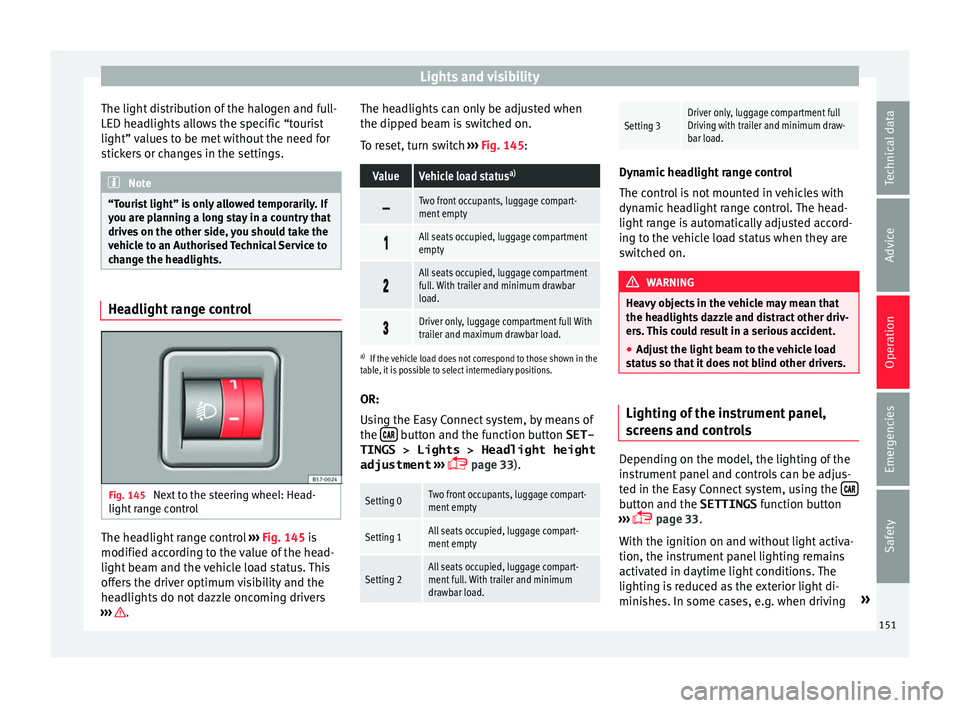
Fig. 145
Next to the steering wheel: Head-
light r
an
ge control The headlight range control
››
›
Fig. 145 is
modified according to the value of the head-
light beam and the vehicle load status. This
offers the driver optimum visibility and the
headlights do not dazzle oncoming drivers
››› . The headlights can only be adjusted when
the dip
ped be
am i
s switched on.
To reset, turn switch ››› Fig. 145:
ValueVehicle load status a)
Two front occupants, luggage compart-
ment empty
All seats occupied, luggage compartment
empty
All seats occupied, luggage compartment
full. With trailer and minimum drawbar
load.
Driver only, luggage compartment full With
trailer and maximum drawbar load.
a)
If the vehicle load does not correspond to those shown in the
table, it is possible to select intermediary positions.
OR:
Using the Easy Connect system, by means of
the button and the function button SET-
TINGS > Lights > Headlight height
adjustment
› ›
›
page 33).
Setting 0Two front occupants, luggage compart-
ment empty
Setting 1All seats occupied, luggage compart-
ment empty
Setting 2All seats occupied, luggage compart-
ment full. With trailer and minimum
drawbar load.
Setting 3Driver only, luggage compartment full
Driving with trailer and minimum draw-
bar load. Dynamic headlight range control
The contr
o
l is not mounted in vehicles with
dynamic headlight range control. The head-
light range is automatically adjusted accord-
ing to the vehicle load status when they are
switched on. WARNING
Heavy objects in the vehicle may mean that
the hea dlight
s dazzle and distract other driv-
ers. This could result in a serious accident.
● Adjust the light beam to the vehicle load
stat
us so that it does not blind other drivers. Lighting of the instrument panel,
s
c
r
eens and controls Depending on the model, the lighting of the
in
s
trument
panel and controls can be adjus-
ted in the Easy Connect system, using the button and the SETTINGS
fu
nction b
utton
››› page 33.
With the ignition on and without light activa-
tion, the instrument panel lighting remains
activated in daytime light conditions. The
lighting is reduced as the exterior light di-
minishes. In some cases, e.g. when driving »
151
Technical data
Advice
Operation
Emergencies
Safety
Page 156 of 348
Operation
Headlight wash/wipe system*
The he a
dlight
washers/wipers clean the
headlight lenses.
After the ignition is switched on, the first and
every fifth time the windscreen washer is
switched on, the headlights are also washed.
Therefore, the windscreen wiper lever should
be pulled towards the steering wheel when
the dipped beam or main beam are on. Any
incrusted dirt (such as insects) should be
cleaned regularly (e.g. when refuelling).
To ensure the headlight washers work cor-
rectly in winter, any snow which has got into
the bumper jet supports should be cleaned
away. If necessary, remove snow with an anti-
icing spray. Note
The wiper will try to wipe away any obstacles
that ar
e on the windscreen. The wiper will
stop moving if the obstacle blocks its path.
Remove the obstacle and switch the wiper
back on again. Rain sensor*
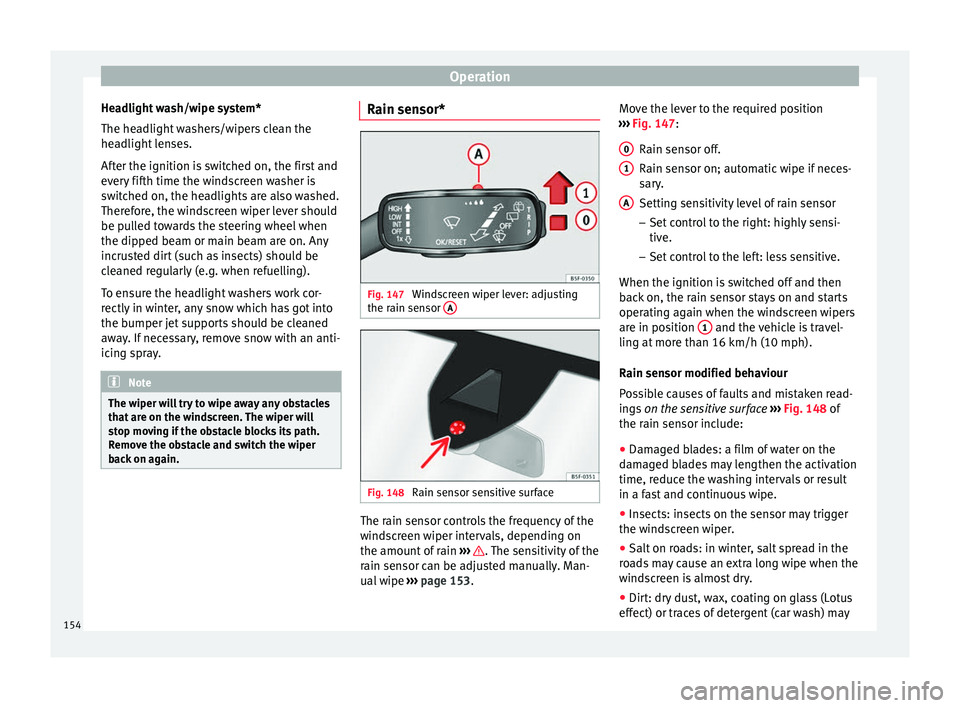
Fig. 147
Windscreen wiper lever: adjusting
the r ain sen
sor A Fig. 148
Rain sensor sensitive surface The rain sensor controls the frequency of the
w
ind
s
creen wiper intervals, depending on
the amount of rain ››› . The sensitivity of the
r ain sen
sor c
an be adjusted manually. Man-
ual wipe ››› page 153. Move the lever to the required position
›››
Fig. 147:
Rain sensor off.
Rain sensor on; automatic wipe if neces-
sary.
Setting sensitivity level of rain sensor
– Set control to the right: highly sensi-
tive.
– Set control to the left: less sensitive.
When the ignition is switched off and then
back on, the rain sensor stays on and starts
operating again when the windscreen wipers
are in position 1 and the vehicle is travel-
lin g at
mor
e than 16 km/h (10 mph).
Rain sensor modified behaviour
Possible causes of faults and mistaken read-
ings on the sensitive surface ››› Fig. 148 of
the rain sensor include:
● Damaged blades: a film of water on the
damag
ed blades may lengthen the activation
time, reduce the washing intervals or result
in a fast and continuous wipe.
● Insects: insects on the sensor may trigger
the winds
creen wiper.
● Salt on roads: in winter, salt spread in the
roa
ds may cause an extra long wipe when the
windscreen is almost dry.
● Dirt: dry dust, wax, coating on glass (Lotus
effect) or trac
es of detergent (car wash) may
0 1
A
154
Page 182 of 348
Operation
WARNING
Never programme the auxiliary heater so that
it sw it
ches itself on and is running in an en-
closed space or an area with no ventilation.
The auxiliary heater exhaust fumes contain
carbon monoxide, an odourless and colour-
less toxic gas. Carbon monoxide can cause
people to lose consciousness. It can also
cause death. Operating instructions
The auxiliary heater exhaust system located
belo
w the
v
ehicle must be kept clear of snow,
mud and other objects. The exhaust fumes
must be able to exit freely. The emissions
generated by the auxiliary heater are re-
moved via an exhaust pipe fitted underneath
the vehicle.
On heating the vehicle interior, depending on
the outside temperature, the warm air is first
directed at the windscreen and then to the
rest of the vehicle interior through the air
vents. Directing the diffusers – towards the
windows for example – can affect air distribu-
tion.
When will the auxiliary heater not be activa-
ted?
● The auxiliary heater requires about as
much po w
er as the dipped beam headlights.
If the 12-volt battery charge is too low, the auxiliary heater switches off automatically
and cannot
be sw
itched on. This avoids prob-
lems when starting the engine.
● The heating must be activated every time
you want
to set off. Similarly, the departure
time must reactivate each time.
● The control lamp (fuel l
evel indicator)
lights up. Note
● Noise s
will be heard while the auxiliary
heater is running.
● When the air humidity is high and the in-
side temper
ature low, condensation from the
heating and ventilating system may evapo-
rate when the auxiliary heater is switched on.
In this case, steam may be released from un-
derneath the vehicle. This does not mean
that there is a vehicle malfunction.
● If the vehicle is tilted, e.g. if parked on a
slope, the operation of
the auxiliary heater
may be restricted if the fuel tank level is low
(just above the reserve level).
● If the auxiliary heater is used a number of
times f
or a long period of time, the 12-volt
battery will lose its charge. To recharge the
battery, the vehicle must be driven for a num-
ber of kilometres from time to time. As a
guideline: The journey should last approxi-
mately as long as the heater was connected.
● At temperatures below +5°C (+41°F), the
auxili
ary heater may switch itself on automat-
ically when the engine is switched on. The auxiliary heater is switched off again after a
cer
t
ain time.180
Page 221 of 348
Driver assistance systems
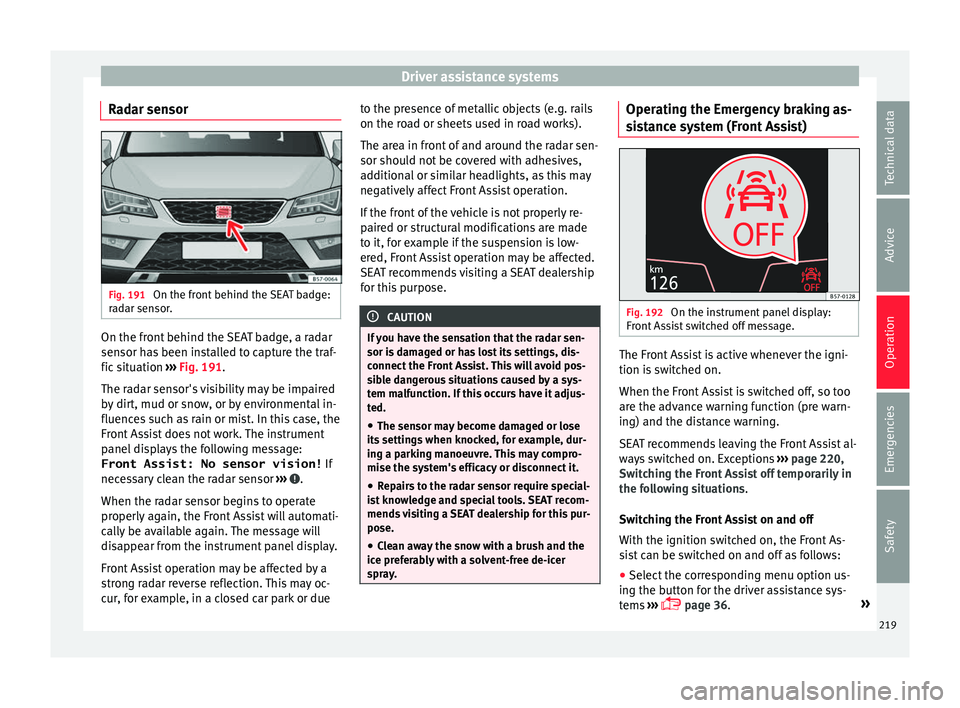
Radar sensor Fig. 191
On the front behind the SEAT badge:
r a
d
ar sensor. On the front behind the SEAT badge, a radar
sen
sor h
a
s been installed to capture the traf-
fic situation ››› Fig. 191.
The radar sensor's visibility may be impaired
by dirt, mud or snow, or by environmental in-
fluences such as rain or mist. In this case, the
Front Assist does not work. The instrument
panel displays the following message: Front Assist: No sensor vision! If
necessary clean the radar sensor ››› .
When the r a
d
ar sensor begins to operate
properly again, the Front Assist will automati-
cally be available again. The message will
disappear from the instrument panel display.
Front Assist operation may be affected by a
strong radar reverse reflection. This may oc-
cur, for example, in a closed car park or due to the presence of metallic objects (e.g. rails
on the roa
d or sheets used in road works).
The area in front of and around the radar sen-
sor should not be covered with adhesives,
additional or similar headlights, as this may
negatively affect Front Assist operation.
If the front of the vehicle is not properly re-
paired or structural modifications are made
to it, for example if the suspension is low-
ered, Front Assist operation may be affected.
SEAT recommends visiting a SEAT dealership
for this purpose. CAUTION
If you have the sensation that the radar sen-
sor is d
amaged or has lost its settings, dis-
connect the Front Assist. This will avoid pos-
sible dangerous situations caused by a sys-
tem malfunction. If this occurs have it adjus-
ted.
● The sensor may become damaged or lose
its settin
gs when knocked, for example, dur-
ing a parking manoeuvre. This may compro-
mise the system's efficacy or disconnect it.
● Repairs to the radar sensor require special-
ist
knowledge and special tools. SEAT recom-
mends visiting a SEAT dealership for this pur-
pose.
● Clean away the snow with a brush and the
ice pref
erably with a solvent-free de-icer
spray. Operating the Emergency braking as-
s
i
s
tance system (Front Assist) Fig. 192
On the instrument panel display:
Fr ont
As
sist switched off message. The Front Assist is active whenever the igni-
tion i
s
sw
itched on.
When the Front Assist is switched off, so too
are the advance warning function (pre warn-
ing) and the distance warning.
SEAT recommends leaving the Front Assist al-
ways switched on. Exceptions ››› page 220,
Switching the Front Assist off temporarily in
the following situations.
Switching the Front Assist on and off
With the ignition switched on, the Front As-
sist can be switched on and off as follows:
● Select the corresponding menu option us-
ing the b utt
on for the driver assistance sys-
tems ›››
page 36. »
219
Technical data
Advice
Operation
Emergencies
Safety
Page 226 of 348
Operation
presence of metallic objects (e.g. rails on the
r o
a
d or sheets used in road works).
The area in front of and around the radar sen-
sor should not be covered with adhesives,
additional or similar headlights, as this may
negatively affect ACC operation.
If the front of the vehicle is not properly re-
paired or structural modifications are made
to it, for example, if the suspension is low-
ered, ACC operation may be affected. In this
scenario, SEAT recommends visiting a SEAT
dealership. CAUTION
If you have the sensation that the radar sen-
sor is d
amaged or has lost its settings, dis-
connect the ACC. This will avoid possible
damage. If this occurs have it adjusted.
● The sensor may become damaged or lose
its settin
gs when knocked, for example, dur-
ing a parking manoeuvre. This may compro-
mise the system's efficacy or disconnect it.
● Repairs to the radar sensor require special-
ist
knowledge and special tools. SEAT recom-
mends visiting a SEAT dealership for this pur-
pose.
● Clean away the snow with a brush and the
ice pref
erably with a solvent-free de-icer
spray. Operating the Adaptive Cruise Control
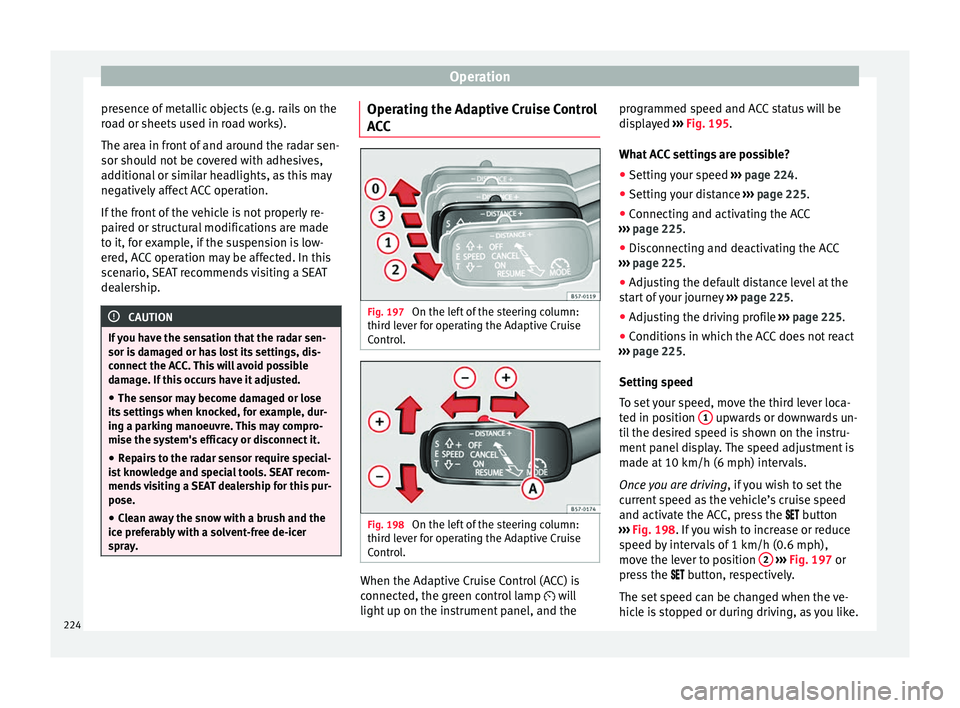
A
C
C Fig. 197
On the left of the steering column:
thir d l
ev
er for operating the Adaptive Cruise
Control. Fig. 198
On the left of the steering column:
thir d l
ev
er for operating the Adaptive Cruise
Control. When the Adaptive Cruise Control (ACC) is
c
onnect
ed, the gr
een control lamp will
light up on the instrument panel, and the programmed speed and ACC status will be
disp
layed ››› Fig. 195.
What ACC settings are possible? ● Setting your speed ›››
page 224.
● Setting your distance ›››
page 225.
● Connecting and activating the ACC
›››
page 225.
● Disconnecting and deactivating the ACC
›››
page 225.
● Adjusting the default distance level at the
star
t of your journey ››› page 225.
● Adjusting the driving profile ›››
page 225.
● Conditions in which the ACC does not react
›››
page 225.
Setting speed
To set your speed, move the third lever loca-
ted in position 1 upwards or downwards un-
ti l
the de
sired speed is shown on the instru-
ment panel display. The speed adjustment is
made at 10 km/h (6 mph) intervals.
Once you are driving , if you wish to set the
current speed as the vehicle’s cruise speed
and activate the ACC, press the button
››› Fig. 198. If you wish to increase or reduce
speed by intervals of 1 km/h (0.6 mph),
move the lever to position 2
›
››
Fig. 197 or
press the button, respectively.
The set speed can be changed when the ve-
hicle is stopped or during driving, as you like.
224
Page 282 of 348
Operation
To promote safety while driving, SEAT recom-
mend s
m
aking the most of the maximum ver-
tical load technically permissible on the cou-
pling device ››› page 273. An insufficient ver-
tical load has a negative influence on the be-
haviour of both the vehicle and trailer.
The vertical load increases the weight on the
rear axle, reducing the vehicle's carrying ca-
pacity.
Gross combination weight of the towing ve-
hicle and trailer
The gross combination weight is the actual
weight of the loaded vehicle plus the actual
weight of the loaded trailer.
In some countries trailers are classified into
distinct categories. SEAT recommends ob-
taining information from a specialised work-
shop regarding which type of trailer is most
suitable for your vehicle.
Trailer loading
The weight of the towing vehicle and trailer
must be balanced. In order to do this, the
load must be as close as possible to the max-
imum vertical load technically permissible on
the coupling point, and it must be evenly dis-
tributed between the back and front of the
trailer:
● Distribute loads in the trailer so that heavy
obj
ects are as near to the axle as possible or
above it. ●
Secure the tr
ailer load properly.
Tyre pressure
Set the tyre pressure of the trailer tyres in ac-
cordance with the trailer manufacturer's rec-
ommendations.
When towing a trailer, inflate the tyres of the
towing vehicle with the maximum allowable
pressure ››› page 308. WARNING
If the maximum permissible axle weight, the
max imum lo
ad technically permissible on the
coupling point, the maximum authorised ve-
hicle weight or the gross combination weight
of the towing vehicle and trailer are excee-
ded, accidents and serious injuries may oc-
cur.
● Never exceed the values indicated!
● The actual weight on the front and rear
axle
s must never exceed the maximum per-
missible axle weight. The weight on the front
and rear axles must never exceed the maxi-
mum permissible weight. WARNING
A shift in weight could jeopardize the stabili-
ty and sec urity
of the towing vehicle and
trailer, which could lead to accidents and se-
rious injuries.
● Always load the trailer correctly. ●
Alw a
ys secure the load properly using belts
or straps that are suitable and in good condi-
tion. Driving with a trailer
Adjusting the headlights
When to
w
ing a trailer, the front part of the ve-
hicle could lift up, and if the dipped beams
are on, this could dazzle other drivers. Use
the headlight range control to lower the cone
of light. If you do not have headlight range
control, have the headlights adjusted by a
specialised workshop.
Special characteristics of driving with a trail-
er
● If your trailer has an overru
n brake, brake
gently at first and then rapidly. This will pre-
vent the jerking that can be caused by the
locking of trailer wheels.
● Due to the gross combination weight of the
tow
ing vehicle and trailer, the braking dis-
tance increases.
● When going down a slope, go into a lower
gear (if
using a manual gearbox or the tip-
tronic automatic gearbox mode) to take ad-
vantage of the braking power provided by the
engine. Otherwise, the braking system could
overheat and even fail.
280
Page 307 of 348
Checking and refilling levels
CAUTION
● Do not mi x
cleaning products recommen-
ded by SEAT with other products. This could
lead to flocculation and may block the wind-
screen washer jets.
● When topping up service fluids, make abso-
lutely c
ertain that you fill the fluids into the
correct reservoirs. Using the wrong fluids
could cause serious malfunctions and engine
damage!
● Not having windscreen wiper fluid reduces
vis
ibility through the windscreen, and leads
to loss of visibility in headlights in models
with headlight washer. Battery
Gener a
l
informationRead the additional information carefully
› ›
›
page 59.
The battery is located in the engine compart-
ment and is almost maintenance-free. It is
checked as part of the Inspection Service.
Nevertheless, check the terminals are clean
and have the correct tightening torque, espe-
cially in summer and winter.
Disconnecting the battery
The battery should only be disconnected in
exceptional cases. When the battery is dis- connected, some of the vehicle's functions
are “los
t” (››› table on page 305). These
functions will require resetting after the bat-
tery is reconnected.
Deactivate the anti-theft alarm* before you
disconnect the battery Otherwise the alarm
will be triggered.
FunctionReprogramming
One-touch function of
the electric windows››› page 141, One-touch
opening and closing.
Remote control key
If the vehicle does not re-
spond to the key, they
should be synchronised
››› page 134.
Digital clock››› page 116.
ESC warning lampAfter driving for a few me-
tres, the warning lamp goes
out again. If the vehicle is not used for long periods
The
v
ehic
le has a system for monitoring the
current consumption when the engine is left
unused for long periods of time ››› page 203.
Some functions, such as the interior lights, or
the remote door opening, may be temporarily
disabled to prevent the battery from running
flat. These functions will come back on as
soon as the ignition is switched on and the
engine started. Winter conditions
During the w
inter, the starting power may be
reduced, and if necessary, the battery should
be charged ››› in Important safety warn-
in g
s
for handling a vehicle battery on
page 306
Important safety warnings for han-
dling a v
ehicle battery All work on batteries requires specialist
kno
wl
edg
e. Please refer to a SEAT Official
Service or a workshop specialising in batter-
ies: risk of burns or exploding battery!
The battery must not be opened. Never try to
change the fluid level of the battery. Other-
wise explosive gas is released from the bat-
tery that could cause an explosion.
Wear eye protection.
Battery acid is very corrosive and caustic. Wear
protective gloves and eye protection. In the event
of electrolyte splashes, rinse off with plenty of
water.
Fires, sparks, open flames and smoking are pro-
hibited.
The battery should only be charged in a well-ven-
tilated zone. Risk of explosion!
Keep children away from acid and batteries!»
305
Technical data
Advice
Operation
Emergencies
Safety
Page 334 of 348
Index
Diesel die sel
p
articulate filter . . . . . . . . . . . . . . . . . . . 204
engine oil . . . . . . . . . . . . . . . . . . . . . . . . . . . . . 300
preheating . . . . . . . . . . . . . . . . . . . . . . . . . . . . 181
refuelling . . . . . . . . . . . . . . . . . . . . . . . . . . . . . . 294
Diesel particulate filter malfunction . . . . . . . . . . . . . . . . . . . . . . . . . . . . 204
Digital clock . . . . . . . . . . . . . . . . . . . . . . . . . . . . . 114
Dimensions . . . . . . . . . . . . . . . . . . . . . . . . . . . . . . 327
Direction of rotation tyres . . . . . . . . . . . . . . . . . . . . . . . . . . . . . . . . . . . 67
Display . . . . . . . . . . . . . . . . . . . . . . . . . . . . 114, 115
Display messages speed limiter . . . . . . . . . . . . . . . . . . . . . . . . . . . 214
Display of traffic signs on the instrument panel activate . . . . . . . . . . . . . . . . . . . . . . . . . . . . . . . 246
deactivate . . . . . . . . . . . . . . . . . . . . . . . . . . . . . 246
Disposal belt tensioners . . . . . . . . . . . . . . . . . . . . . . . . . . 83
Distance control see Adaptive cruise control . . . . . . . . . . . . . . . 221
Door cylinder . . . . . . . . . . . . . . . . . . . . . . . . . . . . . 15
Door handle . . . . . . . . . . . . . . . . . . . . . . . . . . . . . . 15
Door lock . . . . . . . . . . . . . . . . . . . . . . . . . . . . . . . . . 15
Door release lever . . . . . . . . . . . . . . . . . . . . . . . . 113
Doors childproof locks . . . . . . . . . . . . . . . . . . . . . . . . 134
opening and closing . . . . . . . . . . . . . . . . . . . . . 15
Downhill speed control . . . . . . . . . . . . . . . . . . . . 198
Downhill speed control function . . . . . . . . . . . . . 198
Drawer . . . . . . . . . . . . . . . . . . . . . . . . . . . . . . . . . . 160
Drink holders . . . . . . . . . . . . . . . . . . . . . . . . . . . . 161
Driver see Correct sitting position . . . . . . . . . 74, 75, 76
Driver-side general instrument panel left-hand drive . . . . . . . . . . . . . . . . . . . . . . . . . . . 9
right-hand drive . . . . . . . . . . . . . . . . . . . . . . . . . 10 Driver information system
engine oil temperature display . . . . . . . . . . . . . 42
operation through the windscreen wiper lever . 36
Driving driving abroad . . . . . . . . . . . . . . . . . . . . . . . . . 150
driving through water . . . . . . . . . . . . . . . . . . . . 206
economical . . . . . . . . . . . . . . . . . . . . . . . . . . . . 201
safe . . . . . . . . . . . . . . . . . . . . . . . . . . . . . . . . . . . 73
towing . . . . . . . . . . . . . . . . . . . . . . . . . . . . . . . . 102
Driving abroad headlights . . . . . . . . . . . . . . . . . . . . . . . . . . . . . 150
Driving data data summary . . . . . . . . . . . . . . . . . . . . . . . . . . . 39
memory . . . . . . . . . . . . . . . . . . . . . . . . . . . . . . . . 38
Driving in winter trailer . . . . . . . . . . . . . . . . . . . . . . . . . . . . . . . . . 273
Driving mode . . . . . . . . . . . . . . . . . . . . . . . . . . . . 243
Driving on flooded roads . . . . . . . . . . . . . . . . . . . 206
Driving profile . . . . . . . . . . . . . . . . . . . . . . . . . . . . 243
DSG . . . . . . . . . . . . . . . . . . . . . . . . . . . . . . . . . . . . 193
Duplicate keys . . . . . . . . . . . . . . . . . . . . . . . . . . . 126
Dust and pollen filter . . . . . . . . . . . . . . . . . . . . . . 170
Dynamic lights range control . . . . . . . . . . . . . . . . 151
E E10 see Ethanol (fuel) . . . . . . . . . . . . . . . . . . . . . . . 293
Easy Connect . . . . . . . . . . . . . . . . . . . . . . . . 33, 120
Easy Open . . . . . . . . . . . . . . . . . . . . . . . . . . . . . . . 129 things to note . . . . . . . . . . . . . . . . . . . . . . . . . . 132
EDL see Electronic differential lock . . . . . . . . . . . . . 189
Efficiency program additional consumers . . . . . . . . . . . . . . . . . . . . 42
saving tips . . . . . . . . . . . . . . . . . . . . . . . . . . . . . . 42
Electrical accessories see Power socket . . . . . . . . . . . . . . . . . . . . . . . 162 Electric windows . . . . . . . . . . . . . . . . . . . . . . 18, 139
conv enience opening and closing . . . . . . . . . 140
Electromechanical steering . . . . . . . . . . . . . . . . . 200 lamp . . . . . . . . . . . . . . . . . . . . . . . . . . . . . . . . . 200
Electronic differential lock . . . . . . . . . . . . . . . . . . 189
Electronic immobiliser . . . . . . . . . . . . . . . . . . . . . . 15
Electronic self-locking . . . . . . . . . . . . . . . . . . . . . 189
Electronic stability control (ESC) . . . . . . . . . . . . . 189
Electronic torque management (XDS) . . . . . . . . . 190
Emergencies . . . . . . . . . . . . . . . . . . . . . . . . . . . . . . 95 anti-puncture kit . . . . . . . . . . . . . . . . . . . . . . . . . 95
automatic gearbox emergency program . . . . . 199
bulbs . . . . . . . . . . . . . . . . . . . . . . . . . . . . . . . . . . 62
changing a wheel . . . . . . . . . . . . . . . . . . . . . . . . 64
emergency towing of the vehicle . . . . . . . . . . . . 68
fuses . . . . . . . . . . . . . . . . . . . . . . . . . . . . . . . . . . 61
hazard warning lights . . . . . . . . . . . . . . . . . . . 149
jump leads . . . . . . . . . . . . . . . . . . . . . . . . . . . . . 69
manual unlocking and locking . . . . . . . . . . . . . 97
puncture . . . . . . . . . . . . . . . . . . . . . . . . . . . . . . . 62
replacing a blown fuse . . . . . . . . . . . . . . . . . . . . 62
replacing the battery . . . . . . . . . . . . . . . . . . . . 306
vehicle tool kit . . . . . . . . . . . . . . . . . . . . . . . . . . 95
Emergency Assist . . . . . . . . . . . . . . . . . . . . . . . . . 234 see Emergency Assist . . . . . . . . . . . . . . . . . . . . 234
switching off . . . . . . . . . . . . . . . . . . . . . . . . . . . 235
switching on . . . . . . . . . . . . . . . . . . . . . . . . . . . 235
Emergency braking assistance system indications on the display . . . . . . . . . . . . . . . . 217
malfunction . . . . . . . . . . . . . . . . . . . . . . . . . . . . 218
operating . . . . . . . . . . . . . . . . . . . . . . . . . . . . . . 219
radar sensor . . . . . . . . . . . . . . . . . . . . . . . . . . . 219
switching off temporarily . . . . . . . . . . . . . . . . . 220
system limitations . . . . . . . . . . . . . . . . . . . . . . 220
Emergency braking function . . . . . . . . . . . . . . . . 187
Emergency braking warning . . . . . . . . . . . . . . . . 150
332
Page 336 of 348
Index
refuelling . . . . . . . . . . . . . . . . . . . . . . . . . . . . . . 293
s av
in
g . . . . . . . . . . . . . . . . . . . . . . . . . . . . . . . . 201
Fuel consumption engine cut-off due to inertia . . . . . . . . . . . . . . 201
why does fuel consumption increase? . . . . . . 204
Fuel tank cap opening and closing . . . . . . . . . . . . . . . . . . . . . 56
Fuel tank flap opening and closing . . . . . . . . . . . . . . . . . . . . . 56
Full-LED Headlights . . . . . . . . . . . . . . . . . . . . . . . 106
Function Leaving Home . . . . . . . . . . . . . . . . . . . . 149
Fuses . . . . . . . . . . . . . . . . . . . . . . . . . . . . . . . 61, 102 fuse box . . . . . . . . . . . . . . . . . . . . . . . . . . 103, 104
identifying blown fuses . . . . . . . . . . . . . . . . . . . 62
identifying by colours . . . . . . . . . . . . . . . . . . . . . 61
preparation before replacing . . . . . . . . . . . . . . . 62
replacing . . . . . . . . . . . . . . . . . . . . . . . . . . . . . . . 62
G Gear-change indicator . . . . . . . . . . . . . . . . . . . . . . 41
Gearbox DSG see Automatic gearbox . . . . . . . . . . . . . . . . . . . 193
Gearbox lever . . . . . . . . . . . . . . . . . . . . . . . . . . . . . 49
Gear change . . . . . . . . . . . . . . . . . . . . . . . . . . . . . . 49 automatic . . . . . . . . . . . . . . . . . . . . . . . . . . . . . . 49
kick-down . . . . . . . . . . . . . . . . . . . . . . . . . . . . . 244
manual gearbox . . . . . . . . . . . . . . . . . . . . . . . . 192
manual gear change . . . . . . . . . . . . . . . . . . . . . . 49
Gear engaged . . . . . . . . . . . . . . . . . . . . . . . . . . . . . 49
Gear recommendation . . . . . . . . . . . . . . . . . . . . . . 41
Gear shift paddles (automatic gearbox) . . . . . . . 195
General instrument panel control lamps . . . . . . . . . . . . . . . . . . . . . . . . . . . 46
controls and displays . . . . . . . . . . . . . . . . . . . . 113
engine compartment . . . . . . . . . . . . . . . . . . . . 298
warning lamps . . . . . . . . . . . . . . . . . . . . . . . . . . 46
Glove compartment . . . . . . . . . . . . . . . . . . . . . . . 161 H
Hand brake
see P
arking brake . . . . . . . . . . . . . . . . . . . . . . . 186
Hazard warning lights . . . . . . . . . . . . . . . . . 31, 149
HDC see Hill Descent Control . . . . . . . . . . . . . . . . . . 210
Head-on collisions and their laws of physics . . . . 81
Head-protection airbags description . . . . . . . . . . . . . . . . . . . . . . . . . . . . . 24
safety instructions . . . . . . . . . . . . . . . . . . . . . . . 87
Headlights changing a bulb . . . . . . . . . . . . . . . . . . . . . . . . 106
driving abroad . . . . . . . . . . . . . . . . . . . . . . . . . 150
headlight washers . . . . . . . . . . . . . . . . . . . . . . 153
Head restraints . . . . . . . . . . . . . . . . . . . . . . . . . . . . 19 adjustment . . . . . . . . . . . . . . . . . . . . . . . . . . . . 157
front head restraints . . . . . . . . . . . . . . . . . . . . . . 77
rear head restraints . . . . . . . . . . . . . . . . . . . . . . 77
Headrests . . . . . . . . . . . . . . . . . . . . . . . . . . . . . . . . 19 adjustment . . . . . . . . . . . . . . . . . . . . . . . . . . . . 157
front . . . . . . . . . . . . . . . . . . . . . . . . . . . . . . . . . . . 77
Heated rear window . . . . . . . . . . . . . . . . . . . . . 52, 54
Heated windscreen . . . . . . . . . . . . . . . . . . . . . . . 175
Heating and fresh air . . . . . . . . . . . . . . . . . . . . . . . 54
Hill Descent Control control lamp . . . . . . . . . . . . . . . . . . . . . . . . . . . 210
Horn . . . . . . . . . . . . . . . . . . . . . . . . . . . . . . . . . . . 113
How to jump start . . . . . . . . . . . . . . . . . . . . . . . . . . 69 description . . . . . . . . . . . . . . . . . . . . . . . . . . . . . 69
I Identifying letters on engine . . . . . . . . . . . . . . . . 317
Ignition . . . . . . . . . . . . . . . . . . . . . . . . . . . . . 30, 181
Ignition lock . . . . . . . . . . . . . . . . . . . . . . . . . 30, 181 see Starter button . . . . . . . . . . . . . . . . . . . . . . . 183
Incorrect position . . . . . . . . . . . . . . . . . . . . . . . . . . 76 Indications on the display . . . . . . . . . . . . . . . . . . 115
ACT . . . . . . . . . . . . . . . . . . . . . . . . . . . . . . . . . . 202
a
daptive cruise control . . . . . . . . . . . . . . . . . . . 222
assist systems submenu . . . . . . . . . . . . . . . . . . 39
compass . . . . . . . . . . . . . . . . . . . . . . . . . . . . . . 116
distance travelled . . . . . . . . . . . . . . . . . . . . . . . 116
doors, bonnet and rear lid open . . . . . . . . . . . . 40
driver information system . . . . . . . . . . . . . . . . . 36
driving data . . . . . . . . . . . . . . . . . . . . . . . . . . . . . 38
ECO . . . . . . . . . . . . . . . . . . . . . . . . . . . . . . . . . . 116
Emergency brake assist system (Front Assist) 217
engine oil . . . . . . . . . . . . . . . . . . . . . . . . . . . . . . 42
MKB . . . . . . . . . . . . . . . . . . . . . . . . . . . . . . . . . . 117
outside temperature . . . . . . . . . . . . . . . . . . . . . . 41
recommended gear . . . . . . . . . . . . . . . . . . . . . 116
SEAT Drive Profile . . . . . . . . . . . . . . . . . . . . . . . 242
second speed display . . . . . . . . . . . . . . . . . . . 116
selector lever positions . . . . . . . . . . . . . 116, 193
service intervals . . . . . . . . . . . . . . . . . . . . . . . . . 43
speed warning . . . . . . . . . . . . . . . . . . . . . . . . . 116
Start-Stop . . . . . . . . . . . . . . . . . . . . . . . . . . . . . 116
time . . . . . . . . . . . . . . . . . . . . . . . . . . . . . . . . . . 116
traffic signs . . . . . . . . . . . . . . . . . . . . . . . . . . . . 246
tyre monitoring . . . . . . . . . . . . . . . . . . . . . . . . . 313
warning and control lamps . . . . . . . . . . . . . . . 223
warning and information messages . . . . . . . . . 40
Inertia mode . . . . . . . . . . . . . . . . . . . . . . . . . . . . . 199
Infotainment system . . . . . . . . . . . . . . . . . . . . . . . 33
Inspection . . . . . . . . . . . . . . . . . . . . . . . . . . . . . . . 300
Inspection service . . . . . . . . . . . . . . . . . . . . . . . . 300
Instrument panel . . . . . . . . . . . . . . . . . . . . . . . . . 114 display . . . . . . . . . . . . . . . . . . . . . . . . . . . 114, 115
instruments . . . . . . . . . . . . . . . . . . . . . . . . . . . . 114
menus . . . . . . . . . . . . . . . . . . . . . . . . . . . . . . . . . 36
odometer . . . . . . . . . . . . . . . . . . . . . . . . . . . . . . 117
service interval indication . . . . . . . . . . . . . . . . . 43
warning and control lamps . . . . . . . . . . . . . . . 119
334
Page 342 of 348
Index
Trailer . . . . . . . . . . . . . . . . . . . . . . . . . . . . . . . . . . 273 adju
s
ting the headlights . . . . . . . . . . . . . . . . . 280
anti-theft alarm . . . . . . . . . . . . . . . . . . . . . . . . . 279
anti-theft system . . . . . . . . . . . . . . . . . . . . . . . 278
connecting . . . . . . . . . . . . . . . . . . . . . . . . . . . . 278
exterior mirrors . . . . . . . . . . . . . . . . . . . . . . . . . 275
hooking up . . . . . . . . . . . . . . . . . . . . . . . . . . . . 278
loading . . . . . . . . . . . . . . . . . . . . . . . . . . . . . . . 279
malfunction . . . . . . . . . . . . . . . . . . . . . . . . . . . . 279
maximum trailer weight . . . . . . . . . . . . . . . . . . 279
mode . . . . . . . . . . . . . . . . . . . . . . . . . . . . 280, 319
parking aid . . . . . . . . . . . . . . . . . . . . . . . 262, 265
power socket . . . . . . . . . . . . . . . . . . . . . . . . . . . 278
rear LED lights . . . . . . . . . . . . . . . . . . . . . 275, 278
rear lights . . . . . . . . . . . . . . . . . . . . . . . . 275, 278
retrofitting a towing bracket . . . . . . . . . . . . . . 282
stabilisation of the towing vehicle and trailer 281
technical requirements . . . . . . . . . . . . . . . . . . 275
tow rope . . . . . . . . . . . . . . . . . . . . . . . . . 275, 278
trailer mode . . . . . . . . . . . . . . . . . . . . . . . . . . . 280
unlocking the electrical unlocking tow hitch . 276
vertical load on the coupling . . . . . . . . . 273, 279
Trailer mode also see towing bracket . . . . . . . . . . . . . . . . . . 273
see Driving with a trailer . . . . . . . . . . . . . . . . . 273
Trailer weights . . . . . . . . . . . . . . . . . . . . . . . . . . . 319
Transporting children . . . . . . . . . . . . . . . . . . . . . . . 90
Transporting items fastening rings . . . . . . . . . . . . . . . . . . . . . . . . . 165
roof carrier . . . . . . . . . . . . . . . . . . . . . . . . . . . . . 168
roof carrier system . . . . . . . . . . . . . . . . . . . . . . 168
Transporting objects loading the trailer . . . . . . . . . . . . . . . . . . . . . . . 279
net bag . . . . . . . . . . . . . . . . . . . . . . . . . . . . . . . 166
retaining hooks . . . . . . . . . . . . . . . . . . . . . . . . 166
roof carrier system . . . . . . . . . . . . . . . . . . . . . . 170 tailboard for transporting long items . . . . . . . 164
trail
er mode . . . . . . . . . . . . . . . . . . . . . . . . . . . 280
Trims cleaning . . . . . . . . . . . . . . . . . . . . . . . . . . . . . . 287
Turn signal convenience function . . . . . . . . . . . . 145
Turn signal lever . . . . . . . . . . . . . . . . . . . . . . . . . . 145
Tyre Mobility Set . . . . . . . . . . . . . . . . . . . . . . . . . . . 63 components . . . . . . . . . . . . . . . . . . . . . . . . . . . . 96
inflating a tyre . . . . . . . . . . . . . . . . . . . . . . . . . . . 96
sealing a tyre . . . . . . . . . . . . . . . . . . . . . . . . . . . 96
Tyre Mobility System see Anti-puncture kit . . . . . . . . . . . . . . . . . . . . . 95
Tyre monitoring system . . . . . . . . . . . . . . . . . . . . 311 tyre monitoring indicator . . . . . . . . . . . . . . . . . 313
Tyre pressure . . . . . . . . . . . . . . . . . . . . . . . 308, 319
Tyre profile . . . . . . . . . . . . . . . . . . . . . . . . . . . . . . 309
Tyre repair . . . . . . . . . . . . . . . . . . . . . . . . . . . . . . . . 95
Tyre repair kit . . . . . . . . . . . . . . . . . . . . . . . . . . . . . 95 see also Anti-puncture kit . . . . . . . . . . . . . . . . . 95
Tyres . . . . . . . . . . . . . . . . . . . . . . . . . . . . . . . . . . . 307 accessories . . . . . . . . . . . . . . . . . . . . . . . . . . . . 307
changing . . . . . . . . . . . . . . . . . . . . . . . . . . . . . . . 64
dimensions . . . . . . . . . . . . . . . . . . . . . . . . . . . . 309
interchanging . . . . . . . . . . . . . . . . . . . . . . . . . . 309
new tyres . . . . . . . . . . . . . . . . . . . . . . . . . . . . . . 309
repair kit . . . . . . . . . . . . . . . . . . . . . . . . . . . . . . . 95
service life . . . . . . . . . . . . . . . . . . . . . . . . . . . . . 308
tyre pressure . . . . . . . . . . . . . . . . . . . . . . . . . . . 308
wear indicators . . . . . . . . . . . . . . . . . . . . . . . . . 309
with compulsory direction of rotation . . . . . . . . 67
with directional tread pattern . . . . . . . . . . . . . 307
Tyre tread depth . . . . . . . . . . . . . . . . . . . . . . . . . . 309
Tyre wear . . . . . . . . . . . . . . . . . . . . . . . . . . . . . . . . 309
U Unfastening your seat belt . . . . . . . . . . . . . . . . . . 82
Unfasten the seat belt . . . . . . . . . . . . . . . . . . . . . . 19 Unlocking and locking . . . . . . . . . . . . . . . . . . . . . . 15
by r emote control . . . . . . . . . . . . . . . . . . . . . . . 127
with Keyless Access . . . . . . . . . . . . . . . . . . . . . 129
with the central locking switch . . . . . . . . . . . . 128
Upholstery: cleaning alcantara . . . . . . . . . . . . . . . . . . . . . . . . . . . . . . 291
upholstery . . . . . . . . . . . . . . . . . . . . . . . . . . . . . 289
USB . . . . . . . . . . . . . . . . . . . . . . . . . . . . . . . . . . . . 123
USB/AUX-IN Port . . . . . . . . . . . . . . . . . . . . . . . . . 123
V Vanity mirror . . . . . . . . . . . . . . . . . . . . . . . . . . . . . 152
Vehicle chassis number . . . . . . . . . . . . . . . . . . . . . . . . 317
data label . . . . . . . . . . . . . . . . . . . . . . . . . . . . . 317
identification data . . . . . . . . . . . . . . . . . . . . . . 317
identification number . . . . . . . . . . . . . . . . . . . . 317
raising . . . . . . . . . . . . . . . . . . . . . . . . . . . . . . . . . 66
unlocking and locking the vehicle with Keyless Access . . . . . . . . . . . . . . . . . . . . . . . . . . . . . . 129
Vehicle battery . . . . . . . . . . . . . . . . . . . . . . . 59, 305 assisted starting . . . . . . . . . . . . . . . . . . . . . . . . . 69
charge level . . . . . . . . . . . . . . . . . . . . . . . . . . . . 203
charging . . . . . . . . . . . . . . . . . . . . . . . . . . . . . . 306
connecting and disconnecting . . . . . . . . . . . . 305
disconnect and connect . . . . . . . . . . . . . . . . . . . 44
power management . . . . . . . . . . . . . . . . . . . . . 203
replacing . . . . . . . . . . . . . . . . . . . . . . . . . . . . . . 306
winter conditions . . . . . . . . . . . . . . . . . . . . . . . 305
Vehicle care natural leather . . . . . . . . . . . . . . . . . . . . . . . . . 291
windscreen wipers service position . . . . . . . . . 71
Vehicle interior monitoring and anti-tow system 136 activation . . . . . . . . . . . . . . . . . . . . . . . . . . . . . 135
Vehicle seats . . . . . . . . . . . . . . . . . . . . . . . . . . . . . 79
Vehicle tool kit . . . . . . . . . . . . . . . . . . . . . . . . . 64, 95
Ventilation slits . . . . . . . . . . . . . . . . . . . . . . . . . . 163
340