infotainment Seat Ateca 2018 User Guide
[x] Cancel search | Manufacturer: SEAT, Model Year: 2018, Model line: Ateca, Model: Seat Ateca 2018Pages: 348, PDF Size: 7.32 MB
Page 266 of 348
Operation
–
or in location s
such as the brow of a hill.
● In order to guarantee good system opera-
tion, keep the ultr
asound sensors clean, free
of snow or ice, and do not cover them with
adhesives or other objects.
● If you use high-pressure or vapour equip-
ment to c
lean the ultrasound sensors, apply
it directly only very briefly and always from a
distance of more than 10 cm.
● Retrofitting of accessories to the vehicle,
such a
s a bicycle rack, may interfere with the
operation of the Parking Aid.
● In order to familiarise yourself with the sys-
tem, it i
s advised that you practice parking in
an area or car park that is free from traffic.
There must be good weather and light condi-
tions.
● The volume and tone of the warnings can
be modified, in addition t
o the indications
››› page 265.
● In vehicles without an inf
otainment system,
these parameters can be modified in a SEAT
Official Service or in a specialised workshop.
● Please observe information on towing a
trail
er ››› page 265.
● The display on the Easy Connect screen
shows
a slight time delay. Parking Aid operation
Manual disconnection of Parking Aid display
(the audibl
e sou
nds remain active)
● Press a button on the main menu of the fac-
tory
-assembled infotainment system.
● OR: press the BA
CK function button.
Park in
g Aid connection
● Engage reverse (for manual gears) or set
the selector l
ever to R (for automatic gears).
Parking Aid disconnection
● Place the selector level in position P, N or D
(for aut om
atic gearboxes) or disengage re-
verse (for manual gearboxes). If you set the
lever to N or D, the system will remain active
for approximately 8 seconds before switching
off, except with Top View Camera*, when it
will be switched off immediately after engag-
ing reverse.
Temporary suppression of sound in Parking
Aid
● Press the function b
utton. If you have the
Top View Camera* system installed, you can-
not use the temporary suppression of sound
in Parking Aid. Switch from reduced to full-screen view if the
rear a
ssist is fitted (Rear View Camera
“RVC”)
● Press the car icon in the reduced view.
If nece
ssary, switch to the rear-assist image
(Rear View Camera “RVC”)
● Engage reverse gear or turn the selector
lever t
o position R.
● OR: press the RVC fu
nction icon.
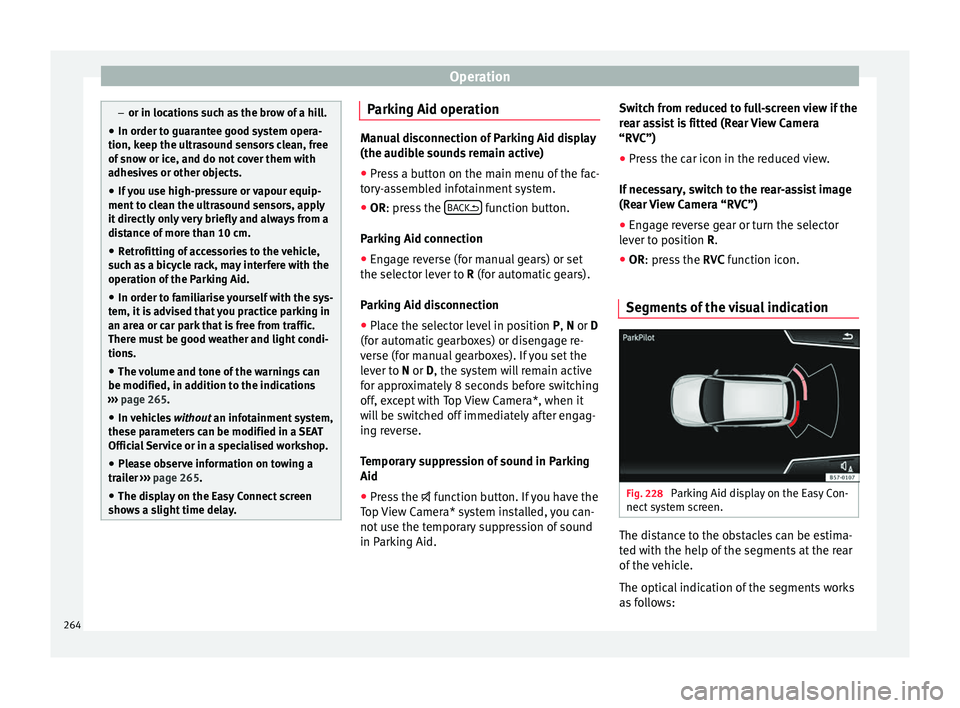
Segments of the visual indication Fig. 228
Parking Aid display on the Easy Con-
nect sy
s
tem screen. The distance to the obstacles can be estima-
t
ed w
ith the help of
the segments at the rear
of the vehicle.
The optical indication of the segments works
as follows:
264
Page 270 of 348
Operation
Instructions for use Fig. 231
Centre console: button for activat-
in g/de
activ
ating the Area View system man-
ually in combination with the parking aid sys-
tem () or else with the rear ParkPilot system ().
Connecting and disconnecting the Area View
system
Manual con-
nection of the
display:
Press the button ››› Fig. 231 once.
The infotainment system screen dis-
plays the aerial view ››› Fig. 230. If
you press the
button when driving
above 15 km/h (9 mph), the image
will not be displayed.
Automatic con-
nection of the
display:
Engage reverse gear.
OR: The vehicle moves backwards.
The view of the image of the vehicle's
rear camera is shown in parallel park-
ing mode with the reduced aerial
view.
Connecting and disconnecting the Area View
system
Manual discon-
nection of the
display:
Press the button ››› Fig. 231
again.
OR: press a button on the factory-
equipped infotainment system, for
example the RADIO
button.
OR: press the function button .
Automatic dis-
connection of
the display:Drive forward at more than approx.
15 km/h (9 mph).
OR: switch the ignition off. The Area
View system menu disappears imme-
diately. Special characteristics
Examples of optical illusions caused by the
cameras:
The images on the area view system cameras are only
two-dimensional. Due to a lack of spatial depth, it is dif-
ficult or impossible to make out on-screen any holes
there may be on the ground, objects jutting out from the
ground or parts protruding from other vehicles.
Situations in which the objects or other vehicles appear
to be further away or closer than they really are:
– On moving from a horizontal plane to a slope.
– On moving from a slope to a horizontal plane.
– If the vehicle is heavily loaded at the rear.
Examples of optical illusions caused by the
cameras:
– If the vehicle approaches protruding objects. These
objects may be outside the cameras' angle of visibility. Trailer mode
The Are
a
View system conceals, in the rear
camera area, all the auxiliary guiding lines
when the factory-fitted towing bracket is con-
nected electrically to a trailer ››› page 273. Note
In order to become familiar with the system
and its f
unctions, SEAT recommends that you
practice handling the Area View system in an
area where there is not too much traffic or in
a car park. 268
Page 271 of 348
Driver assistance systems
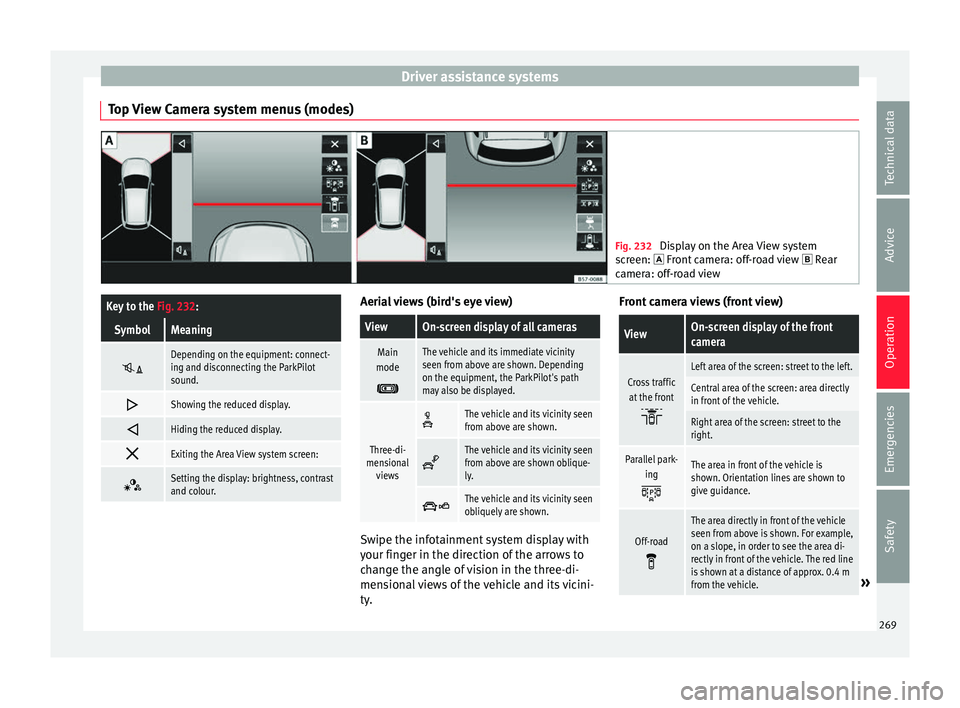
Top View Camera system menus (modes) Fig. 232
Display on the Area View system
sc r
een: Front camera: off-road view Rear
camera: off-road view
Key to the Fig. 232:
SymbolMeaning
Depending on the equipment: connect-
ing and disconnecting the ParkPilot
sound.
Showing the reduced display.
Hiding the reduced display.
Exiting the Area View system screen:
Setting the display: brightness, contrast
and colour. Aerial views (bird's eye view)
ViewOn-screen display of all cameras
Main
mode
The vehicle and its immediate vicinity
seen from above are shown. Depending
on the equipment, the ParkPilot's path
may also be displayed.
Three-di-
mensional views
The vehicle and its vicinity seen
from above are shown.
The vehicle and its vicinity seen
from above are shown oblique-
ly.
The vehicle and its vicinity seen
obliquely are shown.
Swipe the infotainment system display with
y
our fin
g
er in the direction of the arrows to
change the angle of vision in the three-di-
mensional views of the vehicle and its vicini-
ty. Front camera views (front view)
ViewOn-screen display of the front
camera
Cross traffic
at the front
Left area of the screen: street to the left.
Central area of the screen: area directly
in front of the vehicle.
Right area of the screen: street to the
right.
Parallel park- ing
The area in front of the vehicle is
shown. Orientation lines are shown to
give guidance.
Off-road
The area directly in front of the vehicle
seen from above is shown. For example,
on a slope, in order to see the area di-
rectly in front of the vehicle. The red line
is shown at a distance of approx. 0.4 m
from the vehicle.
» 269
Technical data
Advice
Operation
Emergencies
Safety
Page 274 of 348
Operation
● If the ar
e
a behind the vehicle is not dis-
played very clearly or is incomplete.
● If the vehicle is heavily loaded at the rear.
● If the position and installation angle of the
camera h
ave been changed, e.g. after a rear-
end collision. Have the system checked by a
specialised workshop.
Familiarising yourself with the system
To familiarise yourself with the system, the
orientation lines and their function, SEAT rec-
ommends practising parking and manoeu-
vring with the rear assist in a place without
too much traffic or in a car park when there
are good weather and visibility conditions.
Cleaning the camera lens
Keep the camera lens clean and clear of snow
and ice:
● Moisten the lens using a normal alcohol-
based gl
ass cleaning product and clean the
lens with a dry cloth.
● Remove snow using a small brush.
● Use de-icing spray to remove any ice. CAUTION
● Never u se abr
asive cleaning products to
clean the camera lens.
● Do not use hot or warm water to remove ice
or snow fr
om the camera lens. Doing so could
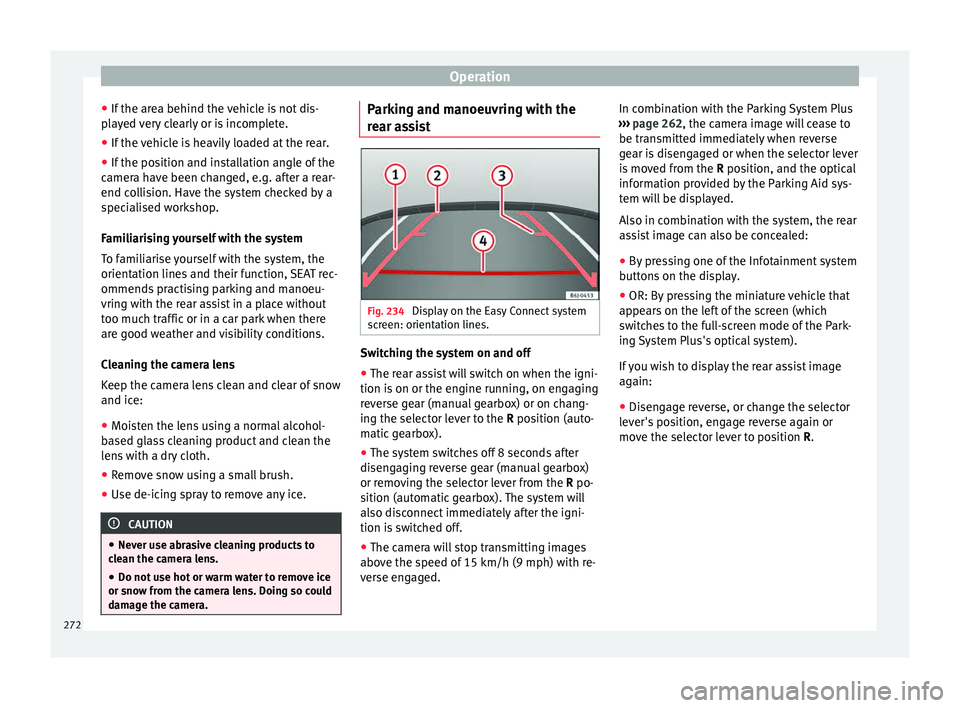
damage the camera. Parking and manoeuvring with the
r
e
ar a
ssist Fig. 234
Display on the Easy Connect system
s c
r
een: orientation lines. Switching the system on and off
●
The rear assist will switch on when the igni-
tion i s
on or the en
gine running, on engaging
reverse gear (manual gearbox) or on chang-
ing the selector lever to the R position (auto-
matic gearbox).
● The system switches off 8 seconds after
diseng
aging reverse gear (manual gearbox)
or removing the selector lever from the R po-
sition (automatic gearbox). The system will
also disconnect immediately after the igni-
tion is switched off.
● The camera will stop transmitting images
above the s
peed of 15 km/h (9 mph) with re-
verse engaged. In combination with the Parking System Plus
›››
page 262, the camera image will cease to
be transmitted immediately when reverse
gear is disengaged or when the selector lever
is moved from the R position, and the optical
information provided by the Parking Aid sys-
tem will be displayed.
Also in combination with the system, the rear
assist image can also be concealed:
● By pressing one of the Infotainment system
button
s on the display.
● OR: By pressing the miniature vehicle that
appear
s on the left of the screen (which
switches to the full-screen mode of the Park-
ing System Plus's optical system).
If you wish to display the rear assist image
again:
● Disengage reverse, or change the selector
lever's
position, engage reverse again or
move the selector lever to position R.
272
Page 336 of 348
Index
refuelling . . . . . . . . . . . . . . . . . . . . . . . . . . . . . . 293
s av
in
g . . . . . . . . . . . . . . . . . . . . . . . . . . . . . . . . 201
Fuel consumption engine cut-off due to inertia . . . . . . . . . . . . . . 201
why does fuel consumption increase? . . . . . . 204
Fuel tank cap opening and closing . . . . . . . . . . . . . . . . . . . . . 56
Fuel tank flap opening and closing . . . . . . . . . . . . . . . . . . . . . 56
Full-LED Headlights . . . . . . . . . . . . . . . . . . . . . . . 106
Function Leaving Home . . . . . . . . . . . . . . . . . . . . 149
Fuses . . . . . . . . . . . . . . . . . . . . . . . . . . . . . . . 61, 102 fuse box . . . . . . . . . . . . . . . . . . . . . . . . . . 103, 104
identifying blown fuses . . . . . . . . . . . . . . . . . . . 62
identifying by colours . . . . . . . . . . . . . . . . . . . . . 61
preparation before replacing . . . . . . . . . . . . . . . 62
replacing . . . . . . . . . . . . . . . . . . . . . . . . . . . . . . . 62
G Gear-change indicator . . . . . . . . . . . . . . . . . . . . . . 41
Gearbox DSG see Automatic gearbox . . . . . . . . . . . . . . . . . . . 193
Gearbox lever . . . . . . . . . . . . . . . . . . . . . . . . . . . . . 49
Gear change . . . . . . . . . . . . . . . . . . . . . . . . . . . . . . 49 automatic . . . . . . . . . . . . . . . . . . . . . . . . . . . . . . 49
kick-down . . . . . . . . . . . . . . . . . . . . . . . . . . . . . 244
manual gearbox . . . . . . . . . . . . . . . . . . . . . . . . 192
manual gear change . . . . . . . . . . . . . . . . . . . . . . 49
Gear engaged . . . . . . . . . . . . . . . . . . . . . . . . . . . . . 49
Gear recommendation . . . . . . . . . . . . . . . . . . . . . . 41
Gear shift paddles (automatic gearbox) . . . . . . . 195
General instrument panel control lamps . . . . . . . . . . . . . . . . . . . . . . . . . . . 46
controls and displays . . . . . . . . . . . . . . . . . . . . 113
engine compartment . . . . . . . . . . . . . . . . . . . . 298
warning lamps . . . . . . . . . . . . . . . . . . . . . . . . . . 46
Glove compartment . . . . . . . . . . . . . . . . . . . . . . . 161 H
Hand brake
see P
arking brake . . . . . . . . . . . . . . . . . . . . . . . 186
Hazard warning lights . . . . . . . . . . . . . . . . . 31, 149
HDC see Hill Descent Control . . . . . . . . . . . . . . . . . . 210
Head-on collisions and their laws of physics . . . . 81
Head-protection airbags description . . . . . . . . . . . . . . . . . . . . . . . . . . . . . 24
safety instructions . . . . . . . . . . . . . . . . . . . . . . . 87
Headlights changing a bulb . . . . . . . . . . . . . . . . . . . . . . . . 106
driving abroad . . . . . . . . . . . . . . . . . . . . . . . . . 150
headlight washers . . . . . . . . . . . . . . . . . . . . . . 153
Head restraints . . . . . . . . . . . . . . . . . . . . . . . . . . . . 19 adjustment . . . . . . . . . . . . . . . . . . . . . . . . . . . . 157
front head restraints . . . . . . . . . . . . . . . . . . . . . . 77
rear head restraints . . . . . . . . . . . . . . . . . . . . . . 77
Headrests . . . . . . . . . . . . . . . . . . . . . . . . . . . . . . . . 19 adjustment . . . . . . . . . . . . . . . . . . . . . . . . . . . . 157
front . . . . . . . . . . . . . . . . . . . . . . . . . . . . . . . . . . . 77
Heated rear window . . . . . . . . . . . . . . . . . . . . . 52, 54
Heated windscreen . . . . . . . . . . . . . . . . . . . . . . . 175
Heating and fresh air . . . . . . . . . . . . . . . . . . . . . . . 54
Hill Descent Control control lamp . . . . . . . . . . . . . . . . . . . . . . . . . . . 210
Horn . . . . . . . . . . . . . . . . . . . . . . . . . . . . . . . . . . . 113
How to jump start . . . . . . . . . . . . . . . . . . . . . . . . . . 69 description . . . . . . . . . . . . . . . . . . . . . . . . . . . . . 69
I Identifying letters on engine . . . . . . . . . . . . . . . . 317
Ignition . . . . . . . . . . . . . . . . . . . . . . . . . . . . . 30, 181
Ignition lock . . . . . . . . . . . . . . . . . . . . . . . . . 30, 181 see Starter button . . . . . . . . . . . . . . . . . . . . . . . 183
Incorrect position . . . . . . . . . . . . . . . . . . . . . . . . . . 76 Indications on the display . . . . . . . . . . . . . . . . . . 115
ACT . . . . . . . . . . . . . . . . . . . . . . . . . . . . . . . . . . 202
a
daptive cruise control . . . . . . . . . . . . . . . . . . . 222
assist systems submenu . . . . . . . . . . . . . . . . . . 39
compass . . . . . . . . . . . . . . . . . . . . . . . . . . . . . . 116
distance travelled . . . . . . . . . . . . . . . . . . . . . . . 116
doors, bonnet and rear lid open . . . . . . . . . . . . 40
driver information system . . . . . . . . . . . . . . . . . 36
driving data . . . . . . . . . . . . . . . . . . . . . . . . . . . . . 38
ECO . . . . . . . . . . . . . . . . . . . . . . . . . . . . . . . . . . 116
Emergency brake assist system (Front Assist) 217
engine oil . . . . . . . . . . . . . . . . . . . . . . . . . . . . . . 42
MKB . . . . . . . . . . . . . . . . . . . . . . . . . . . . . . . . . . 117
outside temperature . . . . . . . . . . . . . . . . . . . . . . 41
recommended gear . . . . . . . . . . . . . . . . . . . . . 116
SEAT Drive Profile . . . . . . . . . . . . . . . . . . . . . . . 242
second speed display . . . . . . . . . . . . . . . . . . . 116
selector lever positions . . . . . . . . . . . . . 116, 193
service intervals . . . . . . . . . . . . . . . . . . . . . . . . . 43
speed warning . . . . . . . . . . . . . . . . . . . . . . . . . 116
Start-Stop . . . . . . . . . . . . . . . . . . . . . . . . . . . . . 116
time . . . . . . . . . . . . . . . . . . . . . . . . . . . . . . . . . . 116
traffic signs . . . . . . . . . . . . . . . . . . . . . . . . . . . . 246
tyre monitoring . . . . . . . . . . . . . . . . . . . . . . . . . 313
warning and control lamps . . . . . . . . . . . . . . . 223
warning and information messages . . . . . . . . . 40
Inertia mode . . . . . . . . . . . . . . . . . . . . . . . . . . . . . 199
Infotainment system . . . . . . . . . . . . . . . . . . . . . . . 33
Inspection . . . . . . . . . . . . . . . . . . . . . . . . . . . . . . . 300
Inspection service . . . . . . . . . . . . . . . . . . . . . . . . 300
Instrument panel . . . . . . . . . . . . . . . . . . . . . . . . . 114 display . . . . . . . . . . . . . . . . . . . . . . . . . . . 114, 115
instruments . . . . . . . . . . . . . . . . . . . . . . . . . . . . 114
menus . . . . . . . . . . . . . . . . . . . . . . . . . . . . . . . . . 36
odometer . . . . . . . . . . . . . . . . . . . . . . . . . . . . . . 117
service interval indication . . . . . . . . . . . . . . . . . 43
warning and control lamps . . . . . . . . . . . . . . . 119
334