interior lights Seat Ateca 2018 User Guide
[x] Cancel search | Manufacturer: SEAT, Model Year: 2018, Model line: Ateca, Model: Seat Ateca 2018Pages: 348, PDF Size: 7.32 MB
Page 107 of 348
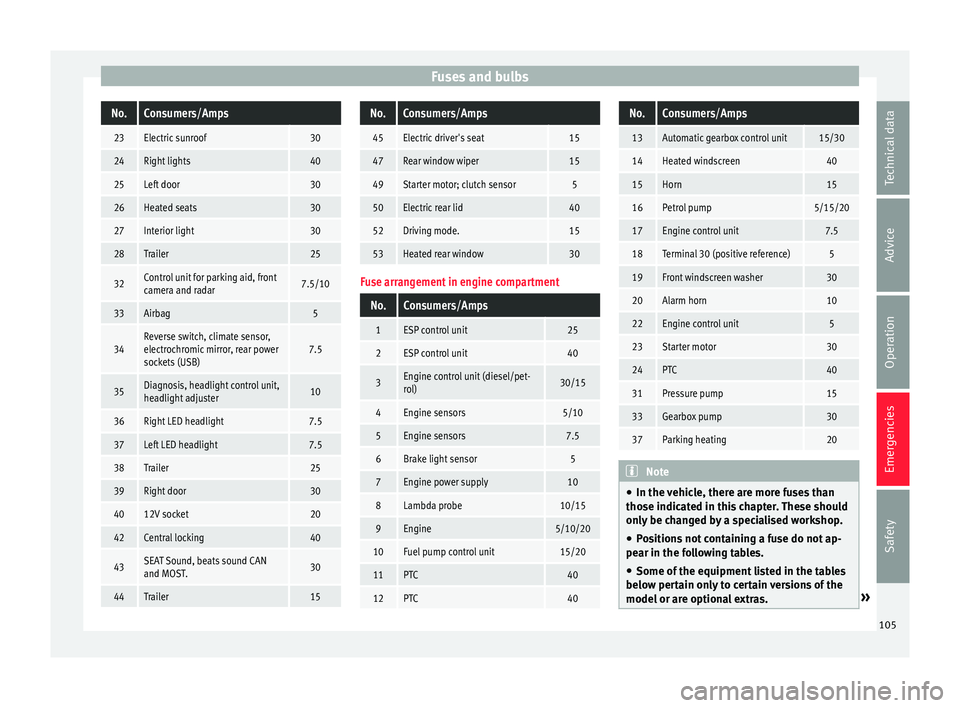
Fuses and bulbsNo.Consumers/Amps
23Electric sunroof30
24Right lights40
25Left door30
26Heated seats30
27Interior light30
28Trailer25
32Control unit for parking aid, front
camera and radar7.5/10
33Airbag5
34Reverse switch, climate sensor,
electrochromic mirror, rear power
sockets (USB)7.5
35Diagnosis, headlight control unit,
headlight adjuster10
36Right LED headlight7.5
37Left LED headlight7.5
38Trailer25
39Right door30
4012V socket20
42Central locking40
43SEAT Sound, beats sound CAN
and MOST.30
44Trailer15
No.Consumers/Amps
45Electric driver's seat15
47Rear window wiper15
49Starter motor; clutch sensor5
50Electric rear lid40
52Driving mode.15
53Heated rear window30
Fuse arrangement in engine compartment
No.Consumers/Amps
1ESP control unit25
2ESP control unit40
3Engine control unit (diesel/pet-
rol)30/15
4Engine sensors5/10
5Engine sensors7.5
6Brake light sensor5
7Engine power supply10
8Lambda probe10/15
9Engine5/10/20
10Fuel pump control unit15/20
11PTC40
12PTC40
No.Consumers/Amps
13Automatic gearbox control unit15/30
14Heated windscreen40
15Horn15
16Petrol pump5/15/20
17Engine control unit7.5
18Terminal 30 (positive reference)5
19Front windscreen washer30
20Alarm horn10
22Engine control unit5
23Starter motor30
24PTC40
31Pressure pump15
33Gearbox pump30
37Parking heating20
Note
● In the v ehic
le, there are more fuses than
those indicated in this chapter. These should
only be changed by a specialised workshop.
● Positions not containing a fuse do not ap-
pear in the fo
llowing tables.
● Some of the equipment listed in the tables
below pert
ain only to certain versions of the
model or are optional extras. » 105
Technical data
Advice
Operation
Emergencies
Safety
Page 108 of 348

Emergencies
●
Ple a
se note that the above lists, while cor-
rect at the time of printing, are subject to
change. Changing a bulb
Topic intr
oductionRead the additional information carefully
›› ›
page 62.
Changing bulbs requires a certain degree of
practical skill.
If you choose to change the engine compart-
ment lamps yourself, remember that it is a
dangerous area ››› in Working in the en-
gine c omp
ar
tment on page 299.
Always use identical bulbs with the same
designation. The name can be found on the
base of the bulb holder.
Depending on how equipped the vehicle is,
there are different sets of headlights and tail
lights:
● Halogen headlights.
● Full-LED main headlights*
● Rear bulb light
● LED rear light* Full-LED headlight system*
Ful
l-LED headlights handle all light functions
(daylight, side light, turn signal, dipped
beam and route light) with light emitting di-
odes (LEDs) as a light source.
Full-LED headlights are designed to last the
lifetime of the car and light bulbs cannot be
replaced. In case of headlight failure, go to
an authorised workshop to have it replaced. WARNING
● Tak e p
articular care when working on com-
ponents in the engine compartment if the en-
gine is warm. Risk of burns.
● Bulbs are highly sensitive to pressure. The
glas
s can break when you touch the bulb,
causing injury.
● When changing bulbs, please take care not
to injure
yourself on sharp edges, in particu-
lar on the headlight housing. CAUTION
● Remo v
e the ignition key before working on
the electric system. Otherwise, a short circuit
could occur.
● Switch off the lights and the parking light
before c
hanging a bulb.
● Take good care to avoid damaging any com-
ponents. For the sake of the environment
Please ask your specialist retailer how to dis-
pose of u
sed bulbs in the proper manner. Note
● Ple a
se check at regular intervals that all
lighting (especially the exterior lighting) on
your vehicle is functioning properly. This is
not only in the interest of your own safety,
but also that of all other road users.
● Before changing a bulb, make sure you
have the c
orrect new bulb.
● Do not touch the glass part of the bulb with
your bar
e hands, use a cloth or paper towel
instead, since the fingerprints left on the
glass will vaporise as a result of the heat gen-
erated by the bulb, they will be deposited on
the reflector and will impair its surface.
● Depending on the level of equipment fitted
in the vehic
le, LEDs may be used for part or
all of the interior and/or exterior lighting.
LEDs have an estimated life that exceeds than
that of the car. If an LED light fails, go to an
authorised workshop for its replacement. 106
Page 128 of 348
Operation
Note
● Never l e
ave any valuable items in the vehi-
cle unattended. Even a locked vehicle is not a
safe.
● If the diode on the driver door sill lights up
for about 30 sec
onds when the vehicle is
locked, the central locking system or anti-
theft alarm* is not working properly. You
should have the fault repaired at a SEAT Offi-
cial Service or specialised workshop.
● The vehicle interior monitoring of the anti-
theft a
larm* system will only function as in-
tended if the windows and the sunroof* are
closed. Car key
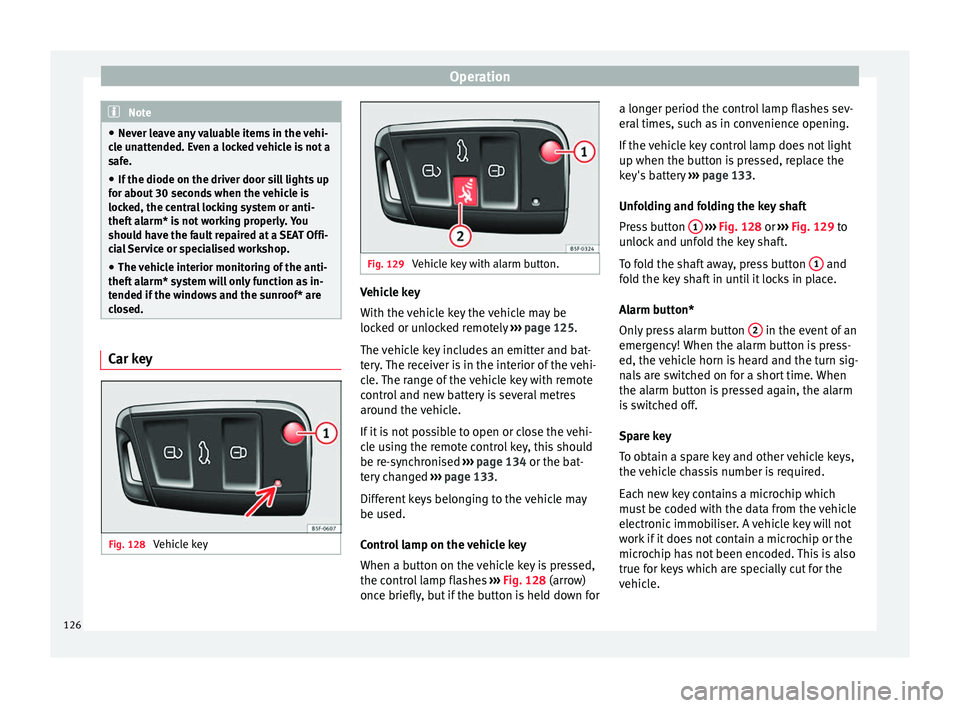
Fig. 128
Vehicle key Fig. 129
Vehicle key with alarm button. Vehicle key
W
ith the
v
ehicle key the vehicle may be
locked or unlocked remotely ››› page 125.
The vehicle key includes an emitter and bat-
tery. The receiver is in the interior of the vehi-
cle. The range of the vehicle key with remote
control and new battery is several metres
around the vehicle.
If it is not possible to open or close the vehi-
cle using the remote control key, this should
be re-synchronised ››› page 134 or the bat-
tery changed ››› page 133.
Different keys belonging to the vehicle may
be used.
Control lamp on the vehicle key
When a button on the vehicle key is pressed,
the control lamp flashes ››› Fig. 128 (arrow)
once briefly, but if the button is held down for a longer period the control lamp flashes sev-
eral time
s, such as in convenience opening.
If the vehicle key control lamp does not light
up when the button is pressed, replace the
key's battery ››› page 133.
Unfolding and folding the key shaft
Press button 1
› ››
Fig. 128
or ›
›› Fig. 129 to
unlock and unfold the key shaft.
To fold the shaft away, press button 1 and
f o
l
d the key shaft in until it locks in place.
Alarm button*
Only press alarm button 2 in the event of an
emer g
ency!
When the alarm button is press-
ed, the vehicle horn is heard and the turn sig-
nals are switched on for a short time. When
the alarm button is pressed again, the alarm
is switched off.
Spare key
To obtain a spare key and other vehicle keys,
the vehicle chassis number is required.
Each new key contains a microchip which
must be coded with the data from the vehicle
electronic immobiliser. A vehicle key will not
work if it does not contain a microchip or the
microchip has not been encoded. This is also
true for keys which are specially cut for the
vehicle.
126
Page 141 of 348
Opening and closing
●
Never l e
ave the vehicle unattended or allow
children to play inside or next to it, especially
if the rear lid is open. Children could enter
the luggage compartment, close the rear lid
and become trapped. A locked vehicle can
reach extremely high and low temperatures,
depending on the time of year, thus causing
serious injuries, illness or even death. CAUTION
Before opening or closing the rear lid, make
s ur e th
at there is enough space to open or
close it, e.g. when pulling a trailer or in a ga-
rage. Rear lid automatic locking
Where the vehicle has been locked by press-
in
g the b
utt
on on the remote control with
the rear lid open, the rear lid will lock auto-
matically when closed.
The automatic rear lid locking time extension
function can be activated. Where this func-
tion is activated and once the rear lid has
been unlocked by pressing the button on
the remote control key ››› page 127, the rear
lid can be re-opened for a certain length of
time.
Where required, the automatic tailgate lock-
ing time extension function can be activated
or deactivated at an Authorised SEAT Service, which will provide all the necessary informa-
tion.
Befor
e the vehicle locks automatically, there
is a risk of intruders getting into the vehicle.
Therefore, we recommend you always lock
the vehicle by pressing the button on the
remote control or by using the central locking
button. WARNING
Observe the safety warnings ›››
in Intro-
duction on pag e 97
.
● Always close the rear lid properly. Risk of
accident
or injury.
● The rear lid must not be opened when the
rever
se or rear fog lights are lit. This may
damage the tail lights.
● Do not close the rear lid by pushing it down
with y
our hand on the rear window. The glass
could smash. Risk of injury!
● Ensure the rear lid is locked after closing it.
If not, it m
ay open unexpectedly while driv-
ing.
● Closing the rear lid without observing and
ensurin
g it is clear could cause serious injury
to you and to third parties. Make sure that no
one is in the path of the rear lid.
● Never drive with the rear lid open or half-
closed, e
xhaust gases may penetrate into the
interior of the vehicle. Danger of poisoning!
● If you only open the rear lid, do not leave
the key in
side. The vehicle cannot be opened
if the key is left inside. Controls for the windows
El ectric
openin
g and closing of win-
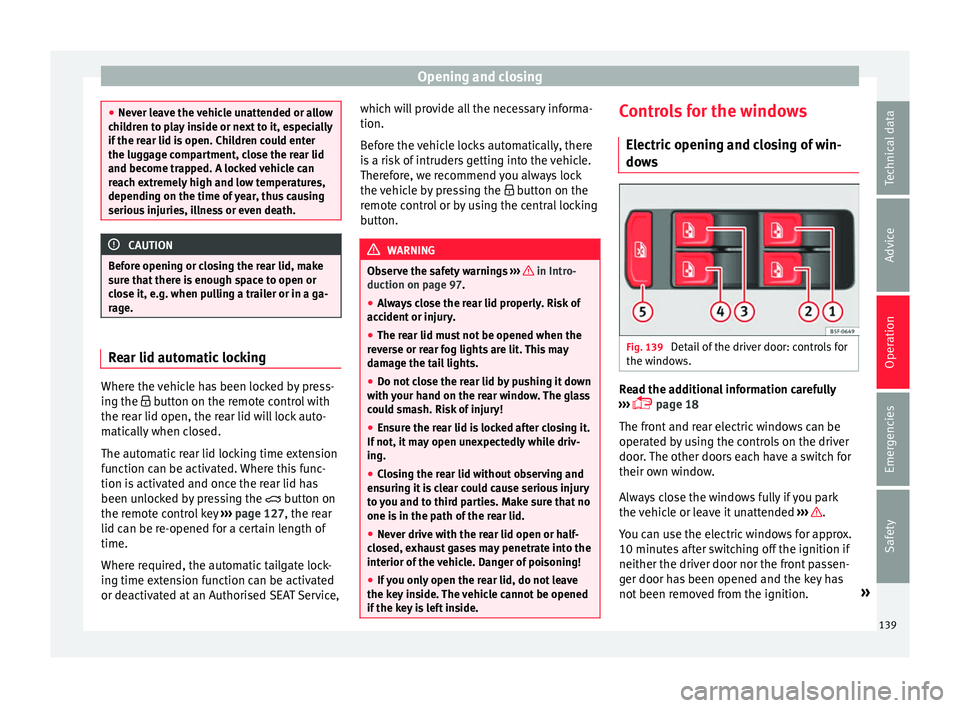
dows Fig. 139
Detail of the driver door: controls for
the w indo
w
s. Read the additional information carefully
› ›
›
page 18
The front and rear electric windows can be
operated by using the controls on the driver
door. The other doors each have a switch for
their own window.
Always close the windows fully if you park
the vehicle or leave it unattended ››› .
Y ou c
an u
se the electric windows for approx.
10 minutes after switching off the ignition if
neither the driver door nor the front passen-
ger door has been opened and the key has
not been removed from the ignition. »
139
Technical data
Advice
Operation
Emergencies
Safety
Page 154 of 348
Operation
through a tunnel without the
f
u nction
active, the instrument panel lighting may
even switch off. The objective of this function
is to provide the driver with a visual indica-
tion that he or she should activate the dip-
ped beam.
Interior and reading lights 1)Read the additional information carefully
›› ›
page 31
Glove compartment and luggage compart-
ment lighting*
When opening and closing the glove com-
partment on the front passenger side and the
rear lid, the respective light will automatically
switch on and off.
Footwell lighting*
The lights in the footwell area below the dash
(driver and front passenger sides) will switch
on when the doors are opened and will de-
crease in intensity while driving. The intensity
of these lights can be adjusted using the ra-
dio menu (see Easy Connect > Light Settings > Interior lighting
›› ›
page 33).
Ambient light*
The ambient light lights up the area of the
centre console, the footwell area and, de-
pending on the version, the front door pan-
els.
The ambient lighting in the door panels may
change colour. The brightness and colour of
these lights can be adjusted using the radio
menu (see Easy Connect > Light Set-
tings > Interior lighting
››› page 33). Note
The reading lights switch off when the vehi-
cl e i
s locked using a key or after several mi-
nutes if the key is removed from the ignition.
This prevents the battery from discharging. Visibility
S u
n
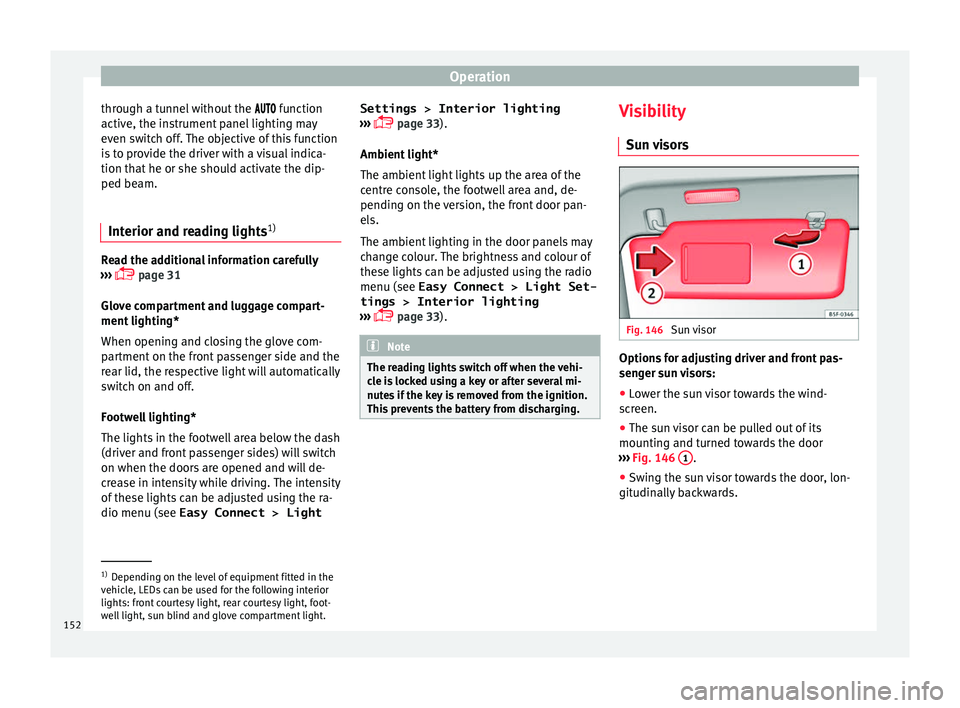
visors Fig. 146
Sun visor Options for adjusting driver and front pas-
sen
g
er s
un visors:
● Lower the sun visor towards the wind-
scr
een.
● The sun visor can be pulled out of its
mounting and t
urned towards the door
››› Fig. 146 1 .
● Swing the sun visor towards the door, lon-
git udin
al
ly backwards. 1)
Depending on the level of equipment fitted in the
vehic l
e, LEDs can be used for the following interior
lights: front courtesy light, rear courtesy light, foot-
well light, sun blind and glove compartment light.
152
Page 157 of 348
Lights and visibility
reduce the effectiveness of the rain sensor or
m ak
e it
react more slowly, later or not at all.
● Cracked windscreen: the impact of a stone
wil
l trigger a single wipe cycle with the rain
sensor on. Next the rain sensor detects the
reduction in the sensitive surface area and
adapts accordingly. The behaviour of the sen-
sor will vary with the size of the damage
caused by the stone. WARNING
The rain sensor may not detect enough rain
to sw it
ch on the wipers.
● If necessary, switch on the wipers manually
when water on the w
indscreen obstructs visi-
bility. Note
● Cle
an the sensitive surface of the rain sen-
sor regularly and check the blades for dam-
age ››› Fig. 148 (arrow).
● To remove wax and coatings, we recom-
mend a window c
leaner containing alcohol.Mirror
Anti-d azz
l
e rear view mirrorIt is dangerous to drive if you cannot see
c
l
e
arly through the rear window. Rear view mirror with automatic anti-dazzle
function*
The anti-d
azzle function is activated every
time the ignition is switched on.
When the anti-dazzle function is enabled, the
interior rear vision mirror will darken auto-
matically according to the amount of light it
receives. The anti-dazzle function is cancel-
led if reverse gear is engaged. WARNING
In the event that an automatic anti-dazzle
re ar
vision mirror breaks, an electrolyte fluid
may leak. This could cause irritation to the
skin, eyes and respiratory organs. If you
come into contact with this liquid, it must be
rinsed with large quantities of water. If neces-
sary, get medial help. CAUTION
In the event that an automatic anti-dazzle
re ar
vision mirror breaks, an electrolyte fluid
may leak. This liquid attacks plastic surfaces.
Clean it with a wet sponge as soon as possi-
ble. Note
● If the light inc
ident in the interior rear vi-
sion mirror is obstructed (e.g. with the sun
blind*), the anti-dazzle rear vision mirror with
automatic setting will not operate perfectly. ●
When the interior light s
are on or reverse
gear engaged, the mirrors do not darken with
automatic adjustment for anti-dazzle posi-
tion. Adjusting the exterior rear-view mir-
ror
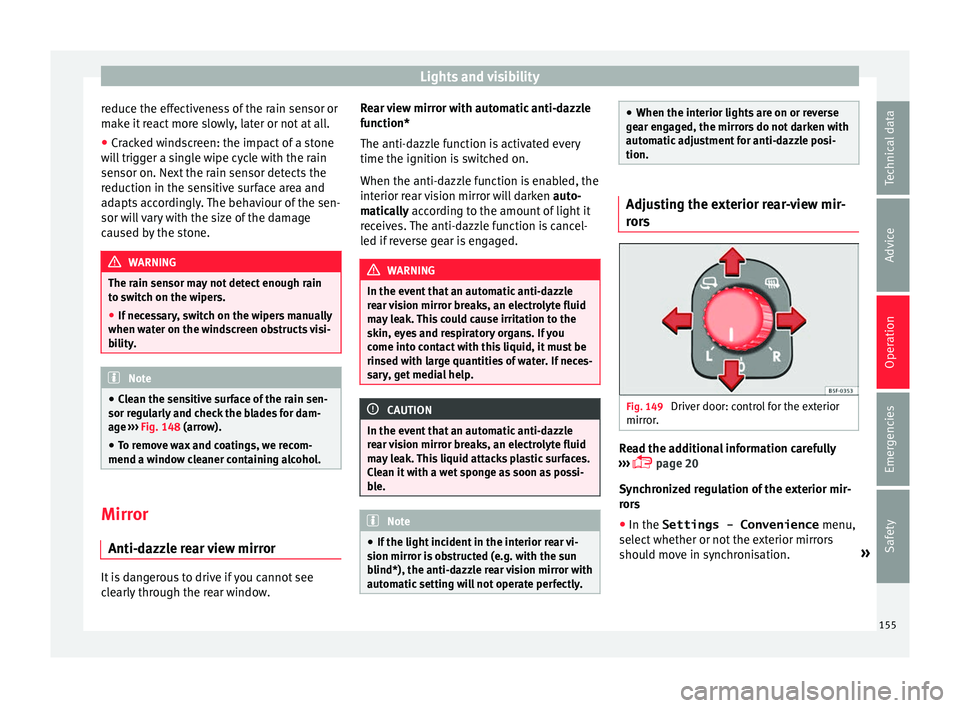
s Fig. 149
Driver door: control for the exterior
mirr or
. Read the additional information carefully
› ›
›
page 20
Synchronized regulation of the exterior mir-
rors
● In the Settings - Convenience menu,
select whether or not
the exterior mirrors
should move in synchronisation. »
155
Technical data
Advice
Operation
Emergencies
Safety
Page 176 of 348
Operation
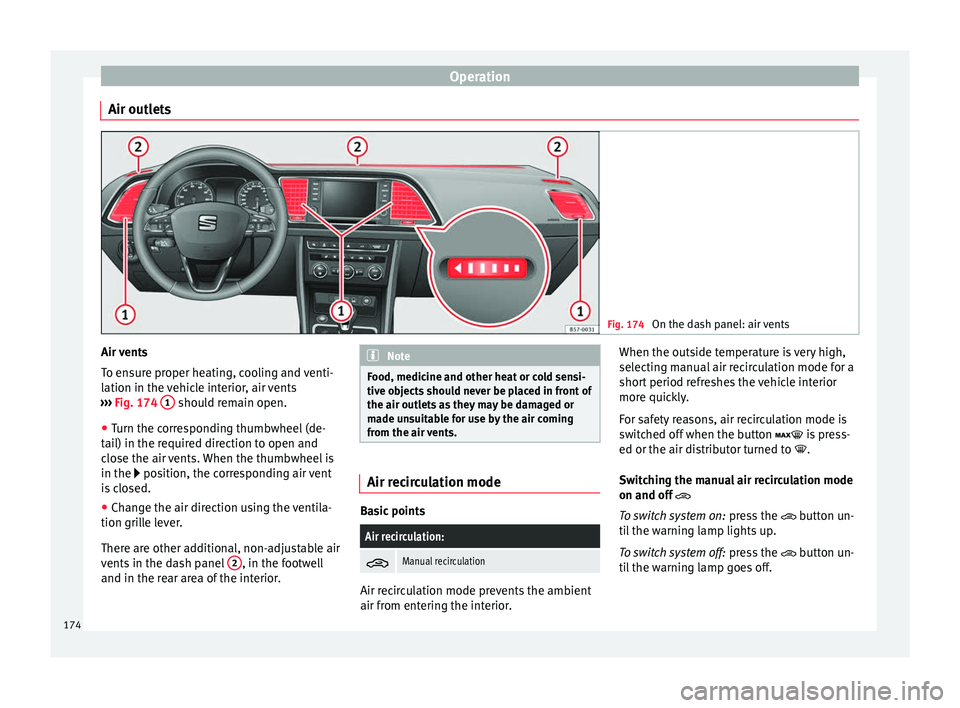
Air outlets Fig. 174
On the dash panel: air vents Air vents
T
o en
s
ure proper heating, cooling and venti-
lation in the vehicle interior, air vents
››› Fig. 174 1 should remain open.
● Turn the corresponding thumbwheel (de-
t ai
l) in the r
equired direction to open and
close the air vents. When the thumbwheel is
in the position, the corresponding air vent
is closed.
● Change the air direction using the ventila-
tion grill
e lever.
There are other additional, non-adjustable air
vents in the dash panel 2 , in the footwell
and in the r ear ar
ea of the interior. Note
Food, medicine and other heat or cold sensi-
tive o b
jects should never be placed in front of
the air outlets as they may be damaged or
made unsuitable for use by the air coming
from the air vents. Air recirculation mode
Basic points
Air recirculation:
Manual recirculation
Air recirculation mode prevents the ambient
air fr
om ent
erin
g the interior. When the outside temperature is very high,
selecting m
anual air recirculation mode for a
short period refreshes the vehicle interior
more quickly.
For safety reasons, air recirculation mode is
switched off when the button is press-
ed or the air distributor turned to .
Switching the manual air recirculation mode
on and off
To switch system on: press the button un-
til the warning lamp lights up.
To switch system off: press the button un-
til the warning lamp goes off.
174
Page 182 of 348
Operation
WARNING
Never programme the auxiliary heater so that
it sw it
ches itself on and is running in an en-
closed space or an area with no ventilation.
The auxiliary heater exhaust fumes contain
carbon monoxide, an odourless and colour-
less toxic gas. Carbon monoxide can cause
people to lose consciousness. It can also
cause death. Operating instructions
The auxiliary heater exhaust system located
belo
w the
v
ehicle must be kept clear of snow,
mud and other objects. The exhaust fumes
must be able to exit freely. The emissions
generated by the auxiliary heater are re-
moved via an exhaust pipe fitted underneath
the vehicle.
On heating the vehicle interior, depending on
the outside temperature, the warm air is first
directed at the windscreen and then to the
rest of the vehicle interior through the air
vents. Directing the diffusers – towards the
windows for example – can affect air distribu-
tion.
When will the auxiliary heater not be activa-
ted?
● The auxiliary heater requires about as
much po w
er as the dipped beam headlights.
If the 12-volt battery charge is too low, the auxiliary heater switches off automatically
and cannot
be sw
itched on. This avoids prob-
lems when starting the engine.
● The heating must be activated every time
you want
to set off. Similarly, the departure
time must reactivate each time.
● The control lamp (fuel l
evel indicator)
lights up. Note
● Noise s
will be heard while the auxiliary
heater is running.
● When the air humidity is high and the in-
side temper
ature low, condensation from the
heating and ventilating system may evapo-
rate when the auxiliary heater is switched on.
In this case, steam may be released from un-
derneath the vehicle. This does not mean
that there is a vehicle malfunction.
● If the vehicle is tilted, e.g. if parked on a
slope, the operation of
the auxiliary heater
may be restricted if the fuel tank level is low
(just above the reserve level).
● If the auxiliary heater is used a number of
times f
or a long period of time, the 12-volt
battery will lose its charge. To recharge the
battery, the vehicle must be driven for a num-
ber of kilometres from time to time. As a
guideline: The journey should last approxi-
mately as long as the heater was connected.
● At temperatures below +5°C (+41°F), the
auxili
ary heater may switch itself on automat-
ically when the engine is switched on. The auxiliary heater is switched off again after a
cer
t
ain time.180
Page 280 of 348

Operation
Hooking up and connecting a trailer Fig. 236
Schematic diagram: assignment of
the pins of the trailer's power socket.
Key to the Fig. 236:
PinMeaning
1Left turn signal
2Rear fog light
3Earth for pins 1, 2, 4, 5, 6, 7 and 8
4Right turn signal
5Rear light, right
6Brake lights
7Rear light, left
8Reverse lights
9Permanent live
10Live charge cable
11Earth for pin 10
Key to the Fig. 236:
PinMeaning
12Unassigned
13Earth for pin 9 Trailer power socket
The v
ehic
le is fitted with a 13-pole power
socket for the electrical connection between
the trailer and the vehicle. With the engine
running, electrical devices on the trailer re-
ceive power from the electrical connection
(pin 9 and pin 10 of the trailer power socket).
If the system detects that a trailer has been
connected electrically, the electrical equip-
ment on the trailer will receive voltage
through this connection (pins 9 and 10). Pin
9 has a permanent live. This powers, for ex-
ample, the trailer's interior lighting. Electrical
devices such as a fridge in a caravan only re-
ceive electrical power if the engine is running
(through pin 10).
To avoid overloading the electrical system,
you cannot connect the ground wires of pin
3, pin 11 or pin 13.
If the trailer has a 7-contact connector , you
will need to use an adapter cable. In this case
the function corresponding to pin 10 will not
be available. Tow rope
The to
w r
ope must always be securely fixed
to the towing vehicle and loose enough so
that the vehicle can handle turns smoothly.
However, make sure that the cable does not
rub on the ground while driving.
Trailer rear lights
Always check the trailer's rear lights to en-
sure they are working correctly and that they
comply with the relevant safety regulations.
Make sure that the maximum permissible
power that can be absorbed by the trailer is
not exceeded ››› page 276.
Connection to the anti-theft system
The trailer is included in the anti-theft system
if the following conditions are met: ● If the vehicle is factory-equipped with an
anti-theft al
arm and towing bracket.
● If the trailer is electrically connected to the
tow
ing vehicle through the trailer power
socket.
● If the electrical systems of the vehicle and
trail
er are in perfect condition and have no
faults or damage.
● If the vehicle is locked with the key and the
anti-theft al
arm is activated.
When the vehicle is locked, the alarm is trig-
gered if the electrical connection with the
trailer is cut off.
278
Page 307 of 348
Checking and refilling levels
CAUTION
● Do not mi x
cleaning products recommen-
ded by SEAT with other products. This could
lead to flocculation and may block the wind-
screen washer jets.
● When topping up service fluids, make abso-
lutely c
ertain that you fill the fluids into the
correct reservoirs. Using the wrong fluids
could cause serious malfunctions and engine
damage!
● Not having windscreen wiper fluid reduces
vis
ibility through the windscreen, and leads
to loss of visibility in headlights in models
with headlight washer. Battery
Gener a
l
informationRead the additional information carefully
› ›
›
page 59.
The battery is located in the engine compart-
ment and is almost maintenance-free. It is
checked as part of the Inspection Service.
Nevertheless, check the terminals are clean
and have the correct tightening torque, espe-
cially in summer and winter.
Disconnecting the battery
The battery should only be disconnected in
exceptional cases. When the battery is dis- connected, some of the vehicle's functions
are “los
t” (››› table on page 305). These
functions will require resetting after the bat-
tery is reconnected.
Deactivate the anti-theft alarm* before you
disconnect the battery Otherwise the alarm
will be triggered.
FunctionReprogramming
One-touch function of
the electric windows››› page 141, One-touch
opening and closing.
Remote control key
If the vehicle does not re-
spond to the key, they
should be synchronised
››› page 134.
Digital clock››› page 116.
ESC warning lampAfter driving for a few me-
tres, the warning lamp goes
out again. If the vehicle is not used for long periods
The
v
ehic
le has a system for monitoring the
current consumption when the engine is left
unused for long periods of time ››› page 203.
Some functions, such as the interior lights, or
the remote door opening, may be temporarily
disabled to prevent the battery from running
flat. These functions will come back on as
soon as the ignition is switched on and the
engine started. Winter conditions
During the w
inter, the starting power may be
reduced, and if necessary, the battery should
be charged ››› in Important safety warn-
in g
s
for handling a vehicle battery on
page 306
Important safety warnings for han-
dling a v
ehicle battery All work on batteries requires specialist
kno
wl
edg
e. Please refer to a SEAT Official
Service or a workshop specialising in batter-
ies: risk of burns or exploding battery!
The battery must not be opened. Never try to
change the fluid level of the battery. Other-
wise explosive gas is released from the bat-
tery that could cause an explosion.
Wear eye protection.
Battery acid is very corrosive and caustic. Wear
protective gloves and eye protection. In the event
of electrolyte splashes, rinse off with plenty of
water.
Fires, sparks, open flames and smoking are pro-
hibited.
The battery should only be charged in a well-ven-
tilated zone. Risk of explosion!
Keep children away from acid and batteries!»
305
Technical data
Advice
Operation
Emergencies
Safety