sport mode Seat Ateca 2018 User Guide
[x] Cancel search | Manufacturer: SEAT, Model Year: 2018, Model line: Ateca, Model: Seat Ateca 2018Pages: 348, PDF Size: 7.32 MB
Page 222 of 348
Operation
● OR: sw it
c
h the system on and off in Easy
Connect using the button and the
S ET
TINGS and
Driv
er a
s
sistance function but-
t on
s
›››
page 33.
When Front Assist is switched off, the instru-
ment panel will inform that it has been
switched off with the following indicator
››› Fig. 192.
Activating or deactivating the pre-warning
(advance warning)
The pre-warning function (advance warning)
can be switched on or off in the Easy Connect
system with the button and the
S
ET
TINGS and
Driv
er a
s
sistance function buttons
› ›
›
page 33.
The system will store the setting for the next
time the ignition is switched on.
SEAT recommends keeping the pre-warning
function switched on at all times.
Depending on the infotainment system in-
stalled in the vehicle, the advance warning
function may be adjusted as follows:
● Advance
● Medium
● Delayed
● Deactivated
SEAT r
ecommends driving with the function
in “Medium” mode. Switching distance warning on and off
If the saf
e distance with regard to the vehicle
in front is exceeded, the relevant warning will
appear on the instrument panel display
. In this case, increase the safe dis-
tance.
The distance warning can be switched on and
off in the Easy Connect system using the button and the
S
ET
TINGS and
Driv er a
s
sistance function buttons
› ›
›
page 33.
The system will store the setting for the next
time the ignition is switched on.
SEAT recommends keeping the distance
warning switched on at all times.
Switching the Front Assist off tempo-
rarily
in the following situations In the following situations the Front Assist
shou
l
d be de
activated due to the system's
limitations:
● When the vehicle is to be towed.
● If the vehicle is on a test bed.
● When the radar sensor is damaged.
● If the radar sensor takes a heavy knock, for
examp
le in a rear collision.
● If it intervenes several times unnecessarily. ●
If the ra
dar sensor is covered temporarily
with some kind of accessory, such as an ad-
ditional headlight or the like.
● When the vehicle is to be loaded on a lorry,
ferry
or train.
System limitations The Front Assist has certain physical limita-
tions
inher
ent to the system. Thus, in certain
circumstances, some of the system's reac-
tions may be inopportune from the driver's
standpoint. So pay attention in order to inter-
vene if necessary.
The following conditions may cause the Front
Assist not to react or to do so too late:
● In the first few instants of driving after
swit c
hing on the ignition, due to the system’s
initial auto-calibration.
● On taking tight bends or complex paths.
● Pressing the accelerator all the way down.
● If the Front Assist is switched off or dam-
aged.
● If the ASR h
as been disconnected or the
ESC activ
ated in Sport mode manually
››› page 191.
● If the ESC is controlling.
● If several brake lights of the vehicle or elec-
trical ly
connected trailer are damaged.
220
Page 227 of 348
Driver assistance systems
Any modification to the programmed speed
w i
l
l be shown on the bottom left part of the
instrument panel display ››› Fig. 195.
Setting your distance level
To increase/reduce the distance level, press
the rocker switch towards the left/right
››› Fig. 198 A .
The in s
trument
panel display shows the mod-
ification of the distance level. There are 5 dis-
tance levels to choose from. SEAT recom-
mends level 3. The set distance can be
changed when the vehicle is stopped or dur-
ing driving, as you like ››› .
C onnectin
g and activ
ating the ACC
To connect and activate the ACC, the position
of the gearbox selector lever, the vehicle
speed and the position of the third level of
the ACC must all be taken into account.
● With a manual gearbox, the gearbox selec-
tor lev
er must be in any gear except first, and
speed must be greater than approximately 30
km/h. With an automatic gearbox, the gear-
box selector lever must be in position D or S.
● To activate the ACC, with the third lever in
position 1 press the
butt
on or mo
ve the
third lever of the ACC to position 2›››
Fig. 197. At thi s
point, the image of the
ACC on the instrument panel display will
switch to Active mode ››› Fig. 195. When the ACC function is active, the vehicle
trav
el
s at a set speed and distance from the
vehicle ahead. Both speed and distance can
be changed at any time.
Disconnecting and deactivating the ACC
To disconnect the ACC move the lever to the 0 position
›››
Fig. 197
(en
gaged). An ACC
deactivated message appears and the
function is totally deactivated.
If you do not wish to disconnect the ACC, just
to switch it temporarily to inactive mode
(Standby), move the third lever to position 3 ›››
Fig. 197 or pre s
s the brake pedal.
It will also switch to inactive mode (Standby)
if the vehicle is stopped and the driver door
is opened.
Adjusting the default distance level at the
start of your journey.
In wet road conditions, you should always set
a larger distance with regard to the vehicle in
front than when driving in dry conditions.
The following distances can be preselected:
● Very short
● Short
● Media
● Long
● Very long In the Easy Connect system you can adjust
the dis
t
ance level that will be applied when
the ACC is connected using the button
and the S
ET
TINGS and
Driv
er a
s
sistance function
b utt
on
s ›››
page 33.
Changing the driving profile
In vehicles with SEAT Drive Profile , the driving
profile selected can have an influence on the
ACC’s acceleration and braking behaviour
››› page 242.
In vehicles without SEAT Drive Profile , the be-
haviour of the ACC can also be affected by se-
lecting any of the following drive profiles in
the Easy Connect system:
● Normal
● Sport
● Eco
● Convenience
In this c
ase, you should access the ACC set-
tings using the button and the
S
ET
TINGS >
Driv er a
s
sistance >
A
C
C function buttons
› ›
›
page 33.
The following conditions may lead the ACC
not to react:
● If the accelerator is pressed.
● If there is no gear engaged.
● If the ESC is controlling. »
225
Technical data
Advice
Operation
Emergencies
Safety
Page 229 of 348
Driver assistance systems
braking will have priority over intervention by
the speed c
ontr
ol or adaptive cruise control.
● Always be ready to use the brakes!
● Observe country-specific provisions gov-
erning ob
ligatory minimum distances be-
tween vehicles. Note
● The pr ogrammed s
peed is erased once the
ignition or the ACC are switched off.
● When the traction control system (ASR) is
deactivat
ed during acceleration or else the
ESC is activated in Sport* Mode
( ››› page 120), the ACC switches off automati-
cally.
● In vehicles with the Start-Stop system, the
engine swit
ches off automatically during the
ACC stopping phase and restarts automatical-
ly to begin driving. Function for preventing overtaking in
an in
s
ide l
ane Fig. 199
On the instrument panel display:
A C
C
active, vehicle detected in an outer lane. The adaptive cruise control (ACC) has a func-
tion th
at
help
s avoid overtaking while driving
in inside lanes at certain speeds.
If another vehicle is detected travelling at a
slower speed in an outer lane, it is displayed
on the multifunction display ››› Fig. 199.
To avoid overtaking while driving in an inside
lane the system will gently brake, and in ac-
cordance with the speed will prevent the car
from overtaking. The driver can override this
function at any time by pressing the accelera-
tor pedal. At low speeds the function is inac-
tive, for greater comfort in a traffic jam or in
city traffic. Deactivating the Adaptive Cruise Con-
trol
ACC temporarily in certain situa-
tions In the following situations the Adaptive
Crui
se C
ontrol (ACC) should be deactivated
due to the system's limitations ››› :
● When changing lanes, on tight bends and
rou nd
abouts, in acceleration and decelera-
tion lanes on motorways or in sections with
road works to prevent involuntary accelera-
tion to reach the programmed speed.
● When going through a tunnel, as operation
cou l
d be affected.
● On roads with several lanes, when other ve-
hicle
s are driving more slowly in the overtak-
ing lane. In this case, slower vehicles will be
overtaken on the right.
● In case of heavy rain, snow or spray, as the
vehicl
e in front might not be detected proper-
ly or, in certain circumstances, might not be
detected at all. WARNING
If the ACC does not switch off in the situa-
tions de
scribed, serious accidents and inju-
ries may occur.
● Always switch off the ACC in critical situa-
tions. » 227
Technical data
Advice
Operation
Emergencies
Safety
Page 234 of 348
Operation
Self-deactivation: the Lane As s
i st system can
be automatically deactivated if there is a sys-
tem malfunction. The control lamp
disappears.
Hands-Off Function
In the absence of steering wheel activity the
system alerts the driver with acoustic signals
and a text message on the dash panel asking
to actively take over the steering.
If the driver does not react to this, the system
also alerts the driver with a little shaking mo-
tion through the brakes and, if the vehicle
has it, activates the Emergency Assist func-
tion ››› page 234.
In vehicles without Emergency Assist, the
adaptive lane guidance function will be disa-
bled after the corresponding warnings to the
driver.
The lane assist system is active but it is not
available (the control lamp is lit up yellow)
● When driving at speeds below 65 km/h (38
mph).
● When the Lane Assist system does not de-
tect the div
iding lines of the road. For exam-
ple, in the event warnings indicating road
works, and snow, dirt, moisture or reflec-
tions.
● When the radius of a curve is too small.
● When no road markings can be seen. ●
When the dist
ance to the next marking to
too great.
● When the system does not detect any clear
and active st
eering movement during a long
period of time.
● Temporarily, in the event of very dynamic
driving s
tyles.
● If a turn signal is activated.
● With the stability control system (ESC) in
Sport
mode or switched off.
BSD Plus (Lane Assist with Blind Spot Detec-
tor)*
The BSD Plus function is achieved by activat-
ing the Lane Assist and BSD functions
››› page 237. In this case, the Lane Assist
function expands its functions in the follow-
ing way:
If the driver tries to change lane and there is
a vehicle in the blind spot:
● The lamp flashes in the corresponding
re
ar-view mirror even though the turn signal
has not been activated.
● The steering wheel vibrates to warn the
driver of the ri
sk of collision.
● torque is applied to correct the steering
and return the
vehicle to its lane. Switching off the Lane Assist system in the
fol
lowing situations
Due to the limits of the Lane Assist system,
switch it off in the following situations:
● When more attention is required of the
driver
● When drivin
g in a sporty style
● In unfavourable weather conditions
● On roads in poor condition
● In areas of road works WARNING
The intelligent technology in the Lane Assist
sys t
em cannot change the limits imposed by
the laws of physics and by the very nature of
the system. Careless or uncontrolled use of
the Lane Assist system may cause accidents
and injury. The system is not a replacement
for driver awareness.
● Always adapt your speed and the distance
to the v
ehicles ahead in line with visibility,
weather conditions, the condition of the road
and the traffic situation.
● Always keep your hands on the steering
wheel so it c
an be turned at any time.
● The Lane Assist system does not detect all
roa
d markings. The road surfaces, road struc-
tures or objects in poor condition can be in-
correctly detected as road markings under
certain circumstances by the Lane Assist sys-
tem. In such situations, switch the Lane As-
sist system off immediately. 232
Page 244 of 348
Operation
Using the blind spot detector (BSD)
w ith p
ark
ing assistant (RCTA)Activating and deactivating the blind spot
detect
or (BSD) w
ith parking assistant (RCTA)
The blind spot detector with parking assis-
tant can be switched on and off by accessing
the Assistance systems menu on the
dash panel display using the steering wheel
controls. If the vehicle is equipped with a
multifunction camera, it can also be ac-
cessed by means of the driver assistance sys-
tems key located on the main beam head-
light lever.
Open the Assistants menu.
● Blind spot
● Exit Assist
If
the verification box on the control panel is
checked , the functionality will be automat-
ically activated at ignition.
When the blind spot detector is ready to op-
erate, the indications in the external mirrors
will turn on briefly as confirmation.
When the vehicle is restarted, the last adjust-
ment in the system will remain active.
If the blind spot detector was automatically
deactivated, it will only be possible to restart
the system after turning the vehicle off and
restarting it. Automatic deactivation of the blind spot de-
tect
or (BSD)
The r
adar sensors of the blind spot detector
with rear cross traffic alert will be automati-
cally deactivated when, among other rea-
sons, one of the sensors is detected to be
permanently covered. This may be the case if,
for example, there is a layer of snow or ice in
front of one of the sensors.
The relevant text message will appear in the
dash panel display.
Trailer mode
The Blind spot detector and the rear cross
traffic alert will be automatically deactivated
and it will be impossible to activate them if
the tow hitch is electrically connected to a
trailer or other similar object.
As soon as the driver starts to drive with a
trailer connected electrically to the vehicle, a
message will appear on the instrument panel
display indicating that the blind spot detec-
tor and the rear cross traffic alert are deacti-
vated. Once the trailer has been unhitched
from the vehicle, if you want to use the blind
spot detector and the rear cross traffic alert,
you will have to reactivate them in the corre-
sponding menu.
If the towing hitch is not factory equipped,
then the blind spot detector and the rear
cross traffic alert will have to be deactivated
manually when driving with a trailer. SEAT Drive Profile*
Relat ed video Fig. 212
Autonomous
driving Introduction
The SEAT Drive Profile enables the driver to
c
hoo
se betw
een four profiles or modes, Eco,
Normal , Sport and Individual , that
modify the behaviour of various vehicle func-
tions, providing different driving experiences.
In addition, the 4Drive version features the Offroad and Snow profiles.
The Individual profile can be configured
according to personal preferences. The other
profiles have a fixed configuration.
Description Depending on the equipment fitted in the ve-
hic
l
e,
SEAT Drive Profile can operate on the
following functions:
242
Page 245 of 348
Driver assistance systems
Engine
D ependin
g on the pr
ofile selected, the en-
gine responds more spontaneously or more
in harmony with the movements of the accel-
erator. Additionally, when the Eco profile is
selected, the Start-Stop function is automati-
cally activated.
In vehicles with automatic transmission, the
gear change points are modified to position
them in lower or higher engine speed ranges.
Additionally, the Eco profile activates the in-
ertia function, enabling consumption to be
further reduced.
In manual gearbox vehicles, the Eco profile
causes the gear change recommendation in-
dications that appear on the dash panel to
vary, facilitating more efficient driving.
Address
The power steering varies its driving modes
and adapts to the profile selected, thus offer-
ing the best behaviour for each situation.
Air conditioning
In vehicles with Climatronic, this can operate
in Eco mode, especially restricting fuel con-
sumption. Adaptive cruise control (ACC)
The accel
eration gradient of the adaptive
cruise control varies according to the active
driving profile ››› page 221.
Electronic stability control (ESC)
In the Offroad and Snow driving profiles,
the electronic stability Control (ESC)
››› page 189 adjusts to adapt to the terrain.
In addition, hill descent control (HDC) is acti-
vated in the Offroad profile ››› page 210.
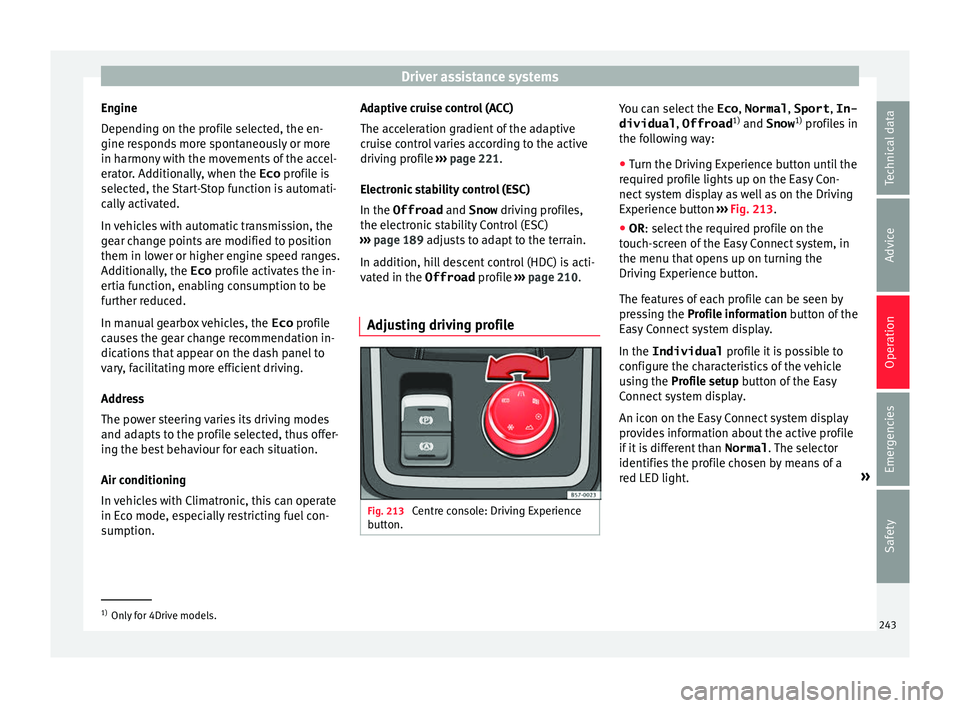
Adjusting driving profile Fig. 213
Centre console: Driving Experience
b utt
on. You can select the
Eco, Normal , Sport, In-
dividual , Offroad1)
and Snow 1)
pr ofi
l
es in
the following way:
● Turn the Driving Experience button until the
required pr
ofile lights up on the Easy Con-
nect system display as well as on the Driving
Experience button ››› Fig. 213.
● OR: select the required profile on the
touc
h-screen of the Easy Connect system, in
the menu that opens up on turning the
Driving Experience button.
The features of each profile can be seen by
pressing the Profile information button of the
Easy Connect system display.
In the Individual profile it is possible to
configure the characteristics of the vehicle
using the Profile setup button of the Easy
Connect system display.
An icon on the Easy Connect system display
provides information about the active profile
if it is different than Normal. The selector
identifies the profile chosen by means of a
red LED light. »1)
Only for 4Drive models.
243
Technical data
Advice
Operation
Emergencies
Safety
Page 246 of 348
OperationDriving
profileCharacteristics
Eco
Places the vehicle in a particularly low
state of consumption, facilitating a fuel-
saving driving style that is respectful to
the environment.
NormalOffers a balanced driving experience,
suitable for everyday use.
SportProvides a complete dynamic perform-
ance in the vehicle, enabling the user a
more sporty driving style.
Individ- ualIt allows you to personalise the configura-
tion. The functions that can be adjusted
depend on the equipment fitted in the ve-
hicle.
Offroad a)It adjusts the vehicle's parameters in or-
der to maintain optimal off-road driving.
Snowa)It adjusts the vehicle's behaviour for driv-
ing on slippery road surfaces, optimising
grip and manoeuvrability.
a)
Only for 4Drive models. WARNING
When operating SEAT Drive Profile, pay atten-
tion to a l
l traffic: doing otherwise could cause
an accident. Note
● When the v ehic
le is switched off it will al-
ways store the driving profile that was selec-
ted when the ignition key was removed. Nev- ertheless, when the engine is restarted, the
engine and the g
e
ar will not restart in the set-
ting selected. For engine and gear to revert to
the desired position, select the correspond-
ing drive profile again or press the Easy Con-
nect system button repeatedly.
● When the vehicle is restarted after using
the Offroad or Snow settings, the sy
stem is
always activated in the Normal profile.
● Your speed and driving style must always
be adjus
ted to visibility, weather, and traffic
conditions.
● The Eco profile is not recommended when
to
wing a vehicle. Kick-down
The Kick-down feature allows maximum ac-
c
el
er
ation to be reached.
If the Eco* profile has been selected in the
SEAT Drive Profile ››› page 243 and the
accelerator is pressed beyond a hard point,
the engine power is automatically controlled
to give your vehicle maximum acceleration. WARNING
Please note that if the road surface is slip-
pery or w
et, the kick-down feature could
cause the driving wheels to spin, which could
result in skidding. 244
Page 251 of 348
Driver assistance systems
● When c ornerin
g
● On r
oads in poor condition
● In unfavourable weather conditions
● When a sporty driving style is employed
● In the event of a serious distraction to the
driver
Fatigue det
ection will be restored when the
vehicle is stopped for more than 15 minutes,
when the ignition is switched off or when the
driver has unbuckled their seat belt and
opened the door.
In the event of slow driving during a long pe-
riod of time (below 65 km/h, 40 mph) the
system automatically re-establishes the tired-
ness calculation. When driving at a faster
speed the driving behaviour will be recalcula-
ted.
Park Assist*
Relat
ed video Fig. 216
Smart solutions Introduction
The Park Assist system is an additional func-
tion of P
arkPi
lot ››› page 257 and helps the
driver to:
● find a suitable parking space,
● select a parking mode,
● park driving in reverse in suitable perpen-
dicul
ar and parallel spaces,
● park driving forwards in suitable perpen-
dicul
ar spaces,
● exit a parking space driving forwards from
a par al
lel space.
In vehicles with a Park Assist system and fac-
tory radio the front, rear and side areas are
represented, and the position of obstacles is
shown relative to the vehicle.
The Park Assist system is subject to certain
limitations inherent to the system and its use
requires special attention by the driver ››› .
WARNING
The technology used in the park assist sys-
tem in v
olves a series of limitations inherent
in the actual system and in the use of ultra-
sonic sensors. The use of Park Assist should
never tempt you to take any risk that may
compromise safety. The system is not a re-
placement for driver awareness.
● Any accidental movement of the vehicle
coul
d result in serious injury. ●
Adapt
your speed and driving style at all
times to suit visibility, weather, road and traf-
fic conditions.
● Certain surfaces of objects and garments
do not refl
ect the ultrasound sensors' sig-
nals. The system cannot detect, at least cor-
rectly, these objects or people wearing such
clothes.
● Ultrasound sensor signals may be affected
by e
xternal sound sources. In certain circum-
stances this may prevent them from detect-
ing people or objects.
● The ultrasound sensors have blind spots in
which ob
stacles and people are not regis-
tered.
● Monitor the area around the vehicle at all
times, sinc
e the ultrasound sensors do not
detect small children, animals or certain ob-
jects in all situations. WARNING
Quick turns of the steering wheel when park-
ing or e x
iting a parking space with Park As-
sist can cause serious injury.
● Do not hold the steering wheel during ma-
noeuvre
s to park or exit a parking space until
the system requests it. Doing so disables the
system during the manoeuvre, resulting in
the parking being cancelled. » 249
Technical data
Advice
Operation
Emergencies
Safety
Page 320 of 348
Technical data
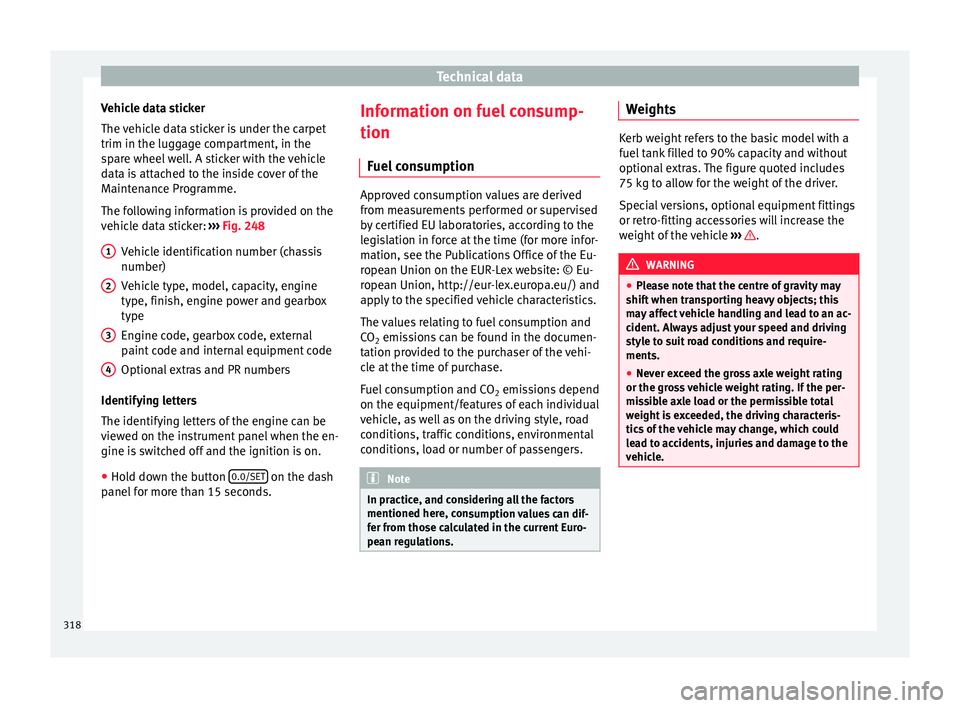
Vehicle data sticker
The v
ehic
le data sticker is under the carpet
trim in the luggage compartment, in the
spare wheel well. A sticker with the vehicle
data is attached to the inside cover of the
Maintenance Programme.
The following information is provided on the
vehicle data sticker: ››› Fig. 248
Vehicle identification number (chassis
number)
Vehicle type, model, capacity, engine
type, finish, engine power and gearbox
type
Engine code, gearbox code, external
paint code and internal equipment code
Optional extras and PR numbers
Identifying letters
The identifying letters of the engine can be
viewed on the instrument panel when the en-
gine is switched off and the ignition is on.
● Hold down the button 0.0/SET on the dash
p anel
f
or more than 15 seconds.
1 2
3
4 Information on fuel consump-
tion
Fuel
c
onsumption Approved consumption values are derived
from me
a
surements performed or supervised
by certified EU laboratories, according to the
legislation in force at the time (for more infor-
mation, see the Publications Office of the Eu-
ropean Union on the EUR-Lex website: © Eu-
ropean Union, http://eur-lex.europa.eu/) and
apply to the specified vehicle characteristics.
The values relating to fuel consumption and
CO 2 emissions can be found in the documen-
tation provided to the purchaser of the vehi-
cle at the time of purchase.
Fuel consumption and CO 2 emissions depend
on the equipment/features of each individual
vehicle, as well as on the driving style, road
conditions, traffic conditions, environmental
conditions, load or number of passengers. Note
In practice, and considering all the factors
mentioned here, c on
sumption values can dif-
fer from those calculated in the current Euro-
pean regulations. Weights
Kerb weight refers to the basic model with a
fuel
t
ank filled to 90% capacity and without
optional extras. The figure quoted includes
75 kg to allow for the weight of the driver.
Special versions, optional equipment fittings
or retro-fitting accessories will increase the
weight of the vehicle ››› .
WARNING
● Ple a
se note that the centre of gravity may
shift when transporting heavy objects; this
may affect vehicle handling and lead to an ac-
cident. Always adjust your speed and driving
style to suit road conditions and require-
ments.
● Never exceed the gross axle weight rating
or the gros
s vehicle weight rating. If the per-
missible axle load or the permissible total
weight is exceeded, the driving characteris-
tics of the vehicle may change, which could
lead to accidents, injuries and damage to the
vehicle. 318
Page 335 of 348

Index
Emergency operation front
p
assenger door . . . . . . . . . . . . . . . . . . . . . 16
selector lever . . . . . . . . . . . . . . . . . . . . . . . . . . . 49
Emission control system control lamp . . . . . . . . . . . . . . . . . . . . . . . . . . . 205
Emissions data . . . . . . . . . . . . . . . . . . . . . . . . . . . 317
Engine assisted starting . . . . . . . . . . . . . . . . . . . . . . . . . 69
noises . . . . . . . . . . . . . . . . . . . . . . . . . . . . . . . . 185
preheating . . . . . . . . . . . . . . . . . . . . . . . . . . . . 181
running in . . . . . . . . . . . . . . . . . . . . . . . . . . . . . 201
Start-Stop system . . . . . . . . . . . . . . . . . . . . . . . 208
starting . . . . . . . . . . . . . . . . . . . . . . . . . . . . . . . 181
starting up (driver messages with the mechan-ical contact) . . . . . . . . . . . . . . . . . . . . . . . . . . 181
switching off (key) . . . . . . . . . . . . . . . . . . . . . . 182
Engine and ignition automatic ignition switch-off . . . . . . . . . . . . . . 183
My Beat . . . . . . . . . . . . . . . . . . . . . . . . . . . . . . . 185
preheating the engine . . . . . . . . . . . . . . . . . . . 184
starting the engine . . . . . . . . . . . . . . . . . . . . . . 184
starting the engine with Press & Drive . . . . . . 184
stopping the engine . . . . . . . . . . . . . . . . . . . . . 185
Engine compartment . . . . . . . . . . . . . . . . . . 17, 298 battery . . . . . . . . . . . . . . . . . . . . . . . . . . . . 59, 305
brake fluid . . . . . . . . . . . . . . . . . . . . . . . . . 59, 303
closing the bonnet . . . . . . . . . . . . . . . . . . . . . . 299
coolant . . . . . . . . . . . . . . . . . . . . . . . . . . . 58, 302
engine oil . . . . . . . . . . . . . . . . . . . . . . . . . 57, 301
opening the bonnet . . . . . . . . . . . . . . . . . . . . . 299
safety notes . . . . . . . . . . . . . . . . . . . . . . . . . . . 298
windscreen washer reservoir . . . . . . . . . . 59, 304
Engine coolant . . . . . . . . . . . . . . . . . . . . . . . . . . . . 58 G 12 plus-plus . . . . . . . . . . . . . . . . . . . . . . . . . . 58
G 13 . . . . . . . . . . . . . . . . . . . . . . . . . . . . . . . . . . . 58
specifications . . . . . . . . . . . . . . . . . . . . . . . . . . . 58
Engine data . . . . . . . . . . . . . . . . . . . . . . . . . . . . . . 320 Engine fault
contro l lamp . . . . . . . . . . . . . . . . . . . . . . . . . . . 205
Engine management . . . . . . . . . . . . . . . . . . . . . . 204 control lamp . . . . . . . . . . . . . . . . . . . . . . . . . . . 205
Engine oil . . . . . . . . . . . . . . . . . . . . . . . . . . . 57, 300 changing . . . . . . . . . . . . . . . . . . . . . . . . . 300, 302
checking oil level . . . . . . . . . . . . . . . . . . . . . . . 301
consumption . . . . . . . . . . . . . . . . . . . . . . . . . . . 301
dipstick . . . . . . . . . . . . . . . . . . . . . . . . . . . . . . . 301
inspection service . . . . . . . . . . . . . . . . . . . . . . 300
maintenance intervals . . . . . . . . . . . . . . . . . . . 300
oil properties . . . . . . . . . . . . . . . . . . . . . . . . . . . 58
specifications . . . . . . . . . . . . . . . . . . . . . . . . . . 300
temperature display . . . . . . . . . . . . . . . . . . . . . . 42
topping up . . . . . . . . . . . . . . . . . . . . . . . . . . . . 301
Environment ecological driving . . . . . . . . . . . . . . . . . . . . . . . 201
environmental compatibility . . . . . . . . . . . . . . 201
Environmental tips filling the tank . . . . . . . . . . . . . . . . . . . . . . . . . 293
refuelling . . . . . . . . . . . . . . . . . . . . . . . . . . . . . . 292
Equipment . . . . . . . . . . . . . . . . . . . . . . . . . 162, 284
ESC electronic stability control (ESC) . . . . . . . . . . . 189
Multi-collision brake . . . . . . . . . . . . . . . . . . . . . 190
Sport Mode . . . . . . . . . . . . . . . . . . . . . . . . . . . . 191
Ethanol (fuel) . . . . . . . . . . . . . . . . . . . . . . . . . . . . 293
Event Data Recorder . . . . . . . . . . . . . . . . . . . . . . . . 94
Exhaust gas purification system catalytic converter . . . . . . . . . . . . . . . . . . . . . . 204
diesel particulate filter . . . . . . . . . . . . . . . . . . . 204
Exhaust pipe: cleaning . . . . . . . . . . . . . . . . . . . . 289
Exhaust purification system for vehicles with diesel engines . . . . . . . . . . . . . . . . . . . . . . . . . 295
Exiting a parking space with Park Assist . . . . . . 256
Exterior lighting changing a bulb . . . . . . . . . . . . . . . . . . . . . . . . 106 Exterior mirrors
adjus ting . . . . . . . . . . . . . . . . . . . . . . . . . . . . . . . 20
driving with a trailer . . . . . . . . . . . . . . . . . . . . . 275
Exterior rear-view mirrors adjusting the exterior rear-view mirrors . . . . . 155
exterior . . . . . . . . . . . . . . . . . . . . . . . . . . . . . . . 155
heated . . . . . . . . . . . . . . . . . . . . . . . . . . . . . . . . 155
Exterior view . . . . . . . . . . . . . . . . . . . . . . . . . . . . . 7, 8
External aerial . . . . . . . . . . . . . . . . . . . . . . . . . . . . 284
F Fastening rings . . . . . . . . . . . . . . . . . . . . . . . . . . . 165
Fatigue detection . . . . . . . . . . . . . . . . . . . . . . . . . 248
Filling the tank . . . . . . . . . . . . . . . . . . . . . . . . . . . 292
Floor mats . . . . . . . . . . . . . . . . . . . . . . . . . . . . . . . . 78
Fluid Level control . . . . . . . . . . . . . . . . . . . . . . . . . 56
Fog light bulb . . . . . . . . . . . . . . . . . . . . . . . . . . . . 108
Four-wheel drive snow chains . . . . . . . . . . . . . . . . . . . . . . . . . . . 206
towing . . . . . . . . . . . . . . . . . . . . . . . . . . . . . . . . . 99
winter tyres . . . . . . . . . . . . . . . . . . . . . . . . . . . . 206
Four wheel drive . . . . . . . . . . . . . . . . . . . . . . . . . . 206
Front airbags . . . . . . . . . . . . . . . . . . . . . . . . . . 21, 86
Front armrest . . . . . . . . . . . . . . . . . . . . . . . . . . . . 159
Front Assist . . . . . . . . . . . . . . . . . . . . . . . . . . . . . . 189 indications on the display . . . . . . . . . . . . . . . . 217
Front passenger front airbag control lamp . . . . . . . . . . . . . . . . . . . . . . . . . . . . 89
deactivation . . . . . . . . . . . . . . . . . . . . . . . . . . . . 22
Front seat manual adjustment . . . . . . . . . . . . . . . . . . . . . . 18
Fuel . . . . . . . . . . . . . . . . . . . . . . . . . . . . . . . . 56, 293 consumption . . . . . . . . . . . . . . . . . . . . . . . . . . . 318
diesel . . . . . . . . . . . . . . . . . . . . . . . . . . . . . . . . . 294
ethanol . . . . . . . . . . . . . . . . . . . . . . . . . . . . . . . 293
fuel gauge . . . . . . . . . . . . . . . . . . . . . . . . . . . . . 118
333