steering wheel Seat Ateca 2018 User Guide
[x] Cancel search | Manufacturer: SEAT, Model Year: 2018, Model line: Ateca, Model: Seat Ateca 2018Pages: 348, PDF Size: 7.32 MB
Page 46 of 348
The essentials
Service due
When the ser v
ic
e date is due, an audible
warning is given when the ignition is switch-
ed on and the spanner displayed on the
screen flashes for a few seconds .
Vehicles with text messages : Service now
will be shown on the instrument panel dis-
play.
Reading a service notification
With the ignition switched on, the engine off
and the vehicle at a standstill, the current
service notification can be read:
Press and hold the button 0.0/SET for more
th an 5 sec
ond
s to consult the service mes-
sage 2 .
When the ser v
ic
e date has passed , a minus
sign is displayed in front of the number of kil-
ometres or days.
Vehicles with text messages : the following
message is displayed: Service --- km
(miles) or --- days ago .
Resetting service interval display
If the service was not carried out by a SEAT
dealership, the display can be reset as fol-
lows: ● Switch off the ignition, press and hold the
button 0.0/S
ET
2 .
● Switch ignition back on. ●
Rel
e
ase the button 0.0/SET and press it
ag ain f
or the ne
xt 20 seconds. Note
● The serv ic
e message disappears after a few
seconds, when the engine is started or when OK/RESET is pressed on the windscreen wiper
lev er
, or OK on the multifunction steering
wheel.
● In v
ehicles with the LongLife system in
which the batt
ery has been disconnected for
a long period of time, it is not possible to cal-
culate the date of the next service. Therefore
the service interval display may not be cor- rect. In this case, bear in mind the maximum
service intervals permitted in the ››› Booklet
Maintenance Programme.
● If you reset the display manually, the next
servic
e interval will be indicated as in vehi-
cles with fixed service intervals. For this rea-
son we recommend that the service interval
display be reset by a SEAT authorised Dealer. Cruise control
Oper atin
g the c
ruise control system
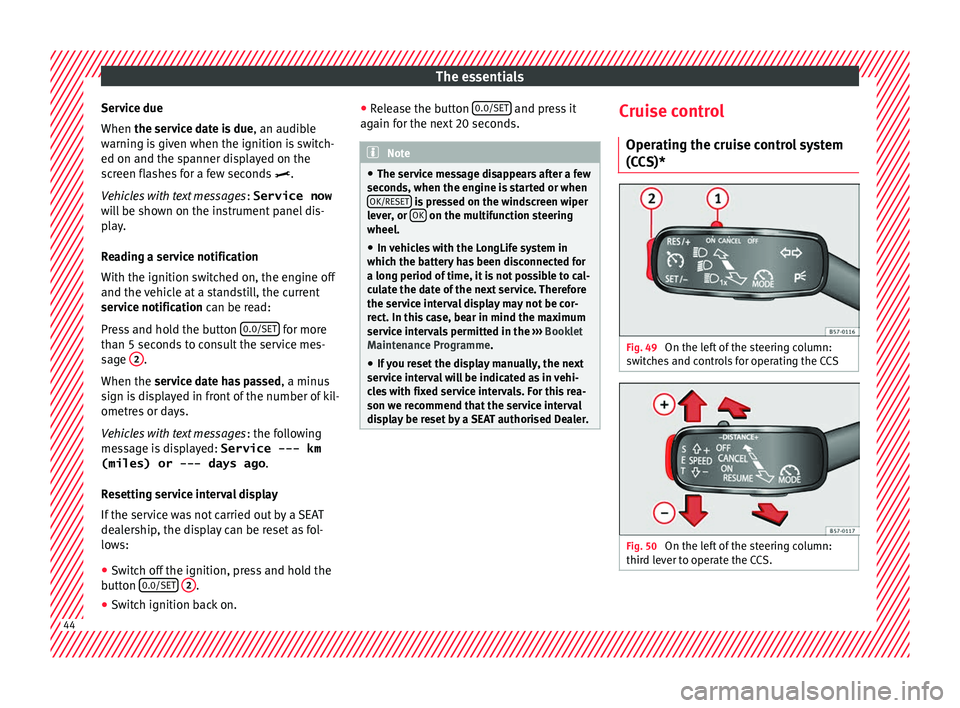
(CCS)* Fig. 49
On the left of the steering column:
sw it
c
hes and controls for operating the CCS Fig. 50
On the left of the steering column:
thir d l
ev
er to operate the CCS. 44
Page 70 of 348
The essentials
Emergency towing of the vehi-
c l
e
T
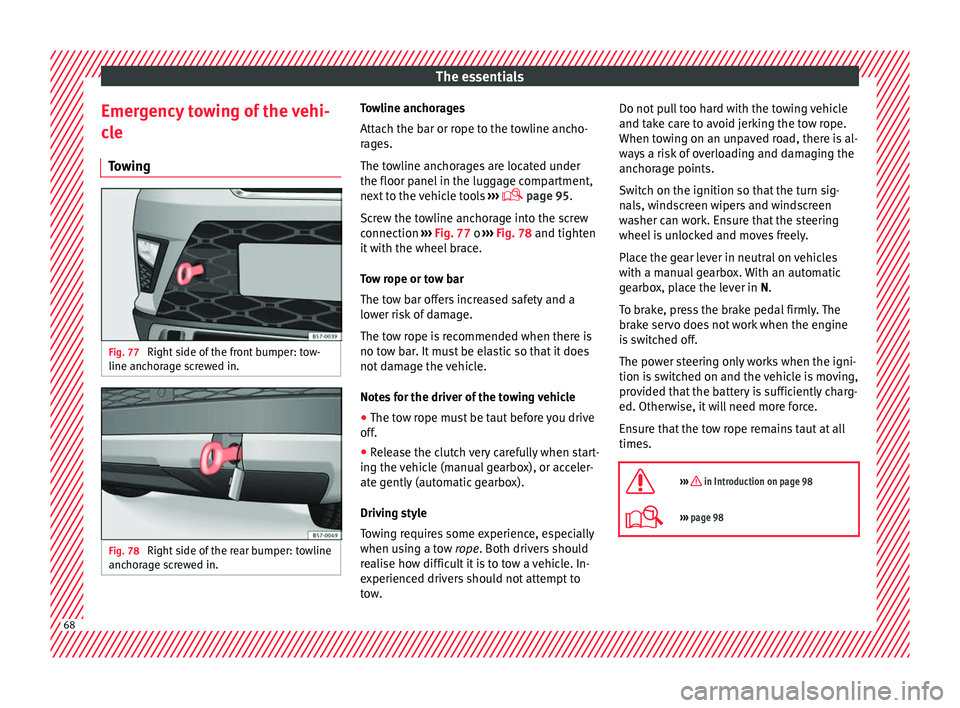
owing Fig. 77
Right side of the front bumper: tow-
line anc hor
ag
e screwed in. Fig. 78
Right side of the rear bumper: towline
anc hor
ag
e screwed in. Towline anchorages
Att
ac
h the b
ar or rope to the towline ancho-
rages.
The towline anchorages are located under
the floor panel in the luggage compartment,
next to the vehicle tools ›››
page 95.
Screw the towline anchorage into the screw
connection ››› Fig. 77 o ››› Fig. 78 and tighten
it with the wheel brace.
Tow rope or tow bar
The tow bar offers increased safety and a
lower risk of damage.
The tow rope is recommended when there is
no tow bar. It must be elastic so that it does
not damage the vehicle.
Notes for the driver of the towing vehicle
● The tow rope must be taut before you drive
off.
● Rel
ease the clutch very carefully when start-
ing the v
ehicle (manual gearbox), or acceler-
ate gently (automatic gearbox).
Driving style
Towing requires some experience, especially
when using a tow rope. Both drivers should
realise how difficult it is to tow a vehicle. In-
experienced drivers should not attempt to
tow. Do not pull too hard with the towing vehicle
and take c
are to avoid jerking the tow rope.
When towing on an unpaved road, there is al-
ways a risk of overloading and damaging the
anchorage points.
Switch on the ignition so that the turn sig-
nals, windscreen wipers and windscreen
washer can work. Ensure that the steering
wheel is unlocked and moves freely.
Place the gear lever in neutral on vehicles
with a manual gearbox. With an automatic
gearbox, place the lever in N.
To brake, press the brake pedal firmly. The
brake servo does not work when the engine
is switched off.
The power steering only works when the igni-
tion is switched on and the vehicle is moving,
provided that the battery is sufficiently charg-
ed. Otherwise, it will need more force.
Ensure that the tow rope remains taut at all
times.
››› in Introduction on page 98
››› page 98 68
Page 76 of 348
Safety
risk of injury. The following points cover part
of the s
af
ety equipment in your SEAT 1)
:
● three-point seat belts,
● belt tension limiters for the front and rear
side seats,
● belt
tensioners for the front and rear side
seats,
● front
airbags,
● knee airbags,
● side airbags in the front seat backrests,
● head-protection airbags,
● “ISOFIX” anchor points for child seats in
the rear s
ide seats with the “ISOFIX” system,
● height-adjustable front head restraints,
● rear head restraints with in-use position
and non-use pos
ition,
● adjustable steering column.
The safety
equipment mentioned above
works together to provide you and your pas-
sengers with the best possible protection in
the event of an accident. However, these
safety systems can only be effective if you
and your passengers are sitting in a correct
position and use this equipment properly.
Safety is everyone's business! Correct position of the vehicle
occup
ants
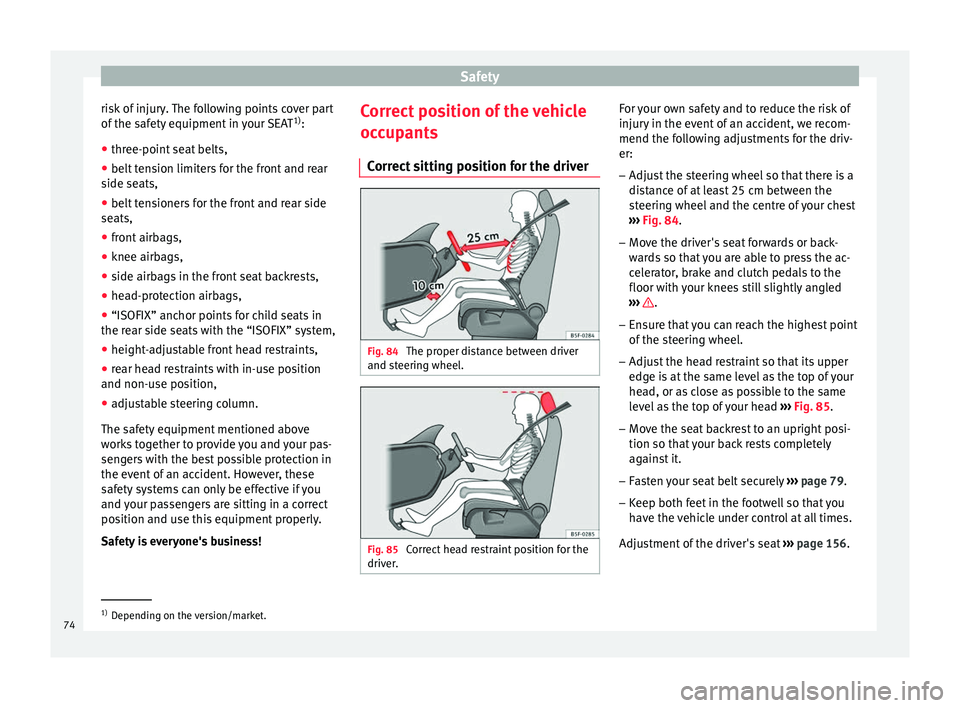
Correct sitting position for the driver Fig. 84
The proper distance between driver
and s t
eerin
g wheel. Fig. 85
Correct head restraint position for the
driv er
. For your own safety and to reduce the risk of
injur
y
in the ev
ent of an accident, we recom-
mend the following adjustments for the driv-
er:
– Adjust the steering wheel so that there is a
dist
ance of at least 25 cm between the
steering wheel and the centre of your chest
››› Fig. 84.
– Move the driver's seat forwards or back-
ward
s so that you are able to press the ac-
celerator, brake and clutch pedals to the
floor with your knees still slightly angled
››› .
– Ensure that you can reach the highest point
of the s
t
eering wheel.
– Adjust the head restraint so that its upper
edge is
at the same level as the top of your
head, or as close as possible to the same
level as the top of your head ››› Fig. 85.
– Move the seat backrest to an upright posi-
tion so that
your back rests completely
against it.
– Fasten your seat belt securely ›››
page 79.
– Keep both feet in the footwell so that you
have the
vehicle under control at all times.
Adjustment of the driver's seat ››› page 156. 1)
Depending on the version/market.
74
Page 77 of 348
Safe driving
WARNING
● An incorr ect
sitting position of the driver
can lead to severe injuries.
● Adjust the driver's seat so that there is at
lea
st 25 cm distance between the centre of
the chest and the centre of the steering
wheel ››› Fig. 84. If you are sitting closer than
25 cm, the airbag system cannot protect you
properly.
● If your physical constitution prevents you
from maint
aining the minimum distance of 25
cm, contact a specialised workshop. The
workshop will help you decide if special spe-
cific modifications are necessary.
● When driving, always hold the steering
wheel with both h
ands on the outside of the
ring at the 9 o'clock and 3 o'clock positions.
This reduces the risk of injury when the driver
airbag is triggered.
● Never hold the steering wheel at the 12
o'clock
position, or in any other manner (e.g.
in the centre of the steering wheel). In such
cases, if the airbag is triggered, you may sus-
tain injuries to the arms, hands and head.
● To reduce the risk of injury to the driver
during sud
den braking manoeuvres or an ac-
cident, never drive with the backrest tilted far
back! The airbag system and seat belts can
only provide optimal protection when the
backrest is in an upright position and the
driver is wearing his or her seat belt correct-
ly.
● Adjust the head restraint properly to ach-
ieve optima
l protection. Adjusting the steering wheel position
Read the additional information carefully
›› ›
page 20. WARNING
● Never a dju
st the position of the steering
wheel when the vehicle is moving, as this
could cause an accident.
● Move the lever up firmly so the steering
wheel pos
ition does not accidentally change
during driving. risk of accident!
● Make sure you are capable of reaching and
firmly ho
lding the upper part of the steering
wheel: risk of accident!
● If you adjust the steering wheel so that it
points t
owards your face, the driver airbag
will not protect you properly in the event of
an accident. Make sure that the steering
wheel points towards your chest. Correct position for the front passen-
g
er For your own safety and to reduce the risk of
injur
y
in the ev
ent of an accident, we recom-
mend the following adjustments for the front
passenger:
– Move the front passenger seat back as far
as po
ssible ››› .–
Mo v
e the se
at backrest to an upright posi-
tion so that your back rests completely
against it.
– Adjust the head restraint so that its upper
edge is
at the same level as the top of your
head, or as close as possible to the same
level as the top of your head ››› page 77.
– Always keep both feet in the footwell in
front of
the front passenger seat.
– Fasten your seat belt securely ›››
page 79.
It is possible to deactivate the front passen-
ger airbag in exceptional circumstances
››› page 89.
Adjusting the front passenger seat
››› page 156. WARNING
● An incorr ect
sitting position of the front
passenger can lead to severe injuries.
● Adjust the front passenger seat so that
there is
at least 25 cm between your chest
and the dash panel. If you are sitting closer
than 25 cm, the airbag system cannot protect
you properly.
● If your physical constitution prevents you
from maint
aining the minimum distance of 25
cm, contact a specialised workshop. The
workshop will help you decide if special spe-
cific modifications are necessary. » 75
Technical data
Advice
Operation
Emergencies
Safety
Page 84 of 348
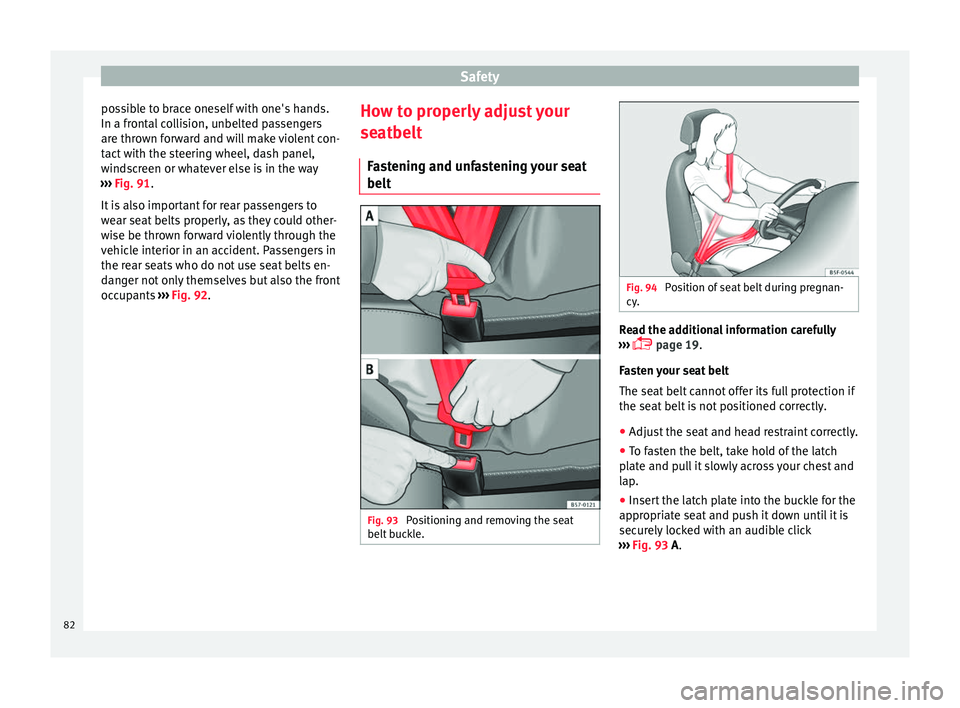
Safety
possible to brace oneself with one's hands.
In a fr ont
al
collision, unbelted passengers
are thrown forward and will make violent con-
tact with the steering wheel, dash panel,
windscreen or whatever else is in the way
››› Fig. 91.
It is also important for rear passengers to
wear seat belts properly, as they could other-
wise be thrown forward violently through the
vehicle interior in an accident. Passengers in
the rear seats who do not use seat belts en-
danger not only themselves but also the front
occupants ››› Fig. 92. How to properly adjust your
seatbelt
F
astening and unfastening your seat
belt Fig. 93
Positioning and removing the seat
belt b
uc
kle. Fig. 94
Position of seat belt during pregnan-
cy . Read the additional information carefully
› ›
›
page 19.
Fasten your seat belt
The seat belt cannot offer its full protection if
the seat belt is not positioned correctly.
● Adjust the seat and head restraint correctly.
● To fasten the belt, take hold of the latch
plat
e and pull it slowly across your chest and
lap.
● Insert the latch plate into the buckle for the
appropri
ate seat and push it down until it is
securely locked with an audible click
››› Fig. 93 A.
82
Page 100 of 348
Emergencies
they should be changed if they are damaged,
or c l
e
aned if they are dirty ››› .
Dam ag
ed w
indscreen wiper blades should be
replaced immediately. These are available
from qualified workshops. WARNING
Worn or dirty windscreen wiper blades reduce
vi s
ibility and increase the risk of accident
and serious injury.
● Always replace damaged or worn wind-
scr
een wiper blades or blades that no longer
clean the windscreen properly. CAUTION
● Damag ed or dir
ty windscreen wipers could
scratch the glass.
● If products containing solvents, rough
spong
es or sharp objects are used to clean
the blades, the graphite layer will be dam-
aged.
● Never use fuel, nail varnish remover, paint
thinner or simil
ar products to clean the win-
dows.
● In icy conditions, always check that the
wiper bl
ades are not frozen to the glass be-
fore using the wipers. In cold weather, it may
help to leave the vehicle parked with the wip-
ers in service position ›››
page 71. CAUTION
● To pr ev
ent damage to the bonnet and the
wiper arms, only leave them in the service
position.
● Before driving, always lower the wiper
arms. Tow-starting and towing
Introduction Tow-starting me
an
s
starting the engine of
the vehicle while another pulls it.
Towing means one vehicle pulling another
that is not roadworthy.
Always consider the legal provisions relating
to tow-starting and towing.
For technical reasons, towing a vehicle with a
discharged battery is not allowed. The jump
start should be used instead ›››
page 69.
If the vehicle comes with the Keyless Access
system, towing is only allowed with the igni-
tion on!
The vehicle battery drains if the vehicle is
towed with the engine switched off and the
ignition connected. Depending on the battery
charge status, the drop in voltage may be so
large, even after just a few minutes, that no
electrical device in the vehicle may work e.g. the hazard warning lights. In vehicles with
the Keyle
ss Access system, the steering
wheel could lock ››› .
WARNING
A vehicle with no power should never be tow-
ed.
● During towing, never switch off the ignition
with the s t
arter button. Otherwise, the elec-
tronic lock of the steering column could sud-
denly get blocked and it would be impossible
to steer the vehicle. This could cause an acci-
dent, serious injury and loss of control of the
vehicle.
● If during towing the vehicle runs out of
power
, stop towing immediately and request
the assistance of specialist personnel. WARNING
Vehicle handling and braking capacity
ch an
ge considerably during towing. Please
observe the following instructions to mini-
mise the risk of serious accidents and injury:
● As the driver of the vehicle being towed:
– You shoul
d depress the brake much hard-
er as the brake servo does not operate.
Pay the utmost attention to avoid crash-
ing into the towing vehicle.
– More strength is required at the steering
wheel as the power steering does not op-
erate when the engine is switched off.
● As the driver of the towing vehicle: 98
Page 102 of 348
Emergencies
● If a br
e
akdown lorry is used, vehicles with
automatic transmission are only allowed to
be towed with the front wheels suspended.
Towing vehicles with four-wheel drive
(4Drive)
Four-wheel drive vehicles (4Drive) can be
towed using a tow bar or tow rope. If the ve-
hicle is towed with the front or rear axle sus-
pended, the engine must be switched off,
otherwise the transmission may be damaged.
Cases where towing a vehicle is not allowed
● If, due to a fault, the gearbox is out of lubri-
cant.
● If
the vehicle battery is discharged, be-
cause the s
teering remains locked and, if ap-
propriate, the electronic parking brake can-
not be deactivated or the electronic lock of
the steering column released.
● If a distance above 50 km needs to be trav-
elled.
● When, f
or example, after an accident, the
smooth rotation of
the wheels or the steering
operation cannot be guaranteed.
When the vehicle is to tow another vehicle:
● Observe legal requirements.
● Keep in mind the instructions in the man-
ual on to
wing vehicles. Note
The vehicle can only be towed if the electron-
ic p ark
ing brake and the electronic lock of the
steering column are deactivated. If the vehi-
cle has no power supply or there is an electric
system fault, the engine must be tow-started
››› page 69 to deactivate the electronic
parking brake and the electronic lock of the
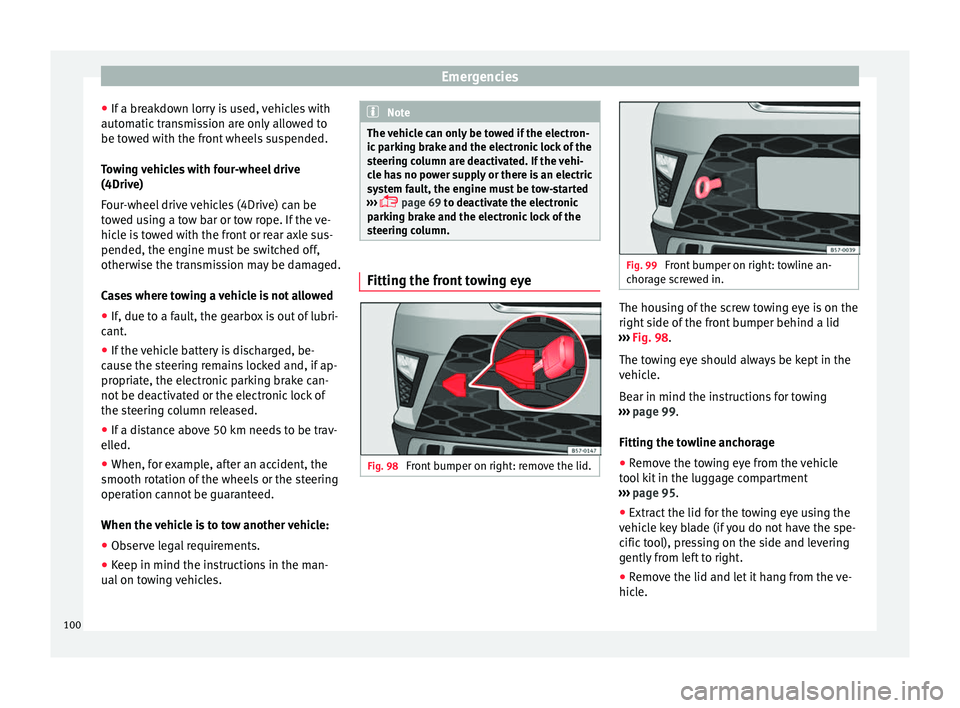
steering column. Fitting the front towing eye
Fig. 98
Front bumper on right: remove the lid. Fig. 99
Front bumper on right: towline an-
chor ag
e screwed in. The housing of the screw towing eye is on the
right
s
ide of
the front bumper behind a lid
››› Fig. 98.
The towing eye should always be kept in the
vehicle.
Bear in mind the instructions for towing
››› page 99.
Fitting the towline anchorage
● Remove the towing eye from the vehicle
tool
kit in the luggage compartment
››› page 95.
● Extract the lid for the towing eye using the
vehicl
e key blade (if you do not have the spe-
cific tool), pressing on the side and levering
gently from left to right.
● Remove the lid and let it hang from the ve-
hicle.
100
Page 104 of 348
Emergencies
CAUTION
● The to w
ing eye must always be completely
and firmly tightened. Otherwise, it could be
released while towing and tow-starting.
● If the vehicle is factory-equipped with a
tow
ing bracket, it is only allowed to tow with
a tow bar if this has been specially designed
to be installed with a tow hitch. If an unsuita-
ble tow bar is used, both the tow hitch and
the vehicle may be damaged. Instead, a tow
rope should be used. Driving tips for towing
Towing requires some expertise and experi-
enc
e, e
s
pecially when using a tow rope. Both
drivers should be familiar with the difficulties
involved in towing. For this reason, inexper-
ienced drivers should abstain from towing.
During towing, it should be ensured that no
impermissible tractive forces or shocks are
generated. When towing on an unpaved
road, there is always a risk of overloading
and damaging the anchorage points.
During towing, the towing vehicle can signal
the change of direction even with the hazard
warning lights turned on. To do so, at the
same time, the turn signal lever must be op-
erated with ignition switched on. Meanwhile,
the hazard warning lights will go off. When
the turn signal lever is returned to the rest position, the hazard warning lights will be
automatic
ally reactivated.
Notes for the driver of the towed vehicle ● Leave the ignition on, so that the steering
is not
blocked, and the electronic parking
brake may be deactivated and the turn sig-
nals and wash/wipe operated.
● More strength is required at the steering
wheel as
the power steering does not oper-
ate when the engine is switched off.
● You should depress the brake much harder
as the br
ake servo does not operate. Avoid
hitting the towing vehicle.
● Bear in mind the information and instruc-
tions in the m
anual of the vehicle to be tow-
ed.
Notes for the driver of the towing vehicle
● Accelerate with particular care and caution.
Avoid sh
arp manoeuvres.
● Brake earlier than usual and smoothly.
● Bear in mind the information and instruc-
tions in the m
anual of the towed vehicle. Fuses and bulbs
F u
se
s
Introduction In general, a fuse can be assigned to various
electric
al
components. Likewise, an electrical
component can be protected by several
fuses.
Only replace fuses when the cause of the
problem has been solved. If a newly inserted
fuse blows after a short time, you must have
the electrical system checked by a special-
ised workshop as soon as possible. WARNING
The high voltages in the electrical system can
give seriou s
electrical shocks, causing burns
and even death!
● Never touch the electrical wiring of the igni-
tion syst
em.
● Take care not to cause short circuits in the
electrica
l system. WARNING
Using unsuitable fuses, repairing fuses or
bridging a c urr
ent circuit without fuses can
cause a fire and serious injury. 102
Page 115 of 348
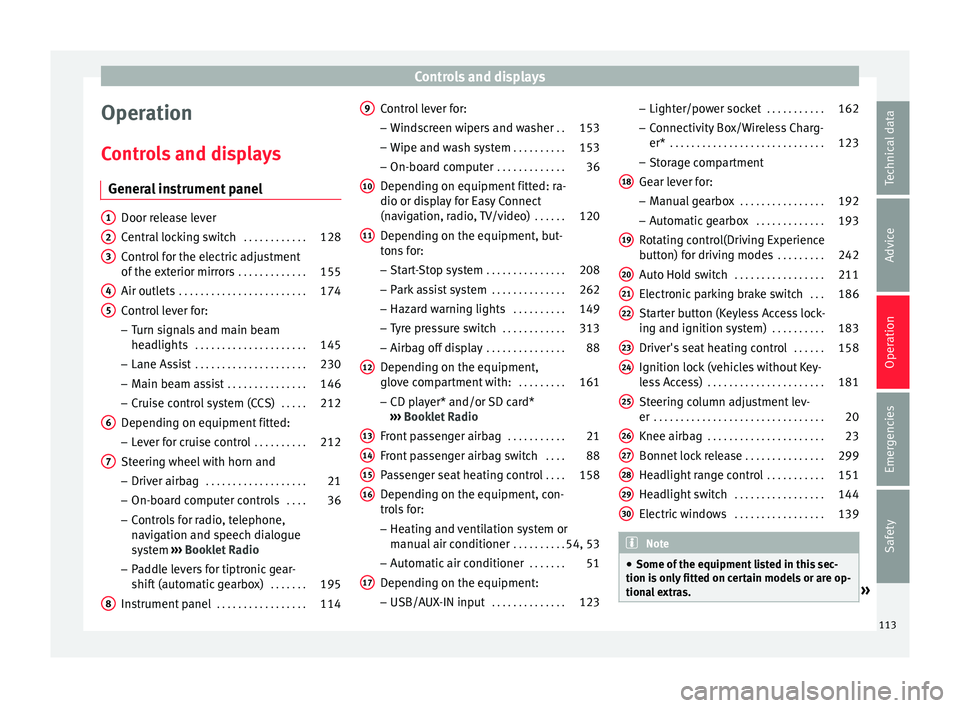
Controls and displays
Operation
C ontr
o
ls and displays
General instrument panel Door release lever
Centr
al
locking switch . . . . . . . . . . . .128
Control for the electric adjustment
of the ext
erior mirrors . . . . . . . . . . . . . 155
Air outlets . . . . . . . . . . . . . . . . . . . . . . . . 174
Control lever for:
– Turn s ign
als and main beam
headlights . . . . . . . . . . . . . . . . . . . . . 145
– Lane Ass i
st . . . . . . . . . . . . . . . . . . . . . 230
– Main beam a
ssist . . . . . . . . . . . . . . . 146
– Cruise c
ontrol system (CCS) . . . . .212
Depending on equipment fitted:
– Lev er f
or cruise control . . . . . . . . . .212
Steering wheel with horn and – Driver airbag . . . . . . . . . . . . . . . . . . . 21
– On-boar d c
omputer controls . . . .36
– Contro
ls for radio, telephone,
navigation and speech dialogue
system ›››
Booklet Radio
– Paddle levers for tiptronic gear-
shift (automatic gearbox) . . . . . . .195
Instrument panel . . . . . . . . . . . . . . . . . 114
1 2
3
4
5
6
7
8 Control lever for:
– Wind
s
creen wipers and washer . .153
– Wipe and wa
sh system . . . . . . . . . . 153
– On-board c
omputer . . . . . . . . . . . . . 36
Depending on equipment fitted: ra-
dio or disp
lay for Easy Connect
(navigation, radio, TV/video) . . . . . .120
Depending on the equipment, but-
tons
for:
– Start-Stop system . . . . . . . . . . . . . . . 208
– Park a
ssist system . . . . . . . . . . . . . . 262
– Hazard w
arning lights . . . . . . . . . .149
– Tyr
e pressure switch . . . . . . . . . . . .313
– Airbag off di
splay . . . . . . . . . . . . . . . 88
Depending on the equipment,
glov e c
ompartment with: . . . . . . . . .161
– CD pl a
yer* and/or SD card*
››› Booklet Radio
Front passenger airbag . . . . . . . . . . .21
Front passenger airbag switch . . . .88
Passenger seat heating control . . . .158
Depending on the equipment, con-
tro l
s for:
– Heating and ventilation system or
manual air conditioner . . . . . . . . . .54, 53
– Autom atic
air conditioner . . . . . . .51
Depending on the equipment:
– USB/A UX-IN inp
ut . . . . . . . . . . . . . . 123
9
10
11
12
13
14
15
16
17 –
Light er/po
w
er socket . . . . . . . . . . . 162
– Connectivity
Box/Wireless Charg-
er* . . . . . . . . . . . . . . . . . . . . . . . . . . . . . 123
– Storag
e compartment
Gear lever for: – Manual gearbox . . . . . . . . . . . . . . . . 192
– Automatic
gearbox . . . . . . . . . . . . . 193
Rotating control(Driving Experience
button) f
or driving modes . . . . . . . . .242
Auto Hold switch . . . . . . . . . . . . . . . . . 211
Electronic parking brake switch . . .186
Starter button (Keyless Access lock-
ing and ignition sys
tem) . . . . . . . . . . 183
Driver's seat heating control . . . . . .158
Ignition lock (vehicles without Key-
les
s Access) . . . . . . . . . . . . . . . . . . . . . . 181
Steering column adjustment lev-
er . . . . . . . . . . . . . . . . . . . . . . . . . . . . . . . . 20
Knee airbag . . . . . . . . . . . . . . . . . . . . . . 23
Bonnet lock release . . . . . . . . . . . . . . .299
Headlight range control . . . . . . . . . . .151
Headlight switch . . . . . . . . . . . . . . . . . 144
Electric windows . . . . . . . . . . . . . . . . . 139 Note
● Some of the equipment li
sted in this sec-
tion is only fitted on certain models or are op-
tional extras. » 18
19
20
21
22
23
24
25
26
27
28
29
30
113
Technical data
Advice
Operation
Emergencies
Safety
Page 123 of 348
Communications and multimedia
Communications and multimedia
C ontr
o
ls on the steering wheel*
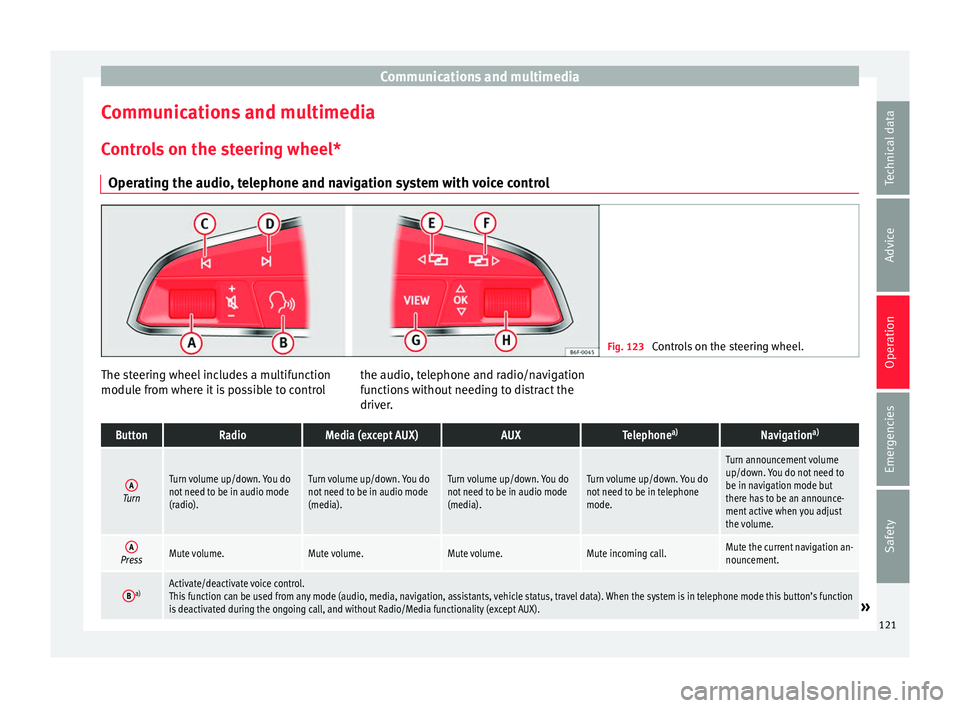
Operating the audio, telephone and navigation system with voice control Fig. 123
Controls on the steering wheel. The steering wheel includes a multifunction
modu
l
e fr
om where it is possible to control the audio, telephone and radio/navigation
function
s without needing to distract the
driver.
ButtonRadioMedia (except AUX)AUXTelephone a)Navigation a)
ATurn
Turn volume up/down. You do
not need to be in audio mode
(radio).Turn volume up/down. You do
not need to be in audio mode
(media).Turn volume up/down. You do
not need to be in audio mode
(media).Turn volume up/down. You do
not need to be in telephone
mode.
Turn announcement volume
up/down. You do not need to
be in navigation mode but
there has to be an announce-
ment active when you adjust
the volume.
APressMute volume.Mute volume.Mute volume.Mute incoming call.Mute the current navigation an-
nouncement.
Ba)Activate/deactivate voice control.
This function can be used from any mode (audio, media, navigation, assistants, vehicle status, travel data). When the system is in telephone mode this button’s function
is deactivated during the ongoing call, and without Radio/Media functionality (except AUX).
» 121
Technical data
Advice
Operation
Emergencies
Safety