seats Seat Ateca 2018 Owner's Guide
[x] Cancel search | Manufacturer: SEAT, Model Year: 2018, Model line: Ateca, Model: Seat Ateca 2018Pages: 348, PDF Size: 7.32 MB
Page 107 of 348
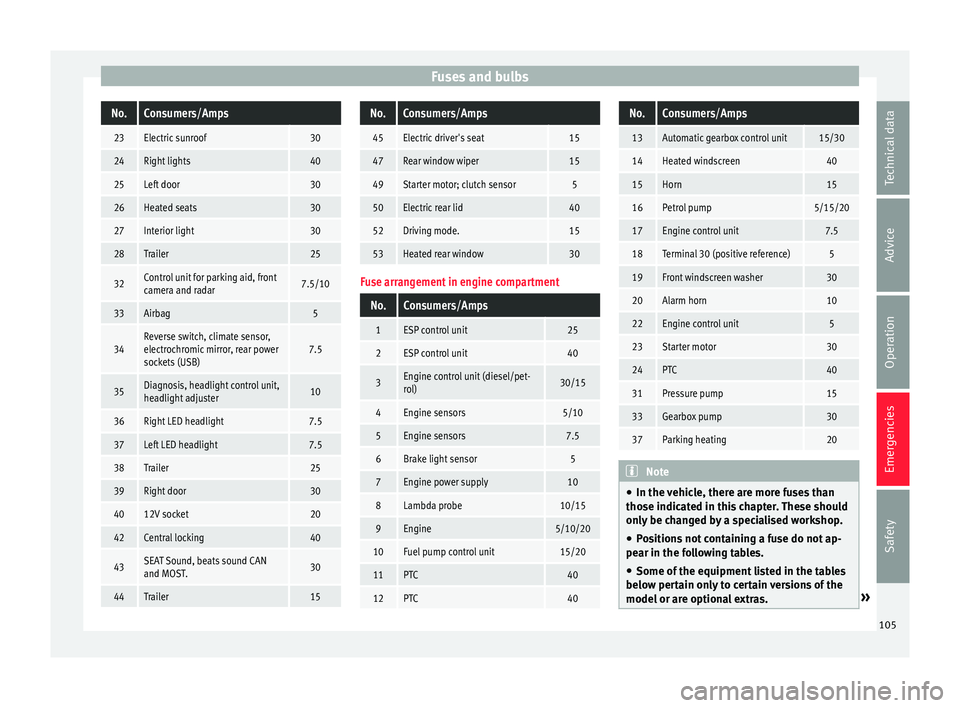
Fuses and bulbsNo.Consumers/Amps
23Electric sunroof30
24Right lights40
25Left door30
26Heated seats30
27Interior light30
28Trailer25
32Control unit for parking aid, front
camera and radar7.5/10
33Airbag5
34Reverse switch, climate sensor,
electrochromic mirror, rear power
sockets (USB)7.5
35Diagnosis, headlight control unit,
headlight adjuster10
36Right LED headlight7.5
37Left LED headlight7.5
38Trailer25
39Right door30
4012V socket20
42Central locking40
43SEAT Sound, beats sound CAN
and MOST.30
44Trailer15
No.Consumers/Amps
45Electric driver's seat15
47Rear window wiper15
49Starter motor; clutch sensor5
50Electric rear lid40
52Driving mode.15
53Heated rear window30
Fuse arrangement in engine compartment
No.Consumers/Amps
1ESP control unit25
2ESP control unit40
3Engine control unit (diesel/pet-
rol)30/15
4Engine sensors5/10
5Engine sensors7.5
6Brake light sensor5
7Engine power supply10
8Lambda probe10/15
9Engine5/10/20
10Fuel pump control unit15/20
11PTC40
12PTC40
No.Consumers/Amps
13Automatic gearbox control unit15/30
14Heated windscreen40
15Horn15
16Petrol pump5/15/20
17Engine control unit7.5
18Terminal 30 (positive reference)5
19Front windscreen washer30
20Alarm horn10
22Engine control unit5
23Starter motor30
24PTC40
31Pressure pump15
33Gearbox pump30
37Parking heating20
Note
● In the v ehic
le, there are more fuses than
those indicated in this chapter. These should
only be changed by a specialised workshop.
● Positions not containing a fuse do not ap-
pear in the fo
llowing tables.
● Some of the equipment listed in the tables
below pert
ain only to certain versions of the
model or are optional extras. » 105
Technical data
Advice
Operation
Emergencies
Safety
Page 125 of 348
Communications and multimedia
Multimedia USB/A UX
-INP
ortFig. 124
Centre console: USB/AUX-IN input. Fig. 125
Centre console, rear section: USB
c onnect
or
s. Depending on the special characteristics and
the c
ou
ntr
y, the vehicle may have a
USB/AUX-IN port.
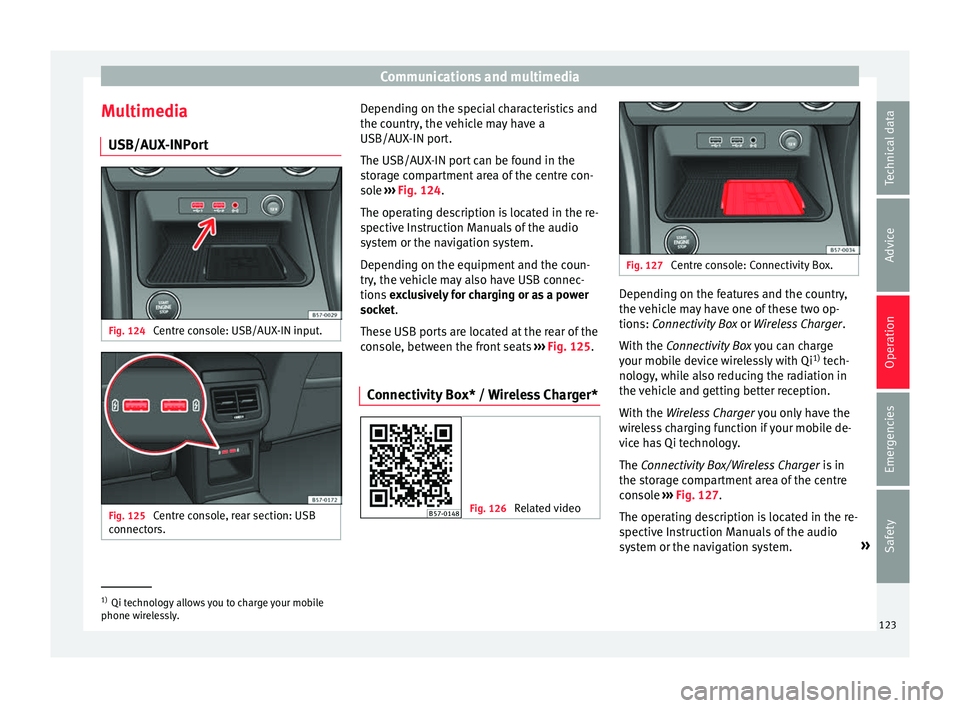
The USB/AUX-IN port can be found in the
storage compartment area of the centre con-
sole ››› Fig. 124.
The operating description is located in the re-
spective Instruction Manuals of the audio
system or the navigation system.
Depending on the equipment and the coun-
try, the vehicle may also have USB connec-
tions exclusively for charging or as a power
socket.
These USB ports are located at the rear of the
console, between the front seats ››› Fig. 125.
Connectivity Box* / Wireless Charger* Fig. 126
Related video Fig. 127
Centre console: Connectivity Box. Depending on the features and the country,
the
v
ehic
le may have one of these two op-
tions: Connectivity Box or Wireless Charger.
With the Connectivity Box you can charge
your mobile device wirelessly with Qi 1)
tech-
nology, while also reducing the radiation in
the vehicle and getting better reception.
With the Wireless Charger you only have the
wireless charging function if your mobile de-
vice has Qi technology.
The Connectivity Box/Wireless Charger is in
the storage compartment area of the centre
console ››› Fig. 127.
The operating description is located in the re-
spective Instruction Manuals of the audio
system or the navigation system. »1)
Qi technology allows you to charge your mobile
phone wir el
essly. 123
Technical data
Advice
Operation
Emergencies
Safety
Page 153 of 348
Lights and visibility
The light distribution of the halogen and full-
LED he a
dlights
allows the specific “tourist
light” values to be met without the need for
stickers or changes in the settings. Note
“Tourist light” is only allowed temporarily. If
you ar e p
lanning a long stay in a country that
drives on the other side, you should take the
vehicle to an Authorised Technical Service to
change the headlights. Headlight range control
Fig. 145
Next to the steering wheel: Head-
light r
an
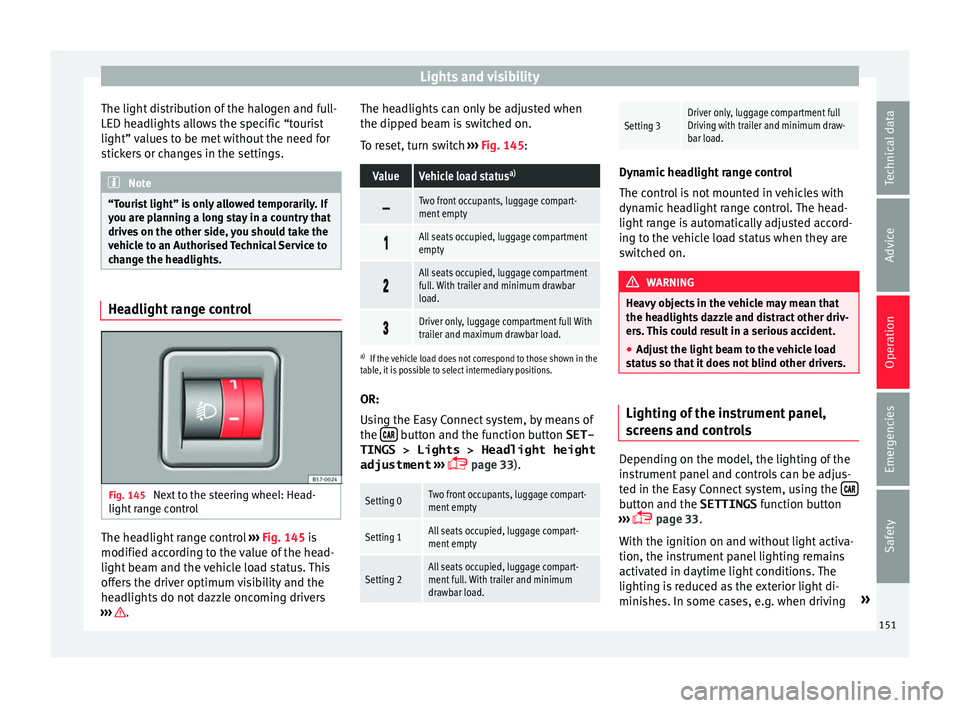
ge control The headlight range control
››
›
Fig. 145 is
modified according to the value of the head-
light beam and the vehicle load status. This
offers the driver optimum visibility and the
headlights do not dazzle oncoming drivers
››› . The headlights can only be adjusted when
the dip
ped be
am i
s switched on.
To reset, turn switch ››› Fig. 145:
ValueVehicle load status a)
Two front occupants, luggage compart-
ment empty
All seats occupied, luggage compartment
empty
All seats occupied, luggage compartment
full. With trailer and minimum drawbar
load.
Driver only, luggage compartment full With
trailer and maximum drawbar load.
a)
If the vehicle load does not correspond to those shown in the
table, it is possible to select intermediary positions.
OR:
Using the Easy Connect system, by means of
the button and the function button SET-
TINGS > Lights > Headlight height
adjustment
› ›
›
page 33).
Setting 0Two front occupants, luggage compart-
ment empty
Setting 1All seats occupied, luggage compart-
ment empty
Setting 2All seats occupied, luggage compart-
ment full. With trailer and minimum
drawbar load.
Setting 3Driver only, luggage compartment full
Driving with trailer and minimum draw-
bar load. Dynamic headlight range control
The contr
o
l is not mounted in vehicles with
dynamic headlight range control. The head-
light range is automatically adjusted accord-
ing to the vehicle load status when they are
switched on. WARNING
Heavy objects in the vehicle may mean that
the hea dlight
s dazzle and distract other driv-
ers. This could result in a serious accident.
● Adjust the light beam to the vehicle load
stat
us so that it does not blind other drivers. Lighting of the instrument panel,
s
c
r
eens and controls Depending on the model, the lighting of the
in
s
trument
panel and controls can be adjus-
ted in the Easy Connect system, using the button and the SETTINGS
fu
nction b
utton
››› page 33.
With the ignition on and without light activa-
tion, the instrument panel lighting remains
activated in daytime light conditions. The
lighting is reduced as the exterior light di-
minishes. In some cases, e.g. when driving »
151
Technical data
Advice
Operation
Emergencies
Safety
Page 158 of 348
Operation
● Turn the kno
b t
o position L1)
.
● Adjust the left-hand exterior mirror. The
right ext
erior mirror will be adjusted at the
same time (synchronised).
● If necessary the right exterior mirror adjust-
ment ma
y need correcting. turn the control to
position R 1)
.
● In the Easy Connect system the exterior mir-
rors
can be adjusted using the button
and the S
ET
TINGS function button.
F o
l
d in the exterior mirrors after parking
(convenience function)*
The Easy Connect system, the button and
the f u
nction b
uttons SETTINGS and
Mirr or
s
and windscreen wipers can be used to
h av
e the e
xterior mirrors fold in when the ve-
hicle is parked ››› page 120.
When the vehicle is locked with the remote
control, by pressing for more than approxi-
mately 1 second the exterior mirrors are fol-
ded in automatically. When the vehicle is
opened with the remote control, the exterior
mirrors are deployed automatically. WARNING
Convex or wide-angle* exterior mirrors give a
lar g
er field of vision. However, they make ob- jects look smaller and further away than they
re
a
lly are. If you use these mirrors to esti-
mate the distance to vehicles behind you
when changing lane, you could misjudge the
distance. Risk of accident! CAUTION
● If one of the mirr
or housings is knocked out
of position (e.g. when parking), the mirrors
must first be fully retracted with the electric
control. Do not readjust the mirror housing by
hand, as this will interfere with the mirror ad-
juster function.
● Before washing the vehicle in an automatic
car wa
sh, please make sure to retract the ex-
terior mirrors to prevent them from being
damaged. Electrically retractable exterior
mirrors must not be folded in or out by hand.
Always use the electrical power control. Note
If the electrical adjustment should fail to op-
erat e, both of
the mirrors can be adjusted by
hand by lightly pressing the edge of the mir-
ror glass. Seats and head restraints
Adju
s
tin
g the seats and headr-
ests
Manual adjustment of the seats Read the additional information carefully
›› ›
page 18 WARNING
The safe driving chapter contains important
inform ation, tip
s, suggestions and warnings
that you should read and observe for your
own safety and the safety of your passengers
››› page 73. WARNING
● Adjus t
the front seats only when the vehi-
cle is stationary. Failure to follow this instruc-
tion could result in an accident.
● Be careful when adjusting the seat height.
Carel
ess or uncontrolled adjustment can
cause injuries.
● The front seat backrests must not be re-
clined for driv
ing. Otherwise, seat belts and
the airbag system might not protect as they
should, with the subsequent danger of injury. 1)
Regulation in right-hand drive vehicles is symmet-
rical .
156
Page 159 of 348
Seats and head restraints
Electric driver's seat adjustment* Read the additional information carefully
›› ›
page 19 WARNING
● If the el ectric
front seats are used negli-
gently or without paying due attention, it can
cause serious injury.
● The front seats can also be electrically ad-
just
ed when the ignition is switched off. Nev-
er leave a child or any other person who may
need help in the vehicle.
● In the event of an emergency, electrical ad-
justment
can be stopped by pressing any
control. CAUTION
To avoid damaging the electrical components
of the fr ont
seats, please refrain from kneel-
ing on the seat or applying sharp pressure at
a single point to the seat cushion and back-
rest. Note
● It m a
y not be possible to electrically adjust
the seat if the vehicle battery is very low.
● If the engine is started while the seats are
being electric
ally adjusted, the adjustment
will stop. Adjusting the front head restraints
Read the additional information carefully
›› ›
page 19
Adjust the head restraint ›››
page 19 so
that as far as possible the top of the head re-
straint is level with the top of your head.
When this is not possible, try to get as close
as possible to this position.
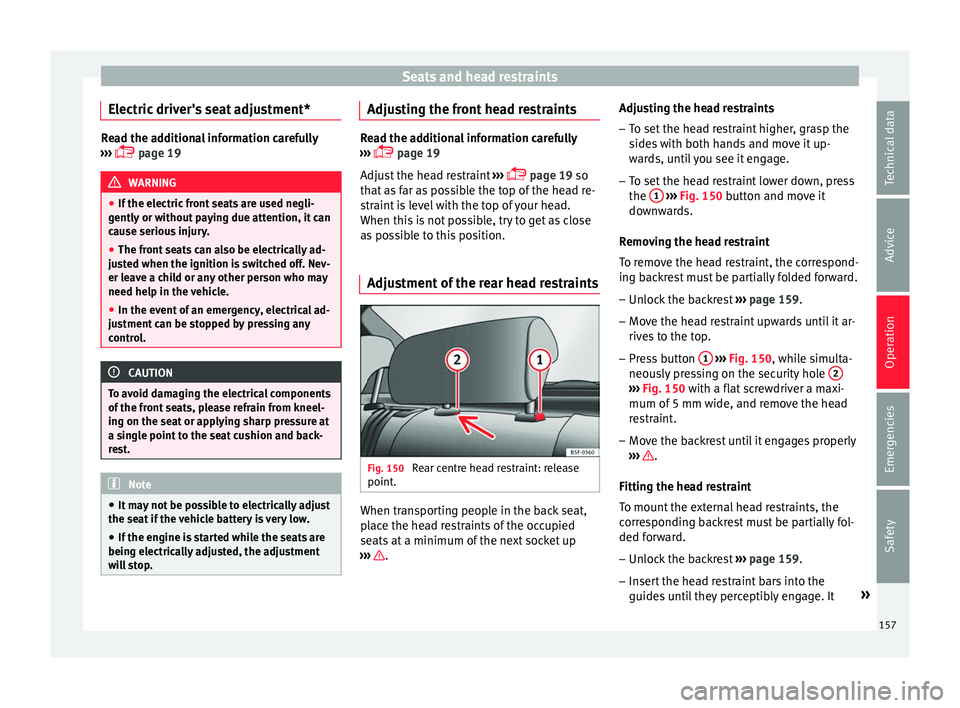
Adjustment of the rear head restraints Fig. 150
Rear centre head restraint: release
point . When transporting people in the back seat,
p
l
ac
e the head restraints of the occupied
seats at a minimum of the next socket up
››› .Adjusting the head restraints
– To set the head restraint higher, grasp the
side
s
with both hands and move it up-
wards, until you see it engage.
– To set the head restraint lower down, press
the 1
› ››
Fig. 150
b
utton and move it
downwards.
Removing the head restraint
To remove the head restraint, the correspond-
ing backrest must be partially folded forward. – Unlock the backrest ›››
page 159.
– Move the head restraint upwards until it ar-
rives
to the top.
– Press button 1
› ›
› Fig. 150
, while simulta-
neously pressing on the security hole 2 ›››
Fig. 150 with a fl at
screwdriver a maxi-
mum of 5 mm wide, and remove the head
restraint.
– Move the backrest until it engages properly
›› ›
.
Fittin g the he
a
d restraint
To mount the external head restraints, the
corresponding backrest must be partially fol-
ded forward.
– Unlock the backrest ›››
page 159.
– Insert the head restraint bars into the
guides u
ntil they perceptibly engage. It »
157
Technical data
Advice
Operation
Emergencies
Safety
Page 160 of 348
Operation
should not be possible to remove the head
r e
s
traint from the backrest.
– Move the backrest until it engages properly
›››
.
WARNING
● Ple a
se observe the general notes
››› page 77.
● Remove the rear head restraints only when
it is
necessary for the placement of a child
seat ››› page 90. After removing a child seat,
remount the head restraint immediately.
Travelling with the head restraints removed
or improperly adjusted increases the risk of
severe injuries. Seat functions
Intr oduction WARNING
Inappropriate use of the seat functions can
cau se sev
ere injuries.
● Assume the proper sitting position before
your trip and rem
ain in it throughout. This al-
so applies to the other occupants.
● Always keep hands, fingers, feet and other
part
s of the body away from the operating ra-
dius and the adjustment of seats. Seat heating
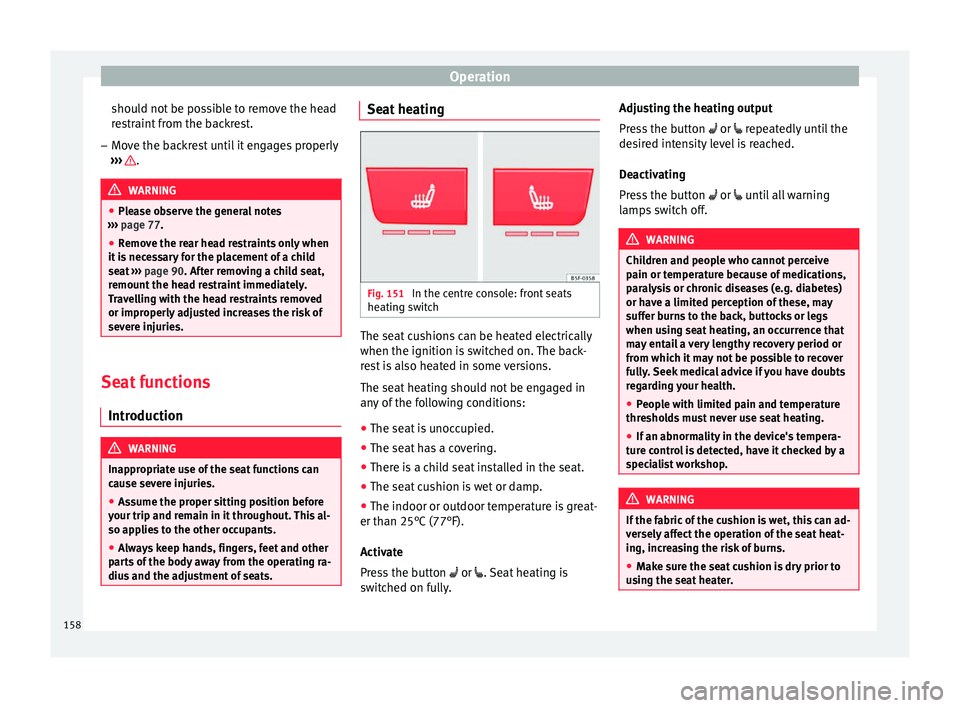
Fig. 151
In the centre console: front seats
he atin
g sw
itch The seat cushions can be heated electrically
when the ignition i
s
sw
itched on. The back-
rest is also heated in some versions.
The seat heating should not be engaged in
any of the following conditions:
● The seat is unoccupied.
● The seat has a covering.
● There is a child seat installed in the seat.
● The seat cushion is wet or damp.
● The indoor or outdoor temperature is great-
er than 25°C (77°F).
A
ctivate
Press the button or . Seat heating is
switched on fully. Adjusting the heating output
Pres
s the button or repeatedly until the
desired intensity level is reached.
Deactivating
Press the button or until all warning
lamps switch off. WARNING
Children and people who cannot perceive
pain or t emper
ature because of medications,
paralysis or chronic diseases (e.g. diabetes)
or have a limited perception of these, may
suffer burns to the back, buttocks or legs
when using seat heating, an occurrence that
may entail a very lengthy recovery period or
from which it may not be possible to recover
fully. Seek medical advice if you have doubts
regarding your health.
● People with limited pain and temperature
thresho
lds must never use seat heating.
● If an abnormality in the device's tempera-
ture c
ontrol is detected, have it checked by a
specialist workshop. WARNING
If the fabric of the cushion is wet, this can ad-
ver sely
affect the operation of the seat heat-
ing, increasing the risk of burns.
● Make sure the seat cushion is dry prior to
usin
g the seat heater. 158
Page 161 of 348
Seats and head restraints
●
Do not s it
on the seat with clothing that is
wet or damp.
● Do not leave clothing that is wet or damp
on the seat.
● Do not
spill liquid on the seat. CAUTION
● To av oid d
amaging the heating elements of
the seat heaters, please do not kneel on the
seat or apply sharp pressure to a single point
on the seat cushion or backrest.
● Liquids, sharps objects and insulating ma-
teria
ls (e.g. covers or child seats) can damage
the seat heating.
● In the event of smells, switch off the seat
heating immedi
ately and have it inspected by
a specialised workshop. For the sake of the environment
The seat heating should remain on only when
needed. Otherw i
se, it is an unnecessary fuel
waste. Front centre armrest
The centre armrest can be adjusted to various
l
ev
el
s.
Adjusting the centre armrest – To adjust the tilt, lift the armrest from the
star
ting position so that it is engaged. –
To ret
urn the armrest to the starting posi-
tion, remove the armrest from the upper
fixed position and lower it.
The armrest can be moved backwards and
forwards.
Folding down and lifting the rear seat
back
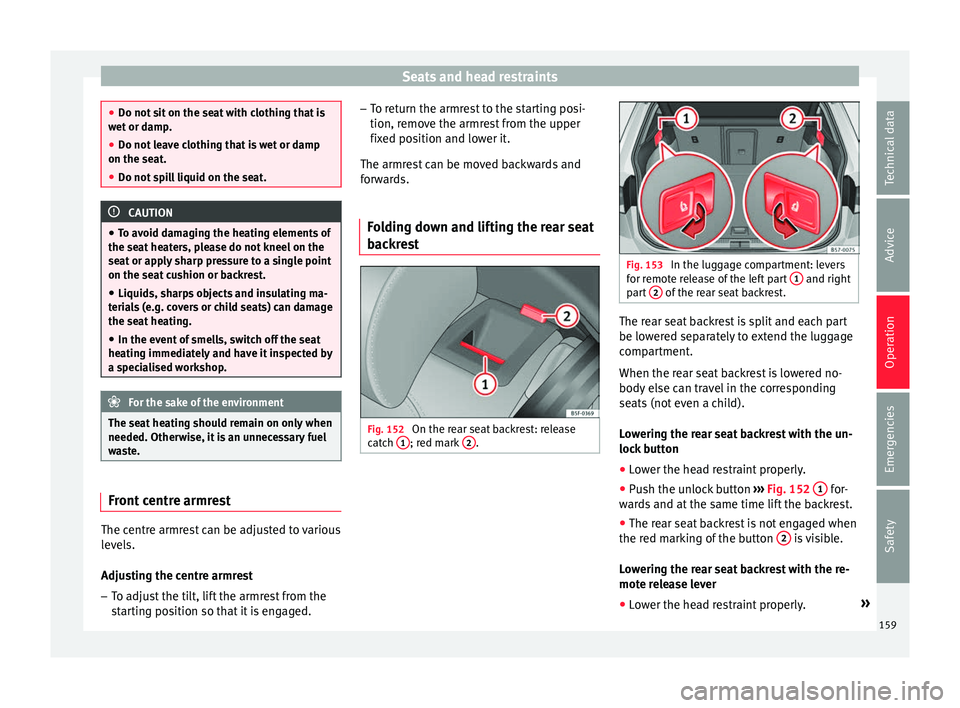
rest Fig. 152
On the rear seat backrest: release
c at
c
h 1 ; red mark
2 . Fig. 153
In the luggage compartment: levers
for r emot
e release of the left part 1 and right
par t
2 of the rear seat backrest.
The rear seat backrest is split and each part
be lo
w
er
ed separately to extend the luggage
compartment.
When the rear seat backrest is lowered no-
body else can travel in the corresponding
seats (not even a child).
Lowering the rear seat backrest with the un-
lock button
● Lower the head restraint properly.
● Push the unlock button ›››
Fig. 152 1 for-
w ar
d
s and at the same time lift the backrest.
● The rear seat backrest is not engaged when
the red mark
ing of the button 2 is visible.
L o
w
ering the rear seat backrest with the re-
mote release lever
● Lower the head restraint properly. »
159
Technical data
Advice
Operation
Emergencies
Safety
Page 162 of 348
Operation
● Open the r e
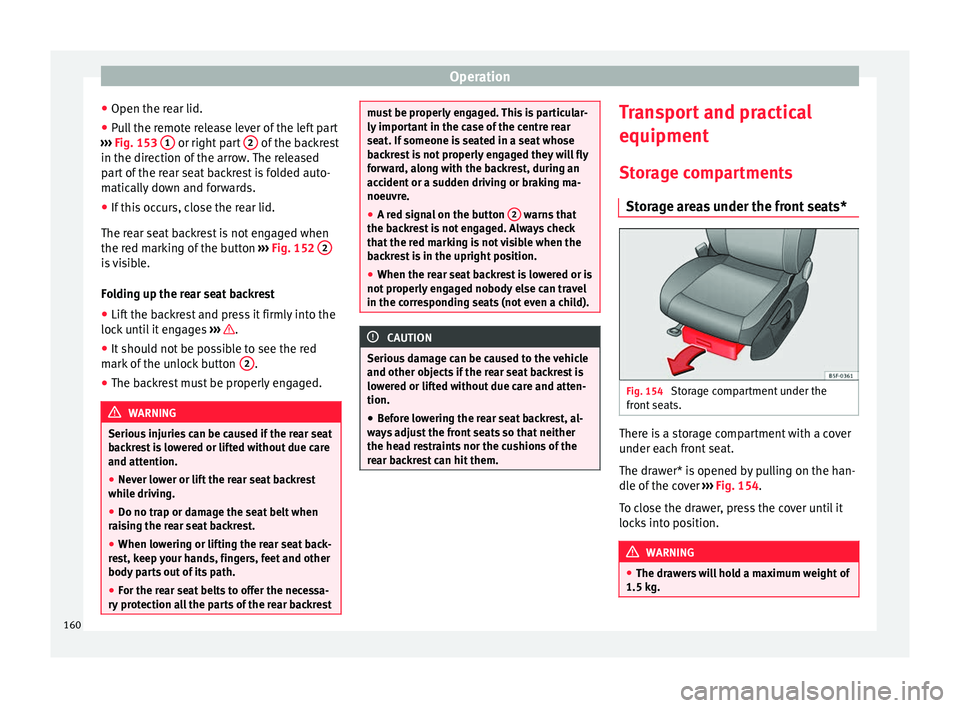
ar lid.
● P
ull the remote release lever of the left part
›››
Fig. 153 1 or right part
2 of the backrest
in the dir ection of
the arr
ow. The released
part of the rear seat backrest is folded auto-
matically down and forwards.
● If this occurs, close the rear lid.
The rear se
at backrest is not engaged when
the red marking of the button ››› Fig. 152 2 is visible.
F
o
l
ding up the rear seat backrest
● Lift the backrest and press it firmly into the
lock u
ntil it engages ››› .
● It should not be possible to see the red
m ark
of
the unlock button 2 .
● The backrest must be properly engaged. WARNING
Serious injuries can be caused if the rear seat
bac k
rest is lowered or lifted without due care
and attention.
● Never lower or lift the rear seat backrest
while driv
ing.
● Do no trap or damage the seat belt when
rais
ing the rear seat backrest.
● When lowering or lifting the rear seat back-
res
t, keep your hands, fingers, feet and other
body parts out of its path.
● For the rear seat belts to offer the necessa-
ry pr
otection all the parts of the rear backrest must be properly engaged. This is particular-
ly impor
t
ant in the case of the centre rear
seat. If someone is seated in a seat whose
backrest is not properly engaged they will fly
forward, along with the backrest, during an
accident or a sudden driving or braking ma-
noeuvre.
● A red signal on the button 2 warns that
the bac k
rest is not engaged. Always check
that the red marking is not visible when the
backrest is in the upright position.
● When the rear seat backrest is lowered or is
not properly
engaged nobody else can travel
in the corresponding seats (not even a child). CAUTION
Serious damage can be caused to the vehicle
and other ob j
ects if the rear seat backrest is
lowered or lifted without due care and atten-
tion.
● Before lowering the rear seat backrest, al-
way
s adjust the front seats so that neither
the head restraints nor the cushions of the
rear backrest can hit them. Transport and practical
equipment
St or
ag
e compartments
Storage areas under the front seats* Fig. 154
Storage compartment under the
fr ont
se
ats. There is a storage compartment with a cover
u
nder e
ac
h front seat.
The drawer* is opened by pulling on the han-
dle of the cover ››› Fig. 154.
To close the drawer, press the cover until it
locks into position. WARNING
● The dra w
ers will hold a maximum weight of
1.5 kg. 160
Page 163 of 348
Transport and practical equipment
●
Do not driv e w
ith the drawer cover open.
There is an injury risk for passengers if the
cargo is released in case of sudden braking or
an accident. Drink holders
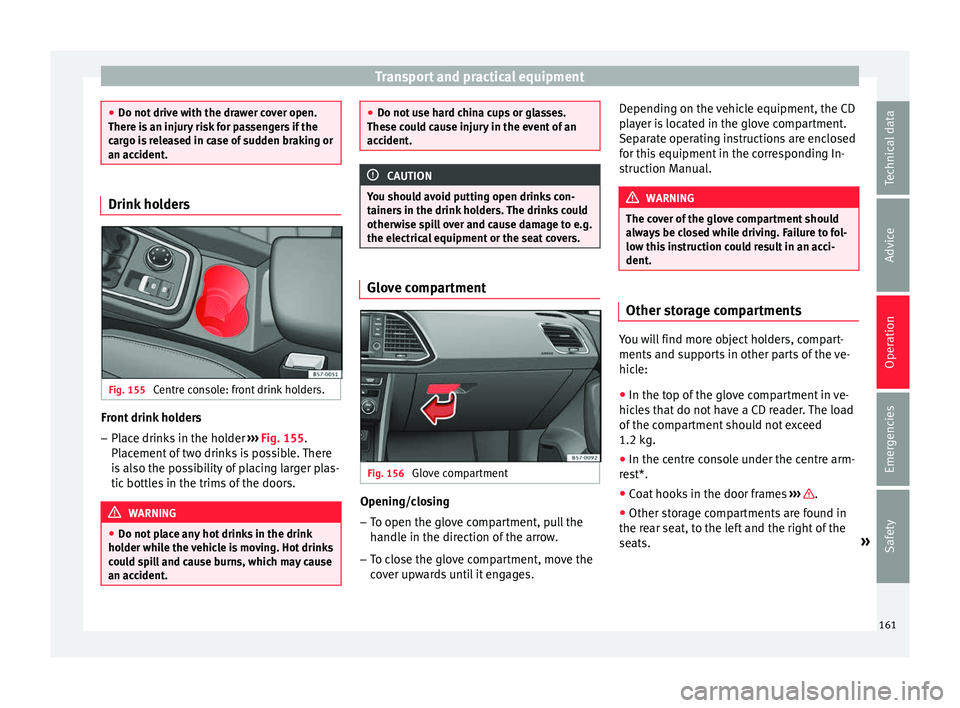
Fig. 155
Centre console: front drink holders. Front drink holders
– Place drinks in the holder ››
›
Fig. 155.
Placement of two drinks is possible. There
is also the possibility of placing larger plas-
tic bottles in the trims of the doors. WARNING
● Do not p l
ace any hot drinks in the drink
holder while the vehicle is moving. Hot drinks
could spill and cause burns, which may cause
an accident. ●
Do not u se h
ard china cups or glasses.
These could cause injury in the event of an
accident. CAUTION
You should avoid putting open drinks con-
t ainer s
in the drink holders. The drinks could
otherwise spill over and cause damage to e.g.
the electrical equipment or the seat covers. Glove compartment
Fig. 156
Glove compartment Opening/closing
– To open the glove compartment, pull the
handl
e in the dir
ection of the arrow.
– To close the glove compartment, move the
cov
er upwards until it engages. Depending on the vehicle equipment, the CD
pla
yer is located in the glove compartment.
Separate operating instructions are enclosed
for this equipment in the corresponding In-
struction Manual. WARNING
The cover of the glove compartment should
alw a
ys be closed while driving. Failure to fol-
low this instruction could result in an acci-
dent. Other storage compartments
You will find more object holders, compart-
ments
and s
up
ports in other parts of the ve-
hicle:
● In the top of the glove compartment in ve-
hicle
s that do not have a CD reader. The load
of the compartment should not exceed
1.2 kg.
● In the centre console under the centre arm-
res
t*.
● Coat hooks in the door frames ›››
.
● Other storage compartments are found in
the r e
ar se
at, to the left and the right of the
seats. »
161
Technical data
Advice
Operation
Emergencies
Safety
Page 164 of 348
Operation
WARNING
● Ple a
se make sure that any items of clothing
hanging from the coat hooks do not obstruct
your view to the rear.
● The coat hooks should only be used for
lightweight c
lothing. Do not leave any heavy
or sharp objects in the pockets.
● Do not use clothes hangers to hang up the
clothing, a
s this could interfere with the func-
tion of the head-protection airbags. Power sockets
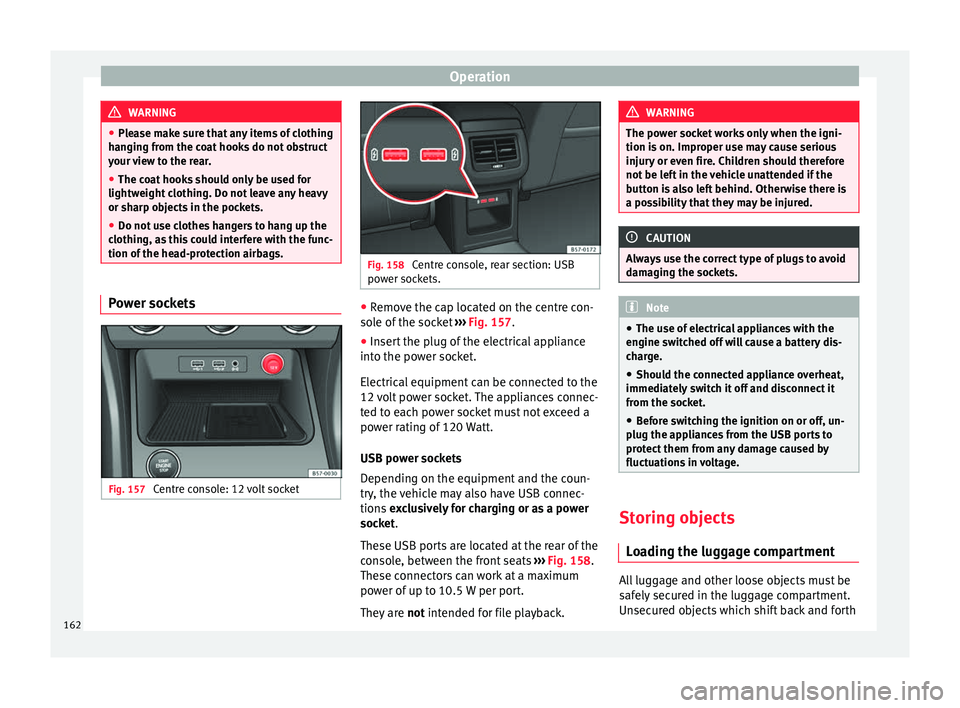
Fig. 157
Centre console: 12 volt socket Fig. 158
Centre console, rear section: USB
pow er soc
kets. ●
Remove the cap located on the centre con-
so l
e of
the socket ››› Fig. 157.
● Insert the plug of the electrical appliance
into the pow
er socket.
Electrical equipment can be connected to the
12 volt power socket. The appliances connec-
ted to each power socket must not exceed a
power rating of 120 Watt.
USB power sockets
Depending on the equipment and the coun-
try, the vehicle may also have USB connec-
tions exclusively for charging or as a power
socket.
These USB ports are located at the rear of the
console, between the front seats ››› Fig. 158.
These connectors can work at a maximum
power of up to 10.5 W per port.
They are not intended for file playback. WARNING
The power socket works only when the igni-
tion is on. Impr
oper use may cause serious
injury or even fire. Children should therefore
not be left in the vehicle unattended if the
button is also left behind. Otherwise there is
a possibility that they may be injured. CAUTION
Always use the correct type of plugs to avoid
dam agin
g the sockets. Note
● The use of el
ectrical appliances with the
engine switched off will cause a battery dis-
charge.
● Should the connected appliance overheat,
immediately
switch it off and disconnect it
from the socket.
● Before switching the ignition on or off, un-
plug the app
liances from the USB ports to
protect them from any damage caused by
fluctuations in voltage. Storing objects
Lo
a
ding the luggage compartment All luggage and other loose objects must be
s
af
ely
secured in the luggage compartment.
Unsecured objects which shift back and forth
162