brake light Seat Ateca 2018 Service Manual
[x] Cancel search | Manufacturer: SEAT, Model Year: 2018, Model line: Ateca, Model: Seat Ateca 2018Pages: 348, PDF Size: 7.32 MB
Page 236 of 348
Operation
Traffic Jam Assist is not active (the Lane As-
s i
s
t control light turns yellow)
● If any of the conditions mentioned on
page 233, T
echnical requirements for using
Traffic Jam Assist are no longer met.
● If any of the conditions required for opera-
tion of the Lane Ass
ist are not met
››› page 230.
● If any of the conditions necessary for the
adaptiv
e cruise control (ACC) to work are no
longer fulfilled ››› page 221.
Situations in which Traffic Jam Assist must
be switched off
Due to the limitations of the system, Traffic
Jam Assist must always be switched off in the
following situations:
● When more attention is required by the
driver.
● When driv
ing in a very sporty style.
● In adverse weather conditions, e.g. in case
of sno
w or heavy rain.
● When driving on roads in poor condition.
● In sections with roadworks.
● In city journeys. WARNING
The smart technology incorporated into Traf-
fic Jam As s
ist cannot defy the laws of phys-
ics; it only works within the limits of the sys- tem. Accidents and severe injury may occur if
Tr
affic
Jam Assist is used negligently or invol-
untarily. The system is not a replacement for
driver awareness.
● Adapt your speed and safe distance to the
vehicl
e in front of you at all times to suit the
visibility, weather, road and traffic condi-
tions.
● Do not use Traffic Jam Assist in city jour-
neys.
● Do not u
se Traffic Jam Assist if there is poor
vis
ibility, for example, in case of snow, ice,
rain or loose gravel, or on steep or slippery
sections or flooded roads.
● Do not use Traffic Jam Assist offroad or on
roa
ds where the surface is not firm. Traffic
Jam Assist has been designed for use on
paved roads only.
● Traffic Jam Assist does not react to people
or animal
s or vehicles crossing your path or
that approach you head-on down the same
lane.
● If Traffic Jam Assist does not reduce speed
sufficiently
, brake the vehicle immediately by
applying the pedal.
● If the vehicle continues to move when you
wish it
to stop after a driver intervention
prompt, brake the vehicle by applying the
pedal.
● If driver intervention is requested on the
da
sh panel display, immediately resume con-
trol of the vehicle.
● Keep your hands on the wheel at all times
to be re
ady to intervene in the steering at any time. The driver is always responsible for
keepin
g the
vehicle in its own lane.
● Always be prepared to take charge of driv-
ing (acc
elerating or braking) yourself. Note
● If T
raffic Jam Assist does not work as de-
scribed in this chapter, stop using it and con-
tact a specialised workshop.
● If the system is faulty, take it to a special-
ised work
shop and have it checked. Emergency Assist
D es
cription and operation Emergency Assist detects whether there is in-
activ
ity
b
y the driver and can automatically
keep the car within the lane and stop it alto-
gether if necessary. This way the system can
actively help avoid an accident.
Emergency Assist is an additional function of
Lane Assist ››› page 230 and combines Lane
Assist functions with Adaptive Cruise Control
(ACC) ››› page 221. Therefore, it is essential
that you read these two chapters carefully
and note the limitations of the systems and
the information about them.
234
Page 237 of 348
Driver assistance systems
Operation of Emergency Assist
Emer g
ency
Assist detects when the driver
ceases to perform any activity and repeatedly
requests that he/she regain active control of
the vehicle, through the use of optical and
acoustic warnings and by applying the
brakes.
If the driver continues to do nothing, the sys-
tem automatically takes over the accelerator,
brakes and steering in order to brake the ve-
hicle and keep it in its lane ››› . When the
Emer g
ency
Assist is actively adjusting, the
hazard warning lights come on ››› page 149
and the vehicle makes slight zigzag move-
ments in the lane in order to warn other driv-
ers.
If the remaining braking distance is suffi-
cient, if necessary the system slows down the
vehicle until it stops completely and auto-
matically switches on the electronic parking
brake ››› page 186.
Switching the Emergency Assist on and off
The Emergency Assist is switched on auto-
matically when the Lane Assist is switched on
››› page 230.
Technical requirements for using the Emer-
gency Assist ● The adaptive cruise control (ACC) must be
switc
hed on ››› page 221. ●
The Lane Assi
st must be switched on
››› page 230.
● The selector lever must be in the D/S posi-
tion or in the
Tiptronic selector gate.
● The system must have detected a lane sep-
aration line on both side
s of the vehicle
››› Fig. 204.
The following conditions may cause the
Emergency Assist not to react or to switch off
automatically:
● If the driver accelerates, brakes or moves
the steerin
g wheel.
● If any of the conditions mentioned in
›››
page 235, Technical requirements for us-
ing the Emergency Assist are not fulfilled.
● If any of the conditions required for opera-
tion of the Lane Ass
ist are not met
››› page 230.
● If any of the conditions necessary for the
adaptiv
e cruise control (ACC) to work are no
longer fulfilled ››› page 221. WARNING
The smart technology incorporated into the
Emerg ency
Assist cannot overcome the limits
imposed by the laws of physics; it only works
within the limits of the system. The driver is
responsible for driving the vehicle.
● Adapt your speed and safe distance to the
vehicl
e in front of you at all times to suit the visibility, weather, road and traffic condi-
tions.
● Keep
your hands on the wheel at all times
to be re
ady to intervene in the steering at any
time.
● The Emergency Assist alone cannot always
avoid acc
idents or serious injuries.
● If the operation of the Emergency Assist is
impaired, f
or example if the radar sensor of
the adaptive cruise control (ACC) or the Lane
Assist camera are covered or have lost their
settings, the system may intervene inoppor-
tunely in braking or in steering.
● The Emergency Assist does not react to
people or anim
al or vehicles crossing your
path or which approach you head-on in the
same lane. WARNING
If the Emergency Assist Intervenes inoppor-
tu nely
, serious accidents and injuries may oc-
cur.
● If the Emergency Assist does not operate
properly, sw
itch off the Lane Assist
››› page 230. Doing so will also switch off the
Emergency Assist.
● Have the system checked by a specialised
workshop
. SEAT recommends visiting a SEAT
dealership for this. » 235
Technical data
Advice
Operation
Emergencies
Safety
Page 238 of 348
Operation
Note
● Autom atic
interventions by the Emergency
Assist on the brakes may be interrupted by
pressing the accelerator or brake or by mov-
ing the wheel.
● Hazard warning lights that come on auto-
matica
lly can be switched off by pressing the
accelerator or the break, moving the steering
wheel or pressing the hazard warning light
switch.
● If this occurs, the Emergency Assist may
deceler
ate the vehicle until it comes to a com-
plete stop.
● When the Emergency Assist is activated, it
is on
ly available again after the ignition has
been switched off and back on again. 236
Page 258 of 348
Operation
Exiting a parking space with Park As-
s i
s
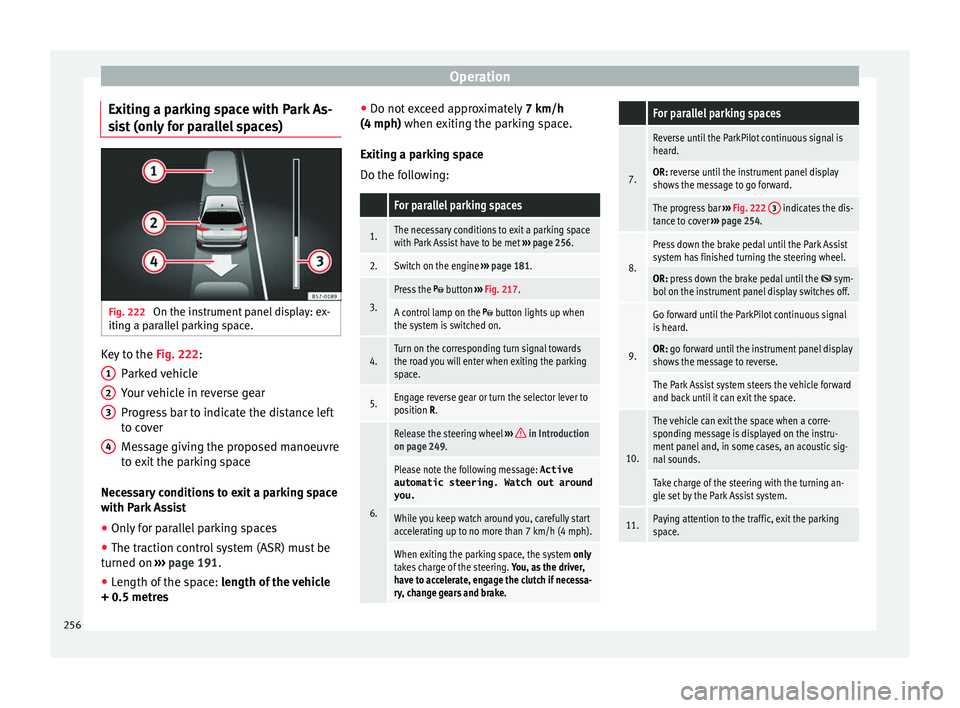
t (only for parallel spaces) Fig. 222
On the instrument panel display: ex-
itin g a p
ar
allel parking space. Key to the
Fig. 222:
P ark
ed
vehicle
Your vehicle in reverse gear
Progress bar to indicate the distance left
to cover
Message giving the proposed manoeuvre
to exit the parking space
Necessary conditions to exit a parking space
with Park Assist
● Only for parallel parking spaces
● The traction control system (ASR) must be
turned on ››
› page 191.
● Length of the space: leng
th of the vehicle
+ 0.5 metres 1 2
3
4 ●
Do not e
x
ceed approximately 7 km/h
(4 mph) when exiting the parking space.
Exiting a parking space
Do the following:
For parallel parking spaces
1.The necessary conditions to exit a parking space
with Park Assist have to be met ››› page 256.
2.Switch on the engine ››› page 181.
3.
Press the button ››› Fig. 217.
A control lamp on the button lights up when
the system is switched on.
4.Turn on the corresponding turn signal towards
the road you will enter when exiting the parking
space.
5.Engage reverse gear or turn the selector lever to
position R.
6.
Release the steering wheel ››› in Introduction
on page 249.
Please note the following message: Active
automatic steering. Watch out around
you.
While you keep watch around you, carefully start
accelerating up to no more than 7 km/h (4 mph).
When exiting the parking space, the system only
takes charge of the steering. You, as the driver,
have to accelerate, engage the clutch if necessa-
ry, change gears and brake.
For parallel parking spaces
7.
Reverse until the ParkPilot continuous signal is
heard.
OR: reverse until the instrument panel display
shows the message to go forward.
The progress bar ››› Fig. 222 3 indicates the dis-
tance to cover ››› page 254.
8.
Press down the brake pedal until the Park Assist
system has finished turning the steering wheel.
OR: press down the brake pedal until the sym-
bol on the instrument panel display switches off.
9.
Go forward until the ParkPilot continuous signal
is heard.
OR: go forward until the instrument panel display
shows the message to reverse.
The Park Assist system steers the vehicle forward
and back until it can exit the space.
10.
The vehicle can exit the space when a corre-
sponding message is displayed on the instru-
ment panel and, in some cases, an acoustic sig-
nal sounds.
Take charge of the steering with the turning an-
gle set by the Park Assist system.
11.Paying attention to the traffic, exit the parking
space. 256
Page 264 of 348
Operation
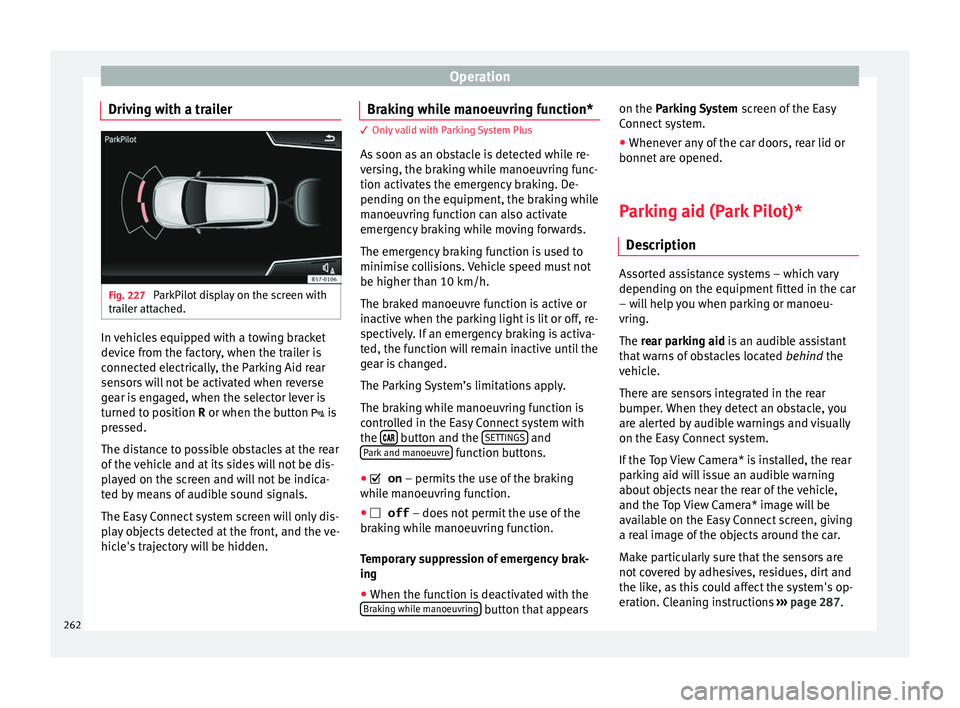
Driving with a trailer Fig. 227
ParkPilot display on the screen with
tr ai
l
er attached. In vehicles equipped with a towing bracket
dev
ic
e fr
om the factory, when the trailer is
connected electrically, the Parking Aid rear
sensors will not be activated when reverse
gear is engaged, when the selector lever is
turned to position R or when the button is
pressed.
The distance to possible obstacles at the rear
of the vehicle and at its sides will not be dis-
played on the screen and will not be indica-
ted by means of audible sound signals.
The Easy Connect system screen will only dis-
play objects detected at the front, and the ve-
hicle's trajectory will be hidden. Braking while manoeuvring function* 3 Only valid with Parking System Plus
As
soon a
s an obstacle is detected while re-
versing, the braking while manoeuvring func-
tion activates the emergency braking. De-
pending on the equipment, the braking while
manoeuvring function can also activate
emergency braking while moving forwards.
The emergency braking function is used to
minimise collisions. Vehicle speed must not
be higher than 10 km/h.
The braked manoeuvre function is active or
inactive when the parking light is lit or off, re-
spectively. If an emergency braking is activa-
ted, the function will remain inactive until the
gear is changed.
The Parking System’s limitations apply.
The braking while manoeuvring function is
controlled in the Easy Connect system with
the button and the
S
ET
TINGS and
P ark
and m
anoeuvre function buttons.
● on – permits the u
se of the braking
while manoeuvring function.
● off – does not
permit the use of the
braking while manoeuvring function.
Temporary suppression of emergency brak-
ing
● When the function is deactivated with the
Brak in
g while manoeuvring button that appearson the P
arking System
s
c
reen of the Easy
Connect system.
● Whenever any of the car doors, rear lid or
bonnet are opened.
P
arking aid (Park Pilot)*
Des
cription Assorted assistance systems – which vary
depending on the equipment
fitt
ed in the car
– will help you when parking or manoeu-
vring.
The rear parking aid is an audible assistant
that warns of obstacles located behind the
vehicle.
There are sensors integrated in the rear
bumper. When they detect an obstacle, you
are alerted by audible warnings and visually
on the Easy Connect system.
If the Top View Camera* is installed, the rear
parking aid will issue an audible warning
about objects near the rear of the vehicle,
and the Top View Camera* image will be
available on the Easy Connect screen, giving
a real image of the objects around the car.
Make particularly sure that the sensors are
not covered by adhesives, residues, dirt and
the like, as this could affect the system's op-
eration. Cleaning instructions ››› page 287.
262
Page 276 of 348
Operation
Vehicles with the Start-Stop system
If the
v
ehicle has a factory-fitted towing
bracket or one that is retrofitted by SEAT, the
Start-Stop system operates as normal. No
special characteristics need to be taken into
account.
If the system does not recognise the trailer or
the trailer bracket has not been retrofitted by
SEAT, the Start-Stop system must be discon-
nected by pressing the corresponding button
in the lower part of the centre console before
driving with the trailer, and it should remain
off for the rest of the journey ››› .
V ehic
l
es with driving profile selection
If you are going to be towing a trailer, the use
of the Eco driving profile is not recommen-
ded. You are advised to select another of the
available driving profiles before beginning to
drive with a trailer. WARNING
Never use the trailer to transport people,
sinc e it
would put their life in danger and is
also prohibited. WARNING
Undue use of the towing bracket may cause
injury and ac
cidents.
● Only use the towing bracket if it is in a per-
fect s
tate of repair and is properly secured. ●
Never modif y
or repair the towing bracket
in any way.
● In order to reduce the danger of injury in
the event of
rear-end collisions and to avoid
injury to pedestrians and cyclists when park-
ing the vehicle, cover or remove the tow hitch
when you are not using a trailer.
● Never fit a towing bracket “with weight dis-
tribution” or “loa
d compensation”. The vehi-
cle has not been designed for this type of
towing bracket. The towing bracket could fail
and the trailer could be released from the ve-
hicle. WARNING
Driving with a trailer and transporting heavy
or lar g
e objects can affect driving properties
and even cause an accident.
● Always secure the load properly using belts
or strap
s that are suitable and in good condi-
tion.
● Adapt your speed and driving style at all
times t
o suit visibility, weather, road and traf-
fic conditions.
● Trailers with a high centre of gravity are
more likely
to overturn than those with a low
one.
● Avoid sudden braking and manoeuvres.
● Take great care when overtaking.
● Reduce speed immediately if you notice
that the tr
ailer is swaying, however slightly. ●
Never driv e at
more than 80 km/h (50 mph)
when towing a trailer (or at more than
100 km/h (60 mph) in exceptional circum-
stances). This also applies in countries where
driving at higher speeds is permitted. Take
into account the speed limit for vehicles with
trailers in the corresponding country, as it
could be less than the speed limit for vehi-
cles without a trailer.
● Never attempt to “straighten” the towing
vehicl
e and trailer while accelerating. WARNING
If the towing bracket has been retrofitted by a
non-S EA
T workshop, the Start-Stop system
must be disconnected manually whenever
driving with a trailer. Otherwise the brake
system could be damaged and could conse-
quently cause a serious accident or injury.
● Always disconnect the Start-Stop system
manual
ly when using a towing bracket that
has not been fitted by a SEAT workshop. Note
● Bef or
e hitching or unhitching a trailer, al-
ways deactivate the anti-theft alarm
››› page 125. Otherwise, the tilt sensor could
cause the alarm to go off.
● Do not drive with a trailer for the engine's
first
1000 km ››› page 201.
● SEAT recommends that, if possible, the tow
hitch be di
sassembled or covered when it is274
Page 277 of 348

Towing bracket device*
not going to be used. In the event of a rear-
end co
l
lision, the damage to the vehicle
could be greater if the bracket is fitted.
● Some retrofitted towing brackets cover the
rear t
owing eye. In these cases, the towing
eye should not be used for tow-starting or for
towing other vehicles. For this reason, if the
vehicle has been retrofitted with a towing
bracket, always keep the tow hitch in the ve-
hicle when you disassemble it. Control lamp
Lamp on button lights up
The tow hitch is not securely locked in position.
Check that the towing bracket is locked
››› page 276. Some warning and control lamps will light up
briefly
when the ignition i
s
switched on to
check certain functions. They will switch off
after a few seconds. WARNING
If the warning lamps and the corresponding
mes s
ages are ignored when they light up, the
vehicle may stall in traffic and cause acci-
dents and severe injuries.
● Never ignore the warning lamps or messag-
es.
● Stop the
vehicle at the next opportunity
and in a safe p
lace. CAUTION
Failure to heed the control lamps and corre-
spondin g t
ext messages when they light up
may result in damage to the vehicle. Technical requirements
Vehicles that are
factor
y-equipped with a
towing bracket fulfil all the technical and le-
gal requirements for driving with a trailer.
If the vehicle is retrofitted with a towing
bracket, only a bracket that is authorised for
the maximum authorised load of the trailer
that is to be towed may be fitted. The towing
bracket must be suitable for the vehicle and
the trailer and must be properly secured to
the vehicle's chassis. Only use a towing
bracket that has been authorised by SEAT for
this vehicle. Always check and take into ac-
count the towing bracket manufacturer's in-
structions. Never fit a towing bracket “with
weight distribution” or “load compensation”.
Towing bracket fitted on the bumper
Never fit a towing bracket to the bumper or to
the area where the bumper is mounted. The
towing bracket should not impair the bum-
per's function. Do not make modifications or
repairs to the exhaust system or the brake
system. Make regular checks to ensure that
the towing bracket is secure. Engine cooling system
Drivin
g w
ith a trailer increases the load on
the engine and cooling system. The cooling
system should have sufficient coolant and be
prepared for the additional effort involved in
driving with a trailer.
Trailer brakes
If the trailer has its own brake system, please
take the relevant legal requirements into ac-
count. Never connect the trailer's brake sys-
tem to the vehicle's brake system.
Tow rope
Always use a cable between the vehicle and
the trailer ››› page 278.
Trailer rear lights
The trailer's rear lights should comply with
the statutory safety regulations ››› page 278.
Never connect the trailer's rear lights directly
to the vehicle's electric system. If you are not
sure that the trailer's electrical connection is
correct, have it checked by a specialised
workshop. SEAT recommends visiting a SEAT
dealership for this.
Exterior mirrors
If you cannot see the area behind the trailer
with the exterior mirrors of the towing vehi-
cle, additional mirrors will have to be instal-
led in accordance with the regulations of the »
275
Technical data
Advice
Operation
Emergencies
Safety
Page 278 of 348
Operation
country in question. The exterior mirrors
shou l
d be a
djusted before you start driving
and must provide a sufficient field of vision
at the rear.
Trailer maximum electricity consumption
ConsumersEurope, Asia, Africa, South America and
Central AmericaAustralia
Brake lights (total)84 Watts108 Watts
Turn signal (on each
side)42 Watts54 Watts
Side lights (on each
side)50 Watts100 Watts
Reverse lights (in
total)42 Watts54 Watts
Rear fog light42 Watts54 Watts
Never exceed the values indicated! WARNING
If the towing bracket is wrongly fitted or is
not the right one, the tr
ailer could become
detached from the vehicle and cause serious
injury. CAUTION
● If the r e
ar lights of the trailer are not cor-
rectly connected, the vehicle's electronic sys-
tem may be damaged.
● If the trailer absorbs excessive electric cur-
rent, the v
ehicle's electronic system may be
damaged.
● Never connect the trailer's electric system
directly t
o the electrical connections of the
tail lights or any other power sources. Only
use the connections intended for providing
electric current to the trailer. Electrical unlocking tow hitch
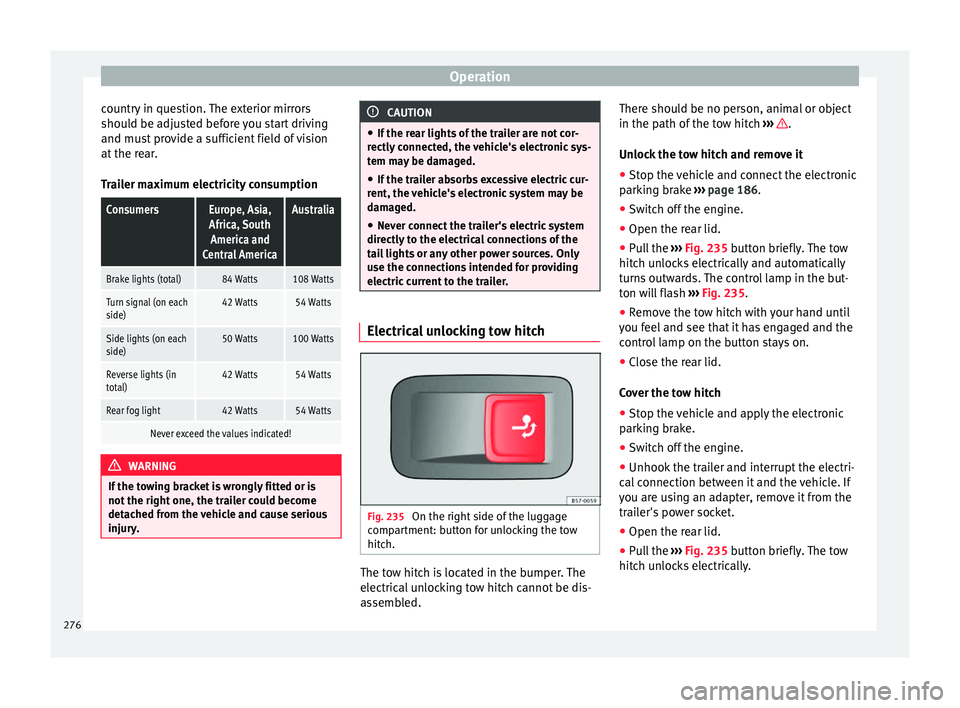
Fig. 235
On the right side of the luggage
c omp
ar
tment: button for unlocking the tow
hitch. The tow hitch is located in the bumper. The
el
ectric al
unlocking tow hitch cannot be dis-
assembled. There should be no person, animal or object
in the path of the t
ow hitch ››› .
Un loc
k
the tow hitch and remove it
● Stop the vehicle and connect the electronic
parkin
g brake ››› page 186.
● Switch off the engine.
● Open the rear lid.
● Pull the ››› Fig. 235 b
utton briefly. The tow
hitch unlocks electrically and automatically
turns outwards. The control lamp in the but-
ton will flash ››› Fig. 235.
● Remove the tow hitch with your hand until
you feel
and see that it has engaged and the
control lamp on the button stays on.
● Close the rear lid.
Cov
er the tow hitch
● Stop the vehicle and apply the electronic
parkin
g brake.
● Switch off the engine.
● Unhook the trailer and interrupt the electri-
cal c
onnection between it and the vehicle. If
you are using an adapter, remove it from the
trailer's power socket.
● Open the rear lid.
● Pull the ››› Fig. 235
button briefly. The tow
hitch unlocks electrically.
276
Page 280 of 348

Operation
Hooking up and connecting a trailer Fig. 236
Schematic diagram: assignment of
the pins of the trailer's power socket.
Key to the Fig. 236:
PinMeaning
1Left turn signal
2Rear fog light
3Earth for pins 1, 2, 4, 5, 6, 7 and 8
4Right turn signal
5Rear light, right
6Brake lights
7Rear light, left
8Reverse lights
9Permanent live
10Live charge cable
11Earth for pin 10
Key to the Fig. 236:
PinMeaning
12Unassigned
13Earth for pin 9 Trailer power socket
The v
ehic
le is fitted with a 13-pole power
socket for the electrical connection between
the trailer and the vehicle. With the engine
running, electrical devices on the trailer re-
ceive power from the electrical connection
(pin 9 and pin 10 of the trailer power socket).
If the system detects that a trailer has been
connected electrically, the electrical equip-
ment on the trailer will receive voltage
through this connection (pins 9 and 10). Pin
9 has a permanent live. This powers, for ex-
ample, the trailer's interior lighting. Electrical
devices such as a fridge in a caravan only re-
ceive electrical power if the engine is running
(through pin 10).
To avoid overloading the electrical system,
you cannot connect the ground wires of pin
3, pin 11 or pin 13.
If the trailer has a 7-contact connector , you
will need to use an adapter cable. In this case
the function corresponding to pin 10 will not
be available. Tow rope
The to
w r
ope must always be securely fixed
to the towing vehicle and loose enough so
that the vehicle can handle turns smoothly.
However, make sure that the cable does not
rub on the ground while driving.
Trailer rear lights
Always check the trailer's rear lights to en-
sure they are working correctly and that they
comply with the relevant safety regulations.
Make sure that the maximum permissible
power that can be absorbed by the trailer is
not exceeded ››› page 276.
Connection to the anti-theft system
The trailer is included in the anti-theft system
if the following conditions are met: ● If the vehicle is factory-equipped with an
anti-theft al
arm and towing bracket.
● If the trailer is electrically connected to the
tow
ing vehicle through the trailer power
socket.
● If the electrical systems of the vehicle and
trail
er are in perfect condition and have no
faults or damage.
● If the vehicle is locked with the key and the
anti-theft al
arm is activated.
When the vehicle is locked, the alarm is trig-
gered if the electrical connection with the
trailer is cut off.
278
Page 282 of 348
Operation
To promote safety while driving, SEAT recom-
mend s
m
aking the most of the maximum ver-
tical load technically permissible on the cou-
pling device ››› page 273. An insufficient ver-
tical load has a negative influence on the be-
haviour of both the vehicle and trailer.
The vertical load increases the weight on the
rear axle, reducing the vehicle's carrying ca-
pacity.
Gross combination weight of the towing ve-
hicle and trailer
The gross combination weight is the actual
weight of the loaded vehicle plus the actual
weight of the loaded trailer.
In some countries trailers are classified into
distinct categories. SEAT recommends ob-
taining information from a specialised work-
shop regarding which type of trailer is most
suitable for your vehicle.
Trailer loading
The weight of the towing vehicle and trailer
must be balanced. In order to do this, the
load must be as close as possible to the max-
imum vertical load technically permissible on
the coupling point, and it must be evenly dis-
tributed between the back and front of the
trailer:
● Distribute loads in the trailer so that heavy
obj
ects are as near to the axle as possible or
above it. ●
Secure the tr
ailer load properly.
Tyre pressure
Set the tyre pressure of the trailer tyres in ac-
cordance with the trailer manufacturer's rec-
ommendations.
When towing a trailer, inflate the tyres of the
towing vehicle with the maximum allowable
pressure ››› page 308. WARNING
If the maximum permissible axle weight, the
max imum lo
ad technically permissible on the
coupling point, the maximum authorised ve-
hicle weight or the gross combination weight
of the towing vehicle and trailer are excee-
ded, accidents and serious injuries may oc-
cur.
● Never exceed the values indicated!
● The actual weight on the front and rear
axle
s must never exceed the maximum per-
missible axle weight. The weight on the front
and rear axles must never exceed the maxi-
mum permissible weight. WARNING
A shift in weight could jeopardize the stabili-
ty and sec urity
of the towing vehicle and
trailer, which could lead to accidents and se-
rious injuries.
● Always load the trailer correctly. ●
Alw a
ys secure the load properly using belts
or straps that are suitable and in good condi-
tion. Driving with a trailer
Adjusting the headlights
When to
w
ing a trailer, the front part of the ve-
hicle could lift up, and if the dipped beams
are on, this could dazzle other drivers. Use
the headlight range control to lower the cone
of light. If you do not have headlight range
control, have the headlights adjusted by a
specialised workshop.
Special characteristics of driving with a trail-
er
● If your trailer has an overru
n brake, brake
gently at first and then rapidly. This will pre-
vent the jerking that can be caused by the
locking of trailer wheels.
● Due to the gross combination weight of the
tow
ing vehicle and trailer, the braking dis-
tance increases.
● When going down a slope, go into a lower
gear (if
using a manual gearbox or the tip-
tronic automatic gearbox mode) to take ad-
vantage of the braking power provided by the
engine. Otherwise, the braking system could
overheat and even fail.
280