wheel Seat Ateca 2018 Workshop Manual
[x] Cancel search | Manufacturer: SEAT, Model Year: 2018, Model line: Ateca, Model: Seat Ateca 2018Pages: 348, PDF Size: 7.32 MB
Page 209 of 348
Driving
●
The brak in
g capability of your vehicle is
limited by the tyres' grip. It is therefore no
different from a car without four-wheel drive.
So do not be tempted to drive too fast on firm
or slippery roads just because the vehicle
still has good acceleration in these condi-
tions. Risk of accident!
● On wet roads bear in mind that the front
wheels m
ay start to “aquaplane” and lose
contact with the road if the car is driven too
fast. If this should happen, there will be no
sudden increase in engine speed to warn the
driver, as occurs with a front-wheel drive car.
For this reason you should always choose a
driving speed suitable for the road condi-
tions. Risk of accident! 207
Technical data
Advice
Operation
Emergencies
Safety
Page 210 of 348
Operation
Driver assistance systems
St ar
t
-Stop System*
Description and operation The Start-Stop system helps save fuel and re-
duce C
O
2 emi
ssions.
In Start-Stop mode, the engine will automati-
cally switch off when the vehicle stops or is
stopping; for example when stopping at traf-
fic lights. The ignition remains switched on
during the stopping phase. The engine auto-
matically switches back on when required. In
this situation, the light of the START ENGINE STOP button stays on
1)
.
As soon a
s
the ignition is switched on, the
Start-Stop function is automatically activa-
ted.
Further information about the Start-Stop sys-
tem can be found in the Easy Connect sys-
tem: by pressing the button in the Vehi-
cle status menu.
B a
s
ic requirements for the Start-Stop mode
● The driver door must be closed.
● The driver must have their seat belt fas-
tened. ●
The bonnet mus
t be closed.
● The engine must have reached a minimum
servic
e temperature.
● The reverse gear must not be engaged.
● The vehicle must not be on a very steep
slope. WARNING
● Never sw it
ch the engine off until the vehi-
cle is stationary. The brake servo and power
steering functions will not be completely cov-
ered under warranty. More force may also be
needed to turn the steering wheel or to brake.
As you cannot steer and brake in the normal
manner, there is a greater risk of accidents
and serious injury.
● Never remove the key from the ignition if
the vehic
le is in motion. Otherwise, the steer-
ing could lock making it impossible to steer
the vehicle.
● To avoid injury, make sure that the Start-
Stop sys
tem is switched off when working in
the engine compartment ››› page 210. CAUTION
The Start-Stop system must always be
swit c
hed off when driving through flooded
areas ››› page 210. Stopping/Starting the engine
Vehicles with a manual gearbox
– Before stopping the vehicle or when it is
stop
ped, put it into neutral and release the
clutch pedal. The engine will switch off. The
warning lamp will appear on the instru-
ment panel display. The engine may stop
before the vehicle comes to a halt in the
deceleration phase (at 7 km/h).
– When the clutch pedal is pressed the en-
gine wil
l start up again. The warning lamp
will switch off.
Vehicles with an automatic gearbox – Use the foot brake to bring the vehicle to a
stop and k
eep the brake pedal pressed
down with your foot. The engine will switch
off. The warning lamp will appear in the
display. The engine may stop before the ve-
hicle comes to a halt in the deceleration
phase (at 7 km/h or 2 km/h, depending on
the vehicle’s gearbox).
– When you take your foot off the brake pedal
the engine wi
ll start up again. The warning
lamp will switch off. In vehicles with the Au-
to Hold* system, when the system is active,
the engine will not start if you remove your
foot from the brake pedal. The car starts
when you press the accelerator pedal. 1)
Only in vehicles with Keyless Access.
208
Page 211 of 348
Driver assistance systems
Additional information related to the auto-
m atic
g
earbox
The engine stops when the selector lever is in
the positions P, D, N and S, in addition to
when in manual mode. With the selector lev-
er in position P, the engine will also remain
switched off when you take your foot off the
brake pedal. In order to start the engine up
again the accelerator must be pressed, or an-
other gear engaged or the brake released.
If the selector lever is placed in position R
during the stopping phase, the engine will
start up again.
Change from position D to P to prevent the
engine from accidentally starting when
changing and passing by position R.
Additional information about vehicles with
Adaptive Cruise Control (ACC)
In vehicles with ACC function, the engine will
start up again in certain operating conditions
if the radar sensor detects that the vehicle
ahead drives off again. Note
● In v ehic
les with an automatic gearbox, you
can control whether the engine should switch
off or not by reducing or increasing the brake
force applied. While the vehicle remains stop-
ped, the engine will not stop if the brake ped-
al is slightly pressed, in traffic jams with fre-
quent stopping and starting for example. As soon as strong pressure is applied to the
brak
e ped
al, the engine will stop.
● In vehicles with manual gearbox, during
the stop
ping phases the brake pedal must re-
main depressed to prevent the vehicle from
moving.
● If the engine “stalls” in vehicles with man-
ual g
earbox, it can be directly started up
again by immediately pressing the clutch
pedal. General notes
The system can interrupt the Start-Stop mode
fr
equently
f
or different reasons.
The engine does not switch off
Before the stopping phase, the system veri-
fies whether certain conditions are met. The
engine does not switch off, in the following
situations for example:
● The engine has not yet reached the mini-
mum required t
emperature for the Start-Stop
mode.
● The interior temperature selected for the air
conditioner ha
s not yet been reached.
● The interior temperature is very high/low.
● Defrost function button activated
›› ›
page 51.
● The parking aid* is switched on. ●
The batt er
y is very low.
● The steering wheel is overly turned or is be-
ing turned.
● If
there is a danger of misting.
● After engaging reverse gear.
● In case of a very steep gradient.
The indication
is shown on the instrument
panel display, and in addition, the driver in-
formation system* shows, .
The engine starts by itself
During a stopping phase the normal Start-
Stop mode can be interrupted in the follow-
ing situations: The engine restarts by itself
without involvement from the driver.
● The interior temperature differs from the
value select
ed on the air conditioner.
● Defrost function button activated
›››
page 51.
● The brake has been pressed several times
consec
utively.
● The battery is too low.
● High power consumption. Note
In vehicles with an automatic gearbox, if the
select or l
ever is placed in position D, N or S
after engaging reverse gear, the vehicle must
be driven at a speed faster than 10 km/h (6 » 209
Technical data
Advice
Operation
Emergencies
Safety
Page 212 of 348
Operation
mph) for the system to return to conditions in
which the en
gine c
an be stopped.Manually switching on/off the Start-
Stop sy
s
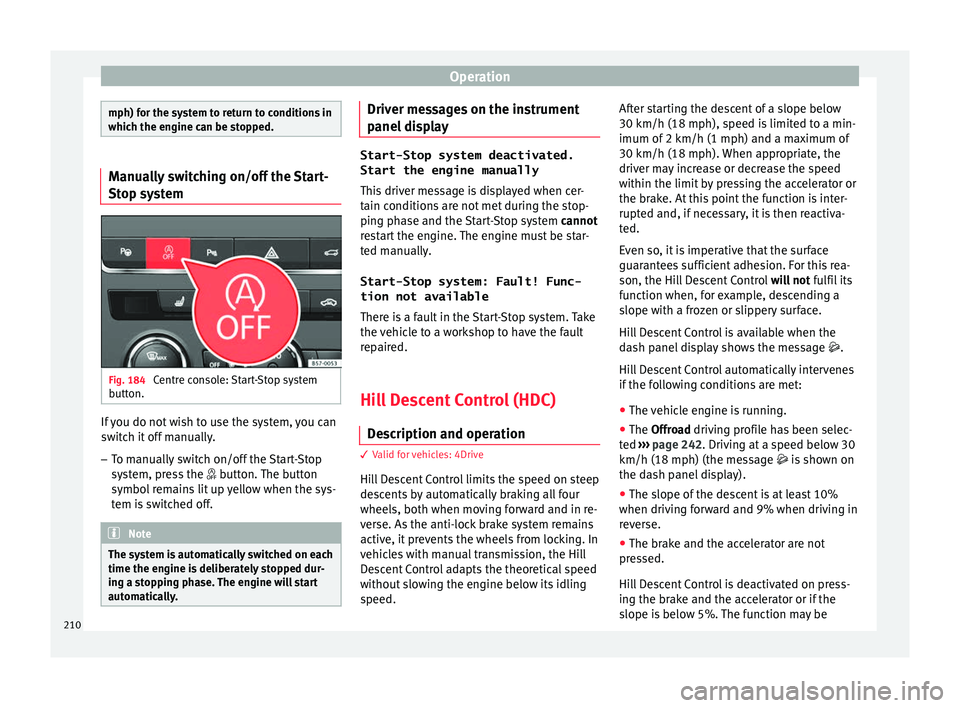
tem Fig. 184
Centre console: Start-Stop system
b utt
on. If you do not wish to use the system, you can
sw
it
c
h it off manually.
– To manually switch on/off the Start-Stop
syst
em, press the button. The button
symbol remains lit up yellow when the sys-
tem is switched off. Note
The system is automatically switched on each
time the engine i s
deliberately stopped dur-
ing a stopping phase. The engine will start
automatically. Driver messages on the instrument
p
anel
di
splay Start-Stop system deactivated.
Start the engine manually
This driv
er message is displayed when cer-
tain conditions are not met during the stop-
ping phase and the Start-Stop system cannot
restart the engine. The engine must be star-
ted manually.
Start-Stop system: Fault! Func-
tion not available There is a fault in the Start-Stop system. Take
the vehicle to a workshop to have the fault
repaired.
Hill Descent Control (HDC) De s
cription and operation 3 V
alid for vehicles: 4Drive
Hi
ll Descent Control limits the speed on steep
descents by automatically braking all four
wheels, both when moving forward and in re-
verse. As the anti-lock brake system remains
active, it prevents the wheels from locking. In
vehicles with manual transmission, the Hill
Descent Control adapts the theoretical speed
without slowing the engine below its idling
speed. After starting the descent of a slope below
30 km/h (18 mph), speed i
s
limited to a min-
imum of 2 km/h (1 mph) and a maximum of
30 km/h (18 mph). When appropriate, the
driver may increase or decrease the speed
within the limit by pressing the accelerator or
the brake. At this point the function is inter-
rupted and, if necessary, it is then reactiva-
ted.
Even so, it is imperative that the surface
guarantees sufficient adhesion. For this rea-
son, the Hill Descent Control will not fulfil its
function when, for example, descending a
slope with a frozen or slippery surface.
Hill Descent Control is available when the
dash panel display shows the message .
Hill Descent Control automatically intervenes
if the following conditions are met:
● The vehicle engine is running.
● The Offroad driving profile has been selec-
ted ›
›› page 242. Driving at a speed below 30
km/h (18 mph) (the message is shown on
the dash panel display).
● The slope of the descent is at least 10%
when driving f
orward and 9% when driving in
reverse.
● The brake and the accelerator are not
pres
sed.
Hill Descent Control is deactivated on press-
ing the brake and the accelerator or if the
slope is below 5%. The function may be
210
Page 220 of 348
Operation
The warning moment varies depending on
the tr affic
s
ituation and driver behaviour. At
the same time, the vehicle will prepare for a
possible emergency braking ››› .
C ritic
a
l warning
If the driver fails to react to the pre-warning
(advance warning), the system may actively
intervene in the brakes and generate a brief
jolt to warn the driver of the imminent danger
of a collision.
Automatic braking
If the driver also fails to react to the critical
warning, the system may initiate independ-
ent emergency braking by progressively in-
creasing the braking effect in accordance
with how critical the situation is.
Driver emergency brake assist system
Faced with an imminent collision, the system
may detect that the driver is not braking hard
enough to avoid the collision. In this case, it
will automatically increase the braking effect.
Due to certain driving circumstances and the
limitations of its operation, there are some
cases in which the system cannot prevent a
collision, although it can significantly mini-
mise the consequences by reducing the
speed and the force of the impact. WARNING
Observe the safety warnings ›››
in Warning
and contr o
l lamps on page 119. WARNING
The Front Assist system cannot change the
la w
s of physics or replace the driver in terms
of keeping control of the vehicle and reacting
to a possible emergency situation. WARNING
Following a Front Assist emergency warning,
pa y
immediate attention to the situation and
try to avoid the collision by braking or by
dodging the obstacle, as applicable.
● If the Front Assist does not work as descri-
bed in this c
hapter (e.g. it repeatedly inter-
venes unnecessarily), switch it off.
● Adapt your speed and safe distance to the
vehicl
e in front of you at all times to suit visi-
bility, weather, road and traffic conditions.
● The Front Assist alone cannot avoid acci-
dents and seriou
s injuries.
● In complex driving situations, occasionally
the Front As
sist may issue warnings and in-
tervene in braking unnecessarily, for example
at traffic islands.
● If the operation of the Front Assist is im-
paired, f
or example, by dirt or because the ra-
dar sensor has lost its settings, the system
may issue unnecessary warnings and inter-
vene inopportunely in the braking. ●
The Front As
sist does not react to animals
or vehicles crossing your path or approaching
head-on down the same lane.
● The Front Assist does not react to pedes-
trians
walking in the same direction or ap-
proaching head-on down the same lane.
● The driver must always be ready to take
over the c
ontrol of the vehicle.
● When the Front Assist causes a braking,
the brake ped
al is “harder”.
● Automatic interventions by the Front Assist
on the brake
s may be interrupted by pressing
the clutch, accelerator or moving the wheel. Note
● When the Front As
sist is connected, the in-
dications on the instrument panel screen may
be concealed by warnings from other func-
tions, such as an incoming call.
● When the Front Assist causes a braking,
the brake ped
al is “harder”.
● Automatic interventions by the Front Assist
on the brake
s may be interrupted by pressing
the clutch, accelerator or moving the wheel.
● The Front Assist may brake the vehicle until
it st
ops completely. However, the brake sys-
tem does not halt the vehicle permanently.
Use the foot brake!
● If the Front Assist does not work as descri-
bed in this c
hapter (e.g. in intervenes several
times unnecessarily), switch it off. Have the
system checked by a specialised workshop.
SEAT recommends visiting a SEAT dealership. 218
Page 224 of 348
Operation
●
Never u se the A
CC when driving off-road or
on unpaved roads. The ACC has been de-
signed for use on paved roads only.
● The ACC does not react on approaching a
fixed o
bstacle, such as the tail of a traffic
jam, a damaged vehicle or a vehicle stopped
at the traffic lights.
● The ACC only reacts to people if a pedes-
trian monitorin
g system is available. In addi-
tion, the system does not react to animals or
vehicles crossing your path or approaching
head-on down the same lane.
● If the ACC does not reduce speed sufficient-
ly, brak
e the vehicle immediately by applying
the pedal.
● If you are driving using the spare wheel,
the ACC
system could automatically switch
off during the journey. Switch off the system
when starting off.
● If the vehicle continues to move involuntar-
ily af
ter a driver intervention prompt, brake
the vehicle by applying the pedal.
● If the dash panel displays a driv
er interven-
tion prompt, adjust the distance yourself.
● The driver should be ready to accelerate or
brake b
y him/herself at all times. CAUTION
If you have the sensation that the radar sen-
sor is d
amaged, disconnect the ACC. This will
avoid possible damage. If this occurs have it
adjusted. ●
Rep air
s to the radar sensor require special-
ist knowledge and special tools. SEAT recom-
mends visiting a SEAT dealership for this pur-
pose. Note
● If the A C
C system does not work as descri-
bed in this chapter, do not use it until it has
been checked by a specialised workshop.
SEAT recommends visiting a SEAT dealership
for this purpose.
● Maximum speed with the ACC activated is
limited to 210 km/h (150 mph).
● When the A
CC is switched on, strange
noises
may be heard during automatic brak-
ing cause by the braking system. Indications on the display, warning
and c
ontr
o
l lamps Fig. 195
On the instrument panel display: (A)
A C
C
inactive (Standby). (B) ACC active. Status display
Indic
ation
s
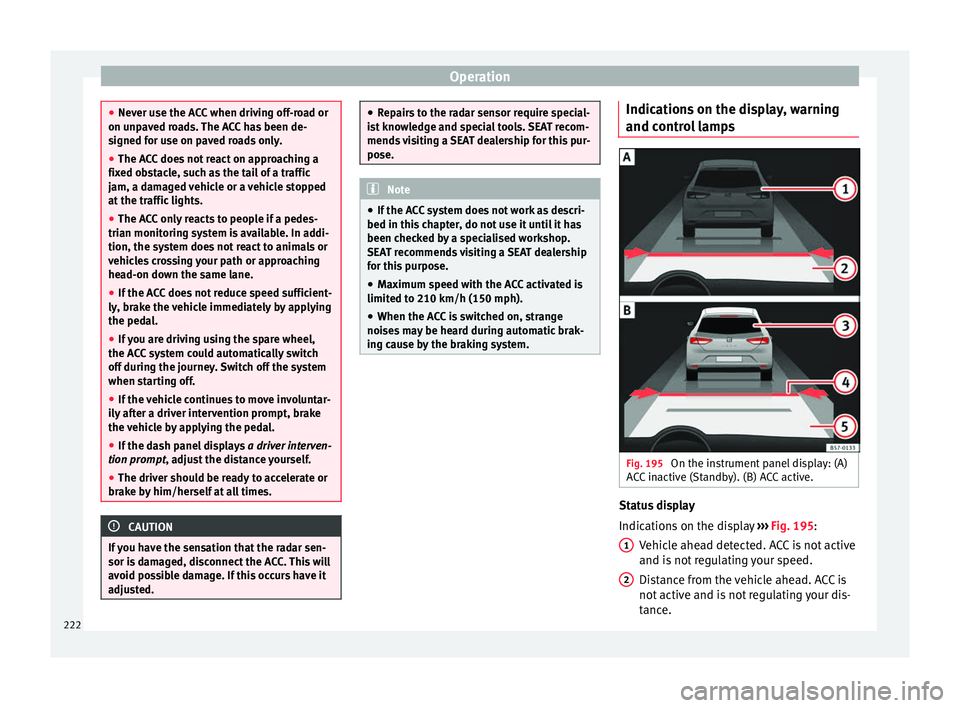
on the display ››› Fig. 195:
Vehicle ahead detected. ACC is not active
and is not regulating your speed.
Distance from the vehicle ahead. ACC is
not active and is not regulating your dis-
tance.
1 2
222
Page 233 of 348
Driver assistance systems
Fig. 204
On the instrument panel display: In-
dic ation on the Lane As
s
ist system display
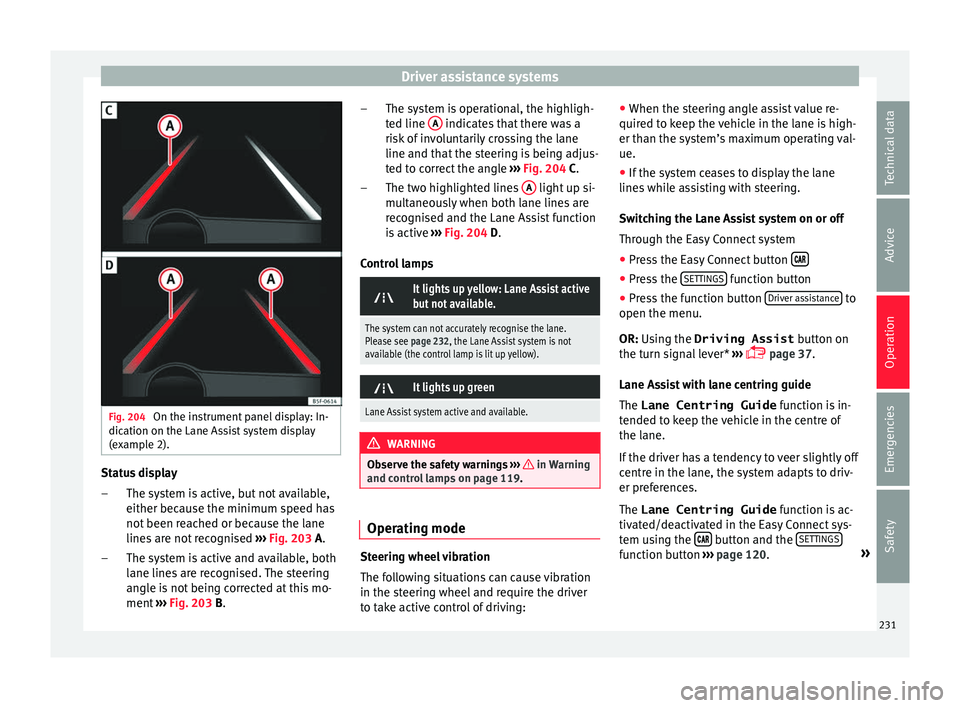
(example 2). Status display
The sy s
t
em is active, but not available,
either because the minimum speed has
not been reached or because the lane
lines are not recognised ››› Fig. 203 A.
The system is active and available, both
lane lines are recognised. The steering
angle is not being corrected at this mo-
ment ››› Fig. 203 B.
–
– The system is operational, the highligh-
ted line
A indicates that there was a
ri sk
of
involuntarily crossing the lane
line and that the steering is being adjus-
ted to correct the angle ››› Fig. 204 C.
The two highlighted lines A light up si-
mu lt
aneou
sly when both lane lines are
recognised and the Lane Assist function
is active ››› Fig. 204 D.
Control lamps
It lights up yellow: Lane Assist active
but not available.
The system can not accurately recognise the lane.
Please see page 232, the Lane Assist system is not
available (the control lamp is lit up yellow).
It lights up green
Lane Assist system active and available.
WARNING
Observe the safety warnings ›››
in Warning
and contr o
l lamps on page 119. Operating mode
Steering wheel vibration
The f
ol
lowing situations can cause vibration
in the steering wheel and require the driver
to take active control of driving: –
– ●
When the steerin
g angle assist value re-
quired to keep the vehicle in the lane is high-
er than the system’s maximum operating val-
ue.
● If the system ceases to display the lane
lines whi
le assisting with steering.
Switching the Lane Assist system on or off
Through the Easy Connect system
● Press the Easy Connect button ●
Press the S
ET
TINGS function button
● Press the function button Driv
er a
s
sistance to
open the menu.
OR: U s
in
g the Driving Assist button on
the turn signal lever* ›››
page 37.
Lane Assist with lane centring guide
The Lane Centring Guide function is in-
tended to keep the vehicle in the centre of
the lane.
If the driver has a tendency to veer slightly off
centre in the lane, the system adapts to driv-
er preferences.
The Lane Centring Guide function is ac-
tivated/deactivated in the Easy Connect sys-
tem using the button and the
S
ET
TINGS function button
›
››
page 120. »
231
Technical data
Advice
Operation
Emergencies
Safety
Page 234 of 348
Operation
Self-deactivation: the Lane As s
i st system can
be automatically deactivated if there is a sys-
tem malfunction. The control lamp
disappears.
Hands-Off Function
In the absence of steering wheel activity the
system alerts the driver with acoustic signals
and a text message on the dash panel asking
to actively take over the steering.
If the driver does not react to this, the system
also alerts the driver with a little shaking mo-
tion through the brakes and, if the vehicle
has it, activates the Emergency Assist func-
tion ››› page 234.
In vehicles without Emergency Assist, the
adaptive lane guidance function will be disa-
bled after the corresponding warnings to the
driver.
The lane assist system is active but it is not
available (the control lamp is lit up yellow)
● When driving at speeds below 65 km/h (38
mph).
● When the Lane Assist system does not de-
tect the div
iding lines of the road. For exam-
ple, in the event warnings indicating road
works, and snow, dirt, moisture or reflec-
tions.
● When the radius of a curve is too small.
● When no road markings can be seen. ●
When the dist
ance to the next marking to
too great.
● When the system does not detect any clear
and active st
eering movement during a long
period of time.
● Temporarily, in the event of very dynamic
driving s
tyles.
● If a turn signal is activated.
● With the stability control system (ESC) in
Sport
mode or switched off.
BSD Plus (Lane Assist with Blind Spot Detec-
tor)*
The BSD Plus function is achieved by activat-
ing the Lane Assist and BSD functions
››› page 237. In this case, the Lane Assist
function expands its functions in the follow-
ing way:
If the driver tries to change lane and there is
a vehicle in the blind spot:
● The lamp flashes in the corresponding
re
ar-view mirror even though the turn signal
has not been activated.
● The steering wheel vibrates to warn the
driver of the ri
sk of collision.
● torque is applied to correct the steering
and return the
vehicle to its lane. Switching off the Lane Assist system in the
fol
lowing situations
Due to the limits of the Lane Assist system,
switch it off in the following situations:
● When more attention is required of the
driver
● When drivin
g in a sporty style
● In unfavourable weather conditions
● On roads in poor condition
● In areas of road works WARNING
The intelligent technology in the Lane Assist
sys t
em cannot change the limits imposed by
the laws of physics and by the very nature of
the system. Careless or uncontrolled use of
the Lane Assist system may cause accidents
and injury. The system is not a replacement
for driver awareness.
● Always adapt your speed and the distance
to the v
ehicles ahead in line with visibility,
weather conditions, the condition of the road
and the traffic situation.
● Always keep your hands on the steering
wheel so it c
an be turned at any time.
● The Lane Assist system does not detect all
roa
d markings. The road surfaces, road struc-
tures or objects in poor condition can be in-
correctly detected as road markings under
certain circumstances by the Lane Assist sys-
tem. In such situations, switch the Lane As-
sist system off immediately. 232
Page 236 of 348
Operation
Traffic Jam Assist is not active (the Lane As-
s i
s
t control light turns yellow)
● If any of the conditions mentioned on
page 233, T
echnical requirements for using
Traffic Jam Assist are no longer met.
● If any of the conditions required for opera-
tion of the Lane Ass
ist are not met
››› page 230.
● If any of the conditions necessary for the
adaptiv
e cruise control (ACC) to work are no
longer fulfilled ››› page 221.
Situations in which Traffic Jam Assist must
be switched off
Due to the limitations of the system, Traffic
Jam Assist must always be switched off in the
following situations:
● When more attention is required by the
driver.
● When driv
ing in a very sporty style.
● In adverse weather conditions, e.g. in case
of sno
w or heavy rain.
● When driving on roads in poor condition.
● In sections with roadworks.
● In city journeys. WARNING
The smart technology incorporated into Traf-
fic Jam As s
ist cannot defy the laws of phys-
ics; it only works within the limits of the sys- tem. Accidents and severe injury may occur if
Tr
affic
Jam Assist is used negligently or invol-
untarily. The system is not a replacement for
driver awareness.
● Adapt your speed and safe distance to the
vehicl
e in front of you at all times to suit the
visibility, weather, road and traffic condi-
tions.
● Do not use Traffic Jam Assist in city jour-
neys.
● Do not u
se Traffic Jam Assist if there is poor
vis
ibility, for example, in case of snow, ice,
rain or loose gravel, or on steep or slippery
sections or flooded roads.
● Do not use Traffic Jam Assist offroad or on
roa
ds where the surface is not firm. Traffic
Jam Assist has been designed for use on
paved roads only.
● Traffic Jam Assist does not react to people
or animal
s or vehicles crossing your path or
that approach you head-on down the same
lane.
● If Traffic Jam Assist does not reduce speed
sufficiently
, brake the vehicle immediately by
applying the pedal.
● If the vehicle continues to move when you
wish it
to stop after a driver intervention
prompt, brake the vehicle by applying the
pedal.
● If driver intervention is requested on the
da
sh panel display, immediately resume con-
trol of the vehicle.
● Keep your hands on the wheel at all times
to be re
ady to intervene in the steering at any time. The driver is always responsible for
keepin
g the
vehicle in its own lane.
● Always be prepared to take charge of driv-
ing (acc
elerating or braking) yourself. Note
● If T
raffic Jam Assist does not work as de-
scribed in this chapter, stop using it and con-
tact a specialised workshop.
● If the system is faulty, take it to a special-
ised work
shop and have it checked. Emergency Assist
D es
cription and operation Emergency Assist detects whether there is in-
activ
ity
b
y the driver and can automatically
keep the car within the lane and stop it alto-
gether if necessary. This way the system can
actively help avoid an accident.
Emergency Assist is an additional function of
Lane Assist ››› page 230 and combines Lane
Assist functions with Adaptive Cruise Control
(ACC) ››› page 221. Therefore, it is essential
that you read these two chapters carefully
and note the limitations of the systems and
the information about them.
234
Page 237 of 348
Driver assistance systems
Operation of Emergency Assist
Emer g
ency
Assist detects when the driver
ceases to perform any activity and repeatedly
requests that he/she regain active control of
the vehicle, through the use of optical and
acoustic warnings and by applying the
brakes.
If the driver continues to do nothing, the sys-
tem automatically takes over the accelerator,
brakes and steering in order to brake the ve-
hicle and keep it in its lane ››› . When the
Emer g
ency
Assist is actively adjusting, the
hazard warning lights come on ››› page 149
and the vehicle makes slight zigzag move-
ments in the lane in order to warn other driv-
ers.
If the remaining braking distance is suffi-
cient, if necessary the system slows down the
vehicle until it stops completely and auto-
matically switches on the electronic parking
brake ››› page 186.
Switching the Emergency Assist on and off
The Emergency Assist is switched on auto-
matically when the Lane Assist is switched on
››› page 230.
Technical requirements for using the Emer-
gency Assist ● The adaptive cruise control (ACC) must be
switc
hed on ››› page 221. ●
The Lane Assi
st must be switched on
››› page 230.
● The selector lever must be in the D/S posi-
tion or in the
Tiptronic selector gate.
● The system must have detected a lane sep-
aration line on both side
s of the vehicle
››› Fig. 204.
The following conditions may cause the
Emergency Assist not to react or to switch off
automatically:
● If the driver accelerates, brakes or moves
the steerin
g wheel.
● If any of the conditions mentioned in
›››
page 235, Technical requirements for us-
ing the Emergency Assist are not fulfilled.
● If any of the conditions required for opera-
tion of the Lane Ass
ist are not met
››› page 230.
● If any of the conditions necessary for the
adaptiv
e cruise control (ACC) to work are no
longer fulfilled ››› page 221. WARNING
The smart technology incorporated into the
Emerg ency
Assist cannot overcome the limits
imposed by the laws of physics; it only works
within the limits of the system. The driver is
responsible for driving the vehicle.
● Adapt your speed and safe distance to the
vehicl
e in front of you at all times to suit the visibility, weather, road and traffic condi-
tions.
● Keep
your hands on the wheel at all times
to be re
ady to intervene in the steering at any
time.
● The Emergency Assist alone cannot always
avoid acc
idents or serious injuries.
● If the operation of the Emergency Assist is
impaired, f
or example if the radar sensor of
the adaptive cruise control (ACC) or the Lane
Assist camera are covered or have lost their
settings, the system may intervene inoppor-
tunely in braking or in steering.
● The Emergency Assist does not react to
people or anim
al or vehicles crossing your
path or which approach you head-on in the
same lane. WARNING
If the Emergency Assist Intervenes inoppor-
tu nely
, serious accidents and injuries may oc-
cur.
● If the Emergency Assist does not operate
properly, sw
itch off the Lane Assist
››› page 230. Doing so will also switch off the
Emergency Assist.
● Have the system checked by a specialised
workshop
. SEAT recommends visiting a SEAT
dealership for this. » 235
Technical data
Advice
Operation
Emergencies
Safety