instrument panel Seat Ateca 2018 Owner's Manual
[x] Cancel search | Manufacturer: SEAT, Model Year: 2018, Model line: Ateca, Model: Seat Ateca 2018Pages: 348, PDF Size: 7.32 MB
Page 7 of 348
Table of Contents
Table of Contents
The e s
senti
als . . . . . . . . . . . . . . . . . . . . . . . . 7
Exterior view . . . . . . . . . . . . . . . . . . . . . . . . . . . . 7
Exterior view . . . . . . . . . . . . . . . . . . . . . . . . . . . . 8
Driver-side general instrument panel (left-
hand drive) . . . . . . . . . . . . . . . . . . . . . . . . . . . . .
9
Driver-side general instrument panel (right-
hand drive) . . . . . . . . . . . . . . . . . . . . . . . . . . . . .
10
Centre console . . . . . . . . . . . . . . . . . . . . . . . . . . 11
Passenger-side general instrument panel (left-
hand drive) . . . . . . . . . . . . . . . . . . . . . . . . . . . . .
12
Passenger-side general instrument panel
(right-hand driv
e) . . . . . . . . . . . . . . . . . . . . . . . . 13
Interior view . . . . . . . . . . . . . . . . . . . . . . . . . . . . 14
How it works . . . . . . . . . . . . . . . . . . . . . . . . . . . . 15
Unlocking and locking . . . . . . . . . . . . . . . . . . . . 15
Before driving . . . . . . . . . . . . . . . . . . . . . . . . . . . 18
Airbags . . . . . . . . . . . . . . . . . . . . . . . . . . . . . . . . 21
Child seats . . . . . . . . . . . . . . . . . . . . . . . . . . . . . 24
Starting the vehicle . . . . . . . . . . . . . . . . . . . . . . 30
Lights and visibility . . . . . . . . . . . . . . . . . . . . . . 30
Easy Connect . . . . . . . . . . . . . . . . . . . . . . . . . . . 33
Driver information System . . . . . . . . . . . . . . . . . 36
Status display . . . . . . . . . . . . . . . . . . . . . . . . . . . 40
Cruise control . . . . . . . . . . . . . . . . . . . . . . . . . . . 44
Warning lamps . . . . . . . . . . . . . . . . . . . . . . . . . . 46
Gearbox lever . . . . . . . . . . . . . . . . . . . . . . . . . . . 49
Air conditioning . . . . . . . . . . . . . . . . . . . . . . . . . 51
Fluid Level control . . . . . . . . . . . . . . . . . . . . . . . 56
Emergencies . . . . . . . . . . . . . . . . . . . . . . . . . . . . 61
Fuses . . . . . . . . . . . . . . . . . . . . . . . . . . . . . . . . . . 61
Bulbs . . . . . . . . . . . . . . . . . . . . . . . . . . . . . . . . . . 62
Action in the event of a puncture . . . . . . . . . . . 62
Changing a wheel . . . . . . . . . . . . . . . . . . . . . . . 64
Snow chains . . . . . . . . . . . . . . . . . . . . . . . . . . . . 67
Emergency towing of the vehicle . . . . . . . . . . . 68 How to jump start . . . . . . . . . . . . . . . . . . . . . . . . 69
Changing the wiper blades . . . . . . . . . . . . . . . . 71
Safety . . . . . . . . . . . . . . . . . . . . . . . . . . . . . . . . 73
Safe driving . . . . . . . . . . . . . . . . . . . . . . . . . . . . 73
Safety first! . . . . . . . . . . . . . . . . . . . . . . . . . . . . . 73
Advice about driving . . . . . . . . . . . . . . . . . . . . . 73
Correct position of the vehicle occupants . . . . 74
Pedal area . . . . . . . . . . . . . . . . . . . . . . . . . . . . . . 78
Seat belts . . . . . . . . . . . . . . . . . . . . . . . . . . . . . . 79
Why wear a seat belt . . . . . . . . . . . . . . . . . . . . . 79
How to properly adjust your seatbelt . . . . . . . . 82
Seat belt tensioners . . . . . . . . . . . . . . . . . . . . . . 83
Airbag system . . . . . . . . . . . . . . . . . . . . . . . . . . 84
Brief introduction . . . . . . . . . . . . . . . . . . . . . . . . 84
Airbag safety instructions . . . . . . . . . . . . . . . . . 86
Deactivating airbags . . . . . . . . . . . . . . . . . . . . . 88
Transporting children safely . . . . . . . . . . . . . . . 90
Safety for children . . . . . . . . . . . . . . . . . . . . . . . 90
Child seats . . . . . . . . . . . . . . . . . . . . . . . . . . . . . 91
Event Data Recorder . . . . . . . . . . . . . . . . . . . . . . 94
Description and operation . . . . . . . . . . . . . . . . . 94
Emergencies . . . . . . . . . . . . . . . . . . . . . . . . . . 95
Self-help . . . . . . . . . . . . . . . . . . . . . . . . . . . . . . . 95
Vehicle tool kit, anti-puncture kit* . . . . . . . . . . 95
Tyre repair . . . . . . . . . . . . . . . . . . . . . . . . . . . . . . 95
Manual unlocking/locking . . . . . . . . . . . . . . . . . 97
Changing the windscreen wiper blades . . . . . . 97
Tow-starting and towing . . . . . . . . . . . . . . . . . . 98
Fuses and bulbs . . . . . . . . . . . . . . . . . . . . . . . . . 102
Fuses . . . . . . . . . . . . . . . . . . . . . . . . . . . . . . . . . . 102
Changing a bulb . . . . . . . . . . . . . . . . . . . . . . . . . 106
Change the front bulbs . . . . . . . . . . . . . . . . . . . 107
Change the rear bulbs . . . . . . . . . . . . . . . . . . . . 109
Side turn signals . . . . . . . . . . . . . . . . . . . . . . . . 111 Operation
. . . . . . . . . . . . . . . . . . . . . . . . . . . . . 113
Controls and displays . . . . . . . . . . . . . . . . . . . . 113
General instrument panel . . . . . . . . . . . . . . . . . 112
Instruments and warning/control lamps . . . . . 114
Instruments . . . . . . . . . . . . . . . . . . . . . . . . . . . . 114
Control lamps . . . . . . . . . . . . . . . . . . . . . . . . . . . 119
Introduction to the Easy Connect system* . . . . 120
System settings (CAR)* . . . . . . . . . . . . . . . . . . . 120
Communications and multimedia . . . . . . . . . . . 121
Controls on the steering wheel* . . . . . . . . . . . . 121
Multimedia . . . . . . . . . . . . . . . . . . . . . . . . . . . . . 123
Opening and closing . . . . . . . . . . . . . . . . . . . . . 125
Central locking . . . . . . . . . . . . . . . . . . . . . . . . . . 125
Anti-theft alarm system* . . . . . . . . . . . . . . . . . . 134
Rear lid (luggage compartment) . . . . . . . . . . . . 137
Controls for the windows . . . . . . . . . . . . . . . . . . 139
Sunroof* . . . . . . . . . . . . . . . . . . . . . . . . . . . . . . . 141
Lights and visibility . . . . . . . . . . . . . . . . . . . . . . 144
Lights . . . . . . . . . . . . . . . . . . . . . . . . . . . . . . . . . 144
Visibility . . . . . . . . . . . . . . . . . . . . . . . . . . . . . . . 152
Windscreen wiper and window wiper sys-
tems . . . . . . . . . . . . . . . . . . . . . . . . . . . . . . . . . . 153 Mirr
or . . . . . . . . . . . . . . . . . . . . . . . . . . . . . . . . . 155
Seats and head restraints . . . . . . . . . . . . . . . . . 156
Adjusting the seats and headrests . . . . . . . . . . 156
Seat functions . . . . . . . . . . . . . . . . . . . . . . . . . . 158
Transport and practical equipment . . . . . . . . . 160
Storage compartments . . . . . . . . . . . . . . . . . . . 160
Storing objects . . . . . . . . . . . . . . . . . . . . . . . . . . 162
Roof carrier* . . . . . . . . . . . . . . . . . . . . . . . . . . . . 168
Air conditioning . . . . . . . . . . . . . . . . . . . . . . . . . 170
Heating, ventilation and cooling . . . . . . . . . . . . 170
Auxiliary heater (additional heater)* . . . . . . . . 177
Driving . . . . . . . . . . . . . . . . . . . . . . . . . . . . . . . . 181
Starting and stopping the engine . . . . . . . . . . . 181
Braking and parking . . . . . . . . . . . . . . . . . . . . . 186
Manual gearbox . . . . . . . . . . . . . . . . . . . . . . . . . 192
5
Page 11 of 348
The essentials
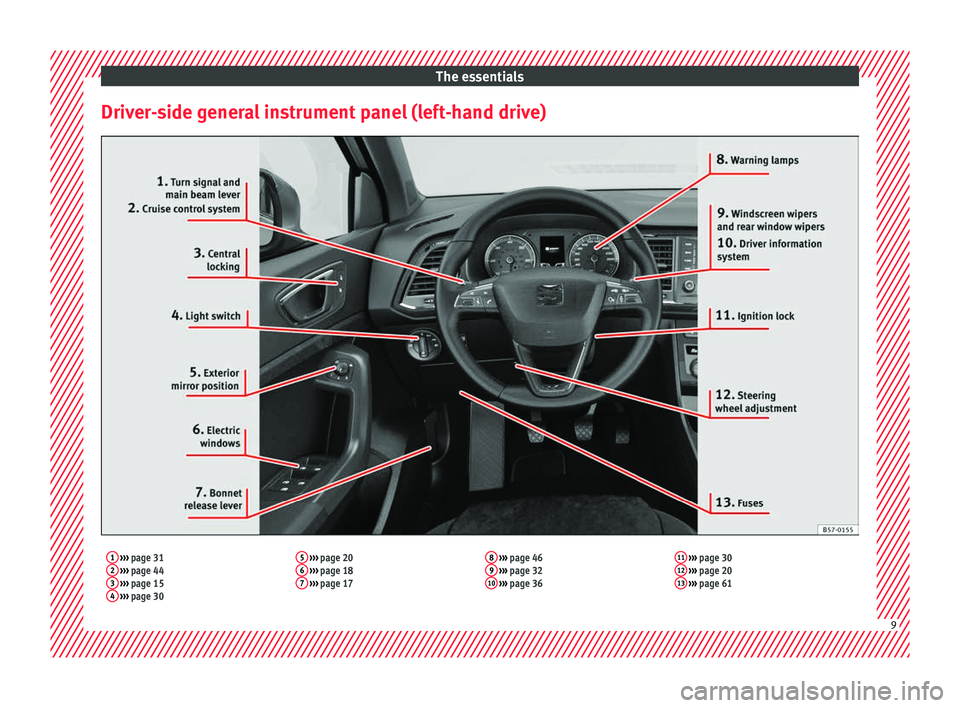
Driver-side general instrument panel (left-hand drive)1 ››› page 31
2 ››› page 44
3 ››› page 15
4 ››› page 30 5
››› page 20
6 ››› page 18
7 ››› page 17 8
››› page 46
9 ››› page 32
10 ››› page 36 11
››› page 30
12 ››› page 20
13 ››› page 61 9
Page 12 of 348
The essentials
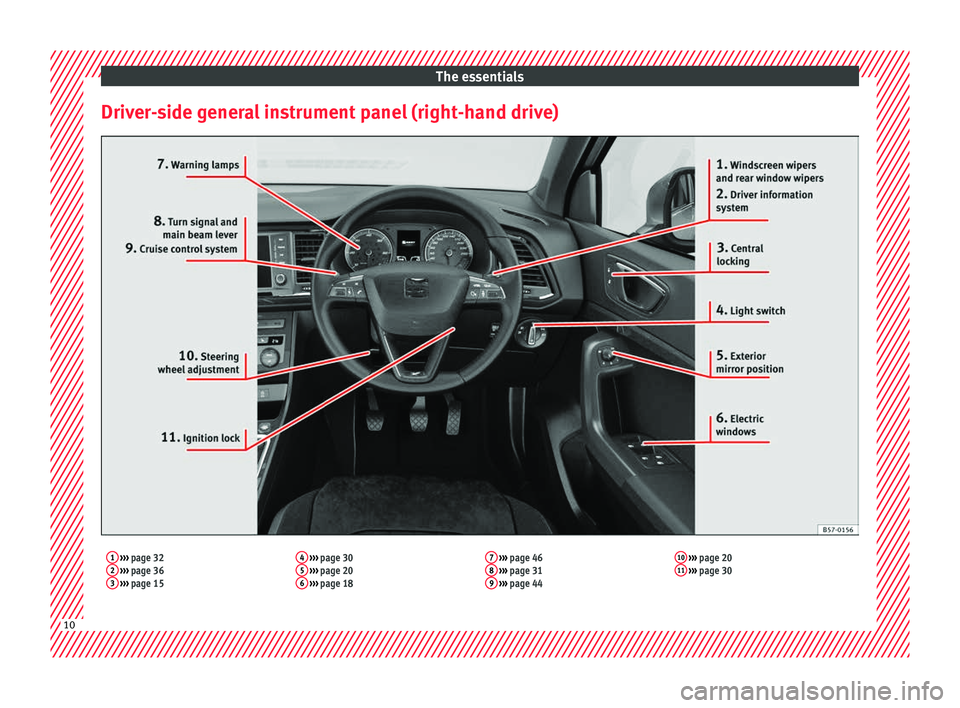
Driver-side general instrument panel (right-hand drive)1 ››› page 32
2 ››› page 36
3 ››› page 15 4
››› page 30
5 ››› page 20
6 ››› page 18 7
››› page 46
8 ››› page 31
9 ››› page 44 10
››› page 20
11 ››› page 30 10
Page 14 of 348
The essentials
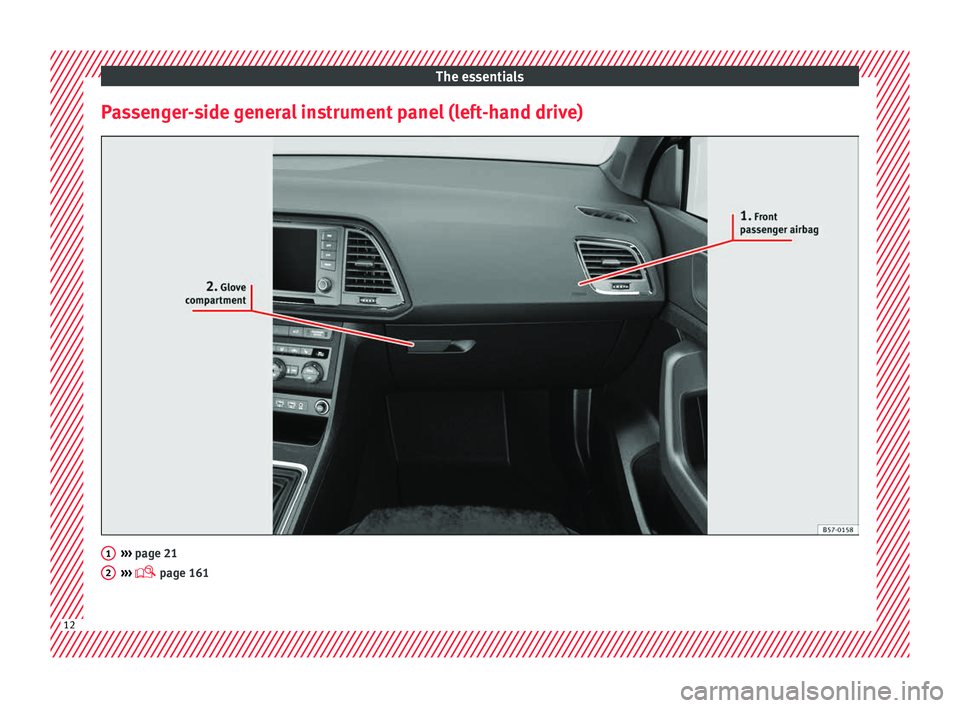
Passenger-side general instrument panel (left-hand drive) ›››
page 21
› ›
› page 161 1
2
12
Page 15 of 348
The essentials
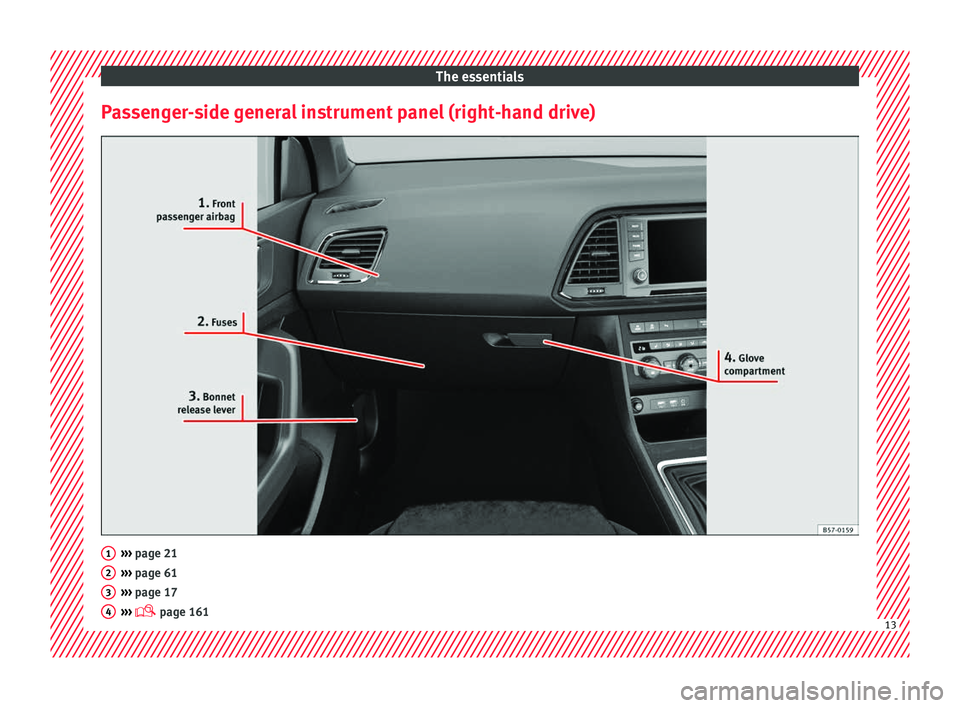
Passenger-side general instrument panel (right-hand drive) ›››
page 21
› ›
› page 61
››› page 17
››› page 161 1
2
3
4
13
Page 18 of 348
The essentials
Special Characteristics
● The anti-theft alarm will remain active when
v ehic
l
es are unlocked. However, the alarm
will not be triggered ›››
page 125.
● After the driver door is opened, you have
15 seconds
to switch on the ignition. Once
this time has elapsed, the alarm is triggered.
● Switch the ignition on. The electronic im-
mobi
lizer recognises a valid vehicle key and
deactivates the anti-theft alarm system. Note
The anti-theft alarm is not activated when the
vehic l
e is locked manually using the key
shaft ›››
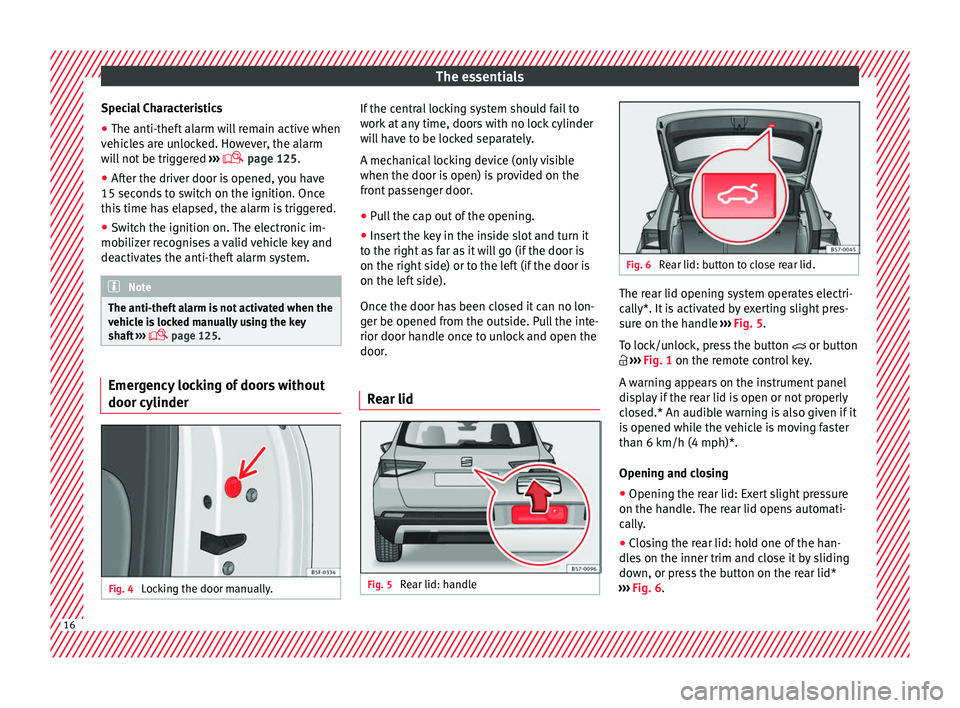
page 125. Emergency locking of doors without
door cylinder
Fig. 4
Locking the door manually. If the central locking system should fail to
w
ork
at
any time, doors with no lock cylinder
will have to be locked separately.
A mechanical locking device (only visible
when the door is open) is provided on the
front passenger door.
● Pull the cap out of the opening.
● Insert the key in the inside slot and turn it
to the right a
s far as it will go (if the door is
on the right side) or to the left (if the door is
on the left side).
Once the door has been closed it can no lon-
ger be opened from the outside. Pull the inte-
rior door handle once to unlock and open the
door.
Rear lid Fig. 5
Rear lid: handle Fig. 6
Rear lid: button to close rear lid. The rear lid opening system operates electri-
c
al
ly*. It
is activated by exerting slight pres-
sure on the handle ››› Fig. 5.
To lock/unlock, press the button or button
››› Fig. 1 on the remote control key.
A warning appears on the instrument panel
display if the rear lid is open or not properly
closed.* An audible warning is also given if it
is opened while the vehicle is moving faster
than 6 km/h (4 mph)*.
Opening and closing
● Opening the rear lid: Exert slight pressure
on the handle.
The rear lid opens automati-
cally.
● Closing the rear lid: hold one of the han-
dles
on the inner trim and close it by sliding
down, or press the button on the rear lid*
››› Fig. 6.16
Page 33 of 348
The essentials
Fr ont fog lights:
mo
v e the switch to the
first position, from positions , or .
Rear fog light: move the switch completely
from positions , or .
● Switching off fog lights: Push the switch or
turn it t
o the position.
››› in Side light and dipped beam head-
light on page 144
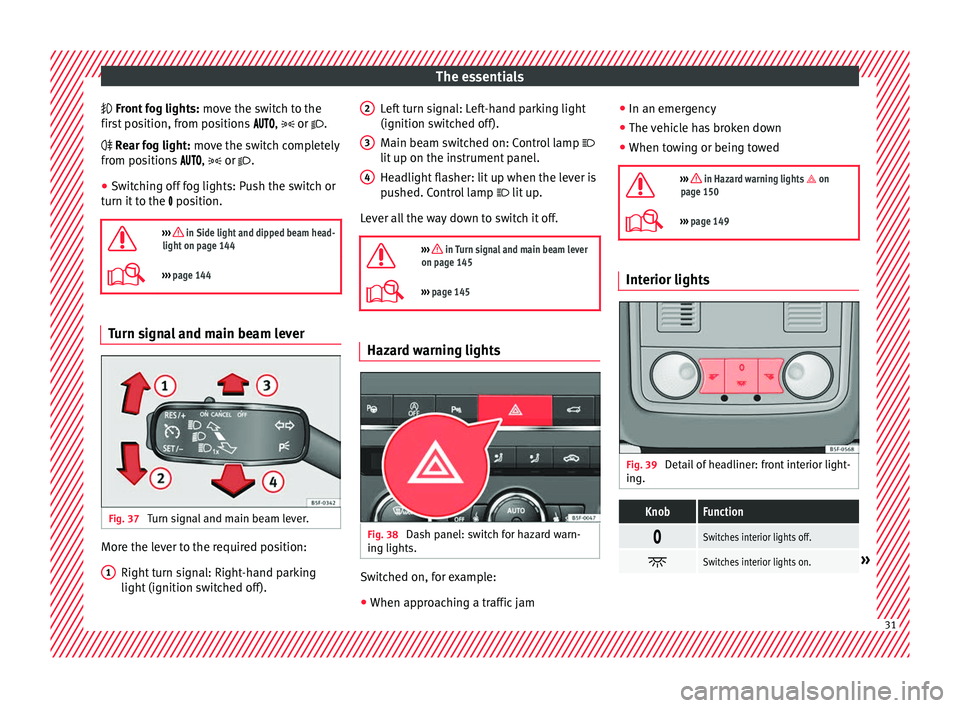
››› page 144 Turn signal and main beam lever
Fig. 37
Turn signal and main beam lever. More the lever to the required position:
Right t
urn s
ignal: Right-hand parking
light (ignition switched off).
1 Left turn signal: Left-hand parking light
(ignition sw
it
c
hed off).
Main beam switched on: Control lamp
lit up on the instrument panel.
Headlight flasher: lit up when the lever is
pushed. Control lamp lit up.
Lever all the way down to switch it off.
››› in Turn signal and main beam lever
on page 145
››› page 145 Hazard warning lights
Fig. 38
Dash panel: switch for hazard warn-
in g lights. Switched on, for example:
●
When approaching a traffic jam
2 3
4 ●
In an emer g
ency
● The
vehicle has broken down
● When towing or being towed
››› in Hazard warning lights on
page 150
››› page 149 Interior lights
Fig. 39
Detail of headliner: front interior light-
in g.
KnobFunction
Switches interior lights off.
Switches interior lights on.»
31
Page 36 of 348
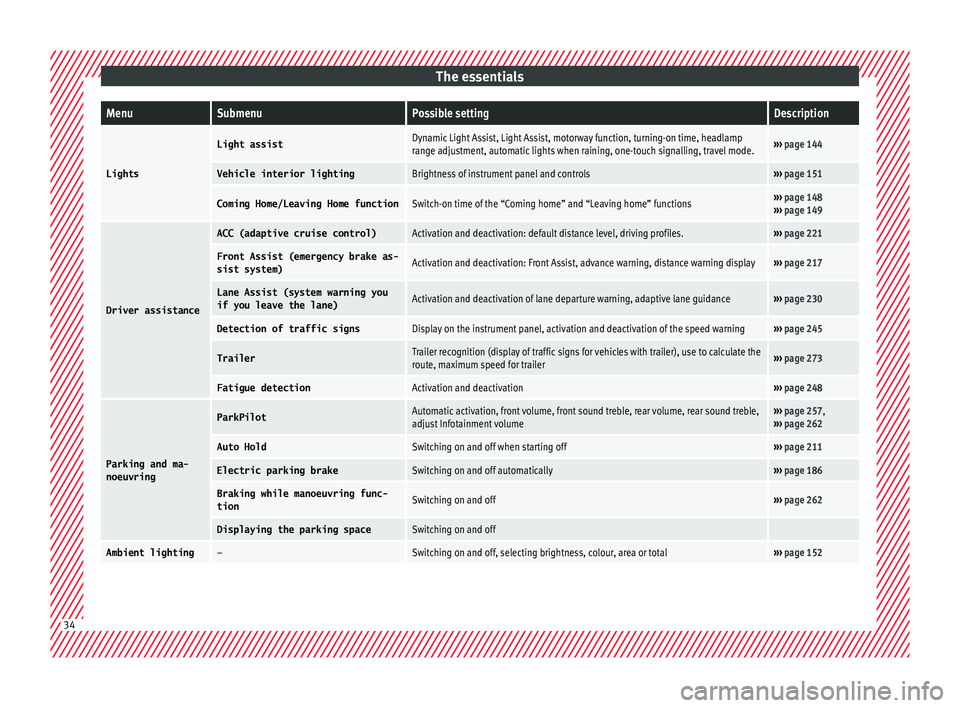
The essentialsMenuSubmenuPossible settingDescription
Lights
Light assistDynamic Light Assist, Light Assist, motorway function, turning-on time, headlamp
range adjustment, automatic lights when raining, one-touch signalling, travel mode.›››
page 144
Vehicle interior lightingBrightness of instrument panel and controls››› page 151
Coming Home/Leaving Home functionSwitch-on time of the “Coming home” and “Leaving home” functions››› page 148
››› page 149
Driver assistance
ACC (adaptive cruise control)Activation and deactivation: default distance level, driving profiles.››› page 221
Front Assist (emergency brake as-
sist system)Activation and deactivation: Front Assist, advance warning, distance warning display››› page 217
Lane Assist (system warning you
if you leave the lane)Activation and deactivation of lane departure warning, adaptive lane guidance››› page 230
Detection of traffic signsDisplay on the instrument panel, activation and deactivation of the speed warning››› page 245
TrailerTrailer recognition (display of traffic signs for vehicles with trailer), use to calculate the
route, maximum speed for trailer››› page 273
Fatigue detectionActivation and deactivation››› page 248
Parking and ma-
noeuvring
ParkPilotAutomatic activation, front volume, front sound treble, rear volume, rear sound treble,
adjust Infotainment volume››› page 257,
››› page 262
Auto HoldSwitching on and off when starting off››› page 211
Electric parking brakeSwitching on and off automatically››› page 186
Braking while manoeuvring func-
tionSwitching on and off››› page 262
Displaying the parking spaceSwitching on and off
Ambient lighting–Switching on and off, selecting brightness, colour, area or total››› page 152 34
Page 37 of 348
The essentialsMenuSubmenuPossible settingDescription
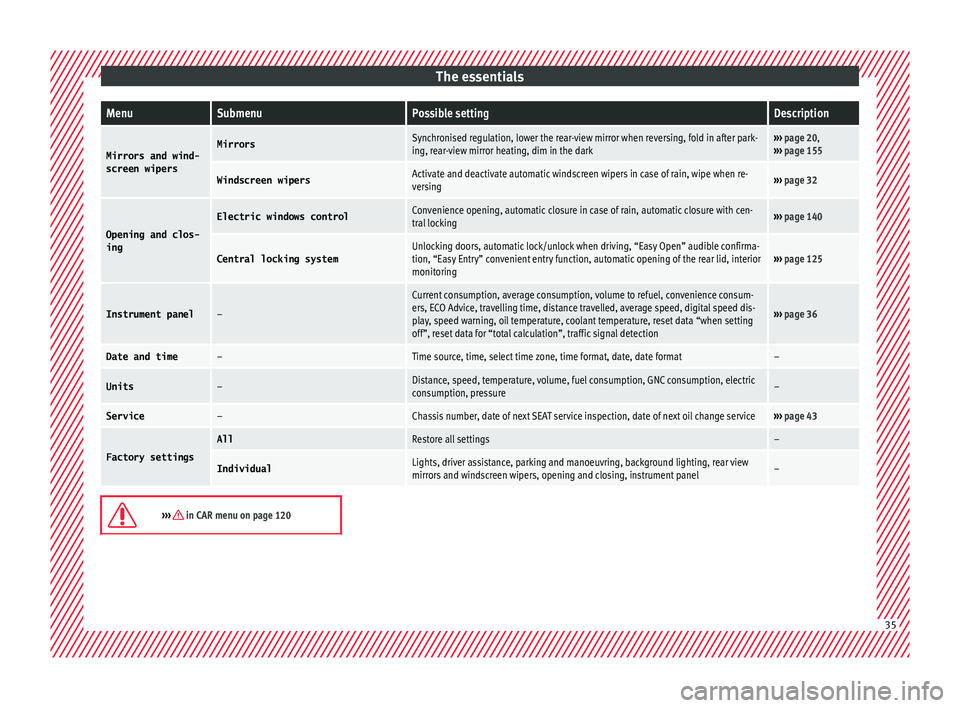
Mirrors and wind-
screen wipersMirrorsSynchronised regulation, lower the rear-view mirror when reversing, fold in after park-
ing, rear-view mirror heating, dim in the dark››› page 20,
››› page 155
Windscreen wipersActivate and deactivate automatic windscreen wipers in case of rain, wipe when re-
versing››› page 32
Opening and clos-
ing
Electric windows controlConvenience opening, automatic closure in case of rain, automatic closure with cen-
tral locking››› page 140
Central locking systemUnlocking doors, automatic lock/unlock when driving, “Easy Open” audible confirma-
tion, “Easy Entry” convenient entry function, automatic opening of the rear lid, interior
monitoring››› page 125
Instrument panel–
Current consumption, average consumption, volume to refuel, convenience consum-
ers, ECO Advice, travelling time, distance travelled, average speed, digital speed dis-
play, speed warning, oil temperature, coolant temperature, reset data “when setting
off”, reset data for “total calculation”, traffic signal detection
››› page 36
Date and time–Time source, time, select time zone, time format, date, date format–
Units–Distance, speed, temperature, volume, fuel consumption, GNC consumption, electric
consumption, pressure–
Service–Chassis number, date of next SEAT service inspection, date of next oil change service››› page 43
Factory settings
AllRestore all settings–
IndividualLights, driver assistance, parking and manoeuvring, background lighting, rear view
mirrors and windscreen wipers, opening and closing, instrument panel–
››› in CAR menu on page 120
35
Page 38 of 348
The essentials
Driver information System Intr oduction With the ignition switched on, it is possible
to r
e
ad the different functions of the display
by scrolling through the menus.
In vehicles with multifunction steering wheel,
the multifunction display can only be operat-
ed with the steering wheel buttons.
The number of menus displayed on the in-
strument panel will vary according to the ve-
hicle electronics and equipment.
A specialised workshop will be able to pro-
gramme or modify additional functions, ac-
cording to the vehicle equipment. SEAT rec-
ommends visiting a SEAT Official Service.
Some menu options can only be read when
the vehicle is at a standstill.
As long as a priority 1 warning is displayed, it
will not be possible to read the menus
››› page 40. Some warning messages can
be confirmed and made to disappear with the
windscreen wiper lever button or the multi-
function steering wheel button.
The information system also provides the fol-
lowing information and displays (depending
on the vehicle's equipment):
Driving data ›››
page 38
■ MFD from departure ■
MFD from r ef
uelling
■ MFD total calculation
Assist systems ››› page 39
Navigation ››› Booklet Navigation system
Audio ››› Booklet Radio or ››› Booklet Naviga-
tion system
Telephone ››› Booklet Radio or ››› Booklet
Navigation system
Vehicle status ››› page 33 WARNING
Any distraction may lead to an accident, with
the risk of
injury.
● Do not operate the instrument panel con-
trol
s when driving. Using the menus on the instrument
p
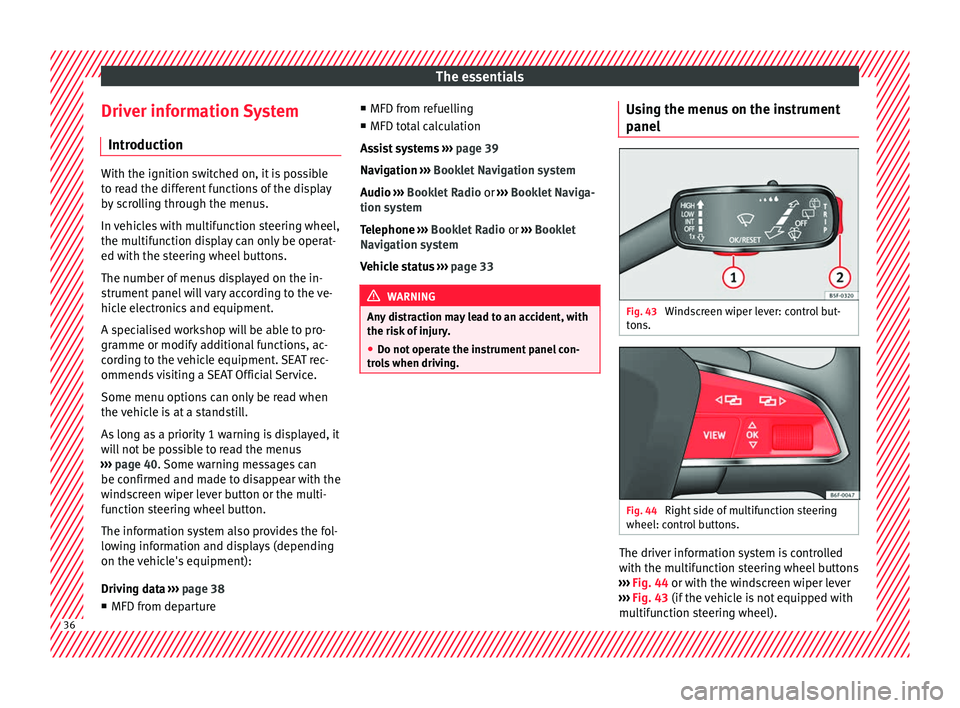
anel Fig. 43
Windscreen wiper lever: control but-
t on
s. Fig. 44
Right side of multifunction steering
wheel: c ontr
o
l buttons. The driver information system is controlled
w
ith the mu
ltif
unction steering wheel buttons
››› Fig. 44 or with the windscreen wiper lever
››› Fig. 43 (if the vehicle is not equipped with
multifunction steering wheel). 36