trailer Seat Ateca 2018 Owner's Manual
[x] Cancel search | Manufacturer: SEAT, Model Year: 2018, Model line: Ateca, Model: Seat Ateca 2018Pages: 348, PDF Size: 7.32 MB
Page 8 of 348
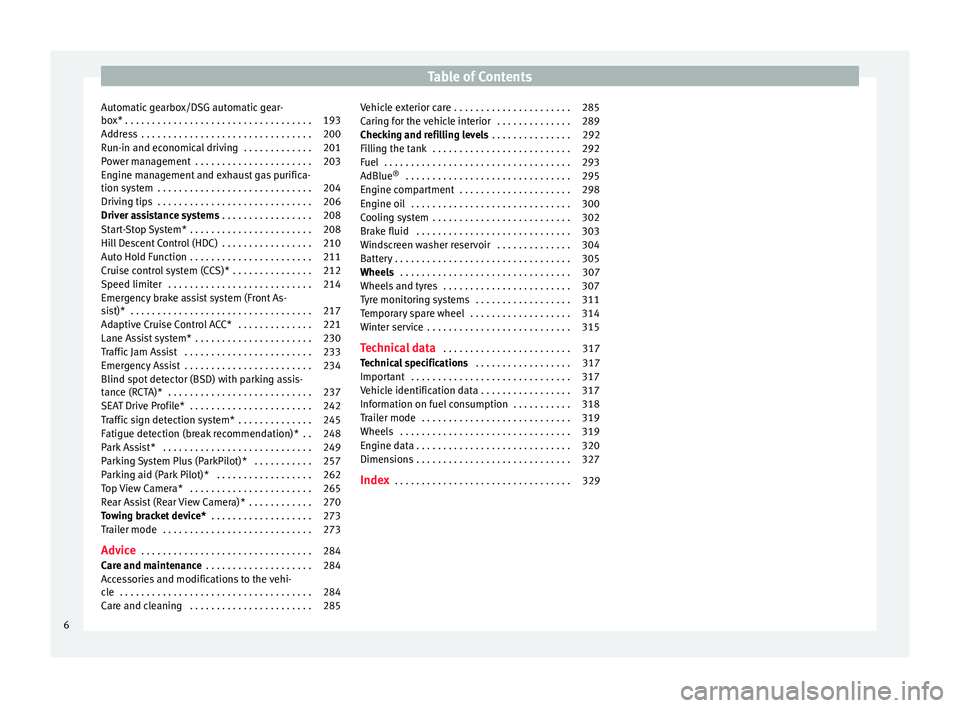
Table of Contents
Automatic gearbox/DSG automatic gear-
bo x*
. . . . . . . . . . . . . . . . . . . . . . . . . . . . . . . . . . . 193
Ad
dress . . . . . . . . . . . . . . . . . . . . . . . . . . . . . . . . 200
Run-in and economical driving . . . . . . . . . . . . . 201
Power management . . . . . . . . . . . . . . . . . . . . . . 203
Engine management and exhaust gas purifica-
tion syst
em . . . . . . . . . . . . . . . . . . . . . . . . . . . . . 204
Driving tips . . . . . . . . . . . . . . . . . . . . . . . . . . . . . 206
Driver assistance systems . . . . . . . . . . . . . . . . . 208
Start-Stop System* . . . . . . . . . . . . . . . . . . . . . . . 208
Hill Descent Control (HDC) . . . . . . . . . . . . . . . . . 210
Auto Hold Function . . . . . . . . . . . . . . . . . . . . . . . 211
Cruise control system (CCS)* . . . . . . . . . . . . . . . 212
Speed limiter . . . . . . . . . . . . . . . . . . . . . . . . . . . 214
Emergency brake assist system (Front As-
sis
t)* . . . . . . . . . . . . . . . . . . . . . . . . . . . . . . . . . . 217
Adaptive Cruise Control ACC* . . . . . . . . . . . . . . 221
Lane Assist system* . . . . . . . . . . . . . . . . . . . . . . 230
Traffic Jam Assist . . . . . . . . . . . . . . . . . . . . . . . . 233
Emergency Assist . . . . . . . . . . . . . . . . . . . . . . . . 234
Blind spot detector (BSD) with parking assis-
tance (RCT
A)* . . . . . . . . . . . . . . . . . . . . . . . . . . . 237
SEAT Drive Profile* . . . . . . . . . . . . . . . . . . . . . . . 242
Traffic sign detection system* . . . . . . . . . . . . . . 245
Fatigue detection (break recommendation)* . . 248
Park Assist* . . . . . . . . . . . . . . . . . . . . . . . . . . . . 249
Parking System Plus (ParkPilot)* . . . . . . . . . . . 257
Parking aid (Park Pilot)* . . . . . . . . . . . . . . . . . . 262
Top View Camera* . . . . . . . . . . . . . . . . . . . . . . . 265
Rear Assist (Rear View Camera)* . . . . . . . . . . . . 270
Towing bracket device* . . . . . . . . . . . . . . . . . . . 273
Trailer mode . . . . . . . . . . . . . . . . . . . . . . . . . . . . 273
Advice . . . . . . . . . . . . . . . . . . . . . . . . . . . . . . . . 284
Care and maintenance . . . . . . . . . . . . . . . . . . . . 284
Accessories and modifications to the vehi-
cle
. . . . . . . . . . . . . . . . . . . . . . . . . . . . . . . . . . . . 284
Care and cleaning . . . . . . . . . . . . . . . . . . . . . . . 285 Vehicle exterior care . . . . . . . . . . . . . . . . . . . . . . 285
Caring for the vehicle interior . . . . . . . . . . . . . . 289
Checking and refilling levels
. . . . . . . . . . . . . . . 292
Filling the tank . . . . . . . . . . . . . . . . . . . . . . . . . . 292
Fuel . . . . . . . . . . . . . . . . . . . . . . . . . . . . . . . . . . . 293
AdBlue ®
. . . . . . . . . . . . . . . . . . . . . . . . . . . . . . . 295
Engine compartment . . . . . . . . . . . . . . . . . . . . . 298
Engine oil . . . . . . . . . . . . . . . . . . . . . . . . . . . . . . 300
Cooling system . . . . . . . . . . . . . . . . . . . . . . . . . . 302
Brake fluid . . . . . . . . . . . . . . . . . . . . . . . . . . . . . 303
Windscreen washer reservoir . . . . . . . . . . . . . . 304
Battery . . . . . . . . . . . . . . . . . . . . . . . . . . . . . . . . . 305
Wheels . . . . . . . . . . . . . . . . . . . . . . . . . . . . . . . . 307
Wheels and tyres . . . . . . . . . . . . . . . . . . . . . . . . 307
Tyre monitoring systems . . . . . . . . . . . . . . . . . . 311
Temporary spare wheel . . . . . . . . . . . . . . . . . . . 314
Winter service . . . . . . . . . . . . . . . . . . . . . . . . . . . 315
Technical data . . . . . . . . . . . . . . . . . . . . . . . . 317
Technical specifications . . . . . . . . . . . . . . . . . . 317
Important . . . . . . . . . . . . . . . . . . . . . . . . . . . . . . 317
Vehicle identification data . . . . . . . . . . . . . . . . . 317
Information on fuel consumption . . . . . . . . . . . 318
Trailer mode . . . . . . . . . . . . . . . . . . . . . . . . . . . . 319
Wheels . . . . . . . . . . . . . . . . . . . . . . . . . . . . . . . . 319
Engine data . . . . . . . . . . . . . . . . . . . . . . . . . . . . . 320
Dimensions . . . . . . . . . . . . . . . . . . . . . . . . . . . . . 327
Index . . . . . . . . . . . . . . . . . . . . . . . . . . . . . . . . . 329
6
Page 36 of 348
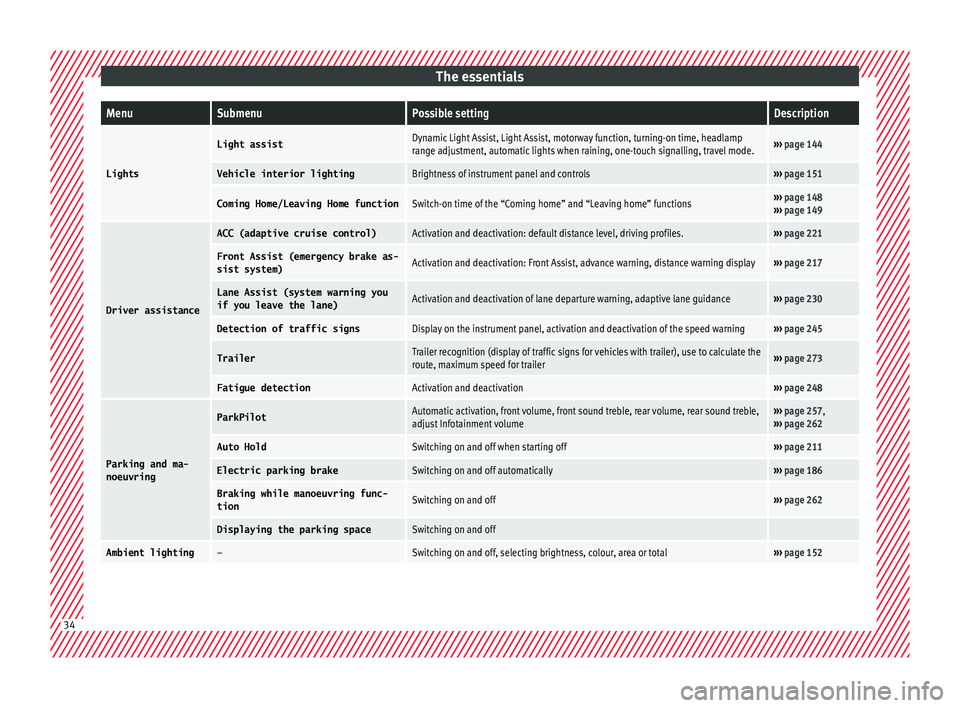
The essentialsMenuSubmenuPossible settingDescription
Lights
Light assistDynamic Light Assist, Light Assist, motorway function, turning-on time, headlamp
range adjustment, automatic lights when raining, one-touch signalling, travel mode.›››
page 144
Vehicle interior lightingBrightness of instrument panel and controls››› page 151
Coming Home/Leaving Home functionSwitch-on time of the “Coming home” and “Leaving home” functions››› page 148
››› page 149
Driver assistance
ACC (adaptive cruise control)Activation and deactivation: default distance level, driving profiles.››› page 221
Front Assist (emergency brake as-
sist system)Activation and deactivation: Front Assist, advance warning, distance warning display››› page 217
Lane Assist (system warning you
if you leave the lane)Activation and deactivation of lane departure warning, adaptive lane guidance››› page 230
Detection of traffic signsDisplay on the instrument panel, activation and deactivation of the speed warning››› page 245
TrailerTrailer recognition (display of traffic signs for vehicles with trailer), use to calculate the
route, maximum speed for trailer››› page 273
Fatigue detectionActivation and deactivation››› page 248
Parking and ma-
noeuvring
ParkPilotAutomatic activation, front volume, front sound treble, rear volume, rear sound treble,
adjust Infotainment volume››› page 257,
››› page 262
Auto HoldSwitching on and off when starting off››› page 211
Electric parking brakeSwitching on and off automatically››› page 186
Braking while manoeuvring func-
tionSwitching on and off››› page 262
Displaying the parking spaceSwitching on and off
Ambient lighting–Switching on and off, selecting brightness, colour, area or total››› page 152 34
Page 43 of 348
The essentialsPriority 1 warning (red symbols)
Symbol flashing or lit; partly combined with audible
warnings.
Stop the vehicle!
It is dangerous ››› in Warning
and control lamps on page 119 !
Check the function that is faulty and repair it. If necessa-
ry, request assistance from specialised personnel.
Priority 2 warning (yellow symbols)
Symbol flashing or lit; partly combined with audible
warnings.
A faulty function, or fluids which are below the correct
levels may cause damage to the vehicle! ›››
in Warn-
ing and control lamps on page 119
Check the faulty function as soon as possible. If neces-
sary, request assistance from specialised personnel.
Informative text
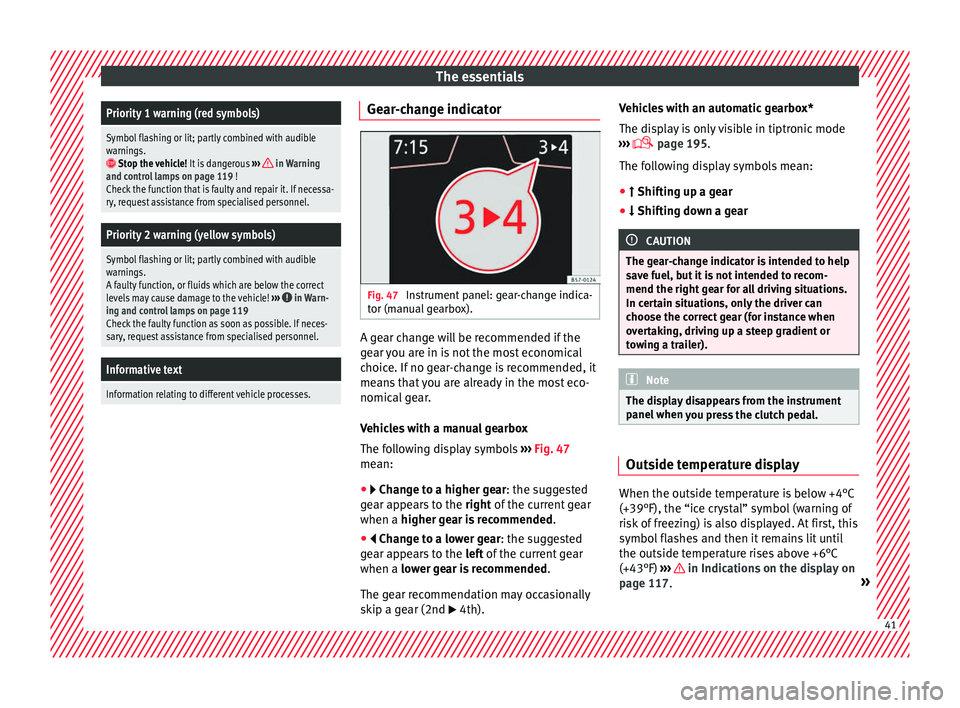
Information relating to different vehicle processes. Gear-change indicator
Fig. 47
Instrument panel: gear-change indica-
t or (m
anual
gearbox). A gear change will be recommended if the
g
e
ar
you are in is not the most economical
choice. If no gear-change is recommended, it
means that you are already in the most eco-
nomical gear.
Vehicles with a manual gearbox
The following display symbols ››› Fig. 47
mean:
● Chan ge to a higher gear: the suggested
g
ear appears to the right of the current gear
when a higher gear is recommended .
● Change to a lower gear: the suggested
g
ear appears to the left of the current gear
when a lower gear is recommended .
The gear recommendation may occasionally
skip a gear (2nd 4th). Vehicles with an automatic gearbox*
The dis
p
lay is only visible in tiptronic mode
››› page 195.
The following display symbols mean:
● Shiftin g up a gear
●
Shifting down a gear CAUTION
The gear-change indicator is intended to help
sav e f
uel, but it is not intended to recom-
mend the right gear for all driving situations.
In certain situations, only the driver can
choose the correct gear (for instance when
overtaking, driving up a steep gradient or
towing a trailer). Note
The display disappears from the instrument
panel when
you press the clutch pedal. Outside temperature display
When the outside temperature is below +4°C
(+39°F), the “ic
e c
r
ystal” symbol (warning of
risk of freezing) is also displayed. At first, this
symbol flashes and then it remains lit until
the outside temperature rises above +6°C
(+43°F) ››› in Indications on the display on
p ag
e 117
. » 41
Page 49 of 348
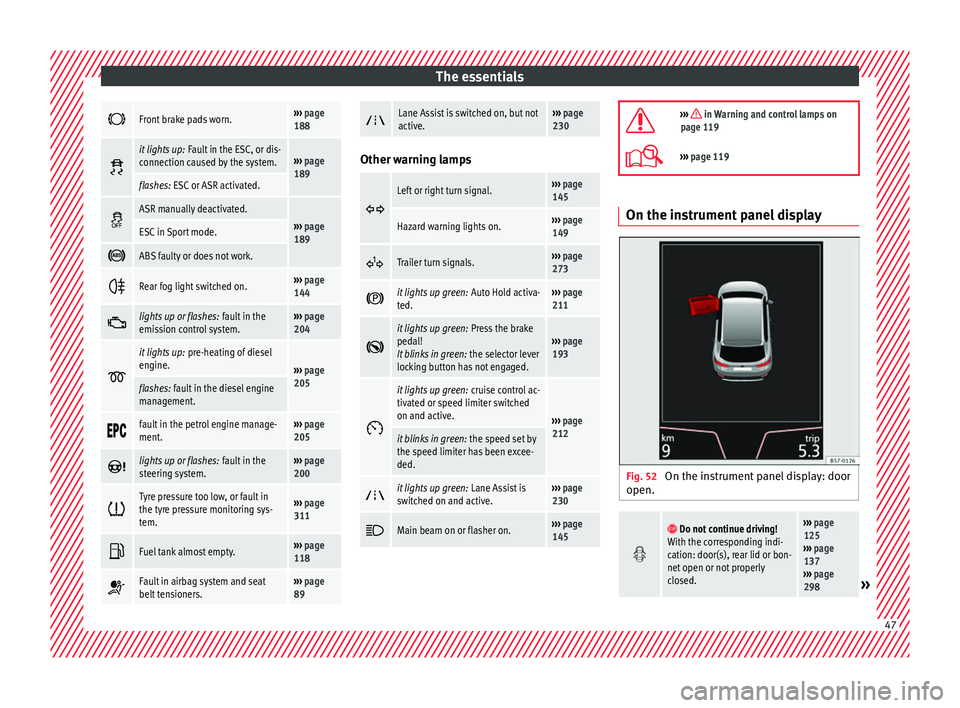
The essentials
Front brake pads worn.›››
page
188
it lights up:
Fault in the ESC, or dis-
connection caused by the system.››› page
189
flashes: ESC or ASR activated.
ASR manually deactivated.›››
page
189ESC in Sport mode.
ABS faulty or does not work.
Rear fog light switched on.›››
page
144
lights up or flashes:
fault in the
emission control system.››› page
204
it lights up:
pre-heating of diesel
engine.
››› page
205
flashes: fault in the diesel engine
management.
fault in the petrol engine manage-
ment.›››
page
205
lights up or flashes:
fault in the
steering system.››› page
200
Tyre pressure too low, or fault in
the tyre pressure monitoring sys-
tem.›››
page
311
Fuel tank almost empty.›››
page
118
Fault in airbag system and seat
belt tensioners.›››
page
89
Lane Assist is switched on, but not
active.›››
page
230 Other warning lamps
Left or right turn signal.›››
page
145
Hazard warning lights on.››› page
149
Trailer turn signals.›››
page
273
it lights up green:
Auto Hold activa-
ted.››› page
211
it lights up green:
Press the brake
pedal!
It blinks in green: the selector lever
locking button has not engaged.››› page
193
it lights up green:
cruise control ac-
tivated or speed limiter switched
on and active.
››› page
212
it blinks in green: the speed set by
the speed limiter has been excee-
ded.
it lights up green:
Lane Assist is
switched on and active.››› page
230
Main beam on or flasher on.›››
page
145
››› in Warning and control lamps on
page 119
››› page 119 On the instrument panel display
Fig. 52
On the instrument panel display: door
open.
Do not continue driving!
With the corresponding indi-
cation: door(s), rear lid or bon-
net open or not properly
closed.››› page
125
››› page
137
››› page
298
» 47
Page 65 of 348
The essentials
● Automatic
ge
arbox: Move the selector lever
to position P.
● If you are towing a trailer, unhitch it from
your v
ehicle.
● Have the vehicle tool kit ›››
page 95
and the spare wheel* ready
››› page 314.
● Observe the applicable legislation for each
countr
y (reflective vest, warning triangles,
etc.).
● All occupants should leave the vehicle and
wait in a s
afe place (for instance behind the
roadside crash barrier). WARNING
● Alw a
ys observe the above steps and pro-
tect yourself and other road users.
● If you change the wheel on a slope, block
the wheel on the oppo
site side of the car with
a stone or similar to prevent the vehicle from
moving. Repairing a tyre with the anti-punc-
t
ur
e k
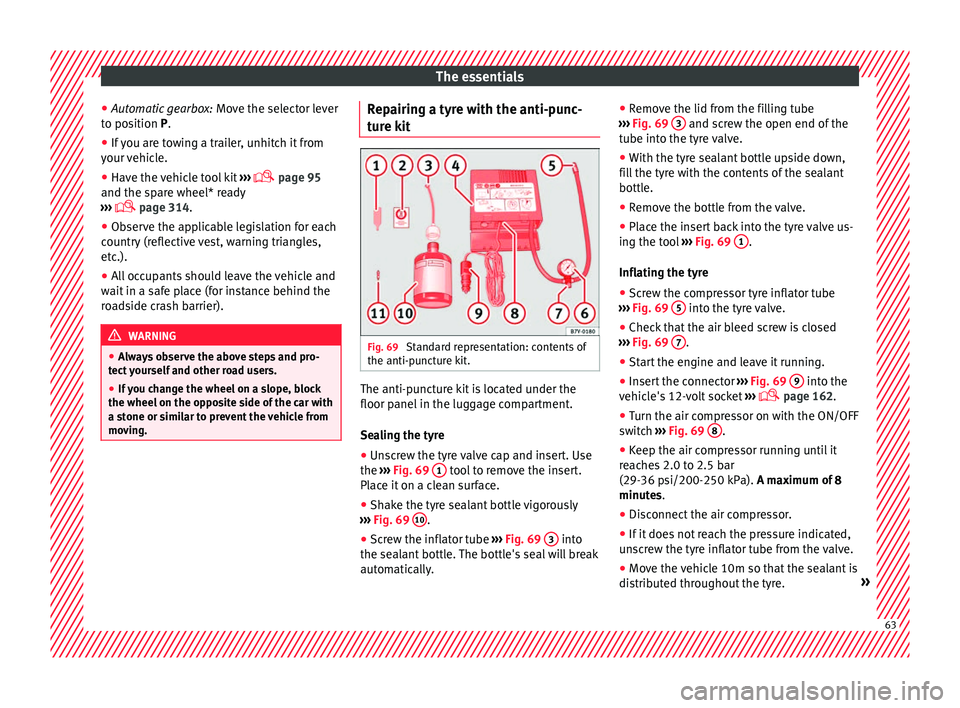
it Fig. 69
Standard representation: contents of
the anti-p u
nct
ure kit. The anti-puncture kit is located under the
floor p
anel
in the lug
gage compartment.
Sealing the tyre
● Unscrew the tyre valve cap and insert. Use
the ›››
Fig. 69 1 tool to remove the insert.
Pl ac
e it
on a clean surface.
● Shake the tyre sealant bottle vigorously
›››
Fig. 69 10 .
● Screw the inflator tube ››
›
Fig. 69 3 into
the se al
ant
bottle. The bottle's seal will break
automatically. ●
Remov
e the lid from the filling tube
››› Fig. 69 3 and screw the open end of the
t ube int
o the ty
re valve.
● With the tyre sealant bottle upside down,
fill
the tyre with the contents of the sealant
bottle.
● Remove the bottle from the valve.
● Place the insert back into the tyre valve us-
ing the too
l ››› Fig. 69 1 .
Infl atin
g the ty
re
● Screw the compressor tyre inflator tube
›››
Fig. 69 5 into the tyre valve.
● Check that the air bleed screw is closed
› ›
›
Fig. 69 7 .
● Start the engine and leave it running.
● Insert the connector ››
›
Fig. 69 9 into the
v ehic
l
e's 12-volt socket ›››
page 162.
● Turn the air compressor on with the ON/OFF
switc
h ››› Fig. 69 8 .
● Keep the air compressor running until it
r e
ac
hes 2.0 to 2.5 bar
(29-36 psi/200-250 kPa). A maximum of 8
minutes.
● Disconnect the air compressor.
● If it does not reach the pressure indicated,
uns
crew the tyre inflator tube from the valve.
● Move the vehicle 10m so that the sealant is
dis trib
uted throughout the tyre. » 63
Page 106 of 348
Emergencies
● Undo the openin g limit
er ›
›› Fig. 103 A in
tw o s
t
eps: first, unlock the limiter by pulling
back on it (arrow 1 ) and then move it gently
t o the right
(arr
ow 2 ). Remove the guide
when the c o
v
er is in the normal opening po-
sition (30°).
● Free the side pivots B to release the cover
t o its
sec
ond opening position (60°).
Follow the same procedure in reverse order to
return the glove compartment to its normal
position. CAUTION
● Alw a
ys carefully remove the fuse box cov-
ers and refit them correctly to avoid problems
with your vehicle.
● Protect the fuse boxes when open to avoid
the entry of
dust or humidity. Dirt and humid-
ity inside fuse boxes can cause damage to
the electrical system. Engine compartment fuses
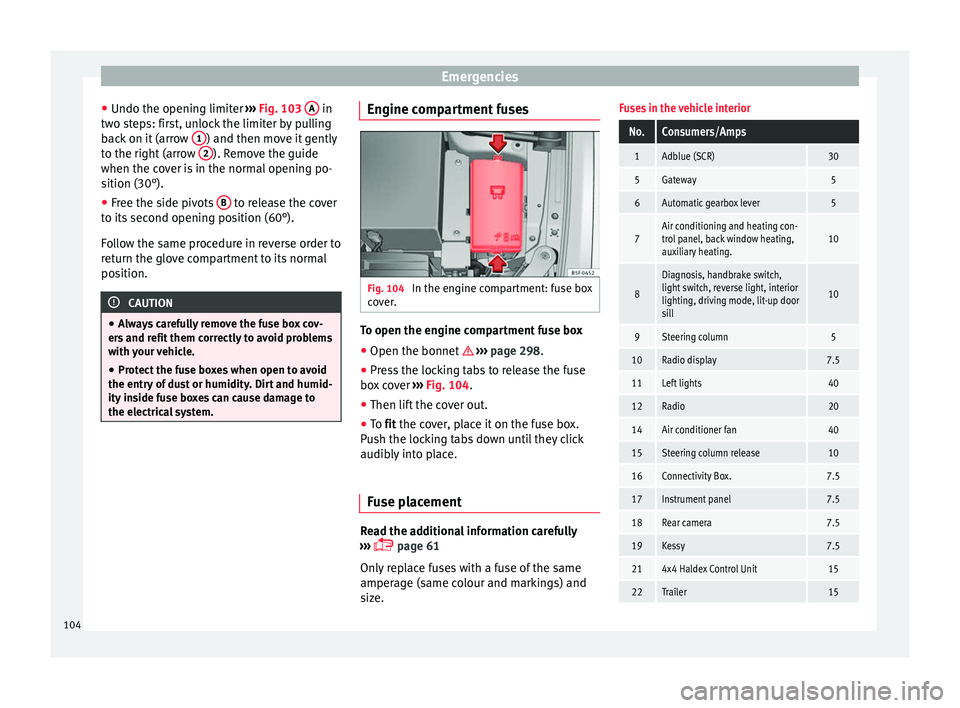
Fig. 104
In the engine compartment: fuse box
c o
v
er. To open the engine compartment fuse box
● Open the bonnet › ›
›
page 298.
● Press the locking tabs to release the fuse
box c
over ››› Fig. 104.
● Then lift the cover out.
● To fit the cover, place it on the fuse box.
Pu
sh the locking tabs down until they click
audibly into place.
Fuse placement Read the additional information carefully
› ›
›
page 61
Only replace fuses with a fuse of the same
amperage (same colour and markings) and
size.
Fuses in the vehicle interior
No.Consumers/Amps
1Adblue (SCR)30
5Gateway5
6Automatic gearbox lever5
7Air conditioning and heating con-
trol panel, back window heating,
auxiliary heating.10
8
Diagnosis, handbrake switch,
light switch, reverse light, interior
lighting, driving mode, lit-up door
sill
10
9Steering column5
10Radio display7.5
11Left lights40
12Radio20
14Air conditioner fan40
15Steering column release10
16Connectivity Box.7.5
17Instrument panel7.5
18Rear camera7.5
19Kessy7.5
214x4 Haldex Control Unit15
22Trailer15 104
Page 107 of 348
Fuses and bulbsNo.Consumers/Amps
23Electric sunroof30
24Right lights40
25Left door30
26Heated seats30
27Interior light30
28Trailer25
32Control unit for parking aid, front
camera and radar7.5/10
33Airbag5
34Reverse switch, climate sensor,
electrochromic mirror, rear power
sockets (USB)7.5
35Diagnosis, headlight control unit,
headlight adjuster10
36Right LED headlight7.5
37Left LED headlight7.5
38Trailer25
39Right door30
4012V socket20
42Central locking40
43SEAT Sound, beats sound CAN
and MOST.30
44Trailer15
No.Consumers/Amps
45Electric driver's seat15
47Rear window wiper15
49Starter motor; clutch sensor5
50Electric rear lid40
52Driving mode.15
53Heated rear window30
Fuse arrangement in engine compartment
No.Consumers/Amps
1ESP control unit25
2ESP control unit40
3Engine control unit (diesel/pet-
rol)30/15
4Engine sensors5/10
5Engine sensors7.5
6Brake light sensor5
7Engine power supply10
8Lambda probe10/15
9Engine5/10/20
10Fuel pump control unit15/20
11PTC40
12PTC40
No.Consumers/Amps
13Automatic gearbox control unit15/30
14Heated windscreen40
15Horn15
16Petrol pump5/15/20
17Engine control unit7.5
18Terminal 30 (positive reference)5
19Front windscreen washer30
20Alarm horn10
22Engine control unit5
23Starter motor30
24PTC40
31Pressure pump15
33Gearbox pump30
37Parking heating20
Note
● In the v ehic
le, there are more fuses than
those indicated in this chapter. These should
only be changed by a specialised workshop.
● Positions not containing a fuse do not ap-
pear in the fo
llowing tables.
● Some of the equipment listed in the tables
below pert
ain only to certain versions of the
model or are optional extras. » 105
Technical data
Advice
Operation
Emergencies
Safety
Page 134 of 348
Operation
● Mo v
e the g
ear lever to position P (if the ve-
hicle has automatic gearbox), since other-
wise the vehicle cannot be locked.
● Close the door.
● Push the central locking button on the
remote c
ontrol and touch the locking sensor
surface ››› Fig. 132 B on the driver door han-
dl e onc
e w
ithin the following 5 seconds. Do
not grip the door handle, otherwise the vehi-
cle will not lock. Deactivation is also possible
if the vehicle is locked through the driver’s
door lock.
● To check that the function has been deacti-
vated, w
ait at least 10 seconds, grip and pull
on the door handle. The door should not
open.
The next time the door can only be unlocked
via the remote control or the lock cylinder.
The next time the door is locked/unlocked,
Keyless Access will be active again.
Convenience functions
To close all the electric windows using the
convenience function, keep a finger on the
locking sensor surface B (arrow) of the door
h andl
e f
or a few seconds until the windows
have closed.
The doors opened by touching the sensor
surface of the door handle depend on the
settings that have been activated in the info-
tainment system with the button and theSETTINGS and
Openin
g and c
lo
sing function but-
t on
s. WARNING
If there is a valid key in the proximity of the
re ar lid, in some c
ases the Easy Open func-
tion may be accidentally activated and the
rear lid will open, for example, when sweep-
ing under the rear bumper, when directing a
water jet or high pressure steam to the area
or when carrying out maintenance work or re-
pairs in that area. If accidentally opened, the
rear lid could injure somebody situated in its
area of operation or cause material damage.
● Therefore, always make sure that there is
no uns
upervised valid key in the area near
the rear lid.
● Before carrying out any maintenance or re-
pair work
on the vehicle, always disable the
Easy Open feature via the infotainment sys-
tem.
● Before washing the vehicle, always disable
the Easy
Open feature via the infotainment
system.
● Before attaching a bicycle rack or a trailer,
›››
page 273, always disable the Easy Open
feature via the infotainment system. CAUTION
The sensor surfaces on the door handles
cou l
d engage if hit with a water jet or high
pressure steam if there is a valid vehicle key
in the proximity. If at least one of the electric windows is open and the sensor surface
B (arrow) on one of the handles is activated
continuou
s
ly, all windows will close. Note
● If the v
ehicle battery has little or no charge,
or the vehicle key battery is almost or entire-
ly out of charge, you will probably not be able
to lock or unlock the vehicle with the Keyless
Access system. The vehicle can be unlocked
or locked manually ››› page 97.
● To control the proper locking of the vehicle,
the rele
ase function is disabled for approx. 2
seconds.
● If the message Keyless access system
faulty is di
splayed on the screen of the
dash panel, abnormalities may occur in the
operation of the Keyless Access system. Con-
tact a specialised workshop. SEAT recom-
mends visiting a SEAT dealership for this.
● Depending on the function set on the info-
tainment sy
stem for the mirrors, the exterior
mirrors will unfold and the surround lighting
will come on when unlocking the vehicle us-
ing the sensor surface on the driver and pas-
senger door handles ››› page 155.
● If there is no valid key inside the vehicle or
the syst
em fails to detect one, a warning will
display on the dash panel screen. This could
happen if any other radio frequency signal in-
terferes with the key signal (e.g. from a mo-
bile device accessory) or if the key is covered
by another object (e.g. an aluminium case). 132
Page 137 of 348
Opening and closing
● The t urn s
ign
al light will flash once on clos-
ing and activating the alarm.
When does the system trigger an alarm?
The anti-theft alarm siren will be triggered for
about 30 seconds accompanied by sound
and optical (flashing) warning signals and
will be repeated about ten times when the
vehicle is locked and the following unauthor-
ised actions are attempted:
● Opening a door that is mechanically un-
locked u
sing the vehicle key without switch-
ing on the ignition in the next 15 seconds (in
certain markets, such as the Netherlands,
there is no 15 second waiting time and the
alarm is activated immediately on opening
the door).
● A door is opened.
● The bonnet is opened.
● The rear lid is opened.
● When the ignition is switched on with a
non-authorised k
ey.
● When the vehicle battery is disconnected.
● Movement inside the vehicle (in vehicles
with interior monit
oring ››› page 136).
● When the vehicle is towed (in vehicles with
anti-tow sy
stem ››› page 136).
● When the vehicle is raised (in vehicles with
anti-to w sy
stem ››› page 136). ●
When the v ehic
le is transported on a ferry
or by rail (vehicles with an anti-tow system or
vehicle interior monitoring ››› page 136).
● When a trailer connected to the anti-theft
alarm sys
tem is disconnected.
How to turn OFF the alarm
Unlock the vehicle with the unlocking button
on the key or turn on the ignition with a valid
key. Note
● Aft er 28 d
ays, the indicator light will be
switched off to prevent the battery from ex-
hausting if the vehicle has been left parked
for a long period of time. The alarm system
remains activated.
● If, after the audible warning goes off, an-
other monitored ar
ea is accessed (e.g. the
rear lid is opened after a door has been
opened), the alarm is triggered again.
● The anti-theft alarm is not activated when
the vehic
le is locked from within using the
central locking button .
● If the driver door is unlocked mechanically
with the key
, only the driver door is unlocked,
the rest of the doors remain locked. Only
when the ignition has been turned on will the
other doors be available - but not unlocked -
and the central locking button will be activa-
ted. ●
If the v
ehicle battery is run down or flat
then the anti-theft alarm will not operate cor-
rectly.
● Vehicle monitoring remains active even if
the batter
y is disconnected or not working for
any reason.
● The alarm is triggered immediately if one of
the batter
y cables is disconnected while the
alarm system is active. Vehicle interior monitoring and anti-
to
w sy
stem* It is a monitoring or control function incorpo-
r
at
ed in the anti-thef
t alarm* which detects
unauthorised vehicle entry by means of ultra-
sound.
Activation
– It is automatically switched on when the
anti-theft al
arm is activated.
Deactivation – Open the vehicle with the key, either me-
chanic
ally or by pressing the button on
the remote control. The time period from
when the door is opened until the key is in-
serted in the contact should not exceed 15
seconds, otherwise the alarm will be trig-
gered. »
135
Technical data
Advice
Operation
Emergencies
Safety
Page 140 of 348
Operation
If you press one of the butt
on s again, the
rear lid will move again in the original direc-
tion.
If the rear lid is met with resistance or an ob-
stacle during the automatic opening or clos-
ing, opening or closing will be interrupted
immediately. For the closing process, the rear
lid opens again slightly.
● Check why it has not been possible to open
or close the r
ear lid.
● Try to open or close the rear lid again.
● If necessary, the rear lid can be opened or
closed b
y hand using reasonable force.
Special feature for pulling a trailer
If the factory-fitted towing bracket is electri-
cally connected to a trailer ››› page 273, the
electric rear lid can only be opened or closed
with the buttons on the rear lid itself.
Acoustic warnings
Throughout the process of opening or closing
the rear lid, acoustic warnings can be heard.
Exception: when the rear lid is opened man-
ually using the handle or the Easy Open func-
tion with the movement of the foot or closed
using the button on the rear lid itself
››› Fig. 137. Modifying and memorising the opening an-
gle
If the s
pace behind or above the vehicle is
less than the travel area of the rear lid, you
can change the opening angle of the rear lid.
To memorise a new opening angle, the rear
lid must be open at least halfway.
● Interrupt the opening process in the de-
sired po
sition.
● Press the button ›
›› Fig. 137 on the rear
lid for at least 3 seconds.
The opening angle is memorised. Memorisa-
tion is indicated by blinking of the hazard
warning lights and an audible warning.
Resetting and memorising the opening angle
For the rear lid to reopen completely, the
opening angle must be reset and memorised
again.
● Release the rear lid and open it to the
memorised height.
● Lif
t the rear lid by hand as far as it goes. To
do this, some for
ce will have to be used.
● Press the button ›
›› Fig. 137 on the rear
lid for at least 3 seconds.
● This resets and memorises the factory-set
opening angl
e. Memorisation is indicated by
blinking of the hazard warning lights and an
audible warning. Automatic protection against overheating
If the sys
tem is operated repeatedly in a
short space of time, it automatically switches
off to prevent overheating.
Once the system is cool again, the function
can be reused. Until then, the rear lid can on-
ly be opened and closed by hand using rea-
sonable force.
If with the rear lid open the vehicle battery is
disconnected ››› page 305 or the corre-
sponding fuse burns out ››› page 102, the
system will have to be reset. This requires
closing the rear lid completely once.
Emergency unlocking
››› page 17 WARNING
If a lot of snow builds up on the rear lid or it
is he
avily loaded, the rear lid may not open
or, after opening, it may lower by itself due to
the extra weight and cause serious injury.
● Do not open the rear lid when there is a lot
of sno
w on it or when carrying a load (e.g. on
a rack).
● Before opening the rear lid, remove the
snow or the lo
ad. WARNING
If the rear lid is closed incorrectly or without
due car e, it
could result in serious injury.138