winter tyres Seat Ateca 2018 Owner's Manual
[x] Cancel search | Manufacturer: SEAT, Model Year: 2018, Model line: Ateca, Model: Seat Ateca 2018Pages: 348, PDF Size: 7.32 MB
Page 8 of 348
Table of Contents
Automatic gearbox/DSG automatic gear-
bo x*
. . . . . . . . . . . . . . . . . . . . . . . . . . . . . . . . . . . 193
Ad
dress . . . . . . . . . . . . . . . . . . . . . . . . . . . . . . . . 200
Run-in and economical driving . . . . . . . . . . . . . 201
Power management . . . . . . . . . . . . . . . . . . . . . . 203
Engine management and exhaust gas purifica-
tion syst
em . . . . . . . . . . . . . . . . . . . . . . . . . . . . . 204
Driving tips . . . . . . . . . . . . . . . . . . . . . . . . . . . . . 206
Driver assistance systems . . . . . . . . . . . . . . . . . 208
Start-Stop System* . . . . . . . . . . . . . . . . . . . . . . . 208
Hill Descent Control (HDC) . . . . . . . . . . . . . . . . . 210
Auto Hold Function . . . . . . . . . . . . . . . . . . . . . . . 211
Cruise control system (CCS)* . . . . . . . . . . . . . . . 212
Speed limiter . . . . . . . . . . . . . . . . . . . . . . . . . . . 214
Emergency brake assist system (Front As-
sis
t)* . . . . . . . . . . . . . . . . . . . . . . . . . . . . . . . . . . 217
Adaptive Cruise Control ACC* . . . . . . . . . . . . . . 221
Lane Assist system* . . . . . . . . . . . . . . . . . . . . . . 230
Traffic Jam Assist . . . . . . . . . . . . . . . . . . . . . . . . 233
Emergency Assist . . . . . . . . . . . . . . . . . . . . . . . . 234
Blind spot detector (BSD) with parking assis-
tance (RCT
A)* . . . . . . . . . . . . . . . . . . . . . . . . . . . 237
SEAT Drive Profile* . . . . . . . . . . . . . . . . . . . . . . . 242
Traffic sign detection system* . . . . . . . . . . . . . . 245
Fatigue detection (break recommendation)* . . 248
Park Assist* . . . . . . . . . . . . . . . . . . . . . . . . . . . . 249
Parking System Plus (ParkPilot)* . . . . . . . . . . . 257
Parking aid (Park Pilot)* . . . . . . . . . . . . . . . . . . 262
Top View Camera* . . . . . . . . . . . . . . . . . . . . . . . 265
Rear Assist (Rear View Camera)* . . . . . . . . . . . . 270
Towing bracket device* . . . . . . . . . . . . . . . . . . . 273
Trailer mode . . . . . . . . . . . . . . . . . . . . . . . . . . . . 273
Advice . . . . . . . . . . . . . . . . . . . . . . . . . . . . . . . . 284
Care and maintenance . . . . . . . . . . . . . . . . . . . . 284
Accessories and modifications to the vehi-
cle
. . . . . . . . . . . . . . . . . . . . . . . . . . . . . . . . . . . . 284
Care and cleaning . . . . . . . . . . . . . . . . . . . . . . . 285 Vehicle exterior care . . . . . . . . . . . . . . . . . . . . . . 285
Caring for the vehicle interior . . . . . . . . . . . . . . 289
Checking and refilling levels
. . . . . . . . . . . . . . . 292
Filling the tank . . . . . . . . . . . . . . . . . . . . . . . . . . 292
Fuel . . . . . . . . . . . . . . . . . . . . . . . . . . . . . . . . . . . 293
AdBlue ®
. . . . . . . . . . . . . . . . . . . . . . . . . . . . . . . 295
Engine compartment . . . . . . . . . . . . . . . . . . . . . 298
Engine oil . . . . . . . . . . . . . . . . . . . . . . . . . . . . . . 300
Cooling system . . . . . . . . . . . . . . . . . . . . . . . . . . 302
Brake fluid . . . . . . . . . . . . . . . . . . . . . . . . . . . . . 303
Windscreen washer reservoir . . . . . . . . . . . . . . 304
Battery . . . . . . . . . . . . . . . . . . . . . . . . . . . . . . . . . 305
Wheels . . . . . . . . . . . . . . . . . . . . . . . . . . . . . . . . 307
Wheels and tyres . . . . . . . . . . . . . . . . . . . . . . . . 307
Tyre monitoring systems . . . . . . . . . . . . . . . . . . 311
Temporary spare wheel . . . . . . . . . . . . . . . . . . . 314
Winter service . . . . . . . . . . . . . . . . . . . . . . . . . . . 315
Technical data . . . . . . . . . . . . . . . . . . . . . . . . 317
Technical specifications . . . . . . . . . . . . . . . . . . 317
Important . . . . . . . . . . . . . . . . . . . . . . . . . . . . . . 317
Vehicle identification data . . . . . . . . . . . . . . . . . 317
Information on fuel consumption . . . . . . . . . . . 318
Trailer mode . . . . . . . . . . . . . . . . . . . . . . . . . . . . 319
Wheels . . . . . . . . . . . . . . . . . . . . . . . . . . . . . . . . 319
Engine data . . . . . . . . . . . . . . . . . . . . . . . . . . . . . 320
Dimensions . . . . . . . . . . . . . . . . . . . . . . . . . . . . . 327
Index . . . . . . . . . . . . . . . . . . . . . . . . . . . . . . . . . 329
6
Page 35 of 348
The essentials
Easy Connect CAR menu settin g
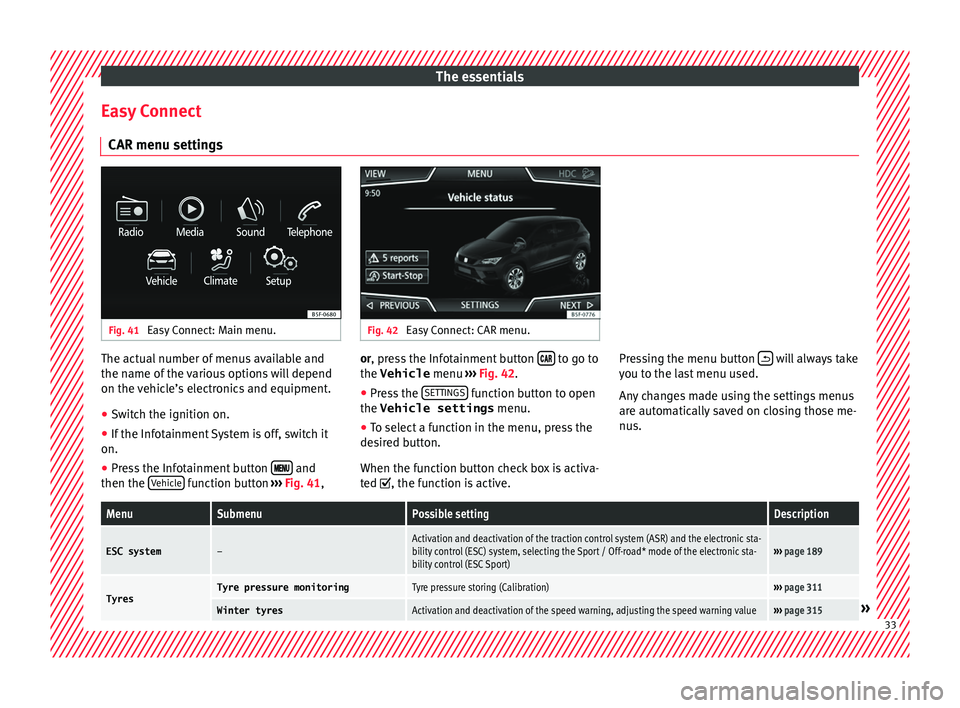
s Fig. 41
Easy Connect: Main menu. Fig. 42
Easy Connect: CAR menu. The actual number of menus available and
the n
ame of
the
various options will depend
on the vehicle’s electronics and equipment.
● Switch the ignition on.
● If the Infotainment System is off, switch it
on.
● Press the Infotainment button and
then the V
ehic
l
e function button
››
› Fig. 41, or, press the Infotainment button
to go to
the Vehicle menu ››
›
Fig. 42.
● Press the SETTINGS function button to open
the Vehicle settings menu.
● To select a function in the menu, press the
de s
ir
ed button.
When the function button check box is activa-
ted , the function is active. Pressing the menu button
will always take
y ou t
o the l
ast menu used.
Any changes made using the settings menus
are automatically saved on closing those me-
nus.
MenuSubmenuPossible settingDescription
ESC system–Activation and deactivation of the traction control system (ASR) and the electronic sta-
bility control (ESC) system, selecting the Sport / Off-road* mode of the electronic sta-
bility control (ESC Sport)››› page 189
TyresTyre pressure monitoringTyre pressure storing (Calibration)››› page 311
Winter tyresActivation and deactivation of the speed warning, adjusting the speed warning value››› page 315» 33
Page 44 of 348
The essentials
When the vehicle is at a standstill or when
tr av
el
ling at very low speeds, the tempera-
ture displayed may be higher than the true
outside temperature as a result of the heat
produced by the engine.
The temperatures measured range from
-40°C to +50°C (-40°F to +122°F).
Engine oil temperature display Vehicles without multifunction steering
wheel
● Press the rocker switch ›
››
Fig. 43 2 until
the m ain menu ap
pe
ars. Enter into Driving
data . With the button 2 move to the oil
t emper
at
ure gauge.
Vehicles with multifunction steering wheel
● Enter the submenu Driving data and
turn the thumbwheel
until the oil tempera-
ture display appears.
The engine reaches its operating temperature
when in normal driving conditions, the oil
temperature is between 80°C (180°F) and
120°C (250°F) . If the engine is required to
work hard and the outside temperature is
high, the engine oil temperature can in-
crease. This does not present any problem as
long as the warning lamps ›››
table on
page 47 or ››› table on page 47 do not
appear on the display. Additional consumers ●
Operation with the windscreen wiper lever*:
Pre s
s the rocker switch ››› Fig. 43 2 until the
main menu ap pe
ars. Enter into the section
Driving data . With the rocker switch,
move to the display Convenience con-
sumers .
● Operation with the multi-function steering
wheel*:
move with the buttons
or
to Driving data
and enter with
OK. Turn
the right thumbwheel until the Conven-
ience consumers display appears.
In addition, a scale will inform you of the cur-
rent sum of all the additional appliances.
Saving tips Tips on how to save fuel will be displayed in
c
ondition
s
that increase fuel consumption.
Follow them to reduce consumption. The indi-
cations appear automatically only with the ef-
ficiency programme. After a time, the tips will
disappear automatically.
If you wish to hide a saving tip immediately
after it appears, press any button on the
windscreen wiper lever*/multifunction steer-
ing wheel*. Note
● If y
ou hide a saving tip, it will reappear af-
ter you switch the ignition on again.
● The saving tips do not appear in all situa-
tions, but
rather with a large separation of
time. Speed warning device
The speed warning device warns the driver
when they h
av
e exceeded the pre-set speed
limit by 3 km/h (2 mph). An audible warning
signal sounds, and the warning lamp and
the driver message Speed limit excee-
ded! will be displayed simultaneously on the
instrument panel. The warning lamp
switches off when reducing speed below the
stored maximum limit.
Speed warning programming is recommen-
ded if you wish to be reminded of a maxi-
mum speed, such as when travelling in a
country with different speed limits or for a
maximum speed for winter tyres.
Setting speed limit warning
You can use the radio or the Easy Connect* to
set, alter or cancel the speed limit warning.
● Vehicles with radio : pres
s the SETUP button
> c ontr
o
l button Driver Assistant >
Speed warning .42
Page 69 of 348
The essentials
the wheel condition and hub mounting surfa-
c e
s.
These surfaces must be clean before fit-
ting the wheel.
Tyres with compulsory direction of ro-
tation A directional tread pattern can be identified
by
the arr
ows on the sidewall that point in
the direction of rotation. Always observe the
direction of rotation indicated when fitting
the wheel to guarantee optimum properties
of this type of tyres with regard to grip,
noises, wear and aquaplaning.
If it is absolutely necessary to fit the spare
tyre* against the direction of rotation, drive
with care as this means the tyre does not of-
fer optimum driving properties. This is of par-
ticular importance when the road surface is
wet.
To return to directional tread tires, replace
the punctured tyre as soon as possible and
restore the obligatory direction of rotation of
all tyres.
Subsequent work ●
Alloy wheels: rep
l
ace the wheel bolt caps.
● Plate wheels: fit the centr
al wheel rim again
››› page 64. ●
Return al
l tools to their proper storing loca-
tion.
● If the replaced wheel does not fit in the
spar
e wheel housing, store it safely in the
luggage compartment ›››
page 162.
● Check the tyre pressure of the newly moun-
ted tyr
e as soon as possible.
● In vehicles fitted with a tyre pressure indi-
cator
, adjust the pressure and store the read-
ing in the radio/Easy Connect system*
››› page 311.
● Have the tightening torque of the wheel
bolts c
hecked as soon as possible with a tor-
que wrench (it should be 140 Nm). Mean-
while, drive carefully.
● Have the flat tyre replaced as quickly as
poss
ible.
Snow chains Use Snow chains should only be used on the
fr
ont
wheel
s.
Check that they are correctly seated after
driving for a few yards; correct the position if
necessary, in accordance with the manufac-
turer's fitting instructions. Keep your speed
below 50 km/h (30 mph). If there is a danger of being trapped despite
havin
g mounted the chains, it is best to disa-
ble the driving wheels (ASR) in the ESC
››› page 191, Switching on/off the ESC
and ASR.
Snow chains will improve braking ability as
well as traction in winter conditions.
For technical reasons snow chains may only
be used with the following wheel rim/tyre
combination.
215/60 R16Chains with links of maximum 15 mm
215/55 R17Chains with links of maximum 15 mm
215/50 R18Chains with links of maximum 15 mm
Other dimensions do not allow chains Remove any central wheel trims and the rim
rin
g bef
or
e fitting snow chains.
Remove the chains when roads are free of
snow. Driving characteristics worsen, and the
wheels become damaged quickly and may
even be rendered unusable. 67
Page 118 of 348
Operation
● St ar
t
-Stop system status display
››› page 208.
● Active cylinder management display
(ACT ®
)* ››
› page 202
● Signs recognised by the traffic signal de-
tection sys
tem ››› page 245
● Low consumption driving status (ECO)
›››
page 116
● Engine code (MKB) ›››
page 117.
Distance travelled
The odometer registers the total distance
travelled by the car.
The odometer (trip ) shows the distance
travelled since the last odometer reset. The
last digit of the trip recorder indicates distan-
ces of 100 metres or one tenths of a mile.
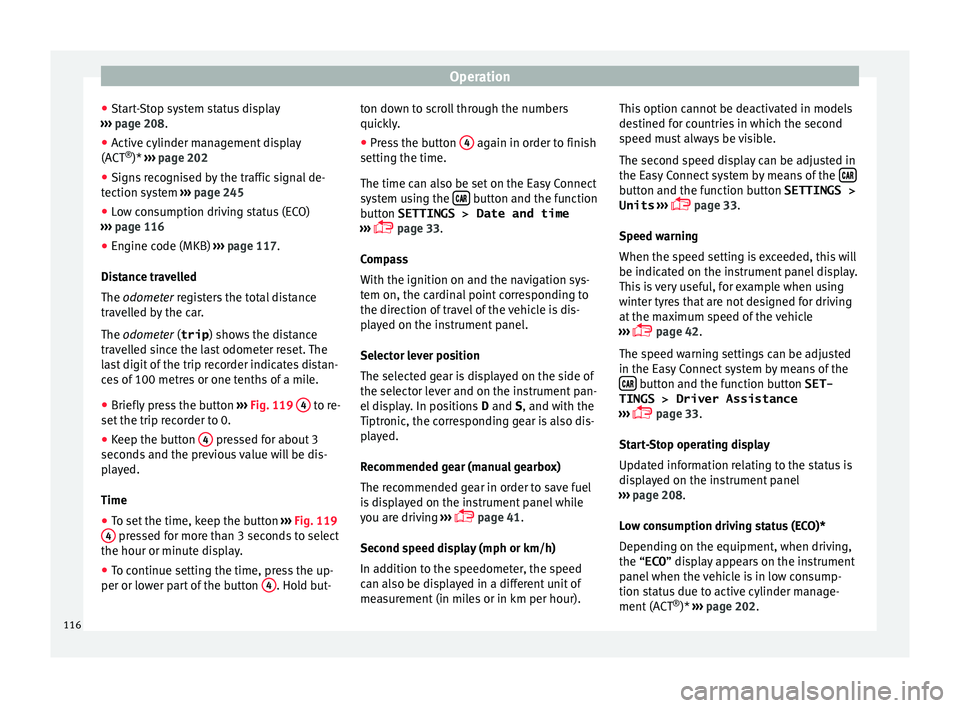
● Briefly press the button ›››
Fig. 119 4 to re-
set the trip r
ec
order to 0.
● Keep the button 4 pressed for about 3
sec ond
s
and the previous value will be dis-
played.
Time
● To set the time, keep the button ›››
Fig. 119
4 pressed for more than 3 seconds to select
the hour or minut e di
s
play.
● To continue setting the time, press the up-
per or lower p
art of the button 4 . Hold but-ton down to scroll through the numbers
quic
k
ly
.
● Press the button 4 again in order to finish
settin g the time.
The time c an al
so be set on the Easy Connect
system using the button and the function
b utt
on
SETTINGS > Date and time
››› page 33.
Compass
With the ignition on and the navigation sys-
tem on, the cardinal point corresponding to
the direction of travel of the vehicle is dis-
played on the instrument panel.
Selector lever position
The selected gear is displayed on the side of
the selector lever and on the instrument pan-
el display. In positions D and S, and with the
Tiptronic, the corresponding gear is also dis-
played.
Recommended gear (manual gearbox)
The recommended gear in order to save fuel
is displayed on the instrument panel while
you are driving ›››
page 41.
Second speed display (mph or km/h)
In addition to the speedometer, the speed
can also be displayed in a different unit of
measurement (in miles or in km per hour). This option cannot be deactivated in models
destined f
or countries in which the second
speed must always be visible.
The second speed display can be adjusted in
the Easy Connect system by means of the button and the function button SETTINGS >
Units › ›
›
page 33.
Speed warning
When the speed setting is exceeded, this will
be indicated on the instrument panel display.
This is very useful, for example when using
winter tyres that are not designed for driving
at the maximum speed of the vehicle
››› page 42.
The speed warning settings can be adjusted
in the Easy Connect system by means of the button and the function button SET-
TINGS > Driver Assistance
› ›
›
page 33.
Start-Stop operating display
Updated information relating to the status is
displayed on the instrument panel
››› page 208.
Low consumption driving status (ECO)*
Depending on the equipment, when driving,
the “ECO ” display appears on the instrument
panel when the vehicle is in low consump-
tion status due to active cylinder manage-
ment (ACT ®
)* ››› page 202.
116
Page 204 of 348
Operation
Active cylinder management (ACT ®
)*
D ependin
g on
vehicle equipment, the active
cylinder management (ACT ®
) may automati-
cally deactivate some of the engine cylinders
if the driving situation does not require too
much power. When it is switched off, no fuel
is injected into these cylinders, hence total
fuel consumption may be reduced. The num-
ber of active cylinders can be seen on the in-
strument panel display ›››
page 37.
Foresight when driving
Acceleration causes the vehicle to consume
more fuel. If you think ahead when driving,
you will need to brake less and thus acceler-
ate less. Wherever possible, let the car roll
slowly to a stop, with a gear engaged (for in-
stance when you can see that the next traffic
lights are red). This takes advantage of the
engine braking effect, reducing wear on the
brakes and tyres. Emissions and fuel con-
sumption will drop to zero due to the overrun
fuel cut-off.
Changing gear to save energy
An effective way of saving is to change in ad-
vance to a higher gear. Running the engine at
high rpm in the lower gears uses an unneces-
sary amount of fuel.
Manual gearbox : shift up from first to second
gear as soon as possible. In any case, we rec-
ommend that you change to a higher gear
upon reaching 2,000 rpm. Choosing the right gear enables fuel savings. Select the highest
poss
ible gear appropriate for the driving sit-
uation (the engine should continue function-
ing with cyclical regularity).
Automatic gearbox : accelerate gradually and
without reaching the “kick-down” position.
Avoid driving at high speed
Avoid travelling at top speed, whenever pos-
sible. Fuel consumption, emission of harmful
gases and noise pollution multiply dispropor-
tionately as speed is increased. Driving at
moderate speeds will help to save fuel.
Reduce idling time
In vehicles with the Start-Stop system idling
is automatically reduced. In vehicles without
the Start-Stop system it is worth switching off
the engine, for example, at level crossings
and at traffic lights that remain red for long
periods of time. When an engine has reached
operating temperature, and depending on
the cylinder capacity, keeping it switched off
for a minimum of about 5 seconds already
saves more than the amount of fuel necessa-
ry for restarting.
The engine takes a long time to warm up
when it is idling. Mechanical wear and pollu-
tant emissions are also especially high dur-
ing this initial warm-up phase. It is therefore
best to drive off immediately after starting the engine. Avoid running the engine at high
speed.
Re
gular maintenance
Regular servicing helps in saving fuel even
before the engine is started. A well-serviced
engine gives you the benefit of improved fuel
efficiency as well as maximum reliability and
an enhanced resale value. A badly serviced
engine can consume up to 10% more fuel
than necessary.
Avoid short journeys
The engine and catalytic converter need to
reach their optimal operating temperature in
order to minimise fuel consumption and
emissions.
A cold engine consumes a disproportionate
amount of fuel. The engine reaches its work-
ing temperature after about four kilometres
(2.5 miles), when fuel consumption will re-
turn to a normal level.
Check tyre pressure
Always make sure the tyres are inflated to the
correct pressures ››› page 308 to save fuel. If
the pressure is below half bar, fuel consump-
tion may increase by 5%. Due to the greater
rolling resistance, under-inflation also increa-
ses tyre wear and impairs handling.
Do not use winter tyres all year round as they
increase fuel consumption by up to 10%.
202
Page 208 of 348
Operation
Driving tips Driv in
g on flooded r
oadsTo prevent damage to the vehicle when driv-
ing thr
ough w
ater, for example, along a floo-
ded road, please observe the following:
● The water should never come above the
lower edg
e of the bodywork.
● Drive at pedestrian speed. WARNING
After driving through water, mud, sludge,
etc ., the br
aking effect can be delayed slight-
ly due to moisture build-up on the discs and
brake pads. Applying the brakes carefully
several times will remove the moisture and
restore the full braking effect. CAUTION
● Drivin g thr
ough flooded areas may severely
damage vehicle components such as the en-
gine, transmission, running gear or electrical
system.
● Whenever driving through water, the Start-
Stop sys
tem* must be switched off
››› page 208. Note
● Check the depth of
the water before enter-
ing the flooded zone. ●
Do not s t
op in the water, drive in reverse, or
stop the engine in any situation.
● Note that vehicles travelling in the opposite
direction ma
y splash water that could exceed
the maximum permitted water height for your
vehicle.
● Avoid driving through salt water (corro-
sion). Four-wheel drive
3 V
alid for vehicles: with four-wheel drive
On f
our-wheel drive models, the engine pow-
er is distributed to all four wheels
General notes
On four-wheel drive vehicles, the engine
power is distributed to all four wheels. The
distribution of power is controlled automati-
cally according to your driving style and the
road conditions. Also see ››› page 189.
The four-wheel drive is specially designed to
complement the superior engine power. This
combination gives the vehicle exceptional
handling and performance capabilities, both
on normal roads and in more difficult condi-
tions, such as snow and ice. Even so (or per-
haps especially for this reason), it is impor-
tant to observe certain safety points ››› .Winter tyres
Th
ank
s
to four-wheel drive, your vehicle will
have plenty of traction in winter conditions,
even with the standard tyres. Nevertheless,
we still recommend that winter tyres or all-
season tyres be fitted on all four wheels to
give even better braking response.
Snow chains
On roads where snow chains are mandatory,
this also applies to cars with four-wheel drive
››› page 67.
Changing tyres
On vehicles with four-wheel drive, all four
tyres must have the same rolling circumfer-
ence. Also avoid using tyres with varying
tread depths ››› page 309.
Off-roader?
Your SEAT is not an off-road vehicle: it does
not have enough ground clearance to be
used as such. It is therefore best to avoid
rough tracks and uneven terrain as much as
possible. WARNING
● Ev en w
ith four-wheel drive, you should al-
ways adjust your speed to suit the condi-
tions. Do not let the extra safety features
tempt you into taking any risks when driving.
Risk of accident! 206
Page 275 of 348
Towing bracket device*
● OR: Pr e
s
s the RVC function button 1)
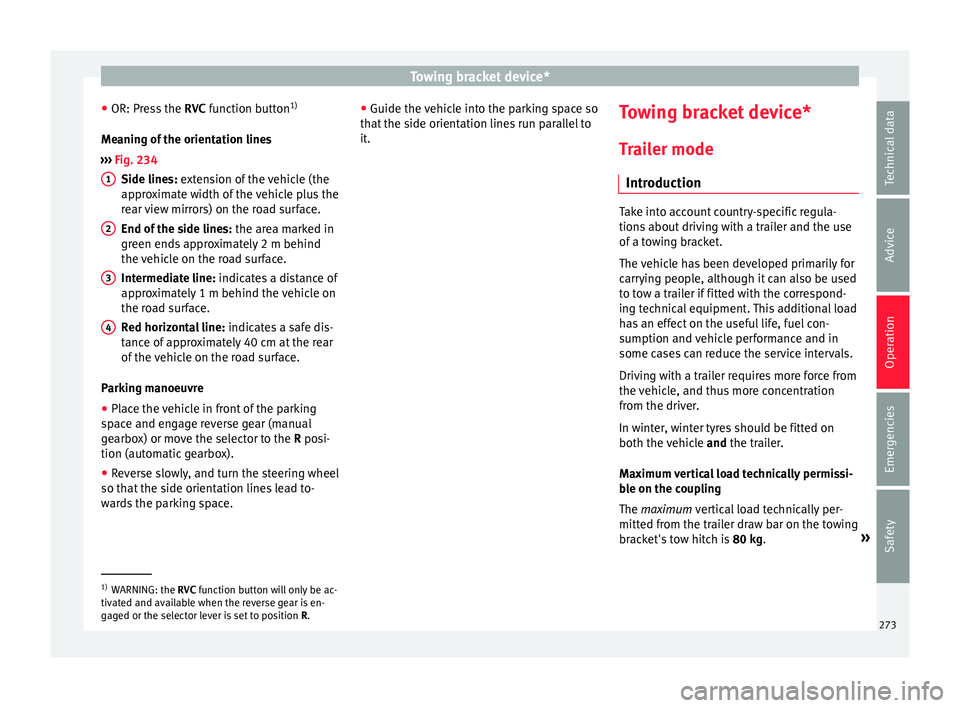
Meaning of the orientation lines
››› Fig. 234
Side lines: extension of the vehicle (the
approximate width of the vehicle plus the
rear view mirrors) on the road surface.
End of the side lines: the area marked in
green ends approximately 2 m behind
the vehicle on the road surface.
Intermediate line: indicates a distance of
approximately 1 m behind the vehicle on
the road surface.
Red horizontal line: indicates a safe dis-
tance of approximately 40 cm at the rear
of the vehicle on the road surface.
Parking manoeuvre ● Place the vehicle in front of the parking
spac
e and engage reverse gear (manual
gearbox) or move the selector to the R posi-
tion (automatic gearbox).
● Reverse slowly, and turn the steering wheel
so that the s
ide orientation lines lead to-
wards the parking space. 1 2
3
4 ●
Guide the v
ehic
le into the parking space so
that the side orientation lines run parallel to
it. Towing bracket device*
T r
ai
ler mode
Introduction Take into account country-specific regula-
tions
about
driving with a trailer and the use
of a towing bracket.
The vehicle has been developed primarily for
carrying people, although it can also be used
to tow a trailer if fitted with the correspond-
ing technical equipment. This additional load
has an effect on the useful life, fuel con-
sumption and vehicle performance and in
some cases can reduce the service intervals.
Driving with a trailer requires more force from
the vehicle, and thus more concentration
from the driver.
In winter, winter tyres should be fitted on
both the vehicle and the trailer.
Maximum vertical load technically permissi-
ble on the coupling
The maximum vertical load technically per-
mitted from the trailer draw bar on the towing
bracket's tow hitch is 80 kg. »1)
WARNING: the RVC function b
utton will only be ac-
tivated and available when the reverse gear is en-
gaged or the selector lever is set to position R.
273
Technical data
Advice
Operation
Emergencies
Safety
Page 288 of 348
Advice
Automatic car washes
B ef
or
e going through a car wash, be sure to
take the usual precautions such as closing
the windows and roof. If the vehicle has spe-
cial accessories such as spoilers or a roof
rack, it is advisable to consult the car wash
tunnel operator.
It is best to use a car wash without revolving
bristles if possible.
Washing the vehicle with a high pressure
cleaner
When washing the vehicle with a high-pres-
sure cleaner, always follow the operating in-
structions for the equipment. This applies
particularly to the operating pressure and the
spraying distance. Do not hold the nozzle too
close to soft materials such as rubber hoses
or seals. The same applies for the parking aid
sensors*, which are located in the rear
and/or front bumper.
Do not use a nozzle that sprays the water out
in a direct stream or one that has a rotating
jet for forcing off dirt.
Factory-fitted adhesive sheets
The following indications should be taken in-
to account to avoid damaging adhesive
sheets:
● Do not use high pressure cleaners. ●
Do not use s crapers to remove ice or snow
from the sheets.
● Do not polish the adhesive sheets.
● Do not use dirty cloths or sponges.
● It is preferable to wash them with a soft
spong
e and gentle neutral soap.
Washing the car by hand
When washing the car by hand, use plenty of
water to soften the dirt first, and rinse off as
well as possible.
Then clean the vehicle with a soft sponge,
glove or brush using only slight pressure.
You should start on the roof and work down.
Special car soap should only be used for very
persistent dirt.
Rinse the sponge or glove thoroughly and of-
ten.
Wheels, sills and similar should be cleaned
last. Use a second sponge for this. WARNING
● The v ehic
le should only be washed with the
ignition switched off. Failure to follow this in-
struction could result in an accident.
● Do not clean the underside of chassis, the
inside of
wheel arches or wheel trims without
protecting your hands and arms. You may cut
yourself on sharp-edged metal parts. Other-
wise, there is a risk of sustaining cuts. ●
When wa shin
g the car during the winter
season: water and ice in the brake system
can reduce braking effectiveness: risk of acci-
dent! CAUTION
● Do not wa
sh the vehicle in direct sunlight –
otherwise the paint can be damaged.
● Do not use sponges, abrasive household
spong
es or similar to clean insect remains.
This could damage the surface.
● Clean off stubborn dirt (insects, etc.) from
the headlight
s at regular intervals, for in-
stance when filling the fuel tank. The head-
lights should only be washed with water, do
not wipe them with a dry cloth or sponge. It
is best to use soapy water.
● Never wash tyres with a jet that sprays the
water out
in a direct stream. This could dam-
age the tyres even if the spray is kept at a
distance and only used for a very short time.
● Before washing the vehicle in an automatic
car wa
sh, please make sure to retract the ex-
terior mirrors to prevent them from being
damaged. Electrically retractable exterior
mirrors must not be folded in or out by hand,
always use the electrical power control. CAUTION
● Bef or
e washing the vehicle in an automatic
car wash, please proceed as follows to lock
the wiper arms so that they are not moved to-
wards the top of the windscreen: 286
Page 313 of 348
Wheels
●
Av oid ru
nning the vehicle on tyres that are
more than 6 years old. If you have no alterna-
tive, you should drive slowly and with extra
care at all times.
● If wheel trims are fitted after the car is pur-
cha
sed, ensure that there is an adequate flow
of air for cooling the brake system. For the sake of the environment
Old tyres must be disposed of according to
the l aw
s in the country concerned. Note
● A S EA
T Service Centre should be consulted
to find out whether wheels or tyres of differ-
ent sizes to those originally fitted by SEAT
can be fitted, and to find out about the com-
binations allowed between the front axle
(axle 1) and the rear axle (axle 2).
● Never mount used tyres if you are not sure
of their “pr
evious history”.
● For technical reasons, it is not generally
poss
ible to use the wheels from other vehi-
cles. In some cases, this may also be true for
the same model of wheel. Wheel bolts
The wheel
bolts
ar
e m
atched to the rims.
When installing different wheels (for instance
alloy wheels or wheels with winter tyres) it is
important to use the correct wheel bolts with the right length and correctly shaped bolt
head
s. This ensures that wheels are fitted se-
curely and that the brake system functions
correctly.
The wheel bolts must be clean and turn easi-
ly.
A special adapter is required to turn the anti-
theft wheel bolts* ›››
page 65.
Tyre monitoring systems Introduction WARNING
Unsuitable handling of the wheels and tyres
ma y
lead to sudden tyre pressure losses, to
tread separation or even to a blow-out.
● Check tyre pressures regularly and ensure
they are m
aintained at the pressures indica-
ted. Tyre pressure that is too low could cause
overheating, resulting in tread detachment or
even burst tyres.
● Tyre pressure should be that indicated on
the label when the ty
res are cold at all times
››› page 319.
● Regularly check the cold inflation pressure
of the tyr
es. If necessary, change the tyre
pressure of the vehicle tyres while they are
cold. ●
Re gu
larly check your tyres for damage and
wear.
● Never exceed the maximum permitted
speed or loa
ds specified for the type of tyre
fitted on your vehicle. For the sake of the environment
Under-inflated tyres lead to increased fuel
c on s
umption and tyre wear. Note
● Driv ing f
or the first time with new tyres at a
high speed can cause them to slightly ex-
pand, which could then produce an air pres-
sure warning.
● Only replace used tyres with those author-
ised by
SEAT for the corresponding type vehi-
cle.
● Do not only rely on the tyre monitoring sys-
tem. Re
gularly check your tyres to ensure
that the tyre pressure is correct and that the
tyres are not damaged due to puncture, cuts,
tears and impacts/dents. Remove objects
from the tyres only when they have not
pierced the tyres. 311
Technical data
Advice
Operation
Emergencies
Safety