change time Seat Ateca XL 2006 Owner's Manual
[x] Cancel search | Manufacturer: SEAT, Model Year: 2006, Model line: Ateca XL, Model: Seat Ateca XL 2006Pages: 288, PDF Size: 9.08 MB
Page 62 of 288

Cockpit
60Displayed categories
The display in the instrument panel shows the mileage and
trip recorder as well as the selector lever position.
Control and warning lamps: “Control and warning lamps”
Clock: “Setting the time”. In some vehicles the ambient temperature is
displayed to the right of the clock.
There are optional and automatic displays in this field.
- Selectable displays: e.g. Multi-function display (MFD) and ambient
temperature display
- Automatic indications: information or warning messages: “Information
or warning messages on the screen”
- Menus with diverse information are shown on the screen allowing many adjustments to be made: “Instrument panel menus” Mileage display or Service Interval Display “Mileage display or Service
Interval Display”
Selector lever position display for the automatic gearbox. The actual
position of the selector lever or the gear which is engaged (for Tiptronic)
are highlighted.
Mileage display or Service Interval DisplayDistance display
The left-hand counter in the display registers the total amount of distance
covered by the vehicle.
The right-hand counter regi
sters the short journeys. The last digit indicates
steps of 100 metres. The trip recorder counter may be reset by the reset
button ⇒page 56, fig. 33 .
Service interval display
A Service pre-warning will appear in the mileage displays if a service is due
soon. A “spanner” symbol appears and the display “km” with the distance
that can be driven until the next service appointment is due. The display will
change after approximately 10 seconds. A “clock symbol” appears and the
number of days until the service appointment should be carried out. The
message displayed in the instrument panel display is
5): SERV. IN ... KM OR
... DAYS . The service message will disappear approximately 20 seconds after
the ignition is switched on or the en gine is running. The normal display can
be resumed by pressing the reset button on the trip counter or by pressing the
rocker switch of the MFI ⇒page 61, fig. 39 .
With the ignition switched on, you can call up the current service message by
pressing the trip counter reset knob for 2 seconds.
Fig. 38 Digital display in
the instrument panel
A1A1A2
5)Depending on the model versionA3A4
A5
AB
AlteaXL_ingles_02_06 Seite 60 Dienstag, 1. August 2006 11:11 11
Page 68 of 288
Cockpit
66
NoteFor electronic and vehicle equipment on e or more of these menus will be
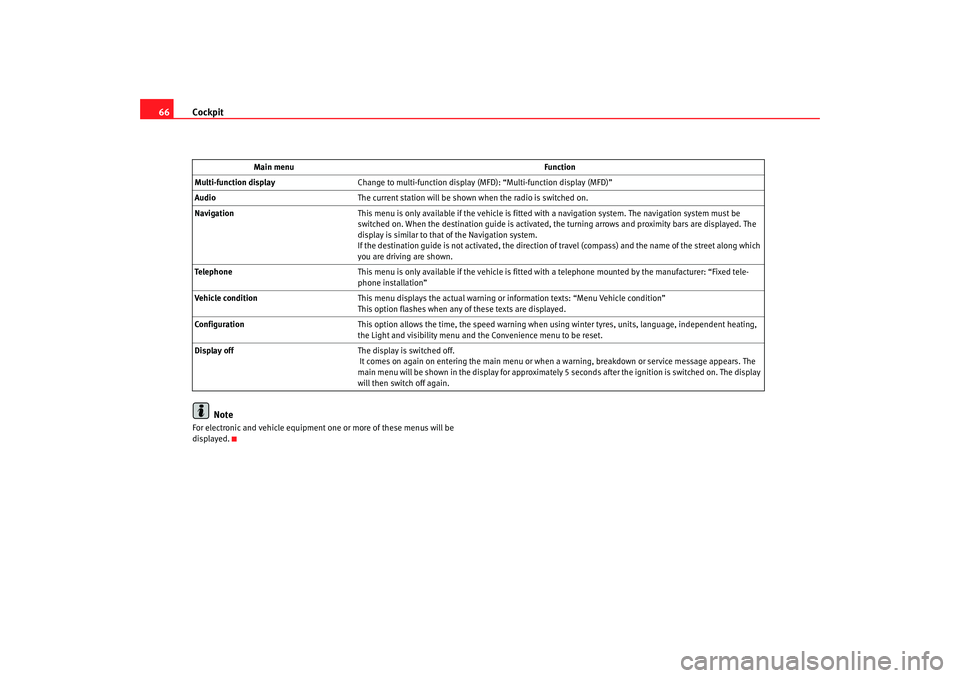
displayed. Main menu
Function
Multi-function display Change to multi-function display (MFD): “Multi-function display (MFD)”
Audio The current station will be shown when the radio is switched on.
Navigation This menu is only available if the vehicle is fitted with a navigation system. The navigation system must be
switched on. When the destination guide is activated, the turning arrows and proximity bars are displayed. The
display is similar to that of the Navigation system.
If the destination guide is not activated, the direction of travel (compass) and the name of the street along which
you are driving are shown.
Telephone This menu is only available if the vehicle is fitted wi th a telephone mounted by the manufacturer: “Fixed tele-
phone installation”
Vehicle condition This menu displays the actual warning or information texts: “Menu Vehicle condition”
This option flashes when any of these texts are displayed.
Configuration This option allows the time, the speed warning when using winter tyres, units, language, independent heating,
the Light and visibility menu and the Convenience menu to be reset.
Display off The display is switched off.
It comes on again on entering the main menu or when a warning, breakdown or service message appears. The
main menu will be shown in the display for approximately 5 seconds after the ignition is switched on. The display
will then switch off again.
AlteaXL_ingles_02_06 Seite 66 Dienstag, 1. August 2006 11:11 11
Page 71 of 288
Cockpit69
Safety First
Operating instructions
Tips and Maintenance
Te c h n i c a l D a t a
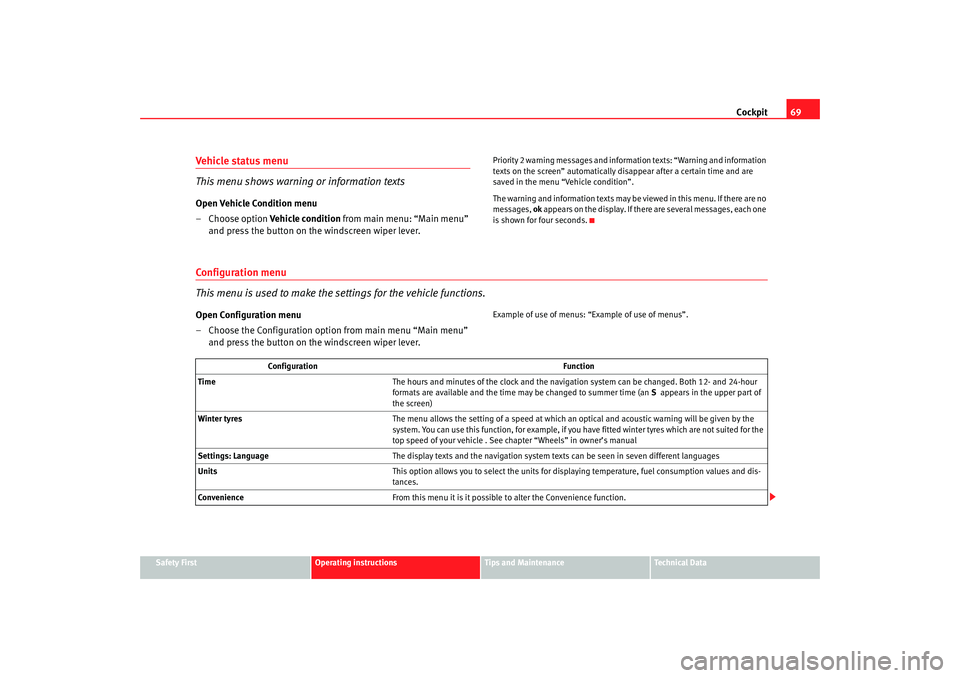
Vehicle status menu
This menu shows warning or information textsOpen Vehicle Condition menu
– Choose option Vehicle condition from main menu: “Main menu”
and press the button on the windscreen wiper lever.
Priority 2 warning messages and inform ation texts: “Warning and information
texts on the screen” automatically di sappear after a certain time and are
saved in the menu “Vehicle condition”.
The warning and information texts may be viewed in this menu. If there are no
messages, ok appears on the display. If there are several messages, each one
is shown for four seconds.
Configuration menu
This menu is used to make the settings for the vehicle functions.Open Configuration menu
– Choose the Configuration option from main menu “Main menu” and press the button on the windscreen wiper lever.
Example of use of menus: “E xample of use of menus”.
Configuration Function
Time The hours and minutes of the clock and the navigation system can be changed. Both 12- and 24-hour
formats are available and the time may be changed to summer time (an S appears in the upper part of
the screen)
Winter tyres The menu allows the setting of a speed at which an optical and acoustic warning will be given by the
system. You can use this function, for example, if you have fitted winter tyres which are not suited for the
top speed of your vehicle . See chapter “Wheels” in owner’s manual
Settings: Language The display texts and the navigation system texts can be seen in seven different languages
Units This option allows you to select the units for displaying temperature, fuel consumption values and dis-
tances.
Convenience From this menu it is it possible to alter the Convenience function.
AlteaXL_ingles_02_06 Seite 69 Dienstag, 1. August 2006 11:11 11
Page 118 of 288

Lights and visibility
116
Signalling a lane change
– Push the lever up or down to the point where you incur resistance and then release the lever. The turn signal will flash
three times. The corresponding warning lamp will also flash.
Switching main beam on and off
– Turn the light switch to position
.
– Press the lever forward ⇒page 115, fig. 77 to switch on the
main beams.
– Pull the lever back towards you to switch the main beam head- lights off again.
Headlight flasher
– Pull the lever towards the steering wheel to operate the flasher.
Switching on parking lights
– Switch off the ignition and remove the key from the lock.
– Move the lever up or down to turn on the right or left-hand parking lights respectively.
WARNING
The main beam can dazzle other drivers. Risk of accident! Never use the
main beam headlights or the headlight flasher if they could dazzle other
drivers.
Note
•
The turn signals only work when the ignition is switched on. The corre-
sponding warning lamp
or flashes in the combi-instrument. The
warning lamp
flashes when the turn signals are operated, provided a
trailer is correctly attached and connected to the vehicle. If a turn signal bulb
is defective, the warning lamp flashes at double speed. If the trailer turn
signal bulbs are damaged, warning lamp
does not light up. You should
have the bulb replaced.
•
The main beam headlights can only be switched on if the dipped beam
headlights are already on. The warning lamp
then comes on in the combi-
instrument.
•
The headlight flasher comes on for as long as you pull the lever – even if
no other lights are switch ed on. The warning lamp
then comes on in the
combi-instrument.
•
When the parking lights are switched on, the headlight and the rear light
on the corresponding side of the vehicle light up. The parking lights will only
work if the key is removed from the igni tion. If the lights are switched on, a
buzzer gives an audible warning while the driver door is open.
•
If the turn signal lever is left on after the key has been taken out of the
ignition lock, an acoustic signal sounds when the driver door is opened. This
is a reminder to switch off the turn signal, unless of course you wish to leave
the parking light on.
A1
A2
A3
A4
AlteaXL_ingles_02_06 Seite 116 Dienstag, 1. August 2006 11:11 11
Page 148 of 288
Seats and stowage
146Luggage compartmentStowing luggage
All luggage must be securely stowed.Please observe the following points to ensure the vehicle handles
well at all times:
– Distribute the load as evenly as possible.
– Place heavy objects as far forward in the luggage compartment
as possible.
– Secure luggage in the luggage compartment with suitable straps on the fastening rings*.
WARNING
•
Loose luggage and other loose items in the vehicle can cause serious
injuries.
•
Loose objects in the luggage compartment can suddenly move and
change the way the vehicle handles.
•
During sudden manoeuvres or accidents, loose objects in the
passenger compartment can be flung forward, injuring vehicle occupants.
•
Always store objects in the luggage compartment and secure with suit-
able straps. This is especially important for heavy objects.
•
When you transport heavy objects, always keep in mind that a change
in the centre of gravity can also cause changes in vehicle handling.
•
Please observe information on safe driving ⇒page 7, “Safe driving”.
Caution
Hard objects on the shelf could chafe against the wires of the heating
element in the rear window and cause damage.
Note
The ventilation slots in front of the rear side windows must not be covered as
this would prevent stale air being extracted from the vehicle.
AlteaXL_ingles_02_06 Seite 146 Dienstag, 1. August 2006 11:11 11
Page 169 of 288

Driving167
Safety First
Operating instructions
Tips and Maintenance
Te c h n i c a l D a t a
Driving programs
The automatic gearbox / direct shift gearbox has two
programmes.Selecting the normal program
– Put the selector lever into position D to drive forwards
– Put the selector lever into position R to reverse. This position is
shared by all programs for reversing.
Selecting the sport program
– Move the lever to position S .If you have selected the normal driving programme D, you will drive in a more
economical driving mode. This program selects a higher gear earlier rather
than remain in a lower gear. If you select the sport programme,
S, the program is designed for a sports
mode, that is, a programme which changes up at higher engine speeds to use
the full power of the engine. This prog ram is not recommended for use on the
motorway or in the city.
Selector lever locking
The selector lever lock prevents gears from being engaged
inadvertently, which would cause the vehicle to move.Releasing the selector lever lock
–Start the vehicle.
– Press and release the brake pedal, at the same time press the button on the selector lever.
Fig. 135 Program selec-
tion
Fig. 136 Deactivating the
lock
AlteaXL_ingles_02_06 Seite 167 Dienstag, 1. August 2006 11:11 11
Page 171 of 288

Driving169
Safety First
Operating instructions
Tips and Maintenance
Te c h n i c a l D a t a
– Do not try to slow the vehicle using another forward gear (engine
braking).
Descending gradients
– With the gear engaged, release the brake and accelerate.The steeper the gradient the lower the gear must be for effective engine
braking. For example, if 3rd gear is used on a very steep gradient, the engine
braking is insufficient and vehicle accelerates. So that the engine speed does
not become excessive, the gearbox changes to the next highest gear. Depress
the brake pedal and move the selector lever to the Tiptronic gate to return to
3rd gear.
WARNING
•
The driver should never leave the vehicle while the engine is running or
with any gear selected. If for any reason you must leave the vehicle with the
engine running, apply the handbrake and move the selector lever to posi-
tion P.
•
When the engine is running and the po sitions D, S or R are selected, it
is necessary to hold the vehicle with the foot brake because the vehicle will
creep at a low speed.
•
Never accelerate while changing the position of the selector lever (risk
of an accident).
•
The selector lever must never be mo ved into the positions R or P while
moving (risk of an accident).
•
Before descending a steep gradient, reduce speed and use the Tiptronic
program to select a lower gear.
•
If you must stop on a hill, always hold the vehicle using the footbrake
to avoid rolling back.
•
The footbrake must not be held fo r a long period of time, not even
lightly; continuous braking will cause overheating of the brakes and a reduction or even a loss of braking power and a significant increase in
braking distances.
•
Never allow the vehicle to coast down a gradient with the selector lever
in positions N or D, even when the engine is not running. For descents, the
use of the Tiptronic program is recommended to keep the speed reduced.Caution
•
Never use the automatic gearbox to hold the vehicle stationary on a hill,
even for short periods, as this may overheat the gearbox and cause damage.
Apply the handbrake or depress the foot brake to hold the vehicle in position.
•
If the vehicle is allowed to roll with the engine stopped but the selector in
position N then the gearbox may be damaged because it will not be
lubricated.WARNING (continued)
AlteaXL_ingles_02_06 Seite 169 Dienstag, 1. August 2006 11:11 11
Page 181 of 288

Intelligent technology179
Safety First
Operating instructions
Tips and Maintenance
Te c h n i c a l D a t a
The TCS should be switched on again afterwards as soon as possible.
WARNING
•
It must be remembered that TCS cann
ot defy the laws of physics. This
should be kept in mind, particular ly on slippery and wet roads and when
towing a trailer.
•
Always adapt your driving style to suit the condition of the roads and
the traffic situation. Do not let the extra safety afforded by TCS tempt you
into taking any risks when driving, this can cause accidents.Caution
•
In order to ensure that TCS function correctly, all four wheels must be
fitted with the same tyres. Any differences in the rolling radius of the tyres can
cause the system to reduce engine power when this is not desired.
•
Modifications to the vehicle (e.g. to the engine, the brake system, running
gear or any components affecting the wh eels and tyres) could affect the effi-
ciency of the ABS and TCS.
Electronic stabilisation program (ESP)*General notes
The electronic stabilisation program increases the vehicle’s
stability on the road.The electronic stabilisation program helps to reduce the danger of skidding.
The electronic stabilisation programme (ESP) consists of ABS, EDL, TCS and
Steering manoeuvre recommendations. Electronic Stabilising Program (ESP)*
ESP reduces the danger of skidding by braking the wheels individually.
The system uses the steering wheel angle and road speed to calculate the
changes of direction desired by the driver, and constantly compares them
with the actual behaviour of the vehi
cle. If the desired course is not being
maintained (for instance, if the car is starting to skid), then the ESP compen-
sates automatically by braking the appropriate wheel.
The forces acting on the braked wheel bring the vehicle back to a stable
condition. If the vehicle tends to oversteer, the system will act on the front
wheel on the outside of the turn.
Steering manoeuvre recommendations
This is a complementary safety function included in the ESP This function aids
the driver to better stabilize the vehicle in a critical situation. For example, in
case of sudden braking surface with varied adherence, the vehicle will tend
to destabilize its trajectory to the right to or to the left. In this case the ESP
recognizes the situation and helps the driver with a counter steering
manoeuvre from the power steering.
This function simply provides the dr iver with a recommended manoeuvre in
critical situations.
The vehicle doesn’t steer itself with this function, the driver has full control of
the vehicle at all times.
WARNING
•
It must be remembered that ESP cann ot defy the laws of physics. This
should be kept in mind, particularly on slippery and wet roads and when
towing a trailer.
•
Always adapt your driving style to suit the condition of the roads and
the traffic situation. Do not let the extra safety afforded by ESP tempt you
into taking any risks when driving, this can cause accidents.
AlteaXL_ingles_02_06 Seite 179 Dienstag, 1. August 2006 11:11 11
Page 222 of 288

Checking and refilling levels
220However, if the level goes down noticeably in a short time, or drops below the
“MIN” mark, there may be a leak in the brake system. A display on the instru-
ment panel will warn you if the brake fluid level is too low ⇒page 72.
WARNING
Before opening the bonnet to check the brake fluid level, read and observe
the warnings ⇒page 206.Changing the brake fluid
The brake fluid must be renewed every two years.We recommend that you have the brake fluid changed by an Authorised
Service Centre.
Before opening the bonnet, please read and follow the warnings ⇒ in
“Safety instructions on working in the engine compartment” on page 206 in
“Working in the engine compartment”.
Brake fluid absorbs moisture. In the cour se of time, it will absorb water from
the ambient air. If the water content in the brake fluid is too high, the brake
system could corrode. This also considerably reduces the boiling point of the
brake fluid. Heavy use of the brakes may then cause a vapour lock which
could impair the braking effect.
For this reason the brake fluid must be renewed every two years.
It is important that you use only use brake fluid compliant with the US
standard FMVSS 116 DOT 4. We recommend the use of Genuine SEAT brake
fluid.
WARNING
Brake fluid is poisonous. Old brake fluid impairs the braking effect.
•
Before opening the bonnet to check the brake fluid level, read and
observe the warnings ⇒page 206.
•
Brake fluid should be stored in the closed original container in a safe
place out of reach of children. There is a toxic risk.
•
Have the brake fluid changed every two years at the latest. Heavy use
of the brakes may cause a vapour lock if the brake fluid is left in the system
for too long. This would seriously affect the efficiency of the brakes and the
safety of the vehicle. This may cause an accident.Caution
Brake fluid could damage the paintwork. Wipe off any brake fluid from the
paintwork immediately.
For the sake of the environment
Brake fluid must be drained and disposed of in the proper manner observing
environmental regulations.
WARNING (continued)
AlteaXL_ingles_02_06 Seite 220 Dienstag, 1. August 2006 11:11 11
Page 223 of 288

Checking and refilling levels221
Safety First
Operating instructions
Tips and Maintenance
Te c h n i c a l D a t a
BatteryWarnings on handling the battery
WARNING
Always be aware of the danger of injury and chemical burns as well as the
risk of accident or fire when working on the battery and the electrical
system:•
Wear eye protection. Protect your eyes , skin and clothing from acid and
particles containing lead.
•
Battery acid is very corrosive and caustic. Wear protective gloves and
eye protection. Do not tilt the batteries. This could spill acid through the
vents. Rinse battery acid from eyes immediately for several minutes with
clear water. Then seek medical care immediately. Neutralize any acid
splashes on the skin or clothing with a soapy solution, and rinse off with
plenty of water. If acid is swallowed by mistake, consult a doctor immedi-
ately.
•
Fires, sparks, naked lights and smoking are prohibited. When handling
cables and electrical equipment, avoid causing sparks and electrostatic charge. Never short the battery terminals. High-energy sparks can cause
injury.
•
A highly explosive mixture of gases is released when the battery is
under charge. The batteries should be charged in a well-ventilated room
only.
•
Keep children away from acid and batteries.
•
Before working on the electrical system, you must switch off the
engine, the ignition and all consumers. The negative cable on the battery
must be disconnected. When a light bulb is changed, you need only switch
off the light.
•
Deactivate the anti-theft alarm by unlocking the vehicle before you
disconnect the battery! The alar m will otherwise be triggered.
•
When disconnecting the battery from the vehicle electrical system,
disconnect first the negative ca ble and then the positive cable.
•
Switch off all electrical consumers before reconnecting the battery.
Reconnect first the positive cable and then the negative cable. Never
reverse the polarity of the connections. This could cause an electrical fire.
•
Never charge a frozen battery, or one which has thawed. This could
result in explosions and chemical burns. Always replace a battery that has
frozen. A flat battery can freeze at temperatures around 0
°C.
•
Ensure that the vent hose is always connected to the battery.
•
Never use a defective battery. This may be fatally explosive. Replace a
damaged battery immediately.Caution
•
Never disconnect the battery if the ignition is switched on or if the engine
is running. This could damage the electrical system or electronic compo-
nents.
•
Do not expose the battery to direct sunlight over a long period of time, as
the intense ultraviolet radiation can damage the battery housing.
Wear eye protection
Battery acid is very corrosive and caustic. Wear protec-
tive gloves and eye protection!
Fires, sparks, naked lights and smoking are prohibited!
A highly explosive mixture of gases is released when the
battery is under charge.
Keep children away from acid and batteries!
WARNING (continued)
AlteaXL_ingles_02_06 Seite 221 Dienstag, 1. August 2006 11:11 11