warning lights Seat Cordoba 2006 User Guide
[x] Cancel search | Manufacturer: SEAT, Model Year: 2006, Model line: Cordoba, Model: Seat Cordoba 2006Pages: 255, PDF Size: 7.57 MB
Page 75 of 255
Opening and closing73
Safety First
Operating instructions
Tips and Maintenance
Te c h n i c a l D a t a
Locking the vehicle
– Press the button ⇒ .
Unlocking the doors
– Press the button .The central locking button is still operative when the ignition is switched off.
Except, if the "safe" security system is activated.
Please note the following when you use the central locking button to lock your
vehicle:•
It will not be possible to open the doors or the tailgate from the outside
(this may offer extra safety, for instance when stopped at traffic lights).
•
The driver's door cannot be locked if it is open. This prevents you from
locking yourself out of the vehicle.
•
Repeated operation of the central lo cking will deactivate the central
locking button for 30 seconds. Once this time has passed, the button may be
used once more.
•
There is a danger that the key may remain inside the vehicle, if the vehicle
is locked using the central locking button when the driver's door is closed
and, for example, the passenger door o pen. If this door is closed, then the
keys will remain inside the vehicle.
•
All doors may be locked separately from inside the car. Do this by pulling
the door release lever twice.
WARNING
•
If the vehicle is locked, children and disabled people may be trapped
inside.
•
The central locking button is not operative in the following cases.
•
When the vehicle is locked from th e outside (using the remote or the
key).
•
While the ignition is not activated after unlocking the door lock cylinder
with the key.Note
•
Vehicle locked, button
•
Vehicle unlocked, button
WARNING (continued)
cordoba_ingles Seite 73 Freitag, 7. Oktober 2005 6:00 18
Page 90 of 255
Lights and visibility
88Lights and visibilityLightsSwitching lights on and off
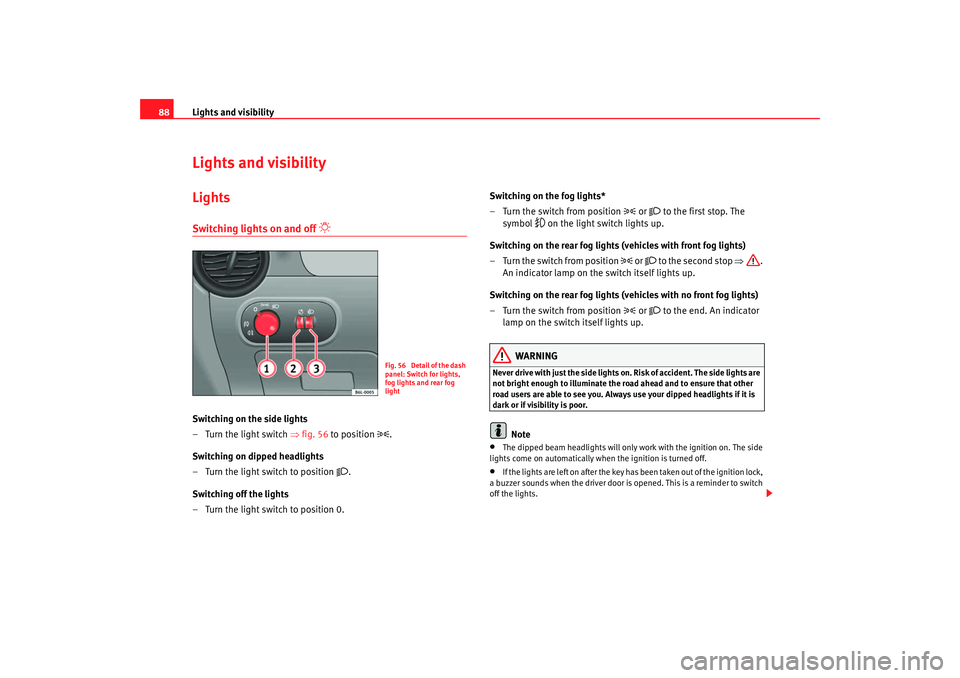
Switching on the side lights
– Turn the light switch ⇒fig. 56 to position
.
Switching on dipped headlights
– Turn the light switch to position
.
Switching off the lights
– Turn the light switch to position 0. Switching on the fog lights*
– Turn the switch from position
or
to the first stop. The
symbol
on the light switch lights up.
Switching on the rear fog lights (vehicles with front fog lights)
– Turn the switch from position
or
to the second stop ⇒ .
An indicator lamp on the switch itself lights up.
Switching on the rear fog lights (vehicles with no front fog lights)
– Turn the switch from position
or
to the end. An indicator
lamp on the switch itself lights up.
WARNING
Never drive with just the side lights on . Risk of accident. The side lights are
not bright enough to illuminate the road ahead and to ensure that other
road users are able to see you. Always use your dipped headlights if it is
dark or if visibility is poor.
Note
•
The dipped beam headlights will only work with the ignition on. The side
lights come on automatically when the ignition is turned off.
•
If the lights are left on after the key has been taken out of the ignition lock,
a buzzer sounds when the driver door is opened. This is a reminder to switch
off the lights.
Fig. 56 Detail of the dash
panel: Switch for lights,
fog lights and rear fog
light
cordoba_ingles Seite 88 Freitag, 7. Oktober 2005 6:00 18
Page 92 of 255
Lights and visibility
90
For the sake of the environmentThe rear window heater should be disconnected as soon as the glass is
demisted. By saving electrical power you can also save fuel .
Note
To avoid possible damage to the battery, an automatic temporary disconnec-
tion of this function is possible, co ming back on when normal operating
conditions are reestablished.Hazard warning lights
The hazard warning lights are used to draw the attention of
other road users to your vehicle in emergencies.
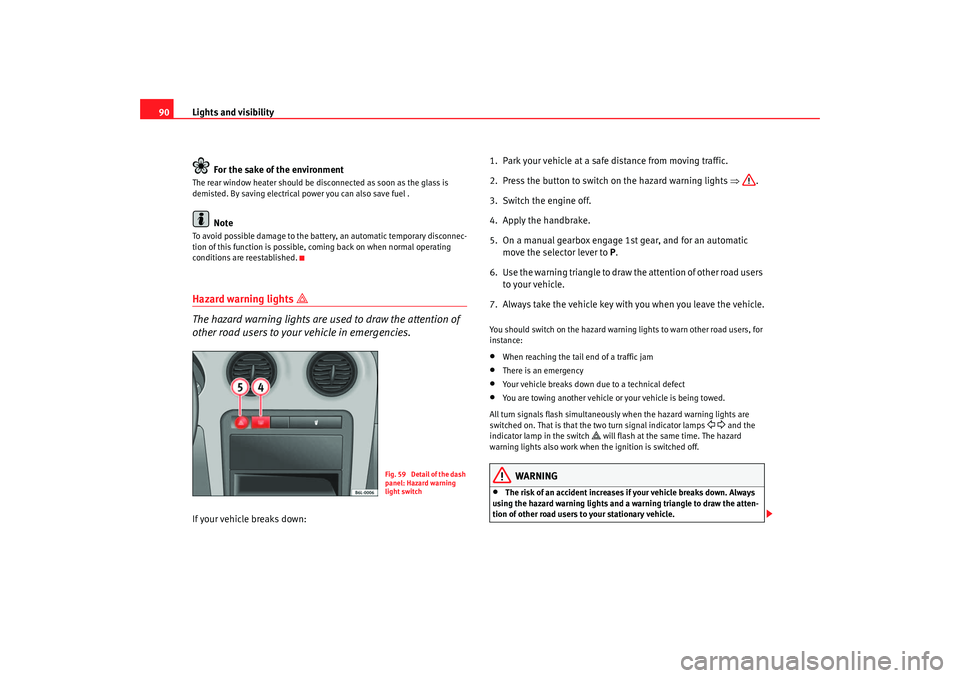
If your vehicle breaks down: 1. Park your vehicle at a safe distance from moving traffic.
2. Press the button to switch on the hazard warning lights ⇒
.
3. Switch the engine off.
4. Apply the handbrake.
5. On a manual gearbox engage 1st gear, and for an automatic move the selector
lever to P.
6
. Use the warning triangle to draw the attention of other road users
to your vehicle.
7. Always take the vehicle key with you when you leave the vehicle.
You should switch on the hazard warning lights to warn other road users, for
instance:•
When reaching the tail end of a traffic jam
•
There is an emergency
•
Your vehicle breaks down due to a technical defect
•
You are towing another vehicle or your vehicle is being towed.
All turn signals flash simultaneously when the hazard warning lights are
switched on. That is that the two turn signal indicator lamps
and the
indicator lamp in the switch
will flash at the same time. The hazard
warning lights also work when the ignition is switched off.
WARNING
•
The risk of an accident increases if your vehicle breaks down. Always
using the hazard warning lights and a warning triangle to draw the atten-
tion of other road users to your stationary vehicle.
Fig. 59 Detail of the dash
panel: Hazard warning
light switch
cordoba_ingles Seite 90 Freitag, 7. Oktober 2005 6:00 18
Page 93 of 255
Lights and visibility91
Safety First
Operating instructions
Tips and Maintenance
Te c h n i c a l D a t a
•
Never park where the catalytic converter could come into contact with
inflammable materials under the vehicle, for example dry grass or spilt
petrol. This could start a fire!Note
•
The battery will run down if the hazard warning lights are left on for a long
time, even if the ignition is switched off.
•
The use of the hazard warning lights d escribed here is subject to the rele-
vant statutory requirements.
Turn signal and main beam headlight lever
The turn signal and main beam lever also operates the
parking lights and the headlight flasher.
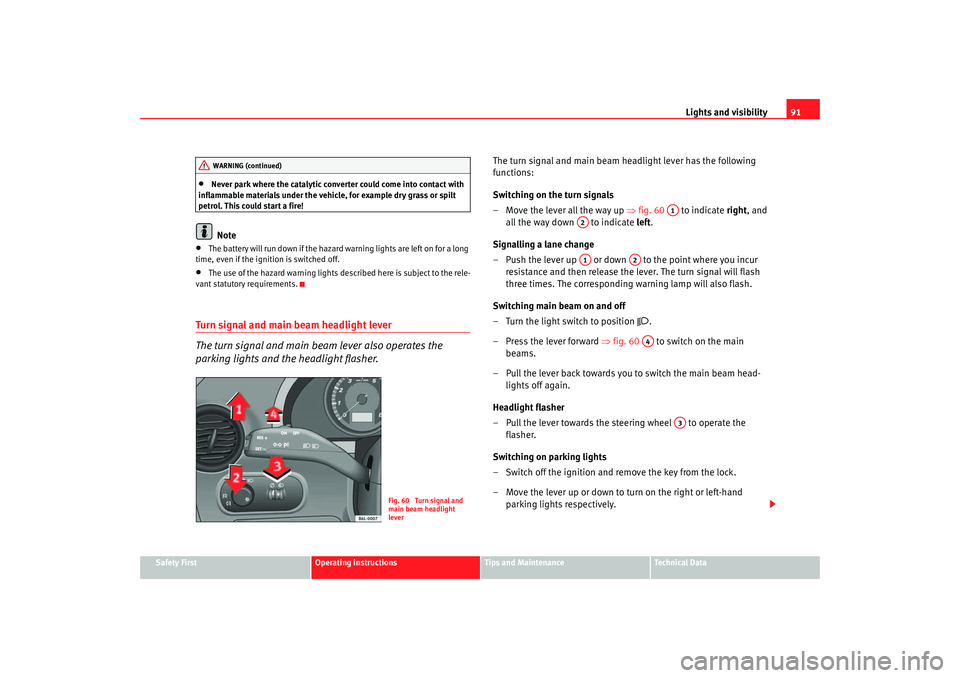
The turn signal and main beam headlight lever has the following
functions:
Switching on the turn signals
– Move the lever all the way up ⇒fig. 60 to indicate right, and
all the way down to indicate left.
Signalling a lane change
– Push the lever up or down to the point where you incur resistance and then release the lever. The turn signal will flash
three times. The corresponding warning lamp will also flash.
Switching main beam on and off
– Turn the light switch to position
.
– Press the lever forward ⇒fig. 60 to switch on the main
beams.
– Pull the lever back towards you to switch the main beam head- lights off again.
Headlight flasher
– Pull the lever towards the steering wheel to operate the flasher.
Switching on parking lights
– Switch off the ignition and remove the key from the lock.
– Move the lever up or down to turn on the right or left-hand parking lights respectively.
WARNING (continued)
Fig. 60 Turn signal and
main beam headlight
lever
A1
A2A1
A2A4
A3
cordoba_ingles Seite 91 Freitag, 7. Oktober 2005 6:00 18
Page 94 of 255
Lights and visibility
92
WARNING
The main beam can dazzle other drivers. Risk of accident! Never use the
main beam headlights or the headlight flasher if they could dazzle other
drivers.
Note
•
The turn signals only work when the ignition is switched on. The corre-
sponding warning lamp
or flashes in the combi-instrument. The
warning lamp
flashes when the turn signals are operated, provided a
trailer is correctly attached and connected to the vehicle. If a turn signal bulb
is defective, the warning lamp flashes at double speed. If the trailer turn
signal bulbs are damaged, warning lamp
does not light up. You should
have the bulb replaced.
•
The main beam headlights can only be switched on if the dipped beam
headlights are already on. The warning lamp
then lights up on the control
panel.
•
The headlight flasher comes on for as long as you pull the lever – even if
no other lights are switched on. The warning lamp
then lights up on the
control panel.
•
When the parking lights are switched on, the headlight and the rear light
on the corresponding side of the vehicle light up. The parking lights will only
work if the key is removed from the ignition. If the lights are switched on, a
buzzer gives an audible warning while the driver door is open.
•
If the turn signal lever is left on after the key has been taken out of the
ignition lock, an acoustic signal sounds when the driver door is opened. This
is a reminder to switch off the turn signal, unless of course you wish to leave
the parking light on.
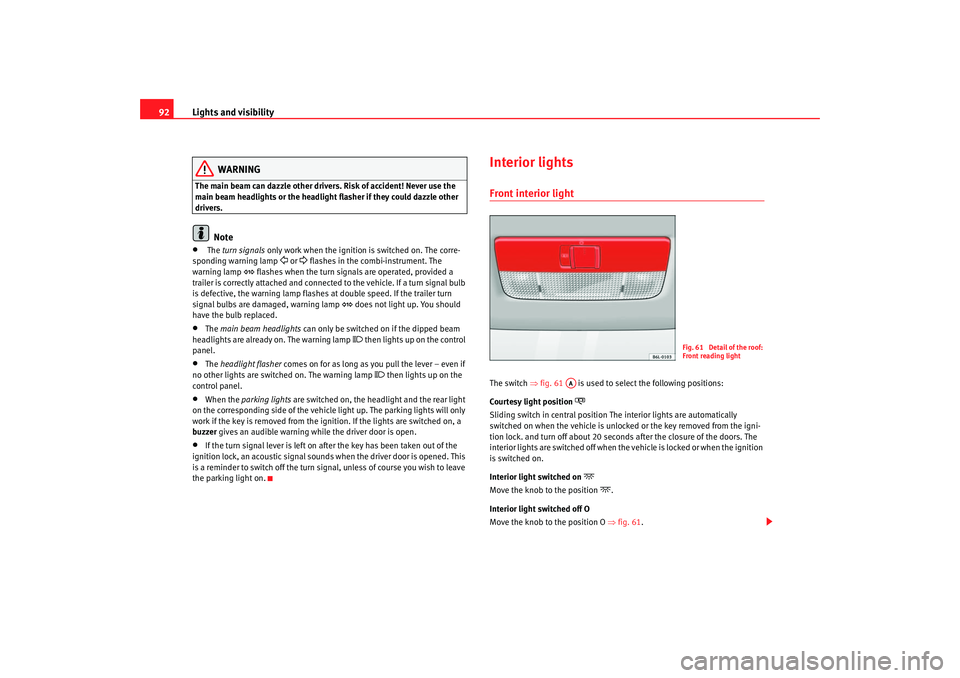
Interior lightsFront interior light The switch ⇒ fig. 61 is used to select the following positions:
Courtesy light position
Sliding switch in central position The interior lights are automatically
switched on when the vehicle is unlocked or the key removed from the igni-
tion lock. and turn off about 20 seconds after the closure of the doors. The
interior lights are switched off when the vehicle is locked or when the ignition
is switched on.
Interior light switched on
Move the knob to the position
.
Interior light switched off O
Move the knob to the position O ⇒ fig. 61.
Fig. 61 Detail of the roof:
Front reading light
AA
cordoba_ingles Seite 92 Freitag, 7. Oktober 2005 6:00 18
Page 96 of 255
Lights and visibility
94Windscreen washersFront windscreen wipers
The windscreen wiper lever controls the windscreen wipers
and the automatic wash and wipe.
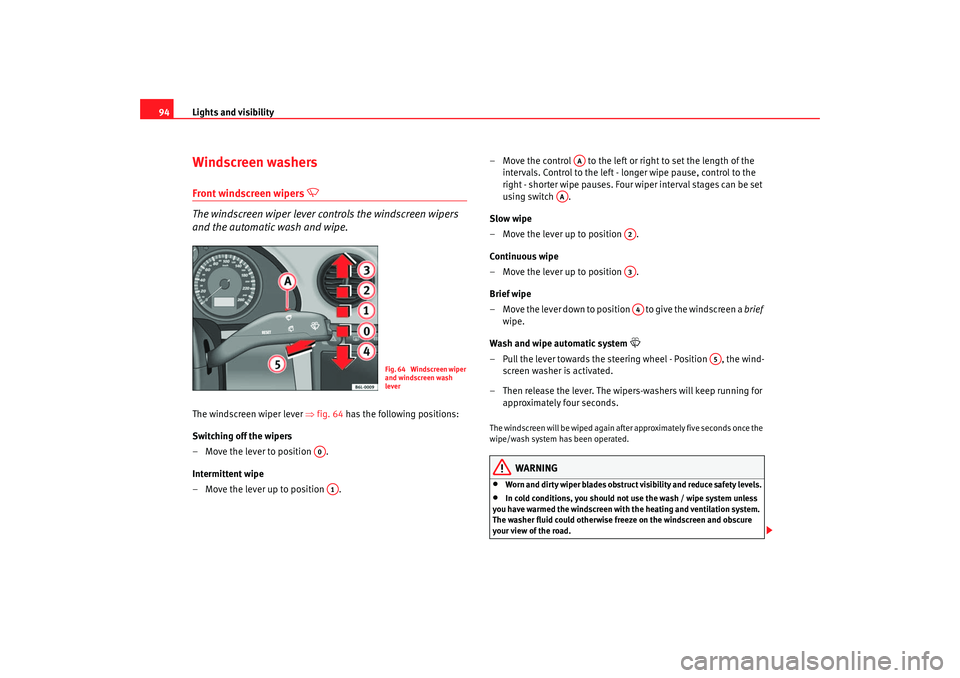
The windscreen wiper lever ⇒fig. 64 has the following positions:
Switching off the wipers
– Move the lever to position .
Intermittent wipe
– Move the lever up to position . – Move the control to the left or right to set the length of the
intervals. Control to the left - longer wipe pause, control to the
right - shor ter wipe pauses. Four wiper inter val stages can be set
using switch .
Slow wipe
– Move the lever up to position .
Continuous wipe
– Move the lever up to position .
Brief wipe
– Move the lever down to position to give the windscreen a brief
wipe.
Wash and wipe automatic system
– Pull the lever towards the steeri ng wheel - Position , the wind-
screen washer is activated.
– Then release the lever. The wipers-washers will keep running for approximately four seconds.The windscreen will be wiped again after approximately five seconds once the
wipe/wash system has been operated.
WARNING
•
Worn and dirty wiper blades obstruct visibility and reduce safety levels.
•
In cold conditions, you should not use the wash / wipe system unless
you have warmed the windscreen with the heating and ventilation system.
The washer fluid could otherwise fr eeze on the windscreen and obscure
your view of the road.
Fig. 64 Windscreen wiper
and windscreen wash
lever
A0A1
AA
AA
A2A3A4
A5
cordoba_ingles Seite 94 Freitag, 7. Oktober 2005 6:00 18
Page 97 of 255
Lights and visibility95
Safety First
Operating instructions
Tips and Maintenance
Te c h n i c a l D a t a
•
Always note the corresponding warnings on ⇒page 180.Caution
In icy conditions, always check that th e wiper blades are not frozen to the
glass before using the wipers for the fi rst time. If you switch on the wipers
when the wiper blades are frozen to the windscreen, you could damage both
the wiper blades and the wiper motor.
Note
•
The windscreen wipers will only work when the ignition is switched on.
•
The heat output of the heated jets* is controlled automatically when the
ignition is switched on, dependi ng upon the outside temperature.
Rain sensor*
The rain sensor controls the frequency of the windscreen
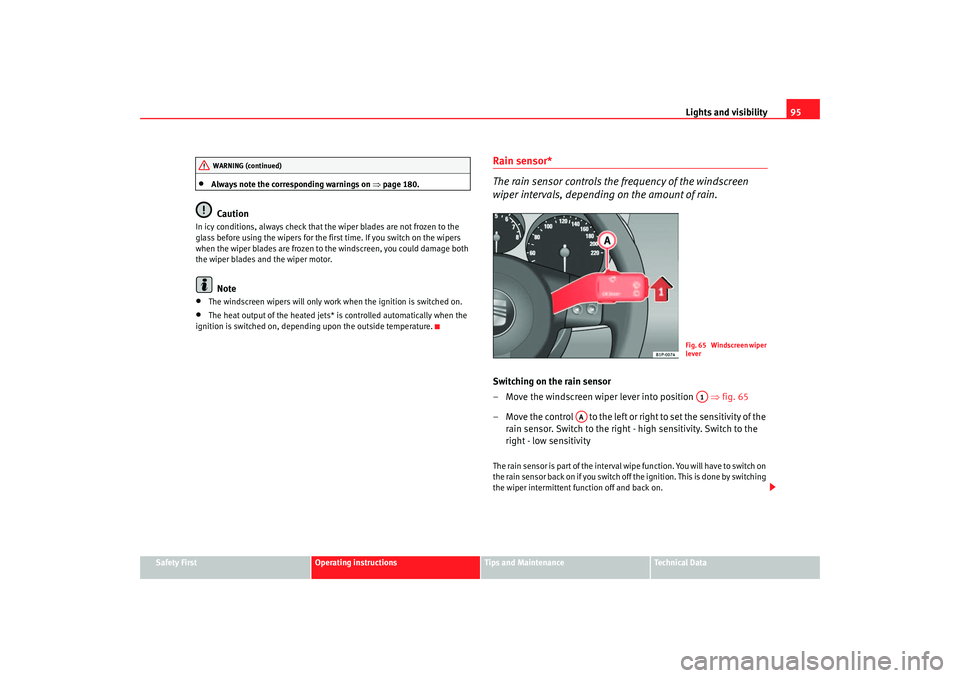
wiper intervals, depending on the amount of rain.Switching on the rain sensor
– Move the windscreen wiper lever into position ⇒fig. 65
– Move the control to the left or right to set the sensitivity of the rain sensor. Switch to the right - high sensitivity. Switch to the
right - low sensitivityThe rain sensor is part of the interval wipe function. You will have to switch on
the rain sensor back on if you switch off the ignition. This is done by switching
the wiper intermittent function off and back on.
WARNING (continued)
Fig. 65 Windscreen wiper
leverA1
AA
cordoba_ingles Seite 95 Freitag, 7. Oktober 2005 6:00 18
Page 99 of 255
Lights and visibility97
Safety First
Operating instructions
Tips and Maintenance
Te c h n i c a l D a t a
Switching off anti-dazzle function
–Press button ⇒page 96, fig. 66 . Warning lamp goes out:
Switching on anti-dazzle function
– Press button ⇒page 96, fig. 66 . Warning lamp is lit.Anti-dazzle function
The anti-dazzle function is activated ev ery time the ignition is switched on.
The green indicator lamp lights up in the mirror housing.
When the anti-dazzle function is activa ted the interior rear-view mirror will
darken automatically according to the amount of li ght it receives (for example
from the headlights of a vehicle behind). The anti-dazzle function is cancelled
if reverse gear is engaged.
Note
•
The automatic anti-dazzle function will only work properly if the sun
blind* for the rear window is retracted and there are no other objects
preventing light from reac hing the interior mirror.
•
If you have to stick any type of sticker on the windscreen, do not do so in
front of the sensors. Doing so could prevent the anti-dazzle function from
working well or even from working at all.
Exterior mirrors
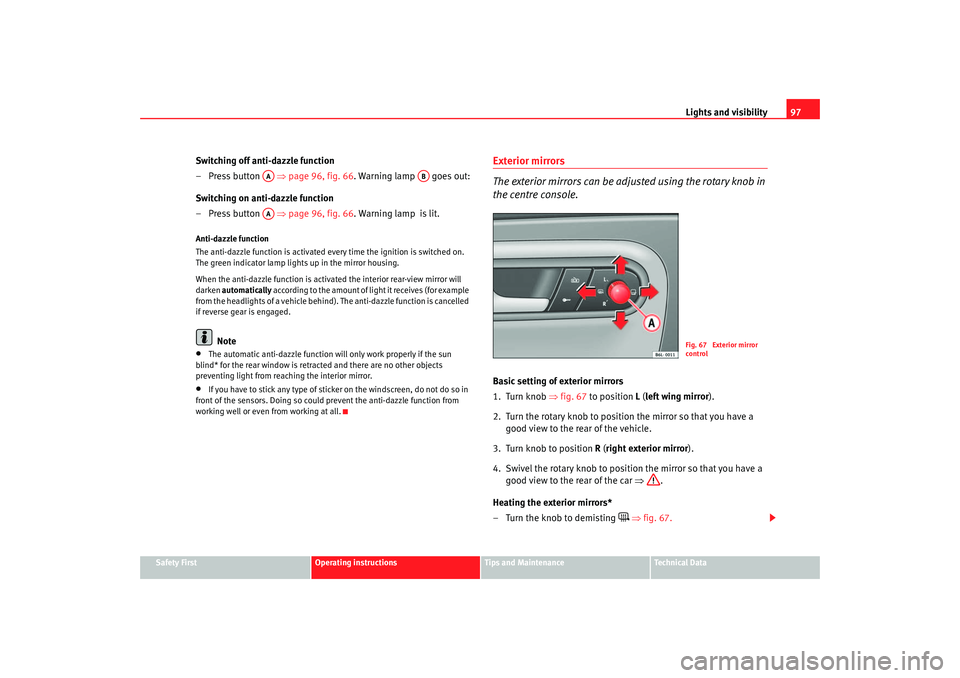
The exterior mirrors can be adjusted using the rotary knob in
the centre console.Basic setting of exterior mirrors
1. Turn knob ⇒fig. 67 to position L ( left wing mirror ).
2. Turn the rotary knob to position the mirror so that you have a good view to the rear of the vehicle.
3. Turn knob to position R (right exterior mirror ).
4. Swivel the rotary knob to position the mirror so that you have a good view to the rear of the car ⇒ .
Heating the exterior mirrors*
– Turn the knob to demisting
⇒ fig. 67.
AA
AB
AA
Fig. 67 Exterior mirror
control
cordoba_ingles Seite 97 Freitag, 7. Oktober 2005 6:00 18
Page 100 of 255
Lights and visibility
98
– Place the control in position L or R once the mirrors have demisted to prevent unnecessary use of the battery.
Folding in exterior mirrors*
– Turn the control ⇒ page 97, fig. 67 to position
to fold in the
exterior mirrors. You should always fold in the exterior mirrors if
you are driving through an automa tic car wash. This will help
prevent damage.
Folding exterior mirrors back out to the extended position*
– Turn the knob to position L or R to fold the exterior mirrors back out ⇒ .
S y
nchronised wing mirror adjustment*
1. Turn the control to the position L ( left exterior mirror ).
2. Turn the rotary knob to position the mirror so that you have a good view to the rear of the vehicle. The right wing mirror will be
adjusted at the same time (synchronised).
WARNING
•
The rear view convex or aspheric mirror increase the field of vision
however the objects in the mirror appear smaller and further away . If you
use these mirrors to estimate the distance to vehicles behind you when
changing lane, you could make a mistake. Risk of accident.
•
If possible, use the interior mirror to estimate distances to vehicles
behind you.
•
Make sure that you do not get your finger trapped between the mirror
and the mirror base when folding back the mirrors. Risk of injury!
For the sake of the environment
The exterior mirror heating should be switched off when it is no longer
needed. Fuel is wasted otherwise.
Note
•
If the electrical adjustment ever fails to operate, the mirrors can be
adjusted by hand by lightly pressing the edge of the mirror glass.
•
The following guideline applies to vehicles with electric wing mirrors: If
the mirror housing is moved as a result of exterior force (e.g. knocked when
parking the vehicle), the mi rrors must be folded in electrically to the final
position. Do not readjust the mirror h ousing by hand, as this will interfere
with the mirror adjuster function.
•
The rear view mirrors can be adjusted separately or simultaneously, as
described before.
cordoba_ingles Seite 98 Freitag, 7. Oktober 2005 6:00 18
Page 114 of 255
Air conditioning
112Air conditioningHeatingControls– Using the controls ⇒fig. 83 and and with the switch
you can set the temperature, air distribution and the blower
speed.
– Press the button to switch air recirculation mode on or off. A button is illuminated by a yellow lamp for as long as the function
is switched on.Temperature
Switch sets the temperature. The required temperature inside the vehicle
cannot be lower than the ambient temp erature. Maximum heat output, which is needed to defrost the windows quickly, is only available when the engine
has reached its operating temperature.
Blower
The air flow can be set at four speeds with switch . The blower should
always be set at the lowest speed when driving slowly.
Air distribution
Control for setting the flow of
air in the required direction.
– Air distribution towards the windsc reen. Air recirculation is, for safety
reasons, not possible in this position. – Air distribution to the upper body. – Air distribution to footwell – Air distribution to the windscreen and the footwell.
Air recirculation mode
Air recirculation on (button symbol lights up) prevents strong odours
in the outside air from entering the vehicle interior, for example when driving
through a tunnel or queuing in traffic ⇒.
When the outside temperature is low, us ing air recirculation mode provides
more effective heating by heating air from the vehicle interior instead of cold
air from outside.
WARNING
•
For your safety, the windows should never be fogged up or covered with
snow or ice. This is essential to ensure good visibility. Please familiarize
yourself with the correct operation of the heating and ventilation system,
including the demist/defrost functions for the windows.
Fig. 83 On the dash
panel: Heater controls
AA
AC
AB
AD
AA
AB
AC
AD
cordoba_ingles Seite 112 Freitag, 7. Oktober 2005 6:00 18