radio Seat Exeo 2008 ADAGIO
[x] Cancel search | Manufacturer: SEAT, Model Year: 2008, Model line: Exeo, Model: Seat Exeo 2008Pages: 47, PDF Size: 1.76 MB
Page 22 of 47
Media drives21
– Before you remove the memory device, switch the audio source for the sound system back to radio.
It may take several seconds for the USB port to detect the memory device.
The MP3 player is switched off automatically when you switch off the sound
system or the ignition. The USB port stores the position of the last track you
were playing. If you do not alter the contents of your memory device, the
music will be continued at the point where you stopped playing.
MP3 players and USB sticks which are not explicitly approved must have
“CERTIFIED USB
TM” or “CERTIFIED HIGH SPEED USB
TM” status.
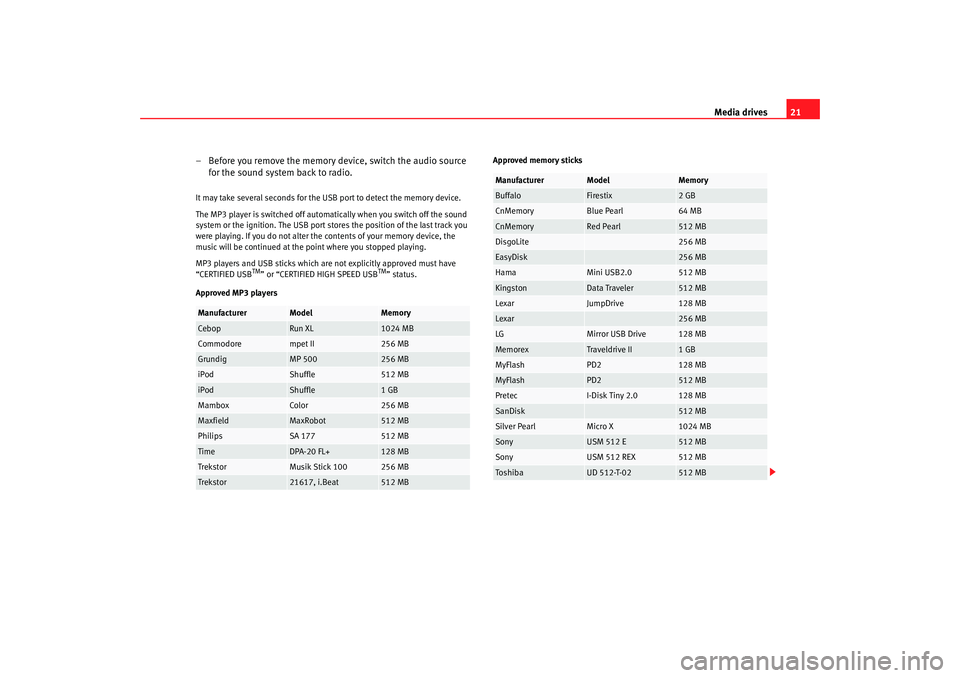
Approved MP3 players Approved memory sticks
Manufacturer
Model
Memory
Cebop
Run XL
1024 MB
Commodore
mpet II
256 MB
Grundig
MP 500
256 MB
iPod
Shuffle
512 MB
iPod
Shuffle
1 GB
Mambox
Color
256 MB
Maxfield
MaxRobot
512 MB
Philips
SA 177
512 MB
Time
DPA-20 FL+
128 MB
Trekstor
Musik Stick 100
256 MB
Trekstor
21617, i.Beat
512 MB
Manufacturer
Model
Memory
Buffalo
Firestix
2 GB
CnMemory
Blue Pearl
64 MB
CnMemory
Red Pearl
512 MB
DisgoLite
256 MB
EasyDisk
256 MB
Hama
Mini USB2.0
512 MB
Kingston
Data Traveler
512 MB
Lexar
JumpDrive
128 MB
Lexar
256 MB
LG
Mirror USB Drive
128 MB
Memorex
Traveldrive II
1 GB
MyFlash
PD2
128 MB
MyFlash
PD2
512 MB
Pretec
I-Disk Tiny 2.0
128 MB
SanDisk
512 MB
Silver Pearl
Micro X
1024 MB
Sony
USM 512 E
512 MB
Sony
USM 512 REX
512 MB
To s hi b a
UD 512-T-02
512 MB
Adagio_EN Seite 21 Dienstag, 7. Oktober 2008 10:55 10
Page 24 of 47
Media drives23
Aux-in connectionIntroduction
Portable players can be plugged into the Aux-in connection
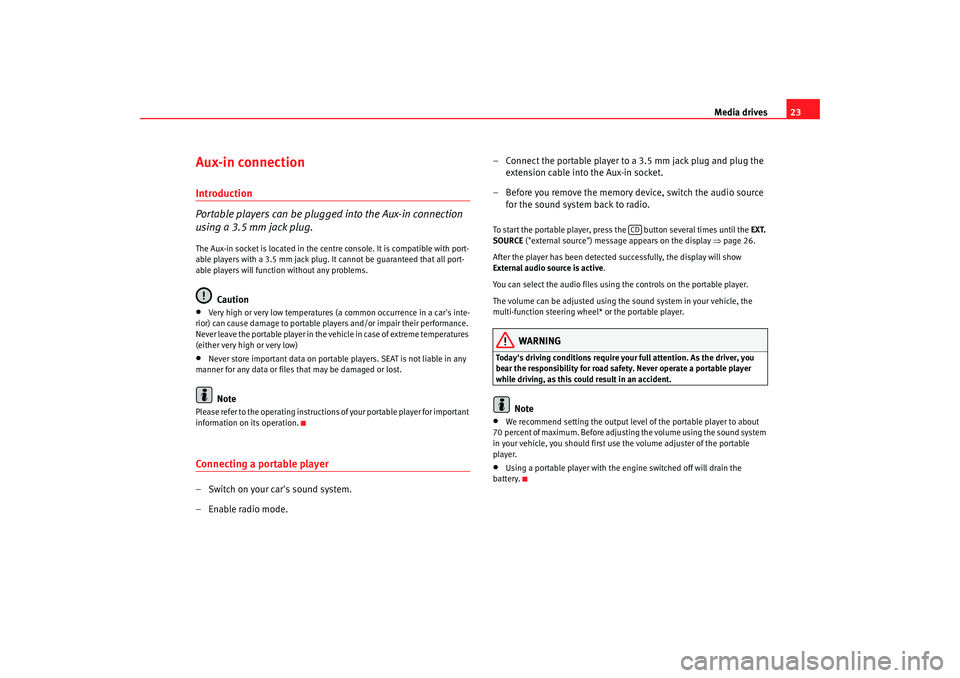
using a 3.5 mm jack plug.The Aux-in socket is located in the centre console. It is compatible with port-
able players with a 3.5 mm jack plug. It cannot be guaranteed that all port-
able players will function without any problems.
Caution
•
Very high or very low temperatures (a common occurrence in a car's inte-
rior) can cause damage to portable pl ayers and/or impair their performance.
Never leave the portable player in the vehicle in case of extreme temperatures
(either very high or very low)
•
Never store important data on portable players. SEAT is not liable in any
manner for any data or files that may be damaged or lost.Note
Please refer to the operating instructions of your portable player for important
information on its operation.Connecting a portable player– Switch on your car's sound system.
– Enable radio mode. – Connect the portable player to a 3.5 mm jack plug and plug the
extension cable into the Aux-in socket.
– Before you remove the memory device, switch the audio source for the sound system back to radio.
To start the portable player, press the button several times until the EXT.
SOURCE ("external source") message appears on the display ⇒page 26.
After the player has been detected successfully, the display will show
External audio source is active .
You can select the audio files using the controls on the portable player.
The volume can be adjusted using the sound system in your vehicle, the
multi-function steering wheel* or the portable player.
WARNING
Today's driving conditions require your full attention. As the driver, you
bear the responsibility for road safety. Never operate a portable player
while driving, as this could result in an accident.
Note
•
We recommend setting the output level of the portable player to about
70 percent of maximum. Before adjusting the volume using the sound system
in your vehicle, you should first use the volume adjuster of the portable
player.
•
Using a portable player with the engine switched off will drain the
battery.
CD
Adagio_EN Seite 23 Dienstag, 7. Oktober 2008 10:55 10
Page 42 of 47
The multi-function steering wheel41
The multi-function steering wheelIntroductionYou can use the multi-function steering wheel for the simple
and efficient operation of selected functions of the radio, CD
and telephone*.
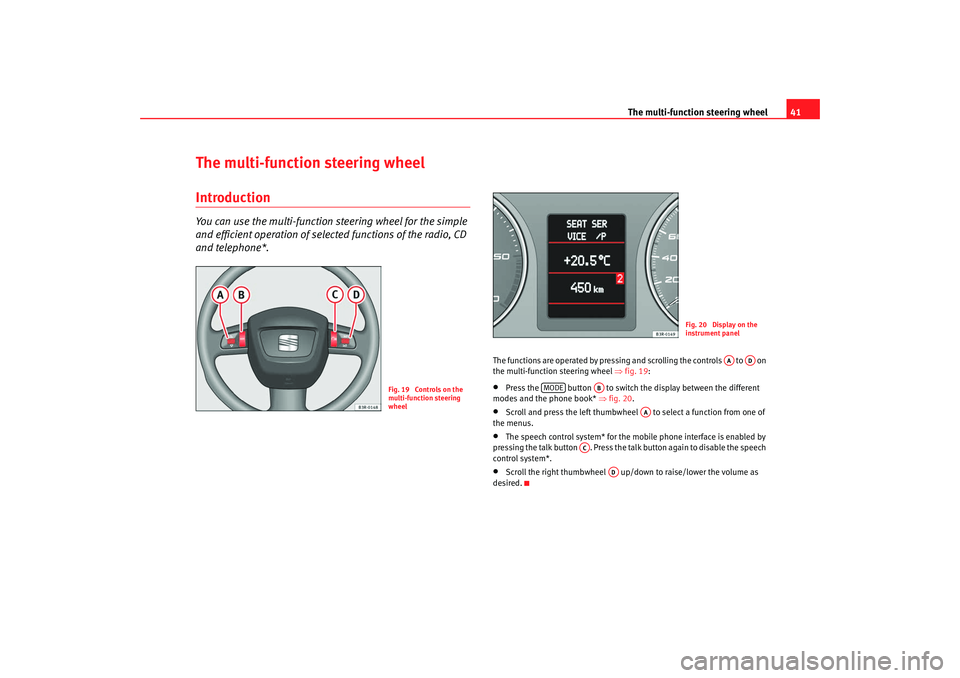
The functions are operated by pressing and scrolling the controls to on
the multi-function steering wheel ⇒fig. 19:•
Press the button to switch the display between the different
modes and the phone book* ⇒ fig. 20.
•
Scroll and press the left thumbwheel to select a function from one of
the menus.
•
The speech control system* for the mobile phone interface is enabled by
pressing the talk button . Press the talk button again to disable the speech
control system*.
•
Scroll the right thumbwheel up/down to raise/lower the volume as
desired.
Fig. 19 Controls on the
multi-function steering
wheel
Fig. 20 Display on the
instrument panel
AA
AD
MODE
AB
AA
AC
AD
Adagio_EN Seite 41 Dienstag, 7. Oktober 2008 10:55 10
Page 43 of 47
The multi-function steering wheel
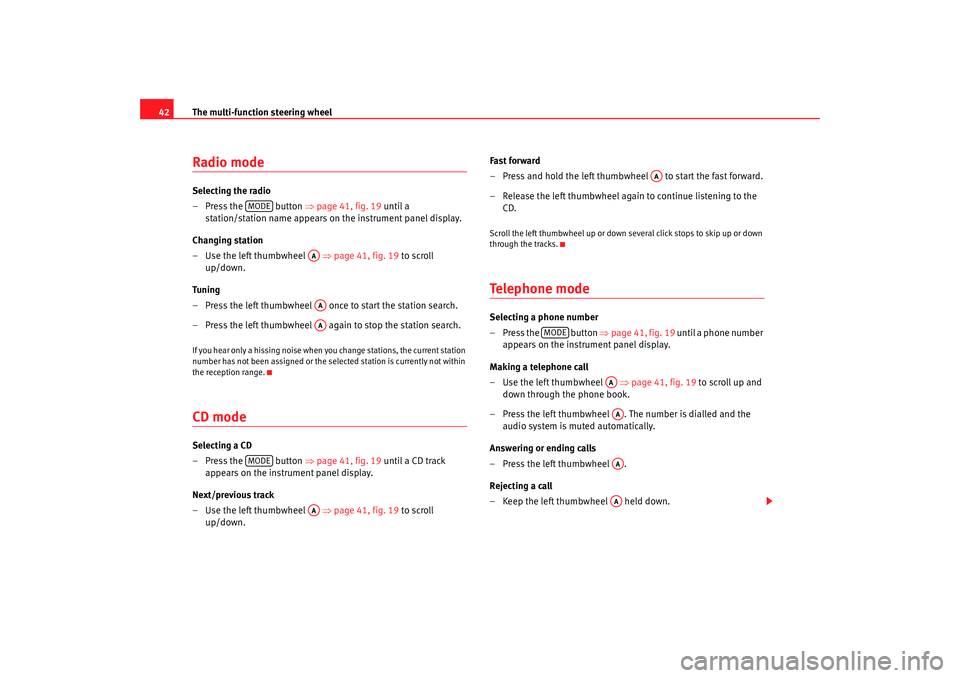
42Radio modeSelecting the radio
– Press the button ⇒page 41, fig. 19 until a
station/station name appears on the instrument panel display.
Changing station
– Use the left thumbwheel ⇒page 41, fig. 19 to scroll
up/down.
Tun i ng
– Press the left thumbwheel once to start the station search.
– Press the left thumbwheel again to stop the station search.If you hear only a hissing noise when you change stations, the current station
number has not been assigned or the selec ted station is currently not within
the reception range.CD modeSelecting a CD
– Press the button ⇒page 41, fig. 19 until a CD track
appears on the instrument panel display.
Next/previous track
– Use the left thumbwheel ⇒page 41, fig. 19 to scroll
up/down. Fast forward
– Press and hold the left thumbwheel to start the fast forward.
– Release the left thumbwheel again to continue listening to the
CD.
Scroll the left thumbwheel up or down several click stops to skip up or down
through the tracks.Te l e p h o n e m o d eSelecting a phone number
– Press the button ⇒page 41, fig. 19 until a phone number
appears on the instrument panel display.
Making a telephone call
– Use the left thumbwheel ⇒page 41, fig. 19 to scroll up and
down through the phone book.
– Press the left thumbwheel . The number is dialled and the audio system is muted automatically.
Answering or ending calls
–Press the left thumbwheel .
Rejecting a call
– Keep the left thumbwheel held down.
MODE
AAAAAA
MODE
AA
AA
MODE
AAAAAAAA
Adagio_EN Seite 42 Dienstag, 7. Oktober 2008 10:55 10
Page 46 of 47
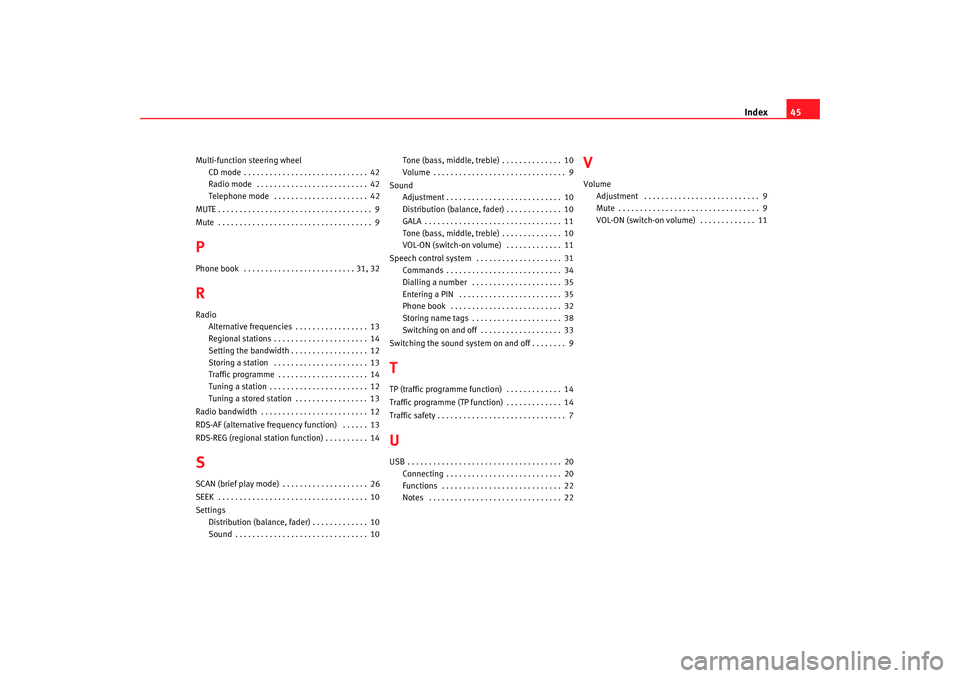
Index45
Multi-function steering wheel
CD mode . . . . . . . . . . . . . . . . . . . . . . . . . . . . . 42
Radio mode . . . . . . . . . . . . . . . . . . . . . . . . . . 42
Telephone mode . . . . . . . . . . . . . . . . . . . . . . 42
MUTE . . . . . . . . . . . . . . . . . . . . . . . . . . . . . . . . . . . . 9
Mute . . . . . . . . . . . . . . . . . . . . . . . . . . . . . . . . . . . . 9PPhone book . . . . . . . . . . . . . . . . . . . . . . . . . . 31, 32RRadio Alternative frequencies . . . . . . . . . . . . . . . . . 13
Regional stations . . . . . . . . . . . . . . . . . . . . . . 14
Setting the bandwidth . . . . . . . . . . . . . . . . . . 12
Storing a station . . . . . . . . . . . . . . . . . . . . . . 13
Traffic programme . . . . . . . . . . . . . . . . . . . . . 14
Tuning a station . . . . . . . . . . . . . . . . . . . . . . . 12
Tuning a stored station . . . . . . . . . . . . . . . . . 13
Radio bandwidth . . . . . . . . . . . . . . . . . . . . . . . . . 12
RDS-AF (alternative frequency function) . . . . . . 13
RDS-REG (regional station function) . . . . . . . . . . 14SSCAN (brief play mode) . . . . . . . . . . . . . . . . . . . . 26
SEEK . . . . . . . . . . . . . . . . . . . . . . . . . . . . . . . . . . . 10
Settings Distribution (balance, fader) . . . . . . . . . . . . . 10
Sound . . . . . . . . . . . . . . . . . . . . . . . . . . . . . . . 10 Tone (bass, middle, treble) . . . . . . . . . . . . . . 10
Volume . . . . . . . . . . . . . . . . . . . . . . . . . . . . . . . 9
Sound Adjustment . . . . . . . . . . . . . . . . . . . . . . . . . . . 10
Distribution (balance, fader) . . . . . . . . . . . . . 10
GALA . . . . . . . . . . . . . . . . . . . . . . . . . . . . . . . . 11
Tone (bass, middle, treble) . . . . . . . . . . . . . . 10
VOL-ON (switch-on volume) . . . . . . . . . . . . . 11
Speech control system . . . . . . . . . . . . . . . . . . . . 31 Commands . . . . . . . . . . . . . . . . . . . . . . . . . . . 34
Dialling a number . . . . . . . . . . . . . . . . . . . . . 35
Entering a PIN . . . . . . . . . . . . . . . . . . . . . . . . 35
Phone book . . . . . . . . . . . . . . . . . . . . . . . . . . 32
Storing name tags . . . . . . . . . . . . . . . . . . . . . 38
Switching on and off . . . . . . . . . . . . . . . . . . . 33
Switching the sound system on and off . . . . . . . . 9
TTP (traffic programme function) . . . . . . . . . . . . . 14
Traffic programme (TP function) . . . . . . . . . . . . . 14
Traffic safety . . . . . . . . . . . . . . . . . . . . . . . . . . . . . . 7UUSB . . . . . . . . . . . . . . . . . . . . . . . . . . . . . . . . . . . . 20 Connecting . . . . . . . . . . . . . . . . . . . . . . . . . . . 20
Functions . . . . . . . . . . . . . . . . . . . . . . . . . . . . 22
Notes . . . . . . . . . . . . . . . . . . . . . . . . . . . . . . . 22
VVolumeAdjustment . . . . . . . . . . . . . . . . . . . . . . . . . . . 9
Mute . . . . . . . . . . . . . . . . . . . . . . . . . . . . . . . . . 9
VOL-ON (switch-on volume) . . . . . . . . . . . . . 11
Adagio_EN Seite 45 Dienstag, 7. Oktober 2008 10:55 10
Page 47 of 47

RADIO ADAGIOOWNER’S MANUAL · MANUAL DE INSTRUÇÕESInglés, Portugués 3R0012006A (09.08) (GT9)
3R0012006A
Portada Adagio_EN PT.qxd 9/10/08 10:00 Página 1