warning Seat Exeo 2008 Owner's manual
[x] Cancel search | Manufacturer: SEAT, Model Year: 2008, Model line: Exeo, Model: Seat Exeo 2008Pages: 303, PDF Size: 10.02 MB
Page 153 of 303
Seats and stowage151
Safety First
Operating instructions
Practical tips
Te c h n i c a l D a t a
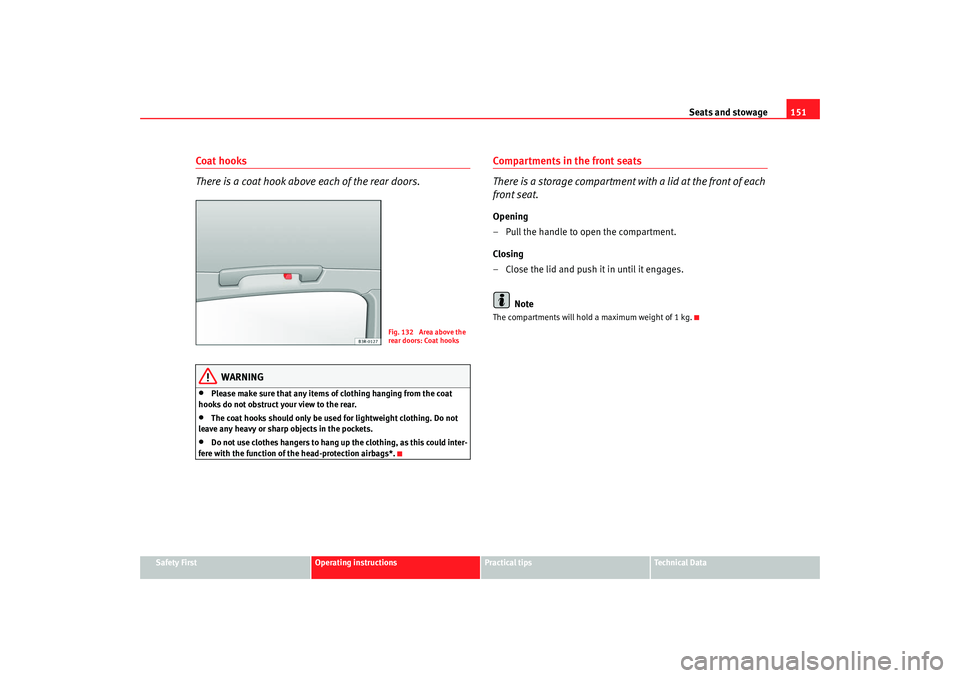
Coat hooks
There is a coat hook above each of the rear doors.
WARNING
•
Please make sure that any items of clothing hanging from the coat
hooks do not obstruct your view to the rear.
•
The coat hooks should only be used for lightweight clothing. Do not
leave any heavy or sharp objects in the pockets.
•
Do not use clothes hangers to hang up the clothing, as this could inter-
fere with the function of the head-protection airbags*.
Compartments in the front seats
There is a storage compartment with a lid at the front of each
front seat.Opening
– Pull the handle to open the compartment.
Closing
– Close the lid and push it in until it engages.
NoteThe compartments will hold a maximum weight of 1 kg.
Fig. 132 Area above the
rear doors: Coat hooks
Exeo_EN.book Seite 151 Freitag, 17. Oktober 2008 11:24 11
Page 158 of 303
Heating, Ventilation and Air conditioning
156Defrosting
The windscreen and side windows are defrosted or demisted
as quickly as possible.– To enable this mode, press the ⇒page 154, fig. 133 button.
– To disable, press the button again or select the button.The temperature is regulated automatically. The air output is increased to
maximum and most of the air comes out of outlets 1 and 2 ⇒page 159.
The air recirculation and ECON modes ar e switched off when the button is
pressed.Air recirculation: manual enabling
The air recirculation setting prevents fumes etc. from entering
the interior.Enabling air recirculation mode
– Press the ⇒page 154, fig. 133 ⇒ button.
Disabling air recirculation mode
– Press the button again or
– Press the button or
– Press the button.In this setting, the air in the vehicle is constantly recirculated. We recommend
using the air recirculation mode in the following circumstances:
•
When driving through a tunnel or in queues of traffic, to prevent fumes
entering the interior of the vehicle.
WARNING
Do not drive for too long with the ai r recirculation mode enabled because,
if the compressor is disconnected, the windscreen may mist up because no
fresh air is entering the interior of the vehicle, with the subsequent risk of
accidents.ECON Mode (economy)
ECON mode helps save fuel.– To enable, press the button ⇒page 154, fig. 133 .
– To disable, press the button again or select the button.Air cooling is disconnected in ECON mode. The heating and the blower are
adjusted automatically. “ECON” stan ds for “Economy”. Disconnecting air
cooling (compressor) saves on fuel.
Please note that the interior temperature must not be lower than the outside
temperature in ECON mode. The blower does not cool or dehumidify the air in
the interior. The windows could therefore mist up.
On diesel vehicles, the supplementary heater is switched off in ECON mode
to save fuel.
Note
If the diode on the ECON button contin ues to light up when the ECON mode
has been switched off (i.e. the climate control has been switched on) this is
AUTO
AUTO
ECONECONECON
AUTO
Exeo_EN.book Seite 156 Freitag, 17. Oktober 2008 11:24 11
Page 164 of 303
Driving
162DrivingAddressAdjusting the steering wheel position
The height and reach of the steering wheel can be adjusted as
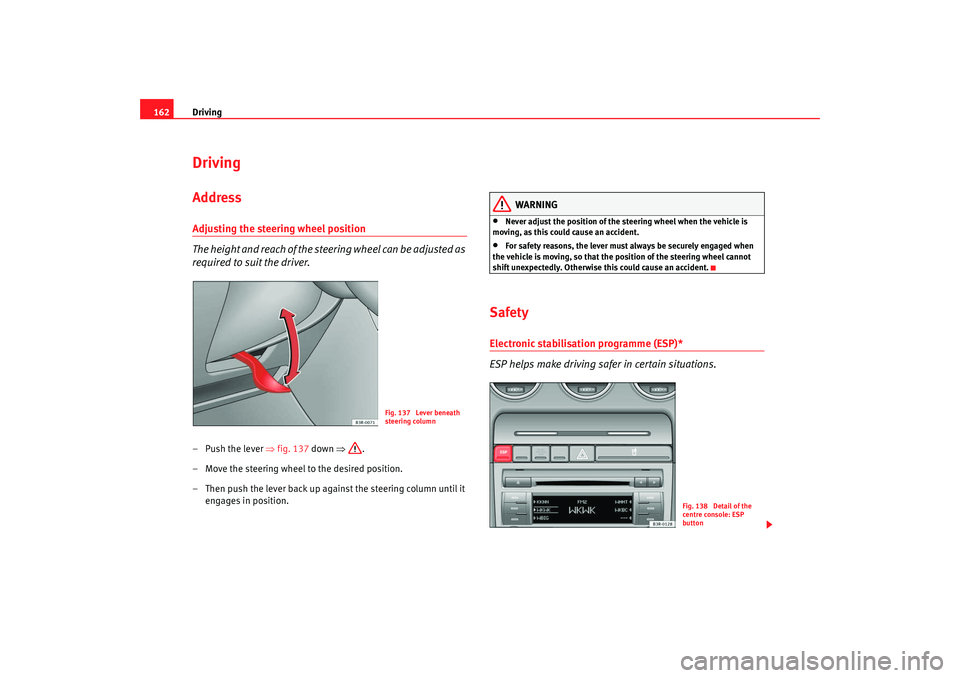
required to suit the driver.–Push the lever ⇒fig. 137 down ⇒.
– Move the steering wheel to the desired position.
– Then push the lever back up against the steering column until it engages in position.
WARNING
•
Never adjust the position of the steering wheel when the vehicle is
moving, as this could cause an accident.
•
For safety reasons, the lever must always be securely engaged when
the vehicle is moving, so that the position of the steering wheel cannot
shift unexpectedly. Otherwise this could cause an accident.
SafetyElectronic stabilisation programme (ESP)*
ESP helps make driving safer in certain situations.
Fig. 137 Lever beneath
steering column
Fig. 138 Detail of the
centre console: ESP
button
Exeo_EN.book Seite 162 Freitag, 17. Oktober 2008 11:24 11
Page 165 of 303

Driving163
Safety First
Operating instructions
Practical tips
Te c h n i c a l D a t a
The Electronic Stabilisation Program (ESP
) contains the electronic differential
lock (EDL) and the traction control system (TCS). The ESP function works
together with the ABS. If a fault in the ABS occurs, both warning lamps light
up, but if the ESP fails, only th e ESP warning lamp lights up.
The ESP is started automatically when the engine is started.
The ESP switch deactivates both TCS and ESP functions. The ESP, in spite of
being off, will always self-connect wher e necessary if brakes are being used.
The TCS can be deactivated when in cases where wheel sliding is desirable.
For example:
•
When driving with snow chains,
•
when driving in deep sn ow or on loose surfaces,
•
when rocking the vehicle backwards and forwards to free it from mud, for
example.
Next, the button should be pressed to reactivate the TCS.
When does the warning light switch on or flash ?
•
On switching the ignition on, it lights up for about two seconds to carry
out a function control.
•
The warning lamp will start flashing when the vehicle is moving if the ESP
or the TCS is activated.
•
It will light up continuously if there is a malfunction in the ESP.
WARNING
•
The electronic stabilisation programme (ESP) cannot defy the laws of
physics. This should be kept in mind, particularly on slippery and wet
roads and when towing a trailer.
•
Always adapt your driving style to suit the condition of the roads and
the traffic situation. Do not let the extra safety afforded by ESP tempt you
into taking any risks when driving, this can cause accidents.
•
Please refer to the corresponding warning notes on ESP in ⇒page 175,
“Intelligent technology”.
Ignition lockIgnition key positions
The ignition key is used to start and stop the engine.Position
The ignition key is inserted in this position. To engage the steering wheel
lock , take out the key and turn the wheel until you hear the pin engage. You
should always engage the steering lock when you leave the vehicle. This will
help to deter thefts ⇒.
WARNING (continued)
Fig. 139 Ignition key
positions
A0
Exeo_EN.book Seite 163 Freitag, 17. Oktober 2008 11:24 11
Page 166 of 303

Driving
164Switching on the ignition/pre-heating glow plugs
If the key is difficult to turn in the lock, move the steering wheel (to take the
load off the steering lock mechanism) until the key turns freely. In the case of
vehicles with a diesel engine, the key is turned to this position to preheat the
glow plugs.
Starting the engine
The engine is started in this position . Electrical components with a high
power consumption are switched off temporarily.
After the engine has started, the ignition key returns to position by itself.
The ignition key has to be turned back to position before re-starting the
engine. The starter inhibitor in the ignition lock prevents the starter motor
from engaging when the engine is running, as this could cause damage.
Switching off the ignition
Turn the ignition key to this position.
WARNING
•
Never remove the ignition key until the vehicle is stationary! Otherwise
the steering lock could engage suddenly, which could cause an accident.
•
Always take the key with you when leaving the vehicle, even if you only
intend to be gone for a short time. This is particularly important if there are
children in the car, as they might otherwise be able to start the engine or
use power-operated equipment (e.g. the electric windows), which could
lead to injuries.Note
•
If the battery has been disconnected and then reconnected, it will be
necessary to leave the key in position for about 5 seconds before starting
the engine.
Starting and stopping the engineStarting the engine
The engine can only be started with an original SEAT key.Vehicles with a petrol engine:
– Use the foot brake.
– Manual gearbox: Push the clutch pedal all the way down.
– Move the gear lever into the neutral position ⇒.
– Turn the ignition key to position without pressing the acceler- ator.
– Release the ignition key as soon as the engine starts (the starter motor must not be allowed to run on with the engine).
A1
A2
A1
A0
A0
A1
Fig. 140 Ignition key
positions
A2
Exeo_EN.book Seite 164 Freitag, 17. Oktober 2008 11:24 11
Page 167 of 303

Driving165
Safety First
Operating instructions
Practical tips
Te c h n i c a l D a t a
Vehicles with a diesel engine:
–Use the foot brake.
– Manual gearbox: Push the clutch pedal all the way down.
– Move the gear lever into the neutral position ⇒.
– Turn the ignition key to position . The pre-heating indicator light
comes on while the glow plugs are preheating.
– When the indicator light
goes out, turn the ignition key to
position . Do not press the accelerator.
– Release the ignition key as soon as the engine starts (the starter motor must not be allowed to run on with the engine).
When starting a very cold engine, it may be a little noisy for the first few
seconds until oil pressure has built up in the hydraulic valve compensators.
This is quite normal, and no cause for concern.
If the engine fails to start straight-away, switch off the starter after about 10
seconds and try again after about half a minute.
Glow plug system*
To assist starting at low temperatures, diesel engines are equipped with a
glow plug preheating system. The pr eheating time depends on the coolant
temperature and the outside temperature. Start the engine as soon as the
glow plug indicator light
goes out.
When the engine is warm or at outside temperatures above +8°C, the glow
plug indicator light will only come on for about one second. This means that
the engine can be started immediately .
If the engine will not start...
•
⇒ page 271
•
⇒page 274
•
⇒page 208, “Refuelling”
WARNING
Never run the engine in confined spaces, as the exhaust gases are
poisonous.
Caution
Avoid high engine speeds, full throttle and extreme load conditions until the
engine has reached its normal operating temperature, otherwise this can
damage the engine.
For the sake of the environment
Do not warm up the engine by running the engine with the vehicle stationary.
Start immediately. This will help avoid unnecessary exhaust emissions.Stopping the engine– Turn the ignition key to position ⇒page 164, fig. 140 .
WARNING
•
Never switch the engine off until the vehicle is stationary.
•
The brake servo and the power steering system work only when the
engine is running. You need more stre ngth to steer and brake the vehicle
when the engine is switched off. Given that you will be unable to steer and
brake as usual, this could lead to a risk of accidents and injuries.
A1
A2
A0
Exeo_EN.book Seite 165 Freitag, 17. Oktober 2008 11:24 11
Page 169 of 303

Driving167
Safety First
Operating instructions
Practical tips
Te c h n i c a l D a t a
If you drive by mistake with the handbrake still applied, you will hear a
warning buzzer and the display will show the message:
Handbrake applied
The handbrake warning is enabled after driving for 3 seconds at a speed
above 5 km/h.
The handbrake warning lamp
lights up when the handbrake is applied
with the ignition on.
WARNING
Please note that the handbrake should be released all the way. If it is only
partially released, this will cause rear brakes overheating, which can
impair the function of the brake system and could lead to an accident.
Caution
After the vehicle has been stopped, always apply the hand brake and engage
a gear.Parking
The following points will ensure there is no risk of the car
rolling away accidentally after it is parked.– Use the foot brake to stop the vehicle.
– Apply handbrake firmly.
– Switch the engine off.
– Engage the first gear ⇒.
When parking on slopes:
Turn the steering wheel so that the, if the vehicle moves, it will do so towards
the curb.
WARNING
•
Do not leave anyone (especially chil dren) in the vehicle when it is
locked. Locked doors could delay assistance in an emergency, potentially
putting lives at risk.
•
Never leave children unsupervised in the vehicle. They could release
e.g. the handbrake or gear lever, moving the vehicle and causing an
accident.
Parking aidGeneral notesVarious systems are available to help you when parking or manoeuvring in
tight spaces, dependi ng on the equipment fitted on your vehicle.
The SEAT parking system gives an acoustic warning if there are any obstacles
behind your car ⇒ page 168.
When you are parking, SEAT parking system plus warns you acoustically and
optically about obstacles in front of and behind the vehicle ⇒ page 168.
Note
To ensure the acoustic parking aid works properly, the sensors must be kept
clean and free of snow and ice.
Exeo_EN.book Seite 167 Freitag, 17. Oktober 2008 11:24 11
Page 170 of 303

Driving
168SEAT parking system*
The SEAT parking system is an acoustic parking aid.Sensors are located in the rear bumper. When the sensors detect an obstacle,
you are alerted by acoustic signals (beeps). The measuring range of the
sensors starts at about:
The acoustic signals sound with increasing frequency as you approach the
obstacle. When the vehicle is less than approx. 0.30 m away from the
obstacle, the warning tone will sound continuously. Do not drive on!
The volume of the warning beeps will be gradually reduced after about 4
seconds if the vehicle remains at a constant distance from a detected
obstacle (it will not be reduced if the obstacle is closer than 0.30 m).
The parking aid is switched on automati cally when reverse gear is engaged.
You will hear a brief acknowledgement tone.
WARNING
•
The parking aid is not a replacement for driver awareness. The driver is
personally responsible for safe parking and other manoeuvres.
•
The sensors have blind spots in which obstacles are not registered.
Always look out for small children and animals because the system will not
always detect them. Always pay attention when reversing to avoid acci-
dents.
•
Always keep a close watch on the ar ea around the vehicle and make full
use of the rear-view mirrors.
Caution
Please note that low obstacles detected by the system may no longer be
registered by the sensors as the car moves closer, so the system will not give
any further warning. Certain kinds of obstacles (such as wire fences, chains,
thin painted posts or trailer draw bars, etc) may not always be detected by the
system, so take care not to damage the vehicle in such cases.
Note
•
Please refer to the notes on towing ⇒page 169.
SEAT parking system plus*
The SEAT parking system plus is an acoustic parking aid.Sensors are located in the front and re ar bumpers. When the sensors detect
an obstacle, you are alerted by acous tic signals (beeps). The measuring
range of the sensors starts at about:
The acoustic signals sound with increa sing frequency as you approach the
obstacle. When the vehicle is less than approx. 0.30 m away from the
obstacle the warning tone will so und continuously. Stop moving immedi-
ately!
The volume of the warni ng beeps will be gradually reduced after about 4
seconds if the vehicle remains at a constant distance from a detected
obstacle (it will not be reduced if the obstacle is closer than 0.30 m).
Rear
Side
0.60 m
Centre
1.60 m
Front
Side
0.90 m
Centre
1.20 m
Rear
Side
0.60 m
Centre
1.60 m
Exeo_EN.book Seite 168 Freitag, 17. Oktober 2008 11:24 11
Page 171 of 303

Driving169
Safety First
Operating instructions
Practical tips
Te c h n i c a l D a t a
Enabling/DisablingEnabling
– Connect the radio or the MMI*
– Engage reverse gear or
– Press the button
on the central console ⇒fig. 142 or on the
gear selector gate. You will hear a brief acknowledgement tone
and the LED on the switch will light up.
Disabling
– Drive forwards faster than 10 km/h, or
– Press the button
or
– disconnect the on button or
– go out of reverse gear.
WARNING
•
The parking aid is not a replacement for driver awareness. The driver is
personally responsible for safe parking and other manoeuvres.
•
The sensors have blind spots in which obstacles are not registered.
Always look out for small children and animals because the system will not
always detect them. Always pay attention when reversing to avoid acci-
dents.
•
Always keep a close eye on the area around the vehicle and make full
use of the rear-view mirrors.Caution
Please note that low obstacles detected by the system may no longer be
registered by the sensors as the car moves closer, so the system will not give
any further warning. Certain kinds of ob stacles (such as wire fences, chains,
thin painted posts or trailer draw bars, etc) may not always be detected by the
system, so take care not to damage the vehicle in such cases.
Note
•
Please refer to the notes on towing ⇒page 169.
•
There is a slight delay in the picture display.
To w i n g b r a c k e t *In towing mode, the rear parking sensors are not enabled when you select
reverse gear or press the switch
. This function may not be guaranteed on
towing brackets that are not factory fitted. This results in the following restric-
tions:
Fig. 142 Centre console:
switch for parking aid
Exeo_EN.book Seite 169 Freitag, 17. Oktober 2008 11:24 11
Page 172 of 303
Driving
170SEAT parking system*
There is no distance warning.
SEAT parking system plus*
There is no rear distance warning. The system will still give a warning when
obstacles are detected while driving forwards.Fault messages*If you hear a long beep for a few seconds and the LED on the switch
* starts
flashing when you switch on the parking aid, a system fault has occurred.
Please have the fault corrected by a Dealer or specialist garage.
Note
If the fault is not corrected before you switch off the ignition, it will only be
indicated by the flashing LED on the switch
* the next time you switch on
the parking aid.
Cruise Control System (CCS)Introduction
The cruise control system allows you to maintain a constant
speed.Using this equipment, any speed over 30 km /h can be kept constant up to the
power output of the engine. This is subject to power output and braking
ability of the engine. This helps to re duce fatigue, especially on long jour-
neys. The indicator light
in the instrument panel li
ghts up when the cruise
control system is operating.
WARNING
For safety reasons, the cruise control system should not be used in dense
traffic or poor road conditions (such as slippery surfaces, heavy rain, loose
grit or gravel), as this could cause an accident.
Caution
On vehicles with a manual gearbox: do not go into neutral if the device is
enabled without previously releasing the clutch, as the engine will increase
its revs and, under certain conditions, could break down.
Note
The cruise control cannot maintain a constant speed when travelling down
steep hills. The vehicle tends to accelerate under its own weight. Change
down to a lower gear in good time or use the foot brake to slow the vehicle.
Exeo_EN.book Seite 170 Freitag, 17. Oktober 2008 11:24 11