instrument panel Seat Exeo 2008 Owner's Guide
[x] Cancel search | Manufacturer: SEAT, Model Year: 2008, Model line: Exeo, Model: Seat Exeo 2008Pages: 303, PDF Size: 10.02 MB
Page 73 of 303

Cockpit71
Safety First
Operating instructions
Practical tips
Te c h n i c a l D a t a
Driver information systemGeneral notes
The driver information system in the instrument panel shows
the status of various on-board systems at a glance.The display for the driver information system is in the centre of the instrument
panel.
The system runs a check on certain components and functions when the igni-
tion is switched on and while the vehi cle is moving. The DIS system gives an
audible warning if a fault should occur or if servicing is required, and a red or
yellow warning symbol (in some cases with a corresponding driver message)
appears in the dashboard display.
The driver is informed on the audio system.
The driver information system includes the following functions:
Note
•
If a fault should occur, the display will show a red or yellow warning
symbol. A red warning symbol indicates a serious malfunction ⇒page 76. A
yellow warning symbol indicates a less serious malfunction ⇒ page 78.
Fig. 47 Cockpit: Digital
display in the instrument
panel
CD and radio display
⇒page 72
Ambient temperature display
⇒page 72
Distance to empty (the distance you can travel with the
remaining fuel)
⇒page 73
Door catch/tailgate warning
⇒page 73
Service interval display
⇒page 74
auto-check control
⇒page 75
Driving tips
⇒page 75
Handbrake warning
⇒page 76
Bulb monitor*
⇒page 81
On-board computer*
⇒page 84
Tyre pressure monitoring*
⇒page 88
Navigation information*
Separate operat-
ing instructions
Exeo_EN.book Seite 71 Freitag, 17. Oktober 2008 11:24 11
Page 76 of 303

Cockpit
74Service indicator
This display reminds the driver when the next routine service
is due.Displaying distance to next service
When you press the service button briefly with the ignition switched on,
the display will show how far the vehicle can be driven before the next service
is due. The query can be made with the engine switched off or in gear up to
speeds of 5 km/h. Every time the igni tion is switched on, the remaining
distance is updated. However, the first time this will be after 500 km.
In new vehicles or following a service, the following display is given for the
first 500 km when the remaining distance until the next service is consulted:
Service reminder
The instrument pane l controls the distance trav elled every day. Calculate the
average of these distances travelled and enable the service reminder suffi-
ciently in advance. The display reverts back to the standard display after about 5 seconds. The
remaining distance to the next service is updated every time the ignition is
switched on, until the service becomes due.
Service due
When a service is due,
SERVICE! will appear in the display immediately after
you switch on the ignition. The display reverts back to the standard display
after about 5 seconds.
Resetting the display
The display is reset by the garage after the service has been carried out. If the
service indicator has not been reset by the specialist garage, please perform
the following steps:
•
Switch the ignition off.
•
Press the service button ⇒fig. 51 and hold while switching on the
ignition. The display will show one of these messages: Service in ----- km or
Service!
•
Now press and hold the reset button until the display shows Service
in ----- km --- days or Service!
The display switches out of the reset mode if you do not press the reset button
within 5 seconds.Note
•
Do not reset the service indicator between services, otherwise the display
will be incorrect.
•
The information in the service indicator remains intact if the battery is
disconnected.
•
The distance to the next service cannot be called up if the system has
detected a Priority 1 fault (red symbol).
Fig. 51 Detailed view of
the instrument panel:
Service indicator
A1
A1A2
Exeo_EN.book Seite 74 Freitag, 17. Oktober 2008 11:24 11
Page 77 of 303

Cockpit75
Safety First
Operating instructions
Practical tips
Te c h n i c a l D a t a
Auto-check systemIntroductionThe auto-check system checks important components and vehicle systems.
These background checks are run consta ntly, as long as the ignition is
switched on.
A message is displayed in the instrument panel if a fault should occur or if any
maintenance or repairs are urgently required. This is accompanied by an
audible warning signal. Depending on the pr iority of the fault, a red or yellow
warning symbol lights up in the display.
The red symbols indicate a danger, whereas the yellow ones represent a
warning . Additional messages to assist the driver may be shown with the red
or yellow symbols.
Driver messages
Additional messages to assist the driver are displayed
together with the warning symbols in the instrument panel.Driver messages and red symbols
If a red warning symbol appears in the display, you can press the
button ⇒fig. 52 to call up an additional driver message.
For example: in the event of an oil pressure malfunction, the oil pressure
symbol
will appear in the display. If you now press the button, the
following message will appear in the display:
Switch off engine, check oil level
The message will disappear from the display after about 5 seconds. If
required, the message can be called up again by briefly pressing the
button.
Fig. 52 Instrument panel:
CHECK button
CHECK
CHECK
CHECK
Exeo_EN.book Seite 75 Freitag, 17. Oktober 2008 11:24 11
Page 83 of 303

Cockpit81
Safety First
Operating instructions
Practical tips
Te c h n i c a l D a t a
Bulb monitor
The bulb monitor checks whether the lights on the vehicle are
working.If a defective bulb is detected, or if one of the lights has failed for any reason,
the bulb monitor symbol
will appear in the display together with an addi-
tional message (which goes out after 5 sec onds). For instance, if the rear left
turn signal is not working, the display in the instrument panel will show the
following message:
Left rear turn signal
The message disappears after 5 seconds. Press the CHECK button briefly if
you wish to call up the message again.
If the display indicates that one of the lights is not working, this can have a
number of causes:
•
Bulb failure ⇒page 249.
•
A “blown” fuse ⇒page 247, “Changing fuses”.
•
Faulty electrical wiring.
Have the components replaced or the wiring repaired as necessary by a
specialist garage.
WARNING
•
Bulbs are highly sensitive to pressure. The glass can break when you
touch the bulb, causing injury.
•
The high voltage element of gas discharge lamps* (xenon light) must
be handled correctly. Otherwise, there is a risk of death.
Speed warning
Introduction
The speed warning function can help prevent you exceeding
a particular pre-set maximum speed.The speed warning function will warn the driver if a pre-set maximum speed
is exceeded. The system gives an audible warning signal if the set speed is
exceeded by about 10 km/h. A warning symbol will also appear in the display
⇒ fig. 55 .
The speed warning function has two different warning speeds, which operate
independently and serve slightly different purposes:
Speed limit warning 1
With speed limit warning 1, the maximum speed can be changed while
driving. The speed limit that has been set remains stored until the ignition is
switched off, or until it is changed or cleared.
Fig. 55 Display: Speed
warning function
Exeo_EN.book Seite 81 Freitag, 17. Oktober 2008 11:24 11
Page 84 of 303

Cockpit
82The speed limit warning symbol
for speed warning 1 ⇒page 81, fig. 55
will appear in the display if you exceed the pre-set speed. It goes out again if
the speed is reduced below the set speed limit.
The symbol also goes out if the speed is increased to more than about 40
km/h above the set speed for at least 10 seconds. However, this does not
cancel the speed limit that was originally set.
Setting speed limit warning 1 ⇒page 82.
Speed limit warning 2
With speed limit warning 2, the speed limit can only be changed or cleared
when the ignition is switched off. You are recommended to store this speed
limit warning if you always wish to be reminded of a particular speed limit.
This could be when driving in countries with general speed limits, or if a
particular speed should not be exceeded when winter tyres are fitted etc.
The speed limit warning symbol
for speed warning 2 will appear in the
display if you exceed the pre-set speed. Unlike speed limit warning 1, the
warning symbol only goes out once th e road speed has dropped below the
set value again.
Setting speed limit warning 2 ⇒page 83.
Note
Please bear in mind that, even with the speed warning function, it is still
important to keep a eye on the car' s speed with the speedometer and to
observe the legal speed limits.
Setting speed limit warning 1
Use the CHECK button to set speed limit warning 1.Setting the speed limit
– Drive at the desired maximum speed.
– Press the CHECK button and hold it down until the symbol ⇒page 81, fig. 55 appears.
Clearing the speed limit
– Drive the vehicle at a minimum of 5 km/h.
– Press the CHECK button for at least two seconds.The speed warning symbol
lights up briefly in th e display when the button
is released to confirm that the selected speed has been stored. The speed
limit that has been selected remains stored until another speed is selected
Fig. 56 Detailed view of
the instrument panel:
CHECK button
Exeo_EN.book Seite 82 Freitag, 17. Oktober 2008 11:24 11
Page 90 of 303

Cockpit
88Use the rocker switch to select the menus and adjust various values. The
selected values are highlighted on a red background.
By pressing the button, you can conf irm the option you have selected
or the value you have set. Selected functions are marked with a tick.
The following symbols are used:Tyre pressure monitoringIntroduction
The tyre pressure monitoring system constantly checks the
pressure of the tyres.The system warns the driver in the event of a loss of pressure by means of
symbols and messages in the instrument panel display. The system works
with the help of the ABS sensors in the wheels.
Please bear in mind that the tyre inflation pressure is also influenced by the
temperature of the tyre. Tyre pressure increases about 0.1 bar for each 10°C
in tyre temperature increase. The tyre heats up while the vehicle is being driven and the tyre pressure will rise accordingly. Therefore, you should only
adjust the tyre pressures when they are
cold (i.e. approximately at ambient
temperature).
To ensure that the tyre pressure monitoring system works reliably, you should
check and, if necessary, adjust the tyre pressures at regular intervals and
store the correct pressures (reference values) in the system.
A tyre pressure information label is attached to the inside of the fuel tank flap.
WARNING
•
Never adjust tyre pressure when the tyres are hot. This may damage or
even burst the tyres. Risk of accident!
•
An insufficiently inflated tyre flexes a lot more at high speeds and
causes significant heating of the ty re. Under these conditions, the tyre
bead may be released or the tyre may burst. Risk of accident!For the sake of the environment
Under-inflated tyres lead to increased fuel consumption and tyre wear.
Note
•
Responsibility for ensuring that the tyres are correctly inflated remains
with the driver; the system can only provide assistance.
•
Pressure can only be adjusted when the tyres are at ambient
temperature.
Cursor
Function selected
Red background (active
function)
Tick
Selected
Box
Not selected
Triangle pointing upwards
Previous page
Triangle pointing down-
wards
Next page
Reset
Exeo_EN.book Seite 88 Freitag, 17. Oktober 2008 11:24 11
Page 114 of 303
Lights and visibility
112Lights and visibilityLightsLights: switching on and off
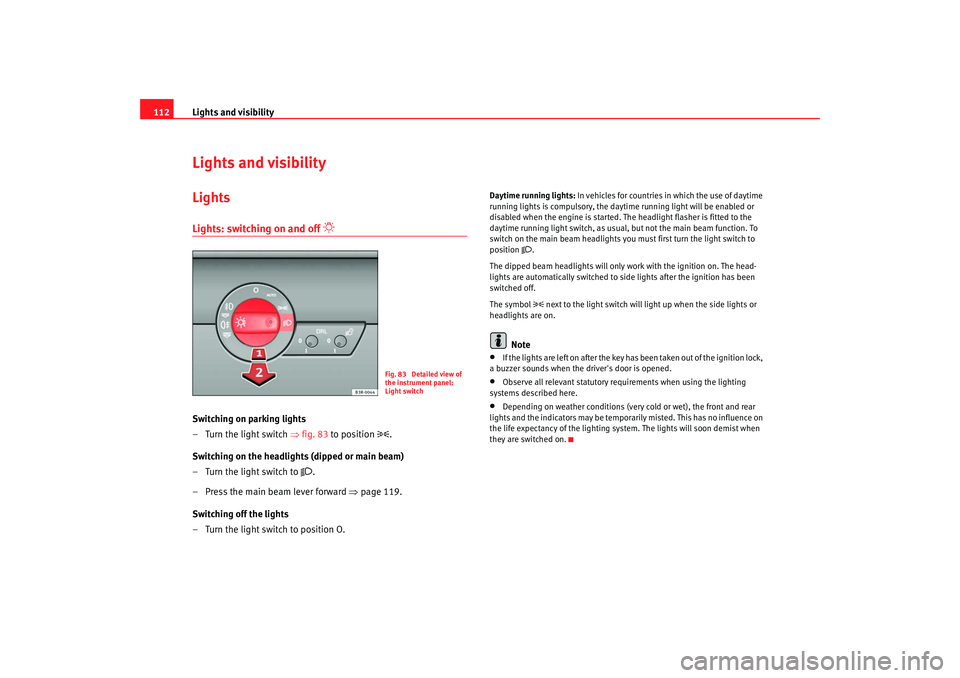
Switching on parking lights
– Turn the light switch ⇒fig. 83 to position
.
Switching on the headlights (dipped or main beam)
– Turn the light switch to
.
– Press the main beam lever forward ⇒page 119.
Switching off the lights
– Turn the light switch to position O.
Daytime running lights: In vehicles for countries in which the use of daytime
running lights is compulsory, the dayt ime running light will be enabled or
disabled when the engine is started. The headlight flasher is fitted to the
daytime running light switch, as usual, but not the main beam function. To
switch on the main beam headlights you must first turn the light switch to
position
.
The dipped beam headlights will only work with the ignition on. The head-
lights are automatically switched to side lights after the ignition has been
switched off.
The symbol next to the light switch will light up when the side lights or
headlights are on.
Note
•
If the lights are left on after the key has been taken out of the ignition lock,
a buzzer sounds when the driver's door is opened.
•
Observe all relevant statutory requirements when using the lighting
systems described here.
•
Depending on weather conditions (very cold or wet), the front and rear
lights and the indicators may be tempor arily misted. This has no influence on
the life expectancy of the lighting syst em. The lights will soon demist when
they are switched on.
Fig. 83 Detailed view of
the instrument panel:
Light switch
Exeo_EN.book Seite 112 Freitag, 17. Oktober 2008 11:24 11
Page 115 of 303
Lights and visibility113
Safety First
Operating instructions
Practical tips
Te c h n i c a l D a t a
Automatic (sensor-controlled) headlights*
If you set the switch to “AUTO”, the headlights will come on
and switch off automatically according to the ambient light
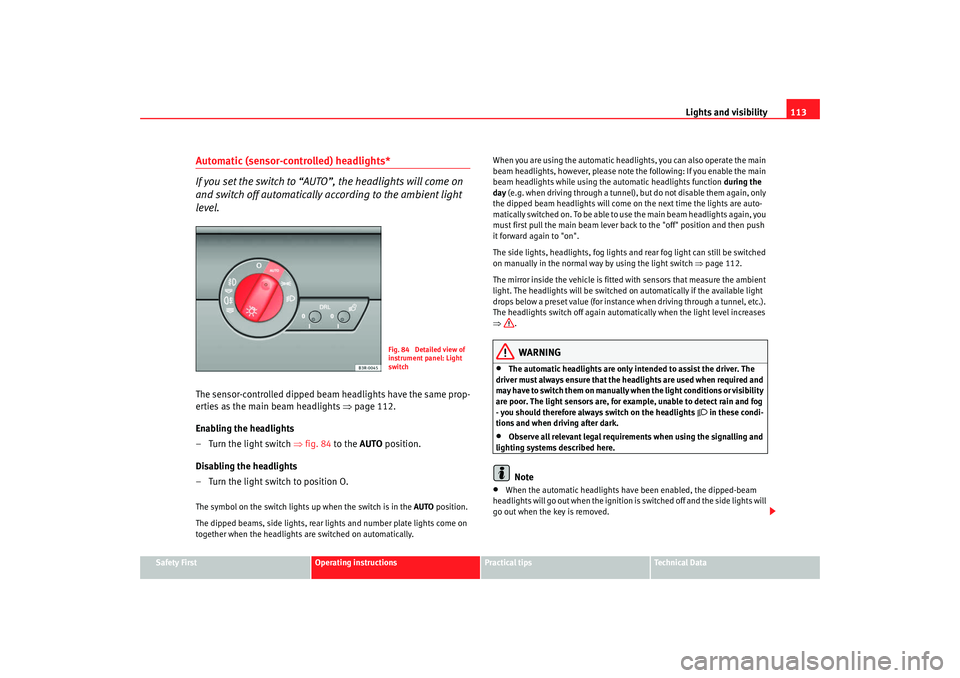
level.The sensor-controlled dipped beam headlights have the same prop-
erties as the main beam headlights ⇒page 112.
Enabling the headlights
– Turn the light switch ⇒ fig. 84 to the AUTO position.
Disabling the headlights
– Turn the light switch to position O.The symbol on the switch lights up when the switch is in the AUTO position.
The dipped beams, side lights, rear li ghts and number plate lights come on
together when the headlights are switched on automatically. When you are using the automatic headlights, you can also operate the main
beam headlights, however, please note the following: If you enable the main
beam headlights while using the automatic headlights function
during the
day (e.g. when driving through a tunnel), but do not disable them again, only
the dipped beam headlights will come on the next time the lights are auto-
matically switched on. To be able to use the main beam headlights again, you
must first pull the main beam lever back to the "off" position and then push
it forward again to "on".
The side lights, headlights, fog lights and rear fog light can still be switched
on manually in the normal way by using the light switch ⇒page 112.
The mirror inside the vehicle is fitted with sensors that measure the ambient
light. The headlights will be switched on automatically if the available light
drops below a preset value (for instance when driving through a tunnel, etc.).
The headlights switch off again automatically when the light level increases
⇒ .
WARNING
•
The automatic headlights are only intended to assist the driver. The
driver must always ensure that the headlights are used when required and
may have to switch them on manually when the light conditions or visibility
are poor. The light sensors are, for example, unable to detect rain and fog
- you should therefore always switch on the headlights
in these condi-
tions and when driving after dark.
•
Observe all relevant legal requirements when using the signalling and
lighting systems described here.Note
•
When the automatic headlights have been enabled, the dipped-beam
headlights will go out when the ignition is switched off and the side lights will
go out when the key is removed.
Fig. 84 Detailed view of
instrument panel: Light
switch
Exeo_EN.book Seite 113 Freitag, 17. Oktober 2008 11:24 11
Page 117 of 303

Lights and visibility115
Safety First
Operating instructions
Practical tips
Te c h n i c a l D a t a
Coming home and leaving home functions*
The coming home and leaving home functions are used to
light up the surroundings in th e dark. The front fog lights, the
rear side lights and the number plate light switch on.Enabling the functions
– Briefly press the knob ⇒fig. 85 to release it from its set position.
– Turn the knob to position 1.
– Press the knob in again to prevent the setting from being changed unintentionally.
Disabling the functions
– Briefly press the knob ⇒fig. 85 to release it from its set position.
– Turn the knob to position 0. – Press the knob in again to prevent the setting from being
changed unintentionally.
The coming home and leaving home functions are controlled by light sensors
in the rear view mirror housing. The sy stem will function when the following
requirements are met:•
The knob is set to position 1.
•
The headlights and the ignition are switched off.
•
Dark conditions; the sensors register little or no light.
Coming home
When the system is enabled and it is dark, the corresponding exterior lights
switch on as soon as the driver's door is opened.
The exterior lights will stay on for up to a maximum of 2 minutes as long as
one of the doors or the tailgate is open.
The exterior lights stay on for about 30 seconds to light up the area in front of
the car after all the doors and the tailgate have been closed.
This time interval is factory-set, but you can have it changed by a specialist
garage to suit your own requirements (max. setting is 60 seconds).
Leaving home
The exterior lights are switched on wh en the vehicle is unlocked with the
button on the remote control key.
The exterior lights go out when the dr iver's door is opened or after 60
seconds when the vehicle locks itself again automatically ⇒page 102.
WARNING
Before leaving the vehicle, remove the key from the ignition, as the lights
will not go out if the coming home is enabled. This will lead to battery
discharge and vehicle breakdown.
Fig. 85 Detailed view of
the instrument panel:
Coming home and leaving
home functions
Exeo_EN.book Seite 115 Freitag, 17. Oktober 2008 11:24 11
Page 118 of 303

Lights and visibility
116
Note•
If you always wish to use the coming home and leaving home functions,
you can leave them permanently switched on. As the system is controlled via
a light sensor, it will only work in dark conditions.
•
Permanent use of the coming home and leaving home functions, particu-
larly o n sho r t jo urneys, will increase the load o n the batter y. To make su re the
battery is always sufficiently charged, occasionally drive longer distances.
•
If the fog lights have been switched on by the coming home and leaving
home functions, they will always be switched off when you switch on the igni-
tion.
•
Observe all relevant legal requirements when using the signalling and
lighting systems described here.
Instrument lighting
The brightness of the instrument lighting, displays and
centre console lighting can be varied as required.
– Press the button to increase the brightness.
– Press the button to reduce the brightness.With the ignition switched on
The lighting of the digital displays will adjust automatically, depending on
the enveloping light.
With the vehicle's lights switched on
When the vehicle's lights are switched on, the brightness of the instrument
lighting, displays and centre console li ghting can be varied by pressing the
and buttons.Headlight range control
When the dipped beam headlights are switched on, the range
of the headlights can be adjusted to suit the load being
carried.
Fig. 86 Instrument panel
lighting
+-
+
-
Fig. 87 Headlight range
control
Exeo_EN.book Seite 116 Freitag, 17. Oktober 2008 11:24 11