fuel consumption Seat Exeo 2008 Owner's manual
[x] Cancel search | Manufacturer: SEAT, Model Year: 2008, Model line: Exeo, Model: Seat Exeo 2008Pages: 303, PDF Size: 10.02 MB
Page 6 of 303
Contents
4Trailer towing
. . . . . . . . . . . . . . . . . . . . . . . . . . . . .
Trailer towing . . . . . . . . . . . . . . . . . . . . . . . . . . . .
Removable towing bracket . . . . . . . . . . . . . . . . .
Your vehicle maintenance and cleaning
. . . .
General notes . . . . . . . . . . . . . . . . . . . . . . . . . . .
Vehicle exterior maintenance . . . . . . . . . . . . . . .
Vehicle interior maintenance . . . . . . . . . . . . . . .
Accessories, parts replacement and
modifications
. . . . . . . . . . . . . . . . . . . . . . . . . . . .
Accessories and spare parts . . . . . . . . . . . . . . . .
Technical modifications . . . . . . . . . . . . . . . . . . .
Mobile telephones and radiotelephones . . . . .
Athermic windscreen* . . . . . . . . . . . . . . . . . . . . .
Checking and refilling levels
. . . . . . . . . . . . . .
Refuelling . . . . . . . . . . . . . . . . . . . . . . . . . . . . . . .
Releasing the tank flap manually . . . . . . . . . . . .
Petrol . . . . . . . . . . . . . . . . . . . . . . . . . . . . . . . . . .
Diesel . . . . . . . . . . . . . . . . . . . . . . . . . . . . . . . . . .
The bonnet . . . . . . . . . . . . . . . . . . . . . . . . . . . . . .
Engine oil . . . . . . . . . . . . . . . . . . . . . . . . . . . . . . .
Cooling system . . . . . . . . . . . . . . . . . . . . . . . . . .
Washer fluid and windscreen wiper blades . . . .
Brake fluid . . . . . . . . . . . . . . . . . . . . . . . . . . . . . .
Battery . . . . . . . . . . . . . . . . . . . . . . . . . . . . . . . . .
Wheels and tyres
. . . . . . . . . . . . . . . . . . . . . . . . .
Wheels . . . . . . . . . . . . . . . . . . . . . . . . . . . . . . . . .
If and when
. . . . . . . . . . . . . . . . . . . . . . . . . . . . . .
Tools, tyre repair kit and spare wheel . . . . . . . .
Changing a wheel . . . . . . . . . . . . . . . . . . . . . . . .
Tyre repair* (Tyre-Mobility-System) . . . . . . . . . .
Fuses . . . . . . . . . . . . . . . . . . . . . . . . . . . . . . . . . .
Bulbs . . . . . . . . . . . . . . . . . . . . . . . . . . . . . . . . . .
Changing bulbs Halogen headlights . . . . . . . . .
Changing bulbs. Bi-Xenon AFS headlights . . . .
Changing rear bulbs (in side panel) . . . . . . . . . .
Changing rear light bulbs (i n boot lid) . . . . . . . . Side indicators . . . . . . . . . . . . . . . . . . . . . . . . . .
Luggage compartment lights . . . . . . . . . . . . . . .
Registration light . . . . . . . . . . . . . . . . . . . . . . . . .
Sunroof light . . . . . . . . . . . . . . . . . . . . . . . . . . . .
Jump-starting . . . . . . . . . . . . . . . . . . . . . . . . . . . .
Towing and tow-starting . . . . . . . . . . . . . . . . . . .
Te c h n i c a l D a t a
. . . . . . . . . . . . . . . . . . . . . . .
General notes on the technical data
. . . . . . .
Outstanding information . . . . . . . . . . . . . . . . . .
Data on fuel consumption . . . . . . . . . . . . . . . . .
Towing a trailer . . . . . . . . . . . . . . . . . . . . . . . . . .
Wheels . . . . . . . . . . . . . . . . . . . . . . . . . . . . . . . . .
Techn ical Data
. . . . . . . . . . . . . . . . . . . . . . . . . . . .
Checking fluid levels . . . . . . . . . . . . . . . . . . . . . .
Petrol engine 1.6l 75 kW (102 HP) . . . . . . . . . . .
Petrol engine 1.8l 110 kW (150 HP) . . . . . . . . .
Petrol engine 2.0l 147 kW (200 HP) . . . . . . . . .
Diesel engine 2.0l 105 kW (143 hp) . . . . . . . . .
Diesel engine 2.0l 125 kW (170 hp) . . . . . . . . .
Dimensions and capacities . . . . . . . . . . . . . . . .
Index
. . . . . . . . . . . . . . . . . . . . . . . . . . . . . . . . . .
186
186
189
197
197
198
203
206
206
206
207
207
208
208
209
210
210
212
214
217
220
222
223
227
227
236
236
238
243
247
249
249
256
262
266 268
269
270
271
271
274
277
277
277
279
280
280
282
282
283
284
285
287
288
290
291
Exeo_EN.book Seite 4 Freitag, 17. Oktober 2008 11:24 11
Page 75 of 303
Cockpit73
Safety First
Operating instructions
Practical tips
Te c h n i c a l D a t a
Note
When the display shows route guidance instructions from the navigation
system, the ambient temperature appears in the second line of the radio
display.Fuel range
The fuel range display can help you to plan your trip.The estimated fuel range is displayed in km. It shows how far the vehicle can
be driven with the amount of fuel left in the tank, assuming the same style of
driving. The fuel range is displayed in increments of 10 km.
The fuel range is calculated on the basis of the fuel consumption over the last
30 kilometres. The fuel range will increase if you drive in a more economical
manner.
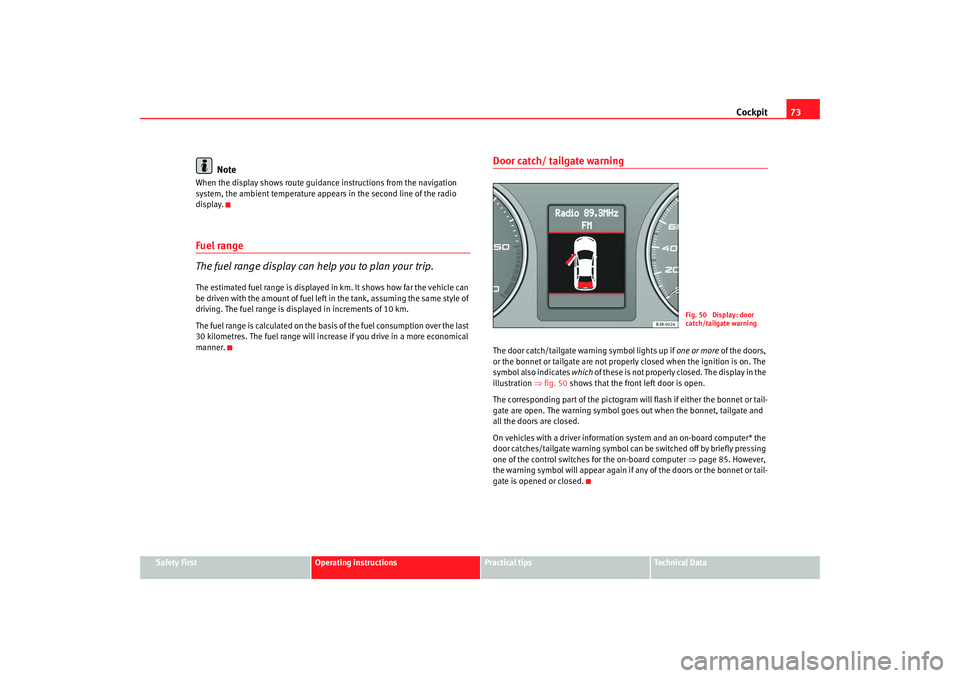
Door catch/ tailgate warningThe door catch/tailgate warning symbol lights up if one or more of the doors,
or the bonnet or tailgate are not proper ly closed when the ignition is on. The
symbol also indicates which of these is not properly closed. The display in the
illustration ⇒fig. 50 shows that the front left door is open.
The corresponding part of the pictogram wil l flash if either the bonnet or tail-
gate are open. The warning symbol goes out when the bonnet, tailgate and
all the doors are closed.
On vehicles with a driver information system and an on-board computer* the
door catches/tailgate warning symbol can be switched off by briefly pressing
one of the control switches for the on-board computer ⇒page 85. However,
the warning symbol will appear again if any of the doors or the bonnet or tail-
gate is opened or closed.
Fig. 50 Display: door
catch/tailgate warning
Exeo_EN.book Seite 73 Freitag, 17. Oktober 2008 11:24 11
Page 86 of 303

Cockpit
84On-board computerIntroduction
The on-board computer provides you with useful information
during a journey, includin g average and current fuel
consumption, average speed, fuel range, driving time and
distance covered.Press RESET button ⇒page 85, fig. 59 to switch back and forward
between the functions of on-board computers 1 and 2.
The numbers in the display ⇒fig. 58 indicates which of the two memories is
currently in use. The figure 1 means that the display is showing the informa-
tion in the single journey memory (on-board computer 1). The figure 2 means
that the display is showing the inform ation in the total journey memory (on-
board computer 2). Single-journey memory (on-board computer 1)
The single-journey memory processes th
e information on a journey from the
time the ignition is switched on until it is switched off. If the journey is
resumed within two hours after the ignition is switched off, the new figures
are automatically included in the calculation. If the journey is interrupted for
more than two hours the stored information is automatically erased when you
resume your journey.
Total-journey memory (on-board computer 2)
Unlike the single-journey memory, the total-journey memory is not erased
automatically. Hence, you can determine the period for which you wish the
on-board computer to supply figures.
Fuel range
The estimated fuel range is displayed in km. The fuel range is displayed in
increments of 10 km.
Average fuel consumption
This mode shows the average fuel consumption since the memory was last
cancelled in litres/100 km.
Instantaneous fuel consumption
The display shows the instantaneous fuel consumption in litres/100 km.
When the vehicle is stationary, the computer will display the last value in the
memory.
Average speed
This mode shows the average speed driven since the memory was last
cancelled (in km/h).
Driving time
This display shows the period of time which has elapsed since the memory
was last cancelled. The longest possible period it can cover is 999 hours and
59 minutes.
Fig. 58 On-board
computer: memory 1
AB
Exeo_EN.book Seite 84 Freitag, 17. Oktober 2008 11:24 11
Page 87 of 303

Cockpit85
Safety First
Operating instructions
Practical tips
Te c h n i c a l D a t a
Driving time warning
After 2 hours of continuous driving, the display automatically switches over
to the driving time display of
2:00. At the same time the driving time display
starts flashing. This is to remind the driver to take a break.
The driving time warning can be switched off by briefly pressing the function
selector switch or the button ⇒fig. 59 .
If you continue driving or take a break for less than 10 minutes, the driving
time warning will switch on once agai n when the total driving time is 4:00
hours, 6:00 hours, etc. However, if you take a break for more than 10 minutes,
the driving time warning clock will be erased.
Distance covered
This display shows the distance you have covered since the memory was last
cancelled. The longest possible distance which can be recorded is
9999.9 km.
Note
•
The displays for fuel consumption (average and instantaneous), fuel
range and speed are shown in metric units.
•
The information in the memory is lost if the battery is disconnected.
Operating
The on-board computer is controlled by means of two
switches on the windscreen wiper lever.Enabling the on-board computer
– Press the reset button repeatedly until the on-board computer (memory 1 or 2) ⇒page 84, fig. 58 is displayed.
Selecting the function
– Press the top or bottom of the function selector switch ⇒fig. 59 . This displays the functions of the on-board computer
in sequence.
Resetting to zero
– Press and hold the Reset button for at least two seconds.The following values can be reset to zero using the Reset button:
Reset
Fig. 59 Windscreen wiper
lever: On-board computer
controls
AB
AA
AB
Exeo_EN.book Seite 85 Freitag, 17. Oktober 2008 11:24 11
Page 88 of 303

Cockpit
86•
Journey duration
•
Distance covered
•
Average fuel consumption
•
Average speed
The on-board computer can only be oper ated when the ignition is switched
on. When the ignition is switched on, the display shows the function that was
last selected.
As well as the figures from the on-boa rd computer (computer 1 or 2), the
display can also show information from the navigation system*. Press the
Reset button briefly to switch back and forward between these displays.Note
•
If you keep the Reset button pressed for longer than two seconds, it will
reset the currently displayed figure to zero (for instance average fuel
consumption).
•
Faults detected by the auto-check control will be displayed even if the
display is off.
•
The information in the memory is lost if the battery is disconnected.
Menu displayIntroduction
AB
Fig. 60 Windscreen wiper
lever: Menu selection
buttonFig. 61 Display: Main
menu
Exeo_EN.book Seite 86 Freitag, 17. Oktober 2008 11:24 11
Page 89 of 303

Cockpit87
Safety First
Operating instructions
Practical tips
Te c h n i c a l D a t a
Some of the functions in your vehicle can be adjusted, activated and
controlled via
menus (e.g. tyre pressure*). With the aid of the menus you can
then also select the information you wish to see displayed on the DIS display.
This is only possible when the ignition is on. The menu is enabled using the
button on the windscreen wiper lever ⇒page 86, fig. 60 .
The main menu lists the different display types (or basic commands):
Programming
Check
Menu off
Help
The main menu options have the following submenus:
Controlling the menu
The menu display is called up via the button and the
rocker switch on the windscreen wiper lever. Use these
controls to make checks and adjust the settings.Functions of the ⇒fig. 62 and the rocker switch :
Enabling the menu
– Press the button until the menu display ⇒page 86,
fig. 61 appears.
Selecting and setting
– Press the rocker switch to select one of the menus. Press "up" or "down" on the switch to select the options accordingly.
Entering and confirming
– Press the button.
Programming
Clock
⇒ page 87
Computer
⇒page 87
Speed warning
⇒page 81
Radio info (on/off)Units: for measuring dis-
tance, fuel consumption and
temperature
⇒page 87
Language: you can select
one of 6 languages.
⇒page 87
Check
Service
⇒page 74
Menu off
When the menu is switched off, the display shows the
same information as on vehicles without the menu func-
tion.
Help
This function helps you select the options you require.
Reset
Reset
Fig. 62 Windscreen wiper
lever: Reset button and
rocker switch
Reset
AB
AA
ResetReset
Exeo_EN.book Seite 87 Freitag, 17. Oktober 2008 11:24 11
Page 90 of 303

Cockpit
88Use the rocker switch to select the menus and adjust various values. The
selected values are highlighted on a red background.
By pressing the button, you can conf irm the option you have selected
or the value you have set. Selected functions are marked with a tick.
The following symbols are used:Tyre pressure monitoringIntroduction
The tyre pressure monitoring system constantly checks the
pressure of the tyres.The system warns the driver in the event of a loss of pressure by means of
symbols and messages in the instrument panel display. The system works
with the help of the ABS sensors in the wheels.
Please bear in mind that the tyre inflation pressure is also influenced by the
temperature of the tyre. Tyre pressure increases about 0.1 bar for each 10°C
in tyre temperature increase. The tyre heats up while the vehicle is being driven and the tyre pressure will rise accordingly. Therefore, you should only
adjust the tyre pressures when they are
cold (i.e. approximately at ambient
temperature).
To ensure that the tyre pressure monitoring system works reliably, you should
check and, if necessary, adjust the tyre pressures at regular intervals and
store the correct pressures (reference values) in the system.
A tyre pressure information label is attached to the inside of the fuel tank flap.
WARNING
•
Never adjust tyre pressure when the tyres are hot. This may damage or
even burst the tyres. Risk of accident!
•
An insufficiently inflated tyre flexes a lot more at high speeds and
causes significant heating of the ty re. Under these conditions, the tyre
bead may be released or the tyre may burst. Risk of accident!For the sake of the environment
Under-inflated tyres lead to increased fuel consumption and tyre wear.
Note
•
Responsibility for ensuring that the tyres are correctly inflated remains
with the driver; the system can only provide assistance.
•
Pressure can only be adjusted when the tyres are at ambient
temperature.
Cursor
Function selected
Red background (active
function)
Tick
Selected
Box
Not selected
Triangle pointing upwards
Previous page
Triangle pointing down-
wards
Next page
Reset
Exeo_EN.book Seite 88 Freitag, 17. Oktober 2008 11:24 11
Page 162 of 303

Heating, Ventilation and Air conditioning
160Each of the three buttons has a specific function. The numbers relate to the
air outlets ⇒ page 159, fig. 135.
Air directed to windows
This setting directs all the air to outlets 1 and 2. Unlike in setting , the
volume of air delivery remains the same.
Air to the driver/front passenger
All the air comes from outlets 3 and 4 in the dash panel and from the rear of
the centre console.
Air to the footwells
Most of the air emerges from outlets 5 and the outlets under the front seats.
Some of the air will also be issued from outlets 3 and 4.
Note
In all of the above air distribution settings, a small amount of air will still
come from the other outlets.Economical use of the climate control
Economical use of the climate control will help save fuel.Engine power is reduced and fuel consumption increases when the
climate control is in cooling mode. To ensure that the system is only
switched on when it is really necessary, please note the following
points:
– Select ECON mode if you wish to save fuel.
– Select ECON mode if you decide to open the windows or sun roof* while driving. – If the vehicle has heated up after standing in the sun, open the
windows and doors for a short time to cool the vehicle.
For the sake of the environment
By saving fuel you also reduce the am ount of pollutants emitted from your
vehicle.Key settings
When the ignition is switched on, the climate control settings
assigned to the key are selected automatically.The climate control settings selected are automatically stored and assigned
to the key in use. When the vehicle is started, the climate control automati-
cally selects the settings assigned to the key. Hence, every driver automati-
cally obtains his/her preferred settings without having to select them manu-
ally.
Note
Should another driver use the key and enter other settings, the previous
settings will be deleted.
Exeo_EN.book Seite 160 Freitag, 17. Oktober 2008 11:24 11
Page 185 of 303

Driving and the environment183
Safety First
Operating instructions
Practical tips
Te c h n i c a l D a t a
Diesel engine particulate filter*
The diesel engine particulate filter eliminates soot produced
by burning diesel.The diesel engine dust filter eliminates most of the soot from the exhaust gas
system. Under normal driving conditions, the filter cleans itself. If the driving
conditions do not allow the filter to clean itself (for example, multiple short
trips) the filter will be obstructed by dust and pollen and the indicator
for
the diesel engine particulate filter indicator will light up. See section on
Warning Lights.
WARNING
•
The diesel engine particulate filter may reach extremely high tempera-
tures; it should not enter into contact with flammable materials under-
neath the vehicle. Failure to comply could result in fire.Caution
•
The vehicle is not designed for refuelling with mixtures of FAME fuel
(biodiesel) over 7%. The diesel particle filter is damaged when this mixture
percentage is exceeded.
Economical and environmentally friendly
drivingEconomical and environmentally friendly drivingFuel consumption, environmental pollut ion and wear to the engine, brakes
and tyres depends in large part on your driving style. By adopting an econom- ical driving style and anticipating the traffic situation ahead, you can easily
reduce fuel consumption by 10-15%. Some
tips on how to help you reduce
pollution while saving money are listed below.
As you drive try to anticipate the traffic situation
A vehicle uses most fuel when accele rating. When you anticipate the situa-
tion, you have to brake less often and, thus, accelerate less. If it is possible,
let the vehicle roll with a gear engaged, for example, if you see a red light
ahead. The braking effect achieved in this way helps to reduce the wear of
brakes and tyres; emissions and fuel consumption are reduced to zero
(disconnection due to inertia).
Change gear early to save energy
An effective way of saving fuel is to change up quickly through the gears.
Running the engine at high rpm in the lower gears uses an unnecessary
amount of fuel.
Manual gearbox: Change from first to second gear as quickly as possible. We
recommend that, whenever possible, you change to a higher gear upon
reaching 2,000 rpm.
Avoid driving at high speed
We advise you not to drive at the top speed permitted by the vehicle. Fuel
consumption, exhaust emissions and noise levels all increase very rapidly at
higher speeds. Driving at moderate speeds will help to save fuel.
Avoid idling
It is worthwhile switching off the engine when waiting in a traffic jam, at level
crossings or at traffic lights with a long red phase. The fuel saved after only
30 - 40 seconds is greater than the amount of fuel needed to restart the
engine.
The engine takes a very long time to warm up when it is running at idling
speed. Mechanical wear and pollutan t emissions are also especially high
during this initial warm-up phase. It is therefore best to drive off immediately
after starting the engine. Avoid running the engine at high speed.
Exeo_EN.book Seite 183 Freitag, 17. Oktober 2008 11:24 11
Page 186 of 303
Driving and the environment
184Periodic maintenance
Periodic maintenance work guarantees that, before beginning a journey, you
will not consume more than the required amount of fuel. A well-serviced
engine gives you the benefit of improved fuel efficiency as well as maximum
reliability and an enhanced resale value.
A badly serviced engine can consume up to 10% more fuel than necessary.
Avoid short journeys
To reduce the consumption and emission of polluting gases, the engine and
the exhaust filtration systems should reach the optimum service tempera-
ture .
With the engine cold, fuel consumption is proportionally higher. The engine
does not warm up and fuel consumptio n does not regularise until having
driven some four kilometres. This is the reas on why we recommend avoiding
short trips wherever possible.
Maintain the correct tyre pressures
Bear in mind that keeping the tyres at an adequate pressure saves fuel. If the
tyre pressures are just 1 bar too low, this can put the fuel consumption up by
as much as 5 %. Due to the greater rolling resistance, under-inflation also
increases tyre wear and impairs handling.
The tyre pressures should always be checked when the tyres are cold.
Do not use winter tyres all through the year: they will increase fuel consump-
tion by up to 10 %.
Avoid unnecessary weight
Every kilo of extra weight will put up the fuel consumption, so it is worth
checking the luggage compartment occasionally to make sure that no unnec-
essary loads are being transported.
A roof carrier is often left in place for the sake of convenience, even when it is
no longer needed. At a speed of 100-120 km/h your car will use about 12%
more fuel as a result of the extra wind resistance caused by the roof carrier
even when it is not in use. Saving electrical energy
The engine activates the alternator, which produces electricity. With the need
for electricity, fuel consumption is al
so increased. Because of this, always
turn off electrical equipment when you do not need them. Examples of equip-
ment that use a lot of electricity are: the fan at high speeds, the rear window
heating or the seat heaters*.
Environmental friendlinessEnvironmental protection is a top priority in the design, choice of materials
and production of your new Seat.
Design measures for economical recycling•
Joints and connections designed for ease of dismantling
•
Modular construction to facilitate dismantling
•
Increased use of single-grade materials
•
Plastic parts and elastomers are labelled in accordance with ISO 1043,
ISO 11469 and ISO 1629
Choice of materials
•
Nearly all materials used can be recycled
•
Similar types of plastics grouped together for easy recycling
•
Recycled materials used in manufacture
•
Reduction of volatile compounds in plastics
•
CFC-free refrigerant in air conditioning
Compliance with prohibited materials laws: cadmium, asbestos, lead,
mercury, chrome VI.
Manufacturing methods
•
Use of recycled material for manufacturing plastic parts
•
Solvent-free cavity sealing
Exeo_EN.book Seite 184 Freitag, 17. Oktober 2008 11:24 11