phone Seat Exeo 2009 MEDIA SYSTEM 1.0
[x] Cancel search | Manufacturer: SEAT, Model Year: 2009, Model line: Exeo, Model: Seat Exeo 2009Pages: 124, PDF Size: 6.27 MB
Page 84 of 124

Mobile phone system83
Operating
RADIO, CD/MP3
TEL (telephone)
NAV, INFO
SETUP
–Say YES, when the speech control system gives you the cue. The
recorded name which was read out will be deleted.You can continue to delete names from the phone book by pressing the talk
button as long as the entries are being read out.
Media System 1.0_EN.book Seite 83 Donnerstag, 10. September 2009 1:52 13
Page 86 of 124
NAV (navigation system)85
Operating
RADIO, CD/MP3
TEL (telephone)
NAV, INFO
SETUP
NAV, INFONAV (navigation system)General safety precautionsThe driver is completely responsible for traffic safety even
when driving with the navigation system active.B e s u r e t ha t y o u a l wa y s ha v e co m p le t e co n t r o l o f y o u r v e h i c l e i n a ll t r a f f i c s i t u -
ations when using navigation system functions.
WARNING
•Today's driving conditions require the full attention of drivers. Please
see ⇒page 6, “Notes on road safety”.•Observe traffic regulations when driving. The route calculated by the
navigation system is a recommendation of how best to reach a destination.
If driving instructions run contrary to traffic laws, the traffic laws always
take precedence. Pay attention to traffic lights, no-stopping signs, lane
change restrictions, one-way streets, etc.Caution
The volume of the sound system should be set at a level that enables you to
hear acoustic signals from outside, such as police and fire brigade sirens.
Failure to do so may cause an accident.
IntroductionIntroductionThe navigation system makes time-consuming map reading superfluous.
During route guidance you receive information on the dash panel display
⇒ page 86, fig. 93 regarding vehicle position, turn-off information (direction
and distance to turn-off) and estimated arrival time. Additionally, you receive
spoken navigation information ⇒page 87.
There are two possibilities for route guidance:•Route without stopover (single destination mode)•Route with stopovers (route plan)
Route without stopover (single destination mode)
In the single destination mode you can drive directly to a destination
⇒ page 91.
Route with stopovers (route plan)
In the route with stopover mode ( ⇒page 92) you can enter up to six stopo-
vers and a final destination.
For example, when travelling you can save time by finding the nearest filling
station in unfamiliar towns. You can also make a stopover to eat in a restau-
rant or visit a tourist attraction.
Media System 1.0_EN.book Seite 85 Donnerstag, 10. September 2009 1:52 13
Page 88 of 124

NAV (navigation system)87
Operating
RADIO, CD/MP3
TEL (telephone)
NAV, INFO
SETUP
Note
You can also start a route guidance in demo mode ⇒ page 107 for simulation
purposes.Navigation system voice guidanceRoute calculation is announced with a voice message. During this time, the
display will show a list of the selected route criteria options ( ⇒page 103)
and the dash panel display will show an arrow. This arrow faces in the direc-
tion of the entered destination.
When route calculation is complete, guidance is given by spoken driving
instructions and symbols. The spoken navigation directions are given in good
time before a turn-off.
You can use the following options to repeat the last navigation voice
message:•Press the rotary pushbutton while in the Nav-Info menu.•Press the control button for Nav-Info if you are not already in the Nav-Info
menu.•press the right thumbwheel on the multi-function steering wheel*
⇒ page 14.
If the navigation CD is inserted in the CD player ⇒page 25, the language in
which the navigation system voice guidance is given can be changed
⇒ page 116.Caution
If driving instructions run contrary to traffic laws, the traffic laws always take
precedence.
Note
•You can adjust the volume of the voice guidance prompts as they are
being announced using the on/off button ⇒page 11 on the navigation
control console or the right thumbwheel on the multi-function steering
wheel* ⇒page 14.•If the vehicle is in a location that cannot be read by the navigation system
(e.g. car park or garage), a voice message will inform you of such. The arrow
in the dash panel display faces in the direction of the entered destination.•In neighbouring countries, the instructions given are slightly different to
those of your country of origin, as the navigation CD for these countries only
contains the main roads.Dynamic navigation
The dynamic navigation function calculates routes based on
the currently available TMC traffic messages.If the dynamic navigation function ⇒page 103 is activated and a TMC radio
station is set, the system constantly checks whether relevant TMC messages
are available for the selected route. If the navigation system then determines
that a TMC traffic message is relevant for the current route, the system will
automatically calculate a new route plan to the destination.
The navigation system receives and processes the traffic announcements
issued by certain channels (TMC) in addition to regular programming. The
reception of TMC traffic messages is free of charge in Germany.
Note
•Please note that the TMC messages sent by the radio stations may not
always be complete and correct.
Media System 1.0_EN.book Seite 87 Donnerstag, 10. September 2009 1:52 13
Page 90 of 124
NAV (navigation system)89
Operating
RADIO, CD/MP3
TEL (telephone)
NAV, INFO
SETUP
If a change of lanes is necessary before making the turn-off, you will be
informed of this
⇒page 86, fig. 93 .
The navigation display in the dash panel display is shown during a route
guidance even when you select other functions in the navigation system (e.g.
radio or CD). When you operate other functions of the dash panel display via
the multi-function steering wheel, the navigation display will temporarily be
replaced by the function you want to use.
Note
•To switch from the navigation display to the on-board computer display,
press the Reset button. Press the button repeatedly to exit.•For more information about the on-board computer RESET button, please
refer to your Owner's Manual.Switching on the navigation system
The navigation functions can be selected with the func-
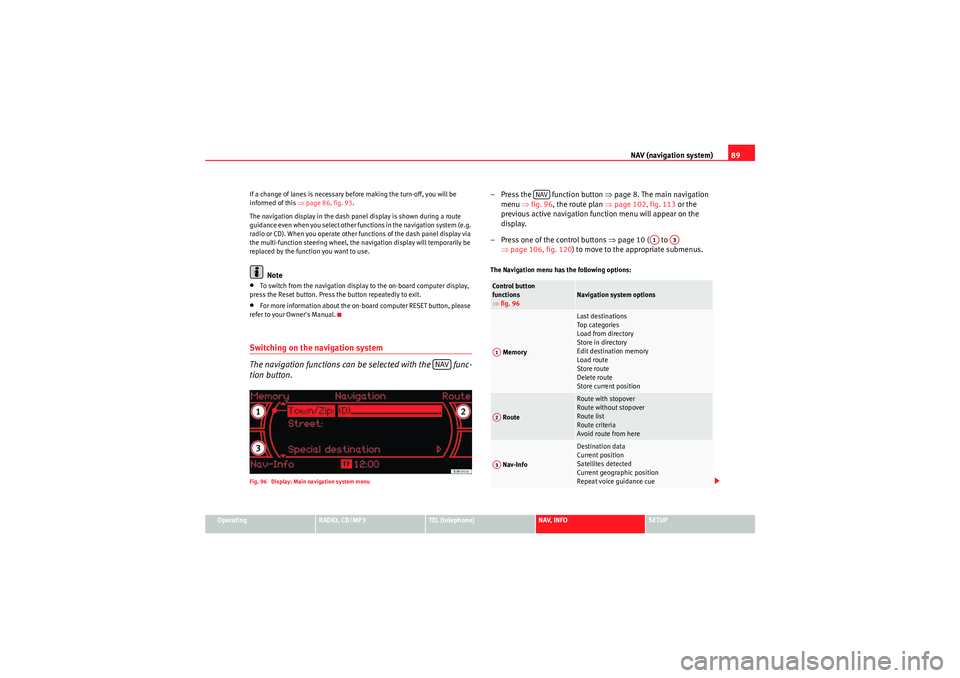
tion button.Fig. 96 Display: Main navigation system menu
– Press the function button ⇒page 8. The main navigation
menu ⇒fig. 96 , the route plan ⇒ page 102, fig. 113 or the
previous active navigation function menu will appear on the
display.
– Press one of the control buttons ⇒page 10 ( to
⇒ page 106, fig. 120 ) to move to the appropriate submenus.The Navigation menu has the following options:
NAV
Control button
functions
⇒fig. 96
Navigation system options
Memory
Last destinations
Top ca te gor ie s
Load from directory
Store in directory
Edit destination memory
Load route
Store route
Delete route
Store current position
Route
Route with stopover
Route without stopover
Route list
Route criteria
Avoid route from here
Nav-Info
Destination data
Current position
Satellites detected
Current geographic position
Repeat voice guidance cue
NAV
A1
A3
A1A2A3
Media System 1.0_EN.book Seite 89 Donnerstag, 10. September 2009 1:52 13
Page 92 of 124
NAV (navigation system)91
Operating
RADIO, CD/MP3
TEL (telephone)
NAV, INFO
SETUP
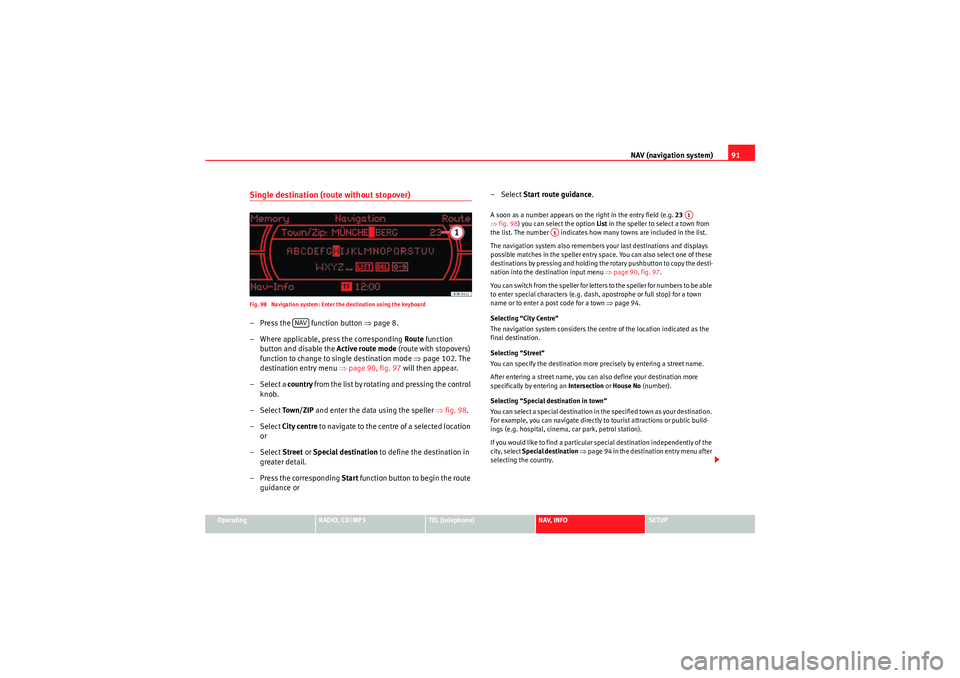
Single destination (route without stopover)Fig. 98 Navigation system: Enter the destination using the keyboard– Press the function button ⇒page 8.
– Where applicable, press the corresponding Route function
button and disable the Active route mode (route with stopovers)
function to change to single destination mode ⇒page 102. The
destination entry menu ⇒page 90, fig. 97 will then appear.
– Select a country f r o m t h e l ist b y r o ta t i n g a n d p r e ssi n g t h e co n t ro l
knob.
– Select To w n / Z I P and enter the data using the speller ⇒fig. 98 .
– Select City centre to navigate to the centre of a selected location
or
– Select Street or Special destination to define the destination in
greater detail.
– Press the corresponding Start function button to begin the route
guidance or – Select
Start route guidance .
A soon as a number appears on the right in the entry field (e.g. 23
⇒ fig. 98 ) you can select the option List in the speller to select a town from
the list. The number indicates how many towns are included in the list.
The navigation system also remembers your last destinations and displays
possible matches in the speller entry space. You can also select one of these
destinations by pressing and holding the rotary pushbutton to copy the desti-
nation into the destination input menu ⇒page 90, fig. 97.
You can switch from the speller for letters to the speller for numbers to be able
to enter special characters (e.g. dash, apostrophe or full stop) for a town
name or to enter a post code for a town ⇒page 94.
Selecting “City Centre”
The navigation system considers the centre of the location indicated as the
final destination.
Selecting “Street”
You can specify the destination more precisely by entering a street name.
After entering a street name, you can also define your destination more
specifically by entering an Intersection or House No (number).
Selecting “Special destination in town”
You can select a special destination in the specified town as your destination.
For example, you can navigate directly to tourist attractions or public build-
ings (e.g. hospital, cinema, car park, petrol station).
If you would like to find a particular special destination independently of the
city, select Special destination ⇒ page 94 in the destination entry menu after
selecting the country.
NAV
A1
A1
Media System 1.0_EN.book Seite 91 Donnerstag, 10. September 2009 1:52 13
Page 94 of 124

NAV (navigation system)93
Operating
RADIO, CD/MP3
TEL (telephone)
NAV, INFO
SETUP
– Press the control button Start ⇒ page 92, fig. 99 to begin the
route guidance.A soon as a number appears on the right in the entry field (e.g. 23
⇒ page 91, fig. 98) you can select the option List in the speller to select a
town from the list. The number indicates how many towns are included in
the list.
The navigation system also remembers your last destinations and displays
possible matches in the speller entry space. You can also select one of these
destinations by pressing and holding the rotary pushbutton to copy the desti-
nation into the destination input menu ⇒ page 90, fig. 97.
You can switch from the speller for letters to the speller for numbers to be able
to enter special characters (e.g. dash, apostrophe or full stop) for a town
name or to enter a post code for a town ⇒page 94.
Follow the directions shown in the dash panel display ⇒page 88 and the
spoken cues ⇒page 87.
Selecting “City Centre”
The navigation system considers the centre of the location indicated as the
final destination.
Selecting “Street”
You can specify the destination more precisely by entering a street name.
After entering a street name, you can also define your destination more
specifically by entering an Intersection or House No (number).
Selecting “Special destination in town”
You can select a special destination in the specified city. For example, you can
navigate directly to tourist attractions or public facilities (e.g. hospital,
cinema, recreation areas). If you would like to find a particular special destination independently of the
city, select
Special destination ⇒ page 94 in the destination entry menu after
selecting the country.
Note
•Once you have entered a city in the keyboard, you can confirm the entry
by pressing and holding down the control knob. When you have entered the
first few letters of a place name and can already see the place you wish to
select listed in the speller display, you can press the rotary pushbutton (long
press) to switch to the list of places.•Once the destinations have been entered, they can be stored in the direc-
tory ⇒ page 100 from where they can be loaded (using the “Load route”
⇒ page 99 function) for reuse as a navigation destination.•Route options can be changed at any time during the route guidance; the
system will then recalculate the route accordingly ⇒page 95.
A1
A1
Media System 1.0_EN.book Seite 93 Donnerstag, 10. September 2009 1:52 13
Page 96 of 124
NAV (navigation system)95
Operating
RADIO, CD/MP3
TEL (telephone)
NAV, INFO
SETUP
– In the destination entry menu ⇒page 90, fig. 97 , select a
country from the list by rotating and pressing the control knob.
– Select Special destination ⇒ page 90, fig. 97 .
– For the special destination required, select a category ( In
immediate vicinity, In vicinity of destination or Along the route)
⇒ page 94, fig. 103 .
– Select the special destination from the category list.
– Select Set as destination . The special destination is automati-
cally transferred to the route guidance.
– Press the control button for Start. The route will be calculated.In immediate vicinity
This special destination category refers to the immediate vicinity of the
vehicle in its current location. This function is especially useful when you are,
for example, trying to find the nearest restaurant.
The special destinations displayed in the list are sorted according to the
distance from your current position (in a straight line). The displayed distance
to the destination can differ considerably from the actual distance to be
driven by car.
In vicinity of destination
This special destination category refers to a previously calculated destination
and is useful when, for example, trying to find a car park or hotel at or near
your final destination.
Nationwide
This special destination is not connected with any previously selected desti-
nation. This refers to the country in question.
This function can be used for guidance to the nearest service area or airport.
Note
•Options that are not available due to your preset criteria cannot be
selected (these are greyed out in the display).•There are sometimes destination entries in the list that cannot be
displayed completely because they are too long (too many characters). If you
select one of these entries using the control knob, a second window will open
up after a few seconds. This screen will show more information about the
selected entry.Entering the destination via position coordinates
You can enter the longitude and latitude coordinates for a
destination using the “Position” option.– Select the option Position in the navigation menu.
– Turn and press the rotary pushbutton to enter the desired longi- tude and latitude coordinates.
– Press the control button for Start to begin the route guidance.Changing/Interrupting route guidanceChanging the route
– Press the button.
– Enter the new data for single destination (route without stopover)
or route plan (route with stopovers) guidance.
NAV
Media System 1.0_EN.book Seite 95 Donnerstag, 10. September 2009 1:52 13
Page 98 of 124
NAV (navigation system)97
Operating
RADIO, CD/MP3
TEL (telephone)
NAV, INFO
SETUP
Memory MenuLast destinations
The last destinations are stored automatically and can be
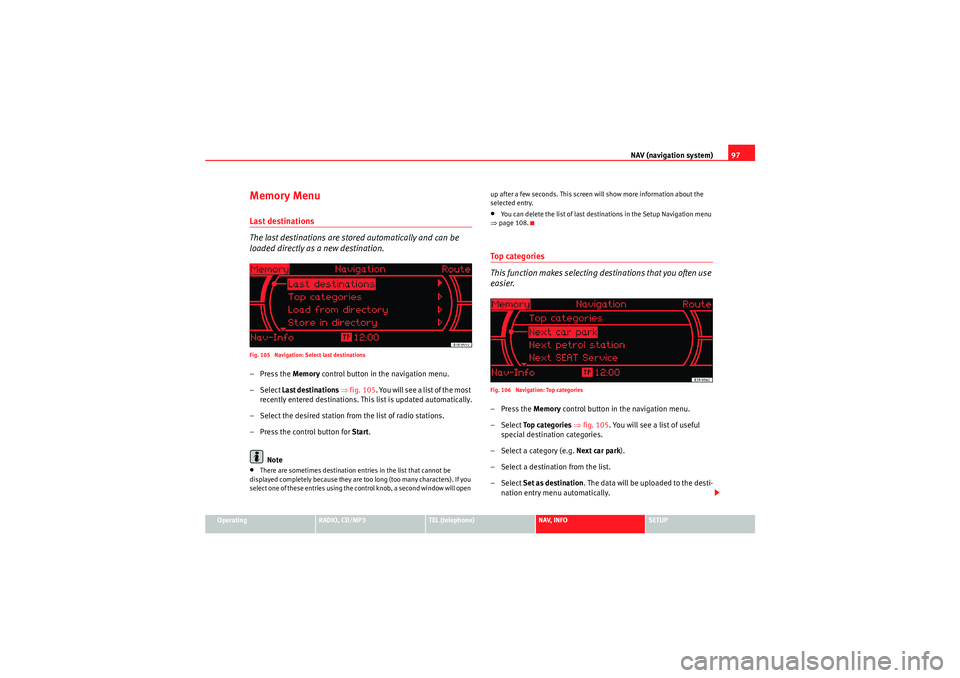
loaded directly as a new destination.Fig. 105 Navigation: Select last destinations–Press the Memory control button in the navigation menu.
– Select Last destinations ⇒ fig. 105 . You will see a list of the most
recently entered destinations. This list is updated automatically.
– Select the desired station from the list of radio stations.
– Press the control button for Start.
Note•There are sometimes destination entries in the list that cannot be
displayed completely because they are too long (too many characters). If you
select one of these entries using the control knob, a second window will open up after a few seconds. This screen will show more information about the
selected entry.
•You can delete the list of last destinations in the Setup Navigation menu
⇒ page 108.To p c a t e g o r i e s
This function makes selecting destinations that you often use
easier.Fig. 106 Navigation: Top categories–Press the Memory control button in the navigation menu.
– Select To p c a t e g o r i e s ⇒ fig. 105. You will see a list of useful
special destination categories.
– Select a category (e.g. Next car park).
– Select a destination from the list.
– Select Set as destination . The data will be uploaded to the desti-
nation entry menu automatically.
Media System 1.0_EN.book Seite 97 Donnerstag, 10. September 2009 1:52 13
Page 100 of 124

NAV (navigation system)99
Operating
RADIO, CD/MP3
TEL (telephone)
NAV, INFO
SETUP
– Select Find entry
14) to file the destination under an existing
directory card.
– Select Display as top destination ⇒ page 98, fig. 108 and press
the control knob. A filled tick box next to this menu option indi-
cates that is activated ⇒ page 20.
– Select Store entry.
Use the option Store in directory to assign an entry in your directory to a
destination ⇒page 91.
Addresses that have been marked as top destinations will be listed in the
destination entry menu and can be selected directly from there ⇒page 96.
If you store a navigation destination in a directory entry that already has an
address assigned to it, the old address will be overwritten with the new one.Loading a destination from the directoryFig. 109 Navigation: Load an entry from directory
–Press the Memory control button in the navigation menu.
– Select Load from directory ⇒ page 97, fig. 105 .
– Select a destination from the list or
– Select Find entry.
– Enter the entry to be found using the speller ⇒page 21 or select
it from the list.A loaded entry can be edited and restored in the directory by selecting the
Memory function.Loading a route
Routes that have been stored previously can be loaded as a
new navigation destination.– In the navigation menu, press the Route function button and
enable the Active route mode (route with stopovers) function.
–Press the Memory control button.
– Select Load route .
– Select the route you would like to load from the list.Route plans that have been stored ⇒page 100 can be loaded again quickly
and conveniently.
You can change the route plan at any time ⇒page 101.
14)This function is available when the list comprises several entries.
Media System 1.0_EN.book Seite 99 Donnerstag, 10. September 2009 1:52 13
Page 102 of 124
NAV (navigation system)101
Operating
RADIO, CD/MP3
TEL (telephone)
NAV, INFO
SETUP
– Select Delete all routes and confirm Delete all? with Ye s to delete
all stored route plans.Editing a route– To do so, select one of the destinations/stopovers using the control knob.
– Select Edit, Move , Delete or Drive to now and edit the destina-
tion/stopover accordingly.Edit : To enter new information for the final destination or stopover.
Move : To change the order of destinations in the route plan.
Delete : To delete the selected final destination or stopover. If you delete the
final destination, the last stopover will automatically be set as the new final
destination.
Drive to now : During your journey you can drive back to a destination or stop-
over starting from your current position.Storing current position
You can store the current position of the vehicle to call up later
as a destination.–Press the Memory control button in the navigation menu.
– Select Store current position .
– Select Create entry . – Select and use the speller to enter a name for the current position
you wish to store.
– Select Display as top destination ⇒ page 98, fig. 108 and press
the control knob. A filled tick box next to this menu option indi-
cates that is activated ⇒page 20.
– Select Store entry.
Media System 1.0_EN.book Seite 101 Donnerstag, 10. September 2009 1:52 13