door lock Seat Exeo 2011 User Guide
[x] Cancel search | Manufacturer: SEAT, Model Year: 2011, Model line: Exeo, Model: Seat Exeo 2011Pages: 313, PDF Size: 5.02 MB
Page 108 of 313

106Unlocking and locking
Note
● The remote control should only be used when the doors and the tailgate
are closed.
● The remote control should not be used when the vehicle is out of sight.
● The anti-theft alarm* can be accidentally triggered and the vehicle
locked if you press the locking button
on the remote control inside the
vehicle before inserting the key in the ignition. If this should happen by
mistake, press the unlock button
.
Re-synchronising
Should the remote control fail to lock or unlock the vehicle,
the system must be re-synchronised.
– If the vehicle is locked, use the key to unlock the driver door.
– Press the unlock button
on the remote control.
– Insert the key into the ignition and switch on the ignition.
– Switch off the ignition and remove the key.
– Press the unlock
or the lock button . Anti-theft alarm system*
Description
The system triggers an alarm if anyone attempts to break in-
to the vehicle.
The anti-theft alarm helps to prevent the vehicle being broken into or sto-
len. If the system senses interference with the vehicle, it triggers an audible
and visible alarm.
How is the system enabled?
The anti-theft alarm system is enabled automatically when the vehicle is
locked with the remote control or by turning the key in the driver door (if the
door is closed). The anti-theft alarm is enabled about 30 seconds after the
vehicle is locked.
How is the system disabled?
The anti-theft alarm is only disabled when the vehicle is unlocked using the
remote control. The vehicle will lock again automatically if none of the doors
is opened within 60 seconds after pressing the remote control button.
If the vehicle is unlocked by turning the key in the driver door, all the other
doors, the tailgate and the tank flap will remain locked.
If the vehicle has been unlocked with the key in the driver door, the key
must be inserted in the ignition lock and the ignition switched on within 15
seconds of opening the door in order to disable the alarm. The alarm will be
triggered if the ignition is not switched on within 15 seconds.
Opening and closing function in cars with alarm
When using the key only without remote control to lock and unlock:
in unlocking all the doors, they unlock simultaneously.
When using the key only without remote control to lock and unlock:
–
Page 109 of 313
107
Unlocking and locking
in unlocking all the doors, they unlock simultaneously.
When combining locking using the remote control key and unlocking using
the key but without the remote control: when unlocking, only the driver door will unlock.
When does the system trigger the alarm?
The following parts of the vehicle are monitored when the vehicle is locked:
● Engine compartment (bonnet)
● Luggage compartment
● Doors
● Tilt angle (tow-away protection)
● Ignition
● Radio (only with a factory-fitted SEAT radio)
● Interior ⇒ page 107
If any of these areas are entered, the alarm will be triggered.
How is the alarm disabled?
The alarm can be switched off by unlocking the vehicle using the remote
control, or by switching on the ignition with the key, thus “disabling” the
alarm system. The alarm will also switch off when it comes to the end of its
cycle.
Turn signals
The turn signals flash briefly when the vehicle is locked to confirm that the
doors, the engine bonnet and the tailgate are properly closed and locked.
If the turn signals do not flash, check the doors, the bonnet and the tailgate
to make sure they are properly closed. The turn signals will also flash briefly
if one of the doors or the tailgate or engine bonnet is closed after the alarm
system has been enabled. –
– LED
When the vehicle is locked, the LED on the top of the driver door trim will
flash rapidly for about 30 seconds and then continue flashing slowly. This is
to indicate that the anti-theft alarm system (including the
interior monitor-
ing and tow-away protection ) is operative. If the LED lights up continuously
for about 30 seconds when the vehicle is locked instead of flashing, this
means the alarm system is not working properly.
Note
● To make sure that the alarm is fully operative when leaving the vehicle,
briefly check that all the doors and windows and the sunroof* are closed.
● The alarm is triggered immediately if one of the battery cables is discon-
nected while the alarm system is enabled.
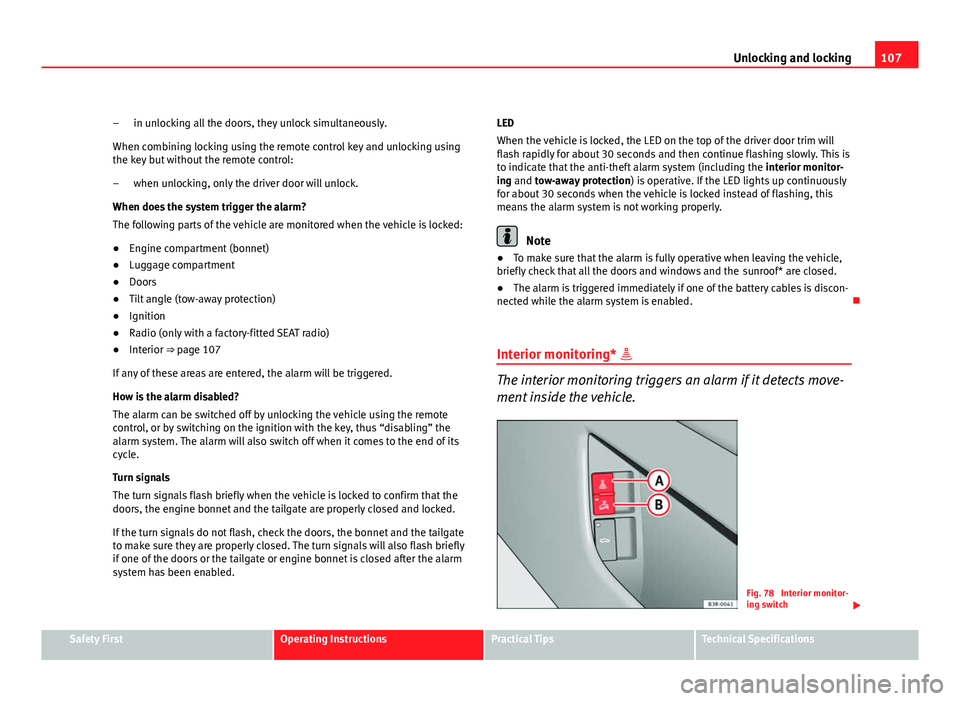
Interior monitoring*
The interior monitoring triggers an alarm if it detects move-
ment inside the vehicle.
Fig. 78 Interior monitor-
ing switch
Safety FirstOperating InstructionsPractical TipsTechnical Specifications
Page 110 of 313
108Unlocking and locking
You should disable the interior monitoring if there is a possibility
that the alarm could be triggered, e.g. by a pet or by an object
moving inside the vehicle ⇒
. The tow-away protection feature,
which is integrated into the alarm system, should be disabled if
the vehicle is being towed or transported (e.g. by rail or ship).
Deactivating the interior monitoring
– Open the door and pull out the switch A
(with the symbol
)
to one side of the storage compartment, in the driver door
⇒ fig. 78.
– Then lock the vehicle.
Deactivating the tow-away protection
– Open the door and pull out switch B
(with the symbol
) to
one side of the storage compartment, in the driver door
⇒ fig. 78.
– Then lock the vehicle.
The LED on switch
will light up when the
interior monitoring is disabled.
The LED on the top of the driver door trim will also light up for about 3 sec-
onds. When the vehicle is locked, the LED on the top of the driver door trim
will flash rapidly for about 3 seconds. About 30 seconds later it starts flash-
ing slowly. The interior monitoring is automatically enabled again the next
time the vehicle is locked.
The LED on switch
will light up when the
tow-away protection function is
disabled. The LED on the top of the driver door trim will also light up for
about 3 seconds. When the vehicle is locked, the LED on the top of the driv-
er door trim will flash rapidly for about 3 seconds. The tow-away protection
is automatically enabled again the next time the vehicle is locked.
WARNING
Do not leave anyone (especially children) in the vehicle if it is locked from
the outside and the anti-theft security system is enabled, as the doors
and windows cannot then be opened from the inside. Locked doors could
delay assistance in an emergency, potentially putting lives at risk.
Electric windows Controls
Fig. 79 Detail of the
driver door: Controls
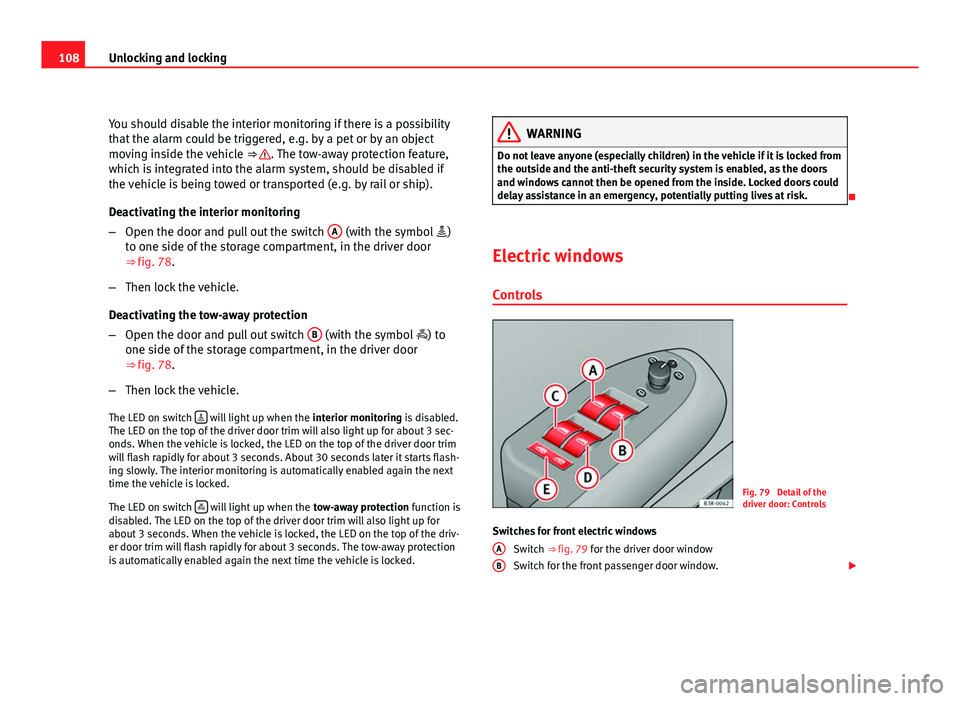
Switches for front electric windows Switch ⇒ fig. 79 for the driver door window
Switch for the front passenger door window.
A
B
Page 111 of 313

109
Unlocking and locking
Switches for rear electric windows Switch for the rear left door window
Switch for the rear right door window
Safety switch
WARNING
● Always take the key with you when leaving the vehicle, even if you
only intend to be gone for a short time. This is particularly important if
there are children in the vehicle, as they might otherwise be able to start
the engine or use power-operated equipment (e.g. the electric windows),
which could cause injuries. The electric window switches are only disa-
bled when the driver door or the front passenger door is opened.
● Never close the windows in a careless or uncontrolled manner, as
there is a risk of causing injuries.
● When locking the vehicle from the outside, make sure that nobody is
inside the vehicle, as the windows cannot be opened from the inside in
an emergency.
Switches on the driver door
The driver can operate all the electric windows in the vehi-
cle. The electric windows are controlled by two-stage switches:
Opening the windows
– Press the switch as far as the first stop and hold it until the win-
dow has moved to the desired position.
– Press the switch briefly to the second stop and the window will
automatically open all the way.
C
DE
Closing the windows
–
Pull the switch as far as the first stop and hold it until the win-
dow has moved to the desired position.
– Pull the switch briefly to the second stop and the window will
automatically close all the way.
Safety switch
The safety switch ⇒ fig. 79 E
can deactivate the rear door switches. The
windows can only be operated from the rear when the safety switch is press-
ed in.
The symbol lights up on the safety switch when the electric windows in
the rear doors are disabled (switch not pressed in).
Note
The windows will work for about ten minutes after the ignition has been
switched off. The electric window switches are only disabled when the driver
door or the front passenger door is opened.
Safety FirstOperating InstructionsPractical TipsTechnical Specifications
Page 112 of 313

110Unlocking and locking
Switches on the front passenger's door and rear doors
Each of these doors has a switch for its own window.
Fig. 80 Switch on front
passenger door
The electric windows are controlled by two-stage switches:
Opening the windows
– Press the switch as far as the first stop and hold it until the win-
dow has moved to the desired position.
– Press the switch briefly to the second stop and the window will
automatically open all the way.
Closing the windows
– Pull the switch as far as the first stop and hold it until the win-
dow has moved to the desired position.
– Pull the switch briefly to the second stop and the window will
automatically close all the way.
Note
The windows will work for about ten minutes after the ignition has been
switched off. The electric window switches are only disabled when one of
the front doors is opened.
Opening and closing the windows using the central locking
function
The windows can be opened or closed simultaneously when
the vehicle is unlocked or locked.
Opening the windows using the remote control
– Press and hold the unlock button
on the remote control until
the windows reach the desired position.
Opening the windows using the ignition key
– Unlock the driver door with the key and hold the key in the un-
lock position until all the windows are open.
Closing the windows using the remote control
– Press and hold the lock button
until all windows are closed
⇒ .
Closing the windows using the ignition key
– Lock the driver door with the key and hold the key in the lock
position until all the windows are closed ⇒
.
The windows will stop moving when you release the remote control button
or turn the key back to its initial position in the door lock.
Page 113 of 313
111
Unlocking and locking
WARNING
● Be careful when closing the windows to ensure nobody is hurt.
● For safety reasons, you should only use the remote control open and
close functions within about 2 metres of the vehicle. To avoid injuries, al-
ways keep an eye on the windows when pressing the button to close
them. The windows stop moving as soon as the button is released.
Possible malfunctions
Automatic open and close function not working
The automatic open and close function will not work if the battery has been
temporarily disconnected. The function can be restored as follows:
● Close the window as far as it will go by lifting and holding the window
switch.
● Release the switch and then lift it again for one second. This will re-ena-
ble the automatic function.
Sliding/tilting sunroof* Description
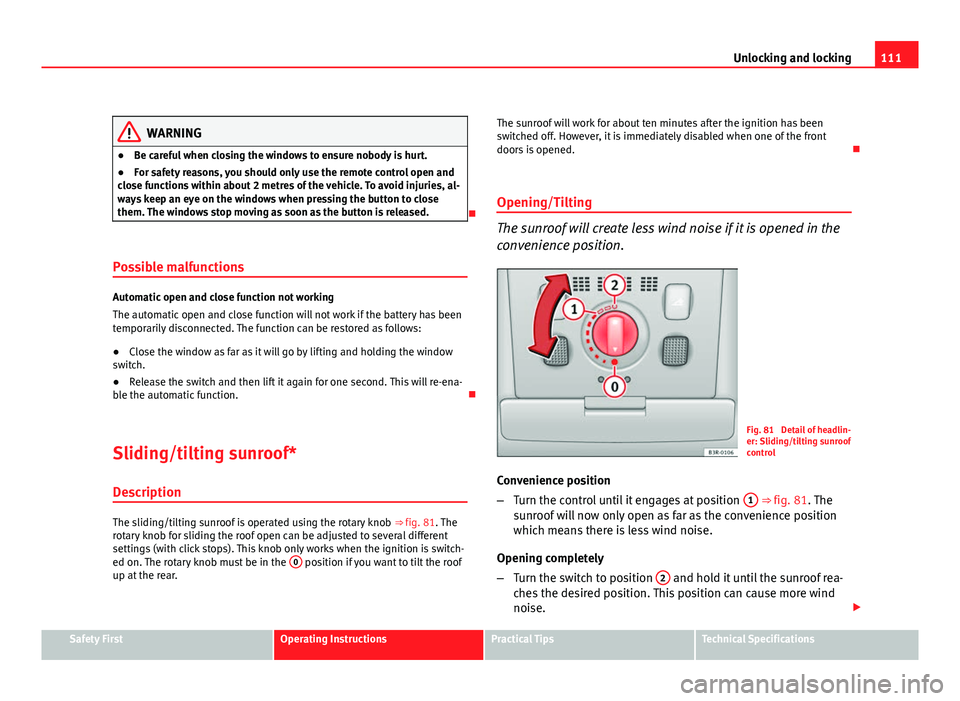
The sliding/tilting sunroof is operated using the rotary knob ⇒ fig. 81. The
rotary knob for sliding the roof open can be adjusted to several different
settings (with click stops). This knob only works when the ignition is switch-
ed on. The rotary knob must be in the 0
position if you want to tilt the roof
up at the rear. The sunroof will work for about ten minutes after the ignition has been
switched off. However, it is immediately disabled when one of the front
doors is opened.
Opening/Tilting
The sunroof will create less wind noise if it is opened in the
convenience position.
Fig. 81 Detail of headlin-
er: Sliding/tilting sunroof
control
Convenience position
– Turn the control until it engages at position 1
⇒ fig. 81. The
sunroof will now only open as far as the convenience position
which means there is less wind noise.
Opening completely
– Turn the switch to position 2
and hold it until the sunroof rea-
ches the desired position. This position can cause more wind
noise.
Safety FirstOperating InstructionsPractical TipsTechnical Specifications
Page 114 of 313
112Unlocking and locking
Tilting open
–Turn the control to position 0
.
– With the control in position 0, press the control briefly to make
the roof tilt open all the way.
– To open the roof as far as an intermediate setting, press and
hold the control until the roof has moved to the desired posi-
tion.
When you release the switch it will automatically spring back from position 2
to position 1.
The sliding sun blind in the headliner automatically opens when the sunroof
is slid open. If required, it can be closed by hand when the sunroof is
closed.
It is advisable to close the sun blind when the vehicle is left standing in the
sun. It is important to remember to close the sunroof when parking the vehi-
cle or if it suddenly starts raining, especially when the sun blind is closed.
For further information on the automatic close function, see ⇒ page 112.
Closing
Closing
– Turn the control to position 0
⇒ fig. 81 to close the sunroof
⇒ .
Closing the sunroof from the tilt position
– Pull the specially formed rear end of the control and hold it until
the sunroof has moved down to the desired position. –
Pull the switch briefly to lower the sunroof automatically to the
fully closed position. If required, the sunroof can be stopped in
any position by briefly pulling the control again ⇒
.
WARNING
Take care when closing the sunroof. There is a risk of suffering injury. For
this reason, always take out the ignition key when leaving the vehicle.
Automatic close function
The sunroof can also be closed from outside the vehicle.
– Turn the key in the lock on the driver door and hold it in the lock
position or press the lock button on the remote control until the
sunroof has closed all the way ⇒
.
WARNING
Take care when closing the sunroof. There is a risk of suffering injury.
Solar sunroof*
The solar cells in the sunroof power the air conditioner fan.
The solar sunroof is operated in the same way as the normal sliding/tilting
sunroof.
The interior trim is fixed to the solar sunroof and cannot be opened and
closed separately.
Page 117 of 313
115
Lights and visibility
Lights and visibility
Lights Lights: switching on and off
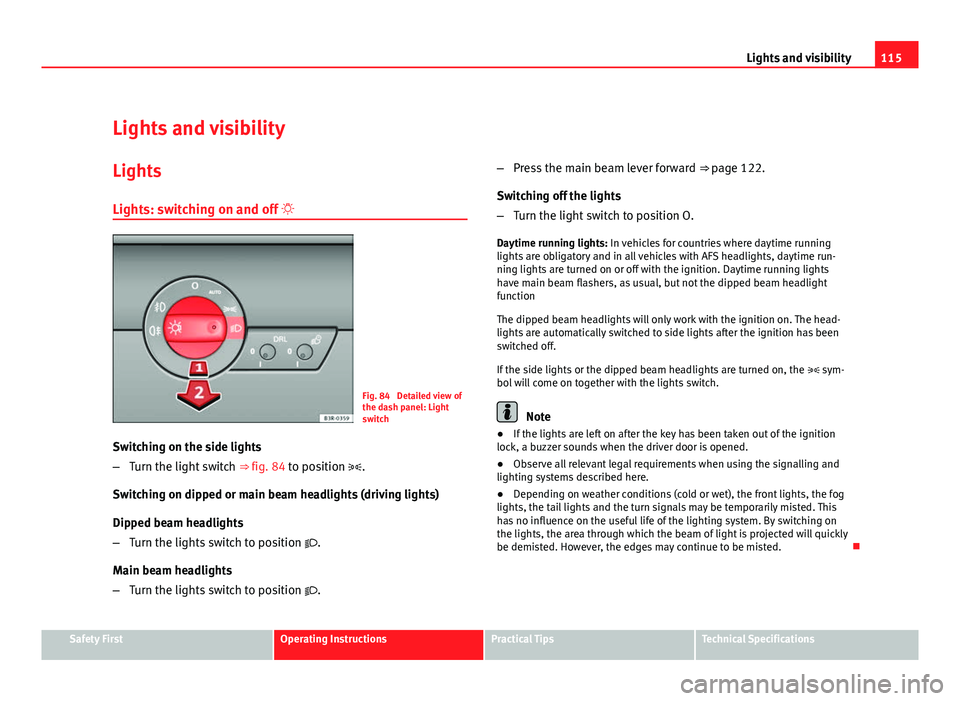
Fig. 84 Detailed view of
the dash panel: Light
switch
Switching on the side lights
– Turn the light switch ⇒ fig. 84 to position .
Switching on dipped or main beam headlights (driving lights)
Dipped beam headlights
– Turn the lights switch to position .
Main beam headlights
– Turn the lights switch to position
. –
Press the main beam lever forward ⇒ page 122.
Switching off the lights
– Turn the light switch to position O.
Daytime running lights: In vehicles for countries where daytime running
lights are obligatory and in all vehicles with AFS headlights, daytime run-
ning lights are turned on or off with the ignition. Daytime running lights
have main beam flashers, as usual, but not the dipped beam headlight
function
The dipped beam headlights will only work with the ignition on. The head-
lights are automatically switched to side lights after the ignition has been
switched off.
If the side lights or the dipped beam headlights are turned on, the sym-
bol will come on together with the lights switch.
Note
● If the lights are left on after the key has been taken out of the ignition
lock, a buzzer sounds when the driver door is opened.
● Observe all relevant legal requirements when using the signalling and
lighting systems described here.
● Depending on weather conditions (cold or wet), the front lights, the fog
lights, the tail lights and the turn signals may be temporarily misted. This
has no influence on the useful life of the lighting system. By switching on
the lights, the area through which the beam of light is projected will quickly
be demisted. However, the edges may continue to be misted.
Safety FirstOperating InstructionsPractical TipsTechnical Specifications
Page 120 of 313
118Lights and visibility
Activating the function
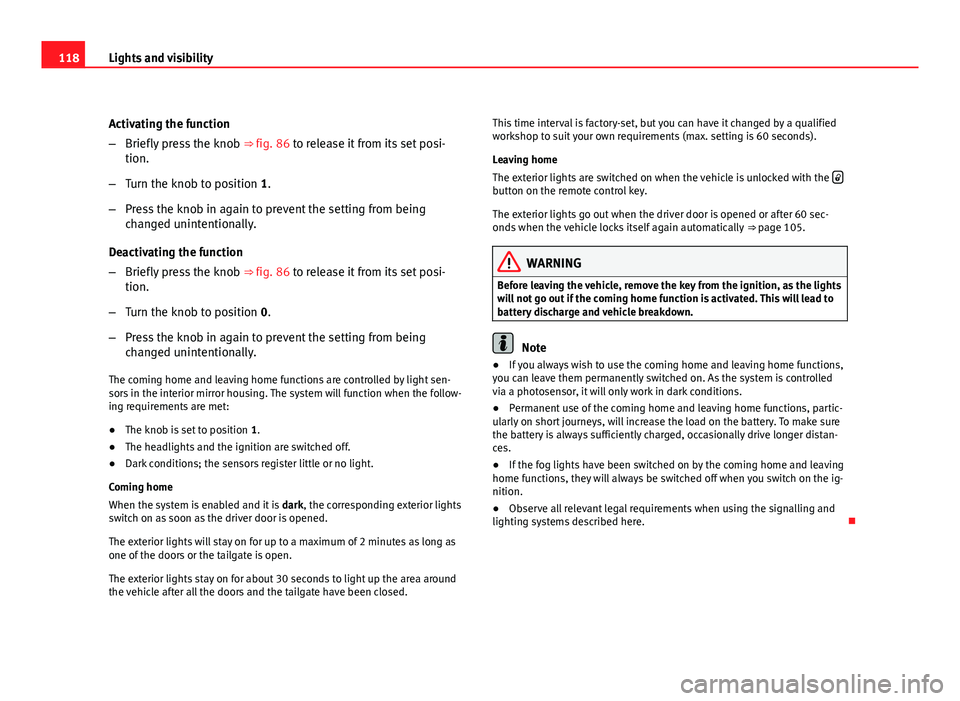
–Briefly press the knob ⇒ fig. 86 to release it from its set posi-
tion.
– Turn the knob to position 1.
– Press the knob in again to prevent the setting from being
changed unintentionally.
Deactivating the function
– Briefly press the knob ⇒ fig. 86 to release it from its set posi-
tion.
– Turn the knob to position 0.
– Press the knob in again to prevent the setting from being
changed unintentionally.
The coming home and leaving home functions are controlled by light sen-
sors in the interior mirror housing. The system will function when the follow-
ing requirements are met:
● The knob is set to position 1.
● The headlights and the ignition are switched off.
● Dark conditions; the sensors register little or no light.
Coming home
When the system is enabled and it is dark, the corresponding exterior lights
switch on as soon as the driver door is opened.
The exterior lights will stay on for up to a maximum of 2 minutes as long as
one of the doors or the tailgate is open.
The exterior lights stay on for about 30 seconds to light up the area around
the vehicle after all the doors and the tailgate have been closed. This time interval is factory-set, but you can have it changed by a qualified
workshop to suit your own requirements (max. setting is 60 seconds).
Leaving home
The exterior lights are switched on when the vehicle is unlocked with the
button on the remote control key.
The exterior lights go out when the driver door is opened or after 60 sec-
onds when the vehicle locks itself again automatically
⇒ page 105.
WARNING
Before leaving the vehicle, remove the key from the ignition, as the lights
will not go out if the coming home function is activated. This will lead to
battery discharge and vehicle breakdown.
Note
● If you always wish to use the coming home and leaving home functions,
you can leave them permanently switched on. As the system is controlled
via a photosensor, it will only work in dark conditions.
● Permanent use of the coming home and leaving home functions, partic-
ularly on short journeys, will increase the load on the battery. To make sure
the battery is always sufficiently charged, occasionally drive longer distan-
ces.
● If the fog lights have been switched on by the coming home and leaving
home functions, they will always be switched off when you switch on the ig-
nition.
● Observe all relevant legal requirements when using the signalling and
lighting systems described here.
Page 126 of 313
124Lights and visibility
Interior light switched on
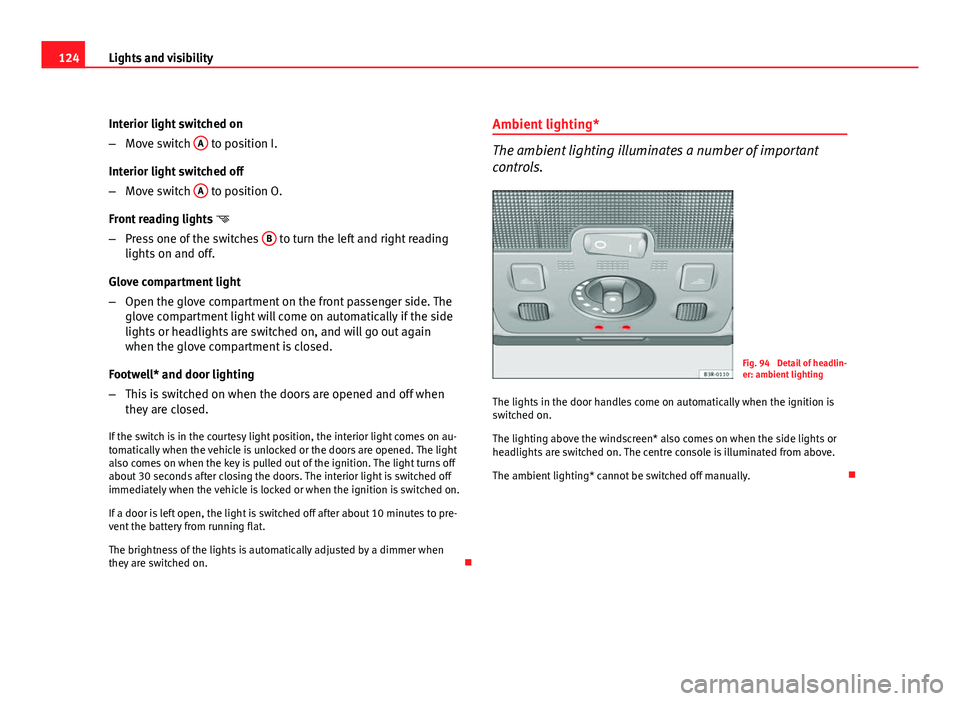
–Move switch A
to position I.
Interior light switched off
– Move switch A
to position O.
Front reading lights
– Press one of the switches B
to turn the left and right reading
lights on and off.
Glove compartment light
– Open the glove compartment on the front passenger side. The
glove compartment light will come on automatically if the side
lights or headlights are switched on, and will go out again
when the glove compartment is closed.
Footwell* and door lighting
– This is switched on when the doors are opened and off when
they are closed.
If the switch is in the courtesy light position, the interior light comes on au-
tomatically when the vehicle is unlocked or the doors are opened. The light
also comes on when the key is pulled out of the ignition. The light turns off
about 30 seconds after closing the doors. The interior light is switched off
immediately when the vehicle is locked or when the ignition is switched on.
If a door is left open, the light is switched off after about 10 minutes to pre-
vent the battery from running flat.
The brightness of the lights is automatically adjusted by a dimmer when
they are switched on. Ambient lighting*
The ambient lighting illuminates a number of important
controls.
Fig. 94 Detail of headlin-
er: ambient lighting
The lights in the door handles come on automatically when the ignition is
switched on.
The lighting above the windscreen* also comes on when the side lights or
headlights are switched on. The centre console is illuminated from above.
The ambient lighting* cannot be switched off manually.