format Seat Exeo 2012 MEDIA SYSTEM E
[x] Cancel search | Manufacturer: SEAT, Model Year: 2012, Model line: Exeo, Model: Seat Exeo 2012Pages: 167, PDF Size: 5.48 MB
Page 41 of 167
RADIO
40By briefly pressing the control knob you start automatic seek, which stops at
the next receivable frequency. Since a station often broadcasts on different
frequency, the tuning stops at each of the receivable frequencies. This means
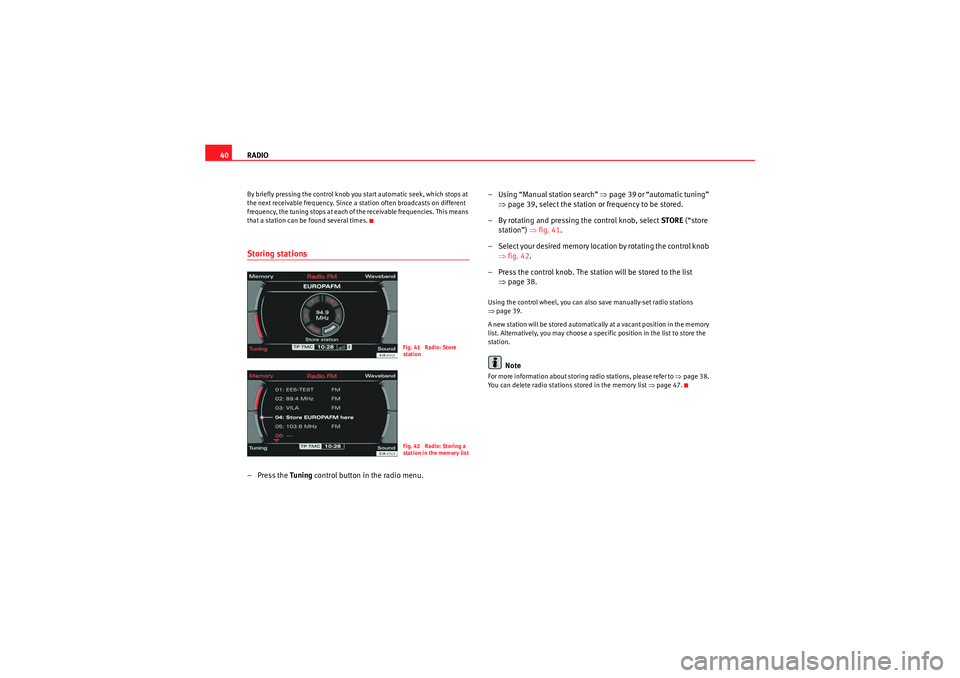
that a station can be found several times.Storing stations– Press the Tuning control button in the radio menu. – Using “Manual station search”
⇒page 39 or “automatic tuning”
⇒ page 39, select the station or frequency to be stored.
– By rotating and pressing the control knob, select STORE (“store
station”) ⇒fig. 41 .
– Select your desired memory location by rotating the control knob ⇒fig. 42 .
– Press the control knob. The station will be stored to the list ⇒page 38.
Using the control wheel, you can also save manually-set radio stations
⇒page 39.
A new station will be stored automatically at a vacant position in the memory
list. Alternatively, you may choose a specific position in the list to store the
station.
Note
For more information about storing radio stations, please refer to ⇒page 38.
You can delete radio stations stored in the memory list ⇒page 47.
Fig. 41 Radio: Store
stationFig. 42 Radio: Storing a
station in the memory list
media_systemE_EN.book Seite 40 Montag, 21. September 2009 1:48 13
Page 43 of 167
RADIO
42The sound and tuning settings and the brightness of the display can be
altered using the control buttons ⇒page 153.
Note
We recommend that you enter these settings when the vehicle is stationary.
Please note ⇒ page 6, “Notes on road safety”.Traffic programme
Use the traffic programme option to switch the function on
and off as desired.
– Starting from any one of the radio menus, press the
⇒page 9 button.
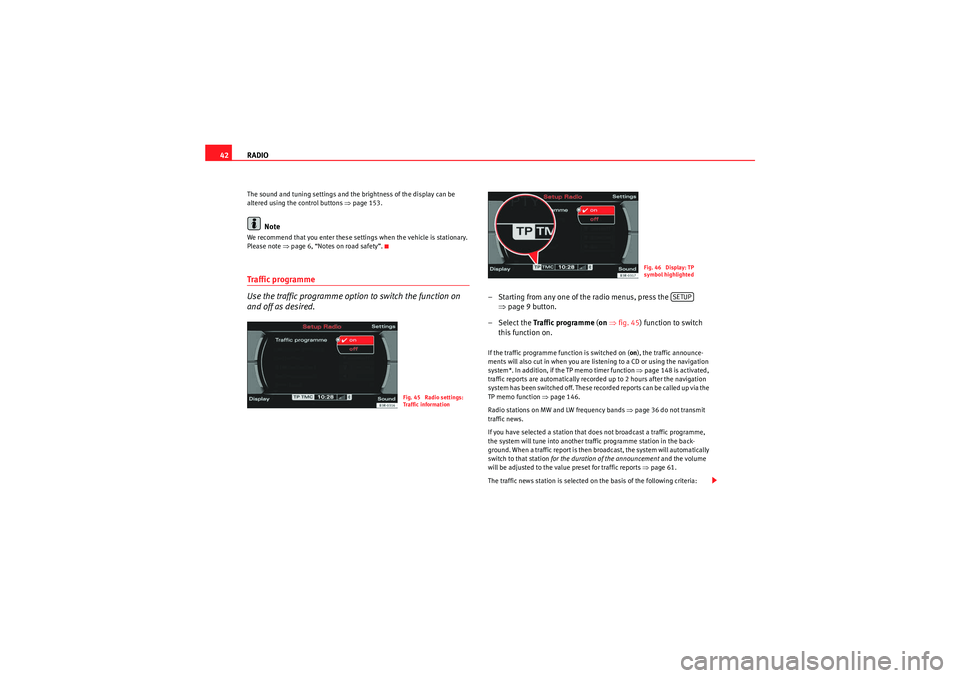
– Select the Traffic programme (on ⇒ fig. 45) function to switch
this function on.If the traffic programme function is switched on ( on), the traffic announce-
ments will also cut in when you are listening to a CD or using the navigation
system*. In addition, if the TP memo timer function ⇒page 148 is activated,
traffic reports are automatically recorded up to 2 hours after the navigation
system has been switched off. These recorded reports can be called up via the
TP memo function ⇒page 146.
Radio stations on MW and LW frequency bands ⇒page 36 do not transmit
traffic news.
If you have selected a station that does not broadcast a traffic programme,
the system will tune into another traffic programme station in the back-
ground. When a traffic report is then broadcast, the system will automatically
switch to that station for the duration of the announcement and the volume
will be adjusted to the value preset for traffic reports ⇒page 61.
The traffic news station is selected on the basis of the following criteria:
Fig. 45 Radio settings:
Traffic information
Fig. 46 Display: TP
symbol highlighted
SETUP
media_systemE_EN.book Seite 42 Montag, 21. September 2009 1:48 13
Page 46 of 167
RADIO45
Operating
RADIO, MEDIA (audiovisual
systems)
NAME, TEL
NAV, INFO
CAR, SETUP
If you have set the station display to
moving ⇒ page 44, fig. 49, the ticker
text will be shown when you tune into a station broadcasting this type of
information.
Alternative frequencies– Starting from any one of the radio menus, press the ⇒page 9 button.
– Switch on the Alt. frequency function (on) ⇒ page 41, fig. 44 to
automatically change frequency within the same station.Because of the limited range of FM (VHF) signals, a radio station may broad-
cast from several transmitters on different frequencies. If the Alt. frequency
function is switched on (on), the radio-navigation system searches for the
strongest frequency signal and tunes into it.
The radio switches from one frequency to another inaudibly. The programme
name appearing on the display is not changed. The control wheel ⇒page 39
displays the corresponding frequency.
Note
To ensure optimum reception, the alternative frequency function will auto-
matically be set to on when you switch on the navigation system or switch to
another station.
Selecting programme type: PTY filter
Use the programme filter to sort the station list according to
your preferences.Switching on the filter function
– Starting from any one of the radio menus, press the ⇒page 9 button.
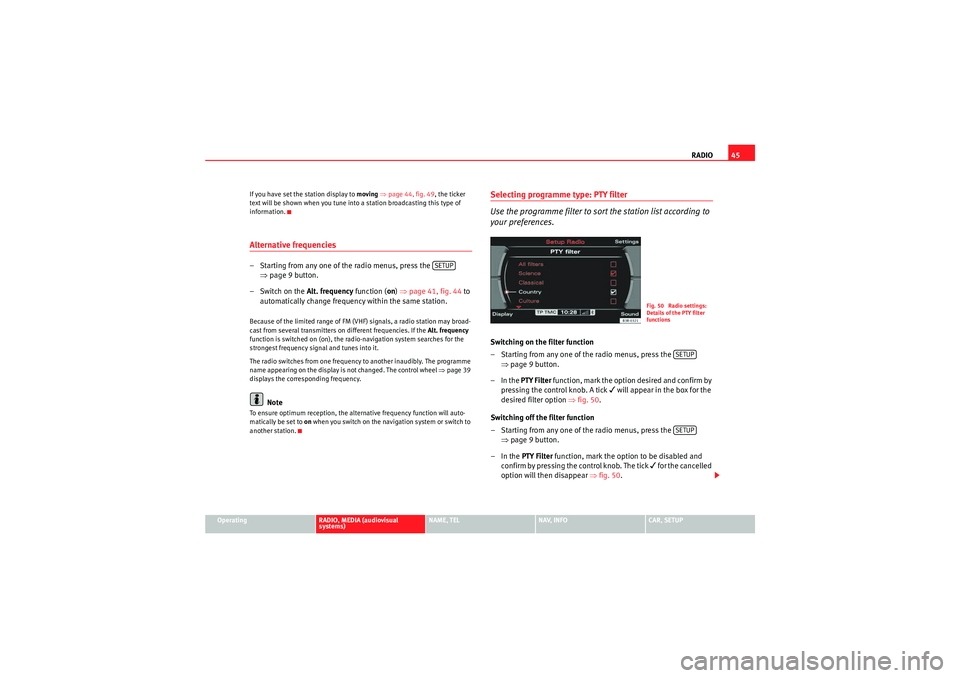
–In the PTY Filter function, mark the option desired and confirm by
pressing the control knob. A tick
will appear in the box for the
desired filter option ⇒fig. 50 .
Switching off the filter function
– Starting from any one of the radio menus, press the ⇒page 9 button.
–In the PTY Filter function, mark the option to be disabled and
confirm by pressing the control knob. The tick
for the cancelled
option will then disappear ⇒fig. 50 .
SETUP
Fig. 50 Radio settings:
Details of the PTY filter
functions
SETUPSETUP
media_systemE_EN.book Seite 45 Montag, 21. September 2009 1:48 13
Page 55 of 167

MEDIA
54•Track function: The CD track currently entered is repeated.Note
The Repeat options can be combined with the Random function. You can find
more information in the description of the Random (mix) function on
⇒page 52.Main MP3 menuSelecting an MP3 track (CD and SD memory card)
The main MP3 menu shows the list of tracks on the data
medium selected.– Press the Source control button from a CD or MP3 menu.
– Select MP3 .
– In the main MP3 menu, select the desired track using the control knob ⇒fig. 63 .
The playing time of the track is displayed after the track name.
Note
•The MP3 playback will be stopped if the display is opened.•The MP3 player may stop while playing individual MP3 tracks from a data
medium if they cannot be read. If this should happen, select another read-
able MP3 track on that medium and playback will continue.•Because there are different methods of generating MP3 files, it is possible
that MP3 files cannot be played or information cannot be read. Please refer to
⇒ page 22 for further information.MP3: Control menuFast forward/reverse within a track–Press the MP3·control control button in the MP3 menu.
– Select >> (“fast forward”) ⇒fig. 64 or << (“fast reverse”) by
rotating the control knob.
Fig. 63 MP3: Track list
(main menu)
Fig. 64 MP3: Fast forward
within a track
media_systemE_EN.book Seite 54 Montag, 21. September 2009 1:48 13
Page 57 of 167

MEDIA
56Scan MP3 tracks– Press the MP3·control control button in the MP3 menu.
– By rotating and pressing the control knob, select SCAN ⇒ fig. 67 .Pressing the control knob activates automatic track scan. Each track of the
currently selected MP3 card or CD will then be played briefly.
When the button is pressed again, scanning stops and the track currently
being played will continue to play.
Note
Because there are different methods of generating MP3 files, it is possible
that MP3 files cannot be played or information cannot be read. Please refer to
⇒page 22 for further information.
MP3 INFO–Press the MP3·control control button in the MP3 menu.
– By rotating and pressing the control knob, select INFO to open
more detailed information about the current track ⇒fig. 68 .If information on the current track (artist, album, year of recording, specific
comments and genre) has been stored in the MP3 file, you can bring up this
information using INFO.
Note
Because there are different methods of generating MP3 files, it is possible
that MP3 files cannot be played or information cannot be read. Please refer to
⇒page 22 for further information.
Fig. 67 MP3: Scanning a
track
Fig. 68 MP3: Information
(INFO)
media_systemE_EN.book Seite 56 Montag, 21. September 2009 1:48 13
Page 58 of 167

MEDIA57
Operating
RADIO, MEDIA (audiovisual
systems)
NAME, TEL
NAV, INFO
CAR, SETUP
Repeating MP3 ("RPT")– Press the MP3·control control button in the MP3 menu.
–Select RPT by rotating the control knob ⇒fig. 69 .
–Select off, Folder or Tr ack .•Off function: The Repeat function is switched off•Folder function: All tracks in the current folder will be repeated.•Tra ck function: The MP3 track currently playing will be repeated.
Note
The Repeat options can be combined with the Random function. You can find
more information in the description of the Random (mix) function on
⇒page 55.MP3 settingsOpening and closing the MP3 settings menu– In an MP3 menu, press the ⇒page 9 button to open the
main Settings menu for the MP3 function ⇒fig. 71 .
– Press the button again to close the main setup menu.The MP3 settings menu has the following options:•Tra ck info•List info
Fig. 69 MP3: RepeatFig. 70 Repeat
Fig. 71 Main MP3
settings menu
SETUP
SETUP
media_systemE_EN.book Seite 57 Montag, 21. September 2009 1:48 13
Page 59 of 167

MEDIA
58The sound and tuning settings and the brightness of the display can be
altered using the control buttons ⇒page 153.
Note
We recommend that you enter these settings when the vehicle is stationary.
In this way you can be sure that you will not be unnecessarily distracted from
the traffic when reading the messages on the display. Please note ⇒page 6,
“Notes on road safety”.Track info– Press the function button in the MP3 menu ⇒ page 9.
– Select Track information .
– Select on or off ⇒ fig. 72.This options allows you to switch track information on and off.
List info– Press the function button in the MP3 menu ⇒page 9.
– Select List information .
– Select Track or File ⇒ fig. 73 .Track
Information regarding individual tracks (such as the artist or album, etc) can
be taken from a previously saved ID3 tag.
This is only possible if the desired information has already been saved to the
ID3 tag, otherwise no information will be available.
If you insert a MP3 storage medium and do not play it immediately, the ID3
tags will load in the background. If you start playing the MP3 storage medium
immediately, the ID3 tag for the current track will be displayed.
If no ID3 tags are available or cannot be read, no track information will
appear.
File
No track information will be displayed.
Fig. 72 MP3 settings:
Select Track info
SETUP
Fig. 73 MP3 settings:
Select List info
SETUP
media_systemE_EN.book Seite 58 Montag, 21. September 2009 1:48 13
Page 70 of 167
Mobile phone system*69
Operating
RADIO, MEDIA (audiovisual
systems)
NAME, TEL
NAV, INFO
CAR, SETUP
•In some cases there may be a delay before the connection is established
between the mobile phone adapter and the navigation system. During this
time the display will show the message “Telephone not available”.•For up-to-date information on the mobile phone adapter, please ask your
dealer or refer to our website.InstallationInstalling and removing the mobile phone adapter
The mobile phone adapter is fitted to the top of the mounting
unit.Installing the mobile phone adapter
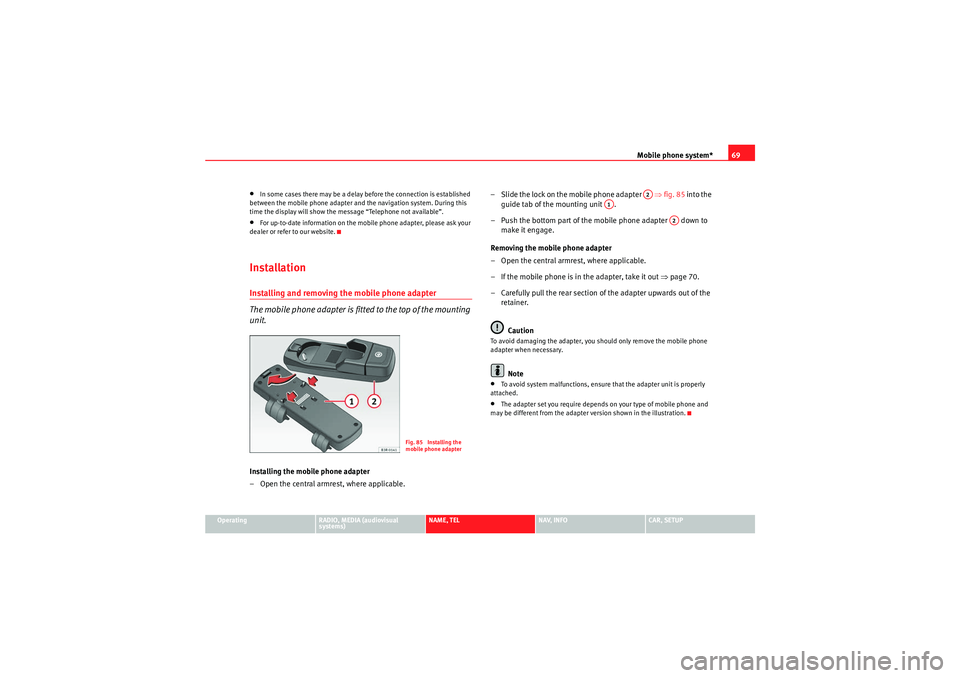
– Open the central armrest, where applicable. – Slide the lock on the mobile phone adapter ⇒
fig. 85 into the
guide tab of the mounting unit .
– Push the bottom part of the mobile phone adapter down to make it engage.
Removing the mobile phone adapter
– Open the central armrest, where applicable.
– If the mobile phone is in the adapter, take it out ⇒page 70.
– Carefully pull the rear section of the adapter upwards out of the retainer.
Caution
To avoid damaging the adapter, you should only remove the mobile phone
adapter when necessary.
Note
•To avoid system malfunctions, ensure that the adapter unit is properly
attached.•The adapter set you require depends on your type of mobile phone and
may be different from the adapter version shown in the illustration.
Fig. 85 Installing the
mobile phone adapter
A2
A1
A2
media_systemE_EN.book Seite 69 Montag, 21. September 2009 1:48 13
Page 73 of 167
Mobile phone system*
72
Note•The use of mobile phones in the vehicle can generate electromagnetic
fields.
−Therefore, you should always operate mobile phones with an external
aerial. It is also valid for the use of mobiles using Bluetooth technology.
The external aerial directs the electromagnetic fields to the exterior,
which reduces the field strength in the vehicle interior.
− If retrofitting an external aerial, please ensure that it is installed
correctly.•For more information on how to bond your mobile phone, please refer to
the mobile phone operating instructions.Using the telephoneIntroduction
Press the button to activate the telephone functions in
the navigation system.
– Press the function button ⇒page 9. The ma in telephone
menu or the telephone submenu last used will appear in the
display.
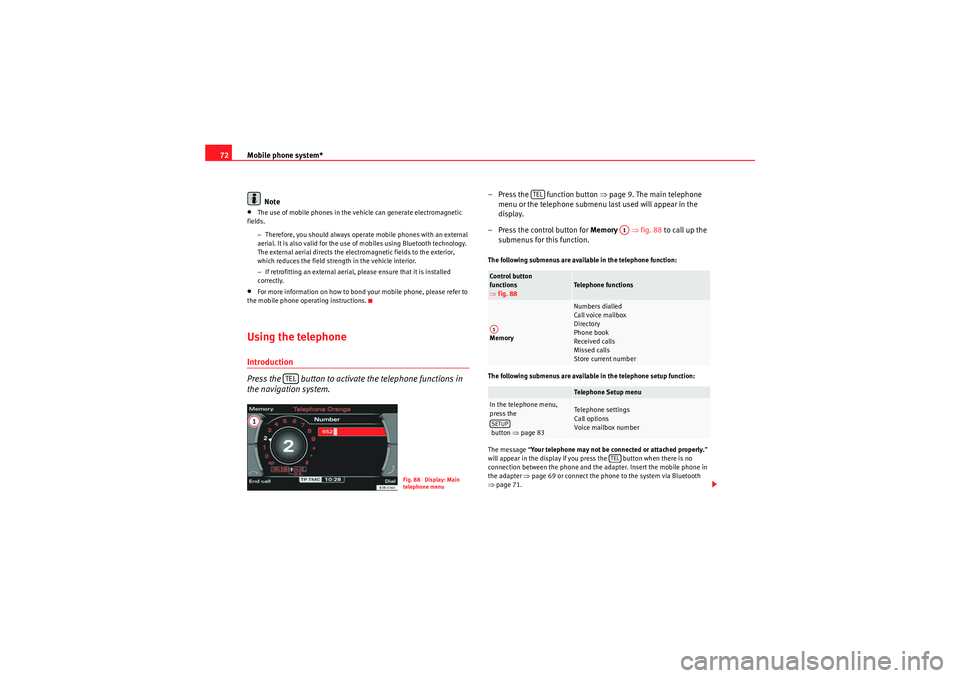
– Press the control button for Memory ⇒fig. 88 to call up the
submenus for this function.The following submenus are available in the telephone function:
The following submenus are available in the telephone setup function:
The message “ Your telephone may not be connected or attached properly. ”
will appear in the display if you press the button when there is no
connection between the phone and the adapter. Insert the mobile phone in
the adapter ⇒page 69 or connect the phone to the system via Bluetooth
⇒ page 71.
TEL
Fig. 88 Display: Main
telephone menu
Control button
functions
⇒ fig. 88
Telephone functions
Memory
Numbers dialled
Call voice mailbox
Directory
Phone book
Received calls
Missed calls
Store current numberTelephone Setup menu
In the telephone menu,
press the
button ⇒ page 83
Telephone settings
Call options
Voice mailbox number
TEL
A1
A1SETUP
TEL
media_systemE_EN.book Seite 72 Montag, 21. September 2009 1:48 13
Page 74 of 167
Mobile phone system*73
Operating
RADIO, MEDIA (audiovisual
systems)
NAME, TEL
NAV, INFO
CAR, SETUP
Requirements for using the telephone
•The vehicle must be fitted with a mobile phone adapter ⇒
page 68.•A mobile phone has been connected to the mobile phone adapter
⇒ page 70 or•A Bluetooth connection exists between the Bluetooth mobile phone and
the on-board phone system, and the ignition is switched on ⇒page 71.
The telephone functions described in this chapter depend on the following:•The telephone used must be compatible with the mobile phone adapter
and it must support the telephone functions described.•The mobile network service provider must support the telephone func-
tions described.
After switching off the ignition, the telephone system will remain in standby
mode for about 30 minutes (shutdown delay
5)) if the phone is left in the
adapter.
Note
•For technical reasons, mobile phones may be temporarily affected by
interference. Please refer to the instru ctions for your mobile phone for more
information.•The range of the handset may be affected in isolated areas (such as a
tunnel or underground garage).•Some places have no range at all. You will not be able to use the tele-
phone in these places.•The activated audio source is muted during a phone conversation.•The basic functions of the telephone can be operated using the multi-
function steering wheel* only if the telephone equipment was installed at the
factory .•For more information about the functions of the multi-function steering
wheel*, please refer to ⇒page 12.
PIN Code (Personal Identification Number)– Press the function button.
– Enter the PIN code using the alphanumeric keyboard and confirm
with OK.The PIN message displayed in the status line indicates that you must enter
your PIN code. You receive the PIN code from your mobile network service
provider together with the SIM card.
You can also enter the PIN code using the speech control system and the
command Enter PIN or Enter PIN code ⇒ page 73 or using the keypad of your
mobile phone.
The alphanumeric keyboard will be displayed automatically when the PIN
code is to be entered in the telephone menu. This will be the case, for
example, when you switch on the mobile phone.
The SIM card will automatically be blocked if you enter the PIN code incor-
rectly 3 times
6). The SIM card can be unblocked with the PUK (personal
unblocking key).
Note
•When you enter the PIN code the digits appear as * in the display.•The PIN symbol may not always be shown in the display (depends on type
of mobile phone).•Depending on your type of mobile phone, you may need to enter the PIN
code at the phone. In this case, no message will appear in the display indi-
cating that you need to enter the PIN code.
5)You can have the shutdown delay changed by a Dealer or Qualified workshop.
6)The total number of times you can enter the PIN code may vary depending on your type
of SIM card
TEL
media_systemE_EN.book Seite 73 Montag, 21. September 2009 1:48 13