radio Seat Exeo 2012 User Guide
[x] Cancel search | Manufacturer: SEAT, Model Year: 2012, Model line: Exeo, Model: Seat Exeo 2012Pages: 317, PDF Size: 5.29 MB
Page 98 of 317
96Steering wheel controls
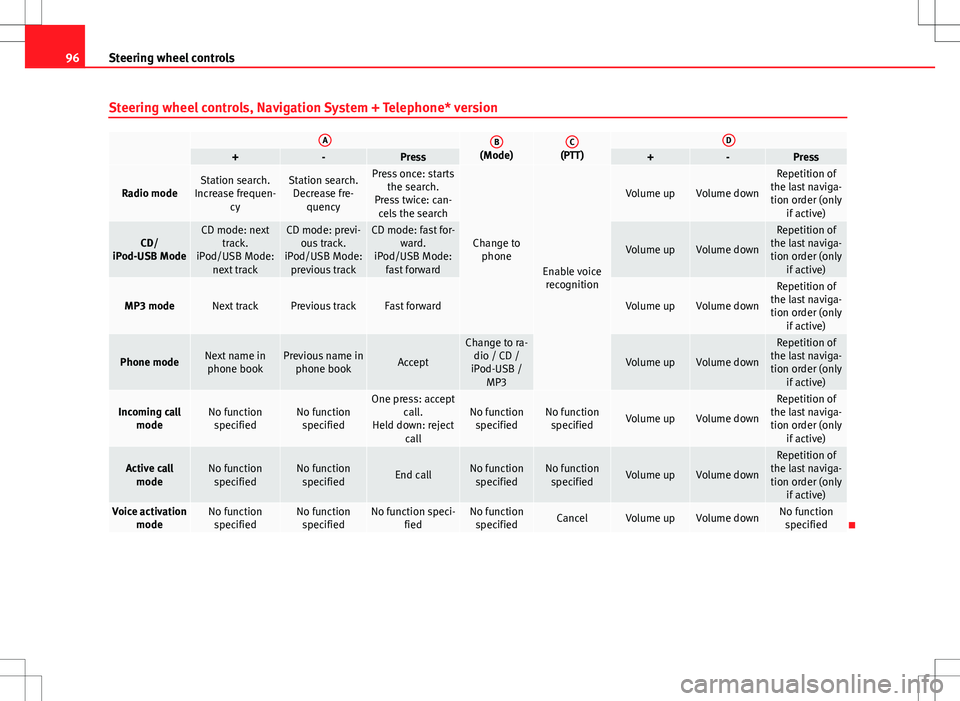
Steering wheel controls, Navigation System + Telephone* version
AB(Mode)C(PTT)D+-Press+-Press
Radio modeStation search.
Increase frequen- cyStation search.Decrease fre- quencyPress once: starts the search.
Press twice: can- cels the search
Change to phone
Enable voicerecognition
Volume upVolume down
Repetition of
the last naviga- tion order (only if active)
CD/
iPod-USB ModeCD mode: next track.
iPod/USB Mode: next trackCD mode: previ-ous track.
iPod/USB Mode: previous trackCD mode: fast for- ward.
iPod/USB Mode: fast forward
Volume upVolume down
Repetition of
the last naviga- tion order (only if active)
MP3 modeNext trackPrevious trackFast forwardVolume upVolume down
Repetition of
the last naviga- tion order (only if active)
Phone modeNext name inphone bookPrevious name in phone bookAccept
Change to ra-dio / CD /
iPod-USB / MP3
Volume upVolume down
Repetition of
the last naviga- tion order (only if active)
Incoming call modeNo functionspecifiedNo functionspecifiedOne press: accept call.
Held down: reject callNo functionspecifiedNo function specifiedVolume upVolume down
Repetition of
the last naviga- tion order (only if active)
Active callmodeNo functionspecifiedNo functionspecifiedEnd callNo functionspecifiedNo function specifiedVolume upVolume down
Repetition of
the last naviga- tion order (only if active)
Voice activation modeNo functionspecifiedNo functionspecifiedNo function speci- fiedNo functionspecifiedCancelVolume upVolume downNo function specified
Page 108 of 317
106Unlocking and locking
Note
● The remote control is automatically disabled when the ignition is switch-
ed on.
● The function of the remote control may be impaired by interference from
other nearby radio signals (e.g. from a mobile phone or TV transmitter) if
these are in the same frequency range.
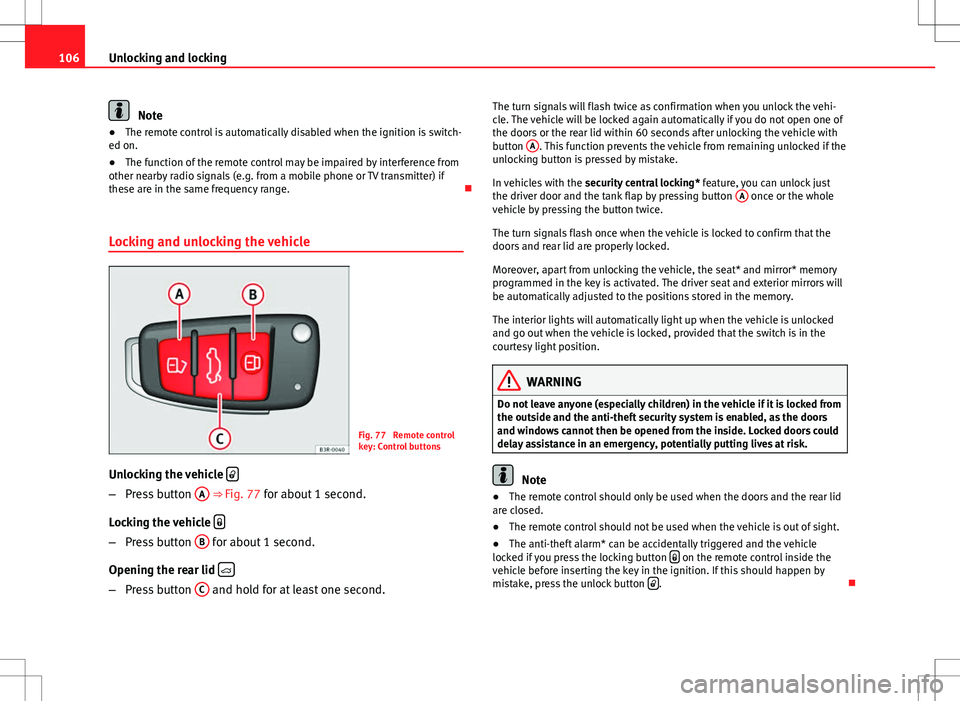
Locking and unlocking the vehicle
Fig. 77 Remote control
key: Control buttons
Unlocking the vehicle
–
Press button A
⇒
Fig. 77 for about 1 second.
Locking the vehicle
–
Press button B for about 1 second.
Opening the rear lid
–
Press button C and hold for at least one second. The turn signals will flash twice as confirmation when you unlock the vehi-
cle. The vehicle will be locked again automatically if you do not open one of
the doors or the rear lid within 60 seconds after unlocking the vehicle with
button
A
. This function prevents the vehicle from remaining unlocked if the
unlocking button is pressed by mistake.
In vehicles with the security central locking* feature, you can unlock just
the driver door and the tank flap by pressing button A
once or the whole
vehicle by pressing the button twice.
The turn signals flash once when the vehicle is locked to confirm that the
doors and rear lid are properly locked.
Moreover, apart from unlocking the vehicle, the seat* and mirror* memory
programmed in the key is activated. The driver seat and exterior mirrors will
be automatically adjusted to the positions stored in the memory.
The interior lights will automatically light up when the vehicle is unlocked
and go out when the vehicle is locked, provided that the switch is in the
courtesy light position.
WARNING
Do not leave anyone (especially children) in the vehicle if it is locked from
the outside and the anti-theft security system is enabled, as the doors
and windows cannot then be opened from the inside. Locked doors could
delay assistance in an emergency, potentially putting lives at risk.
Note
● The remote control should only be used when the doors and the rear lid
are closed.
● The remote control should not be used when the vehicle is out of sight.
● The anti-theft alarm* can be accidentally triggered and the vehicle
locked if you press the locking button
on the remote control inside the
vehicle before inserting the key in the ignition. If this should happen by
mistake, press the unlock button
.
Page 109 of 317

107
Unlocking and locking
Re-synchronising
Should the remote control fail to lock or unlock the vehicle,
the system must be re-synchronised.
– If the vehicle is locked, use the key to unlock the driver door.
– Press the unlock button
on the remote control.
– Insert the key into the ignition and switch on the ignition.
– Switch off the ignition and remove the key.
– Press the unlock
or the lock button .
Anti-theft alarm system* Description
The system triggers an alarm if anyone attempts to break in-
to the vehicle.
The anti-theft alarm helps to prevent the vehicle being broken into or sto-
len. If the system senses interference with the vehicle, it triggers an audible
and visible alarm.
How is the system enabled?
The anti-theft alarm system is enabled automatically when the vehicle is
locked with the remote control or by turning the key in the driver door (if the
door is closed). The anti-theft alarm is enabled about 30 seconds after the
vehicle is locked. How is the system disabled?
The anti-theft alarm is only disabled when the vehicle is unlocked using the
remote control. The vehicle will lock again automatically if none of the doors
is opened within 60 seconds after pressing the remote control button.
If the vehicle is unlocked by turning the key in the driver door, all the other
doors, the rear lid and the tank flap will remain locked.
If the vehicle has been unlocked with the key in the driver door, the key
must be inserted in the ignition lock and the ignition switched on within 15
seconds of opening the door in order to disable the alarm.
The alarm will be
triggered if the ignition is not switched on within 15 seconds.
Opening and closing function in cars with alarm
When using the key only without remote control to lock and unlock:
in unlocking all the doors, they unlock simultaneously.
When using the key only without remote control to lock and unlock: in unlocking all the doors, they unlock simultaneously.
When combining locking using the remote control key and unlocking using
the key but without the remote control: when unlocking, only the driver door will unlock.
When does the system trigger the alarm?
The following parts of the vehicle are monitored when the vehicle is locked:
● Engine compartment (bonnet)
● Luggage compartment
● Doors
● Tilt angle (tow-away protection)
● Ignition
● Radio (only with a factory-fitted SEAT radio)
● Interior ⇒ page 108
–
–
–
Safety FirstOperating InstructionsPractical TipsTechnical Specifications
Page 153 of 317

151
Seats and storage compartments
WARNING
● Heavy appliances or connectors (for example, adapters) which hang
down directly from the Europlug socket may damage the socket with the
resultant risk of injury.
● Ensure that appliances connected to the socket are secure to prevent
them from being thrown around the vehicle in the event of sharp braking
or an accident. This could result in severe injury or loss of life ⇒ page 16,
Storing objects.
● Never spill liquid over the power socket– there is a risk of death. If
any moisture enters the socket, ensure that it is thoroughly dry before
using.
● Improper use of the sockets or electrical accessories can lead to seri-
ous injuries or cause a fire, with the resultant risk of injury.
● Children must never be left alone in the vehicle with the engine run-
ning. They could cause an accident.
● Appliances connected to the socket do not behave in the same way as
when they are connected to the mains power supply. They may overheat
during use and cause injury.
● When using adapters and extension leads, the childproof safety de-
vice on the 230 volt socket is disconnected and the socket is live. Risk of
injury!.
● Never insert objects which conduct electricity, such as a needle, in
the pins of the 230 volt socket. There is a risk of death.
● Always switch off electrical appliances connected to the socket if the
inverter goes off as a result of overheating. Failure to comply could result
in injuries.CAUTION
● The instructions for handling appliances connected to the socket must
be observed.
● If the power consumption of the appliances connected exceeds 150
watts, the socket inverter will overheat. If the temperature exceeds a certain
value, the inverter will switch off. It may also switch off if the outside tem-
perature is very high, even if the power consumption is normal. The inverter
will switch on again automatically after it has cooled down. Appliances con-
nected to the socket, and which have been left switched on, will automati-
cally come back on ⇒
.
● Do not connect neon lamps to the socket. For technical reasons, these
could break down.
● Do not connect 115 volt appliances to the 230 volt power socket, as
they could be damaged. If you have any queries, please check the manufac-
turer's label for details of the power supply accepted by the appliance.
● With some adapters, for example for laptops, their built-in overload dis-
connection system prevents the equipment from switching on in the event
of an excessive start-up current. In this case, disconnect the adapter from
the power supply and try to reconnect after ten seconds.
Note
● Non-insulated equipment may cause interference to the radio or vehicle
electronics.
● The Europlug socket has a built-in childproof device and only carries live
current when the Europlug is correctly plugged in.
● Some appliances may not operate correctly in the absence of adequate
power (watts).
Safety FirstOperating InstructionsPractical TipsTechnical Specifications
Page 212 of 317
210Vehicle maintenance and cleaning
Care of the vehicle exterior
Automatic car wash tunnel
The vehicle can normally be washed without problem in an
automatic car wash.
The vehicle paintwork is so durable that the vehicle can normally be washed
without problems in an automatic car wash tunnel. However, the paintwork
wear depends to a large extent on the kind of the car wash tunnel, the
brushes used, its water filtering and the type of cleaning and preservative
products.
Before going through a vehicle wash, be sure to take the usual precautions
such as closing the windows and sunroof.
If the vehicle has special accessories such as spoilers or a roof rack or two-
way radio aerial, etc., it is advisable to consult the car wash tunnel operator.
After washing, the brakes could take some time to respond as the brake
discs and pads could be wet, or even frozen in winter. Dry the brakes by
braking several times.
WARNING
Water, ice and salt on the brakes can reduce braking efficiency. Risk of
accident.
Washing by hand
Vehicle washing
– First soften the dirt and rinse it off with water. –
Clean your vehicle from top to bottom with a soft sponge, a
glove or a brush. Use very light pressure.
– Rinse the sponge or glove often with clean water.
– Special car shampoo should only be used for very stubborn dirt.
– Leave the wheels, sill panels etc. until last, using a different
sponge or glove.
– Rinse the vehicle thoroughly with water.
– Dry the vehicle surface gently with a chamois leather.
– In cold temperature, dry the rubber seals and their surfaces to
prevent them from freezing. Apply silicone spray to the rubber
seals.
After washing the vehicle
– After washing, avoid sudden and sharp braking. “Dry” the
brakes by braking several times ⇒ page 194, Braking capacity
and braking distance.
WARNING
● Wash your vehicle with the ignition switched off.
● Protect your hands and arms from cuts on sharp metal edges when
cleaning the underbody, the inside of the wheel housings etc. Risk of in-
jury.
● Water, ice and salt on the brakes can reduce braking efficiency. Risk
of accident.
Page 221 of 317

219
Vehicle maintenance and cleaning
Cleaning synthetic leather upholstery
Before cleaning the synthetic leather upholstery, bear in mind the following
recommendations ⇒ page 217, Cleaning the fabric on heated seats and
electrically adjustable seats or seats with airbag components
Only use water and neutral cleaning products to clean synthetic leather up-
holstery.
CAUTION
Do not use solvents, floor wax, shoe cream, stain removers or similar prod-
ucts on synthetic leather. These will stiffen the material, causing it to crack
prematurely.
Plastic parts and dash panel cleaning
– Use a clean, damp cloth to clean plastic parts and the dash
panel.
– If this does not provide satisfactory results, use a special sol-
vent-free plastic cleaning product.
WARNING
Never clean the dash panel and the airbag module surface with cleaners
containing solvents. Solvents cause the surface to become porous. If the
airbag triggered, plastic parts could become detached and cause inju-
ries.
CAUTION
Cleaning products which contain solvents will damage the material. Wooden trim cleaning*
–
Clean the wooden trim with a water-moistened clean cloth.
– If this does not provide satisfactory results, use a gentle soap
solution.
CAUTION
Cleaning products which contain solvents will damage the material.
Cleaning the radio and climate controls
To clean the radio and/or climate controls, use a soft damp cloth. For more
resistant dirt, a neutral soap solution may be used.
Seat belt cleaning
A dirty belt may not work properly.
Check all seat belts regularly and keep them clean.
Seat belt cleaning
– Pull the dirty seat belt right out and unroll it.
– Clean dirty seat belts with a gentle soap solution.
– Allow it to dry.
– Do not roll the seat belt up until it is dry.
Safety FirstOperating InstructionsPractical TipsTechnical Specifications
Page 224 of 317

222Accessories, replacement of parts and modifications
WARNING
Incorrectly performed modifications or other kind of work on your vehicle
can lead to malfunctions and cause accidents.
Mobile phones and two-way radios
First consult your Technical Service if you wish to use a mobile telephone or
a two-way radio with a transmitting power output in excess of 10 watts.
Here you will receive information concerning the technical possibilities for
retrofitting this equipment.
Mobile telephones and two-way radios should be only fitted by a special-
ised workshop, for example a SEAT dealership.
WARNING
● Always concentrate primarily on driving. If you are distracted while
driving you could have an accident.
● Never attach the telephone mountings to the surfaces covering the
airbag units or within the range of the airbags. There is a high danger of
injury if the airbag is triggered.
Note
Please observe the operating instructions of your mobile telephone / two-
way radio. Athermic windscreen*
Fig. 165 Location of the
electronic toll collection
system
Vehicles with an athermic windscreen have an area without athermic treat-
ment above the rear view mirror ⇒ Fig. 165. This area has been designed for
the operating of electronic components of fitted devices (e.g. electronic toll
collection system).
Note
The customer should ensure that the electronic toll collection system is fit-
ted in the correct area to make sure it works correctly.
Page 265 of 317

263
If and when
Fuse assignment
This list shows the fuses which can be replaced relatively
easily by the owner.
No.ConsumerAmps1Air conditioner102Footwell lamps53Heated washer jets54Radiator fan55Parking aid, automatic gearbox106Air conditioner (air purity sensor), pressure sensor5
7Electronic Stability Control (ESC), brake light switch,
clutch pedal switch, steering angle sensor10
8Telephone59Lambda probe heater1010Adaptive headlights right5
11Airbag and disconnection of the front passenger air-
bag5
12Diagnostic socket1013Steering column unit1014Brake lights1015Instrument panel1016Vacant 17Tyre pressure control, rain/light sensor1018Adaptive headlights left519Start-Stop control unit1020Engine management1521Start/Stop battery power management522Vacant 23Vacant
No.ConsumerAmps24Central electrics unit for convenience equipment2025Heater blower3026Rear window heater3027Power socket for trailer (control unit)3028Fuel pump, auxiliary pump for diesel2029Radio, amplifier (with Start-Stop)2030Sliding/tilting sunroof20
31Diagnosis connection, automatic anti-dazzle interior
mirror, reverse light, automatic gearbox15
32Towing socket1533Lighter2034Rear electric windows3035Luggage compartment power socket*2036Wiper system30
37Pump for windscreen washer and headlight washer
system30
38Luggage compartment illumination, alarm1539Radio, amplifier (without Start-Stop)2040Horn2541230 volt socket3042Electronic Stability Control (ESC)2543Front electric windows3044Seat heating35
Some of the electrical items listed in the table are only fitted on certain
models or are optional extras.
Safety FirstOperating InstructionsPractical TipsTechnical Specifications
Page 309 of 317

Deactivating temporarily . . . . . . . . . . . . . . 178
Setting the speed . . . . . . . . . . . . . . . . . . . . 177
Cruise speed . . . . . . . . . . . . . . . . . . . . . . . . . . . 176
Curtain airbags . . . . . . . . . . . . . . . . . . . . . . . . . . 41 Description . . . . . . . . . . . . . . . . . . . . . . . . . . 41
Operation . . . . . . . . . . . . . . . . . . . . . . . . . . . 42
Safety notes . . . . . . . . . . . . . . . . . . . . . . . . . 42
D Danger of fitting a child seat on the front pas- senger seat . . . . . . . . . . . . . . . . . . . . . . . . . . . 29
Dash panel cleaning . . . . . . . . . . . . . . . . . . . . 219
Data entry control . . . . . . . . . . . . . . . . . . . . . . . . 90
Date display . . . . . . . . . . . . . . . . . . . . . . . . . . . . 61
Daytime running lights . . . . . . . . . . . . . . . . . . 120
Deactivating front passenger airbag Safety notes . . . . . . . . . . . . . . . . . . . . . . . . . 45
Deactivating the airbag Front passenger airbag . . . . . . . . . . . . . . . . 44
Diesel . . . . . . . . . . . . . . . . . . . . . . . . . . . . . . . . 225
Diesel engine Winter driving . . . . . . . . . . . . . . . . . . . . . . . 226
Diesel engine particulate filter . . . . . . . . . . . . 196
Diesel particulate filter . . . . . . . . . . . . . . . . . . . 81 Engine oil . . . . . . . . . . . . . . . . . . . . . . . . . . 228
Digital clock . . . . . . . . . . . . . . . . . . . . . . . . . . . . 61
Dipped beam headlights . . . . . . . . . . . . . . . . . 115
DIS Average fuel consumption . . . . . . . . . . . . . . 86
Average speed . . . . . . . . . . . . . . . . . . . . . . . 86 Driving time . . . . . . . . . . . . . . . . . . . . . . . . . 86
Instantaneous fuel consumption . . . . . . . . 86
Disposal Airbags . . . . . . . . . . . . . . . . . . . . . . . . . . . . . 30
Seat belt tensioners . . . . . . . . . . . . . . . . . . . 27
Distance covered . . . . . . . . . . . . . . . . . . . . . . . . 87
Distance to empty . . . . . . . . . . . . . . . . . . . . 74, 86
Door and rear lid warning . . . . . . . . . . . . . . . . . 75
Door lock cylinders . . . . . . . . . . . . . . . . . . . . . . 213
Doors Childproof lock . . . . . . . . . . . . . . . . . . . . . . 105
Locking the doors manually if the centrallocking fails to work . . . . . . . . . . . . . . . . 103
Driver see Correct sitting position . . . . . . . 10, 11, 12
Driver information system . . . . . . . . . . . . . . . . . 72 Auto-check system . . . . . . . . . . . . . . . . . . . . 76
CD, radio and telephone display . . . . . . . . . 73
Door and rear lid warning . . . . . . . . . . . . . . 75
Driver messages . . . . . . . . . . . . . . . . . . . . . . 77
Handbrake warning . . . . . . . . . . . . . . . . . . . 77
Menu display . . . . . . . . . . . . . . . . . . . . . . . . 89
Onboard computer . . . . . . . . . . . . . . . . . . . . 86
Outside temperature display . . . . . . . . . . . . 73
Red symbols . . . . . . . . . . . . . . . . . . . . . . . . . 78
Speed warning . . . . . . . . . . . . . . . . . . . . . . . 83
Warning messages . . . . . . . . . . . . . . . . . . . . 77
Yellow symbols . . . . . . . . . . . . . . . . . . . . . . . 80
Driver messages . . . . . . . . . . . . . . . . . . . . . . . . . 77
driver seat Assigning the key to the seat . . . . . . . . . . 139 Driver seat
Activating stored settings . . . . . . . . . . . . . 138
With memory . . . . . . . . . . . . . . . . . . . . . . . 137
Driving Driving abroad . . . . . . . . . . . . . . . . . . . . . . 198
Economically / Environmentally friendly . 196
Driving abroad . . . . . . . . . . . . . . . . . . . . . . . . . 198 Headlights . . . . . . . . . . . . . . . . . . . . . . . . . 198
Driving safety . . . . . . . . . . . . . . . . . . . . . . . . . . . . 9
DRP see Dynamic gear control programme . . . 184
Dynamic gear control programme . . . . . . . . . . 184
E
Economical driving . . . . . . . . . . . . . . . . . . . . . . 196
Electric windows . . . . . . . . . . . . . . . . . . . . . . . . 109 Central locking system . . . . . . . . . . . . . . . . 111
Possible malfunctions . . . . . . . . . . . . . . . . 111
Rear doors . . . . . . . . . . . . . . . . . . . . . . . . . . 110
Switches on the driver door . . . . . . . . . . . . 110
Switch on front passenger's door . . . . . . . 110
Electronic differential lock How it works . . . . . . . . . . . . . . . . . . . . . . . . 190
Electronic immobiliser . . . . . . . . . . . . . . . . . . . . 99
Electronic Stability Control . . . . . . . . . . . . . . . . 69 description . . . . . . . . . . . . . . . . . . . . . . . . . 165
Operation . . . . . . . . . . . . . . . . . . . . . . . . . . 188
warning lamp . . . . . . . . . . . . . . . . . . . . . . . 166
307
Index
Page 311 of 317

Horn . . . . . . . . . . . . . . . . . . . . . . . . . . . . . . . . . . 57
How to jump start description . . . . . . . . . . . . . 286
I
Identification number . . . . . . . . . . . . . . . . . . . 293
Identification plate . . . . . . . . . . . . . . . . . . . . . . 293
Ignition key Safety interlock . . . . . . . . . . . . . . . . . . . . . . 166
Ignition lock . . . . . . . . . . . . . . . . . . . . . . . . . . . 166
Indicator lamps Glow plug system . . . . . . . . . . . . . . . . . . . . . 70
Main beam headlights . . . . . . . . . . . . . . . . . 70
Indicator lamps - overview . . . . . . . . . . . . . . . . . 65
Instruments Lighting . . . . . . . . . . . . . . . . . . . . . . . . . 62, 119
Interior lights Ambient lighting . . . . . . . . . . . . . . . . . . . . 124
Front . . . . . . . . . . . . . . . . . . . . . . . . . . . . . . 123
Luggage compartment . . . . . . . . . . . . . . . . 125
Rear . . . . . . . . . . . . . . . . . . . . . . . . . . . . . . . 125
Interior mirror With manual anti-dazzle setting . . . . . . . . 130
Interior monitoring . . . . . . . . . . . . . . . . . . . . . . 108
Intermittent wipe . . . . . . . . . . . . . . . . . . . . . . . 128
ISOFIX . . . . . . . . . . . . . . . . . . . . . . . . . . . . . . . . . 52
J
Jack . . . . . . . . . . . . . . . . . . . . . . . . . . . . . . 251, 256
Jump-starting . . . . . . . . . . . . . . . . . . . . . . . . . . 285
Jump leads . . . . . . . . . . . . . . . . . . . . . . . . . . . . 285 K
Keys . . . . . . . . . . . . . . . . . . . . . . . . . . . . . . . . . . . 97 Air conditioner settings . . . . . . . . . . . . . . . 163
Battery . . . . . . . . . . . . . . . . . . . . . . . . . . . . . . 98
Remote control key . . . . . . . . . . . . . . . . . . . 105
Settings for the driver seat . . . . . . . . . . . . 139
Kick-down feature . . . . . . . . . . . . . . . . . . . . . . . 184
L
Lamps Cruise control . . . . . . . . . . . . . . . . . . . . . . . . 67
Cruise speed . . . . . . . . . . . . . . . . . . . . . . . . . 67
Lighting . . . . . . . . . . . . . . . . . . . . . . . . . . . . . . . 115 Instruments . . . . . . . . . . . . . . . . . . . . . 62, 119
Lights Adaptive headlights . . . . . . . . . . . . . . . . . . 121
Automatic headlight control . . . . . . . . . . . 115
Coming home function . . . . . . . . . . . . . . . 117
Cornering light . . . . . . . . . . . . . . . . . . . . . . 121
Dipped beam headlights faulty . . . . . . . . . . 83
Dynamic headlight range control . . . . . . . 120
Headlight flasher . . . . . . . . . . . . . . . . . . . . 123
Leaving home function . . . . . . . . . . . . . . . 117
Parking light . . . . . . . . . . . . . . . . . . . . . . . . 123
Reverse lights faulty . . . . . . . . . . . . . . . . . . . 83
Switching on and off . . . . . . . . . . . . . . . . . 115
Xenon lights . . . . . . . . . . . . . . . . . . . . . . . . 120
Load compartment in the luggage compart- ment
see Loading the luggage compartment . . . 16
Loading the luggage compartment . . . . . . . . . . 16 Locking the doors manually if the central lock-
ing fails to work
Locking the doors manually if the centrallocking fails to work . . . . . . . . . . . . . . . . 103
Locks . . . . . . . . . . . . . . . . . . . . . . . . . . . . . . . . . 213
Long periods of non-use Battery . . . . . . . . . . . . . . . . . . . . . . . . . . . . . 237
Luggage compartment . . . . . . . . . . . . . . . . . . . 142 Extending . . . . . . . . . . . . . . . . . . . . . . . . . . 143
Light . . . . . . . . . . . . . . . . . . . . . . . . . . . . . . 125
Loading . . . . . . . . . . . . . . . . . . . . . . . . . . . . 142
Ski bag . . . . . . . . . . . . . . . . . . . . . . . . . . . . 144
see also Loading the luggage compartment . .16
Luggage rack see Roof rack . . . . . . . . . . . . . . . . . . . . . . . 145
M
Main beam headlights . . . . . . . . . . . . . . . 115, 122
Maintenance Airbags . . . . . . . . . . . . . . . . . . . . . . . . . . . . . 30
Maintenance and cleaning . . . . . . . . . . . . . . . 209
Manual gearbox . . . . . . . . . . . . . . . . . . . . . . . . 179
Mirrors Activating stored settings . . . . . . . . . . . . . 138
Automatic exterior mirror adjustment . . . . 137
Heated exterior mirrors . . . . . . . . . . . . . . . 131
Storing settings . . . . . . . . . . . . . . . . . . . . . 138
Vanity mirrors . . . . . . . . . . . . . . . . . . . . . . . 126
Mobile phones and two-way radios . . . . . . . . 222
multitronic® . . . . . . . . . . . . . . . . . . . . . . . . . . . 180 Driving . . . . . . . . . . . . . . . . . . . . . . . . . . . . . 181
309
Index