height Seat Exeo ST 2010 User Guide
[x] Cancel search | Manufacturer: SEAT, Model Year: 2010, Model line: Exeo ST, Model: Seat Exeo ST 2010Pages: 325, PDF Size: 9.34 MB
Page 137 of 325

Seats and storage compartments135
Safety First
Operating Instructions
Practical Tips
Technical Specifications
•Be careful when adjusting the seat height. Injuries can be caused if the
seat height is adjusted without due care and attention.
Adjusting the backrest angle– Lean forwards to take your weight off the backrest.
– Turn the adjuster wheel ⇒ page 134, fig. 106 to set the angle
of the backrest as required.
WARNING
The front backrests must not be reclined for driving. Otherwise, seat belts
and the airbag system might not protect as they should, with the subse-
quent danger of injury.Adjusting lumbar support*– Do not exert any pressure on the backrest and turn adjuster wheel ⇒page 134, fig. 106 to adjust lumbar support.As you make the adjustments, the curvature of the cushioned area of the
lumbar region becomes more or less acute. In this way, it adapts to the
natural curvature of the spine.
WARNING (continued)
A3
A4
ExeoST_EN.book Seite 135 Freitag, 3. September 2010 11:41 11
Page 139 of 325

Seats and storage compartments137
Safety First
Operating Instructions
Practical Tips
Technical Specifications
Control switches
Seat adjustment
Backrest adjustment
Lumbar support*
WARNING
•The electrical seat adjustment also works when the ignition is off or
when the key is not in the ignition. To avoid accidental injuries, never leave
children unattended in the vehicle.•For safety reasons, the seat must only be adjusted when the vehicle is
at a standstill. Failure to do so could result in an accident.•Be careful when adjusting the seat height. Injuries can be caused if the
seat height is adjusted without due care and attention.
Adjusting the backrest angle
– Press the button in the appr opriate direction of the arrow
⇒ fig. 109 to adjust the backrest ⇒.
WARNING
The front backrests must not be reclined for driving. Otherwise, seat belts
and the airbag system might not protect as they should, with the subse-
quent danger of injury.Lumbar support*The lumbar support can be adjusted to fit the natural curve of
the spine.
AAABAC
Fig. 109 Front seat: Back-
rest adjuster switch
Fig. 110 Front seat:
Adjuster switch for lumbar
support
ExeoST_EN.book Seite 137 Freitag, 3. September 2010 11:41 11
Page 140 of 325
Seats and storage compartments
138
Adjusting the contour
– Press the front part of the adjuster switch ⇒page 137, fig. 110
to increase the contour of the lumbar support.
– Press the rear part of the adjuster switch to decrease the contour of the lumbar support.
Adjusting the height
– Press the top part of the adjuster switch to move the contour upwards.
– Press the bottom part of the adjuster switch to move the contour down.The lumbar support provides effective support for the natural curvature of the
spine to give a more relaxed seating position, especially on long journeys.
Driver seat memory*Description
The memory buttons in the driver door can be used to store
and recall up to four different positions for the driver seat and
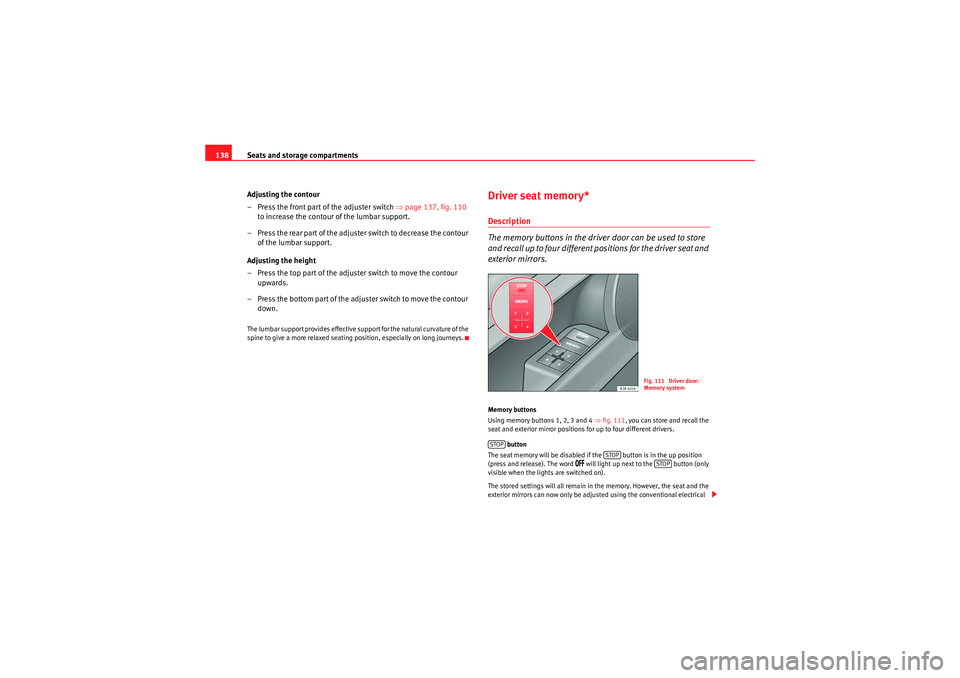
exterior mirrors.Memory buttons
Using memory buttons 1, 2, 3 and 4 ⇒fig. 111 , you can store and recall the
seat and exterior mirror positions for up to four different drivers.
button
The seat memory will be disabled if the button is in the up position
(press and release). The word
/&& will light up next to the button (only
visible when the lights are switched on).
The stored settings will all remain in the memory. However, the seat and the
exterior mirrors can now only be adjusted using the conventional electrical
Fig. 111 Driver door:
Memory system
STOP
STOP
STOP
ExeoST_EN.book Seite 138 Freitag, 3. September 2010 11:41 11
Page 142 of 325
Seats and storage compartments
140Assigning remote control keys
The key must be assigned to a memory button so that the
positions stored in the memory can also be recalled using the
remote control key.Assigning the remote control key to a memory button
– Using the memory button, recall the settings that are to be
programmed onto the key.
– Keeping the memory button pressed down, press the unlock button on the remote control key within 10 seconds.
– Wait for about 2 seconds before releasing the memory button.
Deleting assignment of the remote control key to the memory
button
– Press and hold the button and press the unlock button on the remote control key within 10 seconds.
– Wait for about 2 seconds before releasing the button.The previous settings are automatically cancelled when the keys are re-
assigned to different memory buttons.
Head restraintsFront head restraints
In combination with properly worn seat belts, the head
restraints offer effective protection, provided they are prop-
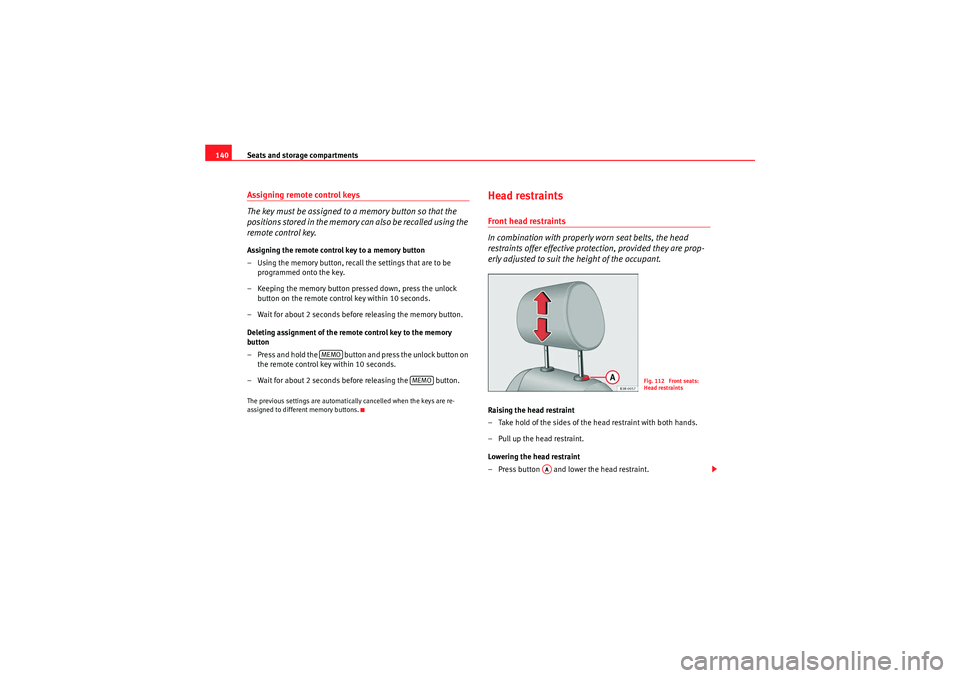
erly adjusted to suit the height of the occupant.Raising the head restraint
– Take hold of the sides of the head restraint with both hands.
– Pull up the head restraint.
Lowering the head restraint
– Press button and lower the head restraint.
MEMO
MEMO
Fig. 112 Front seats:
Head restraints
AA
ExeoST_EN.book Seite 140 Freitag, 3. September 2010 11:41 11
Page 143 of 325

Seats and storage compartments141
Safety First
Operating Instructions
Practical Tips
Technical Specifications
Removing the head restraints
– Pull the head restraint up as far as it will go.
– Press button and pull out the head restraint.
Fitting the head restraint
– Insert the head restraint in its guides until it clicks into place.
Press button and lower the head restraint.The height of the head restraints is adjustable. They should be set to suit the
height of the occupant. In combination with the seat belts, the head
restraints offer effective protection, provided they are properly adjusted.
For best protection, the top of the head restraint should be at least at eye level
or higher.Head restraints on the side rear seats
Raising the head restraint
– Take hold of the sides of the head restraint with both hands.
– Pull the head restraint up as far as it will go.
Lowering the head restraint
– Press button ⇒fig. 113 and lower the head restraint.
Removing the head restraint
– Pull the head restraint up as far as it will go.
– Press button ⇒fig. 113 and pull out the head restraint.
Fitting the head restraint
– Insert the head restraint in its gu ides until it clicks into place.
Press button and lower the head restraint.When the rear seats are not occupied, the head restraints should be moved
to the lowest position so that they do not obstruct the driver's field of
vision.
AAAA
Fig. 113 Outer rear seats:
Head restraints
AAAAAA
ExeoST_EN.book Seite 141 Freitag, 3. September 2010 11:41 11
Page 150 of 325
Seats and storage compartments
148Luggage compartment liner*
You can use the liner to protect the inside of the luggage
compartment when carrying wet or dirty items.
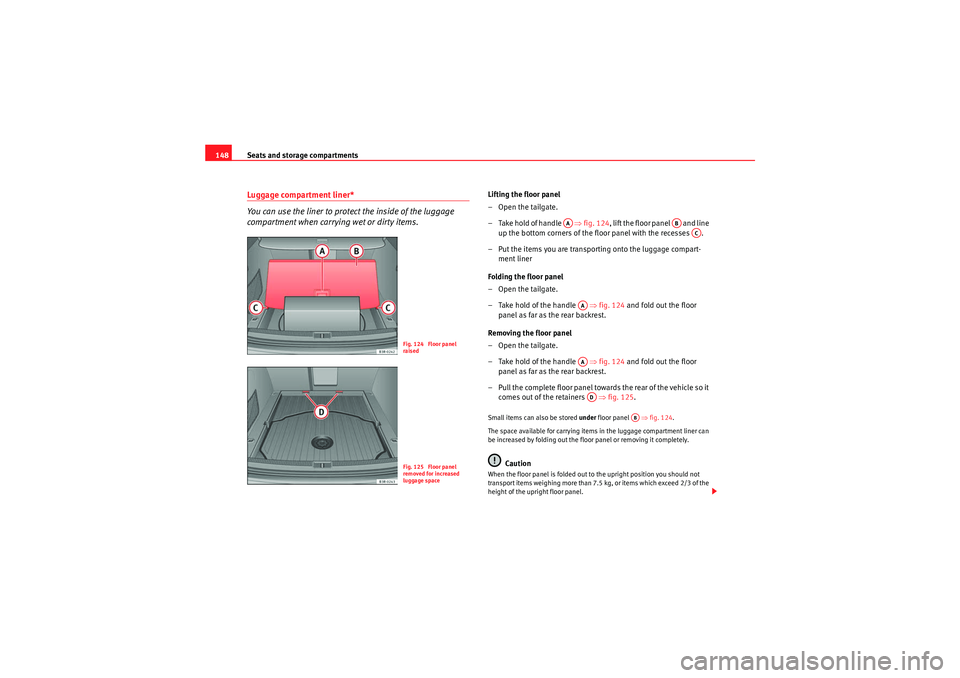
Lifting the floor panel
–Open the tailgate.
– Take hold of handle ⇒fig. 124 , lift the floor panel and line
up the bottom corners of the floor panel with the recesses .
– Put the items you are transporting onto the luggage compart- ment liner
Folding the floor panel
–Open the tailgate.
– Take hold of the handle ⇒fig. 124 and fold out the floor
panel as far as the rear backrest.
Removing the floor panel
–Open the tailgate.
– Take hold of the handle ⇒fig. 124 and fold out the floor
panel as far as the rear backrest.
– Pull the complete floor panel towards the rear of the vehicle so it comes out of the retainers ⇒ fig. 125.Small items can also be stored under floor panel ⇒ fig. 124.
The space available for carrying items in the luggage compartment liner can
be increased by folding out the floor panel or removing it completely.
Caution
When the floor panel is folded out to the upright position you should not
transport items weighing more than 7.5 kg, or items which exceed 2/3 of the
height of the upright floor panel.
Fig. 124 Floor panel
raisedFig. 125 Floor panel
removed for increased
luggage space
AA
AB
AC
AAAAAD
AB
ExeoST_EN.book Seite 148 Freitag, 3. September 2010 11:41 11
Page 174 of 325
Driving
172DrivingSteeringAdjusting the steering wheel position
The height and reach of the steering wheel can be freely
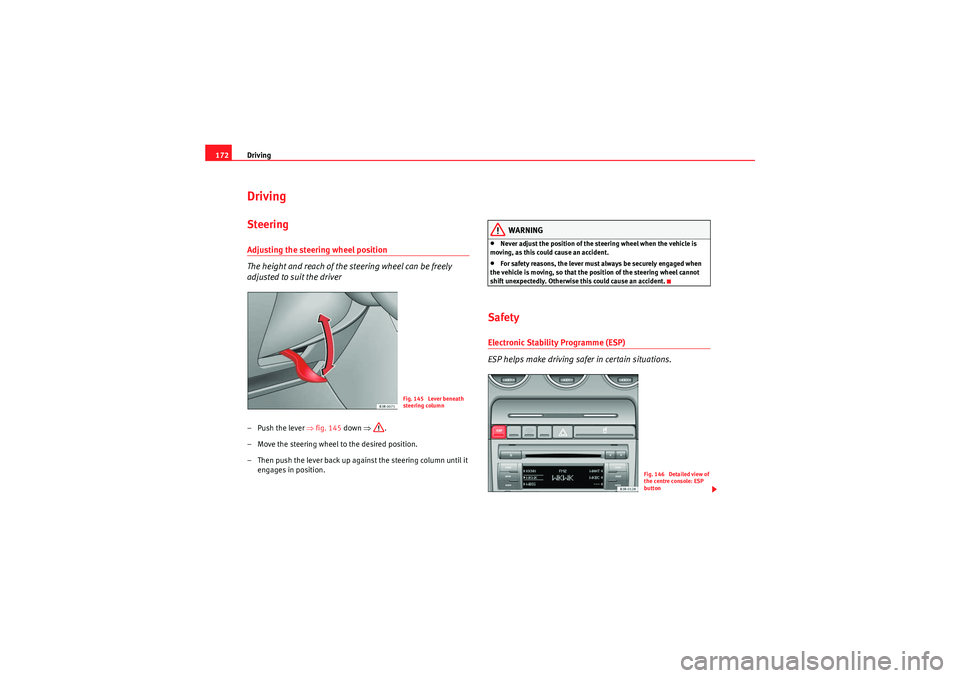
adjusted to suit the driver–Push the lever ⇒ fig. 145 down ⇒.
– Move the steering wheel to the desired position.
– Then push the lever back up against the steering column until it engages in position.
WARNING
•Never adjust the position of the steering wheel when the vehicle is
moving, as this could cause an accident.•For safety reasons, the lever must always be securely engaged when
the vehicle is moving, so that the position of the steering wheel cannot
shift unexpectedly. Otherwise this could cause an accident.
SafetyElectronic Stability Programme (ESP)
ESP helps make driving safer in certain situations.
Fig. 145 Lever beneath
steering column
Fig. 146 Detailed view of
the centre console: ESP
button
ExeoST_EN.book Seite 172 Freitag, 3. September 2010 11:41 11
Page 206 of 325

Trailer towing
204Where possible, operate the trailer with the maximum permitted drawbar
load on the ball joint of the towing bracket, but do not exceed the specified
limit.
Tyre pressure
Check the tyre pressures on your vehicle, and adjust for “full load” conditions
(refer to the sticker listing the tyre pressures on the door pillar). It may also be
necessary to adjust the tyre pressures on the trailer according to the recom-
mendations of the trailer manufacturer.
Exterior mirrors
Check whether you can see enough of the road behind the trailer with the
standard mirrors. If this is not the case you should have additional mirrors
fitted. The two exterior mirrors should be fitted on folding arms. Adjust the
mirrors to give sufficient rear vision.
Headlights
Before starting a journey, check the headlight beam settings with the trailer
hitched up. If necessary, alter the height of the headlight beams by means of
the headlight range control. See ⇒page 120.
Power supply
When you remove the ignition key, the power supply to the trailer is inter-
rupted.
Removable ball joint coupling
Vehicles with a factory-fitted towing bracket are equipped with a removable
ball joint coupling. This is stored in the spare wheel well in the luggage
compartment together with the necessary fitting instructions.
Note
If you frequently tow, we recommend you also have the vehicle serviced
between services.
Notes on towing
Towing a trailer involves additional attention by the driver.Weight distribution
The weight distribution of a loaded trailer with an unladen vehicle is very
unfavourable. However, if this cannot be avoided, drive extra slow to allow for
the unbalanced weight distribution.
Speed
The stability of the vehicle and trailer is reduced with increasing speed. There-
fore, it is advisable not to drive at the maximum permissible speed in unfa-
vourable road, weather or wind conditions. This especially applies when
driving downhill.
You should always reduce speed immediately if the trailer shows the slightest
sign of swaying . Never try to stabilise the trailer by accelerating.
Anticipate hazards and brake in good time. If towing a trailer with an inertia
brake , first brake gently and then harder. This will prevent brake tapping by
the trailer wheels when they lock. Select a low gear in due course before
going down a steep downhill. This enables you to use the engine braking to
slow down the vehicle.
Swaying and pitching can be reduced by stabiliser aids. We recommend
having stabiliser aids installed when towing trailers with a high trailer weight.
They can be purchased and installed at a Technical Service.
Reheating
When climbing long hills in hot weather with the engine running fast in low
gear, you should keep an eye on the coolant temperature gauge ⇒page 60.
Reduce speed immediately if the needle moves to the right end of the scale.
If the temperature warning lamp
v in the instrument panel should start
flashing, stop the vehicle and let the engine cool down by running it at idling
speed for a few minutes.
ExeoST_EN.book Seite 204 Freitag, 3. September 2010 11:41 11
Page 253 of 325

Wheels and tyres251
Safety First
Operating Instructions
Practical Tips
Technical Specifications
•If one or more tyres are being driven in emergency conditions, the
driving quality of the vehicle is impaired and there is a risk of accident.Note
•The run-flat tyres do not “deflate” on losing pressure because they are
supported on the reinforced sides. Therefore defects in the tyre cannot be
detected with a visual inspection.•Snow chains must not be used on front tyres used in emergency
conditions.New tyres and wheels
New tyres and wheels have to be run in.The tyres and wheel rims are an essential part of the vehicle's design. The
tyres and rims approved by SEAT are specially matched to the characteristics
of the vehicle and make a major contribution to good road holding and safe
handling ⇒.
Tyres should be replaced at least in pairs and not individually (i.e. both front
tyres or both rear tyres together). A knowledge of tyre designations makes it
easier to choose the correct tyres. Radial tyres have the tyre designations
marked on the sidewall, for example:
195/65 R15 91T
This contains the following information:
195 Tyre width in mm
65 Height/width ratio in %
RTyre construction: Radial
15 Rim diameter in inches 91 Load rating code
TSpeed rating
The tyres could also have the following information:
•A direction of rotation symbol•“Reinforced” denotes heavy-duty tyres.
The manufacturing date is also indicated on the tyre sidewall (possibly only
on the inner side of the wheel).
“DOT ... 1103...” means, for example, that the tyre was produced in the 11th
week of 2003.
We recommend that work on tyres and wheels be carried out by an Authorised
Service Centre. They are familiar with the procedure and have the necessary
special tools and spare parts as well as the proper facilities for disposing of
the old tyres.
Any Authorised Service Centre has full information on the technical require-
ments when installing or changing tyres, wheels or wheel trims.WARNING
•We recommend that you use only wheels and tyres which have been
approved by SEAT for your model. Failure to do so could impair vehicle
handling. Risk of accident.•Avoid running the vehicle on tyres that are more than six years old. If
you have no alternative, you should drive slowly and with extra care at all
times.•Never use old tyres or those with an unknown history of use.•If wheel trims are retrofitted, you must ensure that the flow of air to the
brakes is not restricted. This could cause them to overheat.•All four wheels must be fitted with radial tyres of the same type, size
(rolling circumference) and the same tread pattern.
WARNING (continued)
ExeoST_EN.book Seite 251 Freitag, 3. September 2010 11:41 11
Page 313 of 325

Technical Specifications311
Safety First
Operating Instructions
Practical Tips
Technical Specifications
Dimensions and capacities
Dimensions
Length, width 4661-4741
a) mm/ 1772 mm
a)With towing eye.Height at kerb weight 1454 mm with roof bars
Front and rear projection 976 mm/ 1048-1123
a) mm
Wheelbase 2642 mm
Turning circle 11.2 m
Track width
b)
b)This data will change depending on the type of wheel rim.
Front Rear
1522 mm 1523 mm
Capacities
Fuel tank 70 l. Reserve 10 l.
Windscreen washer fluid container with headlight washer 4.8 l.
Tyre pressure
Summer-grade tyres:
The correct tyre pressure can be seen on the sticker on the inside of the tank flap.
Winter tyres:
The pressure of these tyres is the same as the summer tyre pressure plus 0.2 bar.
ExeoST_EN.book Seite 311 Freitag, 3. September 2010 11:41 11