ignition Seat Exeo ST 2011 Repair Manual
[x] Cancel search | Manufacturer: SEAT, Model Year: 2011, Model line: Exeo ST, Model: Seat Exeo ST 2011Pages: 319, PDF Size: 5.12 MB
Page 178 of 319
176Driving
Handbrake on
The handbrake warning switches on after driving for 3 seconds at speeds
above 5 km/h.
The handbrake warning lamp lights up when the handbrake is applied
with the ignition on.
WARNING
Please note that the handbrake should be released all the way. If it is on-
ly partially released, this will cause rear brakes overheating, which can
impair the function of the brake system and could lead to an accident.
CAUTION
Once the vehicle has come to a standstill, always apply the handbrake firm-
ly and then, on a manual gearbox, engage a gear, or select P on an auto-
matic.
Parking
The following points will ensure there is no risk of the vehi-
cle rolling away accidentally after it is parked:
– Use the foot brake to stop the vehicle.
– Apply the handbrake firmly.
– Switch the engine off.
– On a manual gearbox engage 1st gear or on an automatic move
the selector lever to P ⇒
. When parking on slopes:
Turn the steering wheel so that the, if the vehicle moves, it will do so to-
wards the curb.
WARNING
● Do not leave anyone (especially children) in the vehicle when it is
locked. Locked doors could delay assistance in an emergency, potentially
putting lives at risk.
● Never leave children unsupervised in the vehicle. They could release
e.g. the handbrake or gear lever, moving the vehicle and causing an acci-
dent.
Parking aid acoustic system General notes
Various systems are available to help you when parking or manoeuvring in
tight spaces, depending on the equipment fitted on your vehicle.
The SEAT Parking System gives an acoustic warning if there are any obsta-
cles behind your vehicle ⇒ page 177.
When you are parking, SEAT Parking System Plus warns you acoustically
and optically about obstacles in front of and behind the vehicle
⇒ page 177.
Note
To ensure the acoustic parking aid works properly, the sensors must be kept
clean and free of snow and ice.
Page 180 of 319
178Driving
Activating/Deactivating
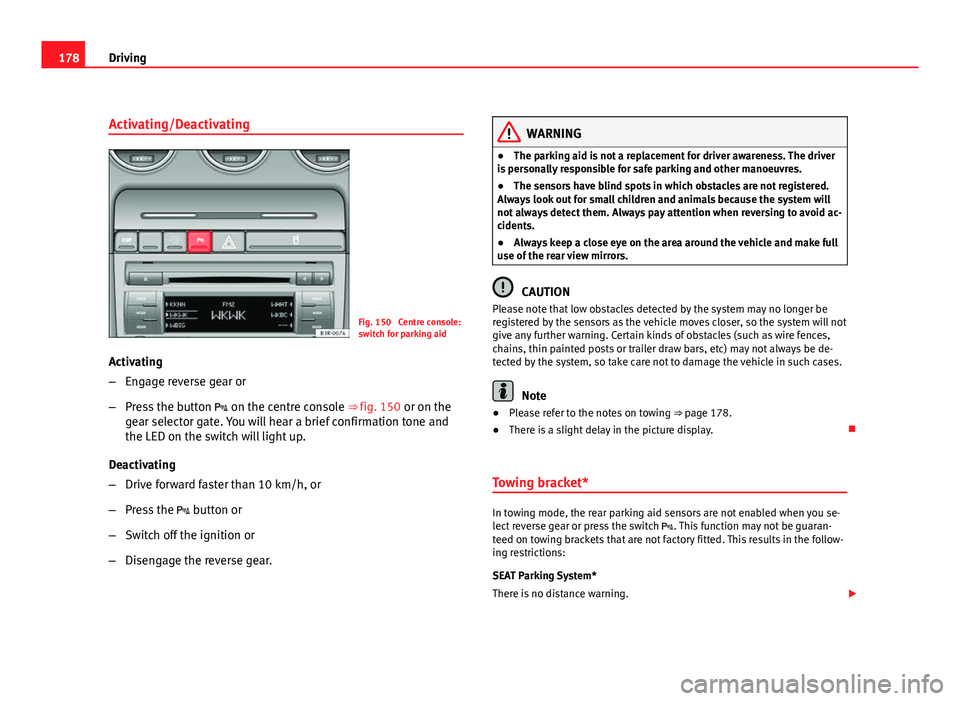
Fig. 150 Centre console:
switch for parking aid
Activating
– Engage reverse gear or
– Press the button on the centre console ⇒ fig. 150 or on the
gear selector gate. You will hear a brief confirmation tone and
the LED on the switch will light up.
Deactivating
– Drive forward faster than 10 km/h, or
– Press the button or
– Switch off the ignition or
– Disengage the reverse gear.
WARNING
● The parking aid is not a replacement for driver awareness. The driver
is personally responsible for safe parking and other manoeuvres.
● The sensors have blind spots in which obstacles are not registered.
Always look out for small children and animals because the system will
not always detect them. Always pay attention when reversing to avoid ac-
cidents.
● Always keep a close eye on the area around the vehicle and make full
use of the rear view mirrors.
CAUTION
Please note that low obstacles detected by the system may no longer be
registered by the sensors as the vehicle moves closer, so the system will not
give any further warning. Certain kinds of obstacles (such as wire fences,
chains, thin painted posts or trailer draw bars, etc) may not always be de-
tected by the system, so take care not to damage the vehicle in such cases.
Note
● Please refer to the notes on towing ⇒ page 178.
● There is a slight delay in the picture display.
Towing bracket*
In towing mode, the rear parking aid sensors are not enabled when you se-
lect reverse gear or press the switch . This function may not be guaran-
teed on towing brackets that are not factory fitted. This results in the follow-
ing restrictions:
SEAT Parking System*
There is no distance warning.
Page 181 of 319
179
Driving
SEAT Parking System Plus*
There is no rear distance warning. The system will still give a warning when
obstacles are detected while driving forward.
Fault messages*
If you hear a long beep for a few seconds and the LED on the button*
starts flashing when you switch on the parking aid, a system fault has oc-
curred. Please have the fault corrected by a Dealer or qualified workshop.
Note
If the fault is not corrected before you switch off the ignition, it will only be
indicated by the flashing LED on the switch * the next time you switch on
the parking aid.
Cruise speed* (Cruise control system)
Introduction
The cruise control system allows you to maintain a constant
speed. Using this system, any speed over 30 km/h can be kept constant, as long as
the engine power allows it. This is subject to power output and braking abil-
ity of the engine. This helps to reduce fatigue, especially on long journeys.
The indicator lamp on the instrument panel lights up when the cruise
control system is operating.
WARNING
For safety reasons, the cruise control system should not be used in dense
traffic or poor road conditions (with ice, slippery surfaces, loose grit or
gravel), as this could cause an accident.
CAUTION
In vehicles with a manual gearbox: do not go into neutral if the device is en-
abled without previously releasing the clutch, as the engine will increase its
revs and, under certain conditions, could break down.
Note
The cruise control cannot maintain a constant speed when travelling down
steep hills. The vehicle tends to accelerate under its own weight. Change
down to a lower gear or use the foot brake to slow the vehicle.
Safety FirstOperating InstructionsPractical TipsTechnical Specifications
Page 183 of 319
181
Driving
Deactivating the cruise control temporarily
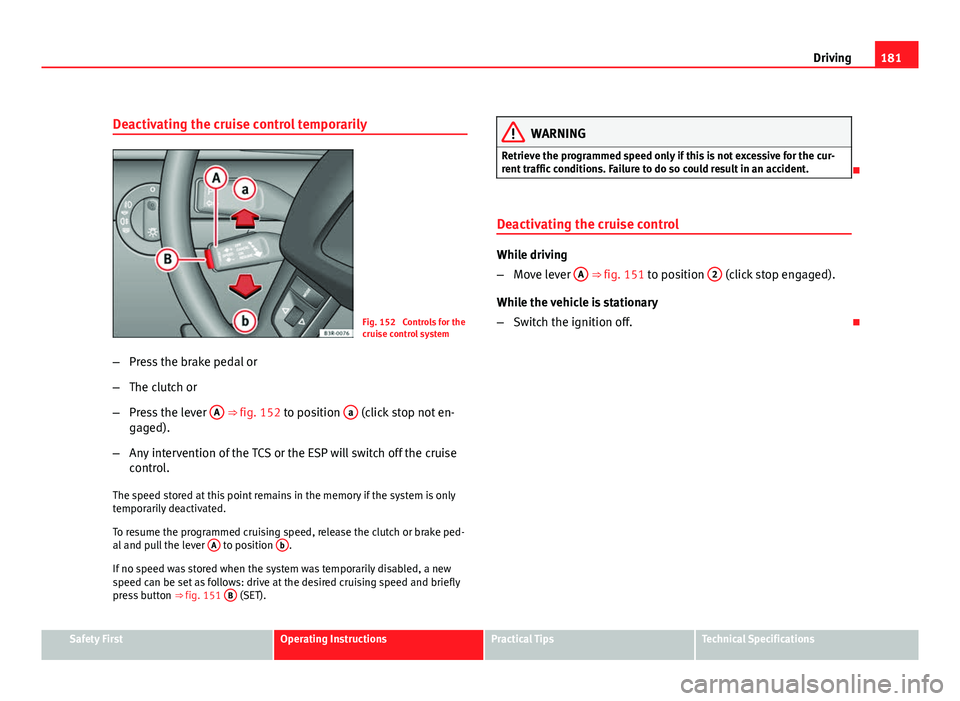
Fig. 152 Controls for the
cruise control system
– Press the brake pedal or
– The clutch or
– Press the lever A
⇒ fig. 152 to position a (click stop not en-
gaged).
– Any intervention of the TCS or the ESP will switch off the cruise
control.
The speed stored at this point remains in the memory if the system is only
temporarily deactivated.
To resume the programmed cruising speed, release the clutch or brake ped-
al and pull the lever A
to position b.
If no speed was stored when the system was temporarily disabled, a new
speed can be set as follows: drive at the desired cruising speed and briefly
press button ⇒ fig. 151 B
(SET).
WARNING
Retrieve the programmed speed only if this is not excessive for the cur-
rent traffic conditions. Failure to do so could result in an accident.
Deactivating the cruise control
While driving
– Move lever A
⇒ fig. 151 to position 2 (click stop engaged).
While the vehicle is stationary
– Switch the ignition off.
Safety FirstOperating InstructionsPractical TipsTechnical Specifications
Page 186 of 319
184Driving
–To prevent the vehicle from rolling away, apply the parking
brake before moving off on steep gradients ⇒
.
Parking the vehicle
– Press and hold the brake pedal ⇒
.
– Apply the parking brake.
– Press and hold the interlock button, move the selector lever to P
and release the interlock button.
The engine can only be started when the selector lever is at P or N.
On level ground it is sufficient to move the selector lever to P. On slopes,
first engage the parking brake and then put the selection lever into the P
position. This avoids overloading the locking mechanism and it will be eas-
ier to move the selector lever from position P.
Vehicles with multitronic® gearbox: Your vehicle is equipped with the hill
hold assist function which makes it easier to start off on a slope. The sys-
tem is activated when you press and hold the brake pedal for a few sec-
onds. When you release the brake pedal the braking force will be main-
tained for a short moment in order to prevent the vehicle rolling back when
you drive away.
WARNING
● While you are selecting a gear and the vehicle is stopped with the en-
gine running, do not accelerate. Failure to do so could result in an acci-
dent.
● Please note that some power will still be transmitted when you stop
temporarily with the selector lever in position D, S or R. Therefore, when
stopping you will need to press the brake with the force required to hold
the vehicle still. Failure to do so could result in an accident.
● Never move the selector lever to R or P when driving, as this could
cause an accident.
Selector lever positions
This section covers all the selector lever positions.
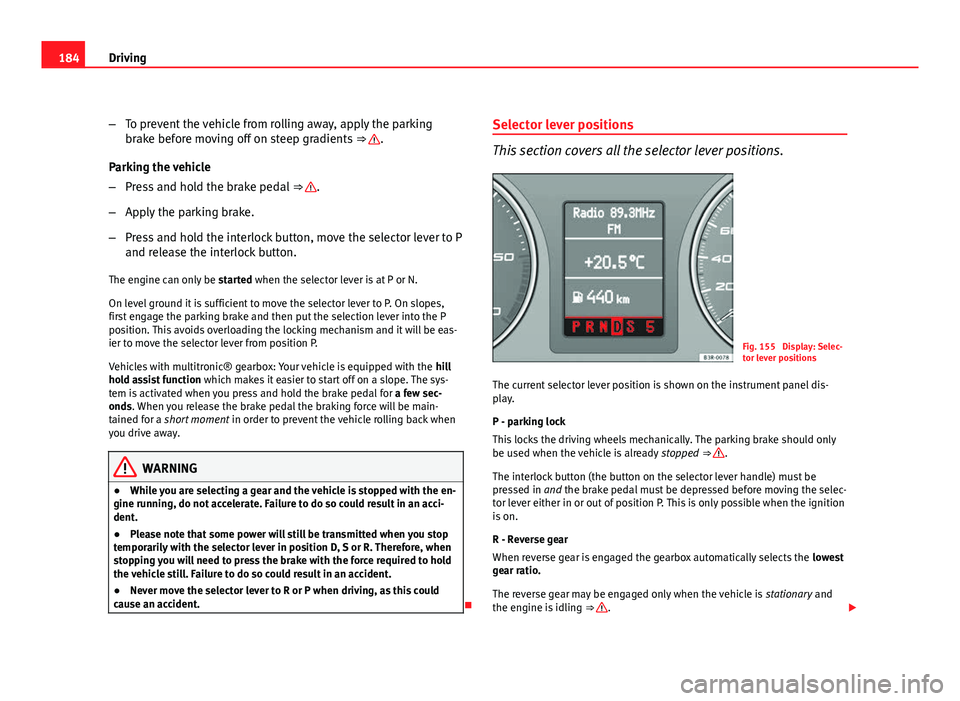
Fig. 155 Display: Selec-
tor lever positions
The current selector lever position is shown on the instrument panel dis-
play.
P - parking lock
This locks the driving wheels mechanically. The parking brake should only
be used when the vehicle is already stopped ⇒
.
The interlock button (the button on the selector lever handle) must be
pressed in and the brake pedal must be depressed before moving the selec-
tor lever either in or out of position P. This is only possible when the ignition
is on.
R - Reverse gear
When reverse gear is engaged the gearbox automatically selects the lowest
gear ratio.
The reverse gear may be engaged only when the vehicle is stationary and
the engine is idling ⇒
.
Page 187 of 319
185
Driving
To move the selector lever to position R, press in the interlock button and at
the same time press the brake pedal. Depending on the model, one or two
reverse lights will come on in selector lever position R (when ignition is
switched on).
N - Neutral (idling)
In this position the gearbox is in neutral ⇒
.
D - Drive (forward)
In this position, the gearbox selects the optimal transmission ratio depend-
ing on the engine load, speed and the dynamic gear regulation programme
(DRP).
Press the brake pedal when moving the selector lever from N to D if the ve-
hicle is stationary or at speeds below 5 km/h ⇒
.
Under certain circumstances (e.g. when driving in mountains or towing a
trailer or caravan) it can be advantageous to switch temporarily to tiptronic
mode ⇒ page 188, so that the gear ratios can be selected manually to suit
the driving conditions.
S - Sport position
To drive in sports mode, select the position S. The engine power reserve is
used to its maximum. When accelerating the gear shifts will be noticeable.
Press the brake pedal when moving the selector lever from N to S if the vehi-
cle is stationary or at speeds below 5 km/h ⇒
.
WARNING
● Never move the selector lever to R or P when driving. Failure to do so
could result in an accident.
● In selector position D or S the vehicle must always be held with the
foot brake when the engine is running. This is because an automatic
gearbox still transmits power even at idling speed, and the vehicle tends
WARNING (Continued)
to “creep”. The throttle must on no account be opened inadvertently (for
instance by hand from the engine compartment) when a gear is engaged
with the vehicle stationary. The vehicle could otherwise start moving im-
mediately (in some cases even if the parking brake is engaged) and pos-
sibly cause an accident.
● To avoid accidents, apply the parking brake and put the selector lever
in position P before opening the bonnet and working on the vehicle with
the engine running. Please observe the important safety warnings
⇒ page 226, Work in the engine compartment.
Note
● Applies to vehicles with tiptronic gearbox:
● If the lever is moved accidentally to N when driving, release the accelera-
tor and let the engine speed drop to idling before selecting D or S again.
● For the sake of fuel economy (and the environment), the gearbox ratios
on some models are designed so that maximum speed is only obtained
when the gear lever is in position S.
Safety FirstOperating InstructionsPractical TipsTechnical Specifications
Page 188 of 319
186Driving
Selector lever lock
The selector lever lock prevents gears from being engaged
inadvertently, so that the vehicle is not set in motion unin-
tentionally.
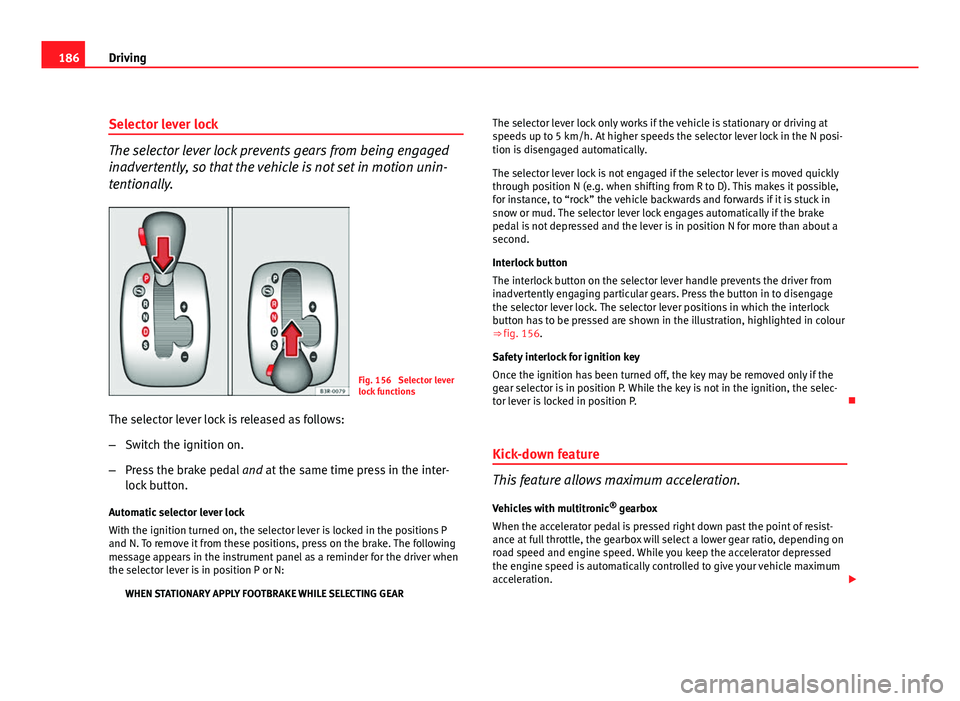
Fig. 156 Selector lever
lock functions
The selector lever lock is released as follows:
– Switch the ignition on.
– Press the brake pedal and at the same time press in the inter-
lock button.
Automatic selector lever lock
With the ignition turned on, the selector lever is locked in the positions P
and N. To remove it from these positions, press on the brake. The following
message appears in the instrument panel as a reminder for the driver when
the selector lever is in position P or N: WHEN STATIONARY APPLY FOOTBRAKE WHILE SELECTING GEAR The selector lever lock only works if the vehicle is stationary or driving at
speeds up to 5 km/h. At higher speeds the selector lever lock in the N posi-
tion is disengaged automatically.
The selector lever lock is not engaged if the selector lever is moved quickly
through position N (e.g. when shifting from R to D). This makes it possible,
for instance, to “rock” the vehicle backwards and forwards if it is stuck in
snow or mud. The selector lever lock engages automatically if the brake
pedal is not depressed and the lever is in position N for more than about a
second.
Interlock button
The interlock button on the selector lever handle prevents the driver from
inadvertently engaging particular gears. Press the button in to disengage
the selector lever lock. The selector lever positions in which the interlock
button has to be pressed are shown in the illustration, highlighted in colour
⇒
fig. 156.
Safety interlock for ignition key
Once the ignition has been turned off, the key may be removed only if the
gear selector is in position P. While the key is not in the ignition, the selec-
tor lever is locked in position P.
Kick-down feature
This feature allows maximum acceleration. Vehicles with multitronic ®
gearbox
When the accelerator pedal is pressed right down past the point of resist-
ance at full throttle, the gearbox will select a lower gear ratio, depending on
road speed and engine speed. While you keep the accelerator depressed
the engine speed is automatically controlled to give your vehicle maximum
acceleration.
Page 199 of 319
197
Driving and the environment
WARNING (Continued)
● On steep slopes, if brakes are excessively used, they will overheat.
Before driving down a long steep slope, it is advisable to reduce speed
and change down into a lower gear or range (depending on the type of
transmission). This makes use of engine braking and relieves the brakes.
● Never let the brakes “drag” by applying light pressure. Continuous
braking will cause the brakes to overheat and the braking distance will
increase. Apply and then release the brakes alternately.
● Never let the vehicle run with the engine switched off. The braking
distance is increased considerably when the brake servo is not active.
● If the brake fluid loses its viscosity and is subjected to heavy use, va-
pour bubbles can form in the brake system. This reduces the efficiency of
the brakes.
● Non-standard or damaged front spoilers could restrict the airflow to
the brakes and cause them to overheat. Before purchasing accessories
please observe the relevant instructions ⇒ page 220, Technical modifi-
cations.
● If a brake circuit fails, the braking distance will be increased consider-
ably. Contact a specialised workshop immediately and avoid unnecessa-
ry journeys.
Exhaust gas purification system Catalytic converter*
To maintain the useful life of the catalytic converter
– Use only unleaded petrol with petrol engines, as lead damages
the catalytic converter.
– Do not let the fuel get too low in the tank. –
For engine oil changes, do not replenish with too much engine
oil ⇒ page 229.
– Never tow the vehicle to start it, use jump leads if necessary
⇒ page 286.
If you notice misfiring, uneven running or loss of power when the vehicle is
moving, reduce speed immediately and have the vehicle inspected at the
nearest specialised workshop. In general, the exhaust gas warning lamp
will light up when any of the described symptoms occur ⇒ page 66. If this
happens, unburnt fuel can enter the exhaust system and escape into the en-
vironment. The catalytic converter can also be damaged by overheating.
WARNING
The catalytic converter reaches very high temperatures! There is a risk of
fire.
● Never park where the catalytic converter could come into contact with
dry grass or flammable materials under the vehicle.
● Do not apply additional underseal or anti-corrosion coatings to the
exhaust pipes, catalytic converter or the heat shields on the exhaust sys-
tem. These materials could catch fire when the vehicle is being driven.
CAUTION
Never run the fuel tank completely dry because the irregularity of the fuel
supply may cause ignition problems. This allows unburnt fuel to enter the
exhaust system, which could cause overheating and damage the catalytic
converter.
For the sake of the environment
Even when the emission control system is working perfectly, there may be a
smell of sulphur from the exhaust gas under some conditions. This depends
on the sulphur content of the fuel used. Quite often the problem can be
solved by changing to another brand of fuel.
Safety FirstOperating InstructionsPractical TipsTechnical Specifications
Page 204 of 319
202Trailer towing
Where possible, operate the trailer with the maximum permitted drawbar
load on the ball joint of the towing bracket, but do not exceed the specified
limit.
Tyre pressure
Check the tyre pressures on your vehicle, and adjust for “full load” condi-
tions (refer to the sticker listing the tyre pressures on the door pillar). It may
also be necessary to adjust the tyre pressures on the trailer according to the
recommendations of the trailer manufacturer.
Exterior mirrors
Check whether you can see enough of the road behind the trailer with the
standard mirrors. If this is not the case you should have additional mirrors
fitted. The two exterior mirrors should be fitted on folding arms. Adjust the
mirrors to give sufficient rear vision.
Headlights
Before starting a journey, check the headlight beam settings with the trailer
hitched up. If necessary, alter the height of the headlight beams by means
of the headlight range control. See ⇒ page 119.
Power supply
When you remove the ignition key, the power supply to the trailer is inter-
rupted.
Removable ball joint coupling
Vehicles with a factory-fitted towing bracket are equipped with a removable
ball joint coupling. This is stored in the spare wheel well in the luggage
compartment together with the necessary fitting instructions.
Note
If you frequently tow, we recommend you also have the vehicle serviced be-
tween services. Notes on towing
Towing a trailer involves additional attention by the driver.
Weight distribution
The weight distribution of a loaded trailer with an unladen vehicle is very
unfavourable. However, if this cannot be avoided, drive extra slow to allow
for the unbalanced weight distribution.
Speed
The stability of the vehicle and trailer is reduced with increasing speed.
Therefore, it is advisable not to drive at the maximum permissible speed in
unfavourable road, weather or wind conditions. This especially applies
when driving downhill.
You should always reduce speed immediately if the trailer shows the slight-
est sign of swaying. Never try to stabilise the trailer by accelerating.
Anticipate hazards and brake in good time. If towing a trailer with an inertia
brake, first brake gently and then harder. This will prevent brake tapping by
the trailer wheels when they lock. Select a low gear in due course before go-
ing down a steep downhill. This enables you to use the engine braking to
slow down the vehicle.
Swaying and pitching can be reduced by stabiliser aids. We recommend
having stabiliser aids installed when towing trailers with a high trailer
weight. They can be purchased and installed at a Technical Service.
Reheating
When climbing long hills in hot weather with the engine running fast in low
gear, you should keep an eye on the coolant temperature gauge ⇒ page 60.
Reduce speed immediately if the needle moves to the right end of the scale.
If the temperature warning lamp in the instrument panel should start
flashing, stop the vehicle and let the engine cool down by running it at
idling speed for a few minutes.
Page 213 of 319
211
Vehicle maintenance and cleaning
Vehicle maintenance and cleaning General notes
Regular washing and care help maintain the value of your
vehicle.Vehicle maintenance
Regular care and washing help to maintain the value of the vehicle. This
may also be one of the requirements for acknowledging warranty claims in
the event of bodywork corrosion or paint defects.
The best way to protect your vehicle against the harmful effects of the envi-
ronment is through correct maintenance and frequent washing. The longer
substances such as insect remains, bird droppings, resinous tree sap, road
dirt, industrial deposits, tar, soot or road salt and other aggressive materi-
als remain on the vehicle, the more damage they do to the paintwork. High
temperatures (for instance in strong sunlight) further intensify the corrosive
effect.
After winter, a period when salt is put on the roads, it is important to have
the underside of the vehicle washed thoroughly.
Products for vehicle maintenance
Car care products are available in your Authorised Service Centre. Keep the
product instructions until you have used them up.
WARNING
● Car care products can be toxic. Because of this, they must always be
kept closed in their original container. Keep them out of the reach of chil-
dren. Failure to comply could result in poisoning.
● Always read and observe the instructions and warnings on the pack-
age before using vehicle care products. Improper use could cause health
problems or damage the vehicle. The use of certain products may pro-
duce noxious vapours; they should be used in well ventilated areas.
● Never use fuel, turpentine, engine oil, nail varnish remover or other
volatile fluids. These are toxic and highly flammable. Risk of fire and ex-
plosion.
● Before washing your vehicle, or carrying out any maintenance, switch
the engine off, apply the handbrake firmly and remove the key from the
ignition.
CAUTION
Never attempt to remove dirt, mud or dust if the surface of the vehicle is dry.
Never use a dry cloth or sponge for cleaning purposes. This could damage
the paintwork or the windows of your vehicle. Soak dirt, mud or dust with
plenty of water.
For the sake of the environment
● When purchasing products for your vehicle maintenance, select the
ones which are not harmful to the environment.
● The waste from car care products should not be disposed of with ordina-
ry household waste. Observe the disposal information on the package.
Safety FirstOperating InstructionsPractical TipsTechnical Specifications