fuel Seat Exeo ST 2012 User Guide
[x] Cancel search | Manufacturer: SEAT, Model Year: 2012, Model line: Exeo ST, Model: Seat Exeo ST 2012Pages: 325, PDF Size: 5.56 MB
Page 93 of 325
91
Cockpit
Menu display
Introduction
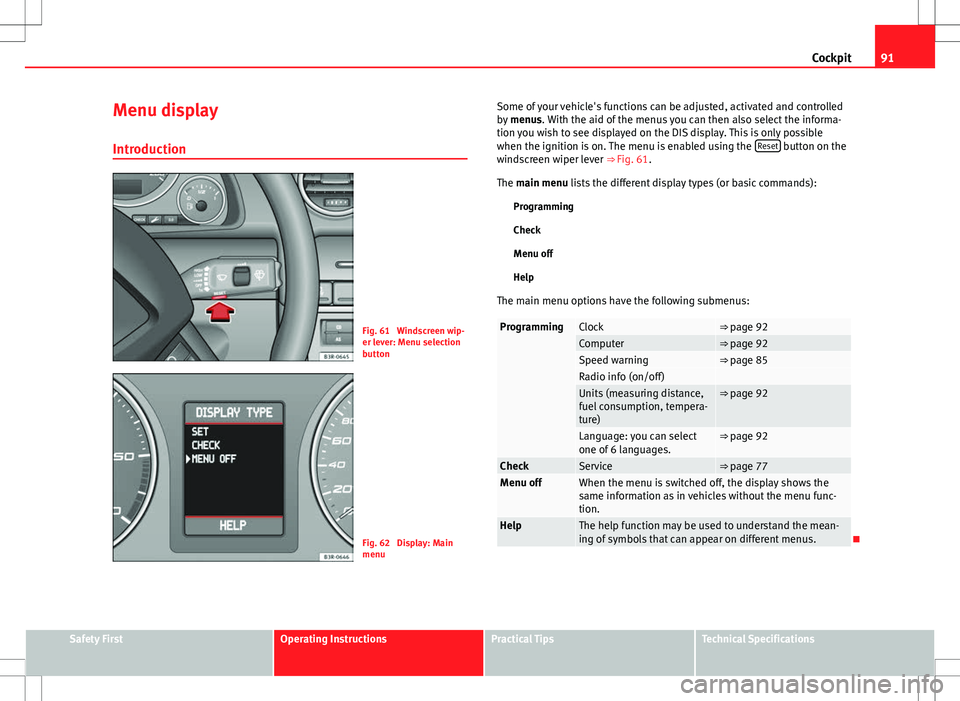
Fig. 61 Windscreen wip-
er lever: Menu selection
button
Fig. 62 Display: Main
menu Some of your vehicle's functions can be adjusted, activated and controlled
by
menus. With the aid of the menus you can then also select the informa-
tion you wish to see displayed on the DIS display. This is only possible
when the ignition is on. The menu is enabled using the Reset
button on the
windscreen wiper lever ⇒ Fig. 61.
The main menu lists the different display types (or basic commands):
Programming
Check
Menu off
Help
The main menu options have the following submenus:
ProgrammingClock⇒ page 92Computer⇒ page 92Speed warning⇒ page 85Radio info (on/off) Units (measuring distance,
fuel consumption, tempera-
ture)⇒ page 92
Language: you can select
one of 6 languages.⇒ page 92
CheckService⇒ page 77Menu offWhen the menu is switched off, the display shows the
same information as in vehicles without the menu func-
tion.
HelpThe help function may be used to understand the mean-
ing of symbols that can appear on different menus.
Safety FirstOperating InstructionsPractical TipsTechnical Specifications
Page 95 of 325
93
Cockpit
driven and the tyre pressure will rise accordingly. Therefore, you should only
adjust the tyre pressures when they are cold (i.e. approximately at ambient
temperature).
To ensure that the tyre pressure monitoring system works reliably, you
should check and, if necessary, adjust the tyre pressures at regular intervals
and store the correct pressures (reference values) in the system.
A tyre pressure information label is attached to the inside of the fuel tank
flap.
WARNING
● Never adjust tyre pressure when the tyres are hot. This may damage
or even burst the tyres. Risk of accident!
● An insufficiently inflated tyre flexes a lot more at high speeds and
causes significant heating of the tyre. Under these conditions, the tyre
bead may be released or the tyre may burst. Risk of accident!
For the sake of the environment
Under-inflated tyres lead to increased fuel consumption and tyre wear.
Note
● Responsibility for ensuring that the tyres are correctly inflated remains
with the driver; the system can only provide assistance.
● Pressure can only be adjusted when the tyres are at ambient tempera-
ture. Tyre pressure monitoring display
The tyre pressure should be corrected as soon as possible if
it is too low.
If the symbol appears, the tyre pressure on at least one of the
wheels is too low.
– Stop the vehicle.
– Check the tyre(s).
– Correct the tyre pressure ⇒ page 250.
For more detailed information on the tyre pressure monitoring system,
please refer to ⇒ page 249.
Safety FirstOperating InstructionsPractical TipsTechnical Specifications
Page 130 of 325

128Lights and visibility
Visibility
Heated rear window
The rear window heating clears the rear window of conden-
sation.
Fig. 96 Switch for heat-
ed rear window
– Press button
to switch the rear window heating on or off
⇒ Fig. 96.
The heated rear window only works when the ignition is switched on. An in-
dicator lamp on the button lights up when the rear window heater is switch-
ed on.
The heated rear window switches off automatically after about 10 minutes if
the outside temperature is above 0°C.
Depending on the outside temperature, the exterior mirrors are also heated
while the heated rear window is turned on. The exterior mirror heating is not activated at temperatures above approxi-
mately 20°C.
For the sake of the environment
Switch off the heated rear window as soon as the rear window has demis-
ted. By saving electrical power you can also save fuel.
Sun visors
The sun visors can improve visibility and contribute to safe-
ty.
Fig. 97 Sun visor
The sun visors 1
for the driver and the front passenger can be pulled out of
their mountings in the centre of the vehicle and turned towards the doors
⇒ Fig. 97.
The vanity mirrors in the sun visor have covers. On opening the cover 2
,
the mirror light* located in the headliner is automatically switched on. The
Page 155 of 325
153
Seats and storage compartments
Roof load
Loads carried on the roof must be securely attached. The ve-
hicle's handling is affected whenever you carry loads on the
vehicle. The authorised load on the roof of your vehicle is 75 kg. Use the weight of
the roof rack system and that of the load as a basis to calculate the roof
load.
If less resistant systems are used, the roof rack must not be loaded to the
maximum weight permitted. If less resistant systems are used, these must
only be loaded to the maximum weight permitted indicated in the assembly
instructions.
WARNING
● Loads carried on the roof must be securely attached. Failure to do so
could result in an accident.
● Do not exceed the maximum roof load for the vehicle, the maximum
axle loads or the maximum gross vehicle weight. Failure to do so could
result in an accident.
● When transporting heavy or bulky loads on the roof, bear in mind that
the vehicle's handling is affected by the extra weight on the roof and a
possible susceptibility to cross winds. Adjust your speed and driving
style accordingly to avoid accidents.
CAUTION
Please take extra care not to let the rear lid strike the roof load when open.
For the sake of the environment
Roof racks are often left attached for convenience, even when they are not
being used. However, the increased air resistance means that the vehicle
uses more fuel. For this reason you should always take off the roof rack
when it is not in use.
Drink holder
Front drink holder
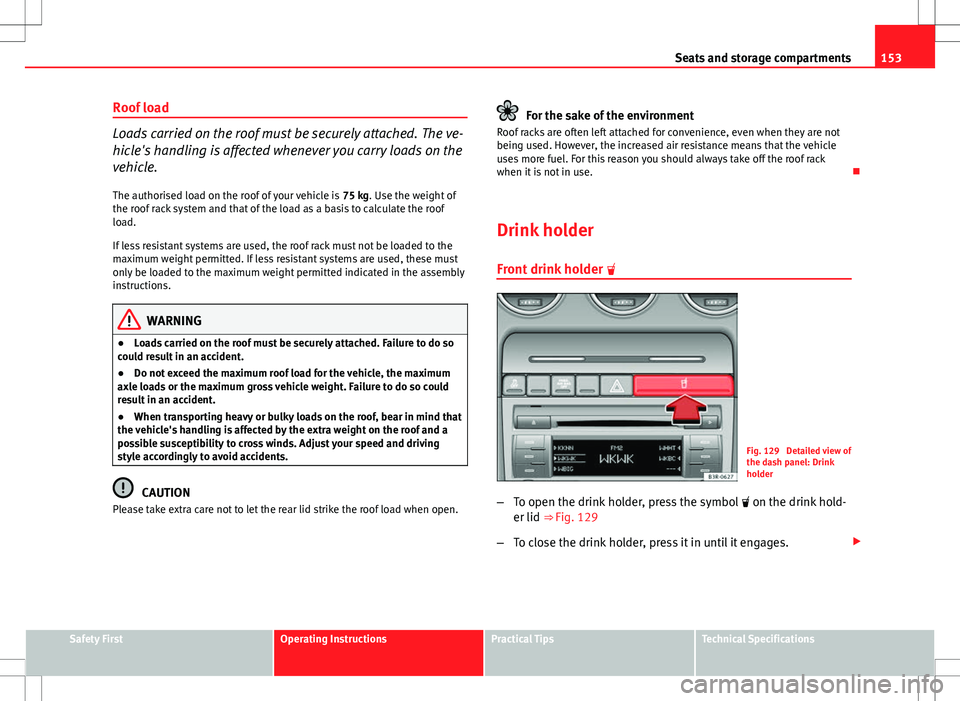
Fig. 129 Detailed view of
the dash panel: Drink
holder
– To open the drink holder, press the symbol
on the drink hold-
er lid ⇒
Fig. 129
– To close the drink holder, press it in until it engages.
Safety FirstOperating InstructionsPractical TipsTechnical Specifications
Page 168 of 325

166Air conditioning
Defrosting
The windscreen and side windows are defrosted or demisted
as quickly as possible.
– To enable this mode, press the
⇒
Fig. 139 button.
– To switch off, press the
button again, or select the AUTO but-
ton.
The temperature is regulated automatically. The air output is increased to
maximum and most of the air comes out of outlets 1 and 2 ⇒ page 169.
The air recirculation and ECON modes are switched off when the
button
is pressed.
Air recirculation: manual activation
The air recirculation setting prevents fumes etc. from enter-
ing the interior.
Activating air recirculation mode
– Press button
⇒ Fig. 139 ⇒ .
Deactivating air recirculation mode
– Press the
button again or
– Press the AUTO
button or
– Press button
.
In this setting, the air in the vehicle is constantly recirculated. We recom-
mend using the air recirculation mode in the following circumstances: ●
When driving through a tunnel or in traffic congestions, to prevent ex-
haust gas entering the interior of the vehicle.
WARNING
Do not drive for too long with the air recirculation mode enabled because,
if the compressor is disconnected, the windscreen may mist up because
no fresh air is entering the interior of the vehicle, with the subsequent
risk of accidents.
ECON Mode (economy) ECON
ECON mode helps save fuel.
– To activate, press the ECON
button ⇒ Fig. 139.
– To deactivate, press the ECON
button again or select the AUTObutton.
Air cooling is disconnected in ECON mode. The heating and the blower are
adjusted automatically. “ECON” stands for “Economy”. Disconnecting air
cooling (compressor) reduces fuel consumption.
Please note that the interior temperature must not be lower than the outside
temperature in ECON mode. The blower does not cool or dehumidify the air
in the interior. The windows could therefore mist up.
In diesel vehicles, the auxiliary heater is switched off in ECON mode to save
fuel.
Page 172 of 325
170Air conditioning
Air directed to windows
This setting directs all the air to outlets 1 and 2. Unlike in setting , the
volume of air delivery remains the same.
Air to the driver/front passenger
All the air comes from outlets 3 and 4 in the dash panel and from the rear of
the centre console.
Air to the footwells
Most of the air emerges from outlets 5 and the outlets under the front seats.
Some of the air will also be issued from outlets 3 and 4.
Note
In all of the above air distribution settings, a small amount of air will still
come from the other outlets.
Economical use of the air conditioner
Economical use of the air conditioner will help save fuel.
Engine power is reduced and fuel consumption increases when the
air conditioner is in cooling mode. To ensure that the system is on-
ly switched on when it is really necessary, please note the follow-
ing points:
– Select ECON mode if you wish to save fuel.
– Select ECON mode if you decide to open the windows or sun-
roof* while driving.
– If the vehicle has heated up after standing in the sun, open the
windows and doors for a short time to cool the vehicle.
For the sake of the environment
By saving fuel you also reduce the amount of pollutants emitted from your
vehicle.
Key settings
When the ignition is switched on, the air conditioner set-
tings assigned to the key are selected automatically.
The air conditioner settings selected are automatically stored and assigned
to the key in use. When the vehicle is started, the air conditioner automati-
cally selects the settings assigned to the key. Hence, every driver automati-
cally obtains his/her preferred settings without having to select them man-
ually.
Note
Should another driver use the key and enter other settings, the previous
settings will be deleted.
Solar-powered blower/sunroof*
If the vehicle is parked in sufficiently strong sunlight, the
blower will operate in solar-powered mode when the igni-
tion is switched off.
After the ignition is switched off, the blower is supplied with electrical pow-
er from the sunroof. Please ensure that outlets 3 and 4 are open ⇒ Fig. 141
to ensure the best possible ventilation.
The blower only works when the sunroof is closed or tilted open at the rear.
Page 173 of 325
171
Air conditioning
If the air recirculation mode is on when you switch off the engine, the air
conditioner will automatically switch to fresh air ventilation.
Auxiliary heater*
Diesel vehicles are fitted with an auxiliary heater 1)
to raise the temperature
of the interior as quickly as possible. At outdoor temperatures below +5°C
and with the engine running, the supplementary heating will switch on and
off automatically depending on the temperature of the coolant.
In order to save fuel, the auxiliary heater can be can be switched off by brief-
ly pressing the
button on the air conditioner. Seat heating*
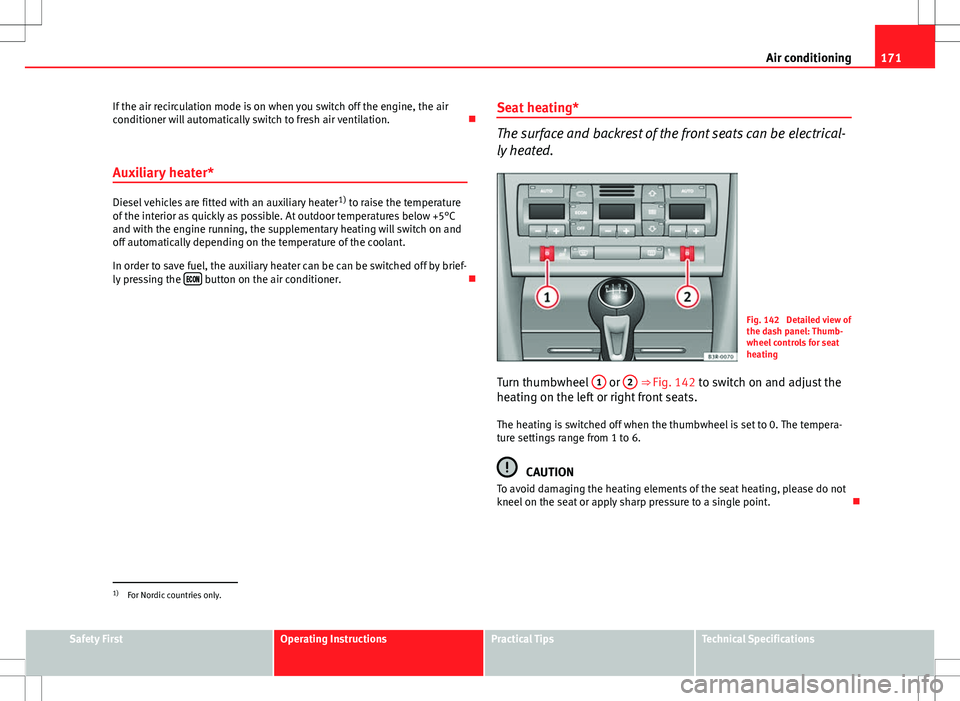
The surface and backrest of the front seats can be electrical-
ly heated.
Fig. 142 Detailed view of
the dash panel: Thumb-
wheel controls for seat
heating
Turn thumbwheel 1
or 2 ⇒ Fig. 142 to switch on and adjust the
heating on the left or right front seats.
The heating is switched off when the thumbwheel is set to 0. The tempera-
ture settings range from 1 to 6.
CAUTION
To avoid damaging the heating elements of the seat heating, please do not
kneel on the seat or apply sharp pressure to a single point.
1)
For Nordic countries only.
Safety FirstOperating InstructionsPractical TipsTechnical Specifications
Page 177 of 325
175
Driving
– Manual gearbox: Push the clutch pedal all the way down.
– Move the gear lever into neutral (automatic gearbox: selector
lever to P or N) ⇒
.
– Turn the ignition key to position 3
without pressing the accel-
erator.
– Release the ignition key as soon as the engine starts (the start-
er motor must not be allowed to run on with the engine).
Vehicles with a diesel engine:
– Use the foot brake.
– Manual gearbox: Push the clutch pedal all the way down. Other-
wise, the engine will not start.
– Move the gear lever into neutral (automatic gearbox: selector
lever to P or N) ⇒
.
– Turn the ignition key to position 2
. The pre-heating indicator
light comes on while the glow plugs are preheating.
– When the indicator light goes out, turn the ignition key to
position 3
. Do not press the accelerator.
– Having completed the previous action the key can be released
immediately, it will return to position 2
and the engine will
have started.
When starting a very cold engine, it may be a little noisy for the first few sec-
onds until oil pressure has built up in the hydraulic valve compensators.
This is quite normal, and no cause for concern.
If the engine fails to start straight away, stop after 10 seconds and try again
after about half a minute. Glow plug system*
To assist starting at low temperatures,
diesel engines are equipped with a
glow plug preheating system. The preheating time depends on the coolant
temperature and the outside temperature. Start the engine as soon as the
glow plug indicator light goes out.
When the engine is warm or at outside temperatures above +8°C the glow
plug indicator lamp will only light up for about one second. This means that
the engine can be started immediately.
If the engine will not start...
● ⇒ page 293
● ⇒ page 297
● ⇒ page 230, Refuelling
WARNING
Never run the engine in confined spaces, as the exhaust gases are poi-
sonous.
CAUTION
Avoid high engine speeds, full throttle and extreme load conditions until
the engine has reached its normal operating temperature, otherwise this
can damage the engine.
For the sake of the environment
Do not warm up the engine by running the engine with the vehicle station-
ary. Start immediately. This will help avoid unnecessary exhaust emissions.
Stopping the engine
– Turn the ignition key to position 1 ⇒ Fig. 146.
Safety FirstOperating InstructionsPractical TipsTechnical Specifications
Page 180 of 325

178Driving
Driver messages
Fig. 148 Display on the
instrument panel during
Start-Stop function oper-
ation.
Fig. 149 Display on the
instrument panel during
Start-Stop function oper-
ation.
When the engine is turned off by the Start-Stop function, this is displayed
on the instrument panel. At each stop, the central Start-Stop symbol lights up for about 5 seconds.
After this time, it turns off and the symbol on the upper right part of the dis-
play remains lit
⇒ Fig. 149.
Note
● There are different versions of the dash panel; the display of indications
on the screen may differ.
● Some indications/symbols of the Start_stop system that appear in the
upper part of the display may not be visible in the case of high priority indi-
cations (faults, fuel reserve indicator, windscreen washer liquid level, etc.).
Page 189 of 325
187
Driving
WARNING
● When the engine is running, the vehicle will start to move as soon as
a gear is engaged and the clutch released.
● Never select the reverse gear when the vehicle is in motion. Risk of
accident.
Note
● Do not rest your hand on the gear lever while driving. The pressure of
your hand could cause premature wear on the selector forks in the gearbox.
● When changing gear, you should always depress the clutch fully to
avoid unnecessary wear and damage.
● Do not hold the car “on the clutch” on hills. This causes premature wear
and damage to the clutch.
● Do not leave your foot on the clutch pedal; although the pressure may
seem insignificant, it can cause the premature wear of the clutch plate. Use
the foot rest when you do not need to change gear.
Automatic gearbox* Introduction
multitronic ®
, tiptronic (7-speed gearbox)
Vehicles with multitronic ®
gearbox
The vehicle is equipped with an electronically controlled continuously varia-
ble transmission (multitronic ®
). Unlike conventional automatics, the gear
ratios are not shifted in fixed steps but continuously variable. This gives
smoother transmission and makes for better fuel economy. The gearbox selects the gear ratio and shifts up or down automatically ac-
cording to the gear change programmes stored in the control unit
⇒ page 191.
If desired, you can also select the gears
manually (tiptronic mode)
⇒ page 192.
Please note that in vehicles with a multitronic® gearbox, torque is transmit-
ted via a multi-plate clutch, and not via a torque converter as on convention-
al automatics. This means that the vehicle will not “creep” as much as con-
ventional automatics when the engine is idling if you stop temporarily with
the selector lever in position D, S or R.
Vehicles with tiptronic gearbox
The vehicle is equipped with an electronically controlled 7-speed automatic
gearbox. The gearbox changes up and down automatically.
If desired, you can also select the gears manually (tiptronic mode)
⇒ page 192.
Safety FirstOperating InstructionsPractical TipsTechnical Specifications