steering Seat Exeo ST 2012 Owner's Guide
[x] Cancel search | Manufacturer: SEAT, Model Year: 2012, Model line: Exeo ST, Model: Seat Exeo ST 2012Pages: 325, PDF Size: 5.56 MB
Page 127 of 325

125
Lights and visibility
Main beam headlights
– Press the lever forward to switch on the main beams.
– Pull the lever back towards you to switch the main beam head-
lights off again.
Headlight flasher
– Pull the lever towards the steering wheel to operate the flasher.
Parking light
– Switch the ignition off.
– Move the lever up or down to turn on the right or left-hand park-
ing lights respectively.
Notes on these functions
● The turn signals only work when the ignition is switched on. The turn
signal lamp or flashes in the instrument panel when the turns signals
⇒ page 67 are working.
● The turn signals are cancelled automatically when the steering wheel is
returned to the straight-ahead position.
● The main beam headlights can only be switched on if the dipped beam
headlights are already on. The main beam headlight indicator lamp then
comes on in the instrument panel.
● The headlight flasher comes on for as long as you pull the lever, even if
no other lights are switched on. The main beam headlight indicator lamp
then comes on in the instrument panel.
● When the parking lights are switched on, the headlight and the tail light
on one side of the vehicle light up with reduced intensity. The parking lights
will only work with the ignition off.
CAUTION
Never use the main beam headlights or the headlight flasher if this would
dazzle oncoming traffic.
Interior lights
Front interior lights and glove compartment light
The front interior light also incorporates the reading lights
for the driver and passenger.
Fig. 92 Detail of headlin-
er: front interior lights
The rocker switch A
⇒
Fig. 92 for the front interior light has the
following functions:
Door light position
– Move switch A
to the centre position.
Safety FirstOperating InstructionsPractical TipsTechnical Specifications
Page 132 of 325
130Lights and visibility
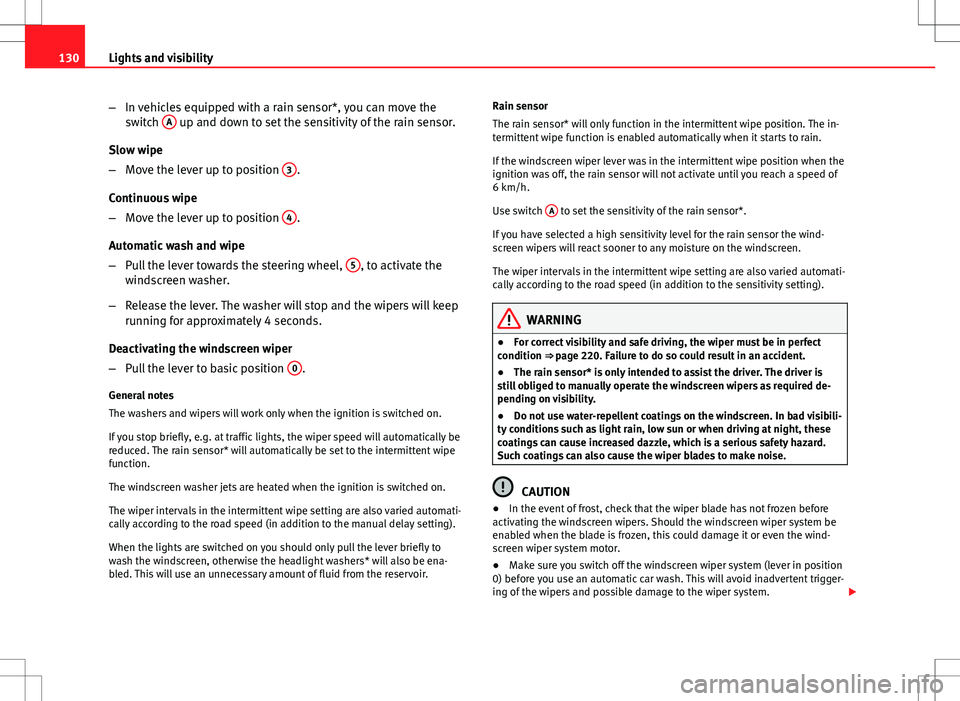
–In vehicles equipped with a rain sensor*, you can move the
switch A
up and down to set the sensitivity of the rain sensor.
Slow wipe
– Move the lever up to position 3
.
Continuous wipe
– Move the lever up to position 4
.
Automatic wash and wipe
– Pull the lever towards the steering wheel, 5
, to activate the
windscreen washer.
– Release the lever. The washer will stop and the wipers will keep
running for approximately 4 seconds.
Deactivating the windscreen wiper
– Pull the lever to basic position 0
.
General notes
The washers and wipers will work only when the ignition is switched on.
If you stop briefly, e.g. at traffic lights, the wiper speed will automatically be
reduced. The rain sensor* will automatically be set to the intermittent wipe
function.
The windscreen washer jets are heated when the ignition is switched on.
The wiper intervals in the intermittent wipe setting are also varied automati-
cally according to the road speed (in addition to the manual delay setting).
When the lights are switched on you should only pull the lever briefly to
wash the windscreen, otherwise the headlight washers* will also be ena-
bled. This will use an unnecessary amount of fluid from the reservoir. Rain sensor
The rain sensor* will only function in the intermittent wipe position. The in-
termittent wipe function is enabled automatically when it starts to rain.
If the windscreen wiper lever was in the intermittent wipe position when the
ignition was off, the rain sensor will not activate until you reach a speed of
6 km/h.
Use switch
A
to set the sensitivity of the rain sensor*.
If you have selected a high sensitivity level for the rain sensor the wind-
screen wipers will react sooner to any moisture on the windscreen.
The wiper intervals in the intermittent wipe setting are also varied automati-
cally according to the road speed (in addition to the sensitivity setting).
WARNING
● For correct visibility and safe driving, the wiper must be in perfect
condition ⇒ page 220. Failure to do so could result in an accident.
● The rain sensor* is only intended to assist the driver. The driver is
still obliged to manually operate the windscreen wipers as required de-
pending on visibility.
● Do not use water-repellent coatings on the windscreen. In bad visibili-
ty conditions such as light rain, low sun or when driving at night, these
coatings can cause increased dazzle, which is a serious safety hazard.
Such coatings can also cause the wiper blades to make noise.
CAUTION
● In the event of frost, check that the wiper blade has not frozen before
activating the windscreen wipers. Should the windscreen wiper system be
enabled when the blade is frozen, this could damage it or even the wind-
screen wiper system motor.
● Make sure you switch off the windscreen wiper system (lever in position
0) before you use an automatic car wash. This will avoid inadvertent trigger-
ing of the wipers and possible damage to the wiper system.
Page 174 of 325
172Driving
Driving
SteeringAdjusting the steering wheel position
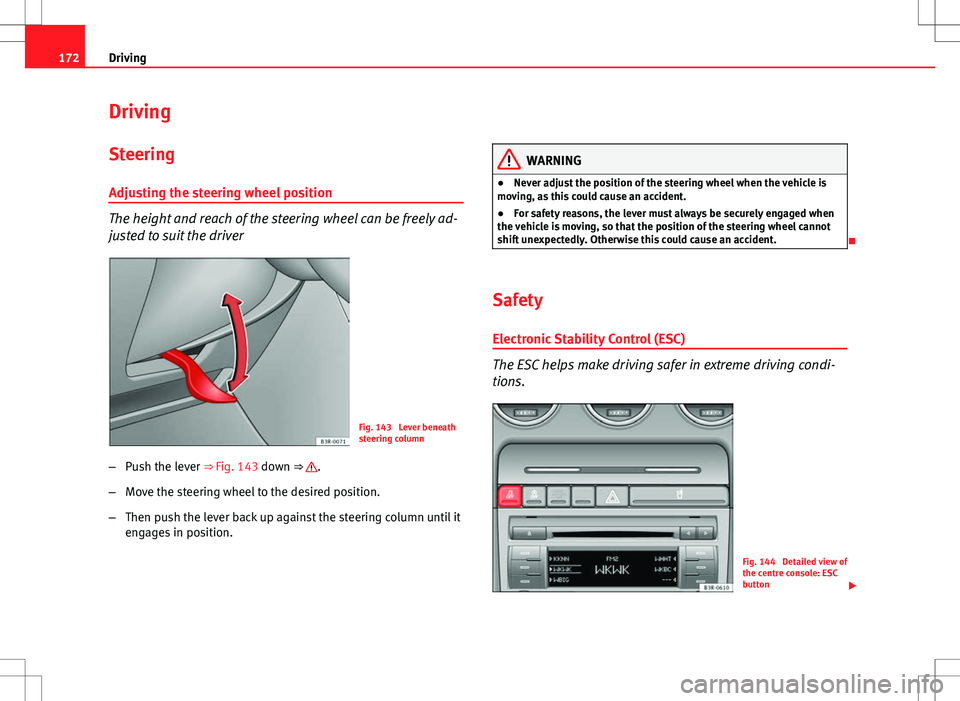
The height and reach of the steering wheel can be freely ad-
justed to suit the driver
Fig. 143 Lever beneath
steering column
– Push the lever ⇒ Fig. 143 down ⇒
.
– Move the steering wheel to the desired position.
– Then push the lever back up against the steering column until it
engages in position.
WARNING
● Never adjust the position of the steering wheel when the vehicle is
moving, as this could cause an accident.
● For safety reasons, the lever must always be securely engaged when
the vehicle is moving, so that the position of the steering wheel cannot
shift unexpectedly. Otherwise this could cause an accident.
Safety Electronic Stability Control (ESC)
The ESC helps make driving safer in extreme driving condi-
tions.
Fig. 144 Detailed view of
the centre console: ESC
button
Page 176 of 325

174Driving
Position 1
The ignition key is inserted in this position. To
engage the steering wheel
lock, take out the key and turn the wheel until you hear the pin engage. You
should always engage the steering lock when you leave the vehicle. This
will help to deter thefts ⇒
.
Switching on the ignition/pre-heating glow plugs 2
If the key is difficult to turn in the lock, move the steering wheel (to take the
load off the steering lock mechanism) until the key turns freely. In the case
of vehicles with a diesel engine, the key is turned to this position to preheat
the glow plugs.
Starting the engine 3
The engine is started in this position. Electrical components with a high
power consumption are switched off temporarily.
After the engine has started, the ignition key returns to position 2
by itself.
The ignition key has to be turned back to position 1
before re-starting the
engine. The starter inhibitor in the ignition lock prevents the starter motor
from engaging when the engine is running, as this could cause damage.
Switching off the ignition 1
Turn the ignition key to this position.
WARNING
● Never remove the ignition key until the vehicle is stationary! Other-
wise the steering lock could engage suddenly, which could cause an acci-
dent.
● Always take the key with you when leaving the vehicle, even if you
only intend to be gone for a short time. This is particularly important if
there are children in the vehicle, as they might otherwise be able to start
the engine or use power-operated equipment (e.g. the electric windows),
which could cause injuries.
Note
● If the battery has been disconnected and then reconnected, it will be
necessary to leave the key in position 2
for about 5 seconds before start-
ing the engine.
● Vehicles with automatic gearbox: After switching off the ignition, you
can only remove the ignition key if the selector lever is in position “P” (park-
ing lock). The selector lever is locked after the ignition key has been re-
moved.
Starting and stopping the engine Starting the engine
The engine can only be started with an original SEAT key.
Fig. 146 Ignition key po-
sitions
Vehicles with a petrol engine:
– Use the foot brake.
Page 178 of 325
176Driving
WARNING
● Never switch the engine off until the vehicle is stationary.
● The brake servo and the power steering system work only when the
engine is running. You need more strength to steer and brake the vehicle
when the engine is switched off. Given that you will be unable to steer
and brake as usual, this could lead to a risk of accidents and injuries.
CAUTION
If the engine has been running under high load for a long time, there is a
risk of heat building up in the engine compartment after the engine has
been switched off; this could cause engine damage. Therefore, you should
let the engine idle for approximately 2 minutes before you switch it off.
Note
After the engine is switched off the radiator fan may run on for up to 10 mi-
nutes, even if the ignition is switched off. It may also start running again af-
ter some time if the coolant temperature rises due to a build-up of heat un-
der the bonnet, or if the engine is already warm and the engine compart-
ment is heated up further by direct sunlight.
Start-Stop function* Description and operation
The Start-Stop function stops the engine when the vehicle is stop-
ped and starts it automatically when required.
– When the vehicle is stopped, put it in neutral and release the
clutch pedal. The engine will stop. –
When the clutch pedal is pressed, the engine starts again.
– The instrument panel screen displays information about the sta-
tus of the Start-Stop function ⇒ Fig. 148.
Start-Stop function conditions
● The driver seat belt must be buckled.
● The engine hood must be closed.
● The engine must be at operating temperature
● The steering wheel must not be turned more than 270°.
● The vehicle must not be on a steep gradient.
● The vehicle must not be in reverse.
● A trailer must not be connected.
● The temperature of the passenger compartment must be within the con-
venience limits ( ECON
button should not be selected).
● The windscreen de-mist function must be off.
● Otherwise it requires more than 50% of the airflow that the fan can sup-
ply.
● The temperature must not be set to HI or LO.
● The driver door must be closed.
● The diesel particulate filter must not be in regeneration mode, for diesel
engines.
● The battery charge must not be low for the next start.
● The battery temperature must be between –1°C and 60°C.
Start-Stop function interruption
In the following situations, the Start-Stop function will be interrupted and
the engine will automatically start:
● The vehicle starts moving.
● The brake pedal is pressed several times in a row.
● The battery has been discharged excessively.
Page 179 of 325
177
Driving
● The Start-Stop System is manually deactivated.
● The windscreen de-mist function is turned on.
● The temperature of the passenger compartment exceeds the comfort
limits (button ECON
should not be selected).
● If more than 50% of the airflow that the fan can supply is ordered.
● Temperature setting HI or LO is selected.
● The engine coolant temperature is insufficient.
● The alternator is faulty, for example the V-belt has ruptured.
● If any of the conditions described in the previous section are not fulfil-
led.
WARNING
Never allow the vehicle to move with the engine off for any reason. You
could lose control of your vehicle. This could cause an accident and seri-
ous injury.
● Power steering does not work when the engine is not running. That is
why it is much more difficult to turn the steering wheel.
● Disconnect the Start-Stop system when driving through water (ford-
ing streams, etc.).
Note
● For vehicles with the Start-Stop function and a manual gearbox, when
the engine is started, the clutch must be pressed.
● When the conditions for the Start-Stop function are not fulfilled, the in-
strument panel displays the Start-Stop indicator dimmed.
● If the steering wheel is turned more than 270°, Stop will not function;
however, the angle of steering wheel turn does not affect starting the vehi-
cle. Activating and deactivating the Start-Stop function
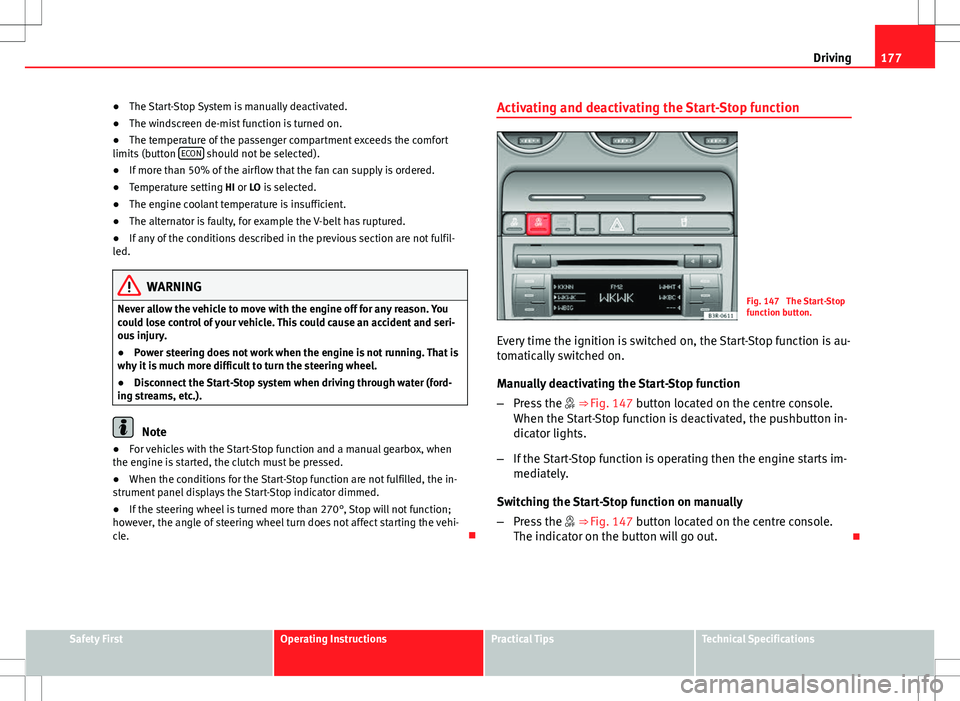
Fig. 147 The Start-Stop
function button.
Every time the ignition is switched on, the Start-Stop function is au-
tomatically switched on.
Manually deactivating the Start-Stop function
– Press the ⇒ Fig. 147 button located on the centre console.
When the Start-Stop function is deactivated, the pushbutton in-
dicator lights.
– If the Start-Stop function is operating then the engine starts im-
mediately.
Switching the Start-Stop function on manually
– Press the ⇒ Fig. 147 button located on the centre console.
The indicator on the button will go out.
Safety FirstOperating InstructionsPractical TipsTechnical Specifications
Page 182 of 325
180Driving
Releasing the handbrake
–Pull the lever up slightly and at the same time press in the re-
lease button ⇒ Fig. 152 (arrow).
– Keep the release button pressed and push the lever all the way
down ⇒
.
If you drive by mistake with the handbrake still applied, you will hear a
warning buzzer and the display will show the message: Handbrake on
The handbrake warning switches on after driving for 3 seconds at speeds
above 5 km/h.
The handbrake warning lamp lights up when the handbrake is applied
with the ignition on.
WARNING
Please note that the handbrake should be released all the way. If it is on-
ly partially released, this will cause rear brakes overheating, which can
impair the function of the brake system and could lead to an accident.
CAUTION
Once the vehicle has come to a standstill, always apply the handbrake firm-
ly and then, on a manual gearbox, engage a gear, or select P on an auto-
matic. Parking
The following points will ensure there is no risk of the vehi-
cle rolling away accidentally after it is parked:
– Use the foot brake to stop the vehicle.
– Apply the handbrake firmly.
– Switch the engine off.
– On a manual gearbox engage 1st gear or on an automatic move
the selector lever to P ⇒
.
When parking on slopes:
Turn the steering wheel so that the, if the vehicle moves, it will do so to-
wards the curb.
WARNING
● Do not leave anyone (especially children) in the vehicle when it is
locked. Locked doors could delay assistance in an emergency, potentially
putting lives at risk.
● Never leave children unsupervised in the vehicle. They could release
e.g. the handbrake or gear lever, moving the vehicle and causing an acci-
dent.
Page 195 of 325
193
Driving
If you select a gear which is lower than the gear shown on the instrument
panel display ⇒ Fig. 161, the gearbox will only shift down when there is no
longer a risk of over-revving the engine.
When the vehicle slows down (for instance when braking), the gearbox au-
tomatically shifts down into the next gear when the minimum engine speed
is reached.
Changing down to a lower gear increases the engine braking effect on
downhill gradients.
When the accelerator pedal is pressed right down past the point of resist-
ance at full throttle, the gearbox will select a lower gear ratio, depending on
road speed and engine speed.
Back-up programme
A back-up system is in place if a fault should occur in the
control system.
The automatic gearbox switches to the back-up programme if a fault should
occur in the control system. This is indicated by a gear pinion symbol which
lights up on the instrument panel display.
It is still possible to move the selector lever to all positions. The manual
shift programme (tiptronic) is not available when the back-up programme is
active.
Vehicles with tiptronic gearbox: When the selector lever is in position D or S
or in the manual shift programme, the gearbox will remain in 3rd gear if 1st,
2nd or 3rd gears were engaged when the fault occurred. The gearbox will
remain in 5th gear if 4th, 5th or 6th gears were engaged. The gearbox will
then engage 3rd gear when you drive away from a standstill or after the en-
gine is restarted. It will still be possible to use reverse gear in the normal way. However, the
electronic lock for reverse gear will be switched off.
CAUTION
Should the gearbox ever switch into the back-up programme, you should
take the vehicle to a technical service or specialised workshop as soon as
possible.
Steering wheel with paddle levers
The paddle levers on the steering wheel enable the driver to
manually select pre-programmed ratios or gears.
Fig. 162 Steering wheel:
tiptronic controls
– Briefly pull the left-hand paddle lever –
to change down to a
lower gear.
– Briefly pull the right-hand paddle lever +
to change up to a
higher gear.
Safety FirstOperating InstructionsPractical TipsTechnical Specifications
Page 197 of 325
195
Intelligent technology
Practical Tips Intelligent technology
Electronic Stability Control (ESC)
General Observations
The Electronic Stability Control increases the vehicle's stabil-
ity on the road.
Fig. 163 Centre console
with ESC switch
The ESC is designed to increase the degree of control in situations where
the vehicle approaches the limits of adhesion, especially when accelerating
and cornering. It reduces the risk of skidding and improves stability in all
road conditions. The system is active across the entire speed range. The anti-lock brake system (ABS), the electronic differential lock (EDL) and
the traction control system (ASR) are all integrated into the Electronic Stabil-
ity Control.
How it works
The ESC control unit processes data from the three integrated systems. It al-
so processes additional inputs provided by other high-precision sensors.
These register the vehicle's rotation about the vertical axis (yaw rate), later-
al acceleration, brake pressure and steering wheel angle.
The system uses the steering wheel angle and road speed to calculate the
changes of direction desired by the driver, and constantly compares them
with the actual behaviour of the vehicle. If the desired course is not being
maintained (for instance, if the vehicle is starting to skid), then the ESC
compensates automatically by braking the appropriate wheel.
The forces acting on the braked wheel bring the vehicle back to a stable
condition. If the vehicle
over swerves (tendency of the rear to leave the
road), the brakes will act on the front wheel facing the outside of the bend.
If the vehicle under swerves (tendency to leave the bend), the braking force
is applied to the rear wheel facing the inside of the bend.
The ESC works in conjunction with the ABS ⇒ page 196. If a malfunction
should occur in the ABS, the ESC will also stop working.
Deactivating
The ESC is activated automatically when the engine is started and performs
a self-test routine.
The ESC cannot be deactivated.
Safety FirstOperating InstructionsPractical TipsTechnical Specifications
Page 201 of 325
199
Intelligent technology
Faults in the brake system
If the brake pedal travel should ever increase suddenly, this may mean that
one of the two brake circuits has failed. Drive immediately to the nearest
specialised workshop and have the fault repaired. Drive there slowly and re-
member that you will have to apply more pressure on the brake pedal and
allow for longer stopping distances.
Low brake fluid level
Malfunctions can occur in the brake system if the brake fluid level is too
low. The brake fluid level is monitored electronically.
WARNING
When applying the brakes to clean off deposits on the pads and discs,
select a clear, dry road. Be sure not to inconvenience or endanger other
road users. Risk of accident.
CAUTION
● Never let the brakes “drag” by leaving your foot on the pedal when it is
not necessary to brake. This overheats the brakes, resulting in longer stop-
ping distances and greater wear.
● Before driving down a long, steep gradient, it is advisable to reduce
speed and change to a lower gear (or move the gear lever to a lower gear
position if your vehicle has automatic transmission). This makes use of en-
gine braking and prolongs the service life of the brakes. If you still have to
use the brakes, it is better to brake firmly at intervals than to apply the
brakes continuously.
Note
If you wish to equip the vehicle with accessories such as a front spoiler or
wheel covers, it is important that the flow of air to the front wheels is not
obstructed, otherwise the brakes can overheat. Brake servo
The brake servo assists the driver when braking
The brake servo increases the pressure you apply to the brake pedal. The
brake servo works only when the engine is running.
WARNING
Ensure the vehicle does not move while in neutral, when the engine is
stopped. Failure to do so could result in an accident.
Note
If the brake servo is not working, e.g. because the vehicle has to be towed
or because it is broken, you will have to press the brake pedal considerably
harder to make up for the lack of servo assistance.
Power steering
Power steering makes it easier to turn the steering wheel
when the engine is running. Power steering assists the driver by reducing the force needed to turn the
steering wheel.
Power steering does not work if the engine is off. In this case the steering
wheel requires much more force to turn.
If the steering is held at its turning limit when the vehicle is stationary, this
will place an excessive load on the power steering system. Turning the
steering wheel to its limit places a load on the system, which causes noise.
It will also reduce the idling speed of the engine.
Safety FirstOperating InstructionsPractical TipsTechnical Specifications