ignition Seat Exeo ST 2012 Workshop Manual
[x] Cancel search | Manufacturer: SEAT, Model Year: 2012, Model line: Exeo ST, Model: Seat Exeo ST 2012Pages: 325, PDF Size: 5.56 MB
Page 132 of 325
130Lights and visibility
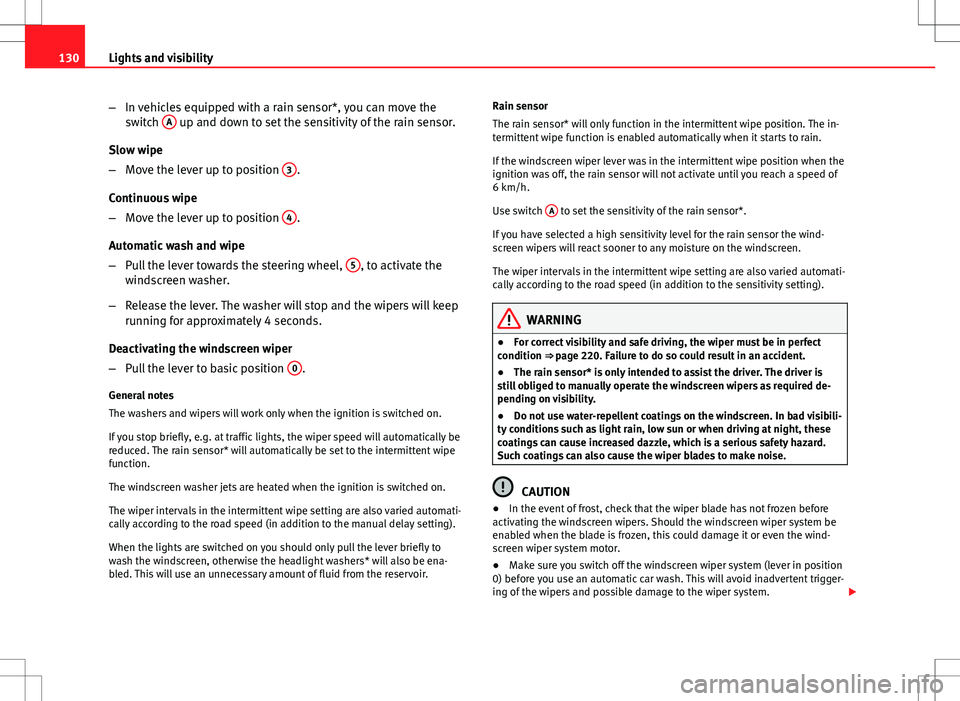
–In vehicles equipped with a rain sensor*, you can move the
switch A
up and down to set the sensitivity of the rain sensor.
Slow wipe
– Move the lever up to position 3
.
Continuous wipe
– Move the lever up to position 4
.
Automatic wash and wipe
– Pull the lever towards the steering wheel, 5
, to activate the
windscreen washer.
– Release the lever. The washer will stop and the wipers will keep
running for approximately 4 seconds.
Deactivating the windscreen wiper
– Pull the lever to basic position 0
.
General notes
The washers and wipers will work only when the ignition is switched on.
If you stop briefly, e.g. at traffic lights, the wiper speed will automatically be
reduced. The rain sensor* will automatically be set to the intermittent wipe
function.
The windscreen washer jets are heated when the ignition is switched on.
The wiper intervals in the intermittent wipe setting are also varied automati-
cally according to the road speed (in addition to the manual delay setting).
When the lights are switched on you should only pull the lever briefly to
wash the windscreen, otherwise the headlight washers* will also be ena-
bled. This will use an unnecessary amount of fluid from the reservoir. Rain sensor
The rain sensor* will only function in the intermittent wipe position. The in-
termittent wipe function is enabled automatically when it starts to rain.
If the windscreen wiper lever was in the intermittent wipe position when the
ignition was off, the rain sensor will not activate until you reach a speed of
6 km/h.
Use switch
A
to set the sensitivity of the rain sensor*.
If you have selected a high sensitivity level for the rain sensor the wind-
screen wipers will react sooner to any moisture on the windscreen.
The wiper intervals in the intermittent wipe setting are also varied automati-
cally according to the road speed (in addition to the sensitivity setting).
WARNING
● For correct visibility and safe driving, the wiper must be in perfect
condition ⇒ page 220. Failure to do so could result in an accident.
● The rain sensor* is only intended to assist the driver. The driver is
still obliged to manually operate the windscreen wipers as required de-
pending on visibility.
● Do not use water-repellent coatings on the windscreen. In bad visibili-
ty conditions such as light rain, low sun or when driving at night, these
coatings can cause increased dazzle, which is a serious safety hazard.
Such coatings can also cause the wiper blades to make noise.
CAUTION
● In the event of frost, check that the wiper blade has not frozen before
activating the windscreen wipers. Should the windscreen wiper system be
enabled when the blade is frozen, this could damage it or even the wind-
screen wiper system motor.
● Make sure you switch off the windscreen wiper system (lever in position
0) before you use an automatic car wash. This will avoid inadvertent trigger-
ing of the wipers and possible damage to the wiper system.
Page 135 of 325

133
Lights and visibility
Switching off the anti-dazzle function
– Press button A
⇒ Fig. 102. Indicator lamp B goes off.
Switching on the anti-dazzle function
– Press button A
⇒ Fig. 102. Indicator lamp B turns on.
Anti-dazzle function
The anti-dazzle function is activated every time the ignition is switched on.
The green indicator lamp lights up in the mirror housing.
When the anti-dazzle function is enabled, the interior mirror will darken au-
tomatically according to the amount of light it receives. The anti-dazzle
function is disabled if:
● the interior lighting is switched on
● reverse gear is engaged
Sensors for automatic headlights*
When the light switch is set to the AUTO position, the dipped beam head-
lights are switched on and off automatically according to the ambient light
level with the aid of the sensors located in the interior mirror ⇒ page 118.
WARNING
Electrolyte fluid can leak from a broken mirror. This fluid can cause irrita-
tion to the skin, eyes and respiratory organs. Wash thoroughly with clean
water should you come into contact with this fluid. Seek medical assis-
tance if needed!
CAUTION
Electrolyte fluid leaking from a broken mirror can cause damage to plastic
surfaces. Use a sponge or similar to remove the fluid as soon as possible.
Note
● The interior mirror automatic anti-dazzle function* will only work proper-
ly if the sun blind* for the rear window is retracted and if there are no other
objects preventing light from reaching the mirror.
● If you have to stick any type of sticker on the windscreen, do not do so in
front of the sensors. Doing so could prevent the automatic headlight or anti-
dazzle function from working correctly or even from working at all.
Exterior mirrors
The exterior mirrors are adjusted electrically.
Fig. 103 Detailed view of
the armrest: Adjuster
knob
Adjusting the exterior mirrors
– Turn the adjuster knob to position ⇒
Fig. 103 L
(left exterior
mirror) or position R (right exterior mirror).
– Move the knob as required to adjust the exterior mirror for a
good view behind you.
Safety FirstOperating InstructionsPractical TipsTechnical Specifications
Page 140 of 325
138Seats and storage compartments
Controls
Seat adjustment
Backrest adjustment
Lumbar support*
WARNING
● The electrical seat adjustment also works when the ignition is off or
when the key is not in the ignition. To avoid accidental injuries, never
leave children unattended in the vehicle.
● For safety reasons, the seat must only be adjusted when the vehicle
is at a standstill. Failure to do so could result in an accident.
● Be careful when adjusting the seat height. Injuries can be caused if
the seat height is adjusted without due care and attention.
Adjusting the backrest angle
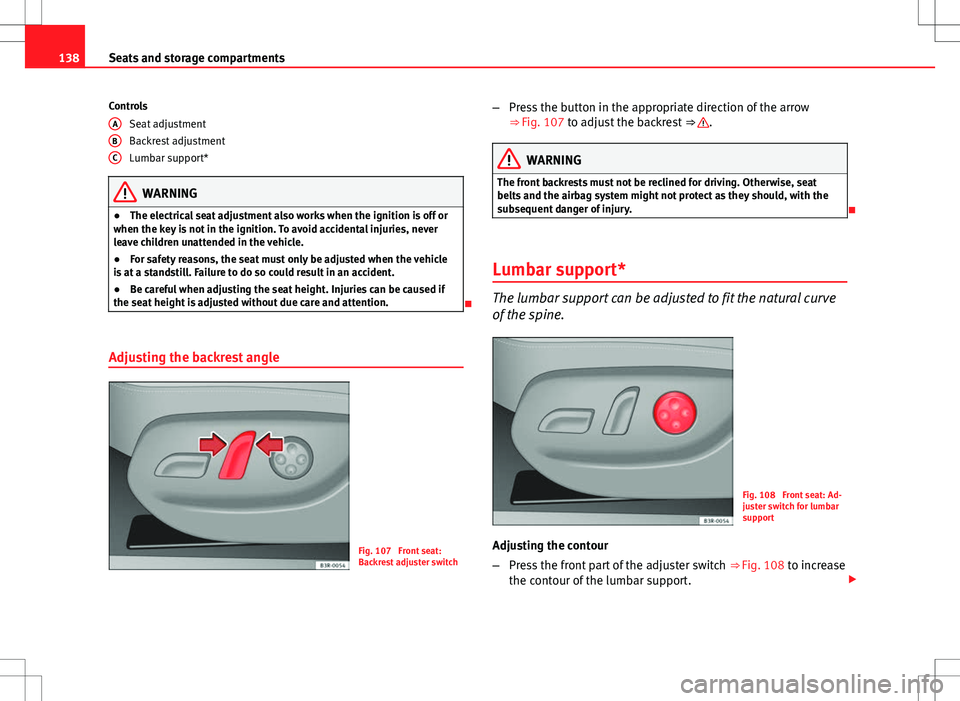
Fig. 107 Front seat:
Backrest adjuster switch
A
BC
–
Press the button in the appropriate direction of the arrow
⇒ Fig. 107 to adjust the backrest ⇒ .
WARNING
The front backrests must not be reclined for driving. Otherwise, seat
belts and the airbag system might not protect as they should, with the
subsequent danger of injury.
Lumbar support*
The lumbar support can be adjusted to fit the natural curve
of the spine.
Fig. 108 Front seat: Ad-
juster switch for lumbar
support
Adjusting the contour
– Press the front part of the adjuster switch ⇒
Fig. 108 to increase
the contour of the lumbar support.
Page 158 of 325
156Seats and storage compartments
Using the cigarette lighter
–Press in the cigarette lighter button.
– Wait for the lighter to pop out slightly.
– Pull out the cigarette lighter immediately.
– Use the glowing heater element of the cigarette lighter to light
your cigarette.
– Put the cigarette lighter back in its socket.
Operating the socket
– Take out the cigarette lighter.
– Insert the plug of the electrical appliance into the cigarette
lighter socket.
The cigarette lighter ⇒ Fig. 133 employs a standard 12 volt socket, which can also be used as a power source for electrical appliances. The applian-
ces connected to the socket must not exceed a power rating of 100 W.
WARNING
● Be careful when using the electric cigarette lighter. Carelessness or
negligence when using the cigarette lighter can cause burns.
● The lighter will only work when the ignition is switched on.
● The electrical sockets and, therefore, any appliances connected to
them will only work when the ignition is switched on.
CAUTION
Always use the correct type of plugs to avoid damaging the sockets.
Note
The use of electrical appliances with the engine switched off will cause a
battery discharge.
Electric socket in the luggage compartment*
Electrical equipment can be connected to the 12 volt socket.
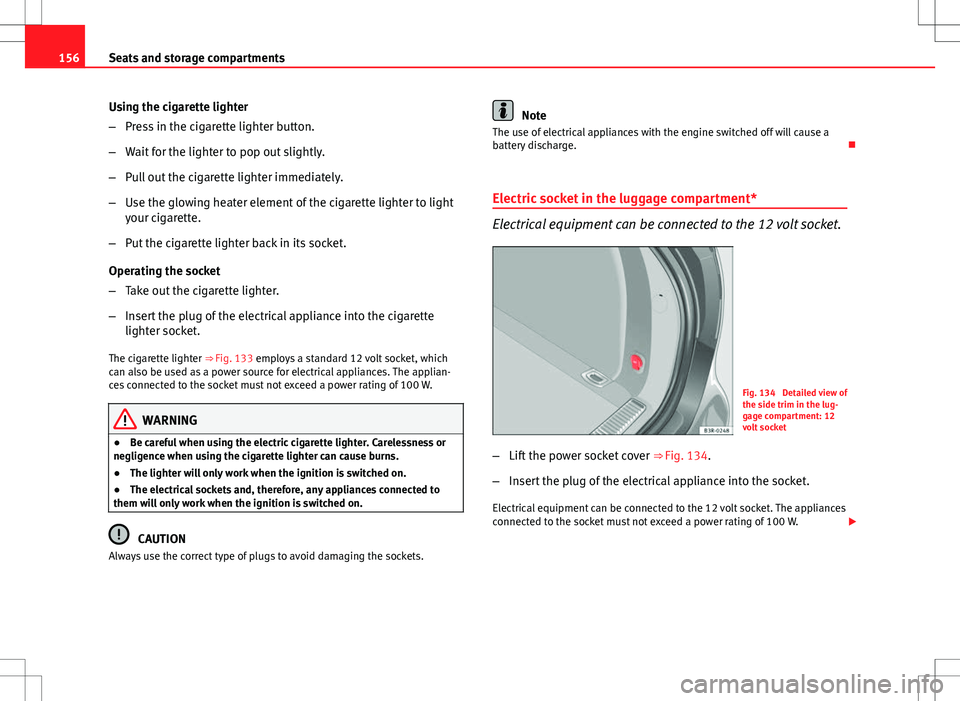
Fig. 134 Detailed view of
the side trim in the lug-
gage compartment: 12
volt socket
– Lift the power socket cover ⇒
Fig. 134.
– Insert the plug of the electrical appliance into the socket.
Electrical equipment can be connected to the 12 volt socket. The appliances
connected to the socket must not exceed a power rating of 100 W.
Page 159 of 325
157
Seats and storage compartments
WARNING
The power points, and any accessories connected to them are also func-
tional with the ignition switched off or the key removed. To avoid the risk
of injury, never leave children unsupervised in the vehicle.
CAUTION
Always use the correct type of plugs to avoid damaging the sockets.
Note
The use of electrical appliances with the engine switched off will cause a
battery discharge.
230 volt socket for Europlug*
Electrical equipment can also be connected to the 230 volt
socket in the centre console.
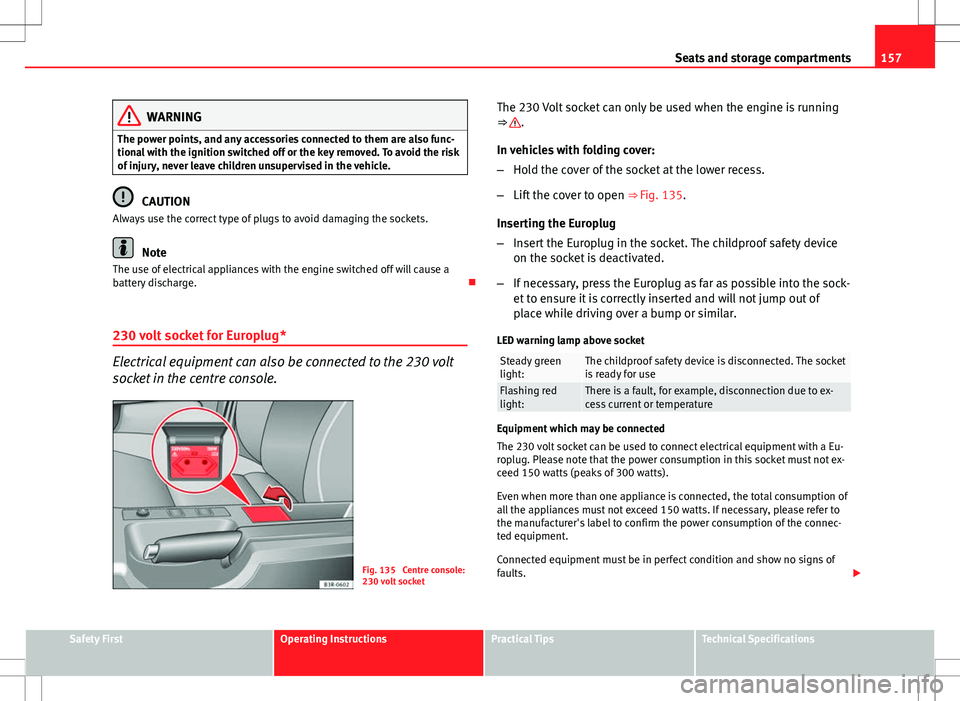
Fig. 135 Centre console:
230 volt socket The 230 Volt socket can only be used when the engine is running
⇒
.
In vehicles with folding cover:
– Hold the cover of the socket at the lower recess.
– Lift the cover to open ⇒ Fig. 135.
Inserting the Europlug
– Insert the Europlug in the socket. The childproof safety device
on the socket is deactivated.
– If necessary, press the Europlug as far as possible into the sock-
et to ensure it is correctly inserted and will not jump out of
place while driving over a bump or similar.
LED warning lamp above socket
Steady green
light:The childproof safety device is disconnected. The socket
is ready for use
Flashing red
light:There is a fault, for example, disconnection due to ex-
cess current or temperature
Equipment which may be connected
The 230 volt socket can be used to connect electrical equipment with a Eu-
roplug. Please note that the power consumption in this socket must not ex-
ceed 150 watts (peaks of 300 watts).
Even when more than one appliance is connected, the total consumption of
all the appliances must not exceed 150 watts. If necessary, please refer to
the manufacturer's label to confirm the power consumption of the connec-
ted equipment.
Connected equipment must be in perfect condition and show no signs of
faults.
Safety FirstOperating InstructionsPractical TipsTechnical Specifications
Page 169 of 325

167
Air conditioning
Note
If the diode on the ECON button continues to light up when the ECON mode
has been switched off (i.e. the air conditioner has been switched on) this is
due to a defect in one of the air conditioner components. If a malfunction
should occur, please contact a specialised workshop.
Air recirculation: automatic activation*
If the outside air is polluted by diesel and petrol emissions,
an air quality sensor in the vehicle will automatically switch
on the air recirculation.
Fig. 140 Button for auto-
matic air recirculation
Activating air recirculation mode
– Press the button
⇒
Fig. 140.
Deactivating air recirculation mode
– Press the
button again or –
Press the AUTO
button or
– Press button
.
The automatic air recirculation mode should normally be left switched on at
all times.
The system is ready to operate approx. 30 seconds after the engine ignition
key has been turned. During this initial period, fresh air is fed into the vehi-
cle.
If the air purity sensor in the air conditioner detects a certain concentration
of fumes in the outside air, the control unit will either pass the incoming air
through the pollution filter or automatically switch on the air recirculation. If
there is a high concentration of pollution in the outside air, the air condi-
tioner automatically switches to air recirculation and the supply of air from
the outside is cut off. As soon as the level of pollution decreases, air is fed
into the vehicle from the outside again.
The automatic air recirculation operates for a maximum period of 12 mi-
nutes. If the windows mist up when the automatic air recirculation is on,
press the
button immediately.
The automatic air recirculation switches itself off under certain circumstan-
ces (for instance if
or is selected). In “ECON” and at temperatures
lower than approx. 8°C below zero, the automatic air recirculation mode is
limited to 12 seconds.
Safety FirstOperating InstructionsPractical TipsTechnical Specifications
Page 172 of 325
170Air conditioning
Air directed to windows
This setting directs all the air to outlets 1 and 2. Unlike in setting , the
volume of air delivery remains the same.
Air to the driver/front passenger
All the air comes from outlets 3 and 4 in the dash panel and from the rear of
the centre console.
Air to the footwells
Most of the air emerges from outlets 5 and the outlets under the front seats.
Some of the air will also be issued from outlets 3 and 4.
Note
In all of the above air distribution settings, a small amount of air will still
come from the other outlets.
Economical use of the air conditioner
Economical use of the air conditioner will help save fuel.
Engine power is reduced and fuel consumption increases when the
air conditioner is in cooling mode. To ensure that the system is on-
ly switched on when it is really necessary, please note the follow-
ing points:
– Select ECON mode if you wish to save fuel.
– Select ECON mode if you decide to open the windows or sun-
roof* while driving.
– If the vehicle has heated up after standing in the sun, open the
windows and doors for a short time to cool the vehicle.
For the sake of the environment
By saving fuel you also reduce the amount of pollutants emitted from your
vehicle.
Key settings
When the ignition is switched on, the air conditioner set-
tings assigned to the key are selected automatically.
The air conditioner settings selected are automatically stored and assigned
to the key in use. When the vehicle is started, the air conditioner automati-
cally selects the settings assigned to the key. Hence, every driver automati-
cally obtains his/her preferred settings without having to select them man-
ually.
Note
Should another driver use the key and enter other settings, the previous
settings will be deleted.
Solar-powered blower/sunroof*
If the vehicle is parked in sufficiently strong sunlight, the
blower will operate in solar-powered mode when the igni-
tion is switched off.
After the ignition is switched off, the blower is supplied with electrical pow-
er from the sunroof. Please ensure that outlets 3 and 4 are open ⇒ Fig. 141
to ensure the best possible ventilation.
The blower only works when the sunroof is closed or tilted open at the rear.
Page 175 of 325

173
Driving
The Electronic Stability Control (ESC) contains the electronic differential lock
(EDL) and the traction control system (ASR). The ESC works together with
the ABS. If a fault in the ABS occurs, both warning lamps light up, but if the
ESC fails, only the ESC warning lamp lights up.
The ESC system is started automatically when the engine is started.
The ESC system is always active and cannot be switched off. The ESC switch
only switches the ASR off.
The ASR can be deactivated when wheel spin is desirable.
For example:
● When driving with snow chains.
● When driving in deep snow or on loose surfaces.
● When the vehicle is stuck, to rock it backwards and forwards.
Press the button to switch the ASR back on when you no longer need wheel
spin.
Situations in which the warning lamp lights
●
On switching the ignition on, it lights up for about two seconds to carry
out a function control.
● The warning lamp will start flashing when the vehicle is moving if the
ESC or the ASR is activated.
● It will light up continuously if there is a fault in the ESC.
WARNING
● Do not forget that the electronic stability control ESC cannot defy the
laws of physics. This should be kept in mind, particularly on slippery and
wet roads and when towing a trailer.
● Always adapt your driving style to suit the condition of the roads and
the traffic situation. The greater safety provided by the ESC should not
encourage you to run any risks.
● Please refer to the corresponding warning notes on ESC in
⇒ page 195, Intelligent technology.
Ignition lock Ignition key positions
The ignition key is used to start and stop the engine.
Fig. 145 Ignition key po-
sitions
Safety FirstOperating InstructionsPractical TipsTechnical Specifications
Page 176 of 325

174Driving
Position 1
The ignition key is inserted in this position. To
engage the steering wheel
lock, take out the key and turn the wheel until you hear the pin engage. You
should always engage the steering lock when you leave the vehicle. This
will help to deter thefts ⇒
.
Switching on the ignition/pre-heating glow plugs 2
If the key is difficult to turn in the lock, move the steering wheel (to take the
load off the steering lock mechanism) until the key turns freely. In the case
of vehicles with a diesel engine, the key is turned to this position to preheat
the glow plugs.
Starting the engine 3
The engine is started in this position. Electrical components with a high
power consumption are switched off temporarily.
After the engine has started, the ignition key returns to position 2
by itself.
The ignition key has to be turned back to position 1
before re-starting the
engine. The starter inhibitor in the ignition lock prevents the starter motor
from engaging when the engine is running, as this could cause damage.
Switching off the ignition 1
Turn the ignition key to this position.
WARNING
● Never remove the ignition key until the vehicle is stationary! Other-
wise the steering lock could engage suddenly, which could cause an acci-
dent.
● Always take the key with you when leaving the vehicle, even if you
only intend to be gone for a short time. This is particularly important if
there are children in the vehicle, as they might otherwise be able to start
the engine or use power-operated equipment (e.g. the electric windows),
which could cause injuries.
Note
● If the battery has been disconnected and then reconnected, it will be
necessary to leave the key in position 2
for about 5 seconds before start-
ing the engine.
● Vehicles with automatic gearbox: After switching off the ignition, you
can only remove the ignition key if the selector lever is in position “P” (park-
ing lock). The selector lever is locked after the ignition key has been re-
moved.
Starting and stopping the engine Starting the engine
The engine can only be started with an original SEAT key.
Fig. 146 Ignition key po-
sitions
Vehicles with a petrol engine:
– Use the foot brake.
Page 177 of 325
175
Driving
– Manual gearbox: Push the clutch pedal all the way down.
– Move the gear lever into neutral (automatic gearbox: selector
lever to P or N) ⇒
.
– Turn the ignition key to position 3
without pressing the accel-
erator.
– Release the ignition key as soon as the engine starts (the start-
er motor must not be allowed to run on with the engine).
Vehicles with a diesel engine:
– Use the foot brake.
– Manual gearbox: Push the clutch pedal all the way down. Other-
wise, the engine will not start.
– Move the gear lever into neutral (automatic gearbox: selector
lever to P or N) ⇒
.
– Turn the ignition key to position 2
. The pre-heating indicator
light comes on while the glow plugs are preheating.
– When the indicator light goes out, turn the ignition key to
position 3
. Do not press the accelerator.
– Having completed the previous action the key can be released
immediately, it will return to position 2
and the engine will
have started.
When starting a very cold engine, it may be a little noisy for the first few sec-
onds until oil pressure has built up in the hydraulic valve compensators.
This is quite normal, and no cause for concern.
If the engine fails to start straight away, stop after 10 seconds and try again
after about half a minute. Glow plug system*
To assist starting at low temperatures,
diesel engines are equipped with a
glow plug preheating system. The preheating time depends on the coolant
temperature and the outside temperature. Start the engine as soon as the
glow plug indicator light goes out.
When the engine is warm or at outside temperatures above +8°C the glow
plug indicator lamp will only light up for about one second. This means that
the engine can be started immediately.
If the engine will not start...
● ⇒ page 293
● ⇒ page 297
● ⇒ page 230, Refuelling
WARNING
Never run the engine in confined spaces, as the exhaust gases are poi-
sonous.
CAUTION
Avoid high engine speeds, full throttle and extreme load conditions until
the engine has reached its normal operating temperature, otherwise this
can damage the engine.
For the sake of the environment
Do not warm up the engine by running the engine with the vehicle station-
ary. Start immediately. This will help avoid unnecessary exhaust emissions.
Stopping the engine
– Turn the ignition key to position 1 ⇒ Fig. 146.
Safety FirstOperating InstructionsPractical TipsTechnical Specifications