infotainment Seat Ibiza 2017 MEDIA SYSTEM PLUS - NAVI SYSTEM
[x] Cancel search | Manufacturer: SEAT, Model Year: 2017, Model line: Ibiza, Model: Seat Ibiza 2017Pages: 88, PDF Size: 2.34 MB
Page 21 of 88
Audio and Media Mode
Digital radio mode (DAB, DAB+ and
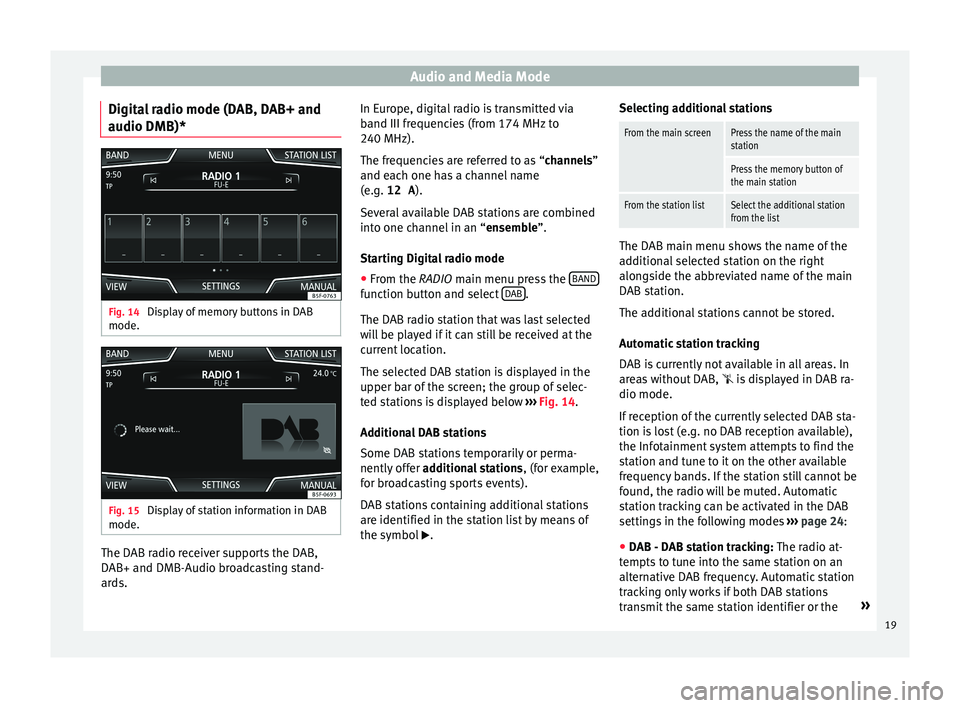
audio DMB)* Fig. 14
Display of memory buttons in DAB
mode. Fig. 15
Display of station information in DAB
mode. The DAB radio receiver supports the DAB,
D
AB+ and DMB-Audio br
o
adcasting stand-
ards. In Europe, digital radio is transmitted via
band III frequenc
ies (from 174 MHz to
240 MHz).
The frequencies are referred to as “channels”
and each one has a channel name
(e.g. 12 A ).
Several available DAB stations are combined
into one channel in an “ensemble”.
Starting Digital radio mode ● From the RADIO main menu pre
ss the BAND function button and select
D
AB .
The D AB r
a
dio station that was last selected
will be played if it can still be received at the
current location.
The selected DAB station is displayed in the
upper bar of the screen; the group of selec-
ted stations is displayed below ››› Fig. 14.
Additional DAB stations
Some DAB stations temporarily or perma-
nently offer additional stations , (for example,
for broadcasting sports events).
DAB stations containing additional stations
are identified in the station list by means of
the symbol . Selecting additional stations
From the main screenPress the name of the main
station
Press the memory button of
the main station
From the station listSelect the additional station
from the list
The DAB main menu shows the name of the
ad
dition
al selected station on the right
alongside the abbreviated name of the main
DAB station.
The additional stations cannot be stored.
Automatic station tracking
DAB is currently not available in all areas. In
areas without DAB,
is displayed in DAB ra-
dio mode.
If reception of the currently selected DAB sta-
tion is lost (e.g. no DAB reception available),
the Infotainment system attempts to find the
station and tune to it on the other available
frequency bands. If the station still cannot be
found, the radio will be muted. Automatic
station tracking can be activated in the DAB
settings in the following modes ›››
page 24:
● DAB - DAB station tracking: The ra dio at
-
tempts to tune into the same station on an
alternative DAB frequency. Automatic station
tracking only works if both DAB stations
transmit the same station identifier or the »
19
Page 23 of 88
Audio and Media ModeFunctions of the memory buttons
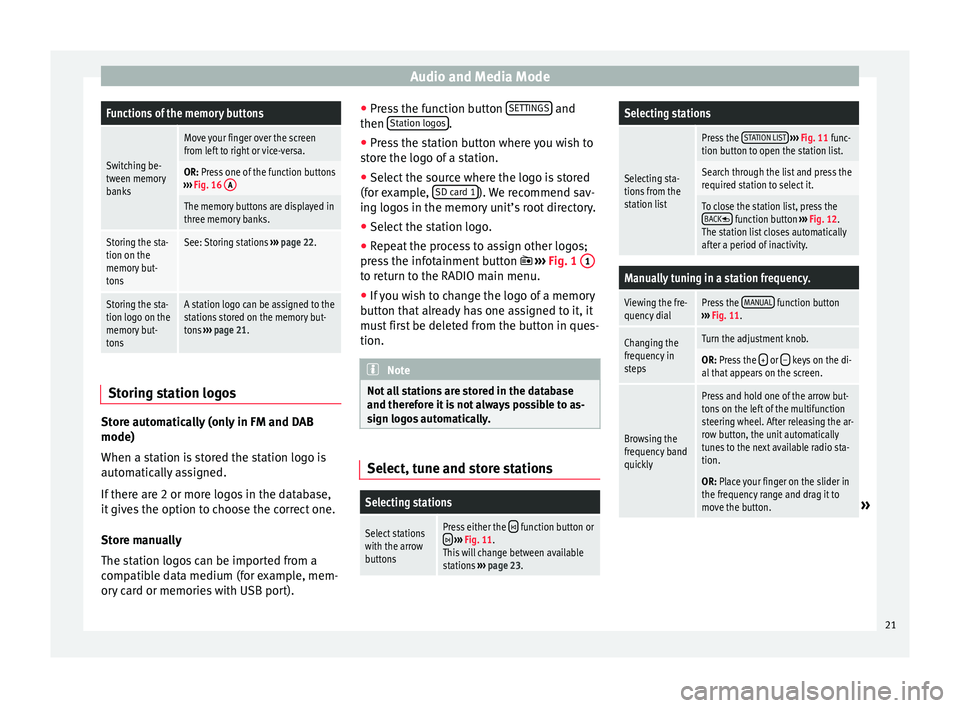
Switching be-
tween memory
banks
Move your finger over the screen
from left to right or vice-versa.
OR: Press one of the function buttons
››› Fig. 16 A
The memory buttons are displayed in
three memory banks.
Storing the sta-
tion on the
memory but-
tonsSee: Storing stations
››› page 22.
Storing the sta-
tion logo on the
memory but-
tonsA station logo can be assigned to the
stations stored on the memory but-
tons ››› page 21. Storing station logos
Store automatically (only in FM and DAB
mode)
When a s
t
ation i
s stored the station logo is
automatically assigned.
If there are 2 or more logos in the database,
it gives the option to choose the correct one.
Store manually
The station logos can be imported from a
compatible data medium (for example, mem-
ory card or memories with USB port). ●
Pres
s the function button SETTINGS and
then St
ation log
o
s .
● Press the station button where you wish to
s t
or
e the logo of a station.
● Select the source where the logo is stored
(for ex
ample, SD card 1 ). We recommend sav-
in g log
o
s in the memory unit’s root directory.
● Select the station logo.
● Repeat the process to assign other logos;
pres
s the infotainment button ››› Fig. 1 1 to return to the RADIO main menu.
●
If you wish to change the logo of a memory
b utt
on th
at already has one assigned to it, it
must first be deleted from the button in ques-
tion. Note
Not all stations are stored in the database
and theref or
e it is not always possible to as-
sign logos automatically. Select, tune and store stations
Selecting stations
Select stations
with the arrow
buttonsPress either the function button or
››› Fig. 11.
This will change between available
stations ››› page 23.
Selecting stations
Selecting sta-
tions from the
station list
Press the STATION LIST
››› Fig. 11 func-
tion button to open the station list.
Search through the list and press the
required station to select it.
To close the station list, press the BACK function button ››› Fig. 12.
The station list closes automatically
after a period of inactivity.
Manually tuning in a station frequency.
Viewing the fre-
quency dialPress the MANUAL function button
››› Fig. 11.
Changing the
frequency in
stepsTurn the adjustment knob.
OR: Press the + or – keys on the di-
al that appears on the screen.
Browsing the
frequency band
quickly
Press and hold one of the arrow but-
tons on the left of the multifunction
steering wheel. After releasing the ar-
row button, the unit automatically
tunes to the next available radio sta-
tion.
OR: Place your finger on the slider in
the frequency range and drag it to
move the button.
» 21
Page 25 of 88
Audio and Media Mode
depending on the case, to the traffic news
s t
ation (E
ON).
The media mode is paused and the volume is
adjusted to the preset level ››› page 76.
The volume of the traffic announcement can
be modified with the volume control . The
adjusted volume setting will be applied to
subsequent announcements.
● Press the Cancel function button to end the
c urr
ent
traffic announcement. The TP function
remains switched on.
● OR: Press the De
activate function button to
end the c urr
ent
traffic warning and perma-
nently deactivate the TP function. This can be
reactivated in the Settings menu.
Setup (FM, AM, DAB) FM setup
Sel
ect
the FM
frequency band by pressing
the Infotainment button .
OR:Press the BAND function button and se-
l ect
the FM
frequency band.
Press the SETTINGS function button to open
the FM Settings menu.
Function button: function
Sound: Sound settings ››› page 76.
Function button: function
Scan: Scan function. When the scan function is active,
all available stations on the current frequency band are
played in sequence for approximately 5 seconds each
››› page 22.
Seek mode: To adjust settings for the buttons with the ar-
rows and . This setting applies to all frequency
bands (FM, AM and DAB).
Preset list: All stored stations on the selected fre-
quency band can be browsed with the arrow but-
tons.
Station list: All available stations on the selected fre-
quency band can be browsed with the arrow but-
tons.
Traffic programme (TP): The TP function (traffic news sta-
tion tracking) is active ››› page 22.
Delete presets: To delete all or some of the stored sta-
tions.
Station logos: To manually assign or delete the stored
station logos to and from the memory buttons
››› page 21.
Radio text: Radio Text is active
››› page 18, Radio text.
Advanced settingsa)
: Setup of the RDS (radio data system).
Autostore station logosa)
: Logos can be automatically
assigned to the stations stored on the memory but-
tons if they are available in the Infotainment sys-
tem. Also see ››› page 21.
Region for station logoa)
: Allows you to select the re-
gion (country) in which the vehicle is located. This
optimises the automatic assignment of station
logos. The option also allows the system to select
the region automatically.
Function button: function
Alternative frequency (AF)a)
: The automatic station
tracking is active. With the checkbox deactiva-
ted, the RDS regional function button remains inac-
tive (grey).
Radio Data System (RDS)a)
: The Radio Data System
(RDS) is deactivated ››› page 18. If the checkbox
is deactivated, the traffic news station functions
(TP), Radio Text, station name and programme type
will not be available.
RDS Regionala) : Setting automatic station tracking by
RDS ››› page 18.
Fixed: The unit only switches to alternative fre-
quencies for the selected station if the same re-
gional service is being broadcast.
Automatic: the unit always switches to the sta-
tion's frequency that currently offers the best
reception. As a result, regional programmes
may be interrupted.
a) This depends on the country and unit in question.
AM Setup
Select the AM frequency band by pressing
the Infotainment button .
OR: Press the BAND function button and se-
l ect
the AM
frequency band.
Press the SETTINGS function button to open
the AM Settings menu.
Function button: function
Sound: Sound settings ››› page 76.» 23
Page 26 of 88
Audio and Media ModeFunction button: function
Scan: Scan function. When the scan function is active,
all available stations on the current frequency band are
played in sequence for approximately 5 seconds each
››› page 22.
Seek mode: To adjust settings for the buttons with the ar-
rows and . This setting applies to all frequency
bands (FM, AM and DAB).
Preset list: All stored stations on the selected fre-
quency band can be browsed with the arrow but-
tons.
Station list: All available stations on the selected fre-
quency band can be browsed with the arrow but-
tons.
Traffic programme (TP): The TP function (traffic news sta-
tion tracking) is active ››› page 22.
Delete presets: To delete all or some of the stored sta-
tions.
Station logos: To assign the logos to the stations stored
on the memory buttons ››› page 21. DAB Settings
Sel
ect
the D
AB frequency band by pressing
the Infotainment button .
OR: Press the BAND function button and se-
l ect
the D
ABfrequency band.
Press the SETTINGS function button to open
the DAB Settings menu.
Function button: function
Sound: Sound settings ››› page 76.
Scan: Scan function. When the scan function is active,
all available stations on the current frequency band are
played in sequence for approximately 5 seconds each
››› page 22.
Seek mode: To adjust settings for the buttons with the ar-
rows and . This setting applies to all frequency
bands (FM, AM and DAB).
Preset list: All stored stations on the selected fre-
quency band can be browsed with the arrow but-
tons.
Station list: All available stations on the selected fre-
quency band can be browsed with the arrow but-
tons.
Traffic programme (TP): The TP function (traffic news sta-
tion tracking) is active ››› page 22.
Delete presets: To delete all or some of the stored sta-
tions.
Station logos: To assign the logos to the stations stored
on the memory buttons ››› page 21.
Radio text: Radio Text is active
››› page 18, Radio text.
Advanced settings: DAB services setup.
Autostore station logosa)
: The station logos are auto-
matically assigned when the radio stations are stor-
ed to the memory buttons ››› page 21.
DAB traffic announcements: DAB traffic announce-
ments are played in the same way as TP traffic an-
nouncements in all operating modes.
Function button: function
Other DAB announcements: DAB announcements
(news, sport, weather, warnings etc.) will interrupt
the current DAB radio mode.
DAB-DAB station tracking: automatic station tracking
within the DAB frequency range is activated.
Automatic DAB - FM switching: switching to FM fre-
quency band is allowed for automatic station track-
ing.
a) This depends on the country and unit in question. 24
Page 27 of 88
Audio and Media Mode
Media mode Intr oduction Fig. 17
Related video “M
edia sources” are audio sources contain-
in g audio fi
les on various different data stor-
age devices (e.g. CD, memory card, external MP3 player). These audio files can be played
by the Inf
otainment system via their corre-
sponding drives or audio input sockets (inter-
nal CD drive, memory card slot, AUX-IN multi-
media socket etc.).
Copyright
Audio and video files on data storage devices
are usually protected by intellectual property
rights, as per the corresponding national and
international laws. Be aware of the current le-
gal provisions! Note
● MPEG-4 HE -AA
C audio coding technology
and patents are licensed from Fraunhofer IIS.
● This product is subject to certain intellectu-
al pr
operty rights and copyrights owned by
the Microsoft Corporation. The use or distri-
bution of this type of technology outside this
product requires a licence from Microsoft or
an authorised Microsoft company.
● The infotainment system only plays undam-
aged comp
atible audio files; other files are
ignored.
● Consult the list of supported devices on the
SEAT w
ebsite. Requirements for data storage devices and files
Factory-fitted CD drives conform to safety
c
l
a
ss 1 according to DIN IEC 76 (CO)
6/ VDE 0837.
The infotainment system only accepts stand-
ard 12-cm CDs and memory cards with these dimensions: 32 mm x 24 mm x 2.1 mm or
1.4 mm.
The suppor
ted file formats listed are collec-
tively referred to below as “audio files”. A CD containing audio files of these types is refer-
red to a
s an “audio data CD”. »
25
Page 30 of 88
Audio and Media Mode
MEDIA main menu Fig. 19
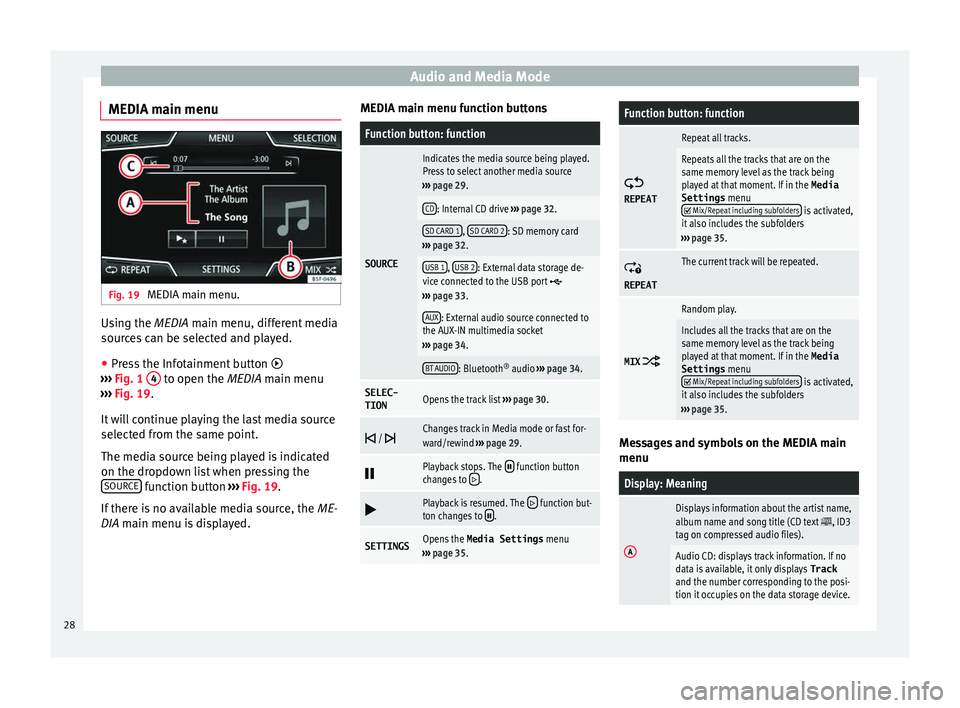
MEDIA main menu. Using the MEDIA m
ain menu, diff
er ent media
sources can be selected and played.
● Press the Infotainment button
›››
Fig. 1 4 to open the MEDIA m
ain menu
› ›
› Fig. 19.
It will continue playing the last media source
selected from the same point.
The media source being played is indicated
on the dropdown list when pressing the SOURCE function button
››
›
Fig. 19.
If there is no available media source, the ME-
DIA main menu is displayed. MEDIA main menu function buttons
Function button: function
SOURCE
Indicates the media source being played.
Press to select another media source
››› page 29.
CD: Internal CD drive ››› page 32.
SD CARD 1, SD CARD 2: SD memory card
››› page 32.
USB 1, USB 2: External data storage de-
vice connected to the USB port ››› page 33.
AUX: External audio source connected to
the AUX-IN multimedia socket
››› page 34.
BT AUDIO: Bluetooth ®
audio ››› page 34.
SELEC-
TIONOpens the track list ››› page 30.
/ Changes track in Media mode or fast for-
ward/rewind
››› page 29.
Playback stops. The function button
changes to .
Playback is resumed. The function but-
ton changes to .
SETTINGSOpens the Media Settings menu
››› page 35.
Function button: function
REPEAT
Repeat all tracks.
Repeats all the tracks that are on the
same memory level as the track being
played at that moment. If in the
Media
Settings menu
Mix/Repeat including subfolders is activated,
it also includes the subfolders
››› page 35.
REPEAT
The current track will be repeated.
MIX
Random play.
Includes all the tracks that are on the
same memory level as the track being
played at that moment. If in the Media
Settings menu
Mix/Repeat including subfolders is activated,
it also includes the subfolders
››› page 35. Messages and symbols on the MEDIA main
menu
Display: Meaning
A
Displays information about the artist name,
album name and song title (CD text , ID3
tag on compressed audio files).
Audio CD: displays track information. If no
data is available, it only displays Track
and the number corresponding to the posi-
tion it occupies on the data storage device. 28
Page 31 of 88
Audio and Media ModeDisplay: Meaning
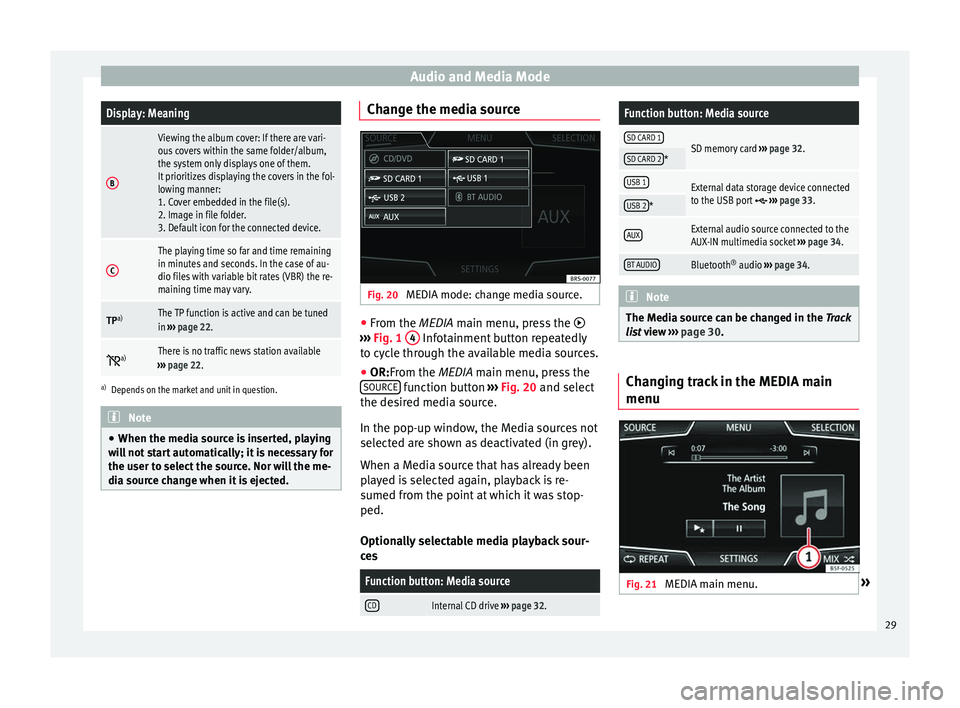
B
Viewing the album cover: If there are vari-
ous covers within the same folder/album,
the system only displays one of them.
It prioritizes displaying the covers in the fol-
lowing manner:
1. Cover embedded in the file(s).
2. Image in file folder.
3. Default icon for the connected device.
C
The playing time so far and time remaining
in minutes and seconds. In the case of au-
dio files with variable bit rates (VBR) the re-
maining time may vary.
TP
a)The TP function is active and can be tuned
in
››› page 22.
a)There is no traffic news station available
››› page 22.
a)
Depends on the market and unit in question. Note
● When the media sour c
e is inserted, playing
will not start automatically; it is necessary for
the user to select the source. Nor will the me-
dia source change when it is ejected. Change the media source
Fig. 20
MEDIA mode: change media source. ●
From the MEDIA m ain menu, pr
e
ss the
››› Fig. 1 4 Infotainment button repeatedly
t o cy
c
le through the available media sources.
● OR:From the MEDIA main menu, press the
SOURCE function button
››
›
Fig. 20 and select
the desired media source.
In the pop-up window, the Media sources not
selected are shown as deactivated (in grey).
When a Media source that has already been
played is selected again, playback is re-
sumed from the point at which it was stop-
ped.
Optionally selectable media playback sour-
ces
Function button: Media source
CDInternal CD drive ››› page 32.
Function button: Media source
SD CARD 1SD memory card ››› page 32.SD CARD 2*
USB 1External data storage device connected
to the USB port ››› page 33.USB 2*
AUXExternal audio source connected to the
AUX-IN multimedia socket ››› page 34.
BT AUDIOBluetooth ®
audio ››› page 34. Note
The Media source can be changed in the Tr ac
k
list view ››› page 30. Changing track in the MEDIA main
menu
Fig. 21
MEDIA main menu. » 29
Page 34 of 88
Audio and Media Mode
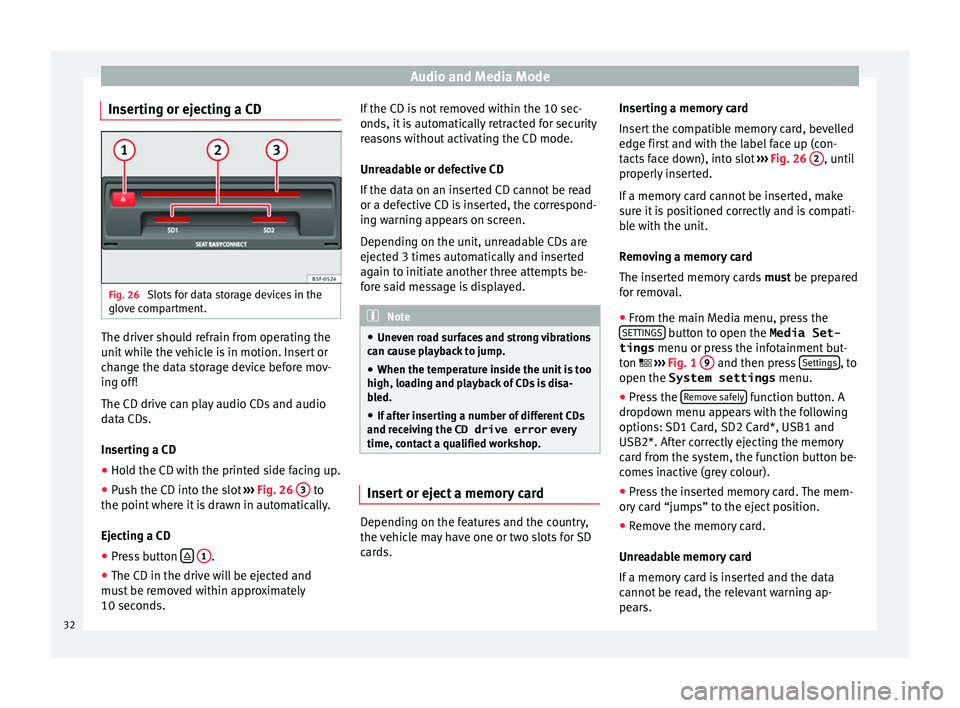
Inserting or ejecting a CD Fig. 26
Slots for data storage devices in the
glo v
e c
ompartment. The driver should refrain from operating the
u
nit
whi
le the vehicle is in motion. Insert or
change the data storage device before mov-
ing off!
The CD drive can play audio CDs and audio
data CDs.
Inserting a CD
● Hold the CD with the printed side facing up.
● Push the CD into the slot ›››
Fig. 26 3 to
the point wher
e it
is drawn in automatically.
Ejecting a CD
● Press button
1 .
● The CD in the drive will be ejected and
mu s
t
be removed within approximately
10 seconds. If the CD is not removed within the 10 sec-
onds, it i
s automatically retracted for security
reasons without activating the CD mode.
Unreadable or defective CD
If the data on an inserted CD cannot be read
or a defective CD is inserted, the correspond-
ing warning appears on screen.
Depending on the unit, unreadable CDs are
ejected 3 times automatically and inserted
again to initiate another three attempts be-
fore said message is displayed. Note
● Uneven r o
ad surfaces and strong vibrations
can cause playback to jump.
● When the temperature inside the unit is too
high, loadin
g and playback of CDs is disa-
bled.
● If after inserting a number of different CDs
and receiv
ing the CD drive error every
time, contact a qualified workshop. Insert or eject a memory card
Depending on the features and the country,
the
v
ehic
le may have one or two slots for SD
cards. Inserting a memory card
Insert
the compatible memory card, bevelled
edge first and with the label face up (con-
tacts face down), into slot ››› Fig. 26 2 , until
pr operly
in
serted.
If a memory card cannot be inserted, make
sure it is positioned correctly and is compati-
ble with the unit.
Removing a memory card
The inserted memory cards must be prepared
for removal.
● From the main Media menu, press the
SETTINGS button to open the Media Set-
tings menu or pr e
s
s the infotainment but-
ton ››› Fig. 1 9 and then press
Settin
g
s , to
open the System settings menu.
● Press the R
emo
v
e safely function button. A
dr opdo
wn menu ap
pears with the following
options: SD1 Card, SD2 Card*, USB1 and
USB2*. After correctly ejecting the memory
card from the system, the function button be-
comes inactive (grey colour).
● Press the inserted memory card. The mem-
ory c
ard “jumps” to the eject position.
● Remove the memory card.
Unrea
dable memory card
If a memory card is inserted and the data
cannot be read, the relevant warning ap-
pears.
32
Page 35 of 88
Audio and Media Mode
External data storage device connec-
t ed t
o USB por
t Depending on the features and the country,
the v
ehic
le may have one or two USB connec-
tions. For their location consult the ››› Booklet
Instruction Manual.
Audio files on an external data storage de-
vice connected to the USB port can be
played and controlled via the Infotainment
system.
Where this manual refers to external data
storage devices, this means USB mass stor-
age devices containing supported audio
files, such as MP3 players, iPods™ and USB
sticks.
Only supported audio files are displayed and
played. Other files are ignored.
Further operation of the external data medi-
um (changing track, selecting tracks and
playback modes) is described in the appro-
priate chapters of this manual ›››
page 25.
Instructions and restrictions
Compatibility with Apple™ devices and other
media players depends on the unit.
The USB port supplies the usual USB volt-
age of 5 volts for a USB connection.
External hard disks with a capacity greater
than 32 GB must be reformatted for the
FAT32 file system in some circumstances. You will find the necessary software and informa-
tion on the Internet
.
T
ake into account all other instructions and
limitations regarding requirements for media
sources ››› page 25.
iPod™, iPad™ and iPhone™
Depending on the country and the equip-
ment, iPods™, iPads™ or iPhones™ can be
connected using the device's USB cable to
the USB port of the vehicle and used as
audio sources.
After connecting an iPod™, iPad™ or
iPhone™, the specific list views of the iPod
are displayed in the upper selection level
( Playlists , Artists , Albums,
Tracks , Podcasts etc.).
Possible error messages after connecting an
external data storage device
Error mes-
sageCauseProcedure
The device
is not
compatibleThe external
data carrier
cannot be
played or com-
munication is
not possible
with the adapt-
er cable being
used.Check the connec-
tion and make sure
the external data
storage device is
working correctly.
If possible, update
the external data
storage device soft-
ware.
Error mes-
sageCauseProcedure
The device does not
workCommunication
fault.Check the connec-
tion and make sure
the external data
medium is working
correctly.
Due to the large number of different data storage devi-
ces and various iPod™, iPad™ and iPhone™ genera-
tions available, it is not possible to guarantee fault-free
operation of all functions described here. Disconnecting
An
y
c
onnected data storage devices must be
prepared before their disconnection in order
to remove them.
● From the main Media menu, press the
SETTINGS button to open the Media Set-
tings menu or pr e
s
s the infotainment but-
ton ›››
Fig. 1 12 and then press
Settin
g
s , to
open the System settings menu.
● Press the R
emo
v
e safely function button. A
dr opdo
wn menu ap
pears with the following
options: SD1 Card, SD2 Card*, USB1 and
USB2*. After correctly ejecting the data stor-
age device from the system, the function but-
ton becomes inactive (grey colour).
● Now the data storage device can be discon-
nected. »
33
Page 36 of 88
Audio and Media Mode
Note
● Do not c onnect
an external media player at
the same time to play music via Bluetooth ®
and via the USB port with the Infotain-
ment system, as this could cause playback
limitations.
● If the external player is an Apple™ device,
it cannot
be simultaneously connected by
USB and by Bluetooth ®
.
● If a connected device is not recognised, dis-
connect a
ll the connected devices and try
connecting the device again.
● Do not use memory card adaptors, USB ex-
tens
ion cords or USB hubs! External audio source connected to
the A
UX
-IN mu
ltimedia socket Depending on the equipment and country
ther
e m
a
y be an AUX-IN multimedia socket
››› Booklet Instruction Manual.
In order to connect the external audio source
to the AUX-IN socket, a suitable cable is re-
quired with a 3.5 mm jack that is inserted in-
to the AUX-IN socket of the vehicle.
The connected external audio source is
played over the vehicle speakers and cannot
be controlled via the Infotainment system
controls.
The connection of an external audio source is
indicated by AUX on the screen. Connecting an external audio source to the
AUX-IN mu
ltimedia socket
● Lower the base volume on the Infotainment
syst
em.
● Connect the external audio source to the
AUX-IN mu
ltimedia socket.
● Start playback on the external audio
source.
● In the MEDIA m
ain menu, press the SOURCE function button and select
A
UX .
The outp ut
volume of the connected external
audio source should be adjusted to the vol-
ume of the other audio sources ››› page 76.
Information on operating an external audio
source connected to the AUX-IN multimedia
socket
OperationEffect
Selection of another au-
dio source from the Info-
tainment system.The external audio source
continues to run in the
background.
Stopping playback on the
external audio source.The infotainment system
remains in the AUX menu.
Disconnecting the plug
from the AUX-IN multime-
dia socket.The infotainment system
remains in the AUX menu. Note
● Ple a
se read and observe the manufactur-
er's instruction manual for the external audio
source.
● Interference noise may be heard if the ex-
terna
l audio source is powered from the 12-
volt power socket of the vehicle. Connecting an external audio source
vi
a Bluet
ooth® Bluetooth
®
Audio mode al lo
w
s you to listen
to audio files being played on a Bluetooth ®
audio source (e.g., a mobile telephone) con-
nected via Bluetooth ®
(audio playback by
Bluetooth ®
) over the vehicle speakers.
Conditions ● The Bluetooth ®
audio source mu
st support
the A2DP Bluetooth ®
profile.
● In the Bluetooth settings menu, the
Bluetooth Audio (A2DP/AVRCP) function must
be activ at
ed ›
›› page 63.
Starting Bluetooth ®
audio transfer
● Activate Bluetooth ®
vis
ibility on the exter-
nal Bluetooth ®
audio source (e.g., mobile tel-
ephone).
● Lower the base volume on the Infotainment
syst
em.
34