audio Seat Ibiza 2017 MEDIA SYSTEM PLUS - NAVI SYSTEM
[x] Cancel search | Manufacturer: SEAT, Model Year: 2017, Model line: Ibiza, Model: Seat Ibiza 2017Pages: 88, PDF Size: 2.34 MB
Page 60 of 88
Telephone management system (PHONE)
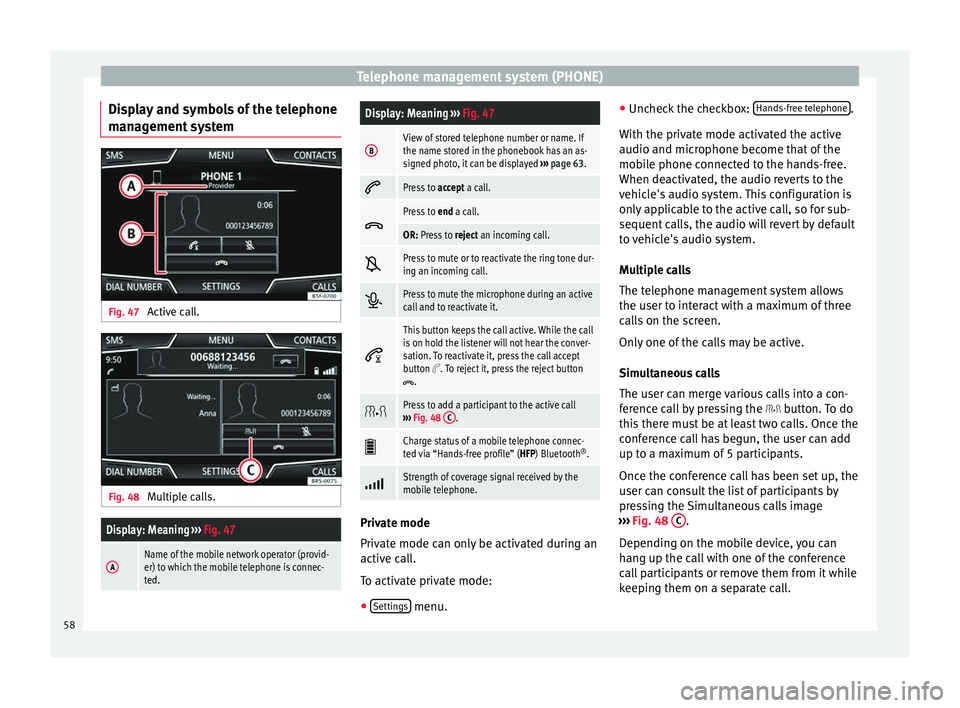
Display and symbols of the telephone
m an
ag
ement system Fig. 47
Active call. Fig. 48
Multiple calls.
Display: Meaning ››› Fig. 47
AName of the mobile network operator (provid-
er) to which the mobile telephone is connec-
ted.
Display: Meaning ››› Fig. 47
BView of stored telephone number or name. If
the name stored in the phonebook has an as-
signed photo, it can be displayed ››› page 63.
Press to
accept a call.
Press to
end a call.
OR: Press to reject an incoming call.
Press to mute or to reactivate the ring tone dur-
ing an incoming call.
Press to mute the microphone during an active
call and to reactivate it.
This button keeps the call active. While the call
is on hold the listener will not hear the conver-
sation. To reactivate it, press the call accept
button
. To reject it, press the reject button.
Press to add a participant to the active call
››› Fig. 48 C.
Charge status of a mobile telephone connec-
ted via “Hands-free profile” (HFP) Bluetooth
®
.
Strength of coverage signal received by the
mobile telephone.
Private mode
Priv
at
e mode c
an only be activated during an
active call.
To activate private mode:
● Settings menu.●
Unc hec
k
the checkbox: Hands-free telephone .
W ith the priv
at
e mode activated the active
audio and microphone become that of the
mobile phone connected to the hands-free.
When deactivated, the audio reverts to the
vehicle's audio system. This configuration is
only applicable to the active call, so for sub-
sequent calls, the audio will revert by default
to vehicle's audio system.
Multiple calls
The telephone management system allows
the user to interact with a maximum of three
calls on the screen.
Only one of the calls may be active.
Simultaneous calls
The user can merge various calls into a con-
ference call by pressing the button. To do
this there must be at least two calls. Once the
conference call has begun, the user can add
up to a maximum of 5 participants.
Once the conference call has been set up, the
user can consult the list of participants by
pressing the Simultaneous calls image
››› Fig. 48 C .
D ependin
g on the mo
bile device, you can
hang up the call with one of the conference
call participants or remove them from it while
keeping them on a separate call.
58
Page 65 of 88
Telephone management system (PHONE)Possible functions
Dialling with
speed dial but-
tonsBriefly press
an assigned speed di-
al button from the PHONE main
menu to call the telephone number
that has been stored on it. Note
The contacts stored on the speed dial buttons
DO NOT upd at
e automatically. If a contact
stored on a speed dial button is modified on
the mobile telephone, the speed dial button
will need to be reassigned. Telephone settings
Press the
S
ET
TINGS function button from the
PHONE m ain menu.
Function button: function
Select mobile phone: From the list, select the mobile tele-
phone to be connected to the hands-free profile with the
Infotainment system.
OR: Press Find telephone to connect a new mobile tele-
phone.
Bluetooth: Open the Bluetooth settings menu
››› page 63.
User profile: Open the User profile settings menu
››› page 63. Bluetooth
®
settin g
s In the PHONE main menu, pr
e
ss the SETTINGS function button and then the
Bluetooth func-
tion butt on.
Function button: function
Bluetooth: Press to deactivate Bluetooth
®
. Disconnects
all active connections.
Visibility: Activation and deactivation of Bluetooth ®
visi-
bility.
Visible: Bluetooth ®
visibility is active.
Hidden: Bluetooth ®
visibility is deactivated. Blue-
tooth ®
visibility must be active for the external
pairing of a Bluetooth ®
device with the Infotain-
ment system. If you have a Bluetooth ®
audio de-
vice active and playing, visibility is automatically
set to Hidden .
Name: Viewing and changing the name the Bluetooth ®
of the Infotainment system. This will be the name dis-
played to other Bluetooth ®
devices.
Paired devices: Displays paired devices. To disconnect
and connect Bluetooth ®
devices and Bluetooth ®
pro-
files.
Find devices: Search for visible Bluetooth ®
devices within
the range of the Infotainment system. The maximum
range is approx. 10 metres.
Bluetooth audio (A2DP/AVRCP): This function must be ac-
tive if it is necessary to connect an external audio source
via Bluetooth ®
to the Infotainment system. ››› page 34. User profile settings
In the PHONE main menu, pr
e
ss the SETTINGS function button and then the
User pr
ofi le func-
tion butt on.
Function button: function
Manage favourites: Editing speed dial buttons.
Speed dial button in use : Press to delete the stored
number.
Speed dial button free : Press to assign a number
from the phonebook to the speed dial button in
question.
Mailbox number: To enter or edit the voicemail number.
Sort by: To set the order of appearance of the entries in
the phonebook ( Forename and surname or vice-versa).
Import contacts: Press to import the phonebook of the
connected telephone, or to update the imported phone-
book.
Reminder: remember your mobile phone: If there is already
an active Bluetooth ®
connection with another mobile
telephone when turning off the ignition, the following
message appears: “Remember your mobile
phone ”.
Show pictures for contactsa)
: If phonebook contacts have
been stored with a photograph, it can be displayed on
the speed dial buttons, on the call lists and in the pho-
nebook.
a) Depending on the mobile phone.»
63
Page 72 of 88
Full Link*
Pairing of portable devices supporting
the Mirr orLink®
, Andr oid Aut
o™
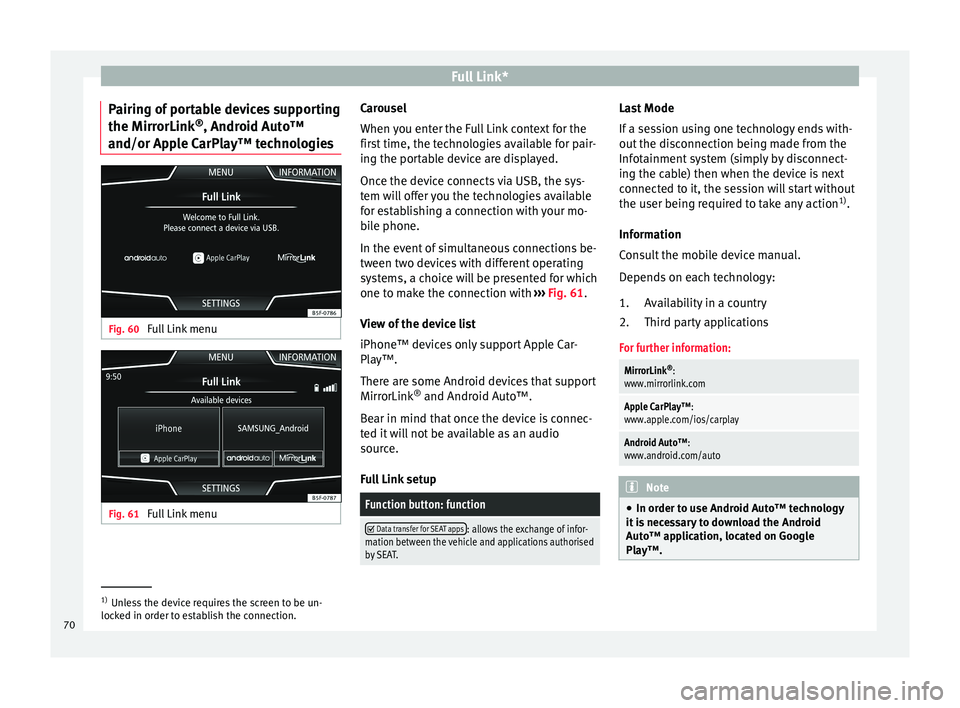
and/or Apple CarPlay™ technologies Fig. 60
Full Link menu Fig. 61
Full Link menu Carousel
When
y
ou ent
er the Full Link context for the
first time, the technologies available for pair-
ing the portable device are displayed.
Once the device connects via USB, the sys-
tem will offer you the technologies available
for establishing a connection with your mo- bile phone.
In the event of simultaneous connections be-
tween two devices with different operating
systems, a choice will be presented for which
one to make the connection with ››› Fig. 61.
View of the device list
iPhone™ devices only support Apple Car-
Play™.
There are some Android devices that support
MirrorLink ®
and Android Auto™.
Bear in mind that once the device is connec-
ted it will not be available as an audio
source.
Full Link setup
Function button: function
Data transfer for SEAT apps: allows the exchange of infor-
mation between the vehicle and applications authorised
by SEAT. Last Mode
If
a se
s
sion using one technology ends with-
out the disconnection being made from the
Infotainment system (simply by disconnect-
ing the cable) then when the device is next
connected to it, the session will start without
the user being required to take any action 1)
.
Information
Consult the mobile device manual.
Depends on each technology: Availability in a country
Third party applications
For further information:
MirrorLink ®
:
www.mirrorlink.com
Apple CarPlay™:
www.apple.com/ios/carplay
Android Auto™:
www.android.com/auto Note
● In order t o u
se Android Auto™ technology
it is necessary to download the Android
Auto™ application, located on Google
Play™. 1.
2.
1)
Unless the device requires the screen to be un-
lock ed in or
der to establish the connection.
70
Page 78 of 88

SetupFunction button: function
System information: Viewing system information (device
number, hardware and software versions).
Update: To update navigation data ››› page 37 Do not
remove the memory card while the navigation data is
being installed.
Copyright: Copyright information.
Configuration wizard: Open the wizard to configure the ini-
tial setup of the Infotainment system. Note
For the proper functioning of the Infotain-
ment sy s
tem it is important that the date and
time set in the vehicle are correct. Sound and volume settings
M ak
in
g settings The selection of possible settings will de-
pend on the c
ou
ntr
y, the unit in question and
the vehicle equipment.
● Press the infotainment button
› ››
Fig. 1 12 .
● Press the Sou
nd function button to open
the m ain Sound settings
menu.
● Pr e
ss the function button on the main
menu corre
sponding to one where changes are to be made. All settings are applied in-
stant
aneously.
Overview of screen and function buttons
Function button: function
Volume: To adjust the volume settings.
Announcements: To set the playback volume of an-
nouncements, for example traffic announcements.
Navigation announcements: To adjust the playback vol-
ume of audible driving recommendations.
Voice control: To set the volume for voice control
playback.
Maximum switch-on volume: To set the maximum
switch-on volume of the equipment.
Speed-dependent volume adjustment (GALA): To deter-
mine the level of adjustment for speed-dependent
volume. The audio volume will increase automati-
cally as vehicle speed increases.
Entertainment fading while parking: To adjust the desired
decrease in volume with ParkPilot activated.
Entertainment fading (nav. announcements): Adjusts the
playback volume during a navigation announce-
ment.
AUX volume: To set the playback volume of the au-
dio sources connected via the AUX-IN multi-media
socket ( Low, Medium or High). Also see
››› page 76, Overview of screen and function but-
tons.
Function button: function
Bluetooth audio: To set the playback volume of the
audio sources connected via Bluetooth ®
(Low , Me-
dium or High ). Also see ››› page 76, Overview of
screen and function buttons.
Equaliser: To adjust the characteristics of the sound.
Balance - Fader: To adjust the distribution of the sound.
The cursor indicates the current distribution of the
sound inside the passenger compartment. To modify the
distribution of the sound, briefly press the passenger
compartment view for the desired position or use the ar-
row keys to change it gradually. To focus the distribution
of sound in the centre of the passenger compartment,
press the central function button located between the
arrows.
Sound focus: Optimises the sound in the passenger com-
partment.
Touchscreen tone: Confirmation tone for pressing a func-
tion button is activated.
No voice guidance during call: No audible driving instruc-
tions will be given during a telephone conversation. Adjust the playback volume for external au-
dio sour
c
e
s
If you need to increase the playback volume
for the external audio source, first lower the
base volume on the Infotainment system.
If the sound from the external audio source is
too low, increase the output volume on the
external audio source. If this is not enough,
change the input volume to medium or high.
76
Page 79 of 88
Setup
If the sound from the connected external au-
dio sour c
e i
s too loud or distorted, lower the
output volume on the external audio source.
If this is not sufficient, set the input volume
to Medium or Quiet. 77
Page 80 of 88
Other important information
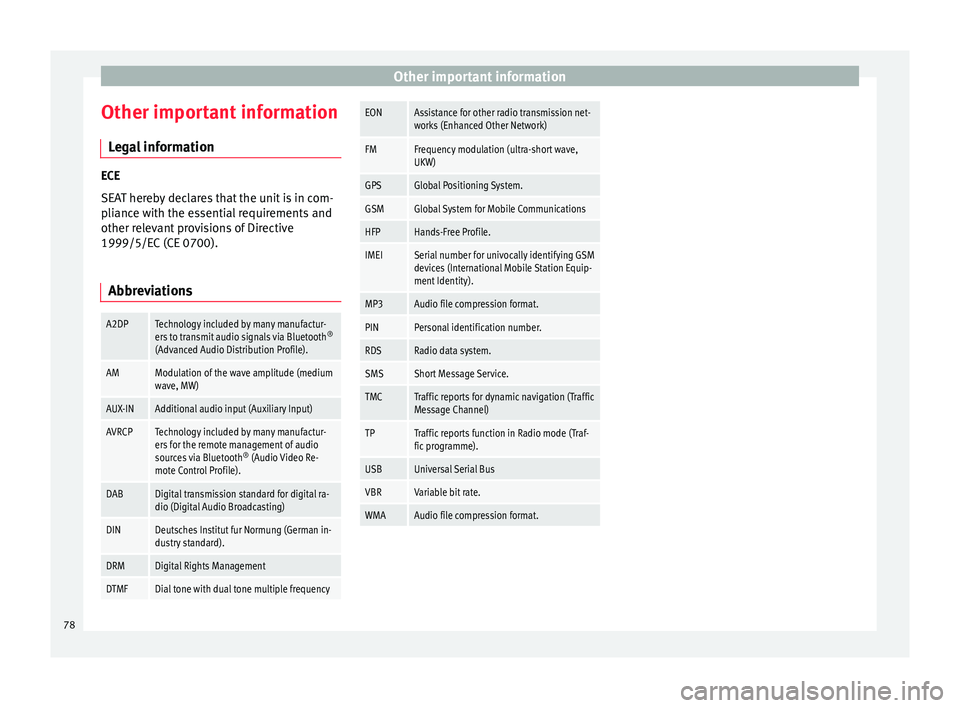
Other important information Le
g
al information ECE
SEA
T her
eby declares that the unit is in com-
pliance with the essential requirements and
other relevant provisions of Directive
1999/5/EC (CE 0700).
Abbreviations
A2DPTechnology included by many manufactur-
ers to transmit audio signals via Bluetooth ®
(Advanced Audio Distribution Profile).
AMModulation of the wave amplitude (medium
wave, MW)
AUX-INAdditional audio input (Auxiliary Input)
AVRCPTechnology included by many manufactur-
ers for the remote management of audio
sources via Bluetooth ®
(Audio Video Re-
mote Control Profile).
DABDigital transmission standard for digital ra-
dio (Digital Audio Broadcasting)
DINDeutsches Institut fur Normung (German in-
dustry standard).
DRMDigital Rights Management
DTMFDial tone with dual tone multiple frequency
EONAssistance for other radio transmission net-
works (Enhanced Other Network)
FMFrequency modulation (ultra-short wave,
UKW)
GPSGlobal Positioning System.
GSMGlobal System for Mobile Communications
HFPHands-Free Profile.
IMEISerial number for univocally identifying GSM
devices (International Mobile Station Equip-
ment Identity).
MP3Audio file compression format.
PINPersonal identification number.
RDSRadio data system.
SMSShort Message Service.
TMCTraffic reports for dynamic navigation (Traffic
Message Channel)
TPTraffic reports function in Radio mode (Traf-
fic programme).
USBUniversal Serial Bus
VBRVariable bit rate.
WMAAudio file compression format. 78
Page 81 of 88
Index
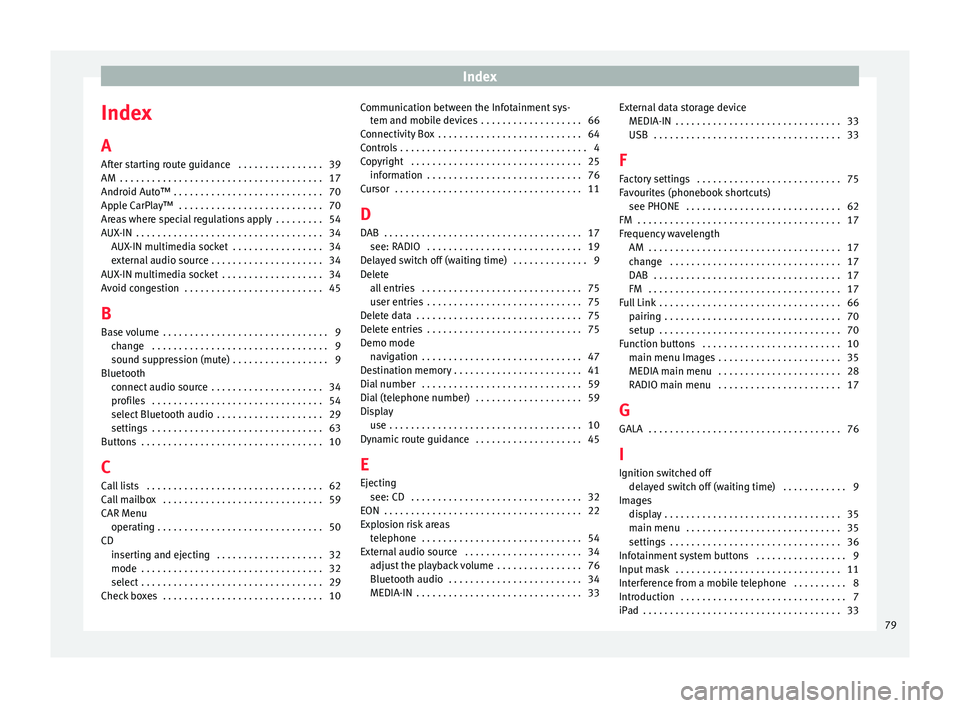
Index
A
Af t
er s
tarting route guidance . . . . . . . . . . . . . . . . 39
AM . . . . . . . . . . . . . . . . . . . . . . . . . . . . . . . . . . . . . . 17
Android Auto™ . . . . . . . . . . . . . . . . . . . . . . . . . . . . 70
Apple CarPlay™ . . . . . . . . . . . . . . . . . . . . . . . . . . . 70
Areas where special regulations apply . . . . . . . . . 54
AUX-IN . . . . . . . . . . . . . . . . . . . . . . . . . . . . . . . . . . . 34 AUX-IN multimedia socket . . . . . . . . . . . . . . . . . 34
external audio source . . . . . . . . . . . . . . . . . . . . . 34
AUX-IN multimedia socket . . . . . . . . . . . . . . . . . . . 34
Avoid congestion . . . . . . . . . . . . . . . . . . . . . . . . . . 45
B Base volume . . . . . . . . . . . . . . . . . . . . . . . . . . . . . . . 9 change . . . . . . . . . . . . . . . . . . . . . . . . . . . . . . . . . 9
sound suppression (mute) . . . . . . . . . . . . . . . . . . 9
Bluetooth connect audio source . . . . . . . . . . . . . . . . . . . . . 34
profiles . . . . . . . . . . . . . . . . . . . . . . . . . . . . . . . . 54
select Bluetooth audio . . . . . . . . . . . . . . . . . . . . 29
settings . . . . . . . . . . . . . . . . . . . . . . . . . . . . . . . . 63
Buttons . . . . . . . . . . . . . . . . . . . . . . . . . . . . . . . . . . 10
C
Call lists . . . . . . . . . . . . . . . . . . . . . . . . . . . . . . . . . 62
Call mailbox . . . . . . . . . . . . . . . . . . . . . . . . . . . . . . 59
CAR Menu operating . . . . . . . . . . . . . . . . . . . . . . . . . . . . . . . 50
CD inserting and ejecting . . . . . . . . . . . . . . . . . . . . 32
mode . . . . . . . . . . . . . . . . . . . . . . . . . . . . . . . . . . 32
select . . . . . . . . . . . . . . . . . . . . . . . . . . . . . . . . . . 29
Check boxes . . . . . . . . . . . . . . . . . . . . . . . . . . . . . . 10 Communication between the Infotainment sys-
tem and mob ile devices . . . . . . . . . . . . . . . . . . . 66
Connectivity Box . . . . . . . . . . . . . . . . . . . . . . . . . . . 64
Controls . . . . . . . . . . . . . . . . . . . . . . . . . . . . . . . . . . . 4
Copyright . . . . . . . . . . . . . . . . . . . . . . . . . . . . . . . . 25 information . . . . . . . . . . . . . . . . . . . . . . . . . . . . . 76
Cursor . . . . . . . . . . . . . . . . . . . . . . . . . . . . . . . . . . . 11
D
DAB . . . . . . . . . . . . . . . . . . . . . . . . . . . . . . . . . . . . . 17 see: RADIO . . . . . . . . . . . . . . . . . . . . . . . . . . . . . 19
Delayed switch off (waiting time) . . . . . . . . . . . . . . 9
Delete all entries . . . . . . . . . . . . . . . . . . . . . . . . . . . . . . 75
user entries . . . . . . . . . . . . . . . . . . . . . . . . . . . . . 75
Delete data . . . . . . . . . . . . . . . . . . . . . . . . . . . . . . . 75
Delete entries . . . . . . . . . . . . . . . . . . . . . . . . . . . . . 75
Demo mode navigation . . . . . . . . . . . . . . . . . . . . . . . . . . . . . . 47
Destination memory . . . . . . . . . . . . . . . . . . . . . . . . 41
Dial number . . . . . . . . . . . . . . . . . . . . . . . . . . . . . . 59
Dial (telephone number) . . . . . . . . . . . . . . . . . . . . 59
Display use . . . . . . . . . . . . . . . . . . . . . . . . . . . . . . . . . . . . 10
Dynamic route guidance . . . . . . . . . . . . . . . . . . . . 45
E
Ejecting see: CD . . . . . . . . . . . . . . . . . . . . . . . . . . . . . . . . 32
EON . . . . . . . . . . . . . . . . . . . . . . . . . . . . . . . . . . . . . 22
Explosion risk areas telephone . . . . . . . . . . . . . . . . . . . . . . . . . . . . . . 54
External audio source . . . . . . . . . . . . . . . . . . . . . . 34 adjust the playback volume . . . . . . . . . . . . . . . . 76
Bluetooth audio . . . . . . . . . . . . . . . . . . . . . . . . . 34
MEDIA-IN . . . . . . . . . . . . . . . . . . . . . . . . . . . . . . . 33 External data storage device
MEDIA-IN . . . . . . . . . . . . . . . . . . . . . . . . . . . . . . . 33
USB
. . . . . . . . . . . . . . . . . . . . . . . . . . . . . . . . . . . 33
F
Factory settings . . . . . . . . . . . . . . . . . . . . . . . . . . . 75
Favourites (phonebook shortcuts) see PHONE . . . . . . . . . . . . . . . . . . . . . . . . . . . . . 62
FM . . . . . . . . . . . . . . . . . . . . . . . . . . . . . . . . . . . . . . 17
Frequency wavelength AM . . . . . . . . . . . . . . . . . . . . . . . . . . . . . . . . . . . . 17
change . . . . . . . . . . . . . . . . . . . . . . . . . . . . . . . . 17
DAB . . . . . . . . . . . . . . . . . . . . . . . . . . . . . . . . . . . 17
FM . . . . . . . . . . . . . . . . . . . . . . . . . . . . . . . . . . . . 17
Full Link . . . . . . . . . . . . . . . . . . . . . . . . . . . . . . . . . . 66 pairing . . . . . . . . . . . . . . . . . . . . . . . . . . . . . . . . . 70
setup . . . . . . . . . . . . . . . . . . . . . . . . . . . . . . . . . . 70
Function buttons . . . . . . . . . . . . . . . . . . . . . . . . . . 10 main menu Images . . . . . . . . . . . . . . . . . . . . . . . 35
MEDIA main menu . . . . . . . . . . . . . . . . . . . . . . . 28
RADIO main menu . . . . . . . . . . . . . . . . . . . . . . . 17
G GALA . . . . . . . . . . . . . . . . . . . . . . . . . . . . . . . . . . . . 76
I Ignition switched off delayed switch off (waiting time) . . . . . . . . . . . . 9
Images display . . . . . . . . . . . . . . . . . . . . . . . . . . . . . . . . . 35
main menu . . . . . . . . . . . . . . . . . . . . . . . . . . . . . 35
settings . . . . . . . . . . . . . . . . . . . . . . . . . . . . . . . . 36
Infotainment system buttons . . . . . . . . . . . . . . . . . 9
Input mask . . . . . . . . . . . . . . . . . . . . . . . . . . . . . . . 11
Interference from a mobile telephone . . . . . . . . . . 8
Introduction . . . . . . . . . . . . . . . . . . . . . . . . . . . . . . . 7
iPad . . . . . . . . . . . . . . . . . . . . . . . . . . . . . . . . . . . . . 33
79
Page 82 of 88
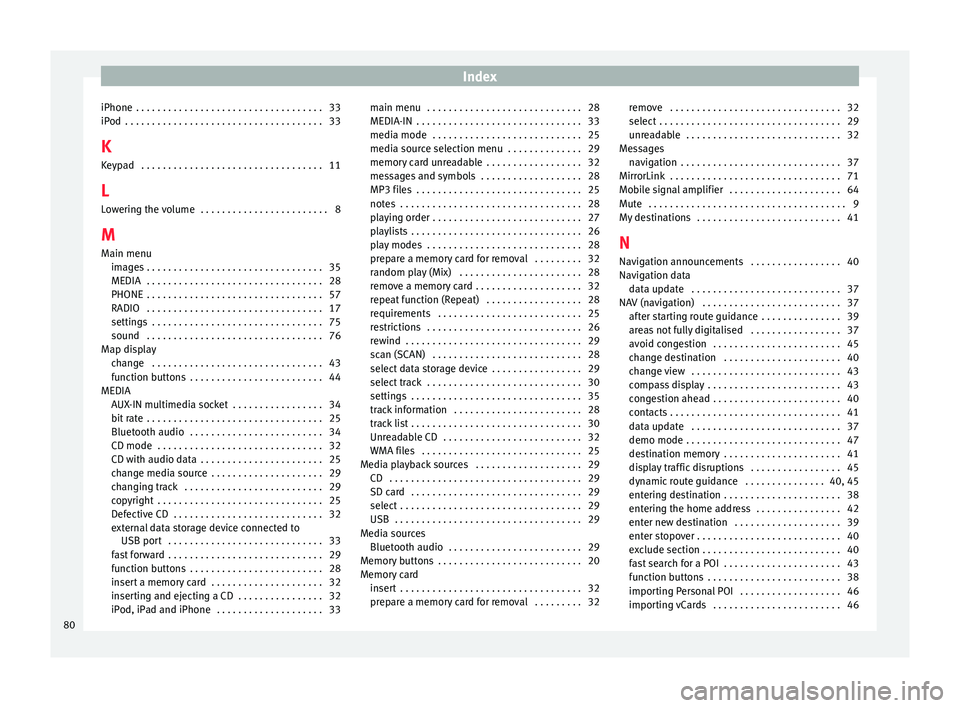
Index
iPhone . . . . . . . . . . . . . . . . . . . . . . . . . . . . . . . . . . . 33
iP od
. . . . . . . . . . . . . . . . . . . . . . . . . . . . . . . . . . . . . 33
K K
eypad . . . . . . . . . . . . . . . . . . . . . . . . . . . . . . . . . . 11
L Lowering the volume . . . . . . . . . . . . . . . . . . . . . . . . 8
M Main menu images . . . . . . . . . . . . . . . . . . . . . . . . . . . . . . . . . 35
MEDIA . . . . . . . . . . . . . . . . . . . . . . . . . . . . . . . . . 28
PHONE . . . . . . . . . . . . . . . . . . . . . . . . . . . . . . . . . 57
RADIO . . . . . . . . . . . . . . . . . . . . . . . . . . . . . . . . . 17
settings . . . . . . . . . . . . . . . . . . . . . . . . . . . . . . . . 75
sound . . . . . . . . . . . . . . . . . . . . . . . . . . . . . . . . . 76
Map display change . . . . . . . . . . . . . . . . . . . . . . . . . . . . . . . . 43
function buttons . . . . . . . . . . . . . . . . . . . . . . . . . 44
MEDIA AUX-IN multimedia socket . . . . . . . . . . . . . . . . . 34
bit rate . . . . . . . . . . . . . . . . . . . . . . . . . . . . . . . . . 25
Bluetooth audio . . . . . . . . . . . . . . . . . . . . . . . . . 34
CD mode . . . . . . . . . . . . . . . . . . . . . . . . . . . . . . . 32
CD with audio data . . . . . . . . . . . . . . . . . . . . . . . 25
change media source . . . . . . . . . . . . . . . . . . . . . 29
changing track . . . . . . . . . . . . . . . . . . . . . . . . . . 29
copyright . . . . . . . . . . . . . . . . . . . . . . . . . . . . . . . 25
Defective CD . . . . . . . . . . . . . . . . . . . . . . . . . . . . 32
external data storage device connected toUSB port . . . . . . . . . . . . . . . . . . . . . . . . . . . . . 33
fast forward . . . . . . . . . . . . . . . . . . . . . . . . . . . . . 29
function buttons . . . . . . . . . . . . . . . . . . . . . . . . . 28
insert a memory card . . . . . . . . . . . . . . . . . . . . . 32
inserting and ejecting a CD . . . . . . . . . . . . . . . . 32
iPod, iPad and iPhone . . . . . . . . . . . . . . . . . . . . 33 main menu . . . . . . . . . . . . . . . . . . . . . . . . . . . . . 28
MEDIA-IN . . . . . . . . . . . . . . . . . . . . . . . . . . . . . . . 33
medi
a mode . . . . . . . . . . . . . . . . . . . . . . . . . . . . 25
media source selection menu . . . . . . . . . . . . . . 29
memory card unreadable . . . . . . . . . . . . . . . . . . 32
messages and symbols . . . . . . . . . . . . . . . . . . . 28
MP3 files . . . . . . . . . . . . . . . . . . . . . . . . . . . . . . . 25
notes . . . . . . . . . . . . . . . . . . . . . . . . . . . . . . . . . . 28
playing order . . . . . . . . . . . . . . . . . . . . . . . . . . . . 27
playlists . . . . . . . . . . . . . . . . . . . . . . . . . . . . . . . . 26
play modes . . . . . . . . . . . . . . . . . . . . . . . . . . . . . 28
prepare a memory card for removal . . . . . . . . . 32
random play (Mix) . . . . . . . . . . . . . . . . . . . . . . . 28
remove a memory card . . . . . . . . . . . . . . . . . . . . 32
repeat function (Repeat) . . . . . . . . . . . . . . . . . . 28
requirements . . . . . . . . . . . . . . . . . . . . . . . . . . . 25
restrictions . . . . . . . . . . . . . . . . . . . . . . . . . . . . . 26
rewind . . . . . . . . . . . . . . . . . . . . . . . . . . . . . . . . . 29
scan (SCAN) . . . . . . . . . . . . . . . . . . . . . . . . . . . . 28
select data storage device . . . . . . . . . . . . . . . . . 29
select track . . . . . . . . . . . . . . . . . . . . . . . . . . . . . 30
settings . . . . . . . . . . . . . . . . . . . . . . . . . . . . . . . . 35
track information . . . . . . . . . . . . . . . . . . . . . . . . 28
track list . . . . . . . . . . . . . . . . . . . . . . . . . . . . . . . . 30
Unreadable CD . . . . . . . . . . . . . . . . . . . . . . . . . . 32
WMA files . . . . . . . . . . . . . . . . . . . . . . . . . . . . . . 25
Media playback sources . . . . . . . . . . . . . . . . . . . . 29 CD . . . . . . . . . . . . . . . . . . . . . . . . . . . . . . . . . . . . 29
SD card . . . . . . . . . . . . . . . . . . . . . . . . . . . . . . . . 29
select . . . . . . . . . . . . . . . . . . . . . . . . . . . . . . . . . . 29
USB . . . . . . . . . . . . . . . . . . . . . . . . . . . . . . . . . . . 29
Media sources Bluetooth audio . . . . . . . . . . . . . . . . . . . . . . . . . 29
Memory buttons . . . . . . . . . . . . . . . . . . . . . . . . . . . 20
Memory card insert . . . . . . . . . . . . . . . . . . . . . . . . . . . . . . . . . . 32
prepare a memory card for removal . . . . . . . . . 32 remove . . . . . . . . . . . . . . . . . . . . . . . . . . . . . . . . 32
select . . . . . . . . . . . . . . . . . . . . . . . . . . . . . . . . . . 29
u
nreadable . . . . . . . . . . . . . . . . . . . . . . . . . . . . . 32
Messages navigation . . . . . . . . . . . . . . . . . . . . . . . . . . . . . . 37
MirrorLink . . . . . . . . . . . . . . . . . . . . . . . . . . . . . . . . 71
Mobile signal amplifier . . . . . . . . . . . . . . . . . . . . . 64
Mute . . . . . . . . . . . . . . . . . . . . . . . . . . . . . . . . . . . . . 9
My destinations . . . . . . . . . . . . . . . . . . . . . . . . . . . 41
N
Navigation announcements . . . . . . . . . . . . . . . . . 40
Navigation data data update . . . . . . . . . . . . . . . . . . . . . . . . . . . . 37
NAV (navigation) . . . . . . . . . . . . . . . . . . . . . . . . . . 37 after starting route guidance . . . . . . . . . . . . . . . 39
areas not fully digitalised . . . . . . . . . . . . . . . . . 37
avoid congestion . . . . . . . . . . . . . . . . . . . . . . . . 45
change destination . . . . . . . . . . . . . . . . . . . . . . 40
change view . . . . . . . . . . . . . . . . . . . . . . . . . . . . 43
compass display . . . . . . . . . . . . . . . . . . . . . . . . . 43
congestion ahead . . . . . . . . . . . . . . . . . . . . . . . . 40
contacts . . . . . . . . . . . . . . . . . . . . . . . . . . . . . . . . 41
data update . . . . . . . . . . . . . . . . . . . . . . . . . . . . 37
demo mode . . . . . . . . . . . . . . . . . . . . . . . . . . . . . 47
destination memory . . . . . . . . . . . . . . . . . . . . . . 41
display traffic disruptions . . . . . . . . . . . . . . . . . 45
dynamic route guidance . . . . . . . . . . . . . . . 40, 45
entering destination . . . . . . . . . . . . . . . . . . . . . . 38
entering the home address . . . . . . . . . . . . . . . . 42
enter new destination . . . . . . . . . . . . . . . . . . . . 39
enter stopover . . . . . . . . . . . . . . . . . . . . . . . . . . . 40
exclude section . . . . . . . . . . . . . . . . . . . . . . . . . . 40
fast search for a POI . . . . . . . . . . . . . . . . . . . . . . 43
function buttons . . . . . . . . . . . . . . . . . . . . . . . . . 38
importing Personal POI . . . . . . . . . . . . . . . . . . . 46
importing vCards . . . . . . . . . . . . . . . . . . . . . . . . 46
80
Page 85 of 88
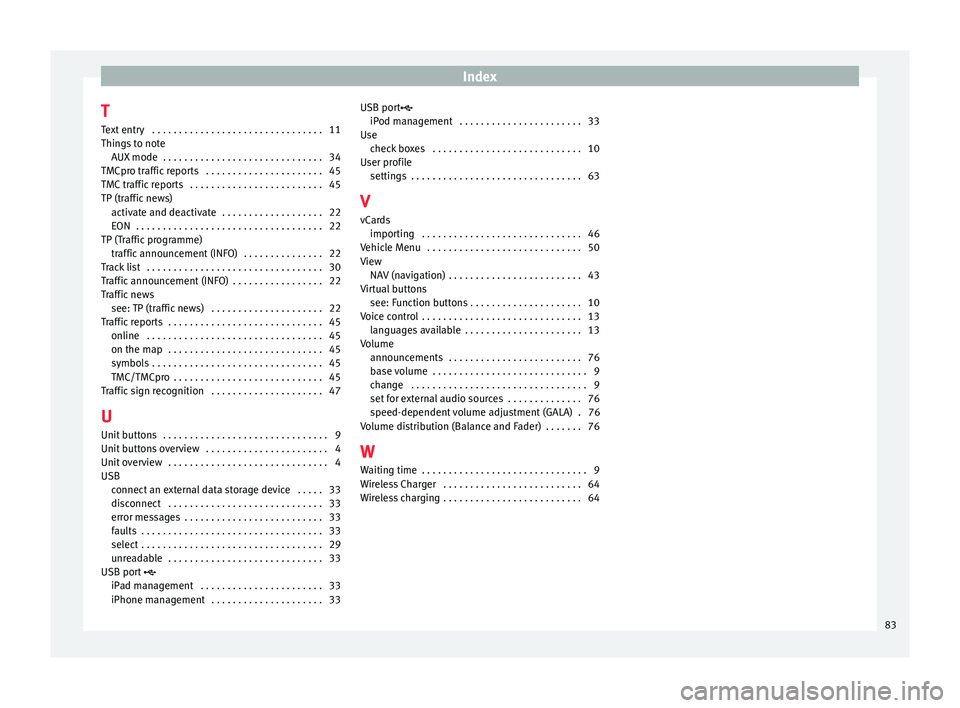
Index
T T e
xt
entry . . . . . . . . . . . . . . . . . . . . . . . . . . . . . . . . 11
Things to note AUX mode . . . . . . . . . . . . . . . . . . . . . . . . . . . . . . 34
TMCpro traffic reports . . . . . . . . . . . . . . . . . . . . . . 45
TMC traffic reports . . . . . . . . . . . . . . . . . . . . . . . . . 45
TP (traffic news) activate and deactivate . . . . . . . . . . . . . . . . . . . 22
EON . . . . . . . . . . . . . . . . . . . . . . . . . . . . . . . . . . . 22
TP (Traffic programme) traffic announcement (INFO) . . . . . . . . . . . . . . . 22
Track list . . . . . . . . . . . . . . . . . . . . . . . . . . . . . . . . . 30
Traffic announcement (INFO) . . . . . . . . . . . . . . . . . 22
Traffic news see: TP (traffic news) . . . . . . . . . . . . . . . . . . . . . 22
Traffic reports . . . . . . . . . . . . . . . . . . . . . . . . . . . . . 45 online . . . . . . . . . . . . . . . . . . . . . . . . . . . . . . . . . 45
on the map . . . . . . . . . . . . . . . . . . . . . . . . . . . . . 45
symbols . . . . . . . . . . . . . . . . . . . . . . . . . . . . . . . . 45
TMC/TMCpro . . . . . . . . . . . . . . . . . . . . . . . . . . . . 45
Traffic sign recognition . . . . . . . . . . . . . . . . . . . . . 47
U
Unit buttons . . . . . . . . . . . . . . . . . . . . . . . . . . . . . . . 9
Unit buttons overview . . . . . . . . . . . . . . . . . . . . . . . 4
Unit overview . . . . . . . . . . . . . . . . . . . . . . . . . . . . . . 4
USB connect an external data storage device . . . . . 33
disconnect . . . . . . . . . . . . . . . . . . . . . . . . . . . . . 33
error messages . . . . . . . . . . . . . . . . . . . . . . . . . . 33
faults . . . . . . . . . . . . . . . . . . . . . . . . . . . . . . . . . . 33
select . . . . . . . . . . . . . . . . . . . . . . . . . . . . . . . . . . 29
unreadable . . . . . . . . . . . . . . . . . . . . . . . . . . . . . 33
USB port
iPad management . . . . . . . . . . . . . . . . . . . . . . . 33
iPhone management . . . . . . . . . . . . . . . . . . . . . 33 USB port
iPod man agement . . . . . . . . . . . . . . . . . . . . . . . 33
Use check boxes . . . . . . . . . . . . . . . . . . . . . . . . . . . . 10
User profile settings . . . . . . . . . . . . . . . . . . . . . . . . . . . . . . . . 63
V
vCards importing . . . . . . . . . . . . . . . . . . . . . . . . . . . . . . 46
Vehicle Menu . . . . . . . . . . . . . . . . . . . . . . . . . . . . . 50
View NAV (navigation) . . . . . . . . . . . . . . . . . . . . . . . . . 43
Virtual buttons see: Function buttons . . . . . . . . . . . . . . . . . . . . . 10
Voice control . . . . . . . . . . . . . . . . . . . . . . . . . . . . . . 13 languages available . . . . . . . . . . . . . . . . . . . . . . 13
Volume announcements . . . . . . . . . . . . . . . . . . . . . . . . . 76
base volume . . . . . . . . . . . . . . . . . . . . . . . . . . . . . 9
change . . . . . . . . . . . . . . . . . . . . . . . . . . . . . . . . . 9
set for external audio sources . . . . . . . . . . . . . . 76
speed-dependent volume adjustment (GALA) . 76
Volume distribution (Balance and Fader) . . . . . . . 76
W Waiting time . . . . . . . . . . . . . . . . . . . . . . . . . . . . . . . 9
Wireless Charger . . . . . . . . . . . . . . . . . . . . . . . . . . 64
Wireless charging . . . . . . . . . . . . . . . . . . . . . . . . . . 64
83
Page 87 of 88

SEAT S.A. is permanently concerned about continuous development of its t\
ypes and models. For this reason we ask you to under-
stand, that at any given time, changes regarding shape, equipment and te\
chnique may take place on the car delivered. For this reason
no right at all may derive based on the data, drawings and descriptions \
in this current handbook.
All texts, illustrations and standards in this handbook are based on the\
status of information at the time of printing. Except for error
or omission, the information included in the current handbook is valid a\
s of the date of closing print.
Re-printing, copying or translating, whether total or partial is not all\
owed unless SEAT allows it in written form.
SEAT reserves all rights in accordance with the “Copyright” Act.
All rights on changes are reserved.
❀This paper has been manufactured using bleached non-chlorine cellulose.
© SEAT S.A. - Reprint: 15.11.17
About this manual
This manual contains information, recommen -
dations, advice and warnings related to your
radio system. The other publications in the
vehicle documentation contain further infor -
mation of which you should be aware for your
own safety and for that of your passengers.
Ensure that the onboard documentation is
kept in the vehicle at all times. This is espe -
cially important when lending or selling the
vehicle to another person.
This manual contains a description of the
equipment supplied with the vehicle at the
time of press. Some of the units described
herein will not be available until a later date or
is only available in certain markets.
The illustrations are intended as a general
guide and may vary from the equipment tted
in your vehicle in some details.
The screen colour and the colour of the infor -
mation displayed on it can vary according to
vehicle model. Directions and positions
of components (e.g.
right, left, front, rear) are always relative to the
direction of travel of the vehicle unless other -
wise stated.
The audiovisual material only is intended to
help users to understand certain car function -
alities better. It does not replace the instruc -
tion manual. Please use the instruction manu -
al to obtain more comprehensive information
and indications.
The equipment marked with an aster -
isk* is tted as standard only in certain
versions, and is only supplied as op -
tional extras for some versions, or are
only offered in certain countries.
® All registered marks are indicated with
®. Although the copyright symbol does
not appear, it is a copyrighted mark.
>> The section is continued on the follow -
ing page.
WARNING
Texts preceded by this symbol contain infor -
mation on safety. They warn you about possi -
ble dangers of accident or injury.
CAUTION
Texts with this symbol draw your attention to
potential sources of damage to your vehicle.
For the sake of the environment
Texts preceded by this symbol contain rele-
vant information concerning environmental
protection.
Note
Texts preceded by this symbol contain additio -
nal information.