change time Seat Ibiza 2017 MEDIA SYSTEM PLUS - NAVI SYSTEM
[x] Cancel search | Manufacturer: SEAT, Model Year: 2017, Model line: Ibiza, Model: Seat Ibiza 2017Pages: 88, PDF Size: 2.34 MB
Page 2 of 88

SEAT S.A. is permanently concerned about continuous development of its t\
ypes and models. For this reason we ask you to under-
stand, that at any given time, changes regarding shape, equipment and te\
chnique may take place on the car delivered. For this reason
no right at all may derive based on the data, drawings and descriptions \
in this current handbook.
All texts, illustrations and standards in this handbook are based on the\
status of information at the time of printing. Except for error
or omission, the information included in the current handbook is valid a\
s of the date of closing print.
Re-printing, copying or translating, whether total or partial is not all\
owed unless SEAT allows it in written form.
SEAT reserves all rights in accordance with the “Copyright” Act.
All rights on changes are reserved.
❀This paper has been manufactured using bleached non-chlorine cellulose.
© SEAT S.A. - Reprint: 15.11.17
About this manual
This manual contains information, recommen -
dations, advice and warnings related to your
radio system. The other publications in the
vehicle documentation contain further infor -
mation of which you should be aware for your
own safety and for that of your passengers.
Ensure that the onboard documentation is
kept in the vehicle at all times. This is espe -
cially important when lending or selling the
vehicle to another person.
This manual contains a description of the
equipment supplied with the vehicle at the
time of press. Some of the units described
herein will not be available until a later date or
is only available in certain markets.
The illustrations are intended as a general
guide and may vary from the equipment tted
in your vehicle in some details.
The screen colour and the colour of the infor -
mation displayed on it can vary according to
vehicle model. Directions and positions
of components (e.g.
right, left, front, rear) are always relative to the
direction of travel of the vehicle unless other -
wise stated.
The audiovisual material only is intended to
help users to understand certain car function -
alities better. It does not replace the instruc -
tion manual. Please use the instruction manu -
al to obtain more comprehensive information
and indications.
The equipment marked with an aster -
isk* is tted as standard only in certain
versions, and is only supplied as op -
tional extras for some versions, or are
only offered in certain countries.
® All registered marks are indicated with
®. Although the copyright symbol does
not appear, it is a copyrighted mark.
>> The section is continued on the follow -
ing page.
WARNING
Texts preceded by this symbol contain infor -
mation on safety. They warn you about possi -
ble dangers of accident or injury.
CAUTION
Texts with this symbol draw your attention to
potential sources of damage to your vehicle.
For the sake of the environment
Texts preceded by this symbol contain rele-
vant information concerning environmental
protection.
Note
Texts preceded by this symbol contain additio -
nal information.
Page 9 of 88
Introduction
Introduction Saf ety
in
structions relating to the In-
fotainment system Travelling on today's roads requires the driv-
er's f
u
ll attention at all times.
Only operate the radio and its various func-
tions when the traffic situation really permits
this. WARNING
● Bef or
e starting the trip, you should famili-
arise yourself with the different radio func-
tions.
● High audio volume may represent a danger
to y
ou and to others.
● Adjust the volume in a way that you can
distin
guish surrounding noise, for example,
horns and sirens, etc.
● Changes to the Infotainment system set-
tings
should be made when the car is stop-
ped, or by a passenger. WARNING
Distracting the driver in any way can lead to
an acc ident
and cause injuries. Operating the
Infotainment system can distract your atten-
tion from the traffic.
● Always drive carefully and responsibly. ●
Select
volume settings that allow you to
easily hear signals from outside the vehicle
at all times (e.g. emergency services sirens
and horns).
● Hearing may be impaired if using too high a
volume settin
g, even if only for short periods
of time. WARNING
The volume level may suddenly change when
y ou sw it
ch audio source or connect a new au-
dio source.
● Lower the base volume before connecting
or switc
hing audio sources. WARNING
The driving recommendations and traffic indi-
cation s
shown on the navigation system may
differ from the current traffic situation.
● Traffic signs and traffic regulations have
priority ov
er the recommendations and dis-
plays provided by the navigation system.
● Adjust your vehicle speed and driving style
to suit
visibility, weather, road and traffic
conditions. WARNING
Connecting, inserting or removing a data me-
dium whil e driv
ing can distract your attention
from the traffic and cause an accident. WARNING
Connecting leads for external devices may
ob s
truct the driver.
● Arrange the connecting leads so that they
do not ob
struct the driver. WARNING
External devices that are loose or not proper-
ly sec ur
ed could move around the passenger
compartment during a sudden driving or
braking manoeuvre or an accident and cause
damage or injury.
● Never place or fit external devices to the
doors, wind
screen, steering wheel, dash pan-
el, the backs of the seats, on top of or near
the area marked “AIRBAG” or between these
areas and the occupants. External devices
can cause serious injury in an accident, espe-
cially when the airbags inflate. WARNING
The armrest may obstruct the driver's arm
mov ement
s, which could cause an accident
and severe injuries.
● Always keep the armrest closed while the
vehicl
e is in motion. WARNING
Opening a CD player's housing can lead to in-
juries fr
om invisible laser radiation.
● Have CD players repaired only by a quali-
fied workshop
. » 7
Page 13 of 88
IntroductionDisplay and function buttons: operation and ef-
fect
×
Press to close a pop-up window or an input
window.
/ Press them to change the setup adjustments
one at a time.
Move the slider around the screen by press-
ing it lightly and without lifting your finger.
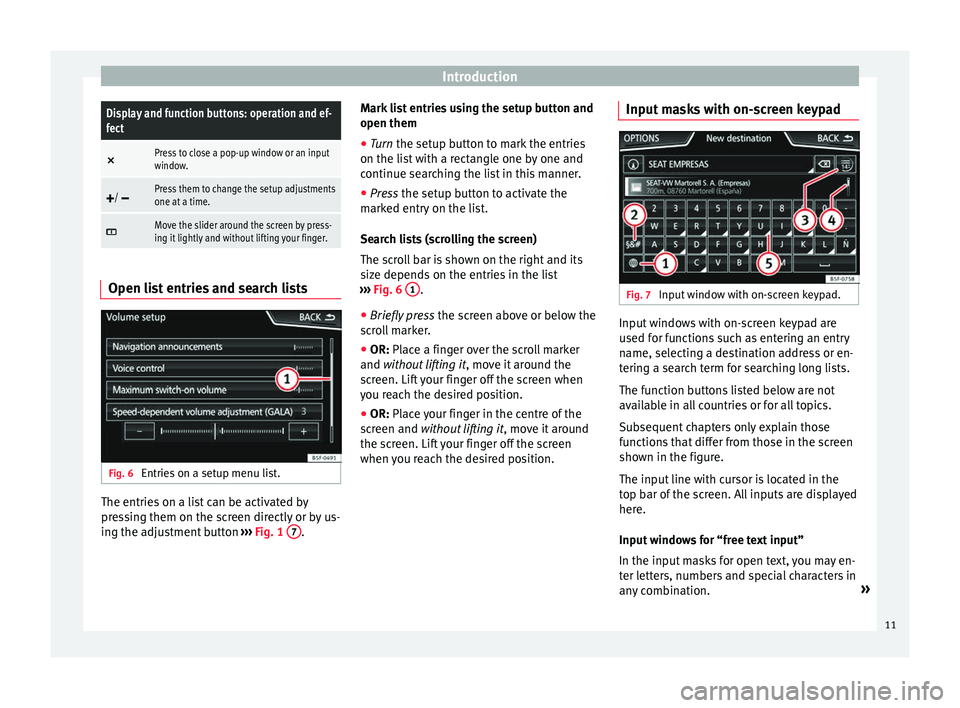
Open list entries and search lists
Fig. 6
Entries on a setup menu list. The entries on a list can be activated by
pr
e
s
sing them on the screen directly or by us-
ing the adjustment button ›››
Fig. 1 7 .Mark list entries using the setup button and
open them
●
Turn the set up button to mark the entries
on the li s
t with a rectangle one by one and
continue searching the list in this manner.
● Press the setup butt
on to activate the
marked entry on the list.
Search lists (scrolling the screen)
The scroll bar is shown on the right and its
size depends on the entries in the list
››› Fig. 6 1 .
● Briefly press the sc
r
een above or below the
scroll marker.
● OR: Place a finger over the scroll marker
and without
lifting it, move it around the
screen. Lift your finger off the screen when
you reach the desired position.
● OR: Place your finger in the centre of the
sc
reen and without lifting it , move it around
the screen. Lift your finger off the screen
when you reach the desired position. Input masks with on-screen keypad Fig. 7
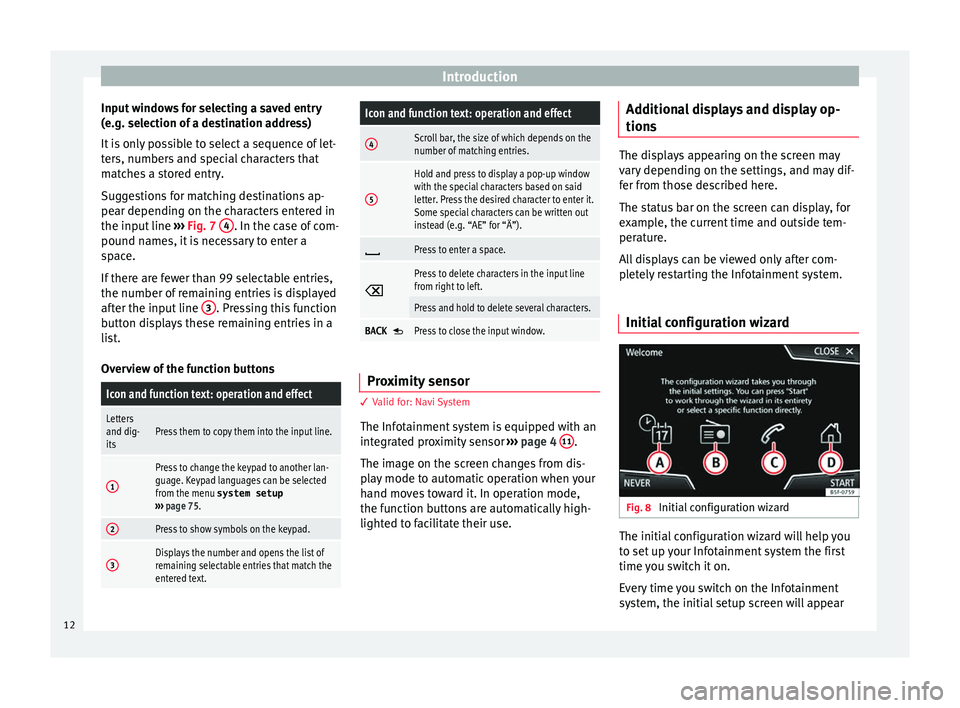
Input window with on-screen keypad. Input windows with on-screen keypad are
u
sed f
or f
unctions such as entering an entry
name, selecting a destination address or en-
tering a search term for searching long lists.
The function buttons listed below are not
available in all countries or for all topics.
Subsequent chapters only explain those
functions that differ from those in the screen
shown in the figure.
The input line with cursor is located in the
top bar of the screen. All inputs are displayed
here.
Input windows for “free text input”
In the input masks for open text, you may en-
ter letters, numbers and special characters in
any combination. »
11
Page 14 of 88
Introduction
Input windows for selecting a saved entry
(e. g. sel
ection of
a destination address)
It is only possible to select a sequence of let-
ters, numbers and special characters that
matches a stored entry.
Suggestions for matching destinations ap-
pear depending on the characters entered in
the input line ››› Fig. 7 4 . In the case of com-
pou nd n
ame
s, it is necessary to enter a
space.
If there are fewer than 99 selectable entries,
the number of remaining entries is displayed
after the input line 3 . Pressing this function
b utt
on di
splays these remaining entries in a
list.
Overview of the function buttons
Icon and function text: operation and effect
Letters
and dig-
itsPress them to copy them into the input line.
1
Press to change the keypad to another lan-
guage. Keypad languages can be selected
from the menu system setup
››› page 75.
2Press to show symbols on the keypad.
3Displays the number and opens the list of
remaining selectable entries that match the
entered text.
Icon and function text: operation and effect
4Scroll bar, the size of which depends on the
number of matching entries.
5
Hold and press to display a pop-up window
with the special characters based on said
letter. Press the desired character to enter it.
Some special characters can be written out
instead (e.g. “AE” for “Ä”).
Press to enter a space.
Press to delete characters in the input line
from right to left.
Press and hold to delete several characters.
BACK Press to close the input window.
Proximity sensor
3 V
alid for: Navi System
The Inf
otainment system is equipped with an
integrated proximity sensor ›››
page 4 11 .
The im ag
e on the s
creen changes from dis-
play mode to automatic operation when your
hand moves toward it. In operation mode,
the function buttons are automatically high-
lighted to facilitate their use. Additional displays and display op-
tions The displays appearing on the screen may
var
y
depending on the settings, and may dif-
fer from those described here.
The status bar on the screen can display, for
example, the current time and outside tem-
perature.
All displays can be viewed only after com-
pletely restarting the Infotainment system.
Initial configuration wizard Fig. 8
Initial configuration wizard The initial configuration wizard will help you
t
o set
up
your Infotainment system the first
time you switch it on.
Every time you switch on the Infotainment
system, the initial setup screen will appear
12
Page 24 of 88
Audio and Media ModeManually tuning in a station frequency.
Hiding the fre-
quency band
Briefly press the adjustment knob
››› Fig. 1 7.
Manual frequency selection is also
closed if you select a station with a
memory button. If no operation is
performed, the frequency range will
disappear after a period of inactivity.
Storing stations
Storing the sta-
tion that is cur-
rently being lis-
tened to.Press and hold
the desired memory
button ››› Fig. 11 until an audible sig-
nal is heard.
The station tuned in will be stored on
this memory button.
Storing a sta-
tion on the list
of stations
Press the STATION LIST
››› Fig. 11 func-
tion button to open the station list.
The stations that are already stored
on a memory button are marked on
the station list with the symbol
››› Fig. 12.
Select the desired station by press-
ing and holding it on the screen. A
screen will appear to store the sta-
tion on the memory buttons.
Press the memory button where the
station is to be stored.
An audible signal is heard and the
station is stored on the memory but-
ton. To continue storing other sta-
tions from the list, repeat the proc-
ess.
Storing stations
Deleting stored
stationsAll the stored stations can be deleted
together or separately from the FM,
AM, DAB Setup menu
››› page 23. SCAN function
When the scan function is active, all availa-
bl
e s
tations on the current frequency band
are played in sequence for approximately 5
seconds each.
Starting and stopping the scan function
Starting the scan
functionPress the SETTINGS function button
and then select SCAN.
Stopping the
scan function
Press the function button to
stop the scan function at the station
that is currently playing.
Manually selecting a station with
the memory buttons or changing the
screen also stops the scan function. Traffic news (TP)
Traffic information tracking with the TP func-
tion i
s
on
ly possible if the station is availa-
ble. The stations with the traffic information
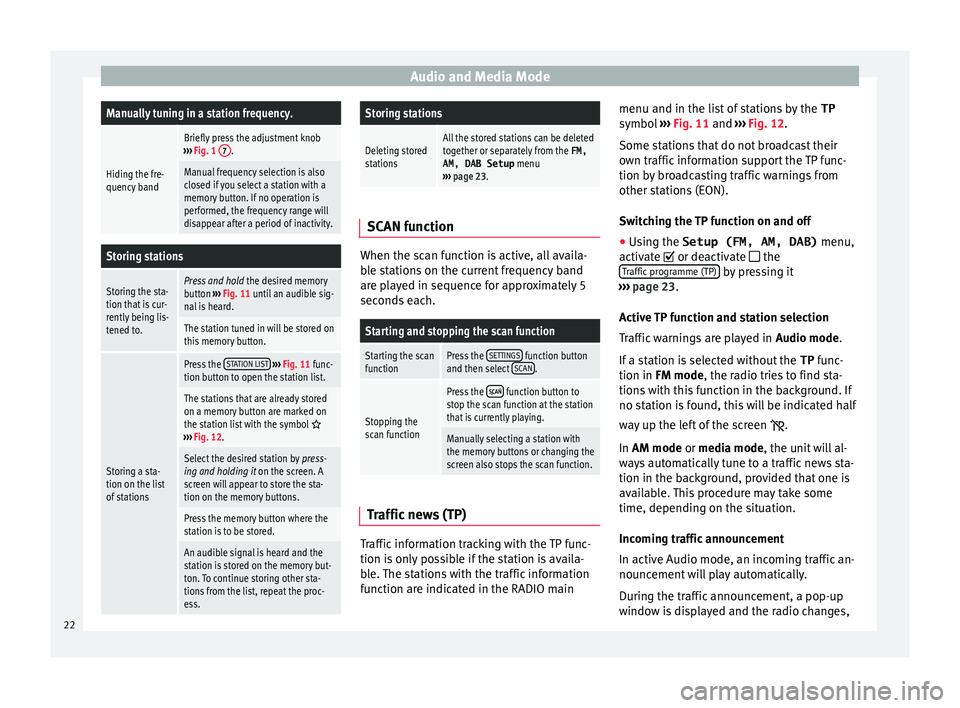
function are indicated in the RADIO main menu and in the list of stations by the
TP
symbol ›
›› Fig. 11 and ››› Fig. 12.
Some stations that do not broadcast their
own traffic information support the TP func-
tion by broadcasting traffic warnings from
other stations (EON).
Switching the TP function on and off
● Using the Setup (FM, AM, DAB) menu,
activate
or deactivate the
Traffic programme (TP) by pressing it
› ›
›
page 23.
Active TP function and station selection
Traffic warnings are played in Audio mode.
If a station is selected without the TP func-
tion in FM mode, the radio tries to find sta-
tions with this function in the background. If
no station is found, this will be indicated half
way up the left of the screen .
In AM mode or media mode, the unit will al-
ways automatically tune to a traffic news sta-
tion in the background, provided that one is
available. This procedure may take some
time, depending on the situation.
Incoming traffic announcement
In active Audio mode, an incoming traffic an-
nouncement will play automatically.
During the traffic announcement, a pop-up
window is displayed and the radio changes,
22
Page 30 of 88
Audio and Media Mode
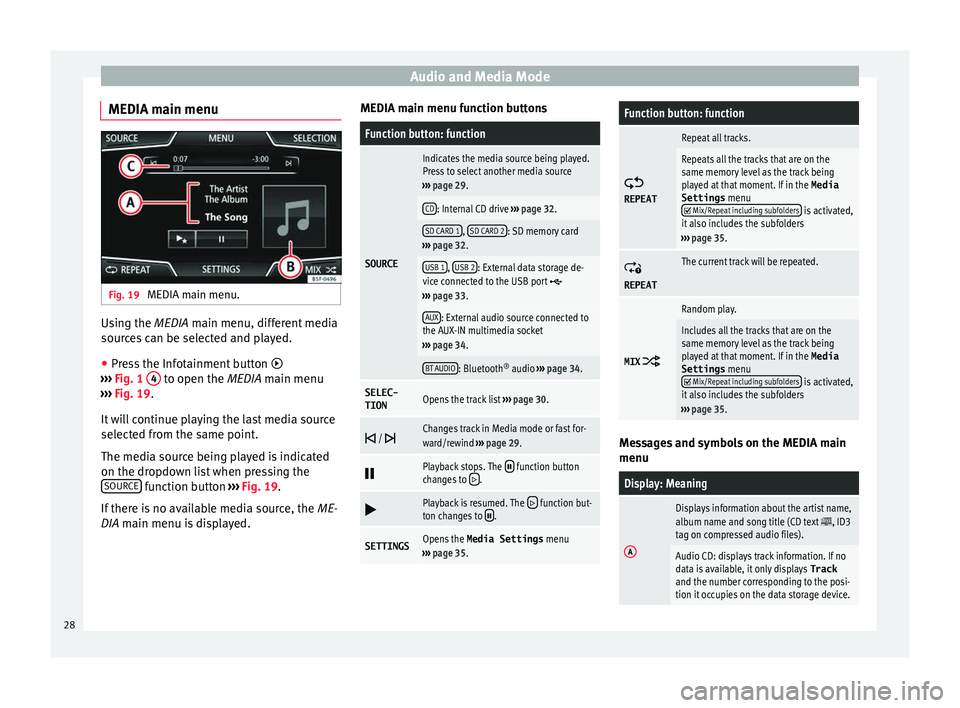
MEDIA main menu Fig. 19
MEDIA main menu. Using the MEDIA m
ain menu, diff
er ent media
sources can be selected and played.
● Press the Infotainment button
›››
Fig. 1 4 to open the MEDIA m
ain menu
› ›
› Fig. 19.
It will continue playing the last media source
selected from the same point.
The media source being played is indicated
on the dropdown list when pressing the SOURCE function button
››
›
Fig. 19.
If there is no available media source, the ME-
DIA main menu is displayed. MEDIA main menu function buttons
Function button: function
SOURCE
Indicates the media source being played.
Press to select another media source
››› page 29.
CD: Internal CD drive ››› page 32.
SD CARD 1, SD CARD 2: SD memory card
››› page 32.
USB 1, USB 2: External data storage de-
vice connected to the USB port ››› page 33.
AUX: External audio source connected to
the AUX-IN multimedia socket
››› page 34.
BT AUDIO: Bluetooth ®
audio ››› page 34.
SELEC-
TIONOpens the track list ››› page 30.
/ Changes track in Media mode or fast for-
ward/rewind
››› page 29.
Playback stops. The function button
changes to .
Playback is resumed. The function but-
ton changes to .
SETTINGSOpens the Media Settings menu
››› page 35.
Function button: function
REPEAT
Repeat all tracks.
Repeats all the tracks that are on the
same memory level as the track being
played at that moment. If in the
Media
Settings menu
Mix/Repeat including subfolders is activated,
it also includes the subfolders
››› page 35.
REPEAT
The current track will be repeated.
MIX
Random play.
Includes all the tracks that are on the
same memory level as the track being
played at that moment. If in the Media
Settings menu
Mix/Repeat including subfolders is activated,
it also includes the subfolders
››› page 35. Messages and symbols on the MEDIA main
menu
Display: Meaning
A
Displays information about the artist name,
album name and song title (CD text , ID3
tag on compressed audio files).
Audio CD: displays track information. If no
data is available, it only displays Track
and the number corresponding to the posi-
tion it occupies on the data storage device. 28
Page 31 of 88
Audio and Media ModeDisplay: Meaning
B
Viewing the album cover: If there are vari-
ous covers within the same folder/album,
the system only displays one of them.
It prioritizes displaying the covers in the fol-
lowing manner:
1. Cover embedded in the file(s).
2. Image in file folder.
3. Default icon for the connected device.
C
The playing time so far and time remaining
in minutes and seconds. In the case of au-
dio files with variable bit rates (VBR) the re-
maining time may vary.
TP
a)The TP function is active and can be tuned
in
››› page 22.
a)There is no traffic news station available
››› page 22.
a)
Depends on the market and unit in question. Note
● When the media sour c
e is inserted, playing
will not start automatically; it is necessary for
the user to select the source. Nor will the me-
dia source change when it is ejected. Change the media source
Fig. 20
MEDIA mode: change media source. ●
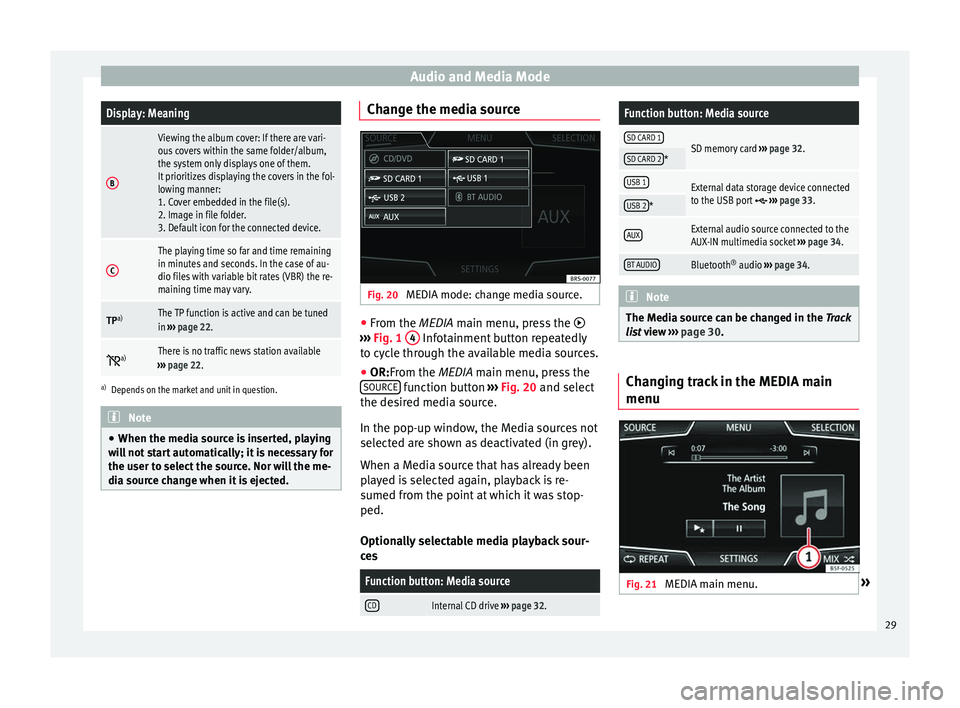
From the MEDIA m ain menu, pr
e
ss the
››› Fig. 1 4 Infotainment button repeatedly
t o cy
c
le through the available media sources.
● OR:From the MEDIA main menu, press the
SOURCE function button
››
›
Fig. 20 and select
the desired media source.
In the pop-up window, the Media sources not
selected are shown as deactivated (in grey).
When a Media source that has already been
played is selected again, playback is re-
sumed from the point at which it was stop-
ped.
Optionally selectable media playback sour-
ces
Function button: Media source
CDInternal CD drive ››› page 32.
Function button: Media source
SD CARD 1SD memory card ››› page 32.SD CARD 2*
USB 1External data storage device connected
to the USB port ››› page 33.USB 2*
AUXExternal audio source connected to the
AUX-IN multimedia socket ››› page 34.
BT AUDIOBluetooth ®
audio ››› page 34. Note
The Media source can be changed in the Tr ac
k
list view ››› page 30. Changing track in the MEDIA main
menu
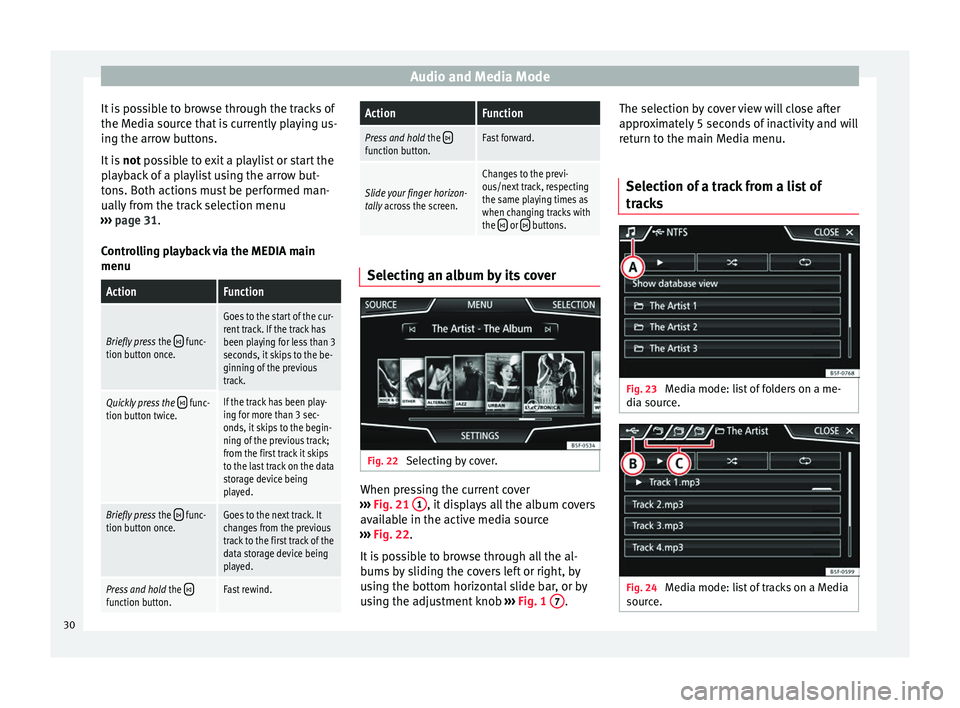
Fig. 21
MEDIA main menu. » 29
Page 32 of 88
Audio and Media Mode
It is possible to browse through the tracks of
the M edi
a sour
ce that is currently playing us-
ing the arrow buttons.
It is not possible to exit a playlist or start the
playback of a playlist using the arrow but-
tons. Both actions must be performed man-
ually from the track selection menu
››› page 31.
Controlling playback via the MEDIA main
menu
ActionFunction
Briefly press the func-
tion button once.
Goes to the start of the cur-
rent track. If the track has
been playing for less than 3
seconds, it skips to the be-
ginning of the previous
track.
Quickly press the func-
tion button twice.If the track has been play-
ing for more than 3 sec-
onds, it skips to the begin-
ning of the previous track;
from the first track it skips
to the last track on the data
storage device being
played.
Briefly press the func-
tion button once.Goes to the next track. It
changes from the previous
track to the first track of the
data storage device being
played.
Press and hold the function button.Fast rewind.
ActionFunction
Press and hold the function button.Fast forward.
Slide your finger horizon-
tally across the screen.
Changes to the previ-
ous/next track, respecting
the same playing times as
when changing tracks with
the
or buttons. Selecting an album by its cover
Fig. 22
Selecting by cover. When pressing the current cover
› ›
›
Fig. 21 1 , it displays all the album covers
av ai
l
able in the active media source
››› Fig. 22.
It is possible to browse through all the al-
bums by sliding the covers left or right, by
using the bottom horizontal slide bar, or by
using the adjustment knob ›››
Fig. 1 7 .The selection by cover view will close after
ap
pr
o
ximately 5 seconds of inactivity and will
return to the main Media menu.
Selection of a track from a list of
track
s Fig. 23
Media mode: list of folders on a me-
di a sour
c
e. Fig. 24
Media mode: list of tracks on a Media
sour c
e. 30
Page 34 of 88
Audio and Media Mode
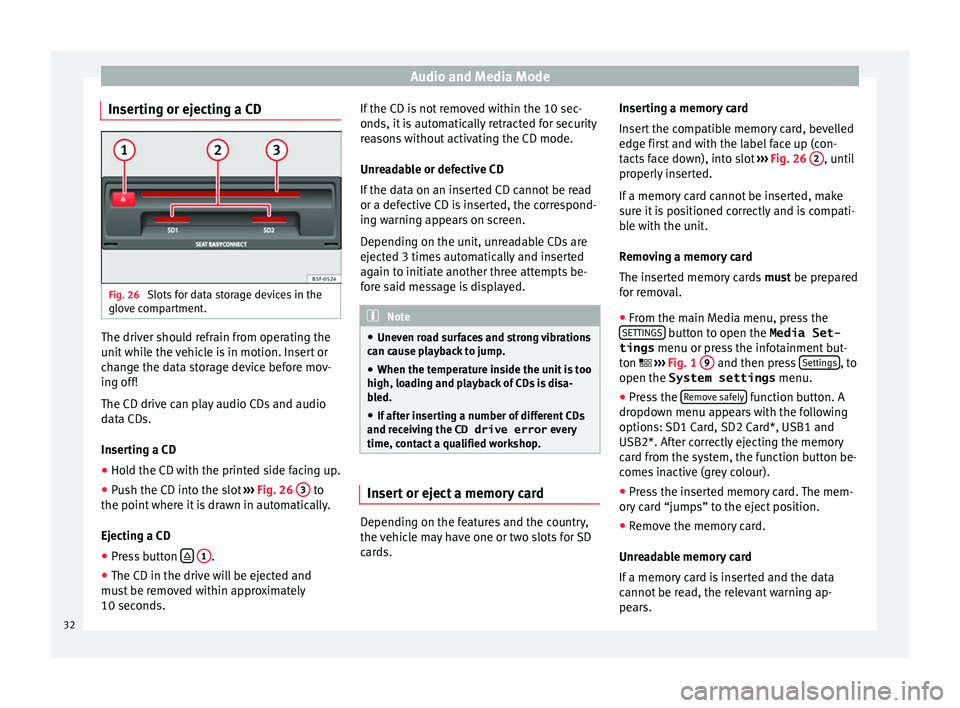
Inserting or ejecting a CD Fig. 26
Slots for data storage devices in the
glo v
e c
ompartment. The driver should refrain from operating the
u
nit
whi
le the vehicle is in motion. Insert or
change the data storage device before mov-
ing off!
The CD drive can play audio CDs and audio
data CDs.
Inserting a CD
● Hold the CD with the printed side facing up.
● Push the CD into the slot ›››
Fig. 26 3 to
the point wher
e it
is drawn in automatically.
Ejecting a CD
● Press button
1 .
● The CD in the drive will be ejected and
mu s
t
be removed within approximately
10 seconds. If the CD is not removed within the 10 sec-
onds, it i
s automatically retracted for security
reasons without activating the CD mode.
Unreadable or defective CD
If the data on an inserted CD cannot be read
or a defective CD is inserted, the correspond-
ing warning appears on screen.
Depending on the unit, unreadable CDs are
ejected 3 times automatically and inserted
again to initiate another three attempts be-
fore said message is displayed. Note
● Uneven r o
ad surfaces and strong vibrations
can cause playback to jump.
● When the temperature inside the unit is too
high, loadin
g and playback of CDs is disa-
bled.
● If after inserting a number of different CDs
and receiv
ing the CD drive error every
time, contact a qualified workshop. Insert or eject a memory card
Depending on the features and the country,
the
v
ehic
le may have one or two slots for SD
cards. Inserting a memory card
Insert
the compatible memory card, bevelled
edge first and with the label face up (con-
tacts face down), into slot ››› Fig. 26 2 , until
pr operly
in
serted.
If a memory card cannot be inserted, make
sure it is positioned correctly and is compati-
ble with the unit.
Removing a memory card
The inserted memory cards must be prepared
for removal.
● From the main Media menu, press the
SETTINGS button to open the Media Set-
tings menu or pr e
s
s the infotainment but-
ton ››› Fig. 1 9 and then press
Settin
g
s , to
open the System settings menu.
● Press the R
emo
v
e safely function button. A
dr opdo
wn menu ap
pears with the following
options: SD1 Card, SD2 Card*, USB1 and
USB2*. After correctly ejecting the memory
card from the system, the function button be-
comes inactive (grey colour).
● Press the inserted memory card. The mem-
ory c
ard “jumps” to the eject position.
● Remove the memory card.
Unrea
dable memory card
If a memory card is inserted and the data
cannot be read, the relevant warning ap-
pears.
32
Page 37 of 88
Audio and Media Mode
● In the MEDIA m ain menu, pr
e
ss the SOURCE function button and select
B
T audio .
● Press Se
ar
c
h for new device in order to con-
nect an e
xt
ernal Bluetooth ®
audio source for
the first time ››› page 54.
● OR: Select a Bluetooth ®
ext
ernal audio
source from the list.
● Please refer to the instructions on the
scr
een of the Infotainment system and on the
Bluetooth ®
audio source regarding the rest
of the procedure.
You may still need to manually start playback
on the Bluetooth ®
source.
When playback on the Bluetooth ®
audio
source is stopped, the Infotainment system
remains in Bluetooth ®
Audio mode.
Controlling playback
The extent to which the Bluetooth ®
audio
source can be controlled via the Infotainment
system depends on the connected Blue-
tooth ®
audio source.
The available functions will depend on the
Bluetooth ®
Audio profile that the connected
external player supports.
With media players that support the AVRCP
Bluetooth ®
profile, playback on the Blue-
tooth ®
audio source can be automatically
started or stopped when the unit is switched
to Bluetooth ®
Audio mode or to a different
audio source. In addition, it is possible to view or change the track via the Infotainment
syst
em. Note
● Due t o the l
arge number of possible Blue-
tooth ®
audio sources, it is not possible to
guarantee fault-free operation of all descri-
bed functions.
● Always switch off the warning and service
tones
on a connected Bluetooth ®
audio
source, e.g. key tones on a mobile telephone,
to prevent possible interference noise and
malfunctions.
● Depending on the external player connec-
ted, the re
sponse time of the system can
vary.
● Do not connect an external media player to
pla
y music via Bluetooth ®
and via the USB
port ››› page 33 at the same time with the
Infotainment system, as this could cause
playback limitations.
● If the external player is an Apple™ device,
it cannot
be simultaneously connected by
USB and by Bluetooth ®
. Media Settings
●
Select the MEDIA main menu b
y
pressing
the Infotainment button ›››
Fig. 1 4 ●
Press the S
ET
TINGS function button to open
the Media Settings menu.
Function button: function
Sound: Sound settings ››› page 76.
Mix/Repeat including subfolders: Subfolders will be inclu-
ded in the selected playback mode ››› page 25.
Bluetooth: Bluetooth ®
settings ››› page 63
Remove safely: In order to prepare the external data stor-
age devices for their removal or disconnection. See also
››› page 32, Insert or eject a memory card and
››› page 33, External data storage device connected to
USB port
.
Traffic programme (TP): The TP function (traffic news sta-
tion tracking) is active ››› page 22. Images
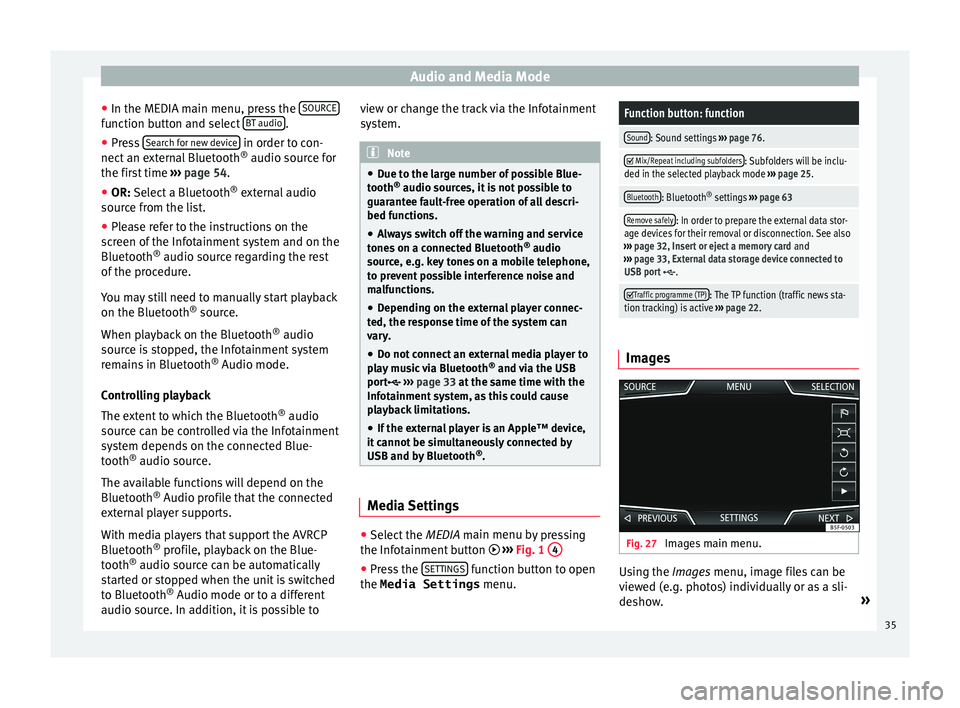
Fig. 27
Images main menu. Using the Ima
ge
s
menu, image files can be
viewed (e.g. photos) individually or as a sli-
deshow. »
35