ECU Seat Ibiza 5D 2005 User Guide
[x] Cancel search | Manufacturer: SEAT, Model Year: 2005, Model line: Ibiza 5D, Model: Seat Ibiza 5D 2005Pages: 252, PDF Size: 7.56 MB
Page 46 of 252
Child safety
44Safety notes on using child seats
Proper use of child seats substantially reduces the risk of
injury in an accident!As the driver, you are responsible for any children you transport in
your vehicle.
– Protect your children by properly using appropriate child seats
⇒page 45.
– Always ensure that the belt webbing is properly positioned according to the instructions prov ided by the manufacturer of the
child seat.
– When travelling, do not allow children to distract you from traffic.
– Take breaks regularly during long trips. Take a break at least every two hours.
WARNING
•
Never install a rear-facing child seat on the front passenger seat unless
the front passenger airbag has been disabled. Risk of potentially fatal inju-
ries to the child! If it is necessary, in exceptional circumstances, to trans-
port a child on the front passenger seat, always disable the front passenger
airbag ⇒ page 41, “Deactivating airbags*”.
•
For those vehicles that do not include a key lock switch to turn the
airbag off, an Authorised Service Centre must be consulted.
•
All passengers, especially children, must assume the proper sitting
position and be properly belted in while travelling.
•
Never hold children or babies on your lap, this can result in potentially
fatal injuries to the child!
•
Never allow a child to be transported in a vehicle without being properly
secured, or to stand up or kneel on a seat while travelling. In an accident,
the child could be flung through the vehicle, causing possibly fatal injuries
to themselves and other occupants.
•
If children assume an improper sitting position when the car is moving,
they expose themselves to greater risk of injury during a sudden braking
manoeuvre or in an accident. This is pa rticularly the case if the child is trav-
elling on the front passenger seat and the airbag system is triggered in an
accident; this could have consequences including serious injury or death.
•
A suitable child seat can protect your child!
•
Never leave a child unsupervised in a child seat or alone in the vehicle.
•
Depending on weather conditions, it may become extremely hot or cold
inside the vehicle. This can be fatal.
•
Children who are less than 1.5 metres tall must not wear a normal seat
belt without a child restraint system, as this could cause injuries to the
abdominal and neck areas during a sudden braking manoeuvre or in an
accident.
•
Do not allow the belt webbing to become twisted or jammed, or to rub
on any sharp edges.
•
Incorrectly worn seat belts can cause injuries even in a minor collision
or sudden braking manoeuvres.
•
The seat belt provides maximum prot ection only when the belt web is
properly positioned ⇒ page 22, “Seat belts”.
•
Only one child may occupy a child seat ⇒page 45, “Child seats”.WARNING (continued)
ibiza_ingles Seite 44 Mittwoch, 5. Oktober 2005 5:17 17
Page 49 of 252
Child safety47
Safety First
Operating instructions
Tips and Maintenance
Te c h n i c a l D a t a
WARNING
•
The shoulder part of the seat belt mu st lie approximately on the centre
of the shoulder, never across the neck or the arm. The seat belt must lie
close to the torso. The lap belt part must lie across the pelvis, not across the stomach, and always fit closely. Pull the belt tight if necessary to take
up any slack ⇒
page 22, “Seat belts”.
•
Read and always observe information and warnings concerning the use
of child seats ⇒ in “Safety notes on using child seats” on page 44.
Securing child seatsWays to secure a child seat
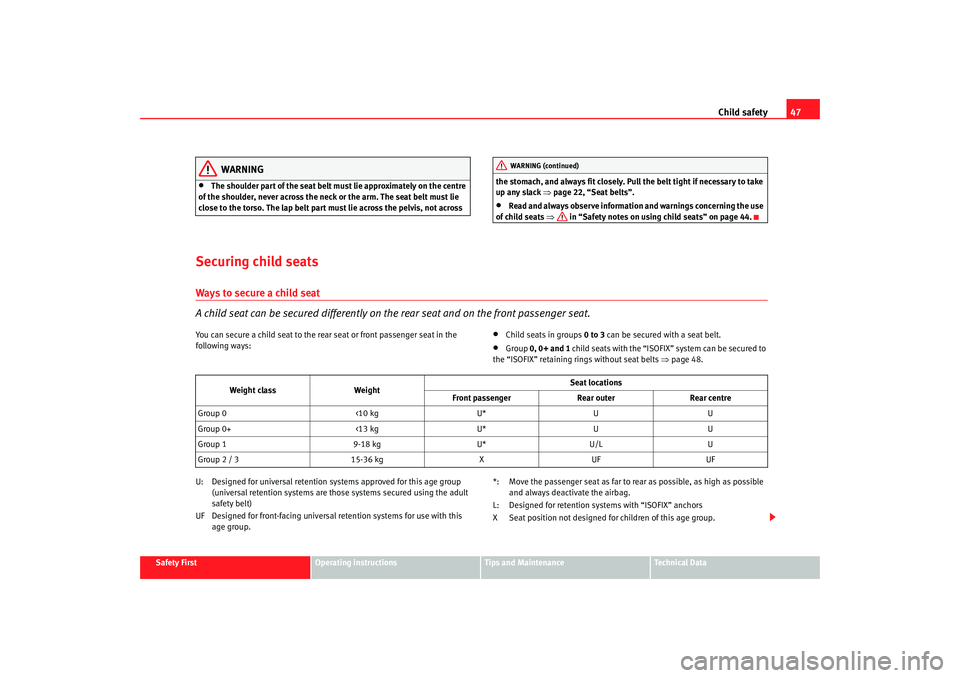
A child seat can be secured differently on th e rear seat and on the front passenger seat.You can secure a child seat to the rear seat or front passenger seat in the
following ways:
•
Child seats in groups 0 to 3 can be secured with a seat belt.
•
Group 0, 0+ and 1 child seats with the “ISOFIX” system can be secured to
the “ISOFIX” retaining rings without seat belts ⇒ page 48.
U: Designed for universal retention systems approved for this age group (universal retention systems are those systems secured using the adult
safety belt)
UF Designed for front-facing universal retention systems for use with this age group. *: Move the passenger seat as far to rear as possible, as high as possible
and always deactivate the airbag.
L: Designed for retention systems with “ISOFIX” anchors
X Seat position not designed for children of this age group.WARNING (continued)
Weight class Weight Seat locations
Front passenger Rear outerRear centre
Group 0 <10 kgU*UU
Group 0+ <13 kgU*UU
Group 1 9-18 kgU*U/L U
Group 2 / 3 15-36 kgXUF UF
ibiza_ingles Seite 47 Mittwoch, 5. Oktober 2005 5:17 17
Page 50 of 252
Child safety
48
WARNING
•
When travelling, children must be secured in the vehicle with a
restraint system suitable for age, weight and size.
•
Never install a rear-facing child seat on the front passenger seat unless
the front passenger airbag has been disabled. Risk of potentially fatal inju-
ries to the child! If it is necessary in exceptional cases to transport a child
on the front passenger seat, you must always disable the front passenger
airbag ⇒ page 41, “Deactivating airbags*”.
•
Read and always observe information and warnings concerning the use
of child seats ⇒ in “Safety notes on using child seats” on page 44.
Securing child seat with the “ISOFIX” system
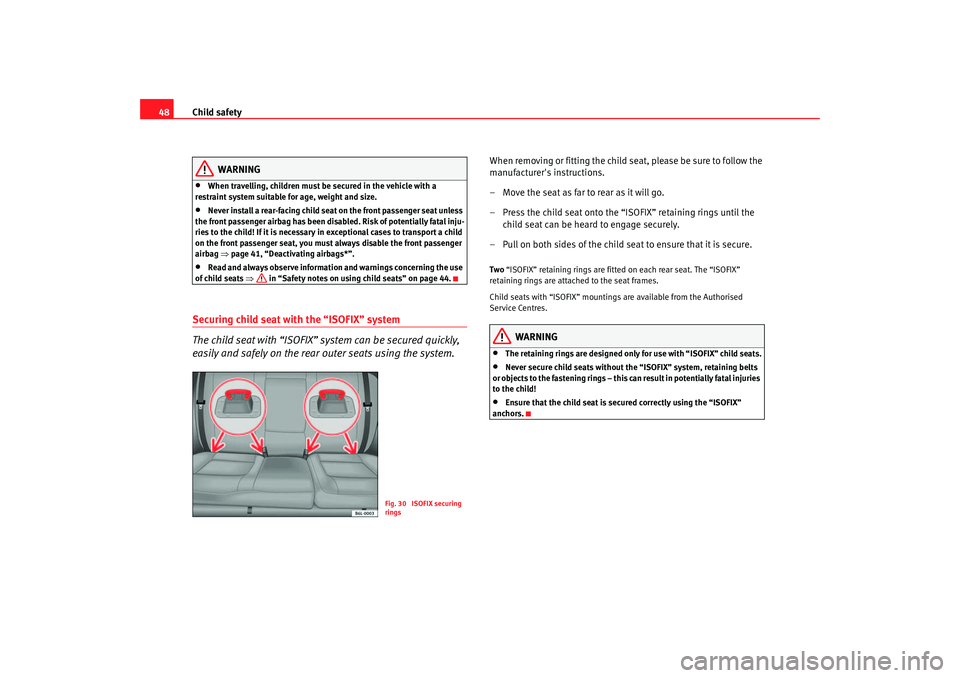
The child seat with “ISOFIX” system can be secured quickly,
easily and safely on the rear outer seats using the system.
When removing or fitting the child seat, please be sure to follow the
manufacturer's instructions.
– Move the seat as far to rear as it will go.
– Press the child seat onto the “ISOFIX” retaining rings until the
child seat can be heard to engage securely.
– Pull on both sides of the child seat to ensure that it is secure.Two “ISOFIX” retaining rings are fitted on each rear seat. The “ISOFIX”
retaining rings are attached to the seat frames.
Child seats with “ISOFIX” mountings are available from the Authorised
Service Centres.
WARNING
•
The retaining rings are designed only for use with “ISOFIX” child seats.
•
Never secure child seats without the “ISOFIX” system, retaining belts
or objects to the fastening rings – this c an result in potentially fatal injuries
to the child!
•
Ensure that the child seat is se cured correctly using the “ISOFIX”
anchors.
Fig. 30 ISOFIX securing
rings
ibiza_ingles Seite 48 Mittwoch, 5. Oktober 2005 5:17 17
Page 72 of 252
Unlocking and locking
70Unlocking and lockingCentral lockingDescription
The central locking system enables you to lock and unlock all
the doors and the tailgate from one point.Central locking can be activated us ing any of the following options:•
the key, by inserting it into the driver's door cylinder and rotating manu-
ally,
•
the central locking button , (electronic control) in the passenger compart-
ment ⇒ page 72.
• the radio frequency remote control, us ing th
e buttons on the ke y
⇒ pa
ge 77.
Various f u
nctions are available to improve the vehicle security:
- Locking system “Safe”
- Selective unlocking system*
- Autolocking system to prevent accidental unlocking
- Speed related automatic locking system*
- Locking release safety systemNote
For anti-theft security, only the driver's door is fitted with a lock cylinder.
Safety system “Safe”
This is an anti-theft device consisting of a double lock for the
door locks and a deactivation function for the boot in order to
make forced entry more difficult.Activation
The “safe” system is activated when the vehicle is locked using the key or the
remote control.
To activate this system with the key, rotate the key once in the door lock
cylinder in the locking direction.
To activate the system using the remote control, press the lock button on the
remote once.
When this system is activated, it is no t possible to open the doors normally,
from the outside or the inside. The boot/tailgate may not be opened. The
central locking button does not work.
Voluntary deactivation
The “Safe” system can be deactivated voluntarily by the user.
This is done by locking two times in quick succession (in under 2 seconds).
This double locking can be executed using the key or the remote control.
Using the key, rotate the lock cylinder twice in the locking direction.
To activate the system using the remote control, press the lock button on the
remote twice.
When the “Safe” system is deactivated, the alarm volumetric sensor is also
deactivated.
ibiza_ingles Seite 70 Mittwoch, 5. Oktober 2005 5:17 17
Page 73 of 252
Unlocking and locking71
Safety First
Operating instructions
Tips and Maintenance
Te c h n i c a l D a t a
When the “Safe” system is deactivated, the doors are locked using the simple
locking system, meaning that
they may be opened from the interior but not
from the exterior.
Involuntary deactivation
The methods described for deactivation of the “Safe” system may be
executed involuntarily (for example, if we press the button because we
want to lock the vehicle, and it locks as a result, however, we are not sure that
it is locked and we press the button once more within 2 seconds, we will have
deactivated the “Safe” system).
Deactivation when opening
To deactivate the system on opening, see “Selective unlocking system*”
“Safe” status
On the driver's door, there is a light indicator visible from the outside of the
vehicle that indicates the “Safe” system status.
We can see that the “Safe” system is activated, by the flashing of the light
indicator . The indicator will flash on all vehicles, whether they are fitted with
an alarm or not, and until the vehicle is unlocked.
Remember:
Safe act i
va ted w i
th or with
out alar
m: Continuous flashing of the
indicat
or.
Safe deactivated without alarm: The indicator remains unlit.
Safe deactivated with alarm: The indicator remains unlit.
WARNING
No one should remain in the vehicle if the “Safe” deadlock mechanism has
been activated. It is not possible to open the doors from the inside or the
outside and this would make any outsid e intervention difficult in case of
emergency. Danger of death. People could become trapped inside in an
emergency.
Selective unlocking system*
This system allows for unlocking only the driver's door, or all
the vehicle.Driver's door unlock button
This is done by a simple unlocking (o nce). This can be done with the key or
the remote control.
With the key, rotate the key once in the lock cylinder in the unlock direction.
The driver's door will be released from the “Safe” system and unlocked and
may be opened and the indicator light will switch off. For vehicles fitted with
an alarm, this system is deactivated.
Using the remote control, press the unlock button on the remote once. The
“Safe” system is deactivated for all the vehicle, only the driver's door is
unlocked for opening, the alarm is tu rned off as is the light indicator.
Unlocking all doors and the boot
So that all the doors and the boot ca n be opened, the unlock button on
the remote must be pressed twice.
The button must be pressed twice in under 2 seconds and this will deactivate
the “Safe” system for all the vehicle, all doors will be unlocked and the boot
will be activated. The indicator will be turned off as will be the alarm for those
vehicles fitted with one.
Unlocking the boot
See ⇒page 77 and ⇒ page 82 .
ibiza_ingles Seite 71 Mittwoch, 5. Oktober 2005 5:17 17
Page 75 of 252
Unlocking and locking73
Safety First
Operating instructions
Tips and Maintenance
Te c h n i c a l D a t a
Locking the vehicle
– Press the button ⇒ .
Unlocking the doors
– Press the button .The central locking button is still operative when the ignition is switched off.
Except, if the "safe" security system is activated.
Please note the following when you use the central locking button to lock your
vehicle:•
It will not be possible to open the doors or the tailgate from the outside
(this may offer extra safety, for instance when stopped at traffic lights).
•
The driver's door cannot be locked if it is open. This prevents you from
locking yourself out of the vehicle.
•
Repeated operation of the central lo cking will deactivate the central
locking button for 30 seconds. Once this time has passed, the button may be
used once more.
•
There is a danger that the key may remain inside the vehicle, if the vehicle
is locked using the central locking button when the driver's door is closed
and, for example, the passenger door o pen. If this door is closed, then the
keys will remain inside the vehicle.
•
All doors may be locked separately from inside the car. Do this by pulling
the door release lever twice.
WARNING
•
If the vehicle is locked, children and disabled people may be trapped
inside.
•
The central locking button is not operative in the following cases.
•
When the vehicle is locked from th e outside (using the remote or the
key).
•
While the ignition is not activated after unlocking the door lock cylinder
with the key.Note
•
Vehicle locked, button
•
Vehicle unlocked, button
WARNING (continued)
ibiza_ingles Seite 73 Mittwoch, 5. Oktober 2005 5:17 17
Page 79 of 252
Unlocking and locking77
Safety First
Operating instructions
Tips and Maintenance
Te c h n i c a l D a t a
Radio frequency remote controlLocking and unlocking the vehicle
The remote control key can be used to lock and unlock the
vehicle from a distance.
The following functions can be perfo rmed using the remote control and
without using the key itself•
Opening and closing central locking system.
•
Turning the anti theft alarm* and the locking security system (double
lock) on and off.
•
Turning interior light on.
The radiofrequency remote control device with batteries is fitted in the head
of the vehicle key. The receiver is in the interior of the vehicle.
The indicator light for the key always flashes when the remote control is used.
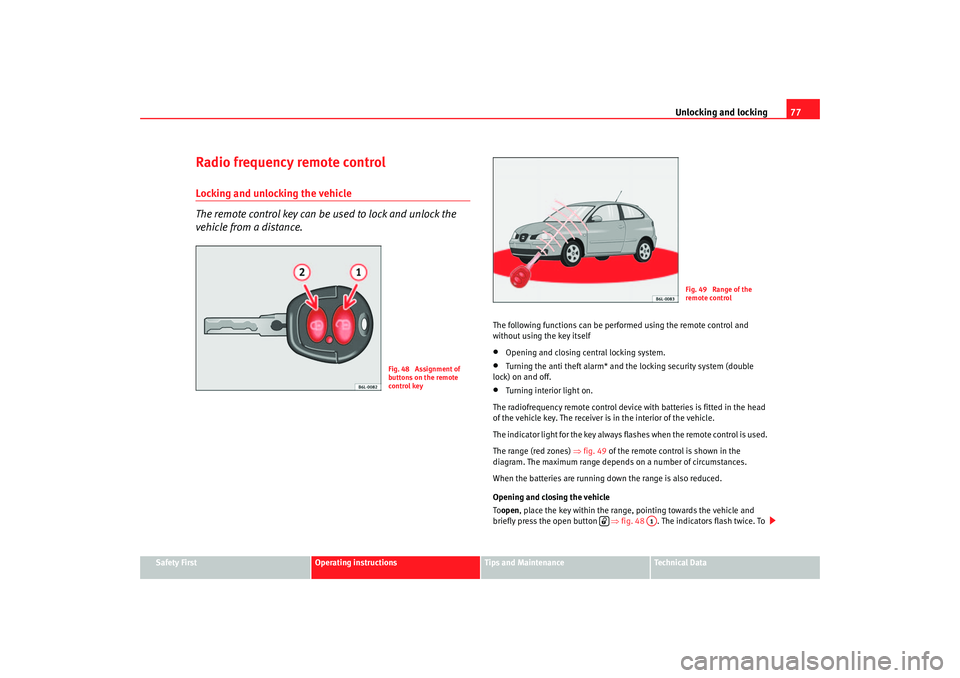
The range (red zones) ⇒fig. 49 of the remote control is shown in the
diagram. The maximum range depends on a number of circumstances.
When the batteries are running down the range is also reduced.
Opening and closing the vehicle
To open , place the key within the range, pointing towards the vehicle and
briefly press the open button ⇒fig. 48 . The indicators flash twice. To
Fig. 48 Assignment of
buttons on the remote
control key
Fig. 49 Range of the
remote control
A1
ibiza_ingles Seite 77 Mittwoch, 5. Oktober 2005 5:17 17
Page 80 of 252
Unlocking and locking
78close the vehicle, press the close button briefly ⇒fig. 48 . The indica-
tors flash once.
By pressing the locking button twice ⇒page 77, fig. 48 both the
locking security mechanism (double) an d the volumetric alarm* are deacti-
vated but the perimetric alarm* remains active and this is indicated by the
ind icator light on the dri ver ' s door.
Selectiv
e unlocking*
When the button ⇒page 77, fig. 48 is used the driver's door is
unlocked, all others remain locked.
Press the button ⇒page 77, fig. 48 twice to unlock all doors.
WARNING
•
Incorrect use of the key can result in critical injuries.
•
Never leave children or disabled persons in the vehicle; in case of emer-
gency they may not be able to leave the vehicle or look after themselves.
•
Never leave any of the vehicle keys in the vehicle. This could result in
serious injuries, accidents or the theft of your vehicle. Always take the key
with you when you leave the vehicle.
•
Unsupervised use of a key could mean that the engine is started or that
electrical equipment is used (e.g. elec tric windows). Risk of accident. The
vehicle can be locked using the remote control key. This could result in
people being trapped in the vehicle in an emergency.Note
•
The radio-frequency remote control can also be programmed so that only
the driver's door is unlocked the first time that the unlocking button on the
radio frequency remote control key is pressed. When the button is pressed
once more, all doors and the tailgate will be unlocked.
•
The remote control functions only when you are in range ⇒page 77,
fig. 49 (red area).
•
If the vehicle is unlocked using the button, the vehicle will be
locked again automatically if any of th e doors or the tailgate are not opened
within 30 seconds of unlocking the vehicle . This function prevents the vehicle
from remaining unlocked if the unlocking button is pressed by mistake.
•
If the vehicle cannot be opened and closed using the remote control, the
remote control key will have to be re-synchronised ⇒page 78.
Changing the batteryIf the battery indicator does not flash when the buttons are pushed, the
battery must be replaced.
Caution
Use of inappropriate batteries may damage the radio frequency remote
control. For this reason, always replac e the dead battery with another of the
same size and power.
For the sake of the environment
The flat batteries must be disposed of in accordance with regulations
governing the protection of the environment.Synchronising the remote control keySynchronising the remote control key
– Use both keys that have been delivered with the vehicle; the key with the remote and the normal key ⇒page 77,
fig. 48 ⇒ page 77
, fig. 49.
A2
A2
A1
A1
A1
ibiza_ingles Seite 78 Mittwoch, 5. Oktober 2005 5:17 17
Page 81 of 252
Unlocking and locking79
Safety First
Operating instructions
Tips and Maintenance
Te c h n i c a l D a t a
–Maximum time allowed for synchronising is 30 seconds.
– The normal key is used to activa te the ignition, and the key with
the remote control is the key to be programmed.
– Check that the car is open before commencing programming.
– Place the key without remote control in the contact inside the steering and ignition lock.
– Use the key with remote control and mechanically lock the vehicle from the driver's door.
– Open and close the driver's door lock mechanically, using the remote control key.
– At the same time press the button on the remote control key.
– Complete the procedure by removing the key from the contactIt is possible that the vehicle could no longer be opened and closed with the
remote control if the button is repeatedly pressed outside of the effective
range of the radio frequency remote cont rol. The remote control key will have
to be resynchronised.
Spare remote control keys are available from Authorised Service Centres, they
must be matched to the locking system.
Anti-theft alarm system*Description of anti-theft alarm system*
The anti-theft alarm triggers an alarm if unauthorised move-
ments are detected around the vehicle.The anti-theft alarm makes it more difficult to break into the vehicle or steal
it. Audible and visible alarms are triggered if the car is opened using the
mechanical key, or if unauthorised access is gained to the vehicle.
The anti-theft alarm system is automatically switched on when the vehicle is
locked. To lock the door either turn the key once in the lock towards the
locking position or press button on the radio-frequency remote
control*. The system is activated immediately and the indicator light located
on the driv er's door will flash along with the indica tors indicating that the
alarm and the locking security system (double lock) have been turned on.
When the vehicle is locked the indicator lamps light up only if the alarm has
been correctly activated (all the protec tion zones should be correctly closed).
If any of the doors or the bonnet are open, when the alarm is connected these
will not be included in the protection zones of the vehicle. If the door or
bonnet is subsequently closed, they will automatically be included in the
vehicle protection zones and the indicators will flash accordingly.
When does the system trigger an alarm?
The alarm system is triggered, in the locked vehicle, when:•
a door
•
the bonnet or
•
the tailgate
are unduly opened
•
or the ignition is switched on
A1
A2
ibiza_ingles Seite 79 Mittwoch, 5. Oktober 2005 5:17 17
Page 104 of 252
Seats and stowage
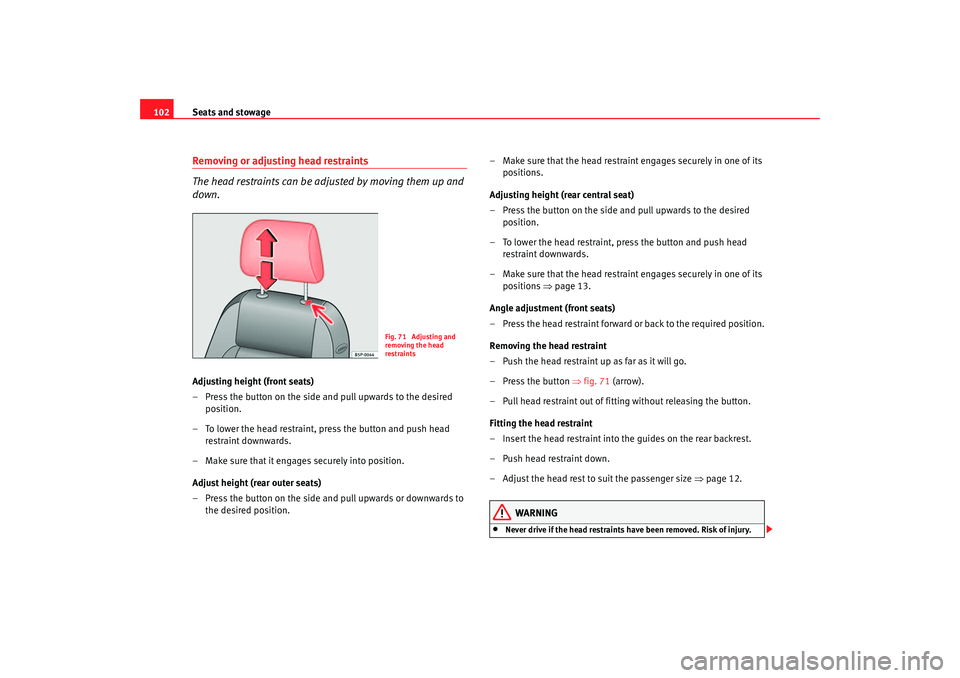
102Removing or adjust ing head restraints
The head restraints can be adjusted by moving them up and
down.Adjusting height (front seats)
– Press the button on the side and pull upwards to the desired position.
– To lower the head restraint, press the button and push head restraint downwards.
– Make sure that it engages securely into position.
Adjust height (rear outer seats)
– Press the button on the side and pull upwards or downwards to the desired position. – Make sure that the head restrain
t engages securely in one of its
positions.
Adjusting height (rear central seat)
– Press the button on the side and pull upwards to the desired position.
– To lower the head restraint, press the button and push head restraint downwards.
– Make sure that the head restrain t engages securely in one of its
positions ⇒ page 13.
Angle adjustment (front seats)
– Press the head restraint forward or back to the required position.
Removing the head restraint
– Push the head restraint up as far as it will go.
– Press the button ⇒fig. 71 (arrow).
– Pull head restraint out of fitting without releasing the button.
Fitting the head restraint
– Insert the head restraint into the guides on the rear backrest.
– Push head restraint down.
– Adjust the head rest to suit the passenger size ⇒ page 12.
WARNING
•
Never drive if the head restraints have been removed. Risk of injury.
Fig. 71 Adjusting and
removing the head
restraints
ibiza_ingles Seite 102 Mittwoch, 5. Oktober 2005 5:17 17