steer Seat Ibiza 5D 2005 User Guide
[x] Cancel search | Manufacturer: SEAT, Model Year: 2005, Model line: Ibiza 5D, Model: Seat Ibiza 5D 2005Pages: 252, PDF Size: 7.56 MB
Page 53 of 252

Cockpit51
Safety First
Operating instructions
Tips and Maintenance
Te c h n i c a l D a t a
Operating instructionsCockpitOverviewOverview of the instrument panel
This overview will help you to familiarise yourself with the
controls and displays quickly.
Door release lever
Air vent
Light switch . . . . . . . . . . . . . . . . . . . . . . . . . . . . . . . . . . . . . . . . .
Light dimmer for instrument panel ligh ting* . . . . . . . . . . . . . .
Headlight range control* . . . . . . . . . . . . . . . . . . . . . . . . . . . . . .
Turn signal and dipped beam lever and cruise control system*
Instrument panel an d warning lights:
− Instruments . . . . . . . . . . . . . . . . . . . . . . . . . . . . . . . . . . . . . . .
− Indication lamps . . . . . . . . . . . . . . . . . . . . . . . . . . . . . . . . . . .
Horn (works only when the igni tion is on)/ and driver front
airbag* . . . . . . . . . . . . . . . . . . . . . . . . . . . . . . . . . . . . . . . . . . . . .
Steering and starter lock . . . . . . . . . . . . . . . . . . . . . . . . . . . . . .
Windscreen wiperand and windscreen wash lever and opera-
tion of the multi-function display * . . . . . . . . . . . . . . . . . . . . . .
Switch for hazard warning lights . . . . . . . . . . . . . . . . . . . . . . . .
Switch for heated rear window . . . . . . . . . . . . . . . . . . . . . . . . . .
Airbag disconnected warning light* . . . . . . . . . . . . . . . . . . . . .
Cup holder* . . . . . . . . . . . . . . . . . . . . . . . . . . . . . . . . . . . . . . . . . Radio casing*/Radio navigation system*
Passenger airbag* . . . . . . . . . . . . . . . . . . . . . . . . . . . . . . . . . . .
Glove box/Stowage compartment . . . . . . . . . . . . . . . . . . . . . . .
Switches for:
−
Heating and ventilation . . . . . . . . . . . . . . . . . . . . . . . . . . . . .
− Air conditioning* . . . . . . . . . . . . . . . . . . . . . . . . . . . . . . . . . .
− Climatronic* . . . . . . . . . . . . . . . . . . . . . . . . . . . . . . . . . . . . . .
Ashtray/ cigarette lighter/socket . . . . . . . . . . . . . . . . . . . . . . . .
Handbrake lever . . . . . . . . . . . . . . . . . . . . . . . . . . . . . . . . . . . . .
Automatic / manual gearbox lever * . . . . . . . . . . . . . . . . . . . .
Pedals . . . . . . . . . . . . . . . . . . . . . . . . . . . . . . . . . . . . . . . . . . . . .
Steering column control lever* . . . . . . . . . . . . . . . . . . . . . . . . .
Stowage compartment . . . . . . . . . . . . . . . . . . . . . . . . . . . . . . . .
Bonnet release lever . . . . . . . . . . . . . . . . . . . . . . . . . . . . . . . . . .
Control for adjusting electric wing mirrors* . . . . . . . . . . . . . . .
Central locking button* . . . . . . . . . . . . . . . . . . . . . . . . . . . . . . .
Electric window controls* . . . . . . . . . . . . . . . . . . . . . . . . . . . . . .
Note
Some of the items of equipment listed here are fitted only on certain models
or are optional extras.
A1A2A3
88
A4
89
A5
89
A6
91, 135
A7
52
60
A8
28
A9
125
A10
94, 55
A11
90
A12
89
A13
29
A14
108
A15A16
31
A17
106
A18
113
116
119
A19
109
A20
134
A21
130, 129
A22
14
A23
123
A24
107
A25
171
A26
98
A27
72
A28
83
ibiza_ingles Seite 51 Mittwoch, 5. Oktober 2005 5:17 17
Page 63 of 252
Cockpit61
Safety First
Operating instructions
Tips and Maintenance
Te c h n i c a l D a t a
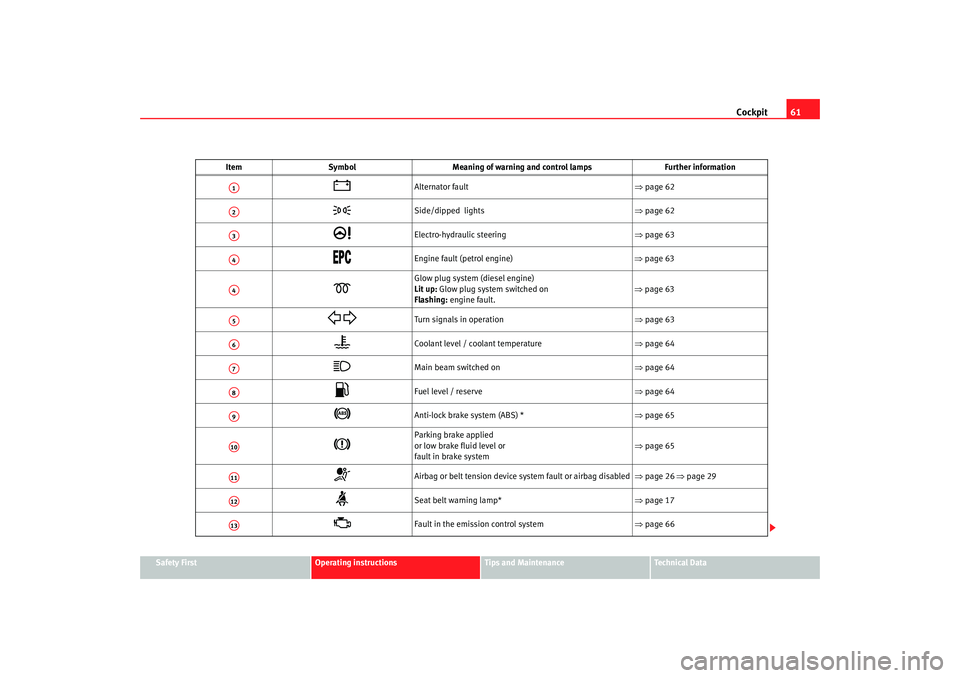
Item
Symbol Meaning of warning and control lamps Further information
Alternator fault ⇒page 62
Side/dipped lights ⇒page 62
Electro-hydraulic steering ⇒page 63
Engine fault (petrol engine) ⇒ page 63
Glow plug system (diesel engine)
Lit up: Glow plug system switched on
Flashing: engine fault.
⇒ page 63
Turn signals in operation ⇒page 63
Coolant level / coolant temperature ⇒page 64
Main beam switched on ⇒page 64
Fuel level / reserve ⇒page 64
Anti-lock brake system (ABS) * ⇒page 65
Parking brake applied
or low brake fluid level or
fault in brake system ⇒
page 65
Airbag or belt tension device system fault or airbag disabled ⇒page 26 ⇒page 29
Seat belt warning lamp* ⇒page 17
Fault in the emission control system ⇒page 66
A1A2A3A4A4A5A6A7A8A9A10A11A12A13
ibiza_ingles Seite 61 Mittwoch, 5. Oktober 2005 5:17 17
Page 65 of 252
Cockpit63
Safety First
Operating instructions
Tips and Maintenance
Te c h n i c a l D a t a
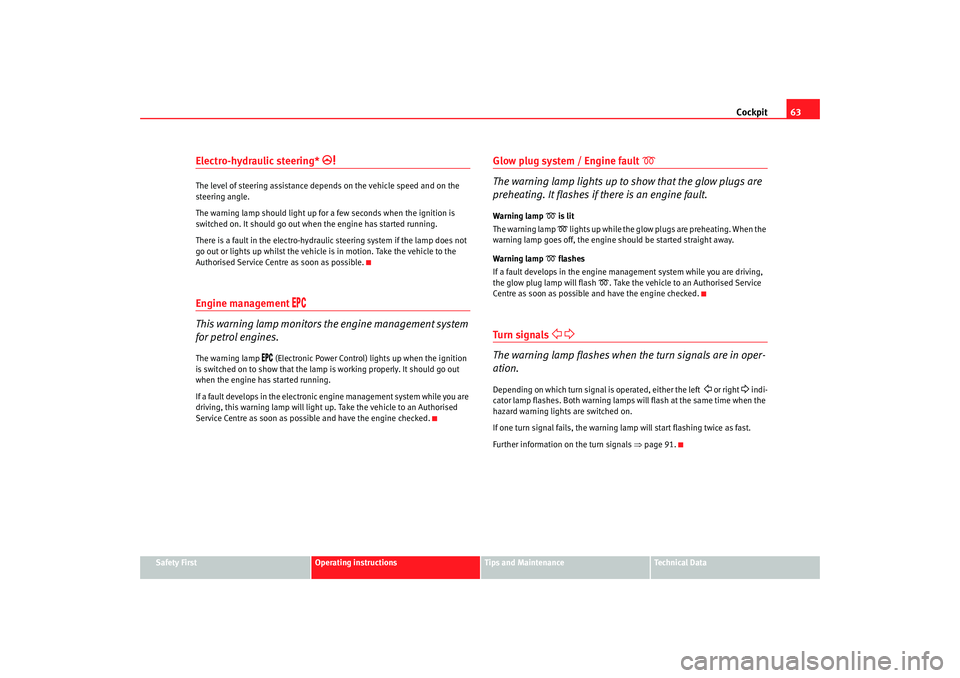
Electro-hydraulic steering*
The level of steering assistance depends on the vehicle speed and on the
steering angle.
The warning lamp should light up for a few seconds when the ignition is
switched on. It should go out when the engine has started running.
There is a fault in the electro-hydraulic steering system if the lamp does not
go out or lights up whilst the vehicle is in motion. Take the vehicle to the
Authorised Service Centre as soon as possible.Engine management
This warning lamp monitors th e engine management system
for petrol engines.The warning lamp
(Electronic Power Control) lights up when the ignition
is switched on to show that the lamp is working properly. It should go out
when the engine has started running.
If a fault develops in the electronic engine management system while you are
driving, this warning lamp will light up. Take the vehicle to an Authorised
Service Centre as soon as possible and have the engine checked.
Glow plug system / Engine fault
The warning lamp lights up to show that the glow plugs are
preheating. It flashes if there is an engine fault.
Warning lamp
is lit
The warning lamp lights up while the glow plugs are preheating. When the
warning lamp goes off, the engine should be started straight away.
Warning lamp
flashes
If a fault develops in the engine management system while you are driving,
the glow plug lamp will flash
. Take the vehicle to an Authorised Service
Centre as soon as possible and have the engine checked.
Tu r n si g nals
The warning lamp flashes when the turn signals are in oper-
ation.Depending on which turn signal is operated, either the left
or right
indi-
cator lamp flashes. Both warning lamps will flash at the same time when the
hazard warning lights are switched on.
If one turn signal fails, the warning lamp will start flashing twice as fast.
Further information on the turn signals ⇒page 91.
ibiza_ingles Seite 63 Mittwoch, 5. Oktober 2005 5:17 17
Page 70 of 252
Steering wheel controls*
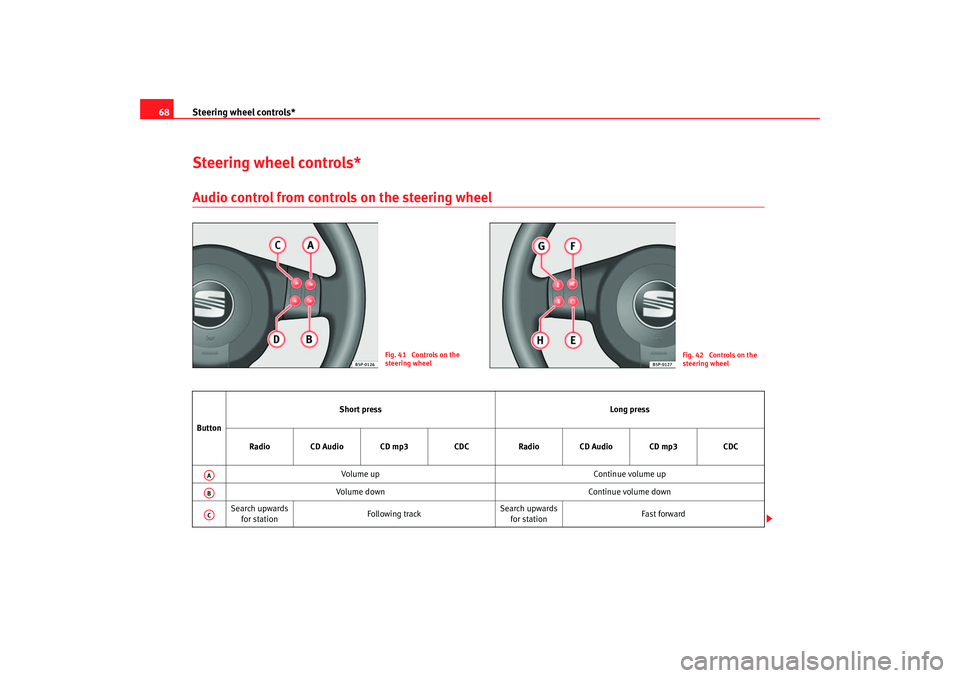
68Steering wheel controls*Audio control from controls on the steering wheel
Fig. 41 Controls on the
steering wheel
Fig. 42 Controls on the
steering wheel
Button Short press
Long press
Radio CD Audio CD mp3 CDCRadio CD Audio CD mp3 CDC
Volume up Continue volume up
Volume down Continue volume down
Search upwards for station Following track Search upwards
for station Fast forwardAAABAC
ibiza_ingles Seite 68 Mittwoch, 5. Oktober 2005 5:17 17
Page 71 of 252
Steering wheel controls*69
Safety First
Operating instructions
Tips and Maintenance
Te c h n i c a l D a t a
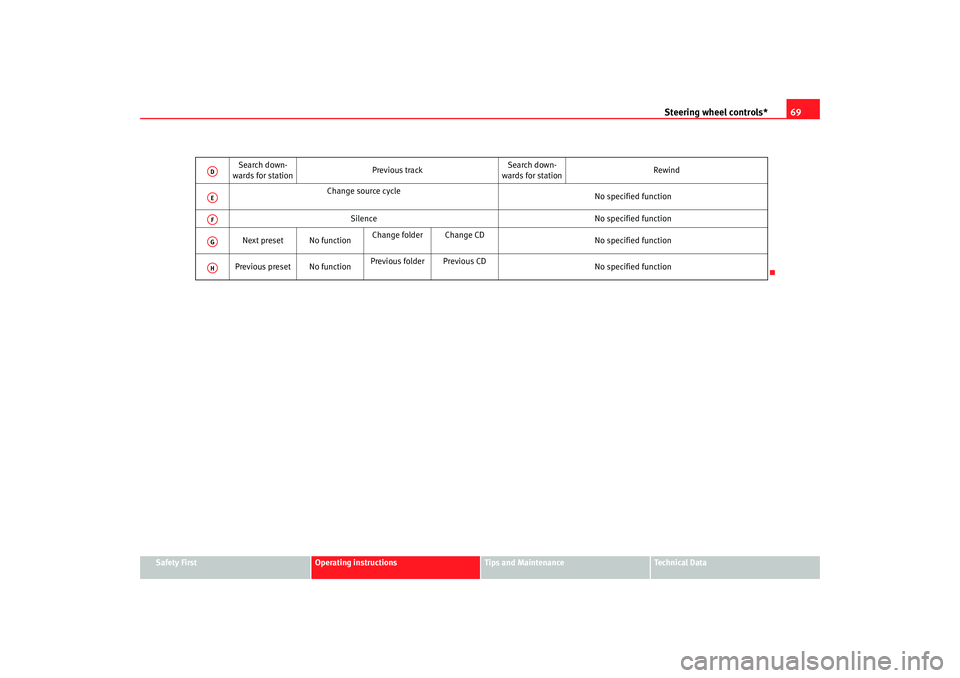
Search down-
wards for station Previous trackSearch down-
wards for station Rewind
Change source cycle No specified function
Silence No specified function
Next preset No function Change folder Change CD
No specified function
Previous preset No function Previous folder Previous CD
No specified function
ADAEAFAGAH
ibiza_ingles Seite 69 Mittwoch, 5. Oktober 2005 5:17 17
Page 78 of 252
Unlocking and locking
76To fold the key bit, press the button and push with the hand, until it is
correctly folded ⇒ page 75, fig. 47.
Duplicate keys
If you need a replacement key, take your key tab to an Authorised Service
Centre.
WARNING
•
Incorrect use of the keys can result in critical injuries.
•
Never leave children or disabled persons in the vehicle; in case of emer-
gency they may not be able to leave the vehicle or look after themselves.
•
Unsupervised use of a key could mean that the engine is started or that
electrical equipment is used (e.g. elec tric windows). Risk of accident. The
doors can be locked using the remote control key. This could result in
people being trapped in the vehicle in an emergency.
•
Never leave any of the vehicle keys in the vehicle. Unauthorised use of
your vehicle could result in injury, damage or theft. Always take the key
with you when you leave the vehicle.
•
Never remove the key from the ignition if the vehicle is in motion. Risk
of accident. The steering lock could engage suddenly, and you would not be
able to steer the vehicle.Caution
There are electronic components in th e key and remote control. Protect the
keys from moisture and excessive vibration.
ibiza_ingles Seite 76 Mittwoch, 5. Oktober 2005 5:17 17
Page 81 of 252
Unlocking and locking79
Safety First
Operating instructions
Tips and Maintenance
Te c h n i c a l D a t a
–Maximum time allowed for synchronising is 30 seconds.
– The normal key is used to activa te the ignition, and the key with
the remote control is the key to be programmed.
– Check that the car is open before commencing programming.
– Place the key without remote control in the contact inside the steering and ignition lock.
– Use the key with remote control and mechanically lock the vehicle from the driver's door.
– Open and close the driver's door lock mechanically, using the remote control key.
– At the same time press the button on the remote control key.
– Complete the procedure by removing the key from the contactIt is possible that the vehicle could no longer be opened and closed with the
remote control if the button is repeatedly pressed outside of the effective
range of the radio frequency remote cont rol. The remote control key will have
to be resynchronised.
Spare remote control keys are available from Authorised Service Centres, they
must be matched to the locking system.
Anti-theft alarm system*Description of anti-theft alarm system*
The anti-theft alarm triggers an alarm if unauthorised move-
ments are detected around the vehicle.The anti-theft alarm makes it more difficult to break into the vehicle or steal
it. Audible and visible alarms are triggered if the car is opened using the
mechanical key, or if unauthorised access is gained to the vehicle.
The anti-theft alarm system is automatically switched on when the vehicle is
locked. To lock the door either turn the key once in the lock towards the
locking position or press button on the radio-frequency remote
control*. The system is activated immediately and the indicator light located
on the driv er's door will flash along with the indica tors indicating that the
alarm and the locking security system (double lock) have been turned on.
When the vehicle is locked the indicator lamps light up only if the alarm has
been correctly activated (all the protec tion zones should be correctly closed).
If any of the doors or the bonnet are open, when the alarm is connected these
will not be included in the protection zones of the vehicle. If the door or
bonnet is subsequently closed, they will automatically be included in the
vehicle protection zones and the indicators will flash accordingly.
When does the system trigger an alarm?
The alarm system is triggered, in the locked vehicle, when:•
a door
•
the bonnet or
•
the tailgate
are unduly opened
•
or the ignition is switched on
A1
A2
ibiza_ingles Seite 79 Mittwoch, 5. Oktober 2005 5:17 17
Page 93 of 252
Lights and visibility91
Safety First
Operating instructions
Tips and Maintenance
Te c h n i c a l D a t a
•
Never park where the catalytic converter could come into contact with
inflammable materials under the vehicle, for example dry grass or spilt
petrol. This could start a fire!Note
•
The battery will run down if the hazard warning lights are left on for a long
time, even if the ignition is switched off.
•
The use of the hazard warning lights d escribed here is subject to the rele-
vant statutory requirements.
Turn signal and main beam headlight lever
The turn signal and main beam lever also operates the
parking lights and the headlight flasher.
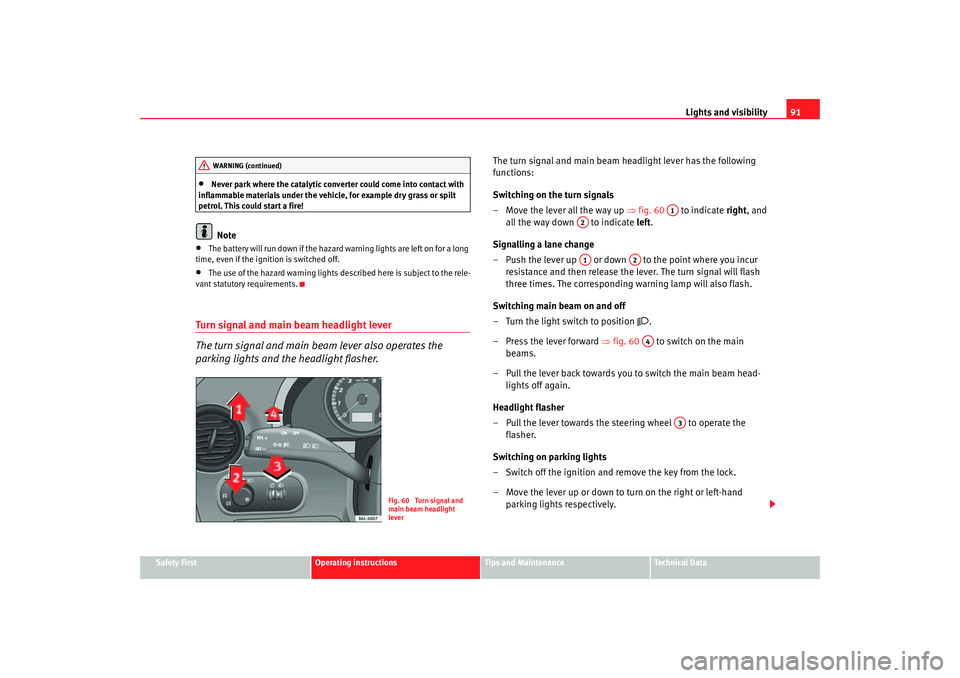
The turn signal and main beam headlight lever has the following
functions:
Switching on the turn signals
– Move the lever all the way up ⇒fig. 60 to indicate right, and
all the way down to indicate left.
Signalling a lane change
– Push the lever up or down to the point where you incur resistance and then release the lever. The turn signal will flash
three times. The corresponding warning lamp will also flash.
Switching main beam on and off
– Turn the light switch to position
.
– Press the lever forward ⇒fig. 60 to switch on the main
beams.
– Pull the lever back towards you to switch the main beam head- lights off again.
Headlight flasher
– Pull the lever towards the steering wheel to operate the flasher.
Switching on parking lights
– Switch off the ignition and remove the key from the lock.
– Move the lever up or down to turn on the right or left-hand parking lights respectively.
WARNING (continued)
Fig. 60 Turn signal and
main beam headlight
lever
A1
A2A1
A2A4
A3
ibiza_ingles Seite 91 Mittwoch, 5. Oktober 2005 5:17 17
Page 96 of 252

Lights and visibility
94Windscreen washersFront windscreen wipers
The windscreen wiper lever controls the windscreen wipers
and the automatic wash and wipe.
The windscreen wiper lever ⇒fig. 64 has the following positions:
Switching off the wipers
– Move the lever to position .
Intermittent wipe
– Move the lever up to position . – Move the control to the left or right to set the length of the
intervals. Control to the left - longer wipe pause, control to the
right - shor ter wipe pauses. Four wiper inter val stages can be set
using switch .
Slow wipe
– Move the lever up to position .
Continuous wipe
– Move the lever up to position .
Brief wipe
– Move the lever down to position to give the windscreen a brief
wipe.
Wash and wipe automatic system
– Pull the lever towards the steeri ng wheel - Position , the wind-
screen washer is activated.
– Then release the lever. The wipers-washers will keep running for approximately four seconds.The windscreen will be wiped again after approximately five seconds once the
wipe/wash system has been operated.
WARNING
•
Worn and dirty wiper blades obstruct visibility and reduce safety levels.
•
In cold conditions, you should not use the wash / wipe system unless
you have warmed the windscreen with the heating and ventilation system.
The washer fluid could otherwise fr eeze on the windscreen and obscure
your view of the road.
Fig. 64 Windscreen wiper
and windscreen wash
lever
A0A1
AA
AA
A2A3A4
A5
ibiza_ingles Seite 94 Mittwoch, 5. Oktober 2005 5:17 17
Page 98 of 252
Lights and visibility
96
Note•
Do not put stickers on the windscreen in front of the sensor. This may
cause sensor disruption or faults.
Rear window wiper
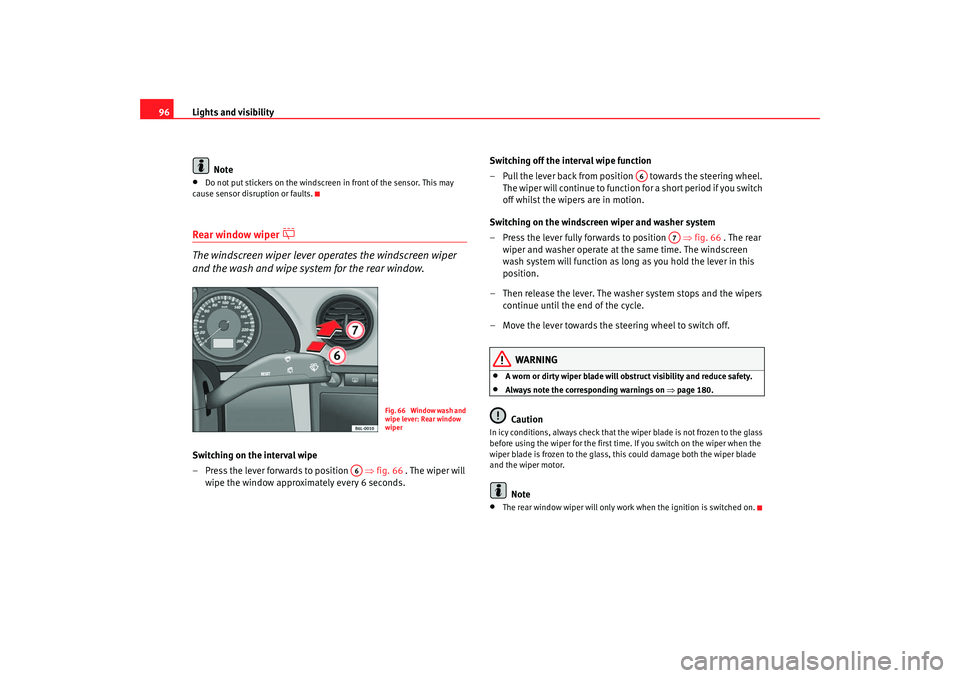
The windscreen wiper lever operates the windscreen wiper
and the wash and wipe system for the rear window.Switching on the interval wipe
– Press the lever forwards to position ⇒fig. 66 . The wiper will
wipe the window approximately every 6 seconds. Switching off the interval wipe function
– Pull the lever back from position towards the steering wheel.
The wiper will continue to function for a short period if you switch
off whilst the wipers are in motion.
Switching on the windscreen wiper and washer system
– Press the lever fully forwards to position ⇒fig. 66 . The rear
wiper and washer operate at the same time. The windscreen
wash system will function as long as you hold the lever in this
position.
– Then release the lever. The washer system stops and the wipers continue until the end of the cycle.
– Move the lever towards the steering wheel to switch off.
WARNING
•
A worn or dirty wiper blade will obstruct visibility and reduce safety.
•
Always note the corresponding warnings on ⇒page 180.Caution
In icy conditions, always check that the wiper blade is not frozen to the glass
before using the wiper for the first time. If you switch on the wiper when the
wiper blade is frozen to the glass, this could damage both the wiper blade
and the wiper motor.
Note
•
The rear window wiper will only work when the ignition is switched on.
F i g . 6 6 W i n d o w w a s h a n d
wipe lever: Rear window
wiper
A6
A6
A7
ibiza_ingles Seite 96 Mittwoch, 5. Oktober 2005 5:17 17