stop start Seat Ibiza 5D 2012 Owner's Guide
[x] Cancel search | Manufacturer: SEAT, Model Year: 2012, Model line: Ibiza 5D, Model: Seat Ibiza 5D 2012Pages: 280, PDF Size: 3.66 MB
Page 148 of 280
146Driving
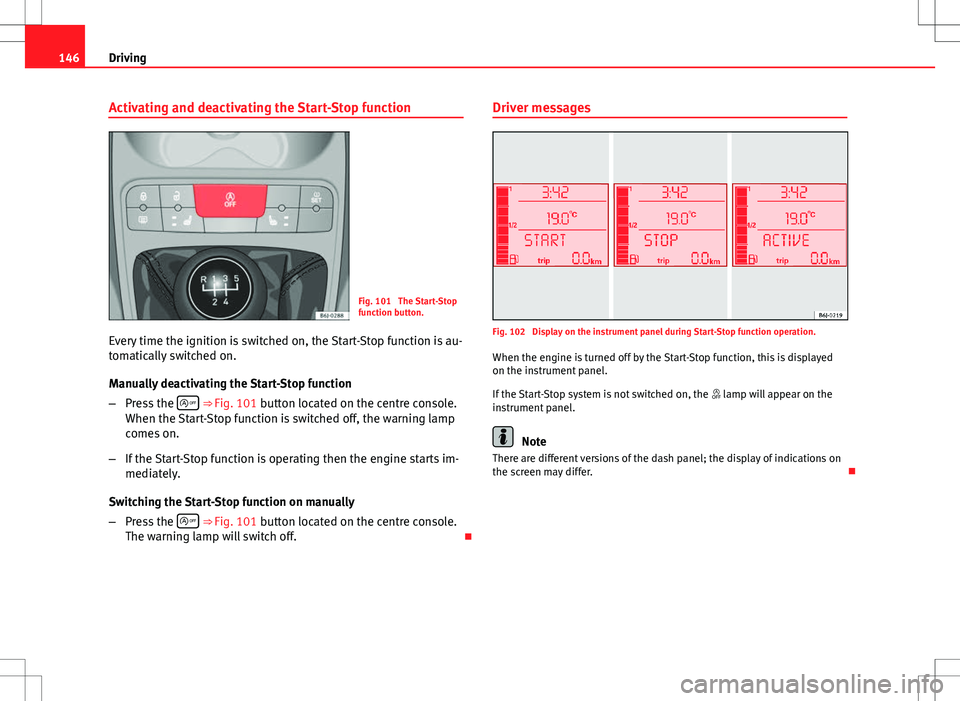
Activating and deactivating the Start-Stop function
Fig. 101 The Start-Stop
function button.
Every time the ignition is switched on, the Start-Stop function is au-
tomatically switched on.
Manually deactivating the Start-Stop function
– Press the
⇒ Fig. 101 button located on the centre console.
When the Start-Stop function is switched off, the warning lamp
comes on.
– If the Start-Stop function is operating then the engine starts im-
mediately.
Switching the Start-Stop function on manually
– Press the
⇒ Fig. 101 button located on the centre console.
The warning lamp will switch off. Driver messages
Fig. 102 Display on the instrument panel during Start-Stop function operation.
When the engine is turned off by the Start-Stop function, this is displayed
on the instrument panel.
If the Start-Stop system is not switched on, the lamp will appear on the
instrument panel.
Note
There are different versions of the dash panel; the display of indications on
the screen may differ.
Page 149 of 280
147
Driving
Manual gearbox
Driving with a manual gearbox
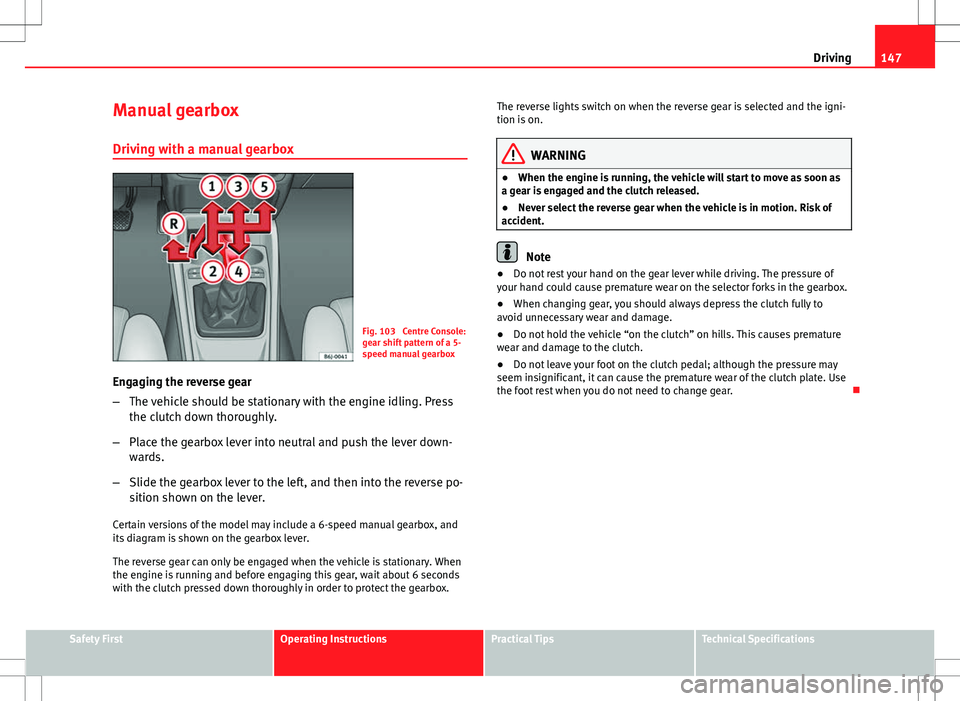
Fig. 103 Centre Console:
gear shift pattern of a 5-
speed manual gearbox
Engaging the reverse gear
– The vehicle should be stationary with the engine idling. Press
the clutch down thoroughly.
– Place the gearbox lever into neutral and push the lever down-
wards.
– Slide the gearbox lever to the left, and then into the reverse po-
sition shown on the lever.
Certain versions of the model may include a 6-speed manual gearbox, and
its diagram is shown on the gearbox lever.
The reverse gear can only be engaged when the vehicle is stationary. When
the engine is running and before engaging this gear, wait about 6 seconds
with the clutch pressed down thoroughly in order to protect the gearbox. The reverse lights switch on when the reverse gear is selected and the igni-
tion is on.
WARNING
● When the engine is running, the vehicle will start to move as soon as
a gear is engaged and the clutch released.
● Never select the reverse gear when the vehicle is in motion. Risk of
accident.
Note
● Do not rest your hand on the gear lever while driving. The pressure of
your hand could cause premature wear on the selector forks in the gearbox.
● When changing gear, you should always depress the clutch fully to
avoid unnecessary wear and damage.
● Do not hold the vehicle “on the clutch” on hills. This causes premature
wear and damage to the clutch.
● Do not leave your foot on the clutch pedal; although the pressure may
seem insignificant, it can cause the premature wear of the clutch plate. Use
the foot rest when you do not need to change gear.
Safety FirstOperating InstructionsPractical TipsTechnical Specifications
Page 151 of 280
149
Driving
The selector lever lock is released as follows:
– Switch the ignition on.
– Hold the brake pedal pressed down and at the same time, hold
the selector lever lock on the left of the selector lever also
pressed down.
The warning lamp on the instrument panel lights up when the brake ped-
al should be applied. This is essential when the selector lever is taken from
the P or N positions.
The selector lever lock only works if the vehicle is stationary or driving at
speeds up to 5 km/h (3 mph). At higher speeds the selector lever lock is
automatically unlocked in the N position.
The selector lever lock is not engaged if the selector lever is moved quickly
through position N (e.g. when shifting from R to D). This makes it possible,
for instance, to “rock” the vehicle backwards and forwards if it is stuck in
snow or mud. The selector lever lock engages automatically if the brake
pedal is not depressed and the lever is in position N for more than about
1second. Driving a car with an automatic gearbox
The gearbox changes gear ratios automatically as the vehi-
cle moves.
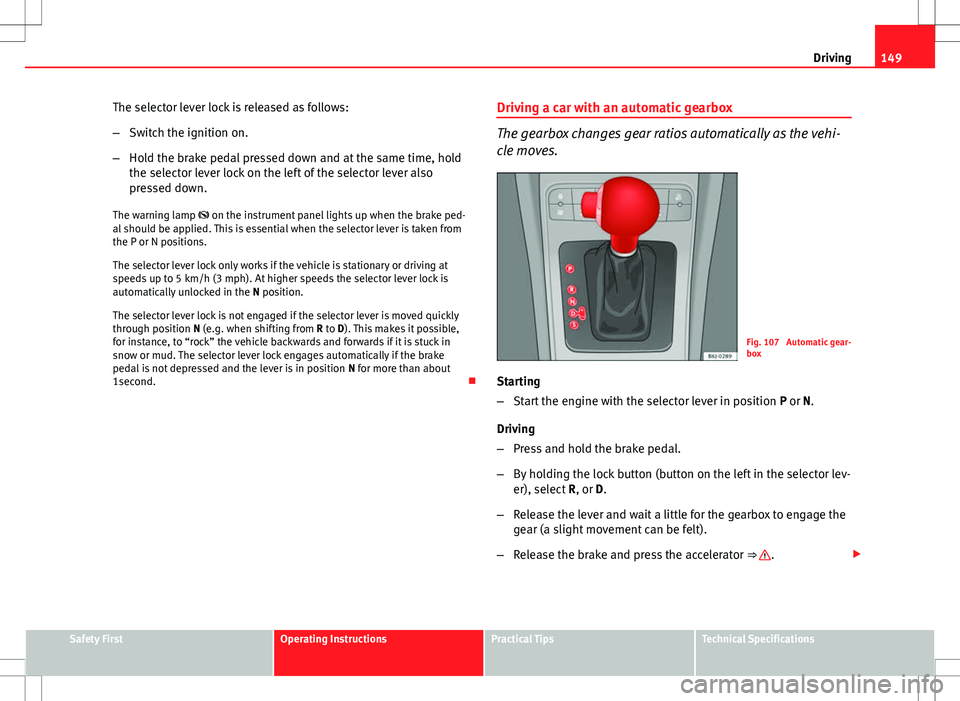
Fig. 107 Automatic gear-
box
Starting
– Start the engine with the selector lever in position P or N.
Driving
– Press and hold the brake pedal.
– By holding the lock button (button on the left in the selector lev-
er), select R, or D.
– Release the lever and wait a little for the gearbox to engage the
gear (a slight movement can be felt).
– Release the brake and press the accelerator ⇒
.
Safety FirstOperating InstructionsPractical TipsTechnical Specifications
Page 152 of 280
150Driving
Stopping briefly
–If stopping for a short time, keep the vehicle stationary by
pressing the foot brake hard to prevent the vehicle moving
backwards on a slope or “creeping” forwards, e.g. at traffic
lights. The selector lever does not need to be put into the posi-
tions P or N.
– Do not press the accelerator.
Parking
– Press and hold the brake pedal until the vehicle comes to a
standstill ⇒
.
– Apply the handbrake.
– By pressing the lock button down, move the selector lever to P
and release the lock button.
Driving up and down hills
– Press the selector lever from position “D” to the right into the
tiptronic selector gate.
– Lightly press the selector lever back to change down.
Holding the car on a hill
– The brake must be always pressed down to prevent the vehicle
from “rolling backwards” ⇒
. Do not try to prevent the vehicle
from rolling backwards by increasing the engine speed while a
range of gears is selected.
Starting the vehicle up hills
– Apply the handbrake. –
With a selected gear, accelerate slowly and at the same time,
release the handbrake.
The steeper the slope, the lower the needed gear. This increases the brak-
ing effect of the engine. For example, when driving down a very steep slope
in third gear. If the engine brake effect is not enough, the vehicle will speed
up. The automatic gearbox automatically changes up to prevent the engine
over-revving. Use the foot brake to reduce speed and change into 3rd gear
using Tiptronic* ⇒
.
Your vehicle has an automatic interlock which prevents the selector lever
from being put into a position for driving forwards or in reverse from posi-
tions P or N if the brake pedal is not depressed.
The ignition key cannot be removed unless the selector lever is in position
P.
Control lamp “Pressing brake pedal”
When the warning lamp next to the selector lever lights up, press the brake
pedal. This is necessary when the automatic gearbox selector lever is
moved out of positions P or N. A text message or instructions to perform
necessary operations may appear on the instrument panel.
WARNING
● As a driver, you should never leave your vehicle if the engine is run-
ning and a gear is engaged. If you have to leave your vehicle while the
engine is running, you must apply the parking brake and put the selector
lever in position P.
● If the engine is running and D or R are engaged, you will need to hold
vehicle stopped by depressing the brake pedal. The vehicle would keep
on creeping forward as the power transmission is not fully interrupted
even when the engine is idling.
Page 155 of 280
153
Driving
Selector lever positions
The selected gear is displayed on the side of the selector lever and on the
instrument panel display. The currently selected gear for the automatic
gearbox will also be shown on the display.
Tiptronic gear indicator
If the automatic gearbox is shifted manually, the selected gears are shown
on the screen.
P - parking lock
When the selector lever is in this position, the driven wheels are locked me-
chanically.
Position P on the lever must only be selected if the vehicle is stationary.
To move selector lever from position P, the locking button on the selector
lever handle must be pressed and the brake pedal depressed at the same
time while the ignition is switched on.
To put the selector lever in position P, simply press the lock button down
and, if necessary, depress the brake pedal down.
R - Reverse gear
The reverse gear is engaged in this position.
Reverse gear must be engaged only when the vehicle is stationary and the
engine is idling.
To move the selector lever to position R, press the lock button down and, at
the same time, press the brake pedal down, with the ignition switched on.
With the selector lever in position R and the ignition switched on the follow-
ing occurs:
● Reverse lights light up.
● The air conditioner automatically changes the air recirculation mode. ●
The wiper starts if the windscreen washer is on.
● The parking distance warning system* switches on.
N - Neutral (idling)
If this position is selected, the gearbox is in neutral. Power is not transmit-
ted to the wheels and the engine does not have a braking function.
Never use the N position to drive down a long hill. There is no engine brak-
ing and the brakes are subjected to excessive stain.
You could damage the automatic gearbox if you drive down hills with the
gearbox lever in position N and the engine switched off.
D - Drive (forward)
In this position the gearbox automatically changes to a lower or higher gear,
according to the engine's requirements, the driving style and speed. The
braking effect of the engine when driving downhill is very limited when the
selector is in this position. The instrument panel display shows the selected
gear as well as the selector lever in position D.
If position N has been selected and you wish to select D, you must press the
foot brake if the vehicle is stationary, or travelling at under 5 km/h (3 mph).
S - Standard driving position (Sport programme)
When the selector lever is in position S, it will automatically change up into
a higher gear later, and change down into a low gear, if compared with posi-
tion D. This way, it is possible to take full advantage of the engine reserve
power, depending on the engine demand, driving style and speed. The
braking effect of the engine when driving downhill is very limited. On the
instrument panel display the selected gear is shown as well as the selector
lever to position S.
To select gear range S, press the lock button on the selector lever.
Safety FirstOperating InstructionsPractical TipsTechnical Specifications
Page 156 of 280
154Driving
WARNING
If the vehicle moves with no control, an accident and serious injury may
occur.
● As a driver, you should never leave your vehicle if the engine is run-
ning and a gear is engaged. If you have to leave your vehicle while the
engine is running, you must always apply the handbrake and engage the
parking lock position P.
● With the engine running and D or R engaged, you must hold the vehi-
cle stopped by pressing the brake pedal. Even while idling, the power
transmission is not fully interrupted and the vehicle could keep moving
forward.
● Never accelerate when moving the selector lever or you may cause an
accident.
● Never move the selector lever to “R” or “P” when driving. Risk of acci-
dent.
● Before driving down a very steep slope, reduce your speed and shift
to first gear.
● Always hold the vehicle on the foot brake if you stop on hills. Other-
wise, the vehicle could roll back.
● Never allow the brake to rub and do not use the brake pedal too often
or for long periods. Constant braking will cause the brakes to overheat
and will considerably reduce the brake effect. This increases the braking
distance and could cause the brake system to fail.
WARNING
Never switch the engine off until the vehicle is stationary. You could lose
control of your vehicle. This could cause an accident and serious injury.
● The airbags and belt tensioners do not work when the ignition is
switched off.
WARNING (Continued)
● The brake servo does not work with the engine off. You need more
force to stop the vehicle.
● Power steering does not work when the engine is not running. That is
why it is much more difficult to turn the steering wheel.
● Never remove the key from the ignition if the vehicle is in motion. The
steering lock could suddenly engage, and you would not be able to steer
the vehicle.
● Never allow the vehicle to roll downhill with the selector lever in “N”,
regardless of whether the engine is running or not.
CAUTION
If you allow the vehicle to move when the engine is switched off or with the
selector lever in position “N”, take your foot off the accelerator and wait un-
til the engine starts idling before returning to position “D”.
Kickdown feature
This feature allows maximum acceleration. If you press the accelerator down thoroughly, the gearbox automatically
changes down, depending on speed and engine speed, into a lower gear to
take full advantage of give the vehicle maximum acceleration.
The gearbox does not change gear until the engine reaches the maximum
determined engine speed for the gear.
Page 158 of 280
156Driving
Parking
The handbrake should always be firmly applied when the
vehicle is parked.
Always note the following points when parking the vehicle:
–Use the brake pedal to stop the vehicle.
– Apply the handbrake.
– Select first gear.
– Switch the engine off and remove the key from the ignition. Turn
the steering wheel slightly to engage the steering lock.
– Always take you keys with you when you leave the vehicle ⇒
.
Additional notes on parking the vehicle on gradients:
Turn the steering wheel so that the vehicle rolls against the kerb if it started
to roll.
● If the vehicle is parked facing downhill, turn the front wheels so that
they point towards the kerb .
● If the vehicle is parked facing uphill, turn the front wheels so that they
point away from the kerb .
● Secure the vehicle as normal by applying the handbrake firmly and se-
lecting first gear.
WARNING
● Take measures to reduce the risk of injury when you leave your vehi-
cle unattended.
● Never park where the hot exhaust system could ignite inflammable
materials, such as dry grass, low bushes, spilt fuel etc.
● Never allow vehicle occupants to remain in the vehicle when it is
locked. They would be unable to open the vehicle from the inside, and
could become trapped in the vehicle in an emergency. In the event of an
emergency, locked doors will delay assistance to vehicle occupants.
● Never leave children alone in the vehicle. They could set the vehicle
in motion, for example, by releasing the handbrake or the gearbox lever.
● Depending on weather conditions, it may become extremely hot or
cold inside the vehicle. This can be fatal.
Hill-start aid*
This function is only included in vehicles with ESC. This device helps when starting uphill.
These are the basic operation conditions: doors closed, brake pedal press-
ed down and vehicle in neutral. The system gets activated on engaging
gear.
After removing your foot from the brake pedal, the braking force is main-
tained for a few seconds to prevent the vehicle from moving backward when
putting into gear. This short space of time is enough to start the vehicle
with ease.
This system also works when reversing uphill.
Page 159 of 280
157
Driving
WARNING
● If you do not start the vehicle immediately after taking your foot off
the brake pedal, the vehicle may start to roll back under certain condi-
tions. Depress the brake pedal or use the handbrake immediately.
● If the engine stalls, depress the brake pedal or use the handbrake im-
mediately.
● When following a line of traffic uphill, if you want to prevent the vehi-
cle from rolling back accidentally when starting off, hold the brake pedal
down for a few seconds before starting off.
Note
The Official Service or a specialised workshop can tell you if your vehicle is
equipped with this system.
Acoustic parking aid system* Rear parking aid
The parking aid system will use an audible warning to indi-
cate of the approach of any object towards the rear of the ve-
hicle. Description
The acoustic parking aid system will measure the distance between the rear
of the vehicle and any possible obstacle using four ultrasonic sensors loca-
ted on the rear bumper. The measuring range of the sensors starts approxi-
mately and depending on the nature of the obstacle at a distance of:
● side of the rear bumper: 0.6 m
● middle of the rear bumper: 1.6 m Activation
The system is activated by engagement of the reverse gear. A brief audible
warning confirms the activation and correct function of the system.
Reverse gear
The distance warning will begin as soon as an obstacle is detected by the
system. The frequency of the bleeps emitted by the system will increase rap-
idly as the vehicle approaches the obstacle.
After a distance lower than approximately 30 cm, a continuous signal
sounds (stop signal). The driver should not reverse any further.
Models with a factory-fitted towing bracket: When the vehicle is less than
0.35 m away from the obstacle the warning tone will sound continuously.
The driver should then not reverse any further.
The warning tone decreases by 30% after 3 seconds from the start of the
system.
Provided that it is not in continuous mode, the tone on the parking aid sys-
tem stops when it detects a wall parallel to the vehicle.
Trailer towing
For vehicles factory-fitted with a towing bar, the parking aid system will not
be activated by the engagement of the reverse gear when pulling a trailer,
as the trailer's electric connector will be plugged into the vehicle.
Possible faults
If a continuous beep sounds for some seconds when the reverse gear is en-
gaged, this indicates that there is a fault in the parking aid system.
If the fault continues until the ignition is turned off, the audible warning of
the fault will not be emitted every time the system is reactivated (by engag-
ing the reverse gear). Thus, the system ready indication will not sound ei-
ther. Have the fault repaired by a Technical Service as soon as possible.
If there is no ready signal or no acoustic warning signal, then the parking
aid loudspeaker is faulty and may not warn of obstacles.
Safety FirstOperating InstructionsPractical TipsTechnical Specifications
Page 167 of 280
165
Intelligent technology
The ASR helps the car to start moving, accelerate and climb a gradient in
slippery conditions, where this may otherwise be difficult or even impossi-
ble.
The ASR automatically switches on when the engine is started. If necessary,
it may be turned on or off by briefly pushing the ESC button on the centre
console.
When the ASR is off, the warning lamp is lit. The ASR should normally be
left on. Only in exceptional circumstances, when the slipping of the wheels
is required, can they be disconnected using the ESC button, for example.
● With compact temporary spare wheel.
● When using the snow chains.
● When driving in deep snow or on loose surfaces
● When the vehicle is bogged-down, to free it by rocking.
The ASR should be switched on again as soon as possible.
WARNING
● Remember that not even the ASR can defy the laws of physics. This
should be kept in mind, particularly on slippery and wet roads and when
towing a trailer.
● Always adapt your driving style to suit the condition of the roads and
the traffic situation. The greater safety provided by the ASR should not
encourage you to run any risks.
CAUTION
● To ensure that the ASR works correctly, identical tyres should be fitted
on all four wheels. Any differences in the rolling radius of the tyres can
cause the system to reduce engine power when this is not desired.
● Any modifications made to the vehicle (for example, to the engine,
brake system, running gear or to the combination of wheels and tyres) may
affect the operation of the ABS and ASR. XDS*
Driveshaft differential
When taking a bend, the driveshaft differential mechanism allows the outer
wheel to turn at a higher speed than the inner wheel. In this way, the wheel
that is turning faster (outer wheel) receives less drive torque than the inner
wheel. This may mean that in certain situations the torque delivered to the
inner wheel is too high, causing the wheels to spin. On the other hand, the
outer wheel is receiving a lower drive torque than it could transmit. This
causes an overall loss of lateral grip on the front axle, resulting in under-
steer or “lengthening” of the trajectory.
The XDS system can detect and correct this effect via the sensors and sig-
nals of the ESC.
Via the ESC, the XDS will brake the inside wheel and counter the excess
driving torque of that wheel. This means that the driver's desired trajectory
is much more precise,
The XDS system works in combination with the ESC and is always active,
even when the ASR traction control is disconnected.
Electronic Stability Control (ESC)*
General notes
The Electronic Stability Control increases the vehicle's stabil-
ity on the road. The Electronic Stability Control helps reduce the danger of skidding.
The Electronic Stability Control (ESC) includes the systems ABS, EDL and
ASR
Safety FirstOperating InstructionsPractical TipsTechnical Specifications
Page 169 of 280
167
Intelligent technology
WARNING
● When accelerating on a slippery surface, for example on ice and
snow, press the accelerator carefully. Despite EDL, the driven wheels may
start to spin. This could impair the vehicle's stability.
● Always adapt your driving style to suit road conditions and the traffic
situation. Do not let the extra safety afforded by EDL tempt you into tak-
ing any risks when driving, this can cause accidents.
CAUTION
Modifications to the vehicle (e.g. to the engine, the brake system, running
gear or any components affecting the wheels and tyres) could affect the effi-
ciency of the EDL ⇒ page 185.
Drive wheel traction control system ASR
The traction control system prevents the driven wheels from spinning when
the vehicle is accelerating. ⇒ page 164
Safety FirstOperating InstructionsPractical TipsTechnical Specifications