wheel Seat Ibiza 5D 2012 Owner's Guide
[x] Cancel search | Manufacturer: SEAT, Model Year: 2012, Model line: Ibiza 5D, Model: Seat Ibiza 5D 2012Pages: 280, PDF Size: 3.66 MB
Page 155 of 280
153
Driving
Selector lever positions
The selected gear is displayed on the side of the selector lever and on the
instrument panel display. The currently selected gear for the automatic
gearbox will also be shown on the display.
Tiptronic gear indicator
If the automatic gearbox is shifted manually, the selected gears are shown
on the screen.
P - parking lock
When the selector lever is in this position, the driven wheels are locked me-
chanically.
Position P on the lever must only be selected if the vehicle is stationary.
To move selector lever from position P, the locking button on the selector
lever handle must be pressed and the brake pedal depressed at the same
time while the ignition is switched on.
To put the selector lever in position P, simply press the lock button down
and, if necessary, depress the brake pedal down.
R - Reverse gear
The reverse gear is engaged in this position.
Reverse gear must be engaged only when the vehicle is stationary and the
engine is idling.
To move the selector lever to position R, press the lock button down and, at
the same time, press the brake pedal down, with the ignition switched on.
With the selector lever in position R and the ignition switched on the follow-
ing occurs:
● Reverse lights light up.
● The air conditioner automatically changes the air recirculation mode. ●
The wiper starts if the windscreen washer is on.
● The parking distance warning system* switches on.
N - Neutral (idling)
If this position is selected, the gearbox is in neutral. Power is not transmit-
ted to the wheels and the engine does not have a braking function.
Never use the N position to drive down a long hill. There is no engine brak-
ing and the brakes are subjected to excessive stain.
You could damage the automatic gearbox if you drive down hills with the
gearbox lever in position N and the engine switched off.
D - Drive (forward)
In this position the gearbox automatically changes to a lower or higher gear,
according to the engine's requirements, the driving style and speed. The
braking effect of the engine when driving downhill is very limited when the
selector is in this position. The instrument panel display shows the selected
gear as well as the selector lever in position D.
If position N has been selected and you wish to select D, you must press the
foot brake if the vehicle is stationary, or travelling at under 5 km/h (3 mph).
S - Standard driving position (Sport programme)
When the selector lever is in position S, it will automatically change up into
a higher gear later, and change down into a low gear, if compared with posi-
tion D. This way, it is possible to take full advantage of the engine reserve
power, depending on the engine demand, driving style and speed. The
braking effect of the engine when driving downhill is very limited. On the
instrument panel display the selected gear is shown as well as the selector
lever to position S.
To select gear range S, press the lock button on the selector lever.
Safety FirstOperating InstructionsPractical TipsTechnical Specifications
Page 156 of 280
154Driving
WARNING
If the vehicle moves with no control, an accident and serious injury may
occur.
● As a driver, you should never leave your vehicle if the engine is run-
ning and a gear is engaged. If you have to leave your vehicle while the
engine is running, you must always apply the handbrake and engage the
parking lock position P.
● With the engine running and D or R engaged, you must hold the vehi-
cle stopped by pressing the brake pedal. Even while idling, the power
transmission is not fully interrupted and the vehicle could keep moving
forward.
● Never accelerate when moving the selector lever or you may cause an
accident.
● Never move the selector lever to “R” or “P” when driving. Risk of acci-
dent.
● Before driving down a very steep slope, reduce your speed and shift
to first gear.
● Always hold the vehicle on the foot brake if you stop on hills. Other-
wise, the vehicle could roll back.
● Never allow the brake to rub and do not use the brake pedal too often
or for long periods. Constant braking will cause the brakes to overheat
and will considerably reduce the brake effect. This increases the braking
distance and could cause the brake system to fail.
WARNING
Never switch the engine off until the vehicle is stationary. You could lose
control of your vehicle. This could cause an accident and serious injury.
● The airbags and belt tensioners do not work when the ignition is
switched off.
WARNING (Continued)
● The brake servo does not work with the engine off. You need more
force to stop the vehicle.
● Power steering does not work when the engine is not running. That is
why it is much more difficult to turn the steering wheel.
● Never remove the key from the ignition if the vehicle is in motion. The
steering lock could suddenly engage, and you would not be able to steer
the vehicle.
● Never allow the vehicle to roll downhill with the selector lever in “N”,
regardless of whether the engine is running or not.
CAUTION
If you allow the vehicle to move when the engine is switched off or with the
selector lever in position “N”, take your foot off the accelerator and wait un-
til the engine starts idling before returning to position “D”.
Kickdown feature
This feature allows maximum acceleration. If you press the accelerator down thoroughly, the gearbox automatically
changes down, depending on speed and engine speed, into a lower gear to
take full advantage of give the vehicle maximum acceleration.
The gearbox does not change gear until the engine reaches the maximum
determined engine speed for the gear.
Page 157 of 280
155
Driving
WARNING
You could lose control of the vehicle if you accelerate on slippery road
surfaces. Risk of serious injury.
● Be particularly careful when using the kickdown features on slippery
road surfaces. With a fast acceleration, the vehicle could lose traction
and skid.
● You should use the kickdown feature only when traffic and weather
conditions allow it to be used safely.
Handbrake Using the handbrake
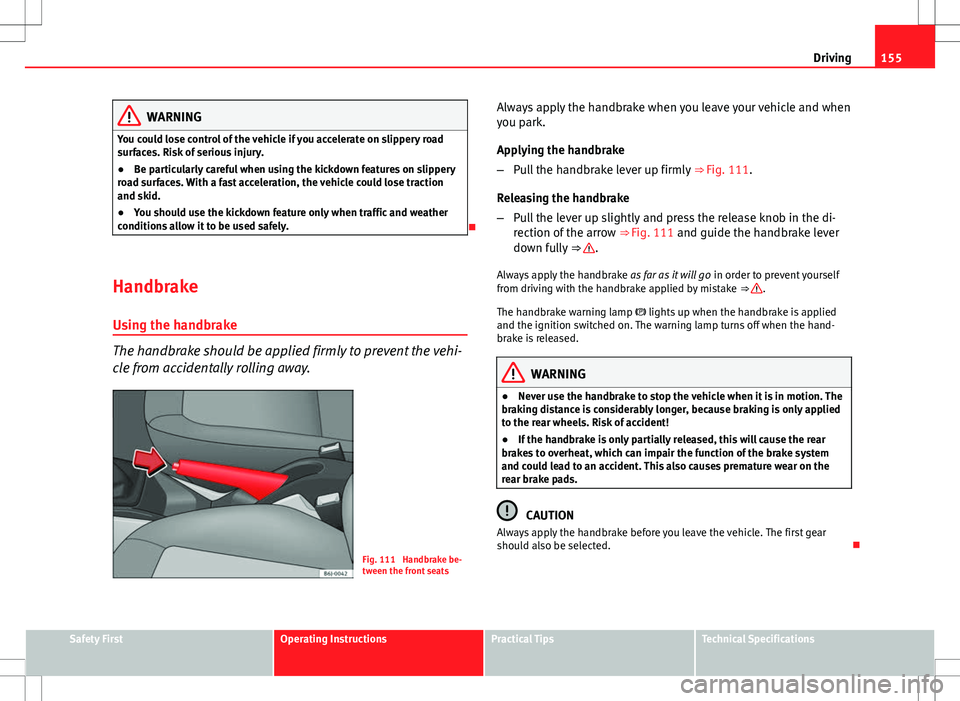
The handbrake should be applied firmly to prevent the vehi-
cle from accidentally rolling away.
Fig. 111 Handbrake be-
tween the front seats Always apply the handbrake when you leave your vehicle and when
you park.
Applying the handbrake
–
Pull the handbrake lever up firmly ⇒ Fig. 111.
Releasing the handbrake
– Pull the lever up slightly and press the release knob in the di-
rection of the arrow ⇒ Fig. 111 and guide the handbrake lever
down fully ⇒
.
Always apply the handbrake as far as it will go in order to prevent yourself
from driving with the handbrake applied by mistake ⇒
.
The handbrake warning lamp lights up when the handbrake is applied
and the ignition switched on. The warning lamp turns off when the hand-
brake is released.
WARNING
● Never use the handbrake to stop the vehicle when it is in motion. The
braking distance is considerably longer, because braking is only applied
to the rear wheels. Risk of accident!
● If the handbrake is only partially released, this will cause the rear
brakes to overheat, which can impair the function of the brake system
and could lead to an accident. This also causes premature wear on the
rear brake pads.
CAUTION
Always apply the handbrake before you leave the vehicle. The first gear
should also be selected.
Safety FirstOperating InstructionsPractical TipsTechnical Specifications
Page 158 of 280
156Driving
Parking
The handbrake should always be firmly applied when the
vehicle is parked.
Always note the following points when parking the vehicle:
–Use the brake pedal to stop the vehicle.
– Apply the handbrake.
– Select first gear.
– Switch the engine off and remove the key from the ignition. Turn
the steering wheel slightly to engage the steering lock.
– Always take you keys with you when you leave the vehicle ⇒
.
Additional notes on parking the vehicle on gradients:
Turn the steering wheel so that the vehicle rolls against the kerb if it started
to roll.
● If the vehicle is parked facing downhill, turn the front wheels so that
they point towards the kerb .
● If the vehicle is parked facing uphill, turn the front wheels so that they
point away from the kerb .
● Secure the vehicle as normal by applying the handbrake firmly and se-
lecting first gear.
WARNING
● Take measures to reduce the risk of injury when you leave your vehi-
cle unattended.
● Never park where the hot exhaust system could ignite inflammable
materials, such as dry grass, low bushes, spilt fuel etc.
● Never allow vehicle occupants to remain in the vehicle when it is
locked. They would be unable to open the vehicle from the inside, and
could become trapped in the vehicle in an emergency. In the event of an
emergency, locked doors will delay assistance to vehicle occupants.
● Never leave children alone in the vehicle. They could set the vehicle
in motion, for example, by releasing the handbrake or the gearbox lever.
● Depending on weather conditions, it may become extremely hot or
cold inside the vehicle. This can be fatal.
Hill-start aid*
This function is only included in vehicles with ESC. This device helps when starting uphill.
These are the basic operation conditions: doors closed, brake pedal press-
ed down and vehicle in neutral. The system gets activated on engaging
gear.
After removing your foot from the brake pedal, the braking force is main-
tained for a few seconds to prevent the vehicle from moving backward when
putting into gear. This short space of time is enough to start the vehicle
with ease.
This system also works when reversing uphill.
Page 166 of 280
164Intelligent technology
WARNING
● The risk of accident is higher if you drive too fast, if you do not keep
your distance to the vehicle in front, and when the road surface is slip-
pery or wet. The increased accident risk cannot be reduced by the brake
assist system.
● The brake assist system cannot defy the laws of physics. Slippery
and wet roads are dangerous even with the brake assist system! There-
fore, it is essential that you adjust your speed to suit the road and traffic
conditions. Do not let the extra safety features tempt you into taking any
risks when driving.
Anti-lock brake system and traction control
ABS Anti-lock brake system (ABS)
The anti-lock brake system prevents the wheels locking dur-
ing braking.
The anti-lock brake system (ABS) is an important part of the vehicle's active
safety system.
How the ABS works
If one of the wheels is turns too slowly in relation to the road speed, and is
close to locking, the system will reduce the braking pressure for this wheel.
The driver is made aware of this control process by a pulsating of the brake
pedal and audible noise. This is a deliberate warning to the driver that one
or more of the wheels is tending to lock and the ABS control function has
intervened. In this situation it is important to keep the brake pedal fully de-
pressed so the ABS can regulate the brake application. Do not “pump”. If you brake hard on a slippery road surface, the best possible control is re-
tained as the wheels do not lock.
However, ABS will not necessarily guarantee shorter braking distances in
all
conditions. The braking distance could even be longer if you brake on gravel
or on fresh snow covering a slippery surface.
WARNING
● The anti-lock brake system cannot defy the laws of physics. Slippery
and wet roads are dangerous even with ABS! If you notice that the ABS is
working (to counteract locked wheels under braking), you should reduce
speed immediately to suit the road and traffic conditions. Do not let the
extra safety features tempt you into taking any risks when driving.
● The effectiveness of ABS is also determined by the tyres fitted
⇒ page 211.
● If the running gear or brake system is modified, the effectiveness of
the ABS could be severely limited.
Traction control system (ASR)*
The traction control system prevents the driven wheels from
spinning when the vehicle is accelerating. The system al-
ways includes ABS
Description and operation of the traction control system during
acceleration (ASR
On front-wheel drive vehicles, the ASR system intervenes, reducing engine
power and preventing the driven wheels from slipping during acceleration.
The system works in the entire speed range in conjunction with ABS. If a
failure occurs in the ABS, the ASR will also stop working.
Page 167 of 280
165
Intelligent technology
The ASR helps the car to start moving, accelerate and climb a gradient in
slippery conditions, where this may otherwise be difficult or even impossi-
ble.
The ASR automatically switches on when the engine is started. If necessary,
it may be turned on or off by briefly pushing the ESC button on the centre
console.
When the ASR is off, the warning lamp is lit. The ASR should normally be
left on. Only in exceptional circumstances, when the slipping of the wheels
is required, can they be disconnected using the ESC button, for example.
● With compact temporary spare wheel.
● When using the snow chains.
● When driving in deep snow or on loose surfaces
● When the vehicle is bogged-down, to free it by rocking.
The ASR should be switched on again as soon as possible.
WARNING
● Remember that not even the ASR can defy the laws of physics. This
should be kept in mind, particularly on slippery and wet roads and when
towing a trailer.
● Always adapt your driving style to suit the condition of the roads and
the traffic situation. The greater safety provided by the ASR should not
encourage you to run any risks.
CAUTION
● To ensure that the ASR works correctly, identical tyres should be fitted
on all four wheels. Any differences in the rolling radius of the tyres can
cause the system to reduce engine power when this is not desired.
● Any modifications made to the vehicle (for example, to the engine,
brake system, running gear or to the combination of wheels and tyres) may
affect the operation of the ABS and ASR. XDS*
Driveshaft differential
When taking a bend, the driveshaft differential mechanism allows the outer
wheel to turn at a higher speed than the inner wheel. In this way, the wheel
that is turning faster (outer wheel) receives less drive torque than the inner
wheel. This may mean that in certain situations the torque delivered to the
inner wheel is too high, causing the wheels to spin. On the other hand, the
outer wheel is receiving a lower drive torque than it could transmit. This
causes an overall loss of lateral grip on the front axle, resulting in under-
steer or “lengthening” of the trajectory.
The XDS system can detect and correct this effect via the sensors and sig-
nals of the ESC.
Via the ESC, the XDS will brake the inside wheel and counter the excess
driving torque of that wheel. This means that the driver's desired trajectory
is much more precise,
The XDS system works in combination with the ESC and is always active,
even when the ASR traction control is disconnected.
Electronic Stability Control (ESC)*
General notes
The Electronic Stability Control increases the vehicle's stabil-
ity on the road. The Electronic Stability Control helps reduce the danger of skidding.
The Electronic Stability Control (ESC) includes the systems ABS, EDL and
ASR
Safety FirstOperating InstructionsPractical TipsTechnical Specifications
Page 168 of 280
166Intelligent technology
Electronic Stability Control (ESC)*
The ESC reduces the risk of skidding by braking the wheels individually.
The system uses the steering wheel angle and road speed to calculate the
changes of direction desired by the driver, and constantly compares them
with the actual behaviour of the vehicle. When irregularities occur, for exam-
ple, if the vehicle begins to skid, the ESC brakes the appropriate wheel au-
tomatically.
The forces acting on the braked wheel bring the vehicle back to a stable
condition. If the vehicle tends to oversteer, the system will act on the front
wheel on the outside of the turn.
WARNING
● Remember that not even the ESC can defy the laws of physics. This
should be kept in mind, particularly on slippery and wet roads and when
towing a trailer.
● Always adapt your driving style to suit the condition of the roads and
the traffic situation. The greater safety provided by the ESC should not
encourage you to run any risks.
CAUTION
● To ensure that the ESC works correctly, all four wheels must be fitted
with the same tyres. Any differences in the rolling radius of the tyres can
cause the system to reduce engine power when this is not desired.
● Any modifications made to the vehicle (for example, to the engine,
brake system, running gear or to the combination of wheels and tyres) may
affect the operation of the ABS, EDL, ESC and ASR. Anti-lock brake system (ABS)
The anti-lock brake system prevents the wheels locking during braking
⇒ page 164
Electronic differential lock (EDL)*
The electronic differential lock helps prevent the loss of trac-
tion caused if one of the driven wheels starts spinning.
EDL helps the vehicle to start moving, accelerate and climb a gradient in
slippery conditions where this may otherwise be difficult or even impossi-
ble.
The system will control the revolutions of the driven wheels using the ABS
sensors (in case of an EDL fault the warning lamp for ABS lights up)
⇒ page 69.
At speeds of up to approximately 80 km/h (50 mph), it is able to balance
out differences in the speed of the driven wheels of approximately 100 rpm
caused by a slippery road surface on one side of the vehicle. It does this by
braking the wheel which has lost traction and distributing more driving
force to the other driven wheel via the differential.
To prevent the disc brake of the braking wheel from overheating, the EDL
cuts out automatically if subjected to excessive loads. The vehicle will con-
tinue to function normally without EDL. For this reason, the driver is not in-
formed that the EDL has been switched off.
The EDL will switch on again automatically when the brake has cooled
down.
Page 169 of 280
167
Intelligent technology
WARNING
● When accelerating on a slippery surface, for example on ice and
snow, press the accelerator carefully. Despite EDL, the driven wheels may
start to spin. This could impair the vehicle's stability.
● Always adapt your driving style to suit road conditions and the traffic
situation. Do not let the extra safety afforded by EDL tempt you into tak-
ing any risks when driving, this can cause accidents.
CAUTION
Modifications to the vehicle (e.g. to the engine, the brake system, running
gear or any components affecting the wheels and tyres) could affect the effi-
ciency of the EDL ⇒ page 185.
Drive wheel traction control system ASR
The traction control system prevents the driven wheels from spinning when
the vehicle is accelerating. ⇒ page 164
Safety FirstOperating InstructionsPractical TipsTechnical Specifications
Page 177 of 280
175
Driving and the environment
Driving tips
Driving with a trailer always requires extra care. Weight distribution
The weight distribution of a loaded trailer with an unladen vehicle is very
unfavourable. However, if this cannot be avoided, drive extra slowly to allow
for the unbalanced weight distribution.
Speed
The stability of the vehicle and trailer is reduced with increasing speed. For
this reason, it is advisable not to drive at the maximum permissible speed
in an unfavourable road, weather or wind conditions. This applies especially
when driving downhill.
You should always reduce speed immediately if the trailer shows the slight-
est sign of snaking. Never try to stop the “snaking” by increasing speed.
Always brake in due course. If the trailer has an overrun brake, apply the
brakes gently at first and then, firmly. This will prevent the jerking that can
be caused by locking of trailer wheels. Select a low gear in due course be-
fore going down a steep downhill. This enables you to use the engine brak-
ing to slow down the vehicle.
Reheating
At very high temperatures and during prolonged slopes, driving in a low
gear and high engine speed, always monitor the coolant temperature gauge
⇒ page 53.
Electronic Stability Control*
The ESC* system helps to stabilise the trailer in case of skidding or rocking.
Safety FirstOperating InstructionsPractical TipsTechnical Specifications
Page 179 of 280
177
Vehicle maintenance and cleaning
Care of the vehicle exterior Automatic car washing tunnel
The vehicle paintwork is so durable that the vehicle can normally be washed
without problems in an automatic car wash tunnel. However, the paintwork
wear depends to a large extent on the kind of the car wash tunnel, the
brushes used, its water filtering and the type of cleaning and preservative
products.
Before going through a car wash, be sure to take the usual precautions such
as closing the windows and sunroof. There is nothing to note apart from
that.
If the vehicle has special accessories such as spoilers or a roof rack or two-
way radio aerial, etc., it is advisable to consult the car wash tunnel operator.
After washing, the brakes could take some time to respond as the brake
discs and pads could be wet, or even frozen in winter. Dry the brakes by
braking several times.
WARNING
Water, ice and salt on the brake system can reduce braking effectiveness.
Risk of accident.
CAUTION
Before putting the vehicle through the car washing tunnel, do not tighten
the aerial if it is folded because it can be damaged. Washing by hand
Vehicle washing
–
First soften the dirt and rinse it off with water.
– Clean your vehicle from top to bottom with a soft sponge, a
glove or a brush. Use very light pressure.
– Rinse the sponge or glove often with clean water.
– Special car shampoo should only be used for very stubborn dirt.
– Leave the wheels, sill panels etc. until last, using a different
sponge or glove.
– Rinse the vehicle thoroughly with water.
– Dry the vehicle surface gently with a chamois leather.
– In cold temperature, dry the rubber seals and their surfaces to
prevent them from freezing. Apply silicone spray to the rubber
seals.
After washing the vehicle
– After washing, avoid sudden and sharp braking. Dry the brakes
by braking several times.
Safety FirstOperating InstructionsPractical TipsTechnical Specifications